Test Case Design – The Basics By Jason Dynes
Test Case Design – The Basics
Test Case Design – The Basics What is a good test? An excellent Test Case satisfies the following criteria: It has a reasonable probability of catching an error. You test to find errors. When searching for ideas for test cases, try working backwards from an idea of how the program might fail. If the program could fail in this way then ask how you could catch it? It is not redundant.  If two tests look for the same error, do you need to run both? It is the best of its breed. In a group of similar tests, one can more effective than the others. You want the best individual one as this will be the one that is most likely to find errors. It is neither too simple not too complex. You can save testing time by combining two or more tests into one test case. Bur don’t create something that is too complicated to execute or understand or that takes too much time to create.  Additionally and very importantly……………..
Test Case Design – The Basics What is a good test? An excellent Test Case should also……. Make Program Failure obvious Testers miss many failures because they don’t read the output carefully enough or don’t recognise a problem. How do we reduce the risk of this happening as we are all human? Write down the expected output or result of each test, as you create it.  Refer to the expected results / notes whilst you are testing. Make any printout or file that you’ll have to inspect as short as possible.  Don’t let the failures hide in a mass of boring print. Program the computer or use a test tool to scan for errors in large output files.  This might be as simple as comparing the test output with a known good file.
Test Case Design – The Basics
Test Case Design – The Basics What techniques can you use to select the best Test Cases? Equivalence Classes and Boundary Values It is essential to understand equivalence classes and their boundaries. Classical Boundary Tests are critical for checking the program’s response to input and output data. Thinking about Boundary conditions teaches you a way of analyzing programs that will strengthen all of your other types of test planning. So what exactly are they?..................
Test Case Design – The Basics Equivalence Classes – What are they? If you expect the same result from two tests, you consider them equivalent.   A group of tests forms an equivalence class if you believe that: They all test the same thing If one test catches a bug, the others probably will too If one test doesn’t catch a bug, the others PROBABLY won’t either You should have reason to believe that test cases are equivalent. So what reasons?.............
Test Case Design – The Basics Equivalence Classes Tests are often considered to be in the same equivalence class when: They involve the same input variables. They result in similar operations in the program. They affect the same output variables. None force the program to do error handling or all of them do.
Test Case Design – The Basics Finding Equivalence Classes Two people analysing a program will create a different list of equivalence classes as this is a subjective process. Look for all the classes you can find as this will help you select tests and avoid wasting time repeating what is virtually the same test. You should run one OR a few of the test cases that belong to that equivalence class and leave the rest aside.
Test Case Design – The Basics
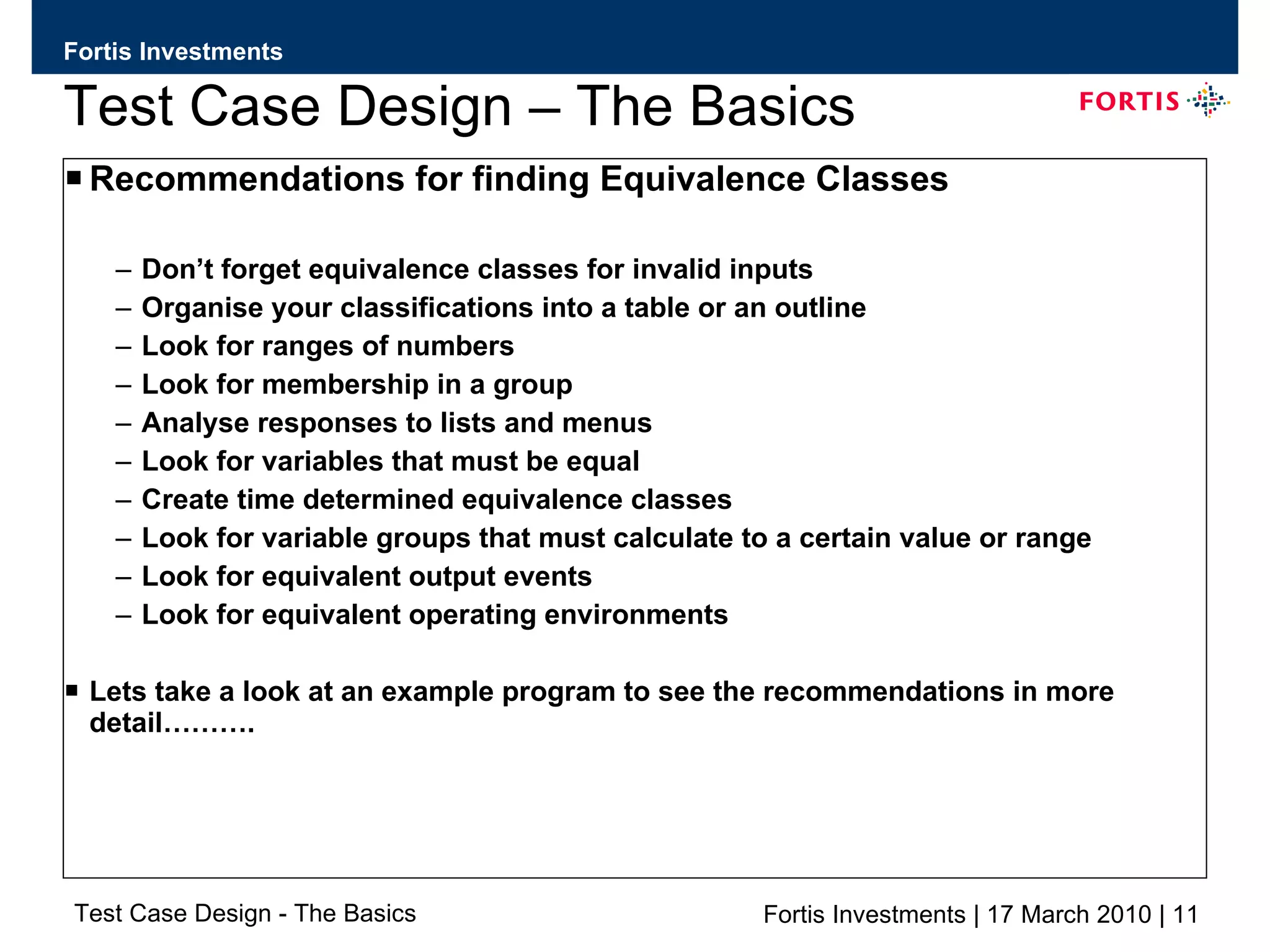
Test Case Design – The Basics Recommendations for finding Equivalence Classes Don’t forget equivalence classes for invalid inputs Organise your classifications into a table or an outline Look for ranges of numbers Look for membership in a group Analyse responses to lists and menus Look for variables that must be equal Create time determined equivalence classes Look for variable groups that must calculate to a certain value or range Look for equivalent output events Look for equivalent operating environments Lets take a look at an example program to see the recommendations in more detail……….
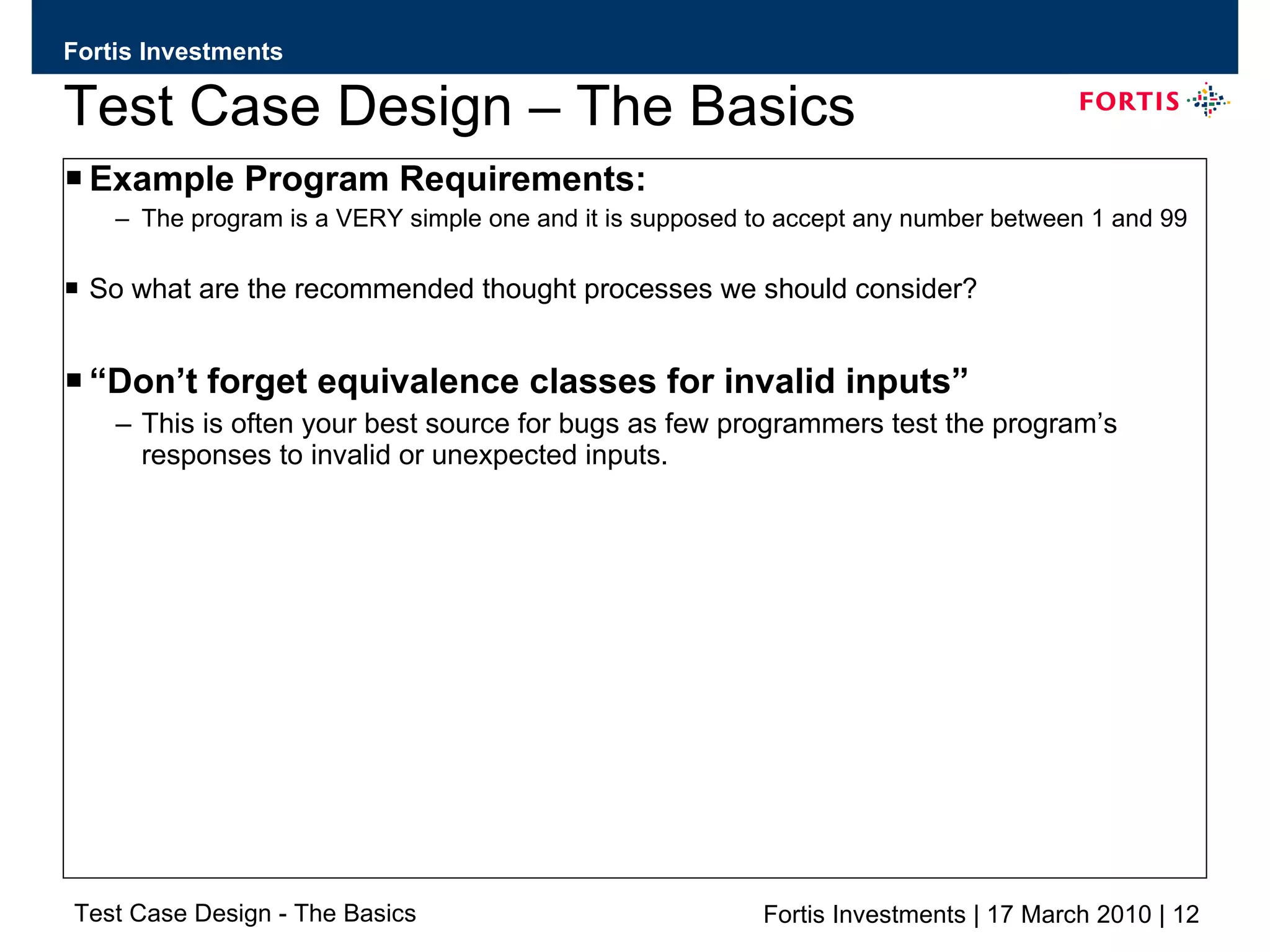
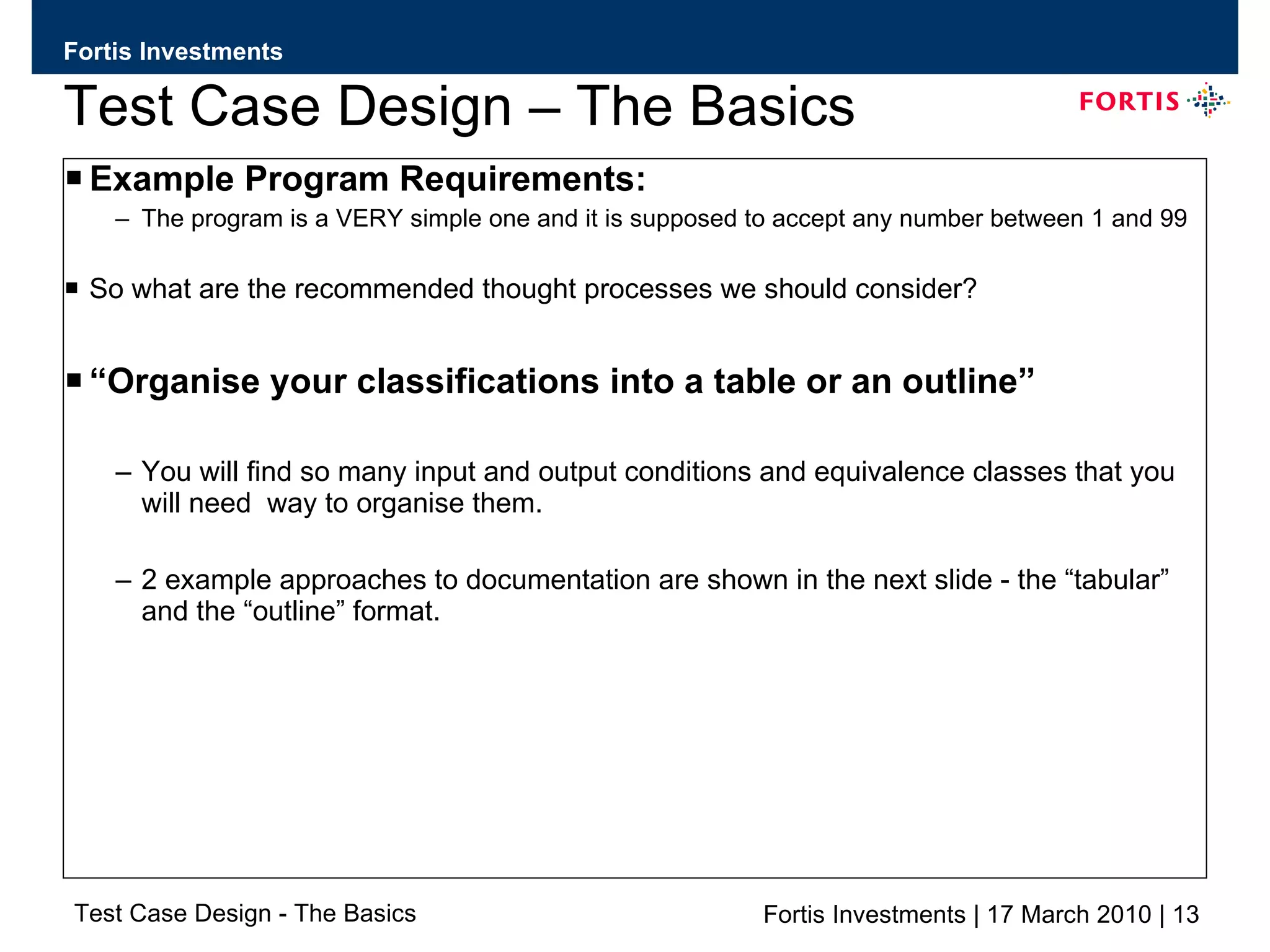
Test Case Design – The Basics Example Program Requirements: The program is a VERY simple one and it is supposed to accept any number between 1 and 99 So what are the recommended thought processes we should consider? “ Don’t forget equivalence classes for invalid inputs” This is often your best source for bugs as few programmers test the program’s responses to invalid or unexpected inputs.
Test Case Design – The Basics Example Program Requirements: The program is a VERY simple one and it is supposed to accept any number between 1 and 99 So what are the recommended thought processes we should consider? “ Organise your classifications into a table or an outline” You will find so many input and output conditions and equivalence classes that you will need  way to organise them. 2 example approaches to documentation are shown in the next slide - the “tabular” and the “outline” format.
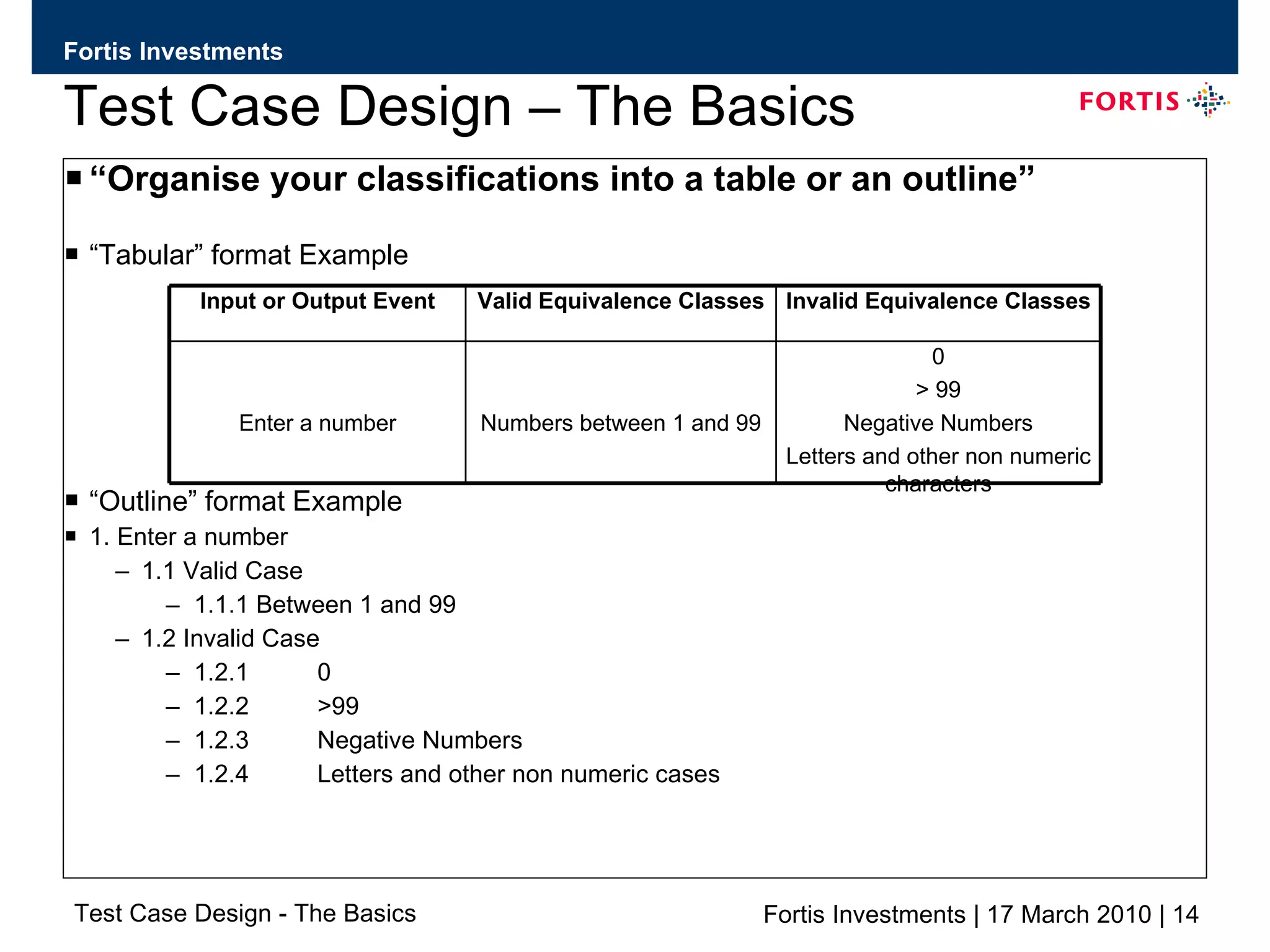
Test Case Design – The Basics “ Organise your classifications into a table or an outline” “ Tabular” format Example “ Outline” format Example 1. Enter a number 1.1 Valid Case 1.1.1 Between 1 and 99 1.2 Invalid Case 1.2.1  0 1.2.2 >99 1.2.3 Negative Numbers 1.2.4 Letters and other non numeric cases 0 > 99 Negative Numbers Letters and other non numeric characters Numbers between 1 and 99 Enter a number Invalid Equivalence Classes Valid Equivalence Classes Input or Output Event
Test Case Design – The Basics
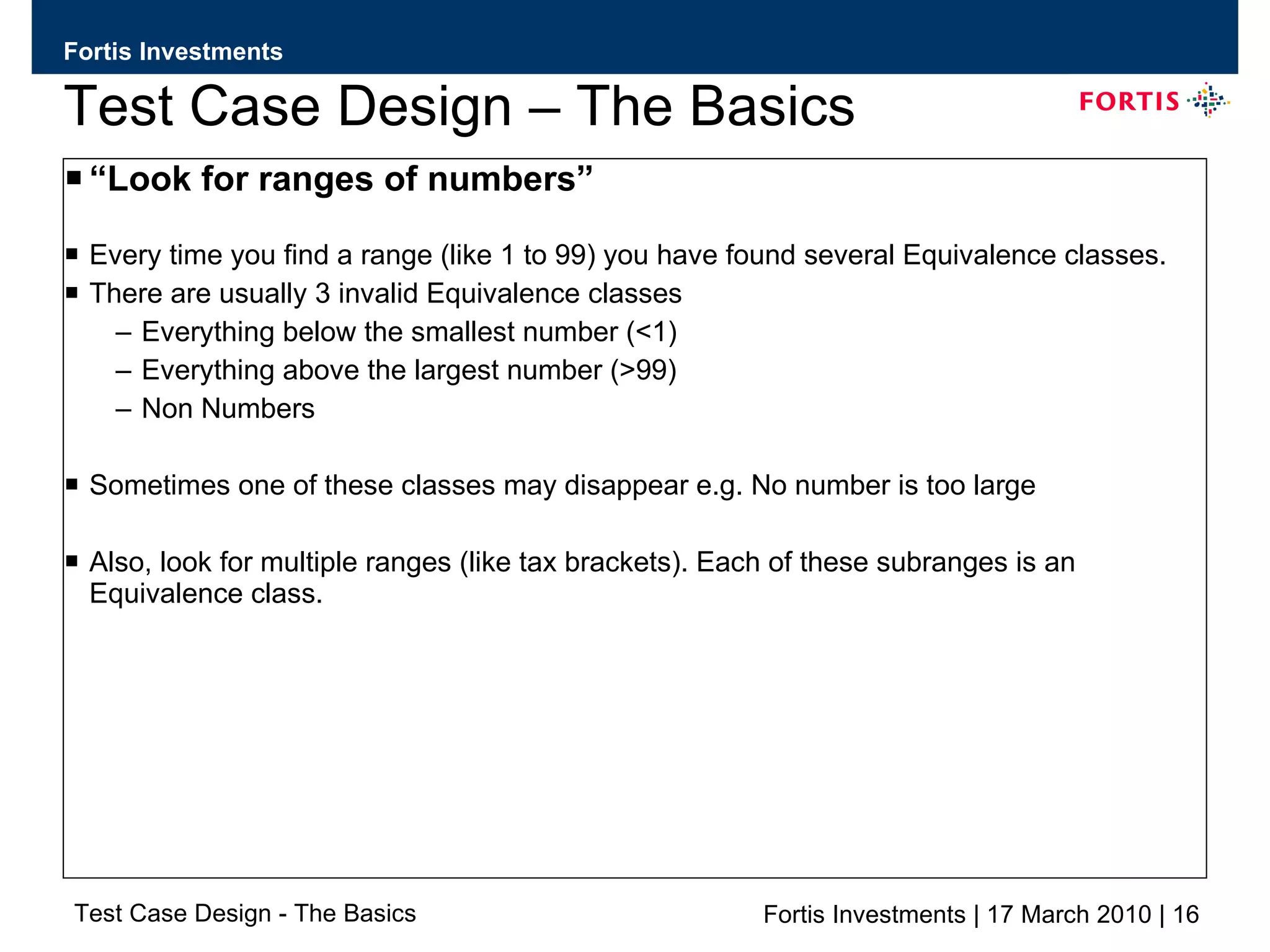
Test Case Design – The Basics “ Look for ranges of numbers” Every time you find a range (like 1 to 99) you have found several Equivalence classes. There are usually 3 invalid Equivalence classes  Everything below the smallest number (<1) Everything above the largest number (>99) Non Numbers Sometimes one of these classes may disappear e.g. No number is too large Also, look for multiple ranges (like tax brackets). Each of these subranges is an Equivalence class.
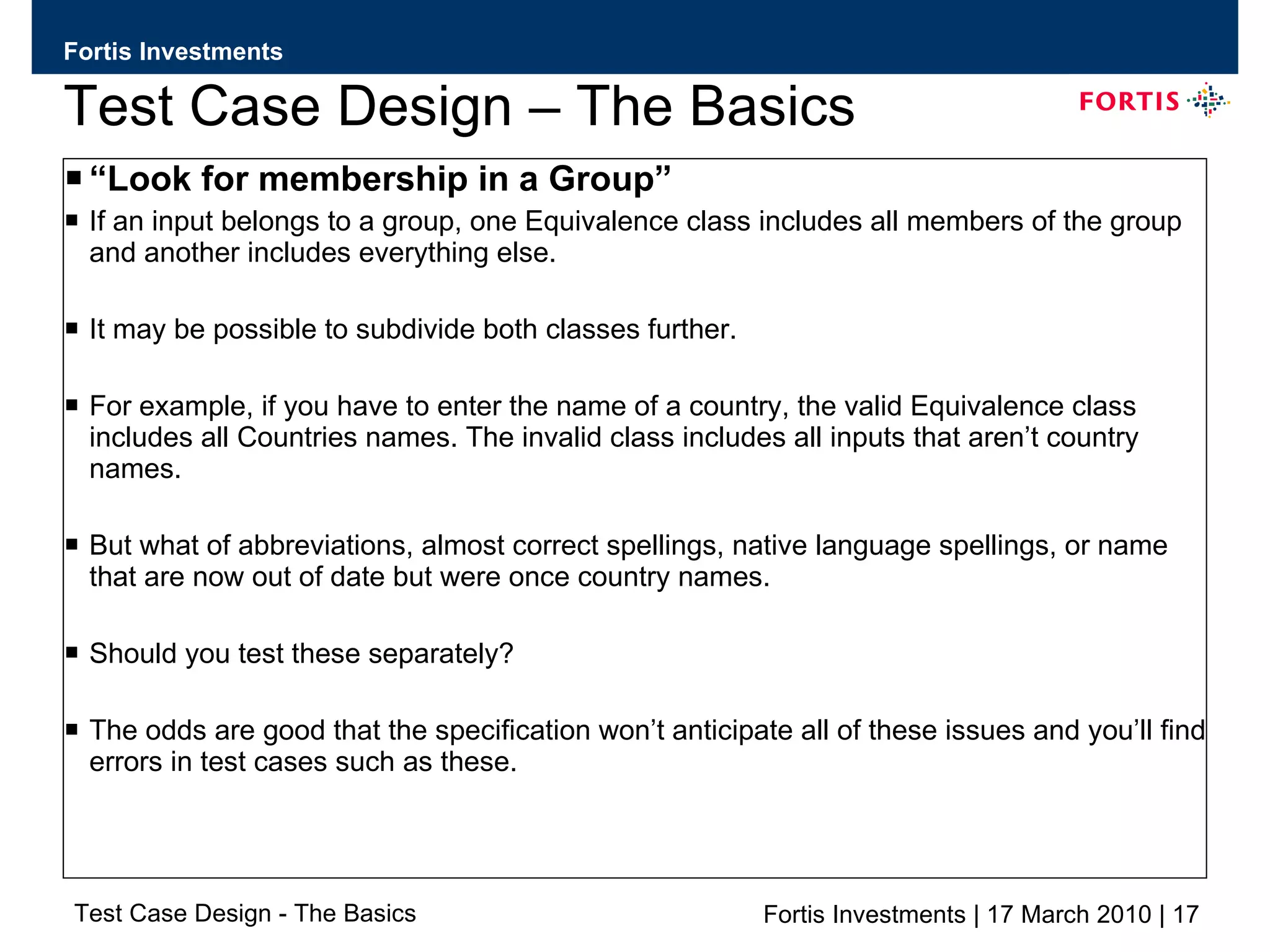
Test Case Design – The Basics “ Look for membership in a Group” If an input belongs to a group, one Equivalence class includes all members of the group and another includes everything else. It may be possible to subdivide both classes further. For example, if you have to enter the name of a country, the valid Equivalence class includes all Countries names. The invalid class includes all inputs that aren’t country names. But what of abbreviations, almost correct spellings, native language spellings, or name that are now out of date but were once country names.  Should you test these separately?  The odds are good that the specification won’t anticipate all of these issues and you’ll find errors in test cases such as these.
Test Case Design – The Basics
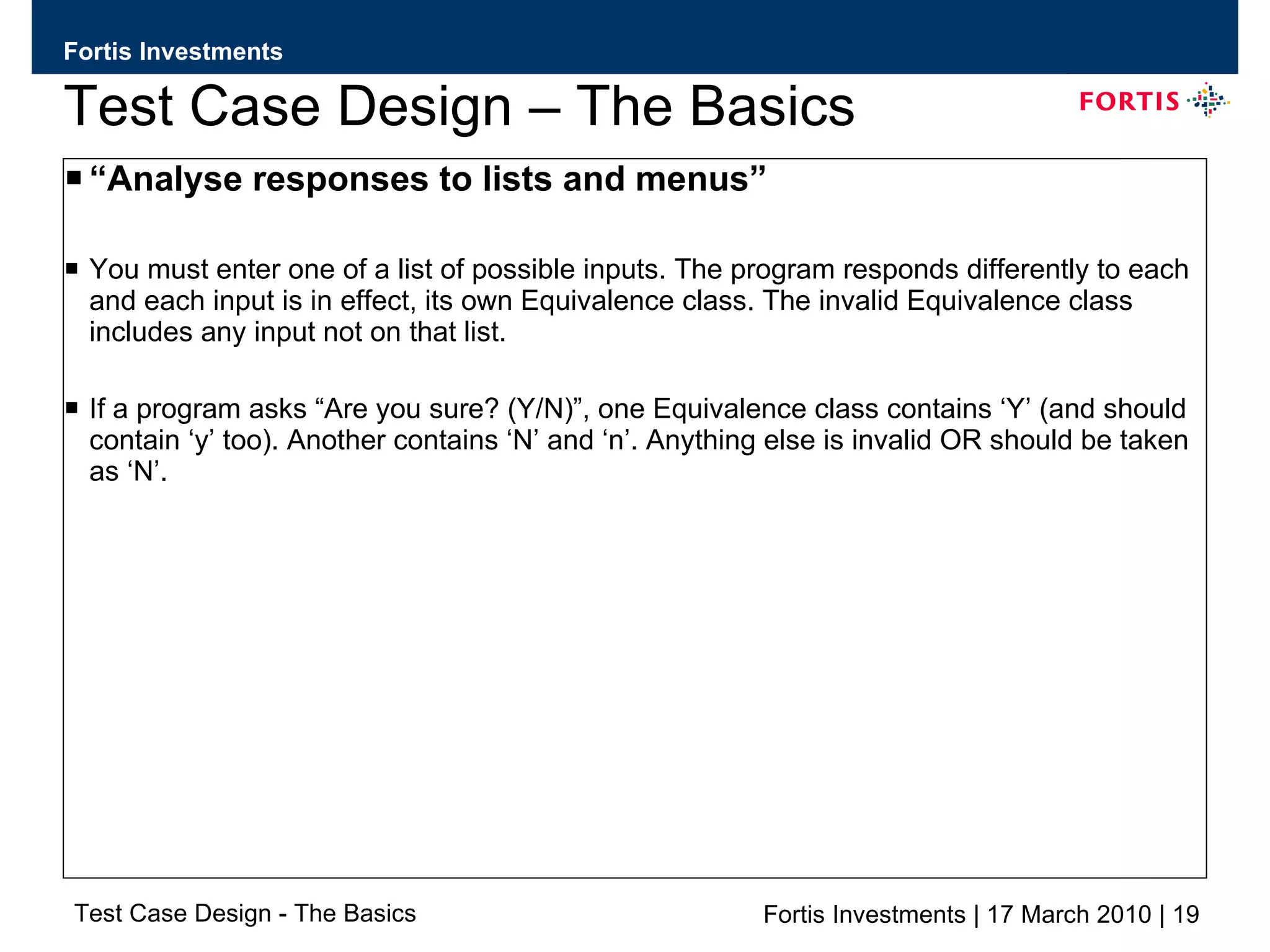
Test Case Design – The Basics “ Analyse responses to lists and menus” You must enter one of a list of possible inputs. The program responds differently to each and each input is in effect, its own Equivalence class. The invalid Equivalence class includes any input not on that list. If a program asks “Are you sure? (Y/N)”, one Equivalence class contains ‘Y’ (and should contain ‘y’ too). Another contains ‘N’ and ‘n’. Anything else is invalid OR should be taken as ‘N’.
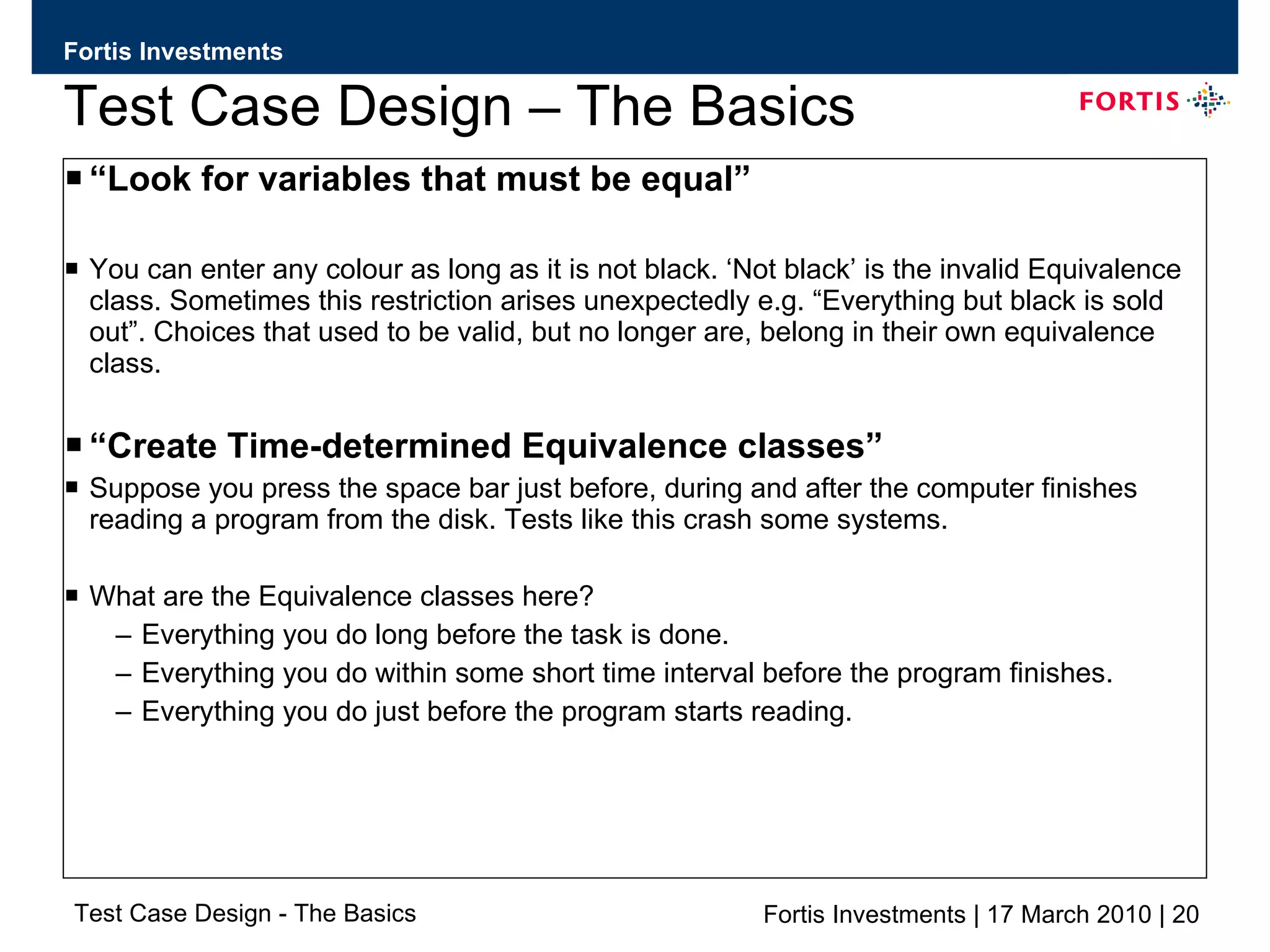
Test Case Design – The Basics “ Look for variables that must be equal” You can enter any colour as long as it is not black. ‘Not black’ is the invalid Equivalence class. Sometimes this restriction arises unexpectedly e.g. “Everything but black is sold out”. Choices that used to be valid, but no longer are, belong in their own equivalence class. “ Create Time-determined Equivalence classes” Suppose you press the space bar just before, during and after the computer finishes reading a program from the disk. Tests like this crash some systems. What are the Equivalence classes here?  Everything you do long before the task is done. Everything you do within some short time interval before the program finishes. Everything you do just before the program starts reading.
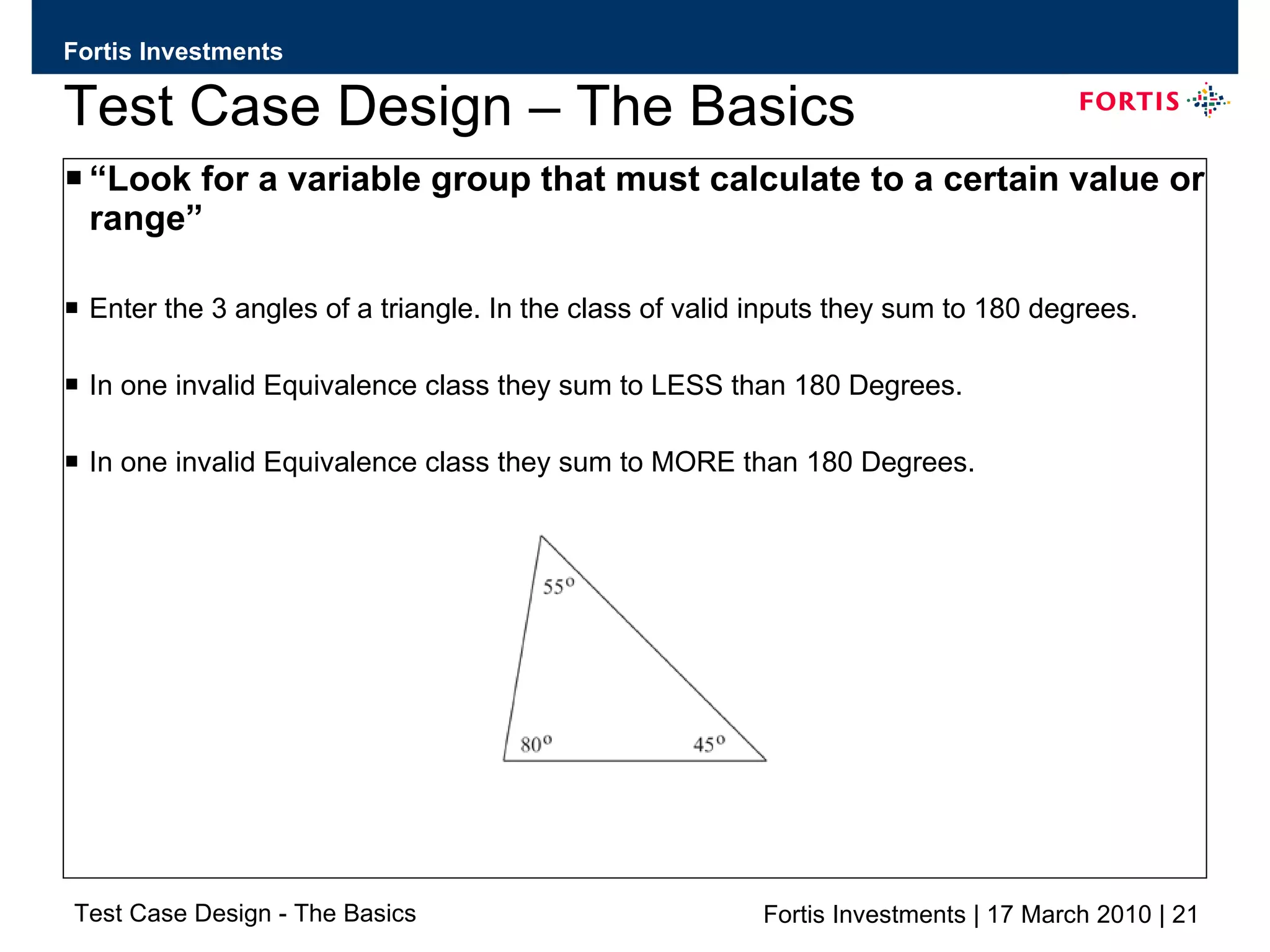
Test Case Design – The Basics “ Look for a variable group that must calculate to a certain value or range” Enter the 3 angles of a triangle. In the class of valid inputs they sum to 180 degrees. In one invalid Equivalence class they sum to LESS than 180 Degrees. In one invalid Equivalence class they sum to MORE than 180 Degrees.
Test Case Design – The Basics “ Look for Equivalent Output events” So far we have stressed about input events but we need to also consider Equivalent outputs. The difficulty here is determining what inputs are needed as many different classes of input may have the same effect. As an example, imagine that a program’s specification says after a series of computations it will print a number between 1 and 45. work backwards and ask the question “What input could make it print something bigger than 45 or less than 1?” Create test cases to try them.
Test Case Design – The Basics Boundaries of Equivalence Classes Use only one or two test cases for each Equivalence class. The best ones are at the class boundaries. The Boundary values are the biggest, smallest, soonest, shortest, loudest, fastest, ugliest members of the class i.e. the most extreme values. Incorrect Inequalities in code (such as > instead of >=) cause failures only at the boundaries. Programs that fail with non boundary values usually fail at the boundaries too.
Test Case Design – The Basics
Test Case Design – The Basics A quick look at…….. Regression Testing: Why do we check whether a bug fix worked? When you report a problem you tell the Developer exactly what you did to find it. Some Developers examine the code thoroughly, find the cause of the problem, fix it and test the fix. Some Developers will address only the symptoms that have been reported, write special case “fixes” which DO NOT solve the underlying problem but DO keep it from appearing under precisely the circumstances you reported. A few Developers will change the code blindly, don’t check their work and give code back with the same bug plus whatever they broke making their “fix”. Claimed 1 in 3 fixes either don’t fix the problem or break something else in the process
Test Case Design – The Basics Regression Testing: What do check to see if a bug fix worked? When you test a bug fix you have 3 objectives. Objective 1:  Check that the bug was actually addressed  Run exactly the same test that you ran when you found the problem.  If this test fails then you do not have to do any further Regression testing. If this passes then ask the question “am I running the right test?” to be sure that you know how to demonstrate the bug. Check on previous build in another test environment if necessary.
Test Case Design – The Basics Regression Testing: What do check to see if a bug fix worked? When you test a bug fix you have 3 objectives. Objective 2: Try to find related bugs  Make the assumption that the Developer fixed only  the symptoms reported without fixing the underlying bug. How could you reach this bug in different ways? Could there be similar errors in other parts of the code?
Test Case Design – The Basics Regression Testing: What do check to see if a bug fix worked? When you test a bug fix you have 3 objectives. Objective 3: Check the rest of the system  Did this fix have unwanted consequences on anything else? This involves informal planning and test cases that you won’t keep forever. Ask yourself what parts of the system might have been affected by the change and look at them.
Test Case Design – The Basics
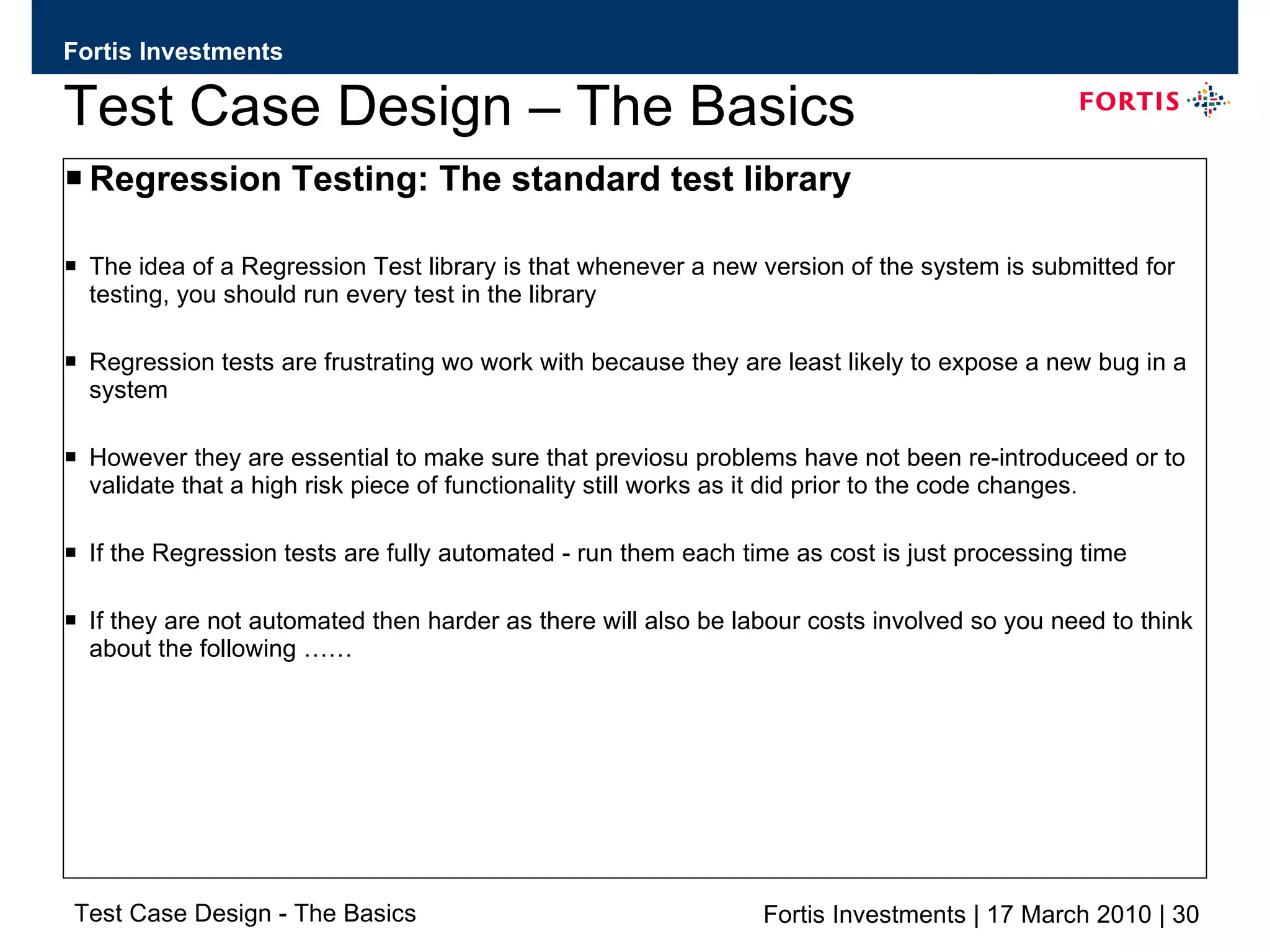
Test Case Design – The Basics Regression Testing: The standard test library The idea of a Regression Test library is that whenever a new version of the system is submitted for testing, you should run every test in the library Regression tests are frustrating wo work with because they are least likely to expose a new bug in a system However they are essential to make sure that previosu problems have not been re-introduceed or to validate that a high risk piece of functionality still works as it did prior to the code changes. If the Regression tests are fully automated - run them each time as cost is just processing time If they are not automated then harder as there will also be labour costs involved so you need to think about the following ……
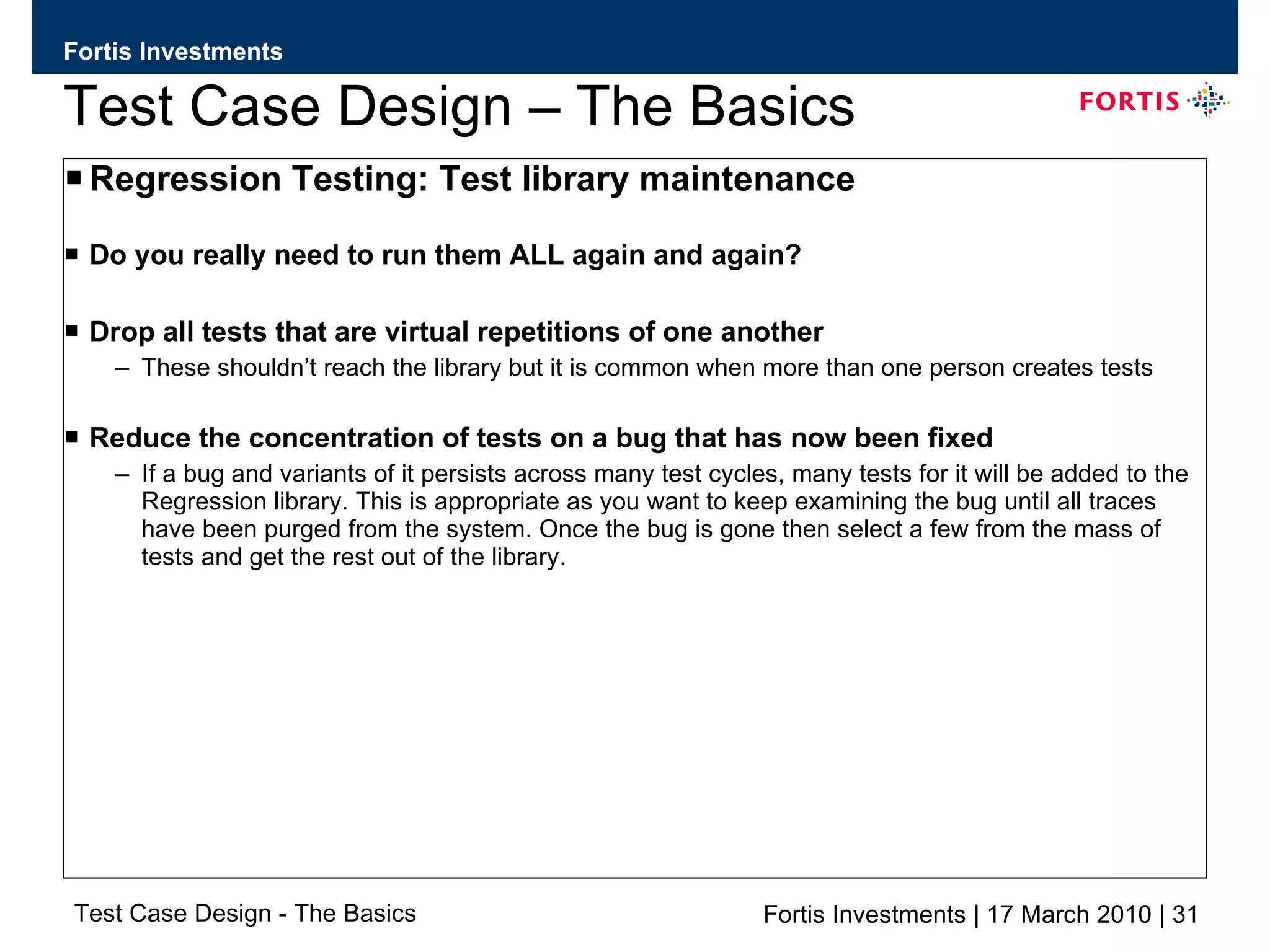
Test Case Design – The Basics Regression Testing: Test library maintenance Do you really need to run them ALL again and again? Drop all tests that are virtual repetitions of one another These shouldn’t reach the library but it is common when more than one person creates tests Reduce the concentration of tests on a bug that has now been fixed If a bug and variants of it persists across many test cycles, many tests for it will be added to the Regression library. This is appropriate as you want to keep examining the bug until all traces have been purged from the system. Once the bug is gone then select a few from the mass of tests and get the rest out of the library.
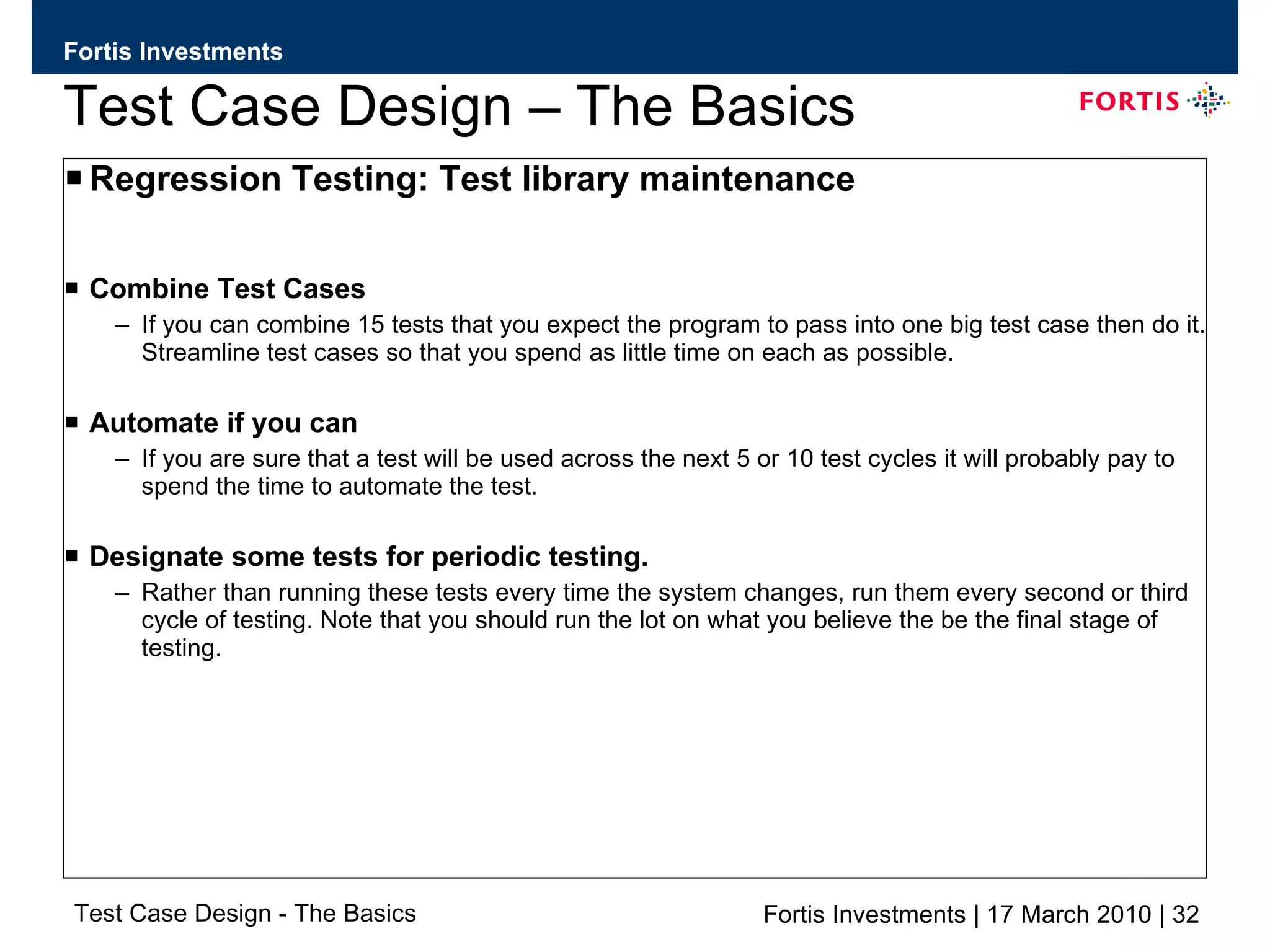
Test Case Design – The Basics Regression Testing: Test library maintenance Combine Test Cases If you can combine 15 tests that you expect the program to pass into one big test case then do it. Streamline test cases so that you spend as little time on each as possible. Automate if you can If you are sure that a test will be used across the next 5 or 10 test cycles it will probably pay to spend the time to automate the test. Designate some tests for periodic testing. Rather than running these tests every time the system changes, run them every second or third cycle of testing. Note that you should run the lot on what you believe the be the final stage of testing.
Test Case Design – The Basics
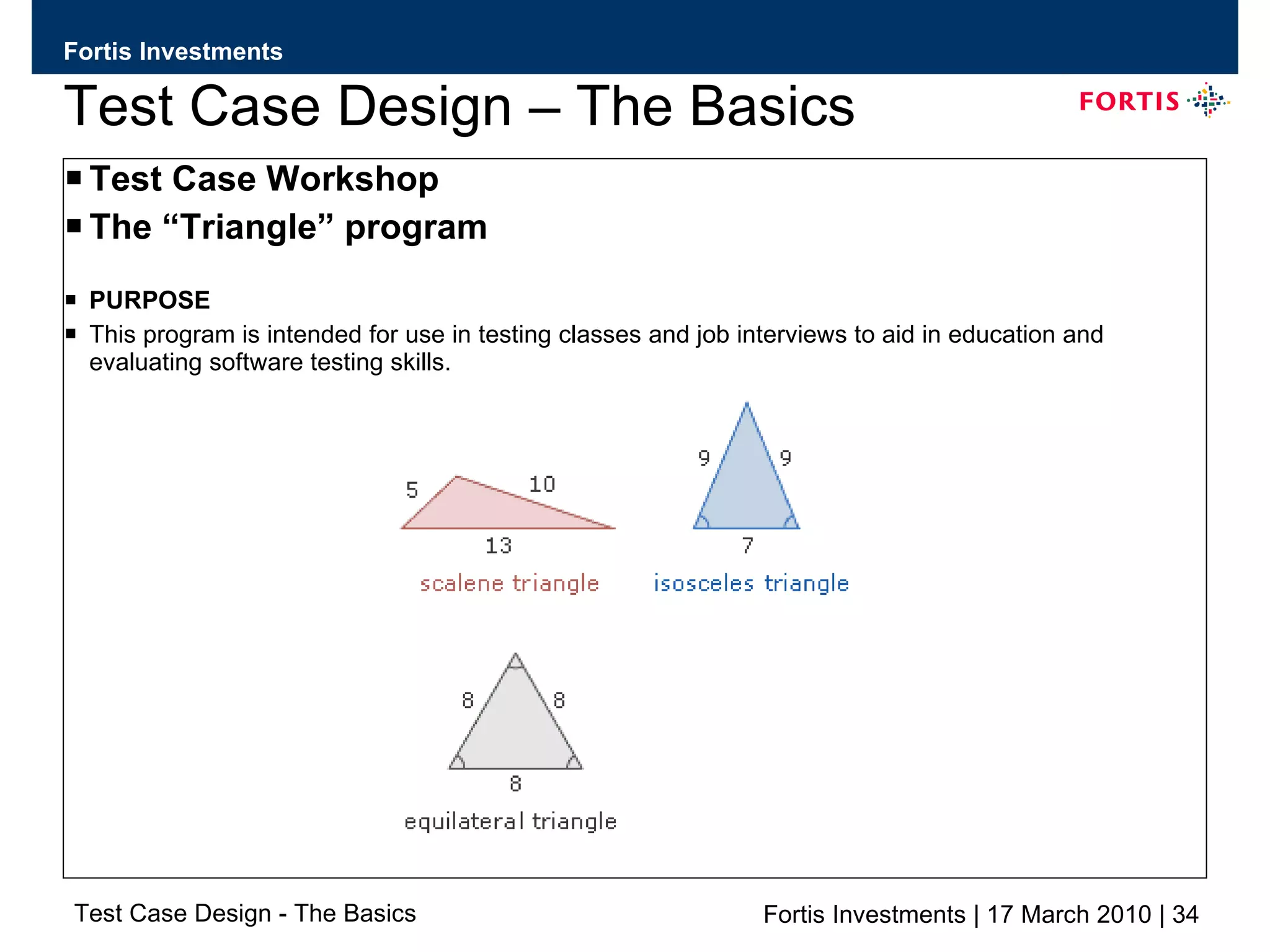
Test Case Design – The Basics Test Case Workshop The “Triangle” program PURPOSE This program is intended for use in testing classes and job interviews to aid in education and evaluating software testing skills.
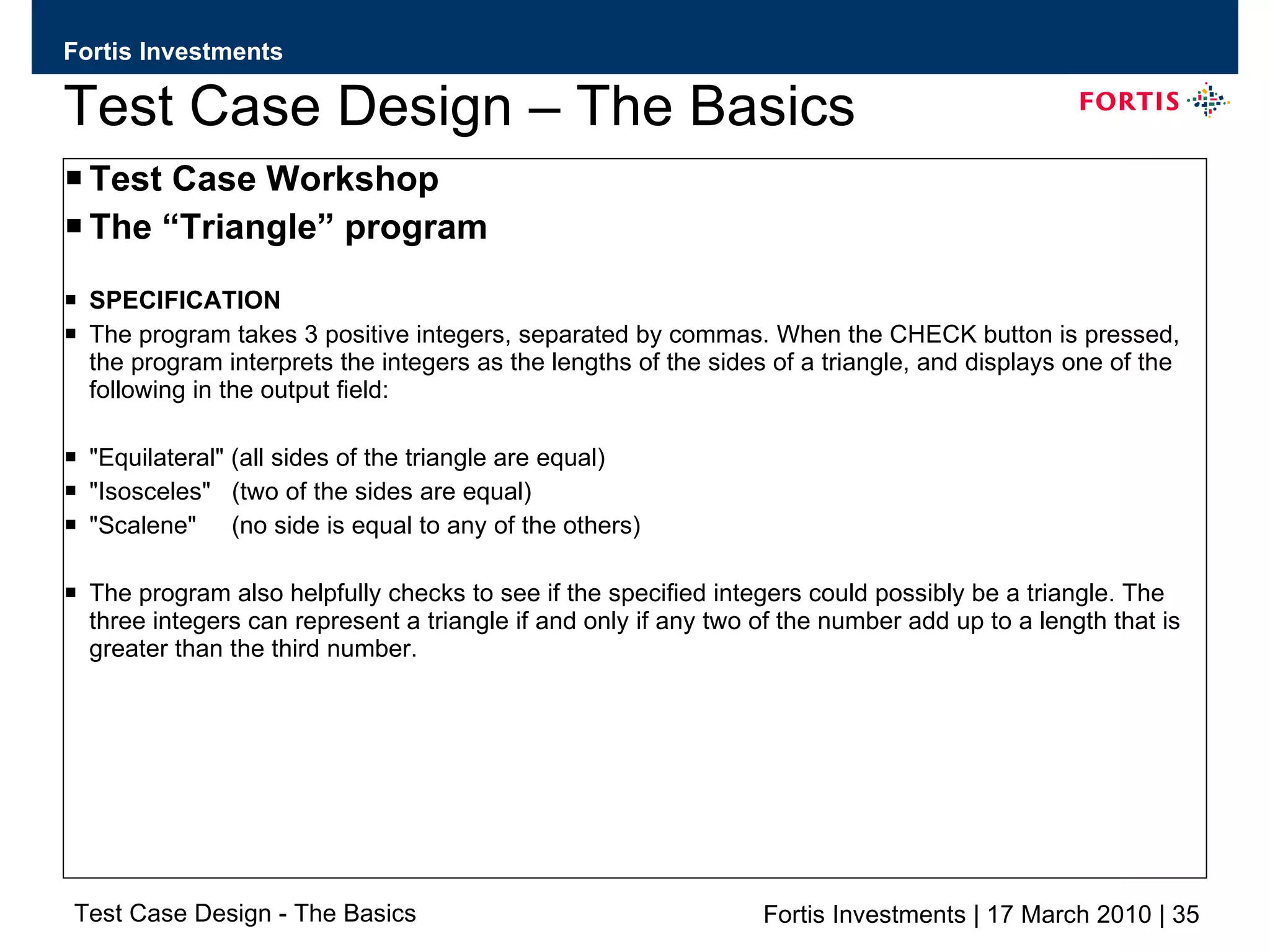
Test Case Design – The Basics Test Case Workshop The “Triangle” program SPECIFICATION The program takes 3 positive integers, separated by commas. When the CHECK button is pressed, the program interprets the integers as the lengths of the sides of a triangle, and displays one of the following in the output field: &quot;Equilateral&quot; (all sides of the triangle are equal) &quot;Isosceles&quot;  (two of the sides are equal) &quot;Scalene&quot;  (no side is equal to any of the others) The program also helpfully checks to see if the specified integers could possibly be a triangle. The three integers can represent a triangle if and only if any two of the number add up to a length that is greater than the third number.
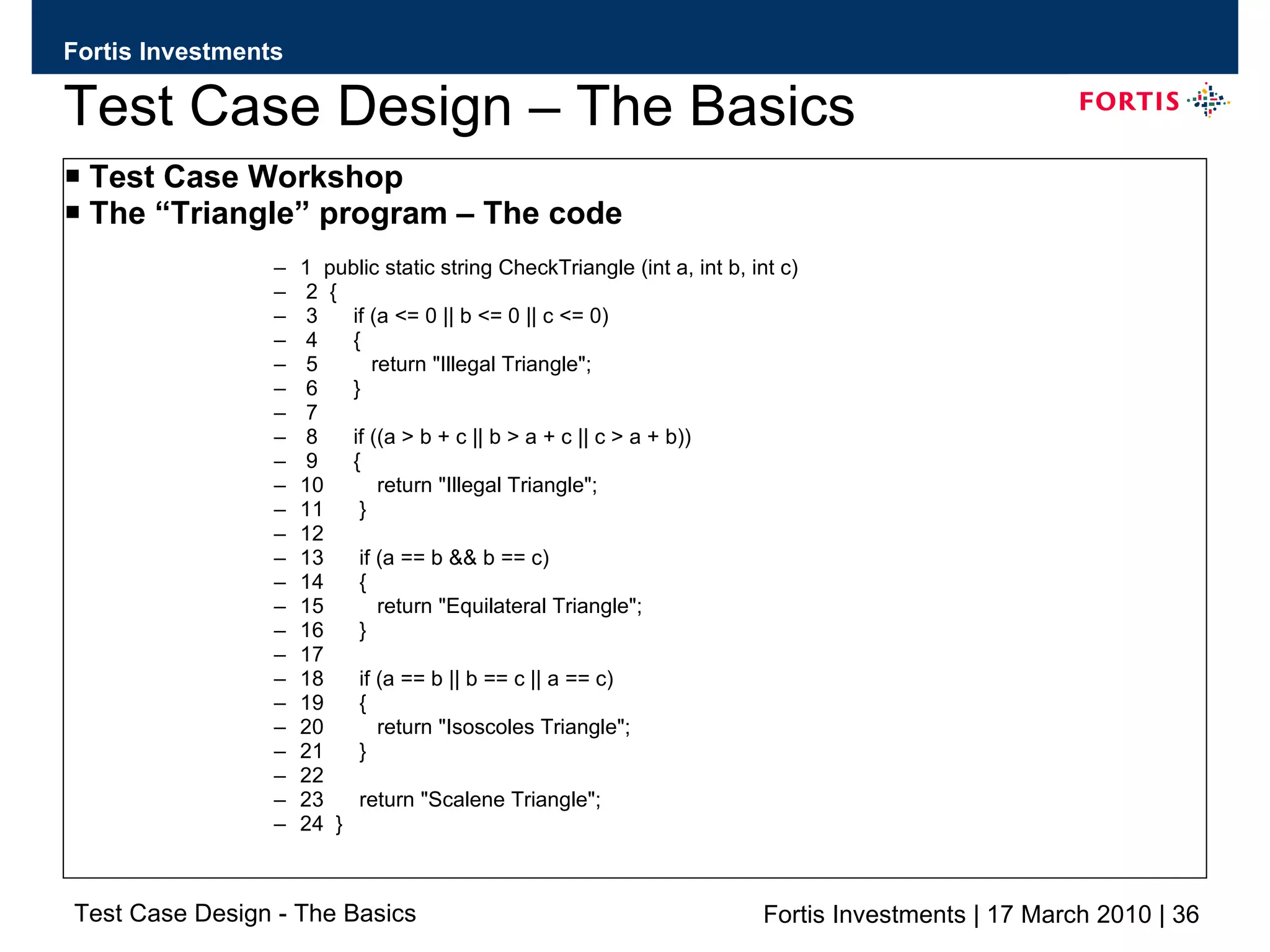
Test Case Design – The Basics Test Case Workshop The “Triangle” program – The code 1  public static string CheckTriangle (int a, int b, int c) 2  { 3  if (a <= 0 || b <= 0 || c <= 0) 4  { 5  return &quot;Illegal Triangle&quot;; 6  } 7 8  if ((a > b + c || b > a + c || c > a + b)) 9  { 10  return &quot;Illegal Triangle&quot;; 11  } 12 13  if (a == b && b == c) 14  { 15  return &quot;Equilateral Triangle&quot;; 16  } 17 18  if (a == b || b == c || a == c) 19  { 20  return &quot;Isoscoles Triangle&quot;; 21  } 22 23  return &quot;Scalene Triangle&quot;; 24  }
Test Case Design – The Basics
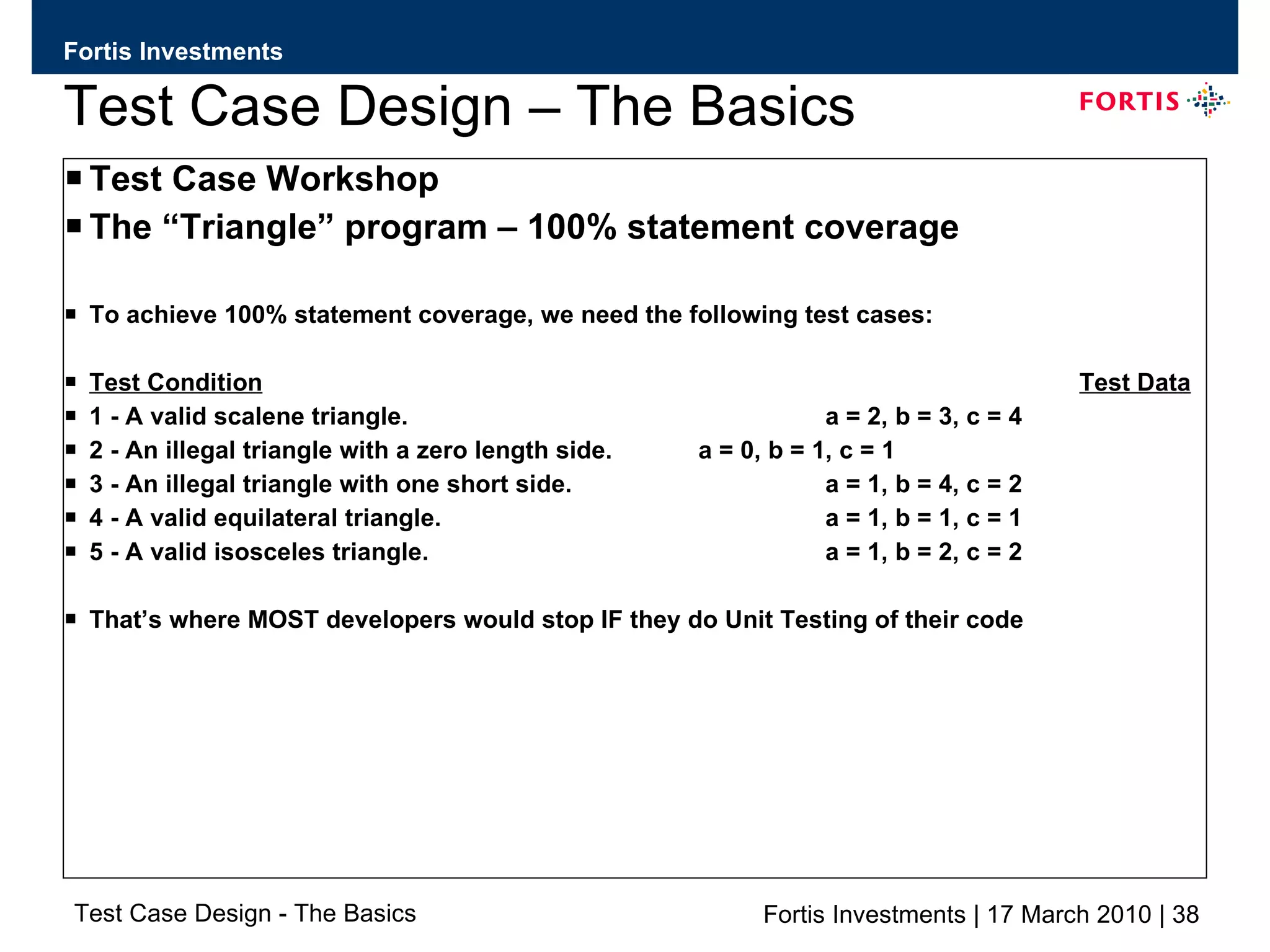
Test Case Design – The Basics Test Case Workshop The “Triangle” program – 100% statement coverage To achieve 100% statement coverage, we need the following test cases: Test Condition Test Data 1 - A valid scalene triangle. a = 2, b = 3, c = 4 2 - An illegal triangle with a zero length side. a = 0, b = 1, c = 1 3 - An illegal triangle with one short side. a = 1, b = 4, c = 2 4 - A valid equilateral triangle. a = 1, b = 1, c = 1 5 - A valid isosceles triangle. a = 1, b = 2, c = 2 That’s where MOST developers would stop IF they do Unit Testing of their code
Test Case Design – The Basics Test Case Workshop The “Triangle” program We know have 100% Statement coverage! Is this the complete list………..?
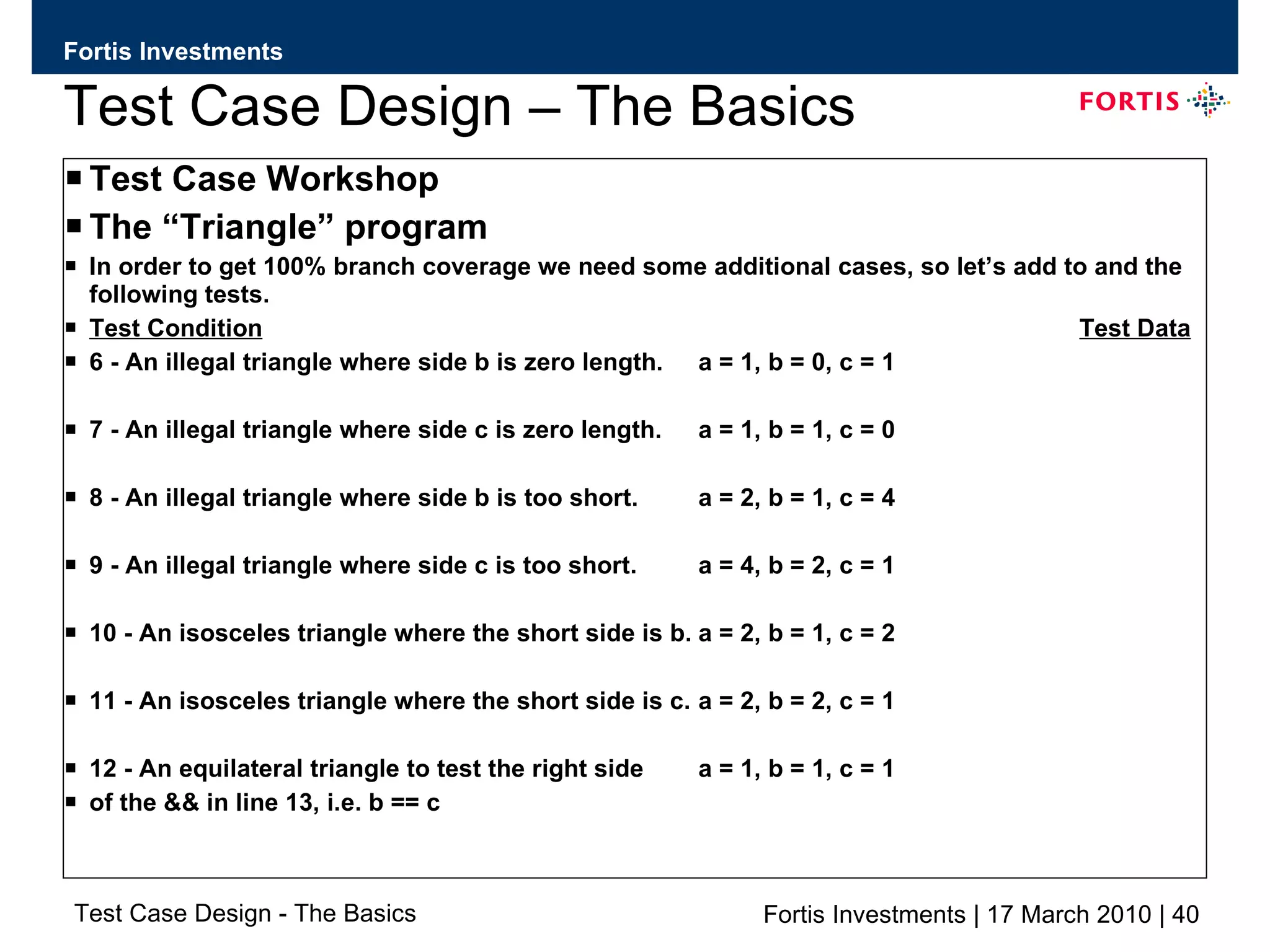
Test Case Design – The Basics Test Case Workshop The “Triangle” program In order to get 100% branch coverage we need some additional cases, so let’s add to and the following tests. Test Condition Test Data 6 - An illegal triangle where side b is zero length. a = 1, b = 0, c = 1 7 - An illegal triangle where side c is zero length. a = 1, b = 1, c = 0 8 - An illegal triangle where side b is too short. a = 2, b = 1, c = 4 9 - An illegal triangle where side c is too short. a = 4, b = 2, c = 1 10 - An isosceles triangle where the short side is b. a = 2, b = 1, c = 2 11 - An isosceles triangle where the short side is c. a = 2, b = 2, c = 1 12 - An equilateral triangle to test the right side  a = 1, b = 1, c = 1   of the && in line 13, i.e. b == c
Test Case Design – The Basics Test Case Workshop The “Triangle” program We know have 100% Branch coverage! Is this the complete list………..?
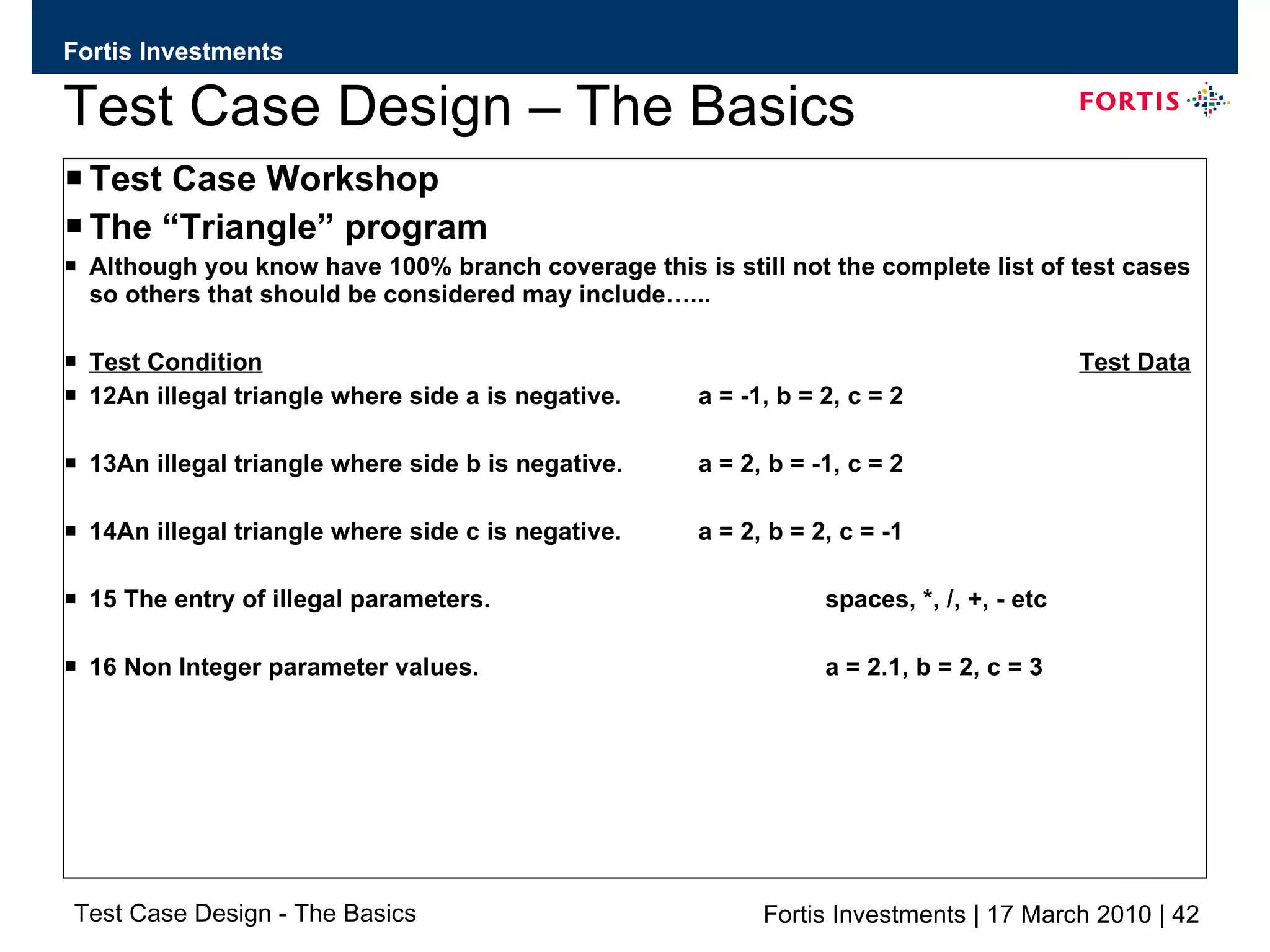
Test Case Design – The Basics Test Case Workshop The “Triangle” program Although you know have 100% branch coverage this is still not the complete list of test cases so others that should be considered may include…... Test Condition Test Data 12An illegal triangle where side a is negative. a = -1, b = 2, c = 2 13An illegal triangle where side b is negative. a = 2, b = -1, c = 2 14An illegal triangle where side c is negative. a = 2, b = 2, c = -1 15 The entry of illegal parameters. spaces, *, /, +, - etc 16 Non Integer parameter values. a = 2.1, b = 2, c = 3
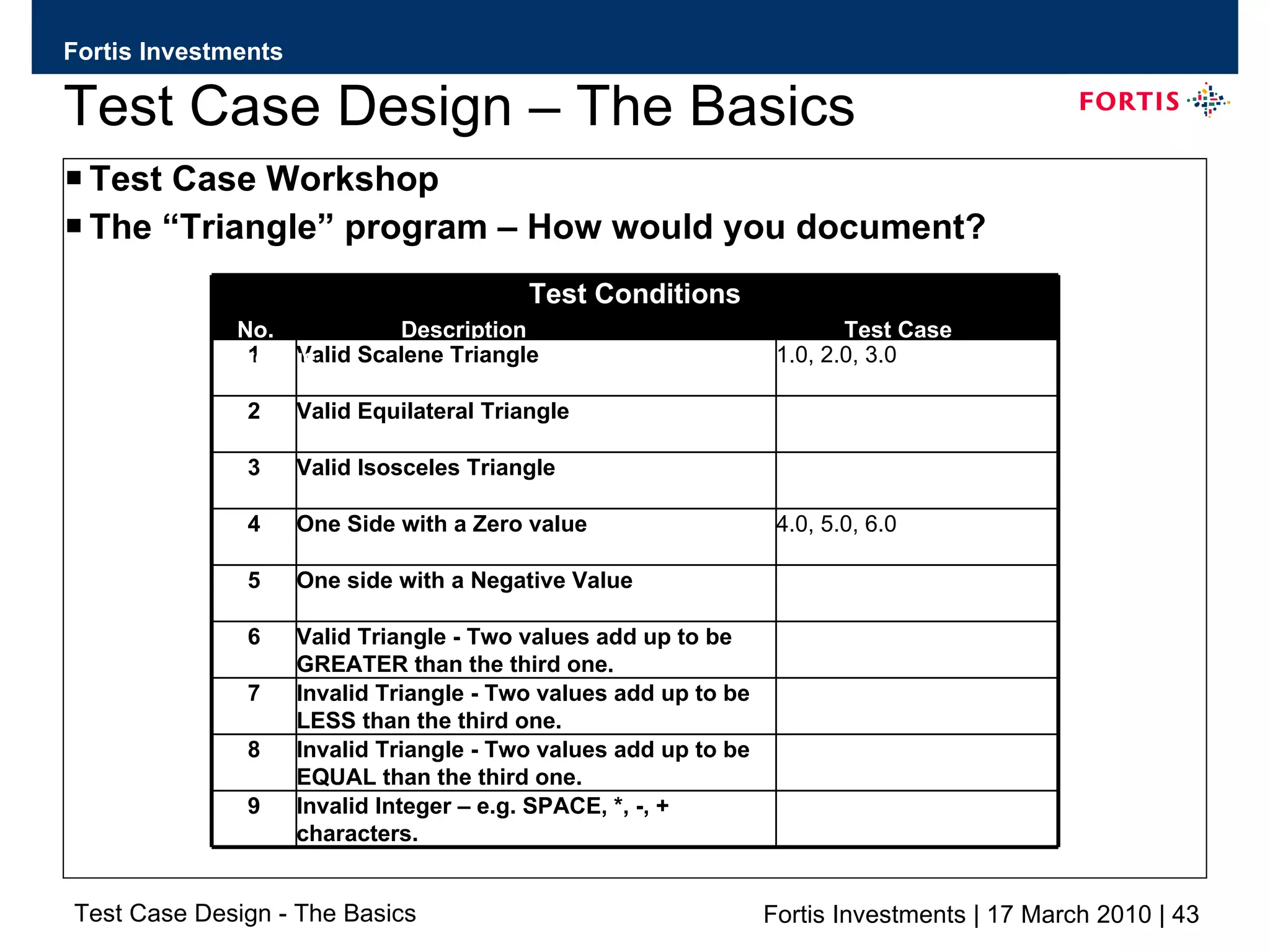
Test Case Design – The Basics Test Case Workshop The “Triangle” program – How would you document? Invalid Integer – e.g. SPACE, *, -, + characters. 9 Invalid Triangle - Two values add up to be EQUAL than the third one.  8 Invalid Triangle - Two values add up to be LESS than the third one. 7 Valid Triangle - Two values add up to be  GREATER than the third one. 6 One side with a Negative Value 5 4.0, 5.0, 6.0 One Side with a Zero value 4 Valid Isosceles Triangle 3 Valid Equilateral Triangle 2 1.0, 2.0, 3.0 Valid Scalene Triangle 1 Test Conditions No.  Description  Test Case Coverage
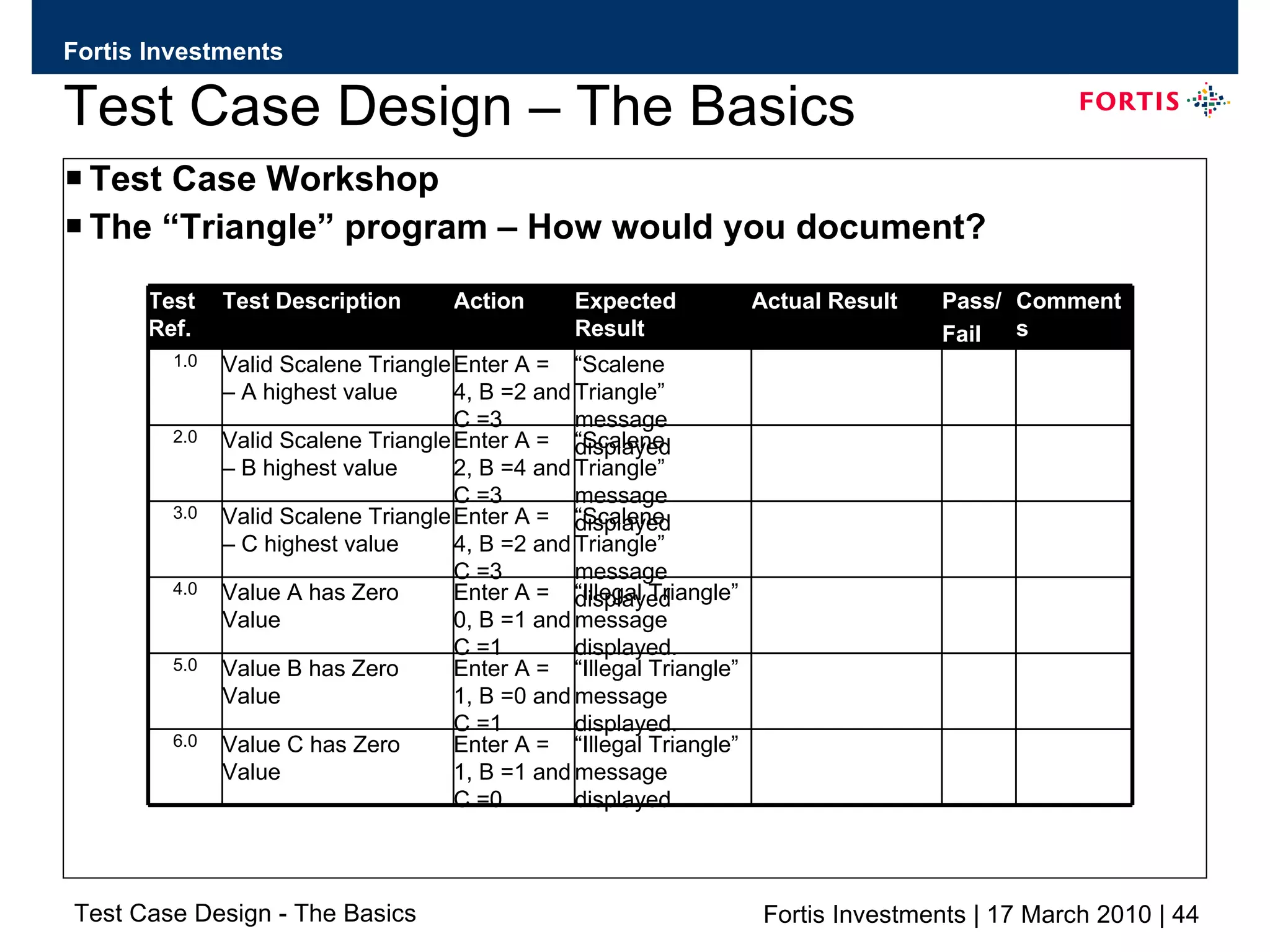
Test Case Design – The Basics Test Case Workshop The “Triangle” program – How would you document? “ Illegal Triangle” message displayed. Enter A = 0, B =1 and C =1 Value A has Zero Value 4.0 “ Illegal Triangle” message displayed. Enter A = 1, B =0 and C =1 Value B has Zero Value 5.0 “ Illegal Triangle” message displayed. Enter A = 1, B =1 and C =0 Value C has Zero Value 6.0 “ Scalene Triangle” message displayed Enter A = 2, B =4 and C =3 Valid Scalene Triangle – B highest value 2.0 “ Scalene Triangle” message displayed Enter A = 4, B =2 and C =3 Valid Scalene Triangle – C highest value 3.0 “ Scalene Triangle” message displayed Enter A = 4, B =2 and C =3 Valid Scalene Triangle – A highest value 1.0 Comments Pass/ Fail Actual Result Expected Result Action Test Description Test Ref.
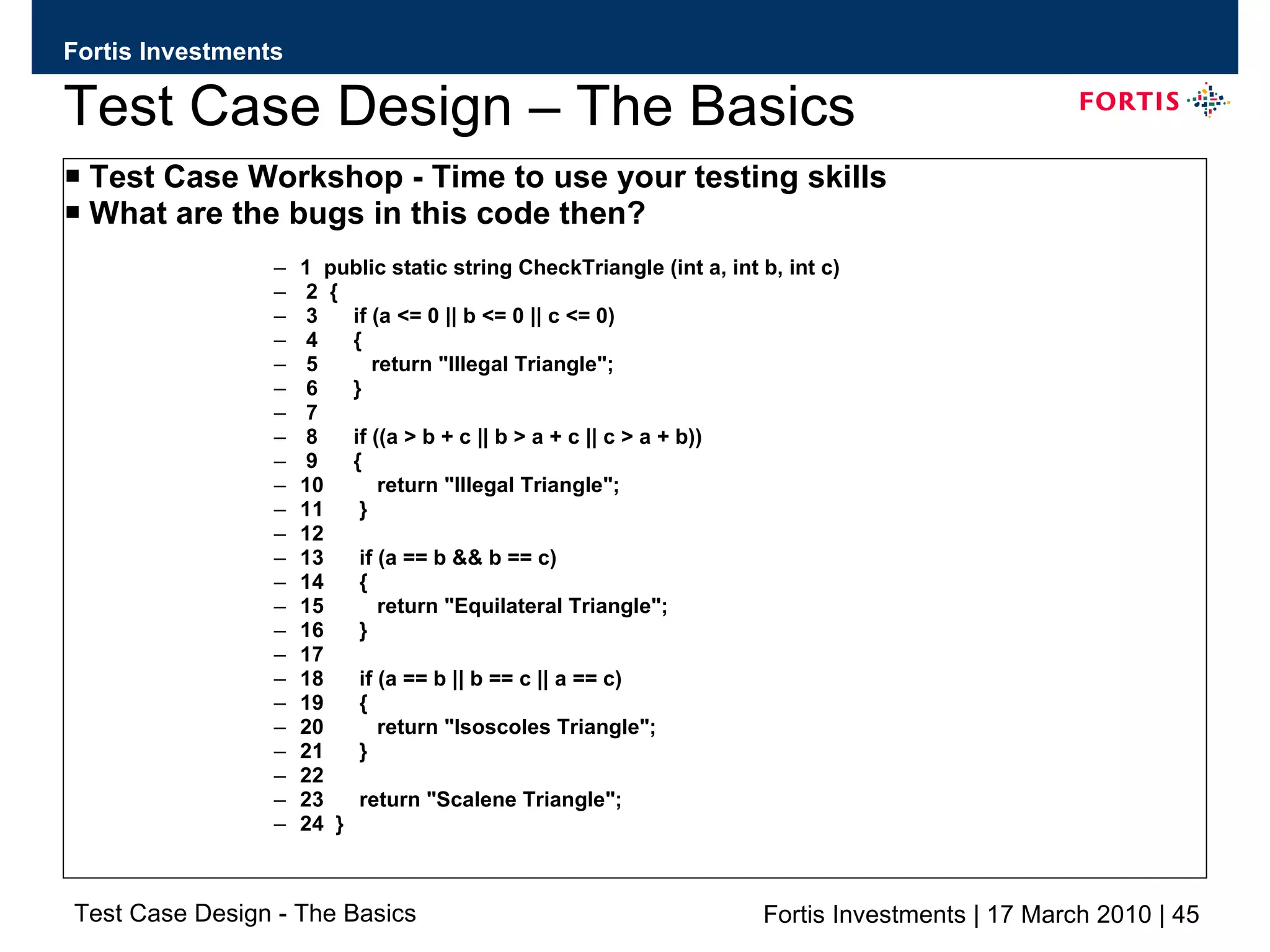
Test Case Design – The Basics Test Case Workshop - Time to use your testing skills What are the bugs in this code then? 1  public static string CheckTriangle (int a, int b, int c) 2  { 3  if (a <= 0 || b <= 0 || c <= 0) 4  { 5  return &quot;Illegal Triangle&quot;; 6  } 7 8  if ((a > b + c || b > a + c || c > a + b)) 9  { 10  return &quot;Illegal Triangle&quot;; 11  } 12 13  if (a == b && b == c) 14  { 15  return &quot;Equilateral Triangle&quot;; 16  } 17 18  if (a == b || b == c || a == c) 19  { 20  return &quot;Isoscoles Triangle&quot;; 21  } 22 23  return &quot;Scalene Triangle&quot;; 24  }
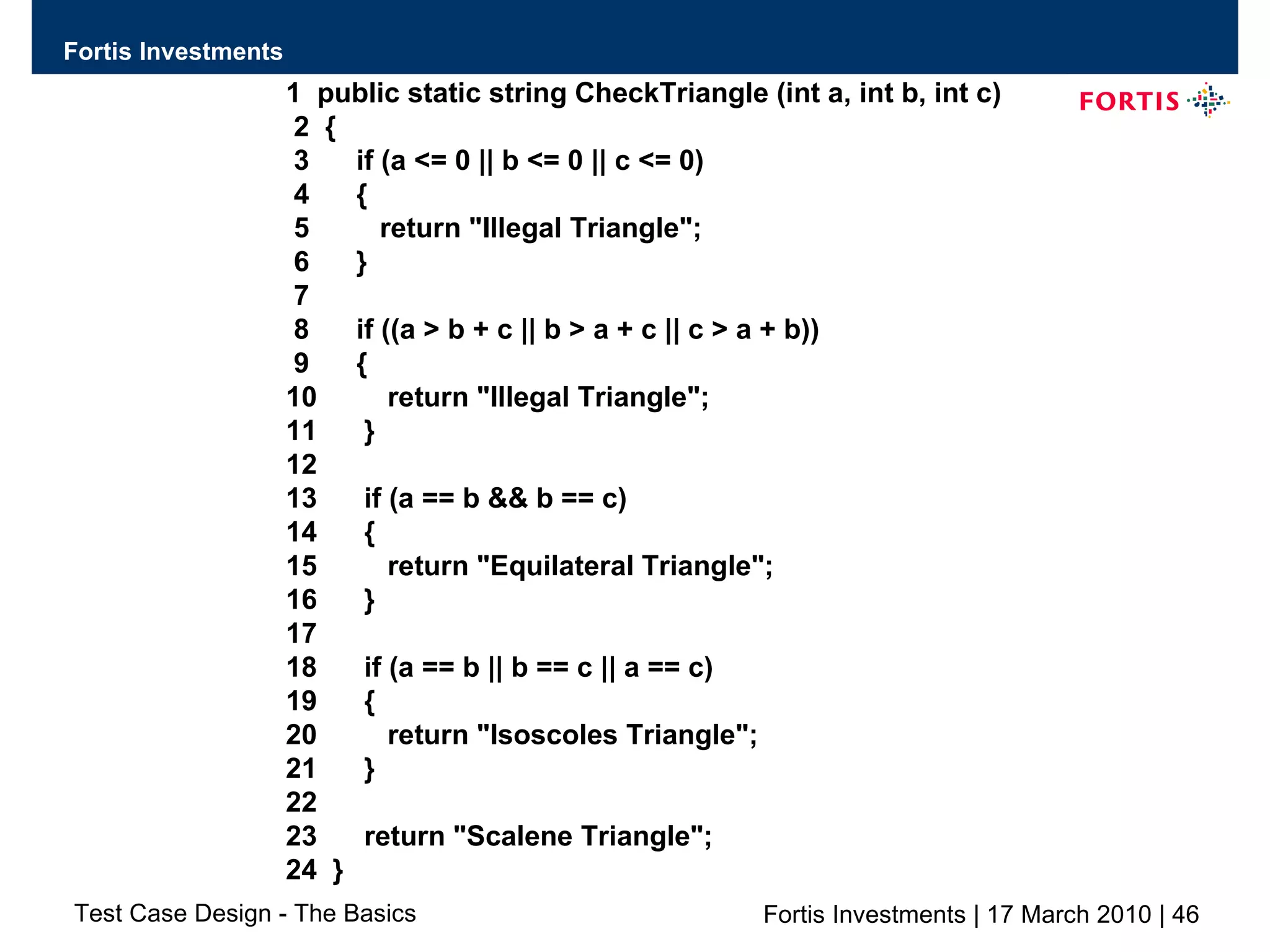
1  public static string CheckTriangle (int a, int b, int c) 2  { 3  if (a <= 0 || b <= 0 || c <= 0) 4  { 5  return &quot;Illegal Triangle&quot;; 6  } 7 8  if ((a > b + c || b > a + c || c > a + b)) 9  { 10  return &quot;Illegal Triangle&quot;; 11  } 12 13  if (a == b && b == c) 14  { 15  return &quot;Equilateral Triangle&quot;; 16  } 17 18  if (a == b || b == c || a == c) 19  { 20  return &quot;Isoscoles Triangle&quot;; 21  } 22 23  return &quot;Scalene Triangle&quot;; 24  }
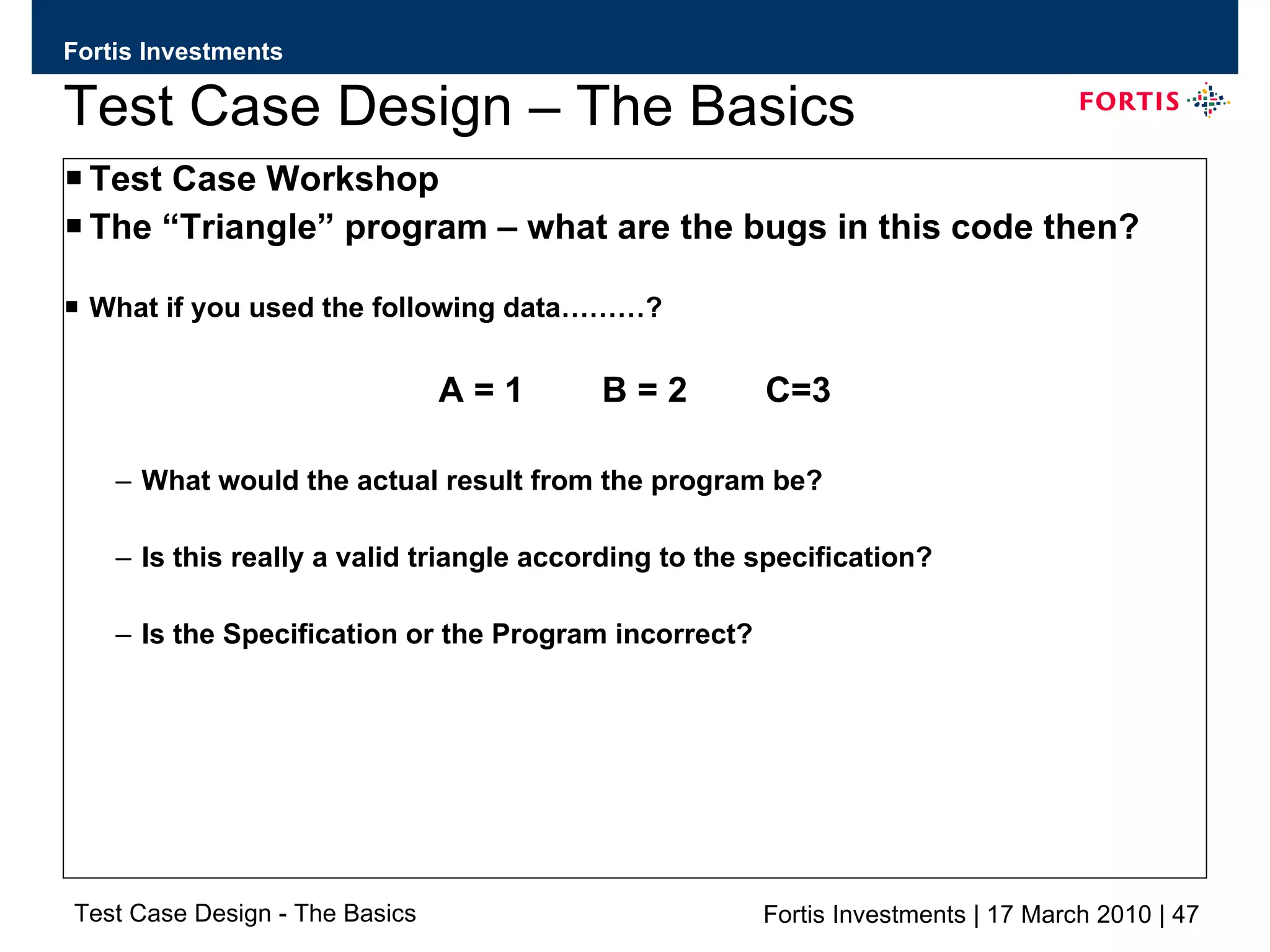
Test Case Design – The Basics Test Case Workshop The “Triangle” program – what are the bugs in this code then? What if you used the following data………? A = 1  B = 2  C=3 What would the actual result from the program be? Is this really a valid triangle according to the specification? Is the Specification or the Program incorrect?
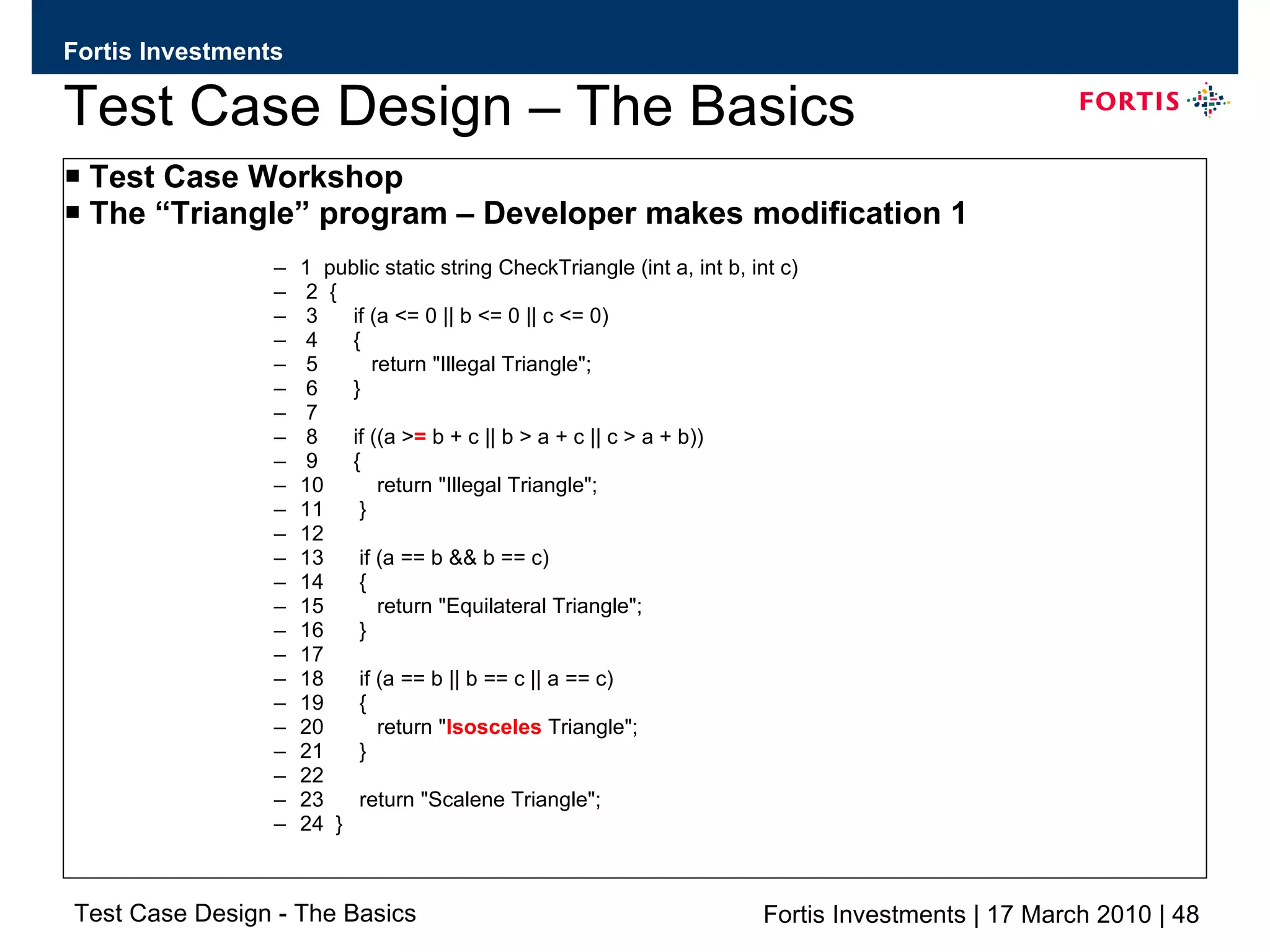
Test Case Design – The Basics Test Case Workshop The “Triangle” program – Developer makes modification 1 1  public static string CheckTriangle (int a, int b, int c) 2  { 3  if (a <= 0 || b <= 0 || c <= 0) 4  { 5  return &quot;Illegal Triangle&quot;; 6  } 7 8  if ((a > =  b + c || b > a + c || c > a + b)) 9  { 10  return &quot;Illegal Triangle&quot;; 11  } 12 13  if (a == b && b == c) 14  { 15  return &quot;Equilateral Triangle&quot;; 16  } 17 18  if (a == b || b == c || a == c) 19  { 20  return &quot; Isosceles  Triangle&quot;; 21  } 22 23  return &quot;Scalene Triangle&quot;; 24  }
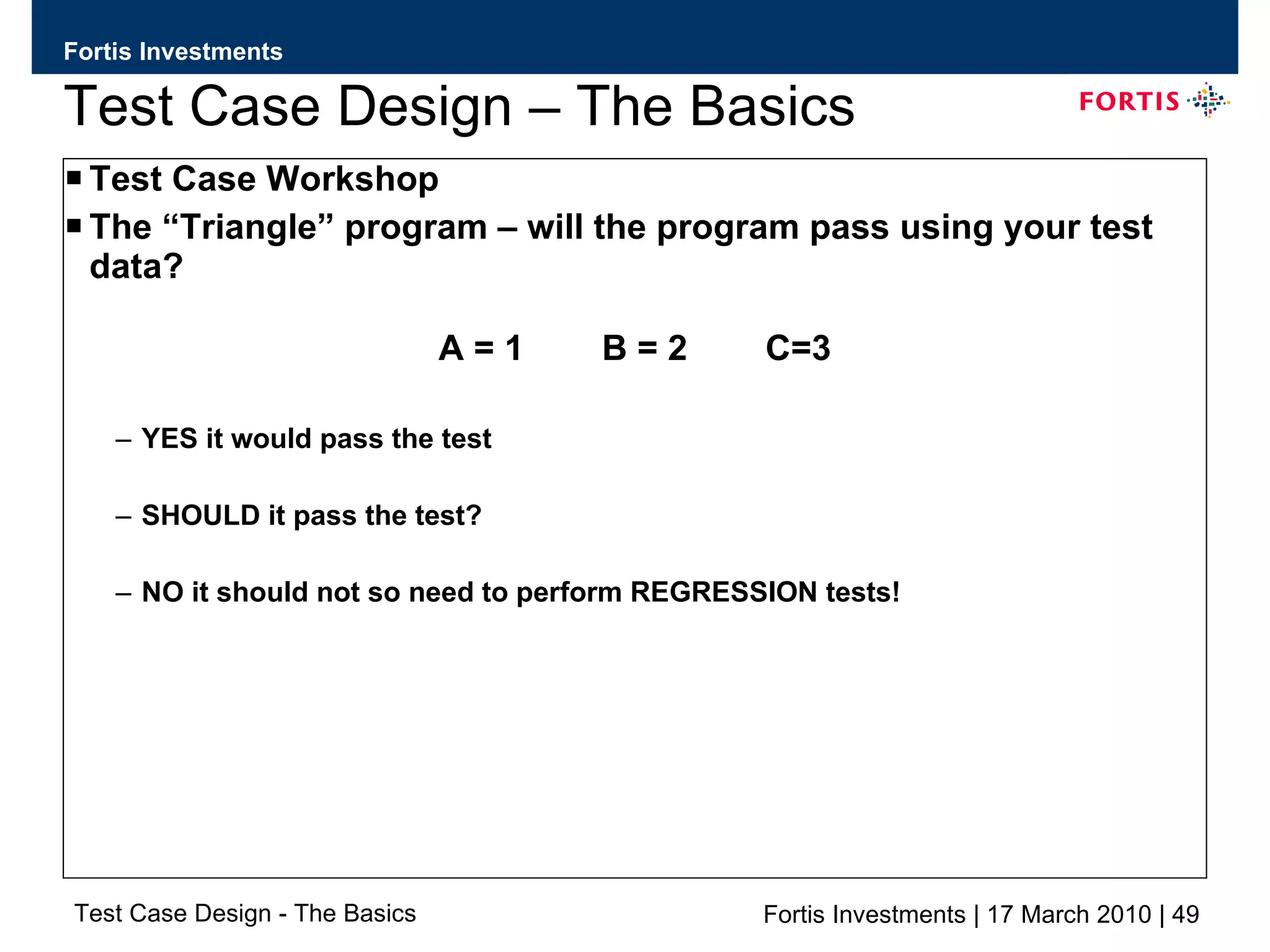
Test Case Design – The Basics Test Case Workshop The “Triangle” program – will the program pass using your test data? A = 1  B = 2  C=3 YES it would pass the test SHOULD it pass the test? NO it should not so need to perform REGRESSION tests!
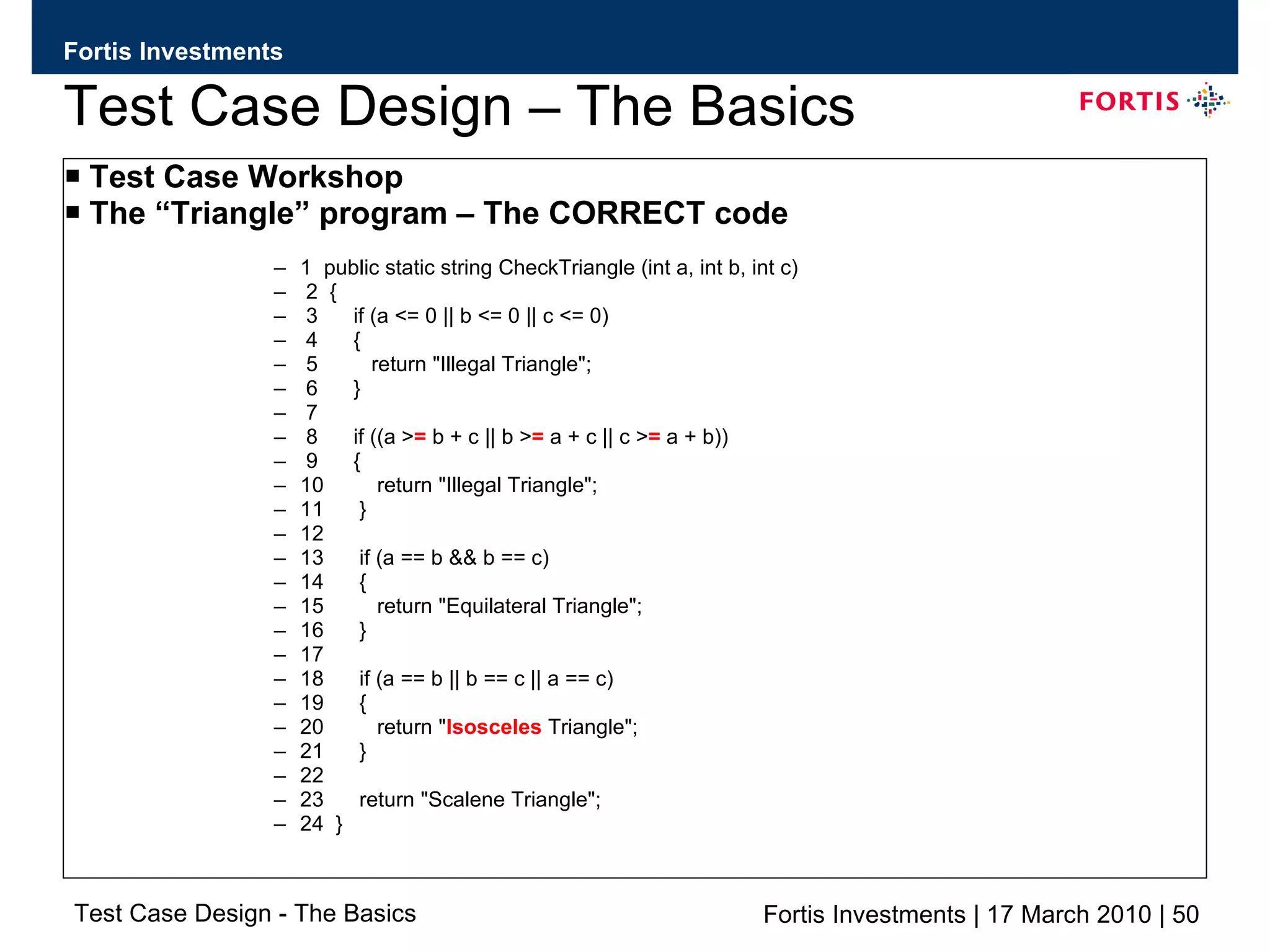
Test Case Design – The Basics Test Case Workshop The “Triangle” program – The CORRECT code 1  public static string CheckTriangle (int a, int b, int c) 2  { 3  if (a <= 0 || b <= 0 || c <= 0) 4  { 5  return &quot;Illegal Triangle&quot;; 6  } 7 8  if ((a > =  b + c || b > =  a + c || c > =  a + b)) 9  { 10  return &quot;Illegal Triangle&quot;; 11  } 12 13  if (a == b && b == c) 14  { 15  return &quot;Equilateral Triangle&quot;; 16  } 17 18  if (a == b || b == c || a == c) 19  { 20  return &quot; Isosceles  Triangle&quot;; 21  } 22 23  return &quot;Scalene Triangle&quot;; 24  }

Test case design_the_basicsv0.4

  • 1.
    Test Case Design– The Basics By Jason Dynes
  • 2.
    Test Case Design– The Basics
  • 3.
    Test Case Design– The Basics What is a good test? An excellent Test Case satisfies the following criteria: It has a reasonable probability of catching an error. You test to find errors. When searching for ideas for test cases, try working backwards from an idea of how the program might fail. If the program could fail in this way then ask how you could catch it? It is not redundant. If two tests look for the same error, do you need to run both? It is the best of its breed. In a group of similar tests, one can more effective than the others. You want the best individual one as this will be the one that is most likely to find errors. It is neither too simple not too complex. You can save testing time by combining two or more tests into one test case. Bur don’t create something that is too complicated to execute or understand or that takes too much time to create. Additionally and very importantly……………..
  • 4.
    Test Case Design– The Basics What is a good test? An excellent Test Case should also……. Make Program Failure obvious Testers miss many failures because they don’t read the output carefully enough or don’t recognise a problem. How do we reduce the risk of this happening as we are all human? Write down the expected output or result of each test, as you create it. Refer to the expected results / notes whilst you are testing. Make any printout or file that you’ll have to inspect as short as possible. Don’t let the failures hide in a mass of boring print. Program the computer or use a test tool to scan for errors in large output files. This might be as simple as comparing the test output with a known good file.
  • 5.
    Test Case Design– The Basics
  • 6.
    Test Case Design– The Basics What techniques can you use to select the best Test Cases? Equivalence Classes and Boundary Values It is essential to understand equivalence classes and their boundaries. Classical Boundary Tests are critical for checking the program’s response to input and output data. Thinking about Boundary conditions teaches you a way of analyzing programs that will strengthen all of your other types of test planning. So what exactly are they?..................
  • 7.
    Test Case Design– The Basics Equivalence Classes – What are they? If you expect the same result from two tests, you consider them equivalent. A group of tests forms an equivalence class if you believe that: They all test the same thing If one test catches a bug, the others probably will too If one test doesn’t catch a bug, the others PROBABLY won’t either You should have reason to believe that test cases are equivalent. So what reasons?.............
  • 8.
    Test Case Design– The Basics Equivalence Classes Tests are often considered to be in the same equivalence class when: They involve the same input variables. They result in similar operations in the program. They affect the same output variables. None force the program to do error handling or all of them do.
  • 9.
    Test Case Design– The Basics Finding Equivalence Classes Two people analysing a program will create a different list of equivalence classes as this is a subjective process. Look for all the classes you can find as this will help you select tests and avoid wasting time repeating what is virtually the same test. You should run one OR a few of the test cases that belong to that equivalence class and leave the rest aside.
  • 10.
    Test Case Design– The Basics
  • 11.
    Test Case Design– The Basics Recommendations for finding Equivalence Classes Don’t forget equivalence classes for invalid inputs Organise your classifications into a table or an outline Look for ranges of numbers Look for membership in a group Analyse responses to lists and menus Look for variables that must be equal Create time determined equivalence classes Look for variable groups that must calculate to a certain value or range Look for equivalent output events Look for equivalent operating environments Lets take a look at an example program to see the recommendations in more detail……….
  • 12.
    Test Case Design– The Basics Example Program Requirements: The program is a VERY simple one and it is supposed to accept any number between 1 and 99 So what are the recommended thought processes we should consider? “ Don’t forget equivalence classes for invalid inputs” This is often your best source for bugs as few programmers test the program’s responses to invalid or unexpected inputs.
  • 13.
    Test Case Design– The Basics Example Program Requirements: The program is a VERY simple one and it is supposed to accept any number between 1 and 99 So what are the recommended thought processes we should consider? “ Organise your classifications into a table or an outline” You will find so many input and output conditions and equivalence classes that you will need way to organise them. 2 example approaches to documentation are shown in the next slide - the “tabular” and the “outline” format.
  • 14.
    Test Case Design– The Basics “ Organise your classifications into a table or an outline” “ Tabular” format Example “ Outline” format Example 1. Enter a number 1.1 Valid Case 1.1.1 Between 1 and 99 1.2 Invalid Case 1.2.1 0 1.2.2 >99 1.2.3 Negative Numbers 1.2.4 Letters and other non numeric cases 0 > 99 Negative Numbers Letters and other non numeric characters Numbers between 1 and 99 Enter a number Invalid Equivalence Classes Valid Equivalence Classes Input or Output Event
  • 15.
    Test Case Design– The Basics
  • 16.
    Test Case Design– The Basics “ Look for ranges of numbers” Every time you find a range (like 1 to 99) you have found several Equivalence classes. There are usually 3 invalid Equivalence classes Everything below the smallest number (<1) Everything above the largest number (>99) Non Numbers Sometimes one of these classes may disappear e.g. No number is too large Also, look for multiple ranges (like tax brackets). Each of these subranges is an Equivalence class.
  • 17.
    Test Case Design– The Basics “ Look for membership in a Group” If an input belongs to a group, one Equivalence class includes all members of the group and another includes everything else. It may be possible to subdivide both classes further. For example, if you have to enter the name of a country, the valid Equivalence class includes all Countries names. The invalid class includes all inputs that aren’t country names. But what of abbreviations, almost correct spellings, native language spellings, or name that are now out of date but were once country names. Should you test these separately? The odds are good that the specification won’t anticipate all of these issues and you’ll find errors in test cases such as these.
  • 18.
    Test Case Design– The Basics
  • 19.
    Test Case Design– The Basics “ Analyse responses to lists and menus” You must enter one of a list of possible inputs. The program responds differently to each and each input is in effect, its own Equivalence class. The invalid Equivalence class includes any input not on that list. If a program asks “Are you sure? (Y/N)”, one Equivalence class contains ‘Y’ (and should contain ‘y’ too). Another contains ‘N’ and ‘n’. Anything else is invalid OR should be taken as ‘N’.
  • 20.
    Test Case Design– The Basics “ Look for variables that must be equal” You can enter any colour as long as it is not black. ‘Not black’ is the invalid Equivalence class. Sometimes this restriction arises unexpectedly e.g. “Everything but black is sold out”. Choices that used to be valid, but no longer are, belong in their own equivalence class. “ Create Time-determined Equivalence classes” Suppose you press the space bar just before, during and after the computer finishes reading a program from the disk. Tests like this crash some systems. What are the Equivalence classes here? Everything you do long before the task is done. Everything you do within some short time interval before the program finishes. Everything you do just before the program starts reading.
  • 21.
    Test Case Design– The Basics “ Look for a variable group that must calculate to a certain value or range” Enter the 3 angles of a triangle. In the class of valid inputs they sum to 180 degrees. In one invalid Equivalence class they sum to LESS than 180 Degrees. In one invalid Equivalence class they sum to MORE than 180 Degrees.
  • 22.
    Test Case Design– The Basics “ Look for Equivalent Output events” So far we have stressed about input events but we need to also consider Equivalent outputs. The difficulty here is determining what inputs are needed as many different classes of input may have the same effect. As an example, imagine that a program’s specification says after a series of computations it will print a number between 1 and 45. work backwards and ask the question “What input could make it print something bigger than 45 or less than 1?” Create test cases to try them.
  • 23.
    Test Case Design– The Basics Boundaries of Equivalence Classes Use only one or two test cases for each Equivalence class. The best ones are at the class boundaries. The Boundary values are the biggest, smallest, soonest, shortest, loudest, fastest, ugliest members of the class i.e. the most extreme values. Incorrect Inequalities in code (such as > instead of >=) cause failures only at the boundaries. Programs that fail with non boundary values usually fail at the boundaries too.
  • 24.
    Test Case Design– The Basics
  • 25.
    Test Case Design– The Basics A quick look at…….. Regression Testing: Why do we check whether a bug fix worked? When you report a problem you tell the Developer exactly what you did to find it. Some Developers examine the code thoroughly, find the cause of the problem, fix it and test the fix. Some Developers will address only the symptoms that have been reported, write special case “fixes” which DO NOT solve the underlying problem but DO keep it from appearing under precisely the circumstances you reported. A few Developers will change the code blindly, don’t check their work and give code back with the same bug plus whatever they broke making their “fix”. Claimed 1 in 3 fixes either don’t fix the problem or break something else in the process
  • 26.
    Test Case Design– The Basics Regression Testing: What do check to see if a bug fix worked? When you test a bug fix you have 3 objectives. Objective 1: Check that the bug was actually addressed Run exactly the same test that you ran when you found the problem. If this test fails then you do not have to do any further Regression testing. If this passes then ask the question “am I running the right test?” to be sure that you know how to demonstrate the bug. Check on previous build in another test environment if necessary.
  • 27.
    Test Case Design– The Basics Regression Testing: What do check to see if a bug fix worked? When you test a bug fix you have 3 objectives. Objective 2: Try to find related bugs Make the assumption that the Developer fixed only the symptoms reported without fixing the underlying bug. How could you reach this bug in different ways? Could there be similar errors in other parts of the code?
  • 28.
    Test Case Design– The Basics Regression Testing: What do check to see if a bug fix worked? When you test a bug fix you have 3 objectives. Objective 3: Check the rest of the system Did this fix have unwanted consequences on anything else? This involves informal planning and test cases that you won’t keep forever. Ask yourself what parts of the system might have been affected by the change and look at them.
  • 29.
    Test Case Design– The Basics
  • 30.
    Test Case Design– The Basics Regression Testing: The standard test library The idea of a Regression Test library is that whenever a new version of the system is submitted for testing, you should run every test in the library Regression tests are frustrating wo work with because they are least likely to expose a new bug in a system However they are essential to make sure that previosu problems have not been re-introduceed or to validate that a high risk piece of functionality still works as it did prior to the code changes. If the Regression tests are fully automated - run them each time as cost is just processing time If they are not automated then harder as there will also be labour costs involved so you need to think about the following ……
  • 31.
    Test Case Design– The Basics Regression Testing: Test library maintenance Do you really need to run them ALL again and again? Drop all tests that are virtual repetitions of one another These shouldn’t reach the library but it is common when more than one person creates tests Reduce the concentration of tests on a bug that has now been fixed If a bug and variants of it persists across many test cycles, many tests for it will be added to the Regression library. This is appropriate as you want to keep examining the bug until all traces have been purged from the system. Once the bug is gone then select a few from the mass of tests and get the rest out of the library.
  • 32.
    Test Case Design– The Basics Regression Testing: Test library maintenance Combine Test Cases If you can combine 15 tests that you expect the program to pass into one big test case then do it. Streamline test cases so that you spend as little time on each as possible. Automate if you can If you are sure that a test will be used across the next 5 or 10 test cycles it will probably pay to spend the time to automate the test. Designate some tests for periodic testing. Rather than running these tests every time the system changes, run them every second or third cycle of testing. Note that you should run the lot on what you believe the be the final stage of testing.
  • 33.
    Test Case Design– The Basics
  • 34.
    Test Case Design– The Basics Test Case Workshop The “Triangle” program PURPOSE This program is intended for use in testing classes and job interviews to aid in education and evaluating software testing skills.
  • 35.
    Test Case Design– The Basics Test Case Workshop The “Triangle” program SPECIFICATION The program takes 3 positive integers, separated by commas. When the CHECK button is pressed, the program interprets the integers as the lengths of the sides of a triangle, and displays one of the following in the output field: &quot;Equilateral&quot; (all sides of the triangle are equal) &quot;Isosceles&quot; (two of the sides are equal) &quot;Scalene&quot; (no side is equal to any of the others) The program also helpfully checks to see if the specified integers could possibly be a triangle. The three integers can represent a triangle if and only if any two of the number add up to a length that is greater than the third number.
  • 36.
    Test Case Design– The Basics Test Case Workshop The “Triangle” program – The code 1 public static string CheckTriangle (int a, int b, int c) 2 { 3 if (a <= 0 || b <= 0 || c <= 0) 4 { 5 return &quot;Illegal Triangle&quot;; 6 } 7 8 if ((a > b + c || b > a + c || c > a + b)) 9 { 10 return &quot;Illegal Triangle&quot;; 11 } 12 13 if (a == b && b == c) 14 { 15 return &quot;Equilateral Triangle&quot;; 16 } 17 18 if (a == b || b == c || a == c) 19 { 20 return &quot;Isoscoles Triangle&quot;; 21 } 22 23 return &quot;Scalene Triangle&quot;; 24 }
  • 37.
    Test Case Design– The Basics
  • 38.
    Test Case Design– The Basics Test Case Workshop The “Triangle” program – 100% statement coverage To achieve 100% statement coverage, we need the following test cases: Test Condition Test Data 1 - A valid scalene triangle. a = 2, b = 3, c = 4 2 - An illegal triangle with a zero length side. a = 0, b = 1, c = 1 3 - An illegal triangle with one short side. a = 1, b = 4, c = 2 4 - A valid equilateral triangle. a = 1, b = 1, c = 1 5 - A valid isosceles triangle. a = 1, b = 2, c = 2 That’s where MOST developers would stop IF they do Unit Testing of their code
  • 39.
    Test Case Design– The Basics Test Case Workshop The “Triangle” program We know have 100% Statement coverage! Is this the complete list………..?
  • 40.
    Test Case Design– The Basics Test Case Workshop The “Triangle” program In order to get 100% branch coverage we need some additional cases, so let’s add to and the following tests. Test Condition Test Data 6 - An illegal triangle where side b is zero length. a = 1, b = 0, c = 1 7 - An illegal triangle where side c is zero length. a = 1, b = 1, c = 0 8 - An illegal triangle where side b is too short. a = 2, b = 1, c = 4 9 - An illegal triangle where side c is too short. a = 4, b = 2, c = 1 10 - An isosceles triangle where the short side is b. a = 2, b = 1, c = 2 11 - An isosceles triangle where the short side is c. a = 2, b = 2, c = 1 12 - An equilateral triangle to test the right side a = 1, b = 1, c = 1 of the && in line 13, i.e. b == c
  • 41.
    Test Case Design– The Basics Test Case Workshop The “Triangle” program We know have 100% Branch coverage! Is this the complete list………..?
  • 42.
    Test Case Design– The Basics Test Case Workshop The “Triangle” program Although you know have 100% branch coverage this is still not the complete list of test cases so others that should be considered may include…... Test Condition Test Data 12An illegal triangle where side a is negative. a = -1, b = 2, c = 2 13An illegal triangle where side b is negative. a = 2, b = -1, c = 2 14An illegal triangle where side c is negative. a = 2, b = 2, c = -1 15 The entry of illegal parameters. spaces, *, /, +, - etc 16 Non Integer parameter values. a = 2.1, b = 2, c = 3
  • 43.
    Test Case Design– The Basics Test Case Workshop The “Triangle” program – How would you document? Invalid Integer – e.g. SPACE, *, -, + characters. 9 Invalid Triangle - Two values add up to be EQUAL than the third one. 8 Invalid Triangle - Two values add up to be LESS than the third one. 7 Valid Triangle - Two values add up to be GREATER than the third one. 6 One side with a Negative Value 5 4.0, 5.0, 6.0 One Side with a Zero value 4 Valid Isosceles Triangle 3 Valid Equilateral Triangle 2 1.0, 2.0, 3.0 Valid Scalene Triangle 1 Test Conditions No. Description Test Case Coverage
  • 44.
    Test Case Design– The Basics Test Case Workshop The “Triangle” program – How would you document? “ Illegal Triangle” message displayed. Enter A = 0, B =1 and C =1 Value A has Zero Value 4.0 “ Illegal Triangle” message displayed. Enter A = 1, B =0 and C =1 Value B has Zero Value 5.0 “ Illegal Triangle” message displayed. Enter A = 1, B =1 and C =0 Value C has Zero Value 6.0 “ Scalene Triangle” message displayed Enter A = 2, B =4 and C =3 Valid Scalene Triangle – B highest value 2.0 “ Scalene Triangle” message displayed Enter A = 4, B =2 and C =3 Valid Scalene Triangle – C highest value 3.0 “ Scalene Triangle” message displayed Enter A = 4, B =2 and C =3 Valid Scalene Triangle – A highest value 1.0 Comments Pass/ Fail Actual Result Expected Result Action Test Description Test Ref.
  • 45.
    Test Case Design– The Basics Test Case Workshop - Time to use your testing skills What are the bugs in this code then? 1 public static string CheckTriangle (int a, int b, int c) 2 { 3 if (a <= 0 || b <= 0 || c <= 0) 4 { 5 return &quot;Illegal Triangle&quot;; 6 } 7 8 if ((a > b + c || b > a + c || c > a + b)) 9 { 10 return &quot;Illegal Triangle&quot;; 11 } 12 13 if (a == b && b == c) 14 { 15 return &quot;Equilateral Triangle&quot;; 16 } 17 18 if (a == b || b == c || a == c) 19 { 20 return &quot;Isoscoles Triangle&quot;; 21 } 22 23 return &quot;Scalene Triangle&quot;; 24 }
  • 46.
    1 publicstatic string CheckTriangle (int a, int b, int c) 2 { 3 if (a <= 0 || b <= 0 || c <= 0) 4 { 5 return &quot;Illegal Triangle&quot;; 6 } 7 8 if ((a > b + c || b > a + c || c > a + b)) 9 { 10 return &quot;Illegal Triangle&quot;; 11 } 12 13 if (a == b && b == c) 14 { 15 return &quot;Equilateral Triangle&quot;; 16 } 17 18 if (a == b || b == c || a == c) 19 { 20 return &quot;Isoscoles Triangle&quot;; 21 } 22 23 return &quot;Scalene Triangle&quot;; 24 }
  • 47.
    Test Case Design– The Basics Test Case Workshop The “Triangle” program – what are the bugs in this code then? What if you used the following data………? A = 1 B = 2 C=3 What would the actual result from the program be? Is this really a valid triangle according to the specification? Is the Specification or the Program incorrect?
  • 48.
    Test Case Design– The Basics Test Case Workshop The “Triangle” program – Developer makes modification 1 1 public static string CheckTriangle (int a, int b, int c) 2 { 3 if (a <= 0 || b <= 0 || c <= 0) 4 { 5 return &quot;Illegal Triangle&quot;; 6 } 7 8 if ((a > = b + c || b > a + c || c > a + b)) 9 { 10 return &quot;Illegal Triangle&quot;; 11 } 12 13 if (a == b && b == c) 14 { 15 return &quot;Equilateral Triangle&quot;; 16 } 17 18 if (a == b || b == c || a == c) 19 { 20 return &quot; Isosceles Triangle&quot;; 21 } 22 23 return &quot;Scalene Triangle&quot;; 24 }
  • 49.
    Test Case Design– The Basics Test Case Workshop The “Triangle” program – will the program pass using your test data? A = 1 B = 2 C=3 YES it would pass the test SHOULD it pass the test? NO it should not so need to perform REGRESSION tests!
  • 50.
    Test Case Design– The Basics Test Case Workshop The “Triangle” program – The CORRECT code 1 public static string CheckTriangle (int a, int b, int c) 2 { 3 if (a <= 0 || b <= 0 || c <= 0) 4 { 5 return &quot;Illegal Triangle&quot;; 6 } 7 8 if ((a > = b + c || b > = a + c || c > = a + b)) 9 { 10 return &quot;Illegal Triangle&quot;; 11 } 12 13 if (a == b && b == c) 14 { 15 return &quot;Equilateral Triangle&quot;; 16 } 17 18 if (a == b || b == c || a == c) 19 { 20 return &quot; Isosceles Triangle&quot;; 21 } 22 23 return &quot;Scalene Triangle&quot;; 24 }