Quality Control ::
Test Case Generation (Using Black Box) and
Test Data Generation (Using Equivalence Class Partitioning)
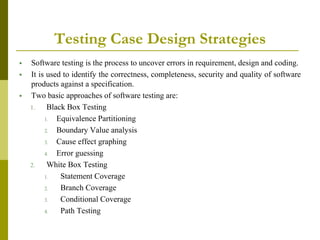
Testing Case Design Strategies
 Software testing is the process to uncover errors in requirement, design and coding.
 It is used to identify the correctness, completeness, security and quality of software
products against a specification.
 Two basic approaches of software testing are:
1. Black Box Testing
1. Equivalence Partitioning
2. Boundary Value analysis
3. Cause effect graphing
4. Error guessing
2. White Box Testing
1. Statement Coverage
2. Branch Coverage
3. Conditional Coverage
4. Path Testing
Testing Case Design Strategies
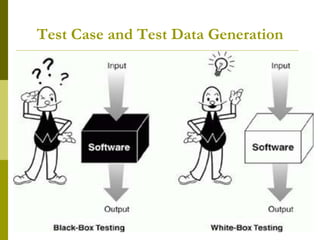
 Black Box Testing
 Method that examines the functionality of an application, without
looking at its structure.
 The tester does not ever examine the programming code and does
not need any further knowledge of the program other than
requirement specifications (SRS).
 You can begin planning for black box testing soon after the
requirements and the functional specifications are available.
Black Box Testing
 Advantages
 The designer and the tester are independent of each other.
 The testing is done from the point of view of the user.
 Test cases can be designed when requirements are clear.
Black Box Testing
 Disadvantages
 Test cases are difficult to design.
 Testing every output against every input will take a long time and
many program structures can go unchecked.
 Inefficient testing because tester only has limited knowledge about
an application.
White Box Testing
 Is detailed examination of internal structure and logic of
code.
 In white box testing, you create test cases by looking at the
code to detect any potential failure scenarios.
 White box testing is also know as Glass Testing or Open box
testing.
White Box Testing
 Advantages
 As tester has knowledge of the source code it is easy to find
errors.
 Due to testers knowledge of code , maximum coverage is
attained during test scenario.
 He or she can then see if the program diverges from its intended
goal.
White Box Testing
 Disadvantages
 As skilled tester are performing tests, costs is increased.
 As it is very difficult to look into every corner of the code, some
code will go unchecked.
 White box testing does not account for errors caused by omission.
Test Case and Test Data Generation
 Equivalence Partitioning
 A good test case is one that has a reasonable probability of
finding an error.
 Keeping in view the fact that an exhaustive-input testing of
a program is impossible.
 limited to trying a small subset of all possible inputs.
 Of course, then, we want to select the right subset-the
subset with the highest probability of finding the most
errors.
Black Box Testing
 The input domain of a program is partitioned into a finite
number of equivalence classes such that we can reasonably
assume that a test of a representative value of each class is
equivalent to a test of any other value.
 That is, if one test case in an equivalence class detects an
error, all other test cases in the equivalence class would be
expected to find the same error.
 Conversely, if a test case did not detect an error, we would
expect that no other test cases in the equivalence class
would fall within another equivalence class, since
equivalence classes may overlap one another.
Equivalence Class Partitioning
 By identifying this as an equivalence class, we are stating that if
no error is found by a test of one element of the set, it is unlikely
that an error would be found by a test of another element of the
set.
 In other words, our testing time is best spent elsewhere.
 Test-case design by equivalence partitioning proceeds in two
steps:
1. identifying the equivalence classes and
2. defining the test cases.
 The equivalence classes are identified by taking each input
condition (usually a sentence or phrase in the specification) and
partitioning it into two or more groups.
Equivalence Class Partitioning
 Following are the guidelines for identifying the equivalence
classes
1. If an input condition specifies a range of values (for example,
“the item count can be from 1 to 999”), identify valid
equivalence class (1 < item count < 999) and invalid
equivalence classes (item count < 1 and item count > 999).
2. If an input condition specifies the number of values (for
example, “one through six owners can be listed for the
automobile”), identify valid equivalence class and invalid
equivalence classes (no owners and more than six owners).
Boundary (Value) Analysis
 Greater number of errors tends to occur at the
Boundaries of the Input Domain than in the
center
 Uses same principal
 Inputs & Outputs grouped into Classes
 Elements are selected such that each edge of
the E.C. is subject of a test (Boundaries are
always a good place to look for defects)
Boundary Value Analysis
 Boundaries mark the point or zone of
transition from one equivalence class to
another.
 The program is more likely to fail at a
boundary, so these are the best members of
(simple, numeric) equivalence classes to use.
 If software can operate on the edge of its
capabilities, it will almost certainly operate well
under normal conditions.
Boundary Value Analysis
 E.C.P. and B.A. can be used together.
 Input: range of valid values
 Test Cases (valid) for the ends of the range
 Test Cases (invalid) for conditions just beyond the
ends
 Input (real number- Range): 0.0 - 90.0
 Test Cases
 0.0, 90.0, -.0.001, 90.001
Boundary Value Analysis
 Input: number of valid values
 Test Cases (maximum and minimum number of values)
 One beneath and beyond these values
 Input (file can contain 1-255 records)
 Test Cases
 0, 1, 255, and 256 records.
 Types of Boundary conditions
 numeric character position quantity speed location size
 Also, extremes
 first/last min/max start/finish over/under empty/full
Shortest/longest slowest/fastest largest/smallest …
Boundary Value Analysis
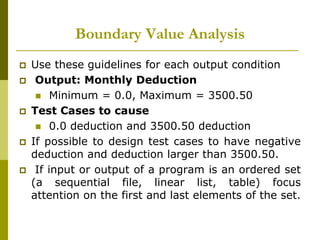
 Use these guidelines for each output condition
 Output: Monthly Deduction
 Minimum = 0.0, Maximum = 3500.50
 Test Cases to cause
 0.0 deduction and 3500.50 deduction
 If possible to design test cases to have negative
deduction and deduction larger than 3500.50.
 If input or output of a program is an ordered set
(a sequential file, linear list, table) focus
attention on the first and last elements of the set.
Example
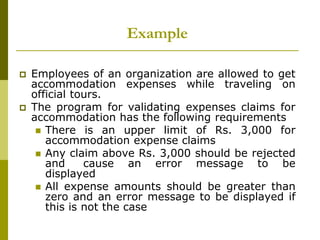
 Employees of an organization are allowed to get
accommodation expenses while traveling on
official tours.
 The program for validating expenses claims for
accommodation has the following requirements
 There is an upper limit of Rs. 3,000 for
accommodation expense claims
 Any claim above Rs. 3,000 should be rejected
and cause an error message to be
displayed
 All expense amounts should be greater than
zero and an error message to be displayed if
this is not the case
Example
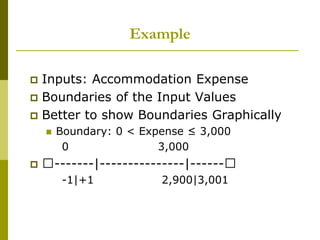
 Inputs: Accommodation Expense
 Boundaries of the Input Values
 Better to show Boundaries Graphically
 Boundary: 0 < Expense ≤ 3,000
0 3,000
 􀃅-------|---------------|------􀃅
-1|+1 2,900|3,001
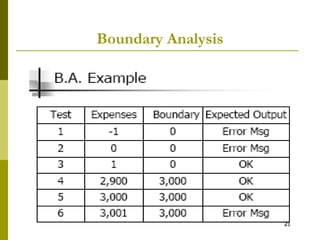
Boundary Analysis
Boundary Analysis
 Rather than thinking about a single
variable with a single range of values, a
variable might have different ranges, such
as the day of the month, in a date:
 1-28
 1-29
 1-30
 1-31
Boundary Analysis
 We analyze the range of dates by partitioning
the month field for the date into different sets:
 {February}
 {April, June, September, November}
 {Jan, March, May, July, August, October, December}
 For testing, you want to pick one of each. There
might or might not be a “boundary” on months.
The boundaries on the days, are sometimes 1-28,
sometimes 1-29, etc
Error Guessing
 Just ‘guess’ where the errors are ……
 Intuition and experience of tester
 Ad hoc, not really a technique
 Strategy:
 Make a list of possible errors or error-prone situations
(often related to boundary conditions)
 Write test cases based on this list
Error Guessing
 Most common error–prone situations ( Risk
Analysis)
 Try to identify critical parts of program (high risk
sections):
 Parts with unclear specifications.
 Developed by junior programmer while he has
problems ……
 Complex specification and code :
 High-risk code will be more thoroughly tested.
Error Guessing
 Defects’ histories are useful
 Some items to try are:
 Empty or null lists/strings
 Zero instances/occurrences
 Blanks or null characters in strings
 Negative numbers
 “Probability of errors remaining in the program is
proportional to the number of errors that have
been found so far” [Myers 79]
Equivalence Class Partitioning
 Employees of an organization are allowed to get
accommodation expenses while traveling on official tours.
The program for validating expenses claims for
accommodation has the following requirements
 There is an upper limit of Rs. 3,000 for accommodation
expense claims
 Any claim above Rs. 3,000 should be rejected and cause an
error message to be displayed
 All expense amount should be greater than zero and an
error message to be displayed if this is not the case
Test Case Generation (Using Black Box) and Test
Data Generation (Equivalence Class Partitioning)
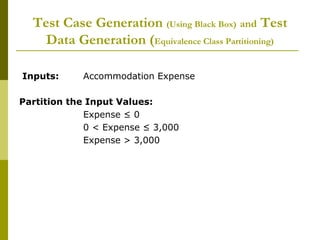
Inputs: Accommodation Expense
Partition the Input Values:
Expense ≤ 0
0 < Expense ≤ 3,000
Expense > 3,000
Test Case Generation (Using Black Box) and Test
Data Generation (Equivalence Class Partitioning)
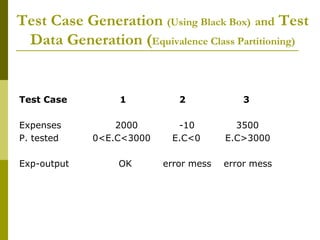
Test Case 1 2 3
Expenses 2000 -10 3500
P. tested 0<E.C<3000 E.C<0 E.C>3000
Exp-output OK error mess error mess
Test Case Generation (Using Black Box) and Test
Data Generation (Equivalence Class Partitioning)
 Consider a function, Grade(), with the following
specification:
 The function is passed an coursework out of 100 out of
which it generates a grade for the course in the range
‘A’ to ‘D’.
 The grade is calculated from the overall mark, which is
calculated as the sum of exam and c/w marks, as
follows:
 greater than or equal to 70 ‘A’
 greater than or equal to 50, but less than 70 ‘B’
 greater than or equal to 30, but less than 50 ‘C’
 less than 30 ‘D’
 Where a mark is outside its expected range then a fault
message (‘FM’) is generated.
 All inputs are passed as parameters.
Test Case Generation (Using Black Box) and Test
Data Generation (Equivalence Class Partitioning)
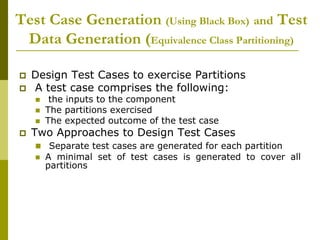
 Design Test Cases to exercise Partitions
 A test case comprises the following:
 the inputs to the component
 The partitions exercised
 The expected outcome of the test case
 Two Approaches to Design Test Cases
 Separate test cases are generated for each partition
 A minimal set of test cases is generated to cover all
partitions
Test Case Generation (Using Black Box) and Test
Data Generation (Equivalence Class Partitioning)
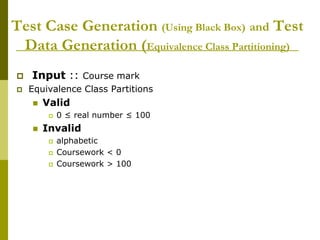
 Input :: Course mark
 Equivalence Class Partitions
 Valid
 0 ≤ real number ≤ 100
 Invalid
 alphabetic
 Coursework < 0
 Coursework > 100
Test Case Generation (Using Black Box) and Test
Data Generation (Equivalence Class Partitioning)
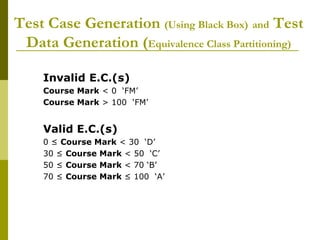
Invalid E.C.(s)
Course Mark < 0 ‘FM’
Course Mark > 100 ‘FM’
Valid E.C.(s)
0 ≤ Course Mark < 30 ‘D’
30 ≤ Course Mark < 50 ‘C’
50 ≤ Course Mark < 70 ‘B’
70 ≤ Course Mark ≤ 100 ‘A’
Test Case Generation (Using Black Box) and Test
Data Generation (Equivalence Class Partitioning)
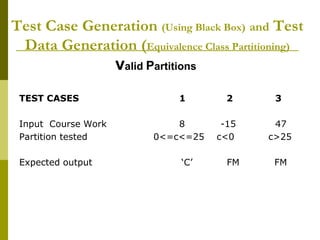
Valid Partitions
TEST CASES 1 2 3
Input Course Work 8 -15 47
Partition tested 0<=c<=25 c<0 c>25
Expected output ‘C’ FM FM
Test Case Generation (Using Black Box) and Test
Data Generation (Equivalence Class Partitioning)
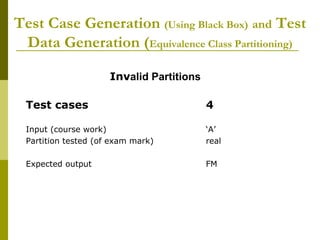
Invalid Partitions
Test cases 4
Input (course work) ‘A’
Partition tested (of exam mark) real
Expected output FM
Test Case Generation (Using Black Box) and Test
Data Generation (Equivalence Class Partitioning)
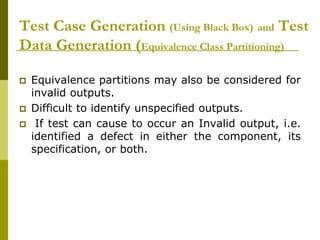
 Equivalence partitions may also be considered for
invalid outputs.
 Difficult to identify unspecified outputs.
 If test can cause to occur an Invalid output, i.e.
identified a defect in either the component, its
specification, or both.
Test Case Generation (Using Black Box) and Test
Data Generation (Equivalence Class Partitioning)
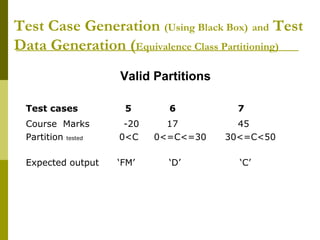
Valid Partitions
Test cases 5 6 7
Course Marks -20 17 45
Partition tested 0<C 0<=C<=30 30<=C<50
Expected output ‘FM’ ‘D’ ‘C’
Test Case Generation (Using Black Box) and Test
Data Generation (Equivalence Class Partitioning)
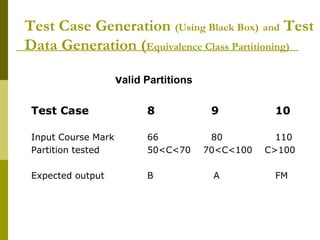
Valid Partitions
Test Case 8 9 10
Input Course Mark 66 80 110
Partition tested 50<C<70 70<C<100 C>100
Expected output B A FM
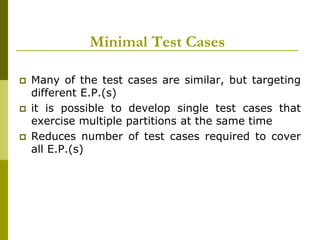
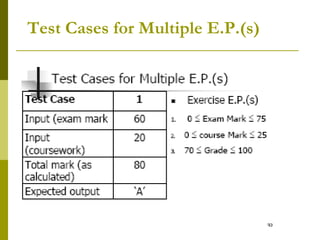
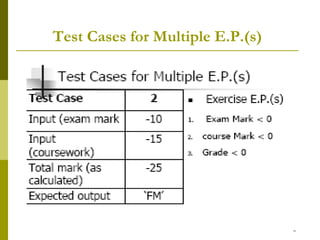
Minimal Test Cases
 Many of the test cases are similar, but targeting
different E.P.(s)
 it is possible to develop single test cases that
exercise multiple partitions at the same time
 Reduces number of test cases required to cover
all E.P.(s)
Test Cases for Multiple E.P.(s)

Black Box Testing

  • 2.
    Quality Control :: TestCase Generation (Using Black Box) and Test Data Generation (Using Equivalence Class Partitioning)
  • 3.
    Testing Case DesignStrategies  Software testing is the process to uncover errors in requirement, design and coding.  It is used to identify the correctness, completeness, security and quality of software products against a specification.  Two basic approaches of software testing are: 1. Black Box Testing 1. Equivalence Partitioning 2. Boundary Value analysis 3. Cause effect graphing 4. Error guessing 2. White Box Testing 1. Statement Coverage 2. Branch Coverage 3. Conditional Coverage 4. Path Testing
  • 4.
    Testing Case DesignStrategies  Black Box Testing  Method that examines the functionality of an application, without looking at its structure.  The tester does not ever examine the programming code and does not need any further knowledge of the program other than requirement specifications (SRS).  You can begin planning for black box testing soon after the requirements and the functional specifications are available.
  • 5.
    Black Box Testing Advantages  The designer and the tester are independent of each other.  The testing is done from the point of view of the user.  Test cases can be designed when requirements are clear.
  • 6.
    Black Box Testing Disadvantages  Test cases are difficult to design.  Testing every output against every input will take a long time and many program structures can go unchecked.  Inefficient testing because tester only has limited knowledge about an application.
  • 7.
    White Box Testing Is detailed examination of internal structure and logic of code.  In white box testing, you create test cases by looking at the code to detect any potential failure scenarios.  White box testing is also know as Glass Testing or Open box testing.
  • 8.
    White Box Testing Advantages  As tester has knowledge of the source code it is easy to find errors.  Due to testers knowledge of code , maximum coverage is attained during test scenario.  He or she can then see if the program diverges from its intended goal.
  • 9.
    White Box Testing Disadvantages  As skilled tester are performing tests, costs is increased.  As it is very difficult to look into every corner of the code, some code will go unchecked.  White box testing does not account for errors caused by omission.
  • 10.
    Test Case andTest Data Generation
  • 11.
     Equivalence Partitioning A good test case is one that has a reasonable probability of finding an error.  Keeping in view the fact that an exhaustive-input testing of a program is impossible.  limited to trying a small subset of all possible inputs.  Of course, then, we want to select the right subset-the subset with the highest probability of finding the most errors. Black Box Testing
  • 12.
     The inputdomain of a program is partitioned into a finite number of equivalence classes such that we can reasonably assume that a test of a representative value of each class is equivalent to a test of any other value.  That is, if one test case in an equivalence class detects an error, all other test cases in the equivalence class would be expected to find the same error.  Conversely, if a test case did not detect an error, we would expect that no other test cases in the equivalence class would fall within another equivalence class, since equivalence classes may overlap one another. Equivalence Class Partitioning
  • 13.
    Equivalence Class Partitioning By identifying this as an equivalence class, we are stating that if no error is found by a test of one element of the set, it is unlikely that an error would be found by a test of another element of the set.  In other words, our testing time is best spent elsewhere.  Test-case design by equivalence partitioning proceeds in two steps: 1. identifying the equivalence classes and 2. defining the test cases.  The equivalence classes are identified by taking each input condition (usually a sentence or phrase in the specification) and partitioning it into two or more groups.
  • 14.
    Equivalence Class Partitioning Following are the guidelines for identifying the equivalence classes 1. If an input condition specifies a range of values (for example, “the item count can be from 1 to 999”), identify valid equivalence class (1 < item count < 999) and invalid equivalence classes (item count < 1 and item count > 999). 2. If an input condition specifies the number of values (for example, “one through six owners can be listed for the automobile”), identify valid equivalence class and invalid equivalence classes (no owners and more than six owners).
  • 15.
    Boundary (Value) Analysis Greater number of errors tends to occur at the Boundaries of the Input Domain than in the center  Uses same principal  Inputs & Outputs grouped into Classes  Elements are selected such that each edge of the E.C. is subject of a test (Boundaries are always a good place to look for defects)
  • 16.
    Boundary Value Analysis Boundaries mark the point or zone of transition from one equivalence class to another.  The program is more likely to fail at a boundary, so these are the best members of (simple, numeric) equivalence classes to use.  If software can operate on the edge of its capabilities, it will almost certainly operate well under normal conditions.
  • 17.
    Boundary Value Analysis E.C.P. and B.A. can be used together.  Input: range of valid values  Test Cases (valid) for the ends of the range  Test Cases (invalid) for conditions just beyond the ends  Input (real number- Range): 0.0 - 90.0  Test Cases  0.0, 90.0, -.0.001, 90.001
  • 18.
    Boundary Value Analysis Input: number of valid values  Test Cases (maximum and minimum number of values)  One beneath and beyond these values  Input (file can contain 1-255 records)  Test Cases  0, 1, 255, and 256 records.  Types of Boundary conditions  numeric character position quantity speed location size  Also, extremes  first/last min/max start/finish over/under empty/full Shortest/longest slowest/fastest largest/smallest …
  • 19.
    Boundary Value Analysis Use these guidelines for each output condition  Output: Monthly Deduction  Minimum = 0.0, Maximum = 3500.50  Test Cases to cause  0.0 deduction and 3500.50 deduction  If possible to design test cases to have negative deduction and deduction larger than 3500.50.  If input or output of a program is an ordered set (a sequential file, linear list, table) focus attention on the first and last elements of the set.
  • 20.
    Example  Employees ofan organization are allowed to get accommodation expenses while traveling on official tours.  The program for validating expenses claims for accommodation has the following requirements  There is an upper limit of Rs. 3,000 for accommodation expense claims  Any claim above Rs. 3,000 should be rejected and cause an error message to be displayed  All expense amounts should be greater than zero and an error message to be displayed if this is not the case
  • 21.
    Example  Inputs: AccommodationExpense  Boundaries of the Input Values  Better to show Boundaries Graphically  Boundary: 0 < Expense ≤ 3,000 0 3,000  􀃅-------|---------------|------􀃅 -1|+1 2,900|3,001
  • 22.
  • 23.
    Boundary Analysis  Ratherthan thinking about a single variable with a single range of values, a variable might have different ranges, such as the day of the month, in a date:  1-28  1-29  1-30  1-31
  • 24.
    Boundary Analysis  Weanalyze the range of dates by partitioning the month field for the date into different sets:  {February}  {April, June, September, November}  {Jan, March, May, July, August, October, December}  For testing, you want to pick one of each. There might or might not be a “boundary” on months. The boundaries on the days, are sometimes 1-28, sometimes 1-29, etc
  • 25.
    Error Guessing  Just‘guess’ where the errors are ……  Intuition and experience of tester  Ad hoc, not really a technique  Strategy:  Make a list of possible errors or error-prone situations (often related to boundary conditions)  Write test cases based on this list
  • 26.
    Error Guessing  Mostcommon error–prone situations ( Risk Analysis)  Try to identify critical parts of program (high risk sections):  Parts with unclear specifications.  Developed by junior programmer while he has problems ……  Complex specification and code :  High-risk code will be more thoroughly tested.
  • 27.
    Error Guessing  Defects’histories are useful  Some items to try are:  Empty or null lists/strings  Zero instances/occurrences  Blanks or null characters in strings  Negative numbers  “Probability of errors remaining in the program is proportional to the number of errors that have been found so far” [Myers 79]
  • 28.
    Equivalence Class Partitioning Employees of an organization are allowed to get accommodation expenses while traveling on official tours. The program for validating expenses claims for accommodation has the following requirements  There is an upper limit of Rs. 3,000 for accommodation expense claims  Any claim above Rs. 3,000 should be rejected and cause an error message to be displayed  All expense amount should be greater than zero and an error message to be displayed if this is not the case
  • 29.
    Test Case Generation(Using Black Box) and Test Data Generation (Equivalence Class Partitioning) Inputs: Accommodation Expense Partition the Input Values: Expense ≤ 0 0 < Expense ≤ 3,000 Expense > 3,000
  • 30.
    Test Case Generation(Using Black Box) and Test Data Generation (Equivalence Class Partitioning) Test Case 1 2 3 Expenses 2000 -10 3500 P. tested 0<E.C<3000 E.C<0 E.C>3000 Exp-output OK error mess error mess
  • 31.
    Test Case Generation(Using Black Box) and Test Data Generation (Equivalence Class Partitioning)  Consider a function, Grade(), with the following specification:  The function is passed an coursework out of 100 out of which it generates a grade for the course in the range ‘A’ to ‘D’.  The grade is calculated from the overall mark, which is calculated as the sum of exam and c/w marks, as follows:  greater than or equal to 70 ‘A’  greater than or equal to 50, but less than 70 ‘B’  greater than or equal to 30, but less than 50 ‘C’  less than 30 ‘D’  Where a mark is outside its expected range then a fault message (‘FM’) is generated.  All inputs are passed as parameters.
  • 32.
    Test Case Generation(Using Black Box) and Test Data Generation (Equivalence Class Partitioning)  Design Test Cases to exercise Partitions  A test case comprises the following:  the inputs to the component  The partitions exercised  The expected outcome of the test case  Two Approaches to Design Test Cases  Separate test cases are generated for each partition  A minimal set of test cases is generated to cover all partitions
  • 33.
    Test Case Generation(Using Black Box) and Test Data Generation (Equivalence Class Partitioning)  Input :: Course mark  Equivalence Class Partitions  Valid  0 ≤ real number ≤ 100  Invalid  alphabetic  Coursework < 0  Coursework > 100
  • 34.
    Test Case Generation(Using Black Box) and Test Data Generation (Equivalence Class Partitioning) Invalid E.C.(s) Course Mark < 0 ‘FM’ Course Mark > 100 ‘FM’ Valid E.C.(s) 0 ≤ Course Mark < 30 ‘D’ 30 ≤ Course Mark < 50 ‘C’ 50 ≤ Course Mark < 70 ‘B’ 70 ≤ Course Mark ≤ 100 ‘A’
  • 35.
    Test Case Generation(Using Black Box) and Test Data Generation (Equivalence Class Partitioning) Valid Partitions TEST CASES 1 2 3 Input Course Work 8 -15 47 Partition tested 0<=c<=25 c<0 c>25 Expected output ‘C’ FM FM
  • 36.
    Test Case Generation(Using Black Box) and Test Data Generation (Equivalence Class Partitioning) Invalid Partitions Test cases 4 Input (course work) ‘A’ Partition tested (of exam mark) real Expected output FM
  • 37.
    Test Case Generation(Using Black Box) and Test Data Generation (Equivalence Class Partitioning)  Equivalence partitions may also be considered for invalid outputs.  Difficult to identify unspecified outputs.  If test can cause to occur an Invalid output, i.e. identified a defect in either the component, its specification, or both.
  • 38.
    Test Case Generation(Using Black Box) and Test Data Generation (Equivalence Class Partitioning) Valid Partitions Test cases 5 6 7 Course Marks -20 17 45 Partition tested 0<C 0<=C<=30 30<=C<50 Expected output ‘FM’ ‘D’ ‘C’
  • 39.
    Test Case Generation(Using Black Box) and Test Data Generation (Equivalence Class Partitioning) Valid Partitions Test Case 8 9 10 Input Course Mark 66 80 110 Partition tested 50<C<70 70<C<100 C>100 Expected output B A FM
  • 40.
    Minimal Test Cases Many of the test cases are similar, but targeting different E.P.(s)  it is possible to develop single test cases that exercise multiple partitions at the same time  Reduces number of test cases required to cover all E.P.(s)
  • 41.
    Test Cases forMultiple E.P.(s)
  • 42.
    Test Cases forMultiple E.P.(s)