Style Guide for Really Good PowerPoints
Adrian Hyde| Partner
Table of contents
 Introduction
 Selecting the right template
 Agenda slides & navigation
 Writing effective titles
 The use of color
 Conclusion
 Appendix
2
This document presents the guidelines used by top-tier consulting
firms to craft effective presentations
 All the top-tier management consulting firms have templates and ‘style-
guides’ to ensure consistent quality
 Until now, these guides have been locked up inside corporate firewalls
 For the first time, ReallyGoodPowerPoints has made these building blocks for
consulting-style presentations available to the public
 If you are shocked by how simple these guidelines are – don’t be; just follow
them consistently and you’ll see the result
3
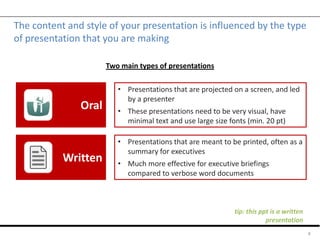
The content and style of your presentation is influenced by the type
of presentation that you are making
4
Oral
Written
• Presentations that are projected on a screen, and led
by a presenter
• These presentations need to be very visual, have
minimal text and use large size fonts (min. 20 pt)
• Presentations that are meant to be printed, often as a
summary for executives
• Much more effective for executive briefings
compared to verbose word documents
Two main types of presentations
tip: this ppt is a written
presentation
Table of contents
 Introduction
 Selecting the right template
 Agenda slides & navigation
 Writing effective titles
 The use of color
 Conclusion
 Appendix
5
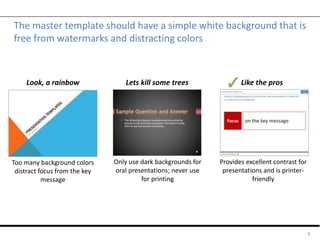
The master template should have a simple white background that is
free from watermarks and distracting colors
6
Too many background colors
distract focus from the key
message
Only use dark backgrounds for
oral presentations; never use
for printing
Look, a rainbow Lets kill some trees Like the pros
Provides excellent contrast for
presentations and is printer-
friendly
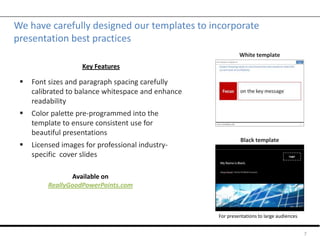
We have carefully designed our templates to incorporate
presentation best practices
 Font sizes and paragraph spacing carefully
calibrated to balance whitespace and enhance
readability
 Color palette pre-programmed into the
template to ensure consistent use for
beautiful presentations
 Licensed images for professional industry-
specific cover slides
7
Black template
White template
Key Features
Available on
ReallyGoodPowerPoints.com
For presentations to large audiences
Table of contents
 Introduction
 Selecting the right template
 Agenda slides & navigation
 Writing effective titles
 The use of color
 Conclusion
 Appendix
8
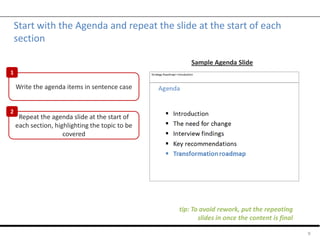
Start with the Agenda and repeat the slide at the start of each
section
9
tip: To avoid rework, put the repeating
slides in once the content is final
Write the agenda items in sentence case
Repeat the agenda slide at the start of
each section, highlighting the topic to be
covered
Sample Agenda Slide
1
2
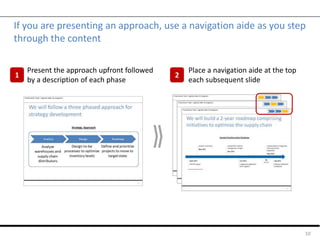
If you are presenting an approach, use a navigation aide as you step
through the content
10
Present the approach upfront followed
by a description of each phase
Place a navigation aide at the top
each subsequent slide
1 2
Table of contents
 Introduction
 Selecting the right template
 Agenda slides & navigation
 Writing effective titles
 The use of color
 Conclusion
 Appendix
11
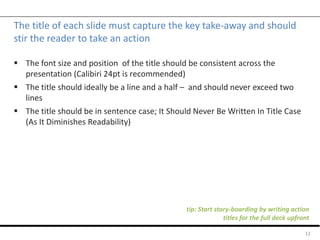
The title of each slide must capture the key take-away and should
stir the reader to take an action
 The font size and position of the title should be consistent across the
presentation (Calibiri 24pt is recommended)
 The title should ideally be a line and a half – and should never exceed two
lines
 The title should be in sentence case; It Should Never Be Written In Title Case
(As It Diminishes Readability)
12
tip: Start story-boarding by writing action
titles for the full deck upfront
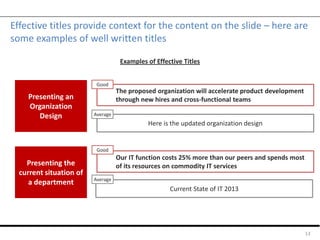
Effective titles provide context for the content on the slide – here are
some examples of well written titles
13
Presenting an
Organization
Design
Here is the updated organization design
The proposed organization will accelerate product development
through new hires and cross-functional teams
Good
Presenting the
current situation of
a department
Our IT function costs 25% more than our peers and spends most
of its resources on commodity IT services
Average
Current State of IT 2013
Good
Average
Examples of Effective Titles
Table of contents
 Introduction
 Selecting the right template
 Agenda slides & navigation
 Writing effective titles
 The use of color
 Conclusion
 Appendix
14
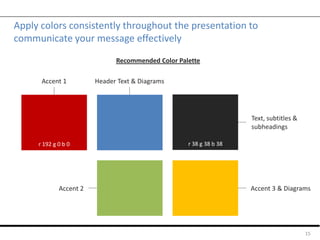
Apply colors consistently throughout the presentation to
communicate your message effectively
15
r 192 g 0 b 0
Accent 1 Header Text & Diagrams
Accent 3 & DiagramsAccent 2
Recommended Color Palette
r 38 g 38 b 38
Text, subtitles &
subheadings
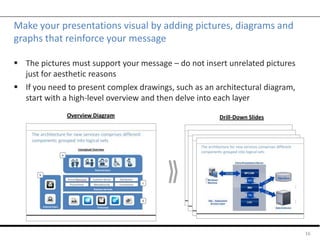
Make your presentations visual by adding pictures, diagrams and
graphs that reinforce your message
 The pictures must support your message – do not insert unrelated pictures
just for aesthetic reasons
 If you need to present complex drawings, such as an architectural diagram,
start with a high-level overview and then delve into each layer
16
Overview Diagram Drill-Down Slides
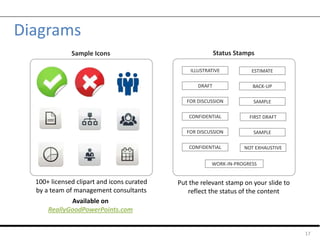
Diagrams
17
ILLUSTRATIVE
DRAFT
FOR DISCUSSION
CONFIDENTIAL
ESTIMATE
WORK-IN-PROGRESS
BACK-UP
SAMPLE
Status StampsSample Icons
100+ licensed clipart and icons curated
by a team of management consultants
Available on
ReallyGoodPowerPoints.com
Put the relevant stamp on your slide to
reflect the status of the content
FIRST DRAFT
FOR DISCUSSION
CONFIDENTIAL
SAMPLE
NOT EXHAUSTIVE
Table of contents
 Introduction
 Selecting the right template
 Agenda slides & navigation
 Writing effective titles
 The use of color
 Conclusion
 Appendix
18
Conclusion
 Effective communication is about structuring your message right, keeping the
language simple and omitting needless words
 Capture the key message of each slide in the title – in fact, write the titles for
the ensure deck first and then put in the content
 Generously use pictures and diagrams, but make sure they support the
content
19
Table of contents
 Introduction
 Selecting the right template
 Agenda slides & navigation
 Writing effective titles
 The use of color
 Conclusion
 Appendix
20
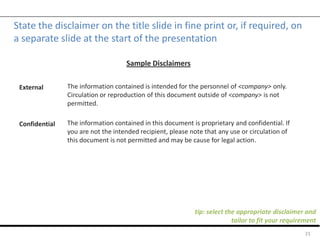
State the disclaimer on the title slide in fine print or, if required, on
a separate slide at the start of the presentation
21
External
Confidential
Sample Disclaimers
The information contained is intended for the personnel of <company> only.
Circulation or reproduction of this document outside of <company> is not
permitted.
The information contained in this document is proprietary and confidential. If
you are not the intended recipient, please note that any use or circulation of
this document is not permitted and may be cause for legal action.
tip: select the appropriate disclaimer and
tailor to fit your requirement

Slide guide for consulting-style presentations

  • 1.
    Style Guide forReally Good PowerPoints Adrian Hyde| Partner
  • 2.
    Table of contents Introduction  Selecting the right template  Agenda slides & navigation  Writing effective titles  The use of color  Conclusion  Appendix 2
  • 3.
    This document presentsthe guidelines used by top-tier consulting firms to craft effective presentations  All the top-tier management consulting firms have templates and ‘style- guides’ to ensure consistent quality  Until now, these guides have been locked up inside corporate firewalls  For the first time, ReallyGoodPowerPoints has made these building blocks for consulting-style presentations available to the public  If you are shocked by how simple these guidelines are – don’t be; just follow them consistently and you’ll see the result 3
  • 4.
    The content andstyle of your presentation is influenced by the type of presentation that you are making 4 Oral Written • Presentations that are projected on a screen, and led by a presenter • These presentations need to be very visual, have minimal text and use large size fonts (min. 20 pt) • Presentations that are meant to be printed, often as a summary for executives • Much more effective for executive briefings compared to verbose word documents Two main types of presentations tip: this ppt is a written presentation
  • 5.
    Table of contents Introduction  Selecting the right template  Agenda slides & navigation  Writing effective titles  The use of color  Conclusion  Appendix 5
  • 6.
    The master templateshould have a simple white background that is free from watermarks and distracting colors 6 Too many background colors distract focus from the key message Only use dark backgrounds for oral presentations; never use for printing Look, a rainbow Lets kill some trees Like the pros Provides excellent contrast for presentations and is printer- friendly
  • 7.
    We have carefullydesigned our templates to incorporate presentation best practices  Font sizes and paragraph spacing carefully calibrated to balance whitespace and enhance readability  Color palette pre-programmed into the template to ensure consistent use for beautiful presentations  Licensed images for professional industry- specific cover slides 7 Black template White template Key Features Available on ReallyGoodPowerPoints.com For presentations to large audiences
  • 8.
    Table of contents Introduction  Selecting the right template  Agenda slides & navigation  Writing effective titles  The use of color  Conclusion  Appendix 8
  • 9.
    Start with theAgenda and repeat the slide at the start of each section 9 tip: To avoid rework, put the repeating slides in once the content is final Write the agenda items in sentence case Repeat the agenda slide at the start of each section, highlighting the topic to be covered Sample Agenda Slide 1 2
  • 10.
    If you arepresenting an approach, use a navigation aide as you step through the content 10 Present the approach upfront followed by a description of each phase Place a navigation aide at the top each subsequent slide 1 2
  • 11.
    Table of contents Introduction  Selecting the right template  Agenda slides & navigation  Writing effective titles  The use of color  Conclusion  Appendix 11
  • 12.
    The title ofeach slide must capture the key take-away and should stir the reader to take an action  The font size and position of the title should be consistent across the presentation (Calibiri 24pt is recommended)  The title should ideally be a line and a half – and should never exceed two lines  The title should be in sentence case; It Should Never Be Written In Title Case (As It Diminishes Readability) 12 tip: Start story-boarding by writing action titles for the full deck upfront
  • 13.
    Effective titles providecontext for the content on the slide – here are some examples of well written titles 13 Presenting an Organization Design Here is the updated organization design The proposed organization will accelerate product development through new hires and cross-functional teams Good Presenting the current situation of a department Our IT function costs 25% more than our peers and spends most of its resources on commodity IT services Average Current State of IT 2013 Good Average Examples of Effective Titles
  • 14.
    Table of contents Introduction  Selecting the right template  Agenda slides & navigation  Writing effective titles  The use of color  Conclusion  Appendix 14
  • 15.
    Apply colors consistentlythroughout the presentation to communicate your message effectively 15 r 192 g 0 b 0 Accent 1 Header Text & Diagrams Accent 3 & DiagramsAccent 2 Recommended Color Palette r 38 g 38 b 38 Text, subtitles & subheadings
  • 16.
    Make your presentationsvisual by adding pictures, diagrams and graphs that reinforce your message  The pictures must support your message – do not insert unrelated pictures just for aesthetic reasons  If you need to present complex drawings, such as an architectural diagram, start with a high-level overview and then delve into each layer 16 Overview Diagram Drill-Down Slides
  • 17.
    Diagrams 17 ILLUSTRATIVE DRAFT FOR DISCUSSION CONFIDENTIAL ESTIMATE WORK-IN-PROGRESS BACK-UP SAMPLE Status StampsSampleIcons 100+ licensed clipart and icons curated by a team of management consultants Available on ReallyGoodPowerPoints.com Put the relevant stamp on your slide to reflect the status of the content FIRST DRAFT FOR DISCUSSION CONFIDENTIAL SAMPLE NOT EXHAUSTIVE
  • 18.
    Table of contents Introduction  Selecting the right template  Agenda slides & navigation  Writing effective titles  The use of color  Conclusion  Appendix 18
  • 19.
    Conclusion  Effective communicationis about structuring your message right, keeping the language simple and omitting needless words  Capture the key message of each slide in the title – in fact, write the titles for the ensure deck first and then put in the content  Generously use pictures and diagrams, but make sure they support the content 19
  • 20.
    Table of contents Introduction  Selecting the right template  Agenda slides & navigation  Writing effective titles  The use of color  Conclusion  Appendix 20
  • 21.
    State the disclaimeron the title slide in fine print or, if required, on a separate slide at the start of the presentation 21 External Confidential Sample Disclaimers The information contained is intended for the personnel of <company> only. Circulation or reproduction of this document outside of <company> is not permitted. The information contained in this document is proprietary and confidential. If you are not the intended recipient, please note that any use or circulation of this document is not permitted and may be cause for legal action. tip: select the appropriate disclaimer and tailor to fit your requirement