. . . . . .
. . . . . .
. . . . . .
. . . . . .
. . . .
. . . .
. . . .
. . . .
. .
AFFINITY
Building
Automation
HVAC/R Drive
Pocket Start Up
WARNING: This is a brief guide only. It does not give safety
information. Incorrect installation or operation of the drive could
cause personal injury or equipment damage. Refer to
AFFINITY User Guide for essential safety information.!
0474-0001-03
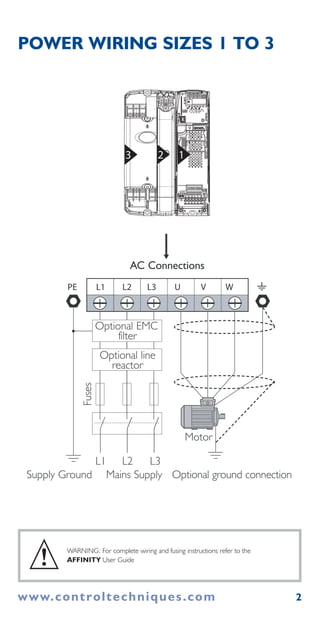
3 2 1
2www.controltechniques.com
Motor
L2L1 L3 U V WPE
AC Connections
Optional EMC
filter
Optional line
reactor
sesuF
Optional ground connectionSupply Ground Mains Supply
L2 L3L1
WARNING: For complete wiring and fusing instructions refer to the
AFFINITY User Guide
POWER WIRING SIZES 1 TO 3
!
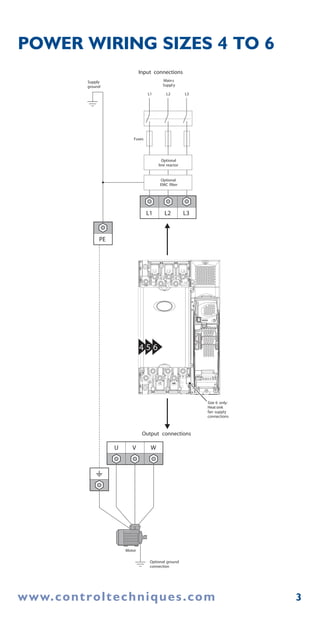
4 5 6
U V W
Motor
Optional ground
connection
Output connections
Input connections
Mains
Supply
L1 L2
Optional
line reactor
Optional
EMC filter
Fuses
L3
L1 L2 L3
PE
Supply
ground
Size 6 only:
Heatsink
fan supply
connections
www.controltechniques.com 3
POWER WIRING SIZES 4 TO 6
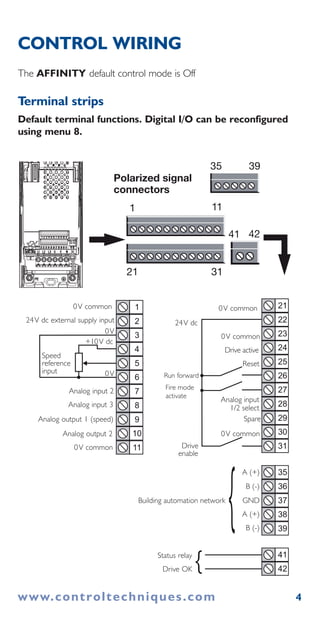
The AFFINITY default control mode is Off
Terminal strips
Default terminal functions. Digital I/O can be reconfigured
using menu 8.
www.controltechniques.com 4
CONTROL WIRING
10
11
8
9
6
7
4
5
3
1
2
30
28
29
26
27
24
25
23
21
22
31
38
36
37
35
39
41
42
1
35 39
11
Polarized signal
connectors
21 31
41 42
0V common
24V dc external supply input
0V
0V
Analog input 2
Analog input 3
Analog input
1/2 select
Spare
A (+)
B (-)
GNDBuilding automation network
A (+)
B (-)
Reset
Drive active
0V common
24V dc
Run forward
Fire mode
activate
Drive
enable
Status relay
Drive OK }
}
0V common
Analog output 1 (speed)
Analog output 2
0V common
+10V dc
Speed
reference
input
0V common
www.controltechniques.com 5
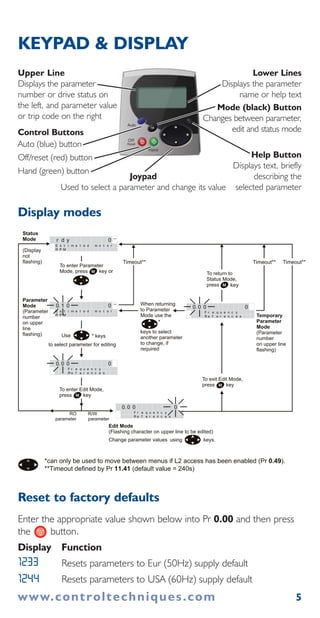
KEYPAD & DISPLAY
Reset to factory defaults
Enter the appropriate value shown below into Pr 0.00 and then press
the button.
Display Function
Resets parameters to Eur (50Hz) supply default
Resets parameters to USA (60Hz) supply default
Display modes
Use * keys
to select parameter for editing
To enter Edit Mode,
press key
Status
Mode
(Display
not
flashing)
Parameter
Mode
(Parameter
number
on upper
line
flashing)
Edit Mode
(Flashing character on upper line to be edited)
Change parameter values using keys.
When returning
to Parameter
Mode use the
keys to select
another parameter
to change, if
required
To exit Edit Mode,
press key
To enter Parameter
Mode, press key or
*
Temporary
Parameter
Mode
(Parameter
number
on upper line
flashing)
Timeout** Timeout**
To return to
Status Mode,
press key
r d y 0 rpm
E s t i m a t e d m o t o r
R P M
0. 1 0 0 rpm
E s t i m a t e d m o t o r
R P M
0. 0 0 0
F r e q u e c yn
R e f e r e c en s
0. 0 0 0
F r e q u e c yn
R e f e r e c en s
0. 0 0 0
F r e q u e c yn
R e f e r e c en s
Timeout**
RO
parameter
R/W
parameter
*can only be used to move between menus if L2 access has been enabled (Pr 0.49).
**Timeout defined by Pr 11.41 (default value = 240s)
1233
1244
Upper Line
Displays the parameter
number or drive status on
the left, and parameter value
or trip code on the right
Lower Lines
Displays the parameter
name or help text
Mode (black) Button
Changes between parameter,
edit and status mode
Help Button
Displays text, briefly
describing the
selected parameter
Joypad
Used to select a parameter and change its value
Control Buttons
Auto (blue) button
Off/reset (red) button
Hand (green) button
www.controltechniques.com 6
OPEN LOOP START-UP
The AFFINITY default operating mode is Open Loop.
The AFFINITY default control mode is Off.
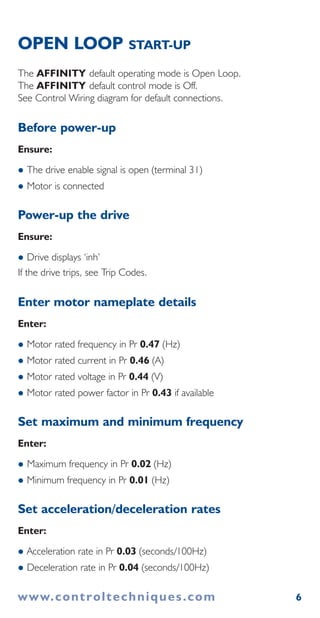
See Control Wiring diagram for default connections.
Before power-up
Ensure:
The drive enable signal is open (terminal 31)
Motor is connected
Power-up the drive
Ensure:
Drive displays ‘inh’
If the drive trips, see Trip Codes.
Enter motor nameplate details
Enter:
Motor rated frequency in Pr 0.47 (Hz)
Motor rated current in Pr 0.46 (A)
Motor rated voltage in Pr 0.44 (V)
Motor rated power factor in Pr 0.43 if available
Set maximum and minimum frequency
Enter:
Maximum frequency in Pr 0.02 (Hz)
Minimum frequency in Pr 0.01 (Hz)
Set acceleration/deceleration rates
Enter:
Acceleration rate in Pr 0.03 (seconds/100Hz)
Deceleration rate in Pr 0.04 (seconds/100Hz)
7
OPEN LOOP START-UP CONTINUED
Autotune (optional)
AFFINITY is able to perform either a stationary or a rotating
autotune. The motor must be at a standstill before an autotune is
enabled. A rotating autotune should be used whenever possible.
WARNING: A rotating autotune will cause the motor to accelerate up to 2/3
base speed in the direction selected regardless of the reference provided.
Once complete the motor will coast to a stop. The enable signal must be
opened before the drive can be made to run at the required reference.
The drive can be stopped at any time by removing the drive enable.
A stationary autotune can be used when the motor is loaded and it is
not possible to remove the load from the motor shaft. A stationary
autotune does not measure the power factor of the motor so the
value on the name plate must be entered into Pr 0.43.
A rotating autotune should only be used if the motor is unloaded or
the load is uncoupled.
To perform an autotune
Set Pr 0.40 = 1 for a stationary autotune or set Pr 0.40 = 2 for a
rotating autotune.
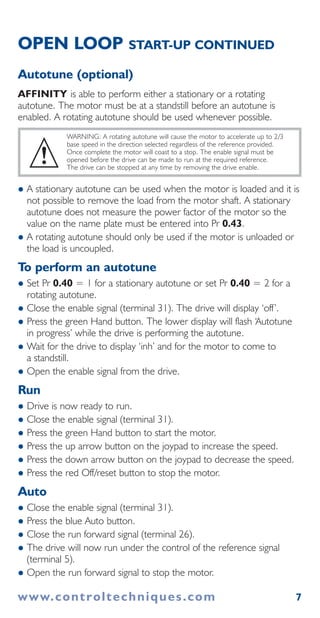
Close the enable signal (terminal 31). The drive will display ‘off’.
Press the green Hand button. The lower display will flash ‘Autotune
in progress’ while the drive is performing the autotune.
Wait for the drive to display ‘inh’ and for the motor to come to
a standstill.
Open the enable signal from the drive.
Run
Drive is now ready to run.
Close the enable signal (terminal 31).
Press the green Hand button to start the motor.
Press the up arrow button on the joypad to increase the speed.
Press the down arrow button on the joypad to decrease the speed.
Press the red Off/reset button to stop the motor.
Auto
Close the enable signal (terminal 31).
Press the blue Auto button.
Close the run forward signal (terminal 26).
The drive will now run under the control of the reference signal
(terminal 5).
Open the run forward signal to stop the motor.
!
www.controltechniques.com
8
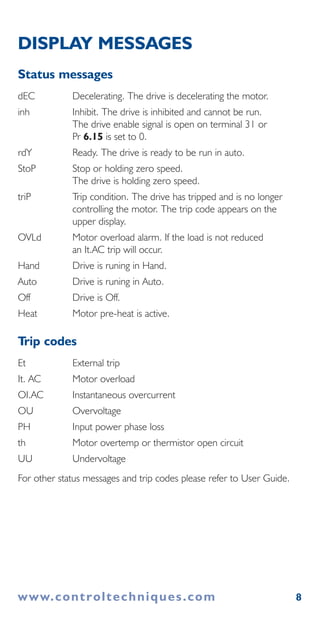
DISPLAY MESSAGES
Status messages
dEC Decelerating. The drive is decelerating the motor.
inh Inhibit. The drive is inhibited and cannot be run.
The drive enable signal is open on terminal 31 or
Pr 6.15 is set to 0.
rdY Ready. The drive is ready to be run in auto.
StoP Stop or holding zero speed.
The drive is holding zero speed.
triP Trip condition. The drive has tripped and is no longer
controlling the motor. The trip code appears on the
upper display.
OVLd Motor overload alarm. If the load is not reduced
an It.AC trip will occur.
Hand Drive is runing in Hand.
Auto Drive is runing in Auto.
Off Drive is Off.
Heat Motor pre-heat is active.
Trip codes
Et External trip
It. AC Motor overload
OI.AC Instantaneous overcurrent
OU Overvoltage
PH Input power phase loss
th Motor overtemp or thermistor open circuit
UU Undervoltage
For other status messages and trip codes please refer to User Guide.
www.controltechniques.com
9
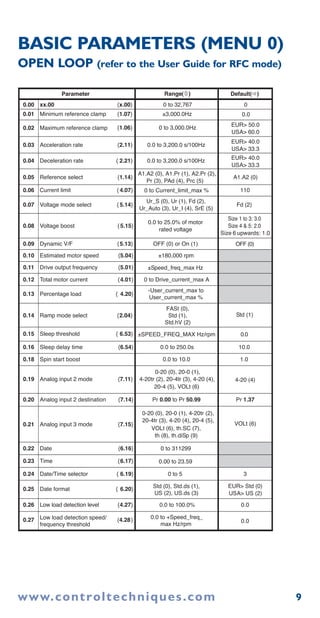
BASIC PARAMETERS (MENU 0)
OPEN LOOP (refer to the User Guide for RFC mode)
Parameter Default( )
0.00 xx.00 {x.00} 0 to 32,767 0
0.00.01 Minimum reference clamp {1.07} ±3,000.0Hz
0.02 Maximum reference clamp {1.06} 0 to 3,000.0Hz
EUR> 50.0
USA> 60.0
EUR> 40.0
USA> 33.3
EUR> Std (0)
USA> US (2)
EUR> 40.0
USA> 33.3
0.03 Acceleration rate {2.11} 0.0 to 3,200.0 s/100Hz
0.04 Deceleration rate { 2.21} 0.0 to 3,200.0 s/100Hz
0.05 Reference select {1.14}
A1.A2 (0), A1.Pr (1), A2.Pr (2),
Pr (3), PAd (4), Prc (5)
A1.A2 (0)
0.06 Current limit { 4.07} 0 to Current_limit_max % 110
0.07 Voltage mode select { 5.14}
Ur_S (0), Ur (1), Fd (2),
Ur_Auto (3), Ur_I (4), SrE (5)
Fd (2)
0.08 Voltage boost {5.15}
0.0 to 25.0% of motor
rated voltage
Size 1 to 3: 3.0
Size 4 & 5: 2.0
Size 6 upwards: 1.0
0.09 Dynamic V/F {5.13} OFF (0) or On (1)
0.10 Estimated motor speed {5.04} ±180,000 rpm
0.11 Drive output frequency {5.01} ±Speed_freq_max Hz
0.12 Total motor current {4.01} 0 to Drive_current_max A
0.13 Percentage load { 4.20}
0.14 Ramp mode select {2.04}
FASt (0),
Std (1),
Std.hV (2)
-User_current_max to
User_current_max %
Std (1)
0.15 Sleep threshold { 6.53} ±SPEED_FREQ_MAX Hz/rpm 0.0
OFF (0)
0.16 Sleep delay time {6.54} 0.0 to 250.0s 10.0
0.18 Spin start boost 0.0 to 10.0 1.0
0.19 Analog input 2 mode {7.11}
0-20 (0), 20-0 (1),
4-20tr (2), 20-4tr (3), 4-20 (4),
20-4 (5), VOLt (6)
4-20 (4)
0.20 Analog input 2 destination {7.14} Pr 0.00 to Pr 50.99 Pr 1.37
0.21 Analog input 3 mode {7.15}
0-20 (0), 20-0 (1), 4-20tr (2),
20-4tr (3), 4-20 (4), 20-4 (5),
VOLt (6), th.SC (7),
th (8), th.diSp (9)
VOLt (6)
0.22 Date {6.16} 0 to 311299
0.00 to 23.590.23 Time {6.17}
0.24 Date/Time selector { 6.19} 0 to 5 3
0.25 Date format { 6.20} Std (0), Std.ds (1),
US (2), US.ds (3)
0.26 Low load detection level {4.27} 0.0 to 100.0% 0.0
0.27 Low load detection speed/
frequency threshold
{4.28} 0.0 to +Speed_freq_
max Hz/rpm
0.0
Range( )
www.controltechniques.com
10
BASIC PARAMETERS (MENU 0)
CONTINUED
0.28 Trip on abnormal load detection {4.29} OFF (0)
0.29 SMARTCARD parameter data {11.36}
0.30 Parameter cloning {11.42}
nonE (0), rEAd (1), Prog (2),
AutO (3), boot (4)
nonE (0)
0.31 Drive rated voltage {11.33} 200 (0), 400 (1),
575 (2), 690 (3) V
0.32 Drive current scaling {11.32}
0.33 Catch a spinning motor {6.09}
0.34 User security code {11.30}
0.35 PC comms mode {11.24}
0.36 PC comms baud rate {11.25}
300 (0), 600 (1), 1200 (2),
2400 (3), 4800 (4), 9600 (5),
19200 (6), 38400 (7),
Modbus RTU only: 57600 (8),
Modbus RTU only: 115200 (9)
19200 (6)
0.37 PC comms address {11.23}
0.38
Hold zero speed/
Motor pre-heat enable
{6.08}
0.39
Motor pre-heat
current magnitude
{6.52} 0
0.40 Autotune {5.12}
0.41
Maximum switching
frequency
{5.18}
3 (0), 4 (1), 6 (2), 8 (3),
12 (4), 16 (5) kHz
3 (0)
0.42 No. of motor poles {5.11} 0 to 60 (Auto to 120 pole) 0 (Auto)
0.43 Motor rated power factor {5.10}
0.44 Motor rated voltage {5.09}
0 to
AC_voltage_set_max
V
200V drive: 230
400V drive:
EUR> 400,
USA> 460
575V drive: 575
690V drive: 690
0.45
Motor rated full load
speed (rpm)
{5.08}
EUR> 1,500,
USA> 1,800
0.46 Motor rated current {5.07}
0 to
Rated_current_max A
Drive rated
current [11.32]
0.47 Rated frequency {5.06}
EUR> 50.0,
USA> 60.0
0.48 Operating mode selector {11.31} OPEn LP (1), rfc (2) OPEn LP (1)
0.49 Security status {11.44} L1 (0), L2 (1), Loc (2)
0.50 Software version {11.29}
Parameter Default( )Range( )
OFF (0) or On (1)
OFF (0)OFF (0) or On (1)
0 to 999
0.00 to 9999.99A
0
00 to 3
00 to 999
rtu (1)AnSI (0), rtu (1), Lcd (2)
10 to 247
0 to 100%
00 to 2
0.8500.000 to 1.000
0 to 180,000 rpm
0 to 3,000.0 Hz
1.00 to 99.99
0.51 Positive logic select { 8.29} OFF (0) or On (1) On (1)
0.52 Timer 1 start date {9.35} 0 to 311299
0 to 311299
0
0.53 Timer 1 start time {9.36} 0.00 to 23.59 0.00
0.55 Timer 1 stop time {9.38} 0.00 to 23.59 0.00
0.56 Timer 1 repeat function {9.39} 0 to 6 0
0.57 Timer 1 enable {9.40} OFF (0) or On (1) OFF (0)
0.58 Timer 1 destination { 9.40} Pr 0.00 to Pr 50.99 Pr 0.00
0.54 Timer 1 stop date {9.37} 0
www.controltechniques.com
11
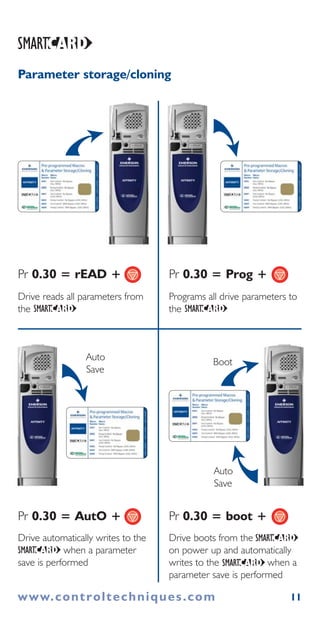
Drive reads all parameters from
the
Pr 0.30 = rEAD +
Programs all drive parameters to
the
Drive automatically writes to the
when a parameter
save is performed
Auto
Save
Drive boots from the
on power up and automatically
writes to the when a
parameter save is performed
Pr 0.30 = Prog +
Pr 0.30 = AutO + Pr 0.30 = boot +
Auto
Save
Boot
Parameter storage/cloning
www.controltechniques.com
12
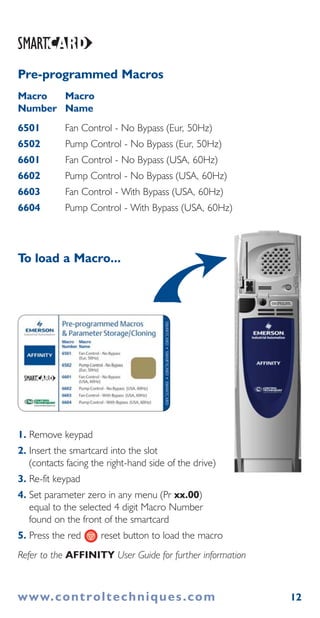
1. Remove keypad
2. Insert the smartcard into the slot
(contacts facing the right-hand side of the drive)
3. Re-fit keypad
4. Set parameter zero in any menu (Pr xx.00)
equal to the selected 4 digit Macro Number
found on the front of the smartcard
5. Press the red reset button to load the macro
Refer to the AFFINITY User Guide for further information
To load a Macro...
www.controltechniques.com
Pre-programmed Macros
Macro Macro
Number Name
6501 Fan Control - No Bypass (Eur, 50Hz)
6502 Pump Control - No Bypass (Eur, 50Hz)
6601 Fan Control - No Bypass (USA, 60Hz)
6602 Pump Control - No Bypass (USA, 60Hz)
6603 Fan Control - With Bypass (USA, 60Hz)
6604 Pump Control - With Bypass (USA, 60Hz)

Affinity quick start guide issue 3

  • 1.
    . . .. . . . . . . . . . . . . . . . . . . . . . . . . . . . . . . . . . . . . . . AFFINITY Building Automation HVAC/R Drive Pocket Start Up WARNING: This is a brief guide only. It does not give safety information. Incorrect installation or operation of the drive could cause personal injury or equipment damage. Refer to AFFINITY User Guide for essential safety information.! 0474-0001-03
  • 2.
    3 2 1 2www.controltechniques.com Motor L2L1L3 U V WPE AC Connections Optional EMC filter Optional line reactor sesuF Optional ground connectionSupply Ground Mains Supply L2 L3L1 WARNING: For complete wiring and fusing instructions refer to the AFFINITY User Guide POWER WIRING SIZES 1 TO 3 !
  • 3.
    4 5 6 UV W Motor Optional ground connection Output connections Input connections Mains Supply L1 L2 Optional line reactor Optional EMC filter Fuses L3 L1 L2 L3 PE Supply ground Size 6 only: Heatsink fan supply connections www.controltechniques.com 3 POWER WIRING SIZES 4 TO 6
  • 4.
    The AFFINITY defaultcontrol mode is Off Terminal strips Default terminal functions. Digital I/O can be reconfigured using menu 8. www.controltechniques.com 4 CONTROL WIRING 10 11 8 9 6 7 4 5 3 1 2 30 28 29 26 27 24 25 23 21 22 31 38 36 37 35 39 41 42 1 35 39 11 Polarized signal connectors 21 31 41 42 0V common 24V dc external supply input 0V 0V Analog input 2 Analog input 3 Analog input 1/2 select Spare A (+) B (-) GNDBuilding automation network A (+) B (-) Reset Drive active 0V common 24V dc Run forward Fire mode activate Drive enable Status relay Drive OK } } 0V common Analog output 1 (speed) Analog output 2 0V common +10V dc Speed reference input 0V common
  • 5.
    www.controltechniques.com 5 KEYPAD &DISPLAY Reset to factory defaults Enter the appropriate value shown below into Pr 0.00 and then press the button. Display Function Resets parameters to Eur (50Hz) supply default Resets parameters to USA (60Hz) supply default Display modes Use * keys to select parameter for editing To enter Edit Mode, press key Status Mode (Display not flashing) Parameter Mode (Parameter number on upper line flashing) Edit Mode (Flashing character on upper line to be edited) Change parameter values using keys. When returning to Parameter Mode use the keys to select another parameter to change, if required To exit Edit Mode, press key To enter Parameter Mode, press key or * Temporary Parameter Mode (Parameter number on upper line flashing) Timeout** Timeout** To return to Status Mode, press key r d y 0 rpm E s t i m a t e d m o t o r R P M 0. 1 0 0 rpm E s t i m a t e d m o t o r R P M 0. 0 0 0 F r e q u e c yn R e f e r e c en s 0. 0 0 0 F r e q u e c yn R e f e r e c en s 0. 0 0 0 F r e q u e c yn R e f e r e c en s Timeout** RO parameter R/W parameter *can only be used to move between menus if L2 access has been enabled (Pr 0.49). **Timeout defined by Pr 11.41 (default value = 240s) 1233 1244 Upper Line Displays the parameter number or drive status on the left, and parameter value or trip code on the right Lower Lines Displays the parameter name or help text Mode (black) Button Changes between parameter, edit and status mode Help Button Displays text, briefly describing the selected parameter Joypad Used to select a parameter and change its value Control Buttons Auto (blue) button Off/reset (red) button Hand (green) button
  • 6.
    www.controltechniques.com 6 OPEN LOOPSTART-UP The AFFINITY default operating mode is Open Loop. The AFFINITY default control mode is Off. See Control Wiring diagram for default connections. Before power-up Ensure: The drive enable signal is open (terminal 31) Motor is connected Power-up the drive Ensure: Drive displays ‘inh’ If the drive trips, see Trip Codes. Enter motor nameplate details Enter: Motor rated frequency in Pr 0.47 (Hz) Motor rated current in Pr 0.46 (A) Motor rated voltage in Pr 0.44 (V) Motor rated power factor in Pr 0.43 if available Set maximum and minimum frequency Enter: Maximum frequency in Pr 0.02 (Hz) Minimum frequency in Pr 0.01 (Hz) Set acceleration/deceleration rates Enter: Acceleration rate in Pr 0.03 (seconds/100Hz) Deceleration rate in Pr 0.04 (seconds/100Hz)
  • 7.
    7 OPEN LOOP START-UPCONTINUED Autotune (optional) AFFINITY is able to perform either a stationary or a rotating autotune. The motor must be at a standstill before an autotune is enabled. A rotating autotune should be used whenever possible. WARNING: A rotating autotune will cause the motor to accelerate up to 2/3 base speed in the direction selected regardless of the reference provided. Once complete the motor will coast to a stop. The enable signal must be opened before the drive can be made to run at the required reference. The drive can be stopped at any time by removing the drive enable. A stationary autotune can be used when the motor is loaded and it is not possible to remove the load from the motor shaft. A stationary autotune does not measure the power factor of the motor so the value on the name plate must be entered into Pr 0.43. A rotating autotune should only be used if the motor is unloaded or the load is uncoupled. To perform an autotune Set Pr 0.40 = 1 for a stationary autotune or set Pr 0.40 = 2 for a rotating autotune. Close the enable signal (terminal 31). The drive will display ‘off’. Press the green Hand button. The lower display will flash ‘Autotune in progress’ while the drive is performing the autotune. Wait for the drive to display ‘inh’ and for the motor to come to a standstill. Open the enable signal from the drive. Run Drive is now ready to run. Close the enable signal (terminal 31). Press the green Hand button to start the motor. Press the up arrow button on the joypad to increase the speed. Press the down arrow button on the joypad to decrease the speed. Press the red Off/reset button to stop the motor. Auto Close the enable signal (terminal 31). Press the blue Auto button. Close the run forward signal (terminal 26). The drive will now run under the control of the reference signal (terminal 5). Open the run forward signal to stop the motor. ! www.controltechniques.com
  • 8.
    8 DISPLAY MESSAGES Status messages dECDecelerating. The drive is decelerating the motor. inh Inhibit. The drive is inhibited and cannot be run. The drive enable signal is open on terminal 31 or Pr 6.15 is set to 0. rdY Ready. The drive is ready to be run in auto. StoP Stop or holding zero speed. The drive is holding zero speed. triP Trip condition. The drive has tripped and is no longer controlling the motor. The trip code appears on the upper display. OVLd Motor overload alarm. If the load is not reduced an It.AC trip will occur. Hand Drive is runing in Hand. Auto Drive is runing in Auto. Off Drive is Off. Heat Motor pre-heat is active. Trip codes Et External trip It. AC Motor overload OI.AC Instantaneous overcurrent OU Overvoltage PH Input power phase loss th Motor overtemp or thermistor open circuit UU Undervoltage For other status messages and trip codes please refer to User Guide. www.controltechniques.com
  • 9.
    9 BASIC PARAMETERS (MENU0) OPEN LOOP (refer to the User Guide for RFC mode) Parameter Default( ) 0.00 xx.00 {x.00} 0 to 32,767 0 0.00.01 Minimum reference clamp {1.07} ±3,000.0Hz 0.02 Maximum reference clamp {1.06} 0 to 3,000.0Hz EUR> 50.0 USA> 60.0 EUR> 40.0 USA> 33.3 EUR> Std (0) USA> US (2) EUR> 40.0 USA> 33.3 0.03 Acceleration rate {2.11} 0.0 to 3,200.0 s/100Hz 0.04 Deceleration rate { 2.21} 0.0 to 3,200.0 s/100Hz 0.05 Reference select {1.14} A1.A2 (0), A1.Pr (1), A2.Pr (2), Pr (3), PAd (4), Prc (5) A1.A2 (0) 0.06 Current limit { 4.07} 0 to Current_limit_max % 110 0.07 Voltage mode select { 5.14} Ur_S (0), Ur (1), Fd (2), Ur_Auto (3), Ur_I (4), SrE (5) Fd (2) 0.08 Voltage boost {5.15} 0.0 to 25.0% of motor rated voltage Size 1 to 3: 3.0 Size 4 & 5: 2.0 Size 6 upwards: 1.0 0.09 Dynamic V/F {5.13} OFF (0) or On (1) 0.10 Estimated motor speed {5.04} ±180,000 rpm 0.11 Drive output frequency {5.01} ±Speed_freq_max Hz 0.12 Total motor current {4.01} 0 to Drive_current_max A 0.13 Percentage load { 4.20} 0.14 Ramp mode select {2.04} FASt (0), Std (1), Std.hV (2) -User_current_max to User_current_max % Std (1) 0.15 Sleep threshold { 6.53} ±SPEED_FREQ_MAX Hz/rpm 0.0 OFF (0) 0.16 Sleep delay time {6.54} 0.0 to 250.0s 10.0 0.18 Spin start boost 0.0 to 10.0 1.0 0.19 Analog input 2 mode {7.11} 0-20 (0), 20-0 (1), 4-20tr (2), 20-4tr (3), 4-20 (4), 20-4 (5), VOLt (6) 4-20 (4) 0.20 Analog input 2 destination {7.14} Pr 0.00 to Pr 50.99 Pr 1.37 0.21 Analog input 3 mode {7.15} 0-20 (0), 20-0 (1), 4-20tr (2), 20-4tr (3), 4-20 (4), 20-4 (5), VOLt (6), th.SC (7), th (8), th.diSp (9) VOLt (6) 0.22 Date {6.16} 0 to 311299 0.00 to 23.590.23 Time {6.17} 0.24 Date/Time selector { 6.19} 0 to 5 3 0.25 Date format { 6.20} Std (0), Std.ds (1), US (2), US.ds (3) 0.26 Low load detection level {4.27} 0.0 to 100.0% 0.0 0.27 Low load detection speed/ frequency threshold {4.28} 0.0 to +Speed_freq_ max Hz/rpm 0.0 Range( ) www.controltechniques.com
  • 10.
    10 BASIC PARAMETERS (MENU0) CONTINUED 0.28 Trip on abnormal load detection {4.29} OFF (0) 0.29 SMARTCARD parameter data {11.36} 0.30 Parameter cloning {11.42} nonE (0), rEAd (1), Prog (2), AutO (3), boot (4) nonE (0) 0.31 Drive rated voltage {11.33} 200 (0), 400 (1), 575 (2), 690 (3) V 0.32 Drive current scaling {11.32} 0.33 Catch a spinning motor {6.09} 0.34 User security code {11.30} 0.35 PC comms mode {11.24} 0.36 PC comms baud rate {11.25} 300 (0), 600 (1), 1200 (2), 2400 (3), 4800 (4), 9600 (5), 19200 (6), 38400 (7), Modbus RTU only: 57600 (8), Modbus RTU only: 115200 (9) 19200 (6) 0.37 PC comms address {11.23} 0.38 Hold zero speed/ Motor pre-heat enable {6.08} 0.39 Motor pre-heat current magnitude {6.52} 0 0.40 Autotune {5.12} 0.41 Maximum switching frequency {5.18} 3 (0), 4 (1), 6 (2), 8 (3), 12 (4), 16 (5) kHz 3 (0) 0.42 No. of motor poles {5.11} 0 to 60 (Auto to 120 pole) 0 (Auto) 0.43 Motor rated power factor {5.10} 0.44 Motor rated voltage {5.09} 0 to AC_voltage_set_max V 200V drive: 230 400V drive: EUR> 400, USA> 460 575V drive: 575 690V drive: 690 0.45 Motor rated full load speed (rpm) {5.08} EUR> 1,500, USA> 1,800 0.46 Motor rated current {5.07} 0 to Rated_current_max A Drive rated current [11.32] 0.47 Rated frequency {5.06} EUR> 50.0, USA> 60.0 0.48 Operating mode selector {11.31} OPEn LP (1), rfc (2) OPEn LP (1) 0.49 Security status {11.44} L1 (0), L2 (1), Loc (2) 0.50 Software version {11.29} Parameter Default( )Range( ) OFF (0) or On (1) OFF (0)OFF (0) or On (1) 0 to 999 0.00 to 9999.99A 0 00 to 3 00 to 999 rtu (1)AnSI (0), rtu (1), Lcd (2) 10 to 247 0 to 100% 00 to 2 0.8500.000 to 1.000 0 to 180,000 rpm 0 to 3,000.0 Hz 1.00 to 99.99 0.51 Positive logic select { 8.29} OFF (0) or On (1) On (1) 0.52 Timer 1 start date {9.35} 0 to 311299 0 to 311299 0 0.53 Timer 1 start time {9.36} 0.00 to 23.59 0.00 0.55 Timer 1 stop time {9.38} 0.00 to 23.59 0.00 0.56 Timer 1 repeat function {9.39} 0 to 6 0 0.57 Timer 1 enable {9.40} OFF (0) or On (1) OFF (0) 0.58 Timer 1 destination { 9.40} Pr 0.00 to Pr 50.99 Pr 0.00 0.54 Timer 1 stop date {9.37} 0 www.controltechniques.com
  • 11.
    11 Drive reads allparameters from the Pr 0.30 = rEAD + Programs all drive parameters to the Drive automatically writes to the when a parameter save is performed Auto Save Drive boots from the on power up and automatically writes to the when a parameter save is performed Pr 0.30 = Prog + Pr 0.30 = AutO + Pr 0.30 = boot + Auto Save Boot Parameter storage/cloning www.controltechniques.com
  • 12.
    12 1. Remove keypad 2.Insert the smartcard into the slot (contacts facing the right-hand side of the drive) 3. Re-fit keypad 4. Set parameter zero in any menu (Pr xx.00) equal to the selected 4 digit Macro Number found on the front of the smartcard 5. Press the red reset button to load the macro Refer to the AFFINITY User Guide for further information To load a Macro... www.controltechniques.com Pre-programmed Macros Macro Macro Number Name 6501 Fan Control - No Bypass (Eur, 50Hz) 6502 Pump Control - No Bypass (Eur, 50Hz) 6601 Fan Control - No Bypass (USA, 60Hz) 6602 Pump Control - No Bypass (USA, 60Hz) 6603 Fan Control - With Bypass (USA, 60Hz) 6604 Pump Control - With Bypass (USA, 60Hz)