Presented by---
Gurpreet Singh
Introduction
 Team viewer is(desktop
sharing) software.
Team viewer GmbH was
founded in 2005 in
Germany.
Available for Windows,
linux,Android,Windows
phone operating system.
definition
Team viewer is a computer software package for remote
control,desktop sharing ,online meetings,web conferencing and file
ransfer, represent presentation between computers.
purpose
 Remote Control.
 Desktop Sharing.
 File Transfer.
 Web Conferencing.
 Online Meeting.
 Slide Share.
installation
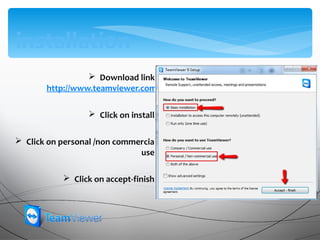
 Download link
http://www.teamviewer.com
 Click on install.
 Click on personal /non commercial
use.
 Click on accept-finish.
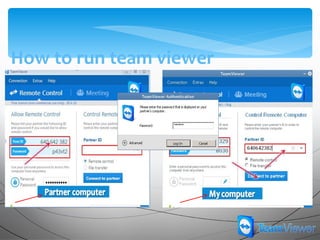
How to run team viewer
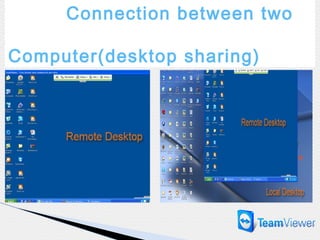
Connection between two
Computer(desktop sharing)
ControlRemote
In the Remote Control
window you can
control your partner's
computer as if you
were sitting in front of
him . You can use your
keyboard and mouse to
control your partner's
computer .
In the title bar of the remote window 's name or Partner ID
displayed Below the title bar is a toolbar with buttons for the
following actions:
Actions
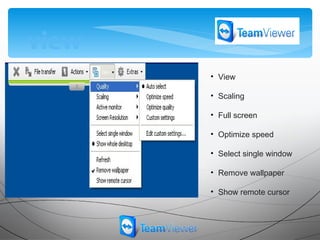
view
• View
• Scaling
• Full screen
• Optimize speed
• Select single window
• Remove wallpaper
• Show remote cursor
Audio/Video
My video
Chat
File transfer
update
Take out
Create folder
Root directory
send
receive
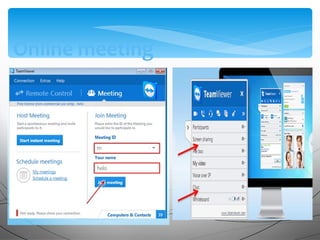
Online meeting
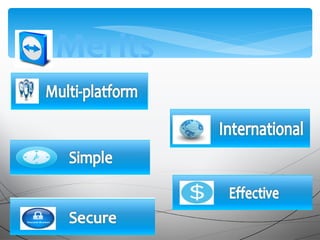
Merits
Demerits
Expensive
Need internet connection
Paid version for commercial use
TeamViewer is a user-friendly program.
Conclusion
TeamViewer can be used to transfer files, create
presentations, remotely Confidentiality and
security of work is provided by built-in means of
protection from unauthorized users.
Teamviewer

Teamviewer

Editor's Notes

  • #2 <number>
  • #3 <number>
  • #6 <number>
  • #7 <number>
  • #8 <number>
  • #18 <number>