1
TeamViewer
  (Remote)
ID
Password                           ID
   Password
                  ID
              Password

                         ID
office

     Internet


Support
1
Team Viewer

          Team Viewer


TeamViewer_Setup.exe (

Skip     Permit)
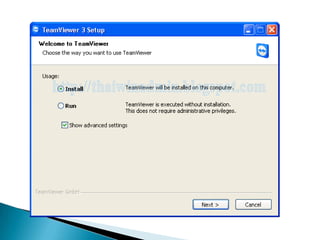
2.       Welcome to Team Viewer
       Install
Environment
personal non-commercial use
    Next
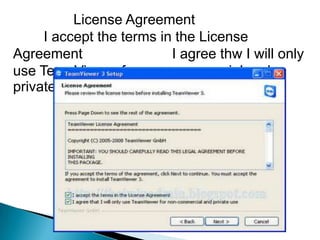
License Agreement
     I accept the terms in the License
Agreement                 I agree thw I will only
use TeamViewer for non-commercial and
private use               Next
Choose installation type
    Start automatically with Windows
               Password:         Confirm
password:                                Next
Install VPN adapter        Next
7.     Choose Installation Location
Next

             Browse
                Next
Choose Start menu Folder
Next
Install
Completeing the
TeamViewer 3 Setup Wizard
    Finish
•
    TeamViewer


      TeamViewer


            TeamViewer   Extra
TeamViewer
Options        Connection
     Accept incoming LAN connections

    OK
TeamViewer
Minimize


           TeamViewer


           TeamViewer


                TeamViewer   Extra
Proxy IP
             Port
           Username      Password
                   OK


           OK
                TeamViewer
TeamViewer

      TeamViewer
              TeamViewer_Setup.exe
      Welcome to TeamViewer
Run          Next
License Agreement
I accept the terms in the License Agreement
        Next
TeamViewer   Create
Session
             Remote Desktop      Connect
to partner
Authentication
                                       Log
On


                 Log On

                          Disconnect
1
1.       Ctrl + Alt + Del


              Print Screen

    2.
TeamViewer

    3.

    4.
1.
     54010517050
2.
     54010517065
3.
     54010520023
4.
     54010520053

Teamviewer