The 
Client Server Model 
Imran, Ella, Christine and Annie
Introducing the Team 
Imran Hafiz, Ella Banka, Christine Delp, and Annie Piotrowski
We know 
1. How to type "google.com" into the address 
bar. 
2. We communicate with Internet users across 
the world within milliseconds. 
3. The Client Server Model makes this possible.
We'll learn 
1. the process behind an 
everyday experience 
2. how CSM revolutionized the 
transfer of information 
3. the pros and cons of CSM 
4. CSM and multimedia
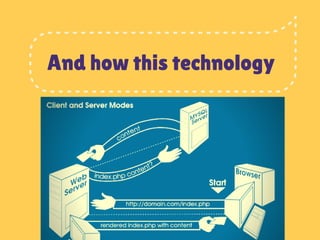
And how this technology
Changed the 
world.
The Client 
1. phones, desktops, laptops, the computer in front of 
you... 
2. any device with software installed that access Interne 
services 
3. To access the WWW, the necessary software is a web 
browser.
The Server 
1. Powerful computer/computer cluster 
that responds to your URL requests
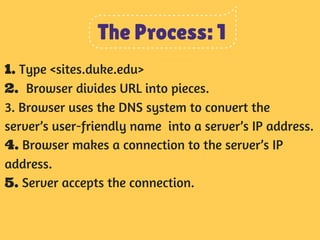
The Process: 1 
1. Type <sites.duke.edu> 
2. Browser divides URL into pieces. 
3. Browser uses the DNS system to convert the 
server’s user-friendly name into a server’s IP address. 
4. Browser makes a connection to the server’s IP 
address. 
5. Server accepts the connection.
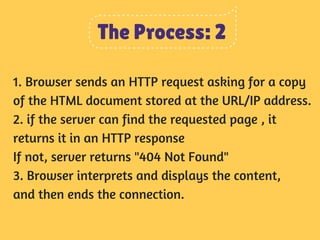
The Process: 2 
1. Browser sends an HTTP request asking for a copy 
of the HTML document stored at the URL/IP address. 
2. if the server can find the requested page , it 
returns it in an HTTP response 
If not, server returns "404 Not Found" 
3. Browser interprets and displays the content, 
and then ends the connection.
And now for a brief intermission
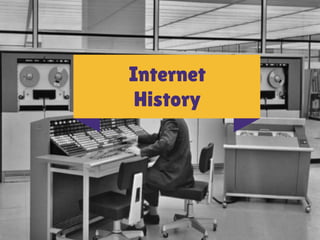
Internet 
History
Background 
1. First mainframe computers did not use CSM. 
2. It only became possible in the late 80's, early 
90's. 
3. This was when applications migrated from 
minicomputers and mainframes with input/output 
terminals to networks of desktop computers.
Multimedia
Multimedia 
1. First Web Browsers only supported single-color 
text, followed by browsers with support for colors 
and font and later pictures. 
2. Support for videos, sound, etc. handled 
differently by various browsers. 
3. Look at the file extension to see what files your 
multimedia elements are stored in. 
.png, .gif, .xml, etc.
Should your 
start-up buy 
a server?
PROS 
1. Computers no longer size of small truck 
2. Centralized location for files helps individual 
computers run faster. 
3. Can access files from any location 
4. server manages common tasks like email and anti-virus 
updates.
CONS 
1. Contrast with peer to peer networks: several 
computers which are connected to each other 
2. P2P's are less expensive for small businesses. 
3. 5. The server is a critical point of failure. If it goes 
down, the entire network comes to a halt. Install 
redundant drives in server or second server.
Test Your 
Knowledge.
Team 4 Presents: The Client Server Model

Team 4 Presents: The Client Server Model

  • 1.
    The Client ServerModel Imran, Ella, Christine and Annie
  • 2.
    Introducing the Team Imran Hafiz, Ella Banka, Christine Delp, and Annie Piotrowski
  • 3.
    We know 1.How to type "google.com" into the address bar. 2. We communicate with Internet users across the world within milliseconds. 3. The Client Server Model makes this possible.
  • 4.
    We'll learn 1.the process behind an everyday experience 2. how CSM revolutionized the transfer of information 3. the pros and cons of CSM 4. CSM and multimedia
  • 5.
    And how thistechnology
  • 6.
  • 7.
    The Client 1.phones, desktops, laptops, the computer in front of you... 2. any device with software installed that access Interne services 3. To access the WWW, the necessary software is a web browser.
  • 8.
    The Server 1.Powerful computer/computer cluster that responds to your URL requests
  • 9.
    The Process: 1 1. Type <sites.duke.edu> 2. Browser divides URL into pieces. 3. Browser uses the DNS system to convert the server’s user-friendly name into a server’s IP address. 4. Browser makes a connection to the server’s IP address. 5. Server accepts the connection.
  • 10.
    The Process: 2 1. Browser sends an HTTP request asking for a copy of the HTML document stored at the URL/IP address. 2. if the server can find the requested page , it returns it in an HTTP response If not, server returns "404 Not Found" 3. Browser interprets and displays the content, and then ends the connection.
  • 11.
    And now fora brief intermission
  • 12.
  • 13.
    Background 1. Firstmainframe computers did not use CSM. 2. It only became possible in the late 80's, early 90's. 3. This was when applications migrated from minicomputers and mainframes with input/output terminals to networks of desktop computers.
  • 14.
  • 15.
    Multimedia 1. FirstWeb Browsers only supported single-color text, followed by browsers with support for colors and font and later pictures. 2. Support for videos, sound, etc. handled differently by various browsers. 3. Look at the file extension to see what files your multimedia elements are stored in. .png, .gif, .xml, etc.
  • 16.
    Should your start-upbuy a server?
  • 17.
    PROS 1. Computersno longer size of small truck 2. Centralized location for files helps individual computers run faster. 3. Can access files from any location 4. server manages common tasks like email and anti-virus updates.
  • 18.
    CONS 1. Contrastwith peer to peer networks: several computers which are connected to each other 2. P2P's are less expensive for small businesses. 3. 5. The server is a critical point of failure. If it goes down, the entire network comes to a halt. Install redundant drives in server or second server.
  • 19.