</Teaching Universal Design
In Computer Science>
Damian Gordon, Ciaran O’Leary
Centre for Excellence
In Universal Design
BSc (Information Systems/Information Technology)
DT255
Conversation
Interaction
Collaboration
Motivation
Mobility
Tracking
Globalisation
Flexibility
Traditional On-Line
Blended Learning
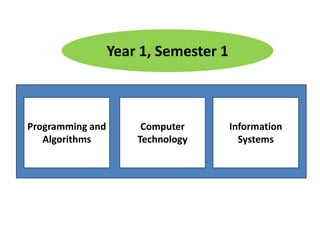
Information
Systems
Computer
Technology
Programming and
Algorithms
Year 1, Semester 1
Information
Systems
Computer
Technology
Programming and
Algorithms
Year 1, Semester 1
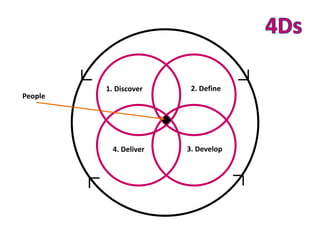
People
1. Discover 2. Define
3. Develop4. Deliver
Low Physical Effort
Size & Space for Approach
and Use
Perceptible Information
Tolerance for Error
Flexibility in Use
Simple and Intuitive
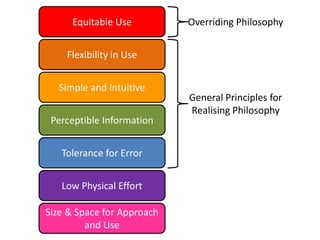
Equitable Use
Low Physical Effort
Size & Space for Approach
and Use
Perceptible Information
Tolerance for Error
Flexibility in Use
Simple and Intuitive
Equitable Use Overriding Philosophy
Low Physical Effort
Size & Space for Approach
and Use
Perceptible Information
Tolerance for Error
Flexibility in Use
Simple and Intuitive
Equitable Use Overriding Philosophy
General Principles for
Realising Philosophy
Low Physical Effort
Size & Space for Approach
and Use
Perceptible Information
Tolerance for Error
Flexibility in Use
Simple and Intuitive
Equitable Use Overriding Philosophy
General Principles for
Realising Philosophy
Principles for Realising
Philosophy within the
Built Environment
Domain
Low Physical Effort
Size & Space for Approach
and Use
Perceptible Information
Tolerance for Error
Flexibility in Use
Simple and Intuitive
Equitable Use Overriding Philosophy
General Principles for
Realising Philosophy
Principles for Realising
Philosophy within the
Built Environment
Domain
Perceptible Information
Tolerance for Error
Flexibility in Use
Simple and Intuitive
Equitable Use Overriding Philosophy
General Principles for
Realising Philosophy
Low Physical Effort
Size & Space for Approach
and Use
Principles for Realising
Philosophy within the
Built Environment
Domain
Perceptible Information
Tolerance for Error
Flexibility in Use
Simple and Intuitive
Equitable Use Overriding Philosophy
General Principles for
Realising Philosophy
Perceptible Information
Tolerance for Error
Flexibility in Use
Simple and Intuitive
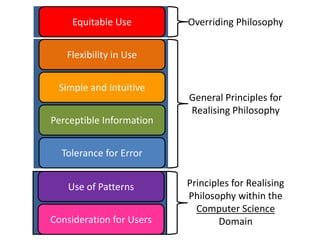
Equitable Use
Use of Patterns
Consideration for Users
Overriding Philosophy
General Principles for
Realising Philosophy
Principles for Realising
Philosophy within the
Computer Science
Domain
Perceptible Information
Tolerance for Error
Flexibility in Use
Simple and Intuitive
Equitable Use
Use of Patterns
Consideration for Users
Repeated themes in terms of
navigation and functionality
Understand the users’ needs,
consider personas, speak their
language
The use of colours, use of clear
language, etc.
Catching, preventing error,
clear error messages.
Configurable interface, adapts to user
needs, variety of ways of achieving the
same thing (e.g. hotkeys)
Navigation pathways,
metaphor, number of clicks,
breadcrumbs, etc.
One product designed well for
everyone.
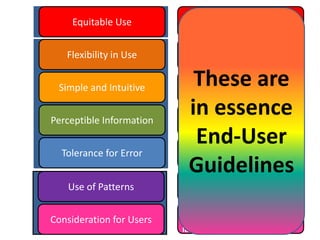
These are
in essence
End-User
Guidelines
…and just
focuses on
the user
interface…
…and just
focuses on
the user
interface…
What
about the
code
itself?
End-User
Guidelines
Developer
Guidelines
End-User Guidelines Developer Guidelines
A. Provide the same means of
use for all users: identical
whenever possible;
equivalent when not.
B. Avoid segregating or
stigmatizing any users.
C. Make provisions for privacy,
security, and safety equally
available to all users.
D. Make the design appealing
to all users.
A. Provide a range of IDEs and
development environments.
B. Ensure that all the necessary
assistive technologies
needed are provided.
C. Provide versioning software,
document backup facilities,
and undelete features.
D. Ensure the software is as
readable and clear as
possible.
Equitable Use
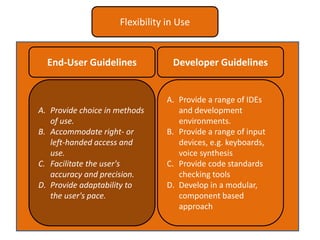
End-User Guidelines Developer Guidelines
A. Provide choice in methods
of use.
B. Accommodate right- or
left-handed access and
use.
C. Facilitate the user's
accuracy and precision.
D. Provide adaptability to
the user's pace.
A. Provide a range of IDEs
and development
environments.
B. Provide a range of input
devices, e.g. keyboards,
voice synthesis
C. Provide code standards
checking tools
D. Develop in a modular,
component based
approach
Flexibility in Use
End-User Guidelines Developer Guidelines
A. Eliminate unnecessary
complexity.
B. Be consistent with user
expectations and intuition
[Navigation pathway,
breadcrumbs]
C. Accommodate a wide range
of literacy and language
skills.
D. Arrange information
consistent with its
importance.[Metaphors]
E. Provide effective prompting
and feedback during and
after task completion.
A. Implement features in
common, expected ways,
don’t obfuscate.
B. Be consistent with developer
expectations.
C. Accommodate a wide range
of literacy and language
skills.
D. Arrange information
consistent with its
importance.
E. Use software libraries when
possible.
Simple and Intuitive
End-User Guidelines Developer Guidelines
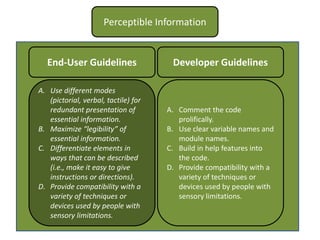
A. Use different modes
(pictorial, verbal, tactile) for
redundant presentation of
essential information.
B. Maximize “legibility” of
essential information.
C. Differentiate elements in
ways that can be described
(i.e., make it easy to give
instructions or directions).
D. Provide compatibility with a
variety of techniques or
devices used by people with
sensory limitations.
A. Comment the code
prolifically.
B. Use clear variable names and
module names.
C. Build in help features into
the code.
D. Provide compatibility with a
variety of techniques or
devices used by people with
sensory limitations.
Perceptible Information
End-User Guidelines Developer Guidelines
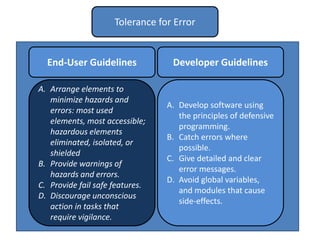
A. Arrange elements to
minimize hazards and
errors: most used
elements, most accessible;
hazardous elements
eliminated, isolated, or
shielded
B. Provide warnings of
hazards and errors.
C. Provide fail safe features.
D. Discourage unconscious
action in tasks that
require vigilance.
A. Develop software using
the principles of defensive
programming.
B. Catch errors where
possible.
C. Give detailed and clear
error messages.
D. Avoid global variables,
and modules that cause
side-effects.
Tolerance for Error
End-User Guidelines Developer Guidelines
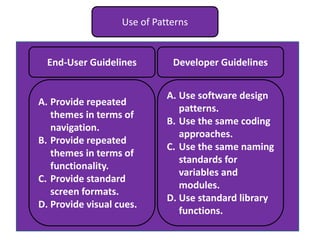
A. Provide repeated
themes in terms of
navigation.
B. Provide repeated
themes in terms of
functionality.
C. Provide standard
screen formats.
D. Provide visual cues.
A. Use software design
patterns.
B. Use the same coding
approaches.
C. Use the same naming
standards for
variables and
modules.
D. Use standard library
functions.
Use of Patterns
End-User Guidelines Developer Guidelines
A. Understand the
users’ needs.
B. Consider the use of
personas.
C. Speak the End-users’
language.
D. Provide help
features.
A. Develop modular
code to help the
developers
B. Develop easily
extensible code.
C. Adhere to coding
standards
D. Comment complex
elements of the
code, and refer to
design documents.
Consideration for Users

Teaching Universal Design in Computer Science

  • 1.
    </Teaching Universal Design InComputer Science> Damian Gordon, Ciaran O’Leary Centre for Excellence In Universal Design
  • 2.
  • 3.
  • 5.
  • 6.
  • 10.
    People 1. Discover 2.Define 3. Develop4. Deliver
  • 11.
    Low Physical Effort Size& Space for Approach and Use Perceptible Information Tolerance for Error Flexibility in Use Simple and Intuitive Equitable Use
  • 12.
    Low Physical Effort Size& Space for Approach and Use Perceptible Information Tolerance for Error Flexibility in Use Simple and Intuitive Equitable Use Overriding Philosophy
  • 13.
    Low Physical Effort Size& Space for Approach and Use Perceptible Information Tolerance for Error Flexibility in Use Simple and Intuitive Equitable Use Overriding Philosophy General Principles for Realising Philosophy
  • 14.
    Low Physical Effort Size& Space for Approach and Use Perceptible Information Tolerance for Error Flexibility in Use Simple and Intuitive Equitable Use Overriding Philosophy General Principles for Realising Philosophy Principles for Realising Philosophy within the Built Environment Domain
  • 15.
    Low Physical Effort Size& Space for Approach and Use Perceptible Information Tolerance for Error Flexibility in Use Simple and Intuitive Equitable Use Overriding Philosophy General Principles for Realising Philosophy Principles for Realising Philosophy within the Built Environment Domain
  • 16.
    Perceptible Information Tolerance forError Flexibility in Use Simple and Intuitive Equitable Use Overriding Philosophy General Principles for Realising Philosophy Low Physical Effort Size & Space for Approach and Use Principles for Realising Philosophy within the Built Environment Domain
  • 17.
    Perceptible Information Tolerance forError Flexibility in Use Simple and Intuitive Equitable Use Overriding Philosophy General Principles for Realising Philosophy
  • 18.
    Perceptible Information Tolerance forError Flexibility in Use Simple and Intuitive Equitable Use Use of Patterns Consideration for Users Overriding Philosophy General Principles for Realising Philosophy Principles for Realising Philosophy within the Computer Science Domain
  • 19.
    Perceptible Information Tolerance forError Flexibility in Use Simple and Intuitive Equitable Use Use of Patterns Consideration for Users Repeated themes in terms of navigation and functionality Understand the users’ needs, consider personas, speak their language The use of colours, use of clear language, etc. Catching, preventing error, clear error messages. Configurable interface, adapts to user needs, variety of ways of achieving the same thing (e.g. hotkeys) Navigation pathways, metaphor, number of clicks, breadcrumbs, etc. One product designed well for everyone. These are in essence End-User Guidelines
  • 20.
    …and just focuses on theuser interface…
  • 21.
    …and just focuses on theuser interface… What about the code itself?
  • 24.
  • 25.
    End-User Guidelines DeveloperGuidelines A. Provide the same means of use for all users: identical whenever possible; equivalent when not. B. Avoid segregating or stigmatizing any users. C. Make provisions for privacy, security, and safety equally available to all users. D. Make the design appealing to all users. A. Provide a range of IDEs and development environments. B. Ensure that all the necessary assistive technologies needed are provided. C. Provide versioning software, document backup facilities, and undelete features. D. Ensure the software is as readable and clear as possible. Equitable Use
  • 26.
    End-User Guidelines DeveloperGuidelines A. Provide choice in methods of use. B. Accommodate right- or left-handed access and use. C. Facilitate the user's accuracy and precision. D. Provide adaptability to the user's pace. A. Provide a range of IDEs and development environments. B. Provide a range of input devices, e.g. keyboards, voice synthesis C. Provide code standards checking tools D. Develop in a modular, component based approach Flexibility in Use
  • 27.
    End-User Guidelines DeveloperGuidelines A. Eliminate unnecessary complexity. B. Be consistent with user expectations and intuition [Navigation pathway, breadcrumbs] C. Accommodate a wide range of literacy and language skills. D. Arrange information consistent with its importance.[Metaphors] E. Provide effective prompting and feedback during and after task completion. A. Implement features in common, expected ways, don’t obfuscate. B. Be consistent with developer expectations. C. Accommodate a wide range of literacy and language skills. D. Arrange information consistent with its importance. E. Use software libraries when possible. Simple and Intuitive
  • 28.
    End-User Guidelines DeveloperGuidelines A. Use different modes (pictorial, verbal, tactile) for redundant presentation of essential information. B. Maximize “legibility” of essential information. C. Differentiate elements in ways that can be described (i.e., make it easy to give instructions or directions). D. Provide compatibility with a variety of techniques or devices used by people with sensory limitations. A. Comment the code prolifically. B. Use clear variable names and module names. C. Build in help features into the code. D. Provide compatibility with a variety of techniques or devices used by people with sensory limitations. Perceptible Information
  • 29.
    End-User Guidelines DeveloperGuidelines A. Arrange elements to minimize hazards and errors: most used elements, most accessible; hazardous elements eliminated, isolated, or shielded B. Provide warnings of hazards and errors. C. Provide fail safe features. D. Discourage unconscious action in tasks that require vigilance. A. Develop software using the principles of defensive programming. B. Catch errors where possible. C. Give detailed and clear error messages. D. Avoid global variables, and modules that cause side-effects. Tolerance for Error
  • 30.
    End-User Guidelines DeveloperGuidelines A. Provide repeated themes in terms of navigation. B. Provide repeated themes in terms of functionality. C. Provide standard screen formats. D. Provide visual cues. A. Use software design patterns. B. Use the same coding approaches. C. Use the same naming standards for variables and modules. D. Use standard library functions. Use of Patterns
  • 31.
    End-User Guidelines DeveloperGuidelines A. Understand the users’ needs. B. Consider the use of personas. C. Speak the End-users’ language. D. Provide help features. A. Develop modular code to help the developers B. Develop easily extensible code. C. Adhere to coding standards D. Comment complex elements of the code, and refer to design documents. Consideration for Users