Calibration
PeriFlux 6000 | tcpO2 made intelligent
Disclaimer
The information contained in this document is intended to provide general
information only. It is not intended to be, nor does it constitute, medical advice.
Under no circumstances is the information contained in this document to be
interpreted as a recommendation for a particular treatment for specific
individuals. In all cases it is recommended that clinicians perform their own
interpretations of data in conjunction with the clinical assessment of their patient.
Due to Perimed’s commitment to continuous improvement of our products, all
specifications are subject to change without notice.
All information and content in this document is protected by copyright. All rights
are reserved. Users are prohibited from modifying, copying, distributing,
transmitting, displaying, publishing, selling, licensing, creating derivative works,
or using any information available in or through the document for commercial or
public purposes. All responsibility for any liability, loss or risk, personal or
otherwise, which is incurred as a consequence, directly or indirectly, of the use
and application of any of the material in this document is specifically disclaimed.
• Calibration
• tcpO2 Site Selection
• Electrode Maintenance
• Interpreting Curves and Results
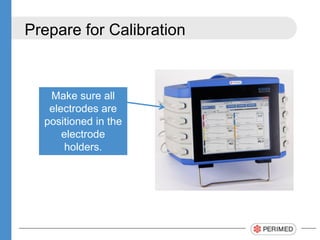
Prepare for Calibration
Make sure all
electrodes are
positioned in the
electrode
holders.
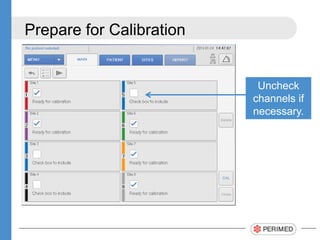
Prepare for Calibration
Uncheck
channels if
necessary.
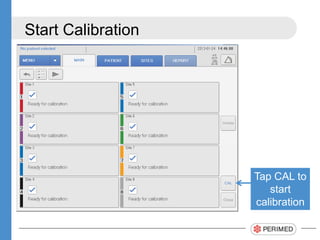
Start Calibration
Tap CAL to
start
calibration
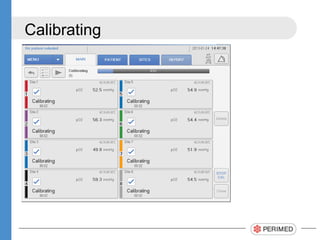
Calibrating
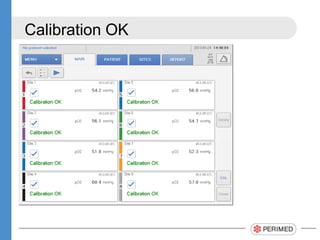
Calibration OK
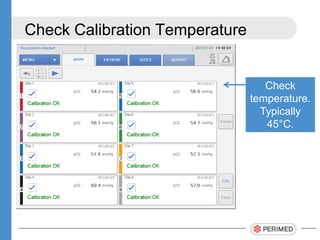
Check Calibration Temperature
Check
temperature.
Typically
45°C.
Comments
Always perform a calibration:
• Before each monitoring period
• When changing patients or changing sites
• Every time an electrode is re-membraned
If the calibration takes more than 5 minutes,
replace the membranes.
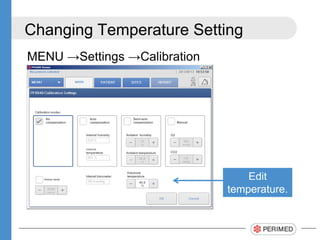
Changing Temperature Setting
MENU →Settings →Calibration
Edit
temperature.
Thank You!
PeriFlux 6000 | tcpO2 made intelligent
www.perimed-instruments.com

Tcpo2 calibration using PeriFlux 6000

  • 1.
    Calibration PeriFlux 6000 |tcpO2 made intelligent
  • 2.
    Disclaimer The information containedin this document is intended to provide general information only. It is not intended to be, nor does it constitute, medical advice. Under no circumstances is the information contained in this document to be interpreted as a recommendation for a particular treatment for specific individuals. In all cases it is recommended that clinicians perform their own interpretations of data in conjunction with the clinical assessment of their patient. Due to Perimed’s commitment to continuous improvement of our products, all specifications are subject to change without notice. All information and content in this document is protected by copyright. All rights are reserved. Users are prohibited from modifying, copying, distributing, transmitting, displaying, publishing, selling, licensing, creating derivative works, or using any information available in or through the document for commercial or public purposes. All responsibility for any liability, loss or risk, personal or otherwise, which is incurred as a consequence, directly or indirectly, of the use and application of any of the material in this document is specifically disclaimed.
  • 3.
    • Calibration • tcpO2Site Selection • Electrode Maintenance • Interpreting Curves and Results
  • 4.
    Prepare for Calibration Makesure all electrodes are positioned in the electrode holders.
  • 5.
  • 6.
    Start Calibration Tap CALto start calibration
  • 7.
  • 8.
  • 9.
  • 10.
    Comments Always perform acalibration: • Before each monitoring period • When changing patients or changing sites • Every time an electrode is re-membraned If the calibration takes more than 5 minutes, replace the membranes.
  • 11.
    Changing Temperature Setting MENU→Settings →Calibration Edit temperature.
  • 12.
    Thank You! PeriFlux 6000| tcpO2 made intelligent www.perimed-instruments.com