Mickaël QUESNOT
1 | P a g e
Activate Account Assignment Objects
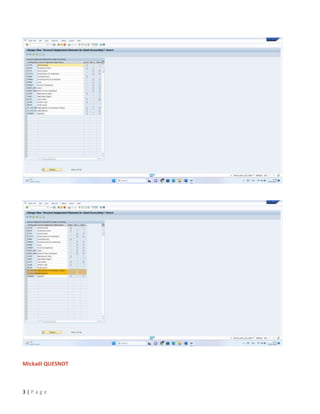
In this step, you make settings for additional account assignment objects (for example, cost center, investment order)
during posting in Asset Accounting.
Requirements
For the posting transactions to the General Ledger, you have to make sure that the account assignment objects you
want to use are available for input, using the field status of posting keys 70 and 75 (debit asset and credit asset). You
make this setting under the step Integration with the General Ledger -> Change the Field Status Variant of the
Asset G/L Accounts.
Activities
1. Activate the account assignment objects you need for Asset Accounting.
2. Specify whether the account assignment object is relevant to the balance sheet. Account assignment
objects that are relevant to the balance sheet can no longer be changed directly in the asset master record
once the asset has been capitalized. Instead, such assets have to be transferred to a new asset master
record to make this change.
3. Specify whether the account assignment object you enter when posting has to agree with the account
assignment object entered in the asset master record. If you set this indicator, you cannot change the
account assignment object when posting.
Example
GEBER (Fund)
Active: YES
Bal.sheet: YES
Agree: NO
Result: The account assignment object Fund
 Is active (available for input) in the asset master record
 Can no longer be changed in the asset master record once the asset is capitalized
 Can be changed during posting, in other words, you do not necessarily have to use the account assignment
object that is entered in the asset master record
Note:
For the cost center account assignment object, it is not possible to deactivate the Agree indicator, since the
cost center always has to agree with the cost center in the asset master record. This prevents you from
entering a different cost center during later account assignment processes.
Mickaël QUESNOT https://www.linkedin.com/in/mickaelquesnot/
Twitter @mistersharesap
2 | P a g e
Further notes
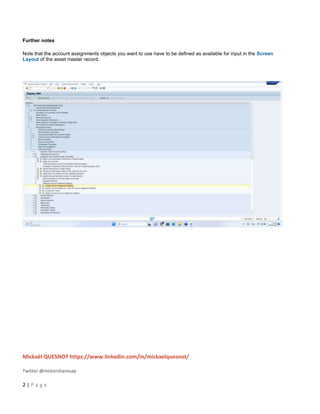
Note that the account assignments objects you want to use have to be defined as available for input in the Screen
Layout of the asset master record.
Mickaël QUESNOT
3 | P a g e

GU_SAP S4 HANA_Activate Account Assignment Objects.docx

  • 1.
    Mickaël QUESNOT 1 |P a g e Activate Account Assignment Objects In this step, you make settings for additional account assignment objects (for example, cost center, investment order) during posting in Asset Accounting. Requirements For the posting transactions to the General Ledger, you have to make sure that the account assignment objects you want to use are available for input, using the field status of posting keys 70 and 75 (debit asset and credit asset). You make this setting under the step Integration with the General Ledger -> Change the Field Status Variant of the Asset G/L Accounts. Activities 1. Activate the account assignment objects you need for Asset Accounting. 2. Specify whether the account assignment object is relevant to the balance sheet. Account assignment objects that are relevant to the balance sheet can no longer be changed directly in the asset master record once the asset has been capitalized. Instead, such assets have to be transferred to a new asset master record to make this change. 3. Specify whether the account assignment object you enter when posting has to agree with the account assignment object entered in the asset master record. If you set this indicator, you cannot change the account assignment object when posting. Example GEBER (Fund) Active: YES Bal.sheet: YES Agree: NO Result: The account assignment object Fund  Is active (available for input) in the asset master record  Can no longer be changed in the asset master record once the asset is capitalized  Can be changed during posting, in other words, you do not necessarily have to use the account assignment object that is entered in the asset master record Note: For the cost center account assignment object, it is not possible to deactivate the Agree indicator, since the cost center always has to agree with the cost center in the asset master record. This prevents you from entering a different cost center during later account assignment processes.
  • 2.
    Mickaël QUESNOT https://www.linkedin.com/in/mickaelquesnot/ Twitter@mistersharesap 2 | P a g e Further notes Note that the account assignments objects you want to use have to be defined as available for input in the Screen Layout of the asset master record.
  • 3.