TagFS — Tag Semantics for Hierarchical File Systems Bonus Track: Introducing SemFS 2006 2006 Web3.0 2006 Stephan Bloehdorn  Institute AIFB, University of Karlsruhe, Germany Olaf Görlitz     ISWeb, University of Koblenz-Landau, Germany Simon Schenk     ISWeb, University of Koblenz-Landau, Germany Max Völkel  Forschungszentrum Informatik, Karlsruhe, Germany talk Max Völkel  Forschungszentrum Informatik, Karlsruhe, Germany
Motivation „ Every user [...] indicated that their attempts to establish elaborate filing schemas for archived information failed because they proved to require more time and effort than the information was worth.“   Barreau and Nardi, 1995 Contributions Mapping file system semantics to tagging semantics Architecture for a semantic file system
Hierarchical file systems have some problems Single locaction property E.g. where to put a song produced by  two  artists? Each file may be only in one folder There are links/shortcuts, but where to put the „primary“ file? Browsing to maximum specifity E.g. 5 clicks for  /My Music/Fatboy Slim/2006/danceable/favourite  even if there are only 5 Fatboy Slim songs altogether  The more you organise, the more you have to browse Missing orthogonality E.g.  /2003/Fatboy Slim/favourite  or  /favourite/Fatboy Slim/2003 ? Many dimensions, only one access path No query refinement FS lists only directories explicitly placed there, no help
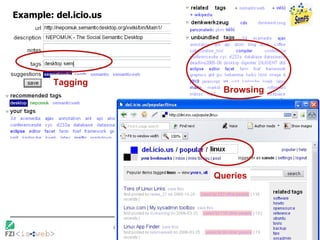
Tagging Simple idea: Instead of putting resources in folders (nested containers), put tags (labels) on resources Tagging user interfaces User sees a resource, can  type in  tags (simple, single keywords, separated by space or comma) User can click on a tag, UI lists all resources with that tag assigned Conjunctive queries: e.g.  fatboyslim+favourite   Examples: del.icou.us, flickr, 100 more Who has used a tagging system? new Web2.0
Example: del.icio.us Tagging Browsing Queries
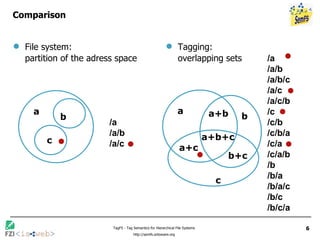
Comparison File system:  partition of the adress space Tagging:  overlapping sets a b a+b+c a+c b+c a+b c a b c /a /a/b /a/c /a /a/b /a/b/c /a/c /a/c/b /c /c/b /c/b/a /c/a /c/a/b /b /b/a /b/a/c /b/c /b/c/a
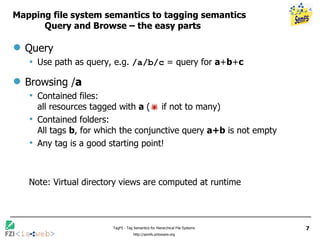
Mapping file system semantics to tagging semantics Query and Browse – the easy parts Query Use path as query, e.g.  /a/b/c  = query for  a + b + c Browsing / a Contained files:  all resources tagged with  a  (   if not to many) Contained folders:  All tags  b , for which the conjunctive query  a+b  is not empty Any tag is a good starting point! Note: Virtual directory views are computed at runtime
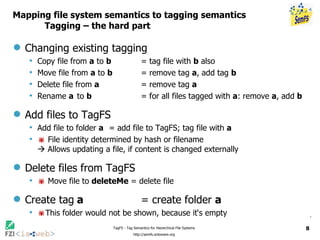
Mapping file system semantics to tagging semantics Tagging – the hard part Changing existing tagging Copy file from  a  to  b   = tag file with  b  also Move file from  a  to  b   = remove tag  a , add tag  b Delete file from  a   = remove tag  a Rename  a to  b = for all files tagged with  a : remove  a , add  b  Add files to TagFS Add file to folder  a   = add file to TagFS; tag file with  a    File identity determined by hash or filename   Allows updating a file, if content is changed externally Delete files from TagFS    Move file to  deleteMe  = delete file Create tag a = create folder  a  This folder would not be shown, because it‘s empty
Tagging in the file system Many locaction property Each file may carry as many tags as desired Browsing until result is small enough Each folder contains all files tagged with the folder name Orthogonality of information dimensions Path interpreted as a conjunctive query, e.g.  Lisa Ekdahl/2006  is the same as  2006/Lisa Ekdahl Not all reviewers agreed on this   Query refinement Each folder lists useful query refinements as sub-folers Providing all standard filesystem operations    compatibility with existing applications
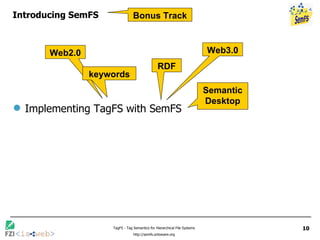
Introducing SemFS Implementing TagFS with SemFS Web2.0 Web3.0 Semantic Desktop RDF keywords Bonus Track
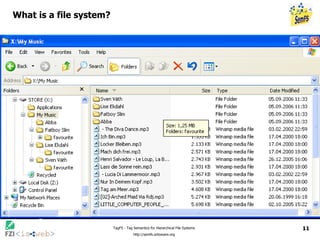
What is a file system?
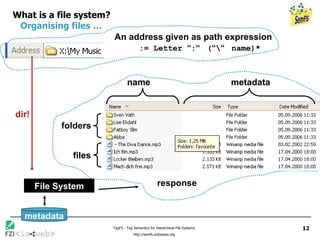
What is a file system?   Organising files …   An address given as path expression    := Letter  “ : “   ( “ \ “   name)* File System dir! response files folders name metadata metadata
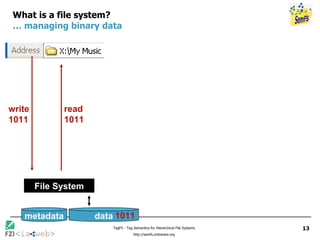
What is a file system? … managing binary data File System metadata data 1011 write 1011 read 1011
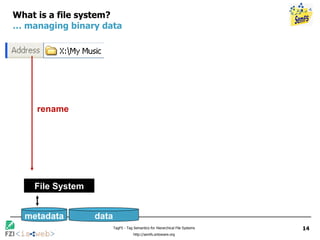
What is a file system? … managing binary data File System rename metadata data
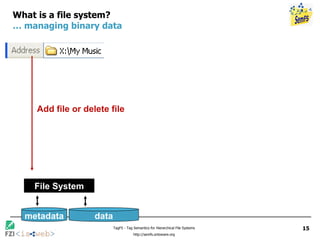
What is a file system? … managing binary data File System Add file or delete file metadata data
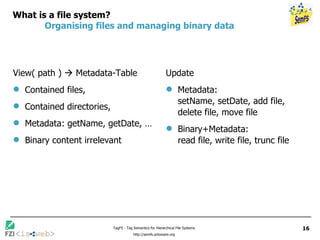
What is a file system?  Organising files and managing binary data View( path )    Metadata-Table Contained files,  Contained directories, Metadata: getName, getDate, … Binary content irrelevant Update Metadata:  setName, setDate, add file, delete file, move file Binary+Metadata:  read file, write file, trunc file
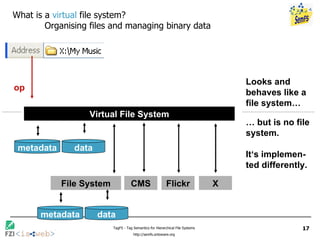
What is a  virtual  file system? Organising files and managing binary data op Virtual File System Looks and behaves like a file system… …  but is no file system.  It‘s implemen-ted differently. metadata data X Flickr CMS File System metadata data
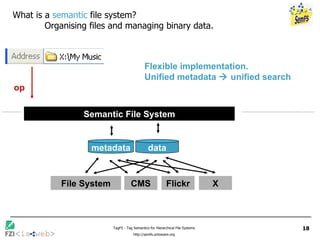
What is a  semantic  file system? Organising files and managing binary data. op Semantic File System Flexible implementation.  Unified metadata    unified search metadata data X Flickr CMS File System
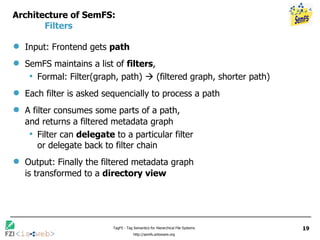
Architecture of SemFS: Filters Input: Frontend gets  path SemFS maintains a list of  filters , Formal: Filter(graph, path)    (filtered graph, shorter path) Each filter is asked sequencially to process a path A filter consumes some parts of a path, and returns a filtered metadata graph Filter can  delegate  to a particular filter  or delegate back to filter chain Output: Finally the filtered metadata graph  is transformed to a  directory view
Architecture of SemFS: Example for Filters Filter-List: [Favourite, Artist , Main] Main-Filter processes  “\My Music“  and returns filtered graph, containing all music-resources.  Delegates to Artist-Filter. Artist-Filter processes  “\Fatboy Slim“  and returns all resource, that have e.g. the dc:creator „Fatboy Slim“.  Delegates to filter chain. Favourites-Filter processes  “\favourite“  and returns all resources accesses more than n times in the last x days Main Artist Favourite \My Music\Fatboy Slim\favourite \Fatboy Slim\favourite \favourite
Architecture of SemFS: Example for Filters Filter-List:  [Favourite, Artist , Main] Main-Filter processes  “\My Music“  and returns filtered graph, containing all music-resources. Delegates to Artist-Filter. Artist-Filter processes  “\Fatboy Slim“  and returns all resource, that have the rdfs:label „Fatboy Slim“. Delegates to filter chain. Favourites-Filter processes  “\favourite“  and returns all resources accesses more than n times in the last x days Main Artist Favourite \My Music\Fatboy Slim\favourite \Fatboy Slim\favourite \favourite View( path )    Metadata-Table Contained files,  Contained directories, Metadata: getName, getDate, …
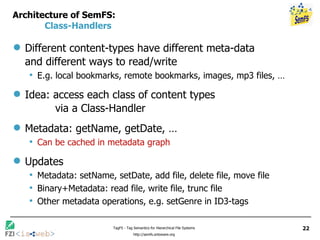
Architecture of SemFS: Class-Handlers Different content-types have different meta-data and different ways to read/write E.g. local bookmarks, remote bookmarks, images, mp3 files, …  Idea: access each class of content types    via a Class-Handler Metadata: getName, getDate, … Can be cached in metadata graph Updates Metadata: setName, setDate, add file, delete file, move file Binary+Metadata: read file, write file, trunc file Other metadata operations, e.g. setGenre in ID3-tags
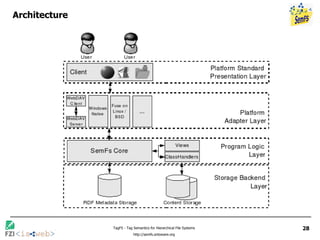
Architecture of SemFS:   Summary: Metadata Graph, Filters, Class-Handlers Metadata graph (RDF)  Holds all metadata acts as a unifying cache, when content has ist own metadata Filters Create the view, organise resources (not limited to files) Class Handlers Handle different content types and manages binary data
Using SemFS: A tagging file system (TagFS) One Filter: Tag-Filter Consumes a single path segment  a Contained files:  Returns all resources tagged with  a Contained folders: All tags  b , for which the conjunctive query  a+b  is not empty One Class Handler Delegates classic metadata queries to underlying file store Binary content resides in a folder of a classic file system Tag-queries handled by metadata graph New problems    No two files may have the same name (when rendered) Rename at insertion or display time
Conclusions TagFS Many locaction property Browsing only until result is small enough, no further Orthogonality of information dimensions Query refinement Compatible with existing applications SemFS An efficient way to implement virtual file systems with pluggable semantics Allows rapid and solid prototype creation Interoperability with Semantic Desktop applications Download Prototype at  http://isweb.uni-koblenz.de/Research (Linux only, WebDAV/Windows in progress) Thank you. Questions?
BACKUP
Contact Information Max Völkel (author, presenter) Forschungszentrum Informatik, Karlsruhe, Germany http://www.fzi.de Stephan Bloehdorn (author) Institute AIFB, University of Karlsruhe, Germany http://aifb.uni-karlsruhe.de / Olaf Görlitz (author) and Simon Schenk (author) ISWeb, University of Koblenz-Landau, Germany http://isweb.uni-koblenz.de /
Architecture
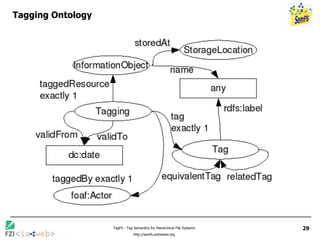
Tagging Ontology

TagFS — Tag Semantics for Hierarchical File Systems

  • 1.
    TagFS — TagSemantics for Hierarchical File Systems Bonus Track: Introducing SemFS 2006 2006 Web3.0 2006 Stephan Bloehdorn Institute AIFB, University of Karlsruhe, Germany Olaf Görlitz ISWeb, University of Koblenz-Landau, Germany Simon Schenk ISWeb, University of Koblenz-Landau, Germany Max Völkel Forschungszentrum Informatik, Karlsruhe, Germany talk Max Völkel Forschungszentrum Informatik, Karlsruhe, Germany
  • 2.
    Motivation „ Everyuser [...] indicated that their attempts to establish elaborate filing schemas for archived information failed because they proved to require more time and effort than the information was worth.“ Barreau and Nardi, 1995 Contributions Mapping file system semantics to tagging semantics Architecture for a semantic file system
  • 3.
    Hierarchical file systemshave some problems Single locaction property E.g. where to put a song produced by two artists? Each file may be only in one folder There are links/shortcuts, but where to put the „primary“ file? Browsing to maximum specifity E.g. 5 clicks for /My Music/Fatboy Slim/2006/danceable/favourite even if there are only 5 Fatboy Slim songs altogether The more you organise, the more you have to browse Missing orthogonality E.g. /2003/Fatboy Slim/favourite or /favourite/Fatboy Slim/2003 ? Many dimensions, only one access path No query refinement FS lists only directories explicitly placed there, no help
  • 4.
    Tagging Simple idea:Instead of putting resources in folders (nested containers), put tags (labels) on resources Tagging user interfaces User sees a resource, can type in tags (simple, single keywords, separated by space or comma) User can click on a tag, UI lists all resources with that tag assigned Conjunctive queries: e.g. fatboyslim+favourite Examples: del.icou.us, flickr, 100 more Who has used a tagging system? new Web2.0
  • 5.
  • 6.
    Comparison File system: partition of the adress space Tagging: overlapping sets a b a+b+c a+c b+c a+b c a b c /a /a/b /a/c /a /a/b /a/b/c /a/c /a/c/b /c /c/b /c/b/a /c/a /c/a/b /b /b/a /b/a/c /b/c /b/c/a
  • 7.
    Mapping file systemsemantics to tagging semantics Query and Browse – the easy parts Query Use path as query, e.g. /a/b/c = query for a + b + c Browsing / a Contained files: all resources tagged with a (  if not to many) Contained folders: All tags b , for which the conjunctive query a+b is not empty Any tag is a good starting point! Note: Virtual directory views are computed at runtime
  • 8.
    Mapping file systemsemantics to tagging semantics Tagging – the hard part Changing existing tagging Copy file from a to b = tag file with b also Move file from a to b = remove tag a , add tag b Delete file from a = remove tag a Rename a to b = for all files tagged with a : remove a , add b Add files to TagFS Add file to folder a = add file to TagFS; tag file with a  File identity determined by hash or filename  Allows updating a file, if content is changed externally Delete files from TagFS  Move file to deleteMe = delete file Create tag a = create folder a  This folder would not be shown, because it‘s empty
  • 9.
    Tagging in thefile system Many locaction property Each file may carry as many tags as desired Browsing until result is small enough Each folder contains all files tagged with the folder name Orthogonality of information dimensions Path interpreted as a conjunctive query, e.g. Lisa Ekdahl/2006 is the same as 2006/Lisa Ekdahl Not all reviewers agreed on this  Query refinement Each folder lists useful query refinements as sub-folers Providing all standard filesystem operations  compatibility with existing applications
  • 10.
    Introducing SemFS ImplementingTagFS with SemFS Web2.0 Web3.0 Semantic Desktop RDF keywords Bonus Track
  • 11.
    What is afile system?
  • 12.
    What is afile system? Organising files … An address given as path expression := Letter “ : “ ( “ \ “ name)* File System dir! response files folders name metadata metadata
  • 13.
    What is afile system? … managing binary data File System metadata data 1011 write 1011 read 1011
  • 14.
    What is afile system? … managing binary data File System rename metadata data
  • 15.
    What is afile system? … managing binary data File System Add file or delete file metadata data
  • 16.
    What is afile system? Organising files and managing binary data View( path )  Metadata-Table Contained files, Contained directories, Metadata: getName, getDate, … Binary content irrelevant Update Metadata: setName, setDate, add file, delete file, move file Binary+Metadata: read file, write file, trunc file
  • 17.
    What is a virtual file system? Organising files and managing binary data op Virtual File System Looks and behaves like a file system… … but is no file system. It‘s implemen-ted differently. metadata data X Flickr CMS File System metadata data
  • 18.
    What is a semantic file system? Organising files and managing binary data. op Semantic File System Flexible implementation. Unified metadata  unified search metadata data X Flickr CMS File System
  • 19.
    Architecture of SemFS:Filters Input: Frontend gets path SemFS maintains a list of filters , Formal: Filter(graph, path)  (filtered graph, shorter path) Each filter is asked sequencially to process a path A filter consumes some parts of a path, and returns a filtered metadata graph Filter can delegate to a particular filter or delegate back to filter chain Output: Finally the filtered metadata graph is transformed to a directory view
  • 20.
    Architecture of SemFS:Example for Filters Filter-List: [Favourite, Artist , Main] Main-Filter processes “\My Music“ and returns filtered graph, containing all music-resources. Delegates to Artist-Filter. Artist-Filter processes “\Fatboy Slim“ and returns all resource, that have e.g. the dc:creator „Fatboy Slim“. Delegates to filter chain. Favourites-Filter processes “\favourite“ and returns all resources accesses more than n times in the last x days Main Artist Favourite \My Music\Fatboy Slim\favourite \Fatboy Slim\favourite \favourite
  • 21.
    Architecture of SemFS:Example for Filters Filter-List: [Favourite, Artist , Main] Main-Filter processes “\My Music“ and returns filtered graph, containing all music-resources. Delegates to Artist-Filter. Artist-Filter processes “\Fatboy Slim“ and returns all resource, that have the rdfs:label „Fatboy Slim“. Delegates to filter chain. Favourites-Filter processes “\favourite“ and returns all resources accesses more than n times in the last x days Main Artist Favourite \My Music\Fatboy Slim\favourite \Fatboy Slim\favourite \favourite View( path )  Metadata-Table Contained files, Contained directories, Metadata: getName, getDate, …
  • 22.
    Architecture of SemFS:Class-Handlers Different content-types have different meta-data and different ways to read/write E.g. local bookmarks, remote bookmarks, images, mp3 files, … Idea: access each class of content types via a Class-Handler Metadata: getName, getDate, … Can be cached in metadata graph Updates Metadata: setName, setDate, add file, delete file, move file Binary+Metadata: read file, write file, trunc file Other metadata operations, e.g. setGenre in ID3-tags
  • 23.
    Architecture of SemFS: Summary: Metadata Graph, Filters, Class-Handlers Metadata graph (RDF) Holds all metadata acts as a unifying cache, when content has ist own metadata Filters Create the view, organise resources (not limited to files) Class Handlers Handle different content types and manages binary data
  • 24.
    Using SemFS: Atagging file system (TagFS) One Filter: Tag-Filter Consumes a single path segment a Contained files: Returns all resources tagged with a Contained folders: All tags b , for which the conjunctive query a+b is not empty One Class Handler Delegates classic metadata queries to underlying file store Binary content resides in a folder of a classic file system Tag-queries handled by metadata graph New problems  No two files may have the same name (when rendered) Rename at insertion or display time
  • 25.
    Conclusions TagFS Manylocaction property Browsing only until result is small enough, no further Orthogonality of information dimensions Query refinement Compatible with existing applications SemFS An efficient way to implement virtual file systems with pluggable semantics Allows rapid and solid prototype creation Interoperability with Semantic Desktop applications Download Prototype at http://isweb.uni-koblenz.de/Research (Linux only, WebDAV/Windows in progress) Thank you. Questions?
  • 26.
  • 27.
    Contact Information MaxVölkel (author, presenter) Forschungszentrum Informatik, Karlsruhe, Germany http://www.fzi.de Stephan Bloehdorn (author) Institute AIFB, University of Karlsruhe, Germany http://aifb.uni-karlsruhe.de / Olaf Görlitz (author) and Simon Schenk (author) ISWeb, University of Koblenz-Landau, Germany http://isweb.uni-koblenz.de /
  • 28.
  • 29.