Introduction to  Podcasting & audio editing Emily Renoe Course Technologies Training & Support Liaison Office of Learning Technology [email_address] Duncan McHugh Multimedia Developer Faculty of Land & Food Systems [email_address] TAG Learning Technology Institute September 17th, 2009
Agenda I) Podcasting basics II) Podcasting options on campus III) Audio editing & Audacity Learning objectives for the session: To gain awareness and insight into educational podcasting     To acquire knowledge and understanding about how to create, edit and upload podcasts using Audacity To explore ways of using podcasts as a curriculum resource learning
I) Podcasting basics http://PodcastSeminar.notlong.com
II) Podcasting on campus ・  Wimba ・  iTunesU
III) Audio editing & Audacity ・  Know your recording devices ・  Tips on getting a good recording ・  Extremely basic audio editing ・  Somewhat complex audio editing
What do you use  for recording sound?
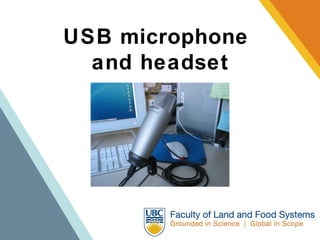
USB microphone  and headset
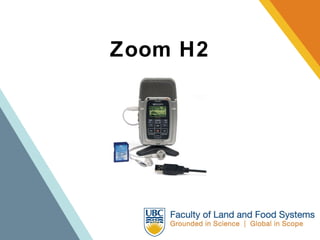
Zoom H2
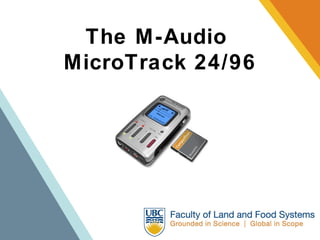
The M-Audio  MicroTrack 24/96
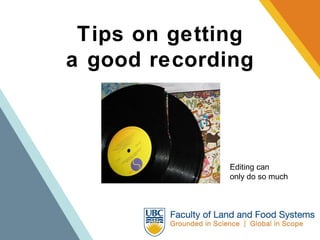
Tips on getting a good recording Editing can  only do so much
Tips on getting a good recording ・  Know the space ・  Consider the room size, number  of participants and ambient noise ・  Use the appropriate equipment ・  Check equipment beforehand ・  Check your levels ・  Bring headphones & keep them on
Audio editing applications Windows: Sound Recorder Mac: Garage Band Open Source: Audacity
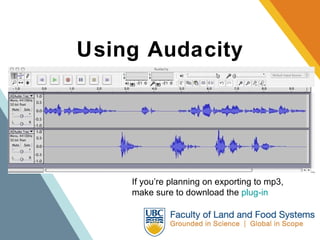
Using Audacity If you’re planning on exporting to mp3, make sure to download the  plug-in
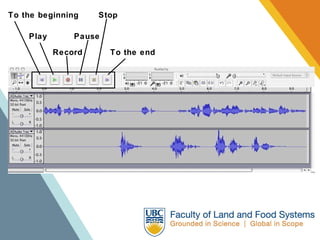
To the beginning Play Record Pause Stop To the end
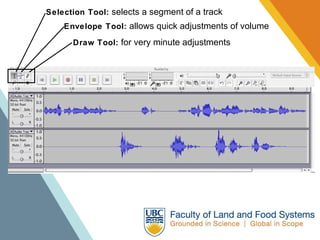
Selection Tool:  selects a segment of a track Envelope Tool:  allows quick adjustments of volume Draw Tool:  for very minute adjustments
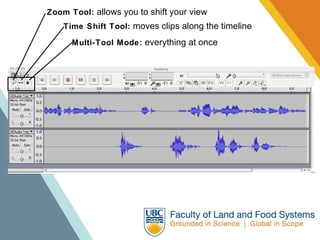
Zoom Tool:  allows you to shift your view Time Shift Tool:  moves clips along the timeline Multi-Tool Mode:  everything at once
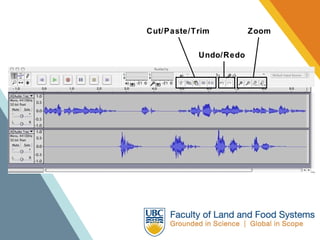
Cut/Paste/Trim Undo/Redo Zoom
Exercise I:   Basic audio editing Step 1 ・  Record 30 seconds of you speaking  ・  Record only one track ・  Make sure to include a bunch of ohhs and  ummms, and other things you won’t want  to keep in your recording
Exercise I:   Basic audio editing Step 2 ・  Use the Selection Tool to edit unwanted sounds  ・  Use the Envelope Tool to adjust the volume of the  recording  ・  Play it back and bask in auditory joy
Beyond basic ・  Multiple tracks ・  Additional tools ・  Effects; some useful, some crazy
Post-production ・  Handling & archiving files ・  Adding metadata ・  Photos & slideshows
Online Audacity tutorials  The Official Audacity tutorial: http://www.lifelonglearner.us/other/audacity/ Educause’s screencast tutorial: http://www.educause.edu/Screencasts/Audacity/Untitled.html Daniel James’s tutorial:   http://quicktoots.linuxaudio.org/toots/audacity/
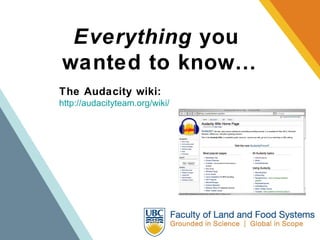
Everything  you  wanted to know… The Audacity wiki: http://audacityteam.org/wiki/
“ Podsafe”:   Sounds that are safe to use ・  Wikipedia:  Podsafe   ・  http://www.freemusicarchive.org/ ・  www.podsafeaudio.com/ ・  http://www.quietamerican.org/ ・  Creative Commons Canada:  www.creativecommons.ca ・  http://www.creativecommons.ca/blog/wp-content/ uploads/2007/06/podcastinglegalguideforcanada.html   ・  http://cchits.ning.com/hits/    ・  http://www.ccmixter.org/
Exercise II:   Audio storytelling ・  Download clips from  http://www.landfood.ubc.ca/learningcentre/duncan/sound_effects/   ・  Create a multi-track recording  ・  Integrate vocals, music and sound effects  ・  Work on the volume and transitions between tracks  ・  Try out a few effects and see what affect they have ・  Please consider:   ・  Your audience: who’s listening?   ・  How long does this take?(!?)
Thanks! Emily Renoe [email_address] Duncan McHugh [email_address] http://blogs.landfood.ubc.ca/duncan/

TAG LTI Podcasting seminar

  • 1.
    Introduction to Podcasting & audio editing Emily Renoe Course Technologies Training & Support Liaison Office of Learning Technology [email_address] Duncan McHugh Multimedia Developer Faculty of Land & Food Systems [email_address] TAG Learning Technology Institute September 17th, 2009
  • 2.
    Agenda I) Podcastingbasics II) Podcasting options on campus III) Audio editing & Audacity Learning objectives for the session: To gain awareness and insight into educational podcasting     To acquire knowledge and understanding about how to create, edit and upload podcasts using Audacity To explore ways of using podcasts as a curriculum resource learning
  • 3.
    I) Podcasting basicshttp://PodcastSeminar.notlong.com
  • 4.
    II) Podcasting oncampus ・ Wimba ・ iTunesU
  • 5.
    III) Audio editing& Audacity ・ Know your recording devices ・ Tips on getting a good recording ・ Extremely basic audio editing ・ Somewhat complex audio editing
  • 6.
    What do youuse for recording sound?
  • 7.
    USB microphone and headset
  • 8.
  • 9.
    The M-Audio MicroTrack 24/96
  • 10.
    Tips on gettinga good recording Editing can only do so much
  • 11.
    Tips on gettinga good recording ・ Know the space ・ Consider the room size, number of participants and ambient noise ・ Use the appropriate equipment ・ Check equipment beforehand ・ Check your levels ・ Bring headphones & keep them on
  • 12.
    Audio editing applicationsWindows: Sound Recorder Mac: Garage Band Open Source: Audacity
  • 13.
    Using Audacity Ifyou’re planning on exporting to mp3, make sure to download the plug-in
  • 14.
    To the beginningPlay Record Pause Stop To the end
  • 15.
    Selection Tool: selects a segment of a track Envelope Tool: allows quick adjustments of volume Draw Tool: for very minute adjustments
  • 16.
    Zoom Tool: allows you to shift your view Time Shift Tool: moves clips along the timeline Multi-Tool Mode: everything at once
  • 17.
  • 18.
    Exercise I: Basic audio editing Step 1 ・ Record 30 seconds of you speaking ・ Record only one track ・ Make sure to include a bunch of ohhs and ummms, and other things you won’t want to keep in your recording
  • 19.
    Exercise I: Basic audio editing Step 2 ・ Use the Selection Tool to edit unwanted sounds ・ Use the Envelope Tool to adjust the volume of the recording ・ Play it back and bask in auditory joy
  • 20.
    Beyond basic ・ Multiple tracks ・ Additional tools ・ Effects; some useful, some crazy
  • 21.
    Post-production ・ Handling & archiving files ・ Adding metadata ・ Photos & slideshows
  • 22.
    Online Audacity tutorials The Official Audacity tutorial: http://www.lifelonglearner.us/other/audacity/ Educause’s screencast tutorial: http://www.educause.edu/Screencasts/Audacity/Untitled.html Daniel James’s tutorial: http://quicktoots.linuxaudio.org/toots/audacity/
  • 23.
    Everything you wanted to know… The Audacity wiki: http://audacityteam.org/wiki/
  • 24.
    “ Podsafe”: Sounds that are safe to use ・ Wikipedia: Podsafe ・ http://www.freemusicarchive.org/ ・ www.podsafeaudio.com/ ・ http://www.quietamerican.org/ ・ Creative Commons Canada: www.creativecommons.ca ・ http://www.creativecommons.ca/blog/wp-content/ uploads/2007/06/podcastinglegalguideforcanada.html ・ http://cchits.ning.com/hits/ ・ http://www.ccmixter.org/
  • 25.
    Exercise II: Audio storytelling ・ Download clips from http://www.landfood.ubc.ca/learningcentre/duncan/sound_effects/ ・ Create a multi-track recording ・ Integrate vocals, music and sound effects ・ Work on the volume and transitions between tracks ・ Try out a few effects and see what affect they have ・ Please consider: ・ Your audience: who’s listening? ・ How long does this take?(!?)
  • 26.
    Thanks! Emily Renoe[email_address] Duncan McHugh [email_address] http://blogs.landfood.ubc.ca/duncan/