Tablet PC

Presented By
    Dadhichi Kumar
     J.Govinda
    Bhuwan Bisht
    Javed Mohd.
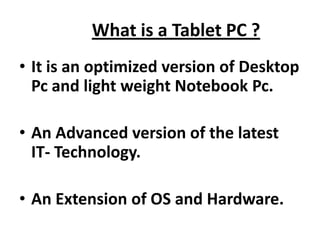
What is a Tablet PC ?
• It is an optimized version of Desktop
  Pc and light weight Notebook Pc.

• An Advanced version of the latest
  IT- Technology.

• An Extension of OS and Hardware.
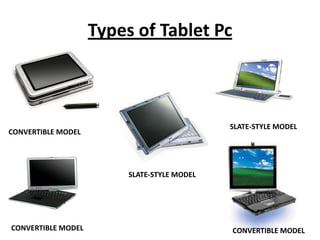
Types of Tablet Pc


                                             SLATE-STYLE MODEL
CONVERTIBLE MODEL


                         SLATE-STYLE MODEL


CONVERTIBLE MODEL                            CONVERTIBLE MODEL
Convertible Model
• Convertible Model
• Like conventional notebook computers
• With attached keyboards and screens that
  turn and flip
• to cover the keyboards and have the touch-
  sensitive
• screens face up for pen user interface
Slate-Style Model
• More lightweight units

• Without integrated keyboards (use optional
  detachable

• USB-connected or wireless keyboards

• Other external peripherals typically required
Technical Feasibility
•   10” to 14” screen, mostly 1024x768 Resolution.
•   Mostly 1.0-1.6 GHz Pentium M Processor.
•   $300+ more than non-tablet notebook.
•   Detachable keyboard.
•   512 MB RAM.
•   DVD.
•   SXGA.
•   60 - 64Gb Flash Drive
Uses Of Tablet Pc
Supports real-time writing; everything does not need to be
  done in advance, as in PowerPoint:
   • Some material difficult to do in PowerPoint (e.g.
     equations, Chinese)
   • Material can still be prepared in advance

Can archive lecture content, don’t need tablet PC to view
Face toward class instead of toward the board.

No messy chalk, markers, or erasers needed
   • Can return to material that would be erased on a board
   • But do need a projector
Uses Of Tablet Pc (Cont.)
• Reading digital content: Web pages, Acrobat
   and Word documents, eBooks, etc.
• Taking notes at meetings, classrooms, hallways,
  anywhere-anytime ,working notes in searchable
  format.
• Comfortable computing: walk-around , standing,
  reclining position, laying down, resting on lap,
  held with one hand.
• Collaborative capabilities via integrated wireless
  networking and collaborative apps like Groove.
Tablet Pc In Higher Education
• Both, students and teachers are mobile users.
• Revolutionary digital note-taking in the classroom:
  take, keep, organize, search and manipulate digital
  notes in one’s own handwriting, inc. diagrams and
  doodles .
• Windows Journal provides unlimited anytime-editable
  sheets of paper to capture what is on the blackboard .
• Students expected to be attracted by sleek designs,
  portable form factors and better ergonomics .
• You cannot hold a laptop with one hand, while talking
  to a professor, in the hallway, and jotting down a note
  Teachers might be lured to mark-up live presentations.
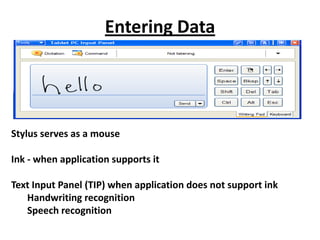
Entering Data


Stylus serves as a mouse

Ink - when application supports it

Text Input Panel (TIP) when application does not support ink
   Handwriting recognition
   Speech recognition
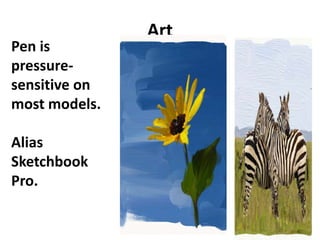
Art
Pen is
pressure-
sensitive on
most models.

Alias
Sketchbook
Pro.
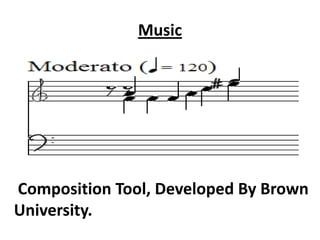
Music


Composition Tool, Developed By Brown
University.
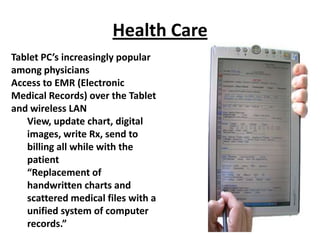
Health Care
Tablet PC’s increasingly popular
among physicians
Access to EMR (Electronic
Medical Records) over the Tablet
and wireless LAN
   View, update chart, digital
   images, write Rx, send to
   billing all while with the
   patient
   “Replacement of
   handwritten charts and
   scattered medical files with a
   unified system of computer
   records.”
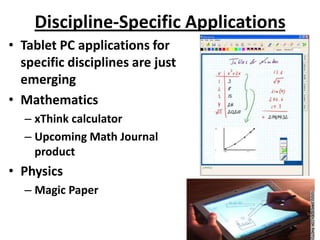
Discipline-Specific Applications
• Tablet PC applications for
  specific disciplines are just
  emerging
• Mathematics
  – xThink calculator
  – Upcoming Math Journal
    product
• Physics
  – Magic Paper
General Applications
Planning, Contacts, Calendaring

   •Franklin Covey Tablet Planner
   • organize handwritten or electronic
   notes, tasks, calendar, contacts,
   Word, PowerPoint, etc.
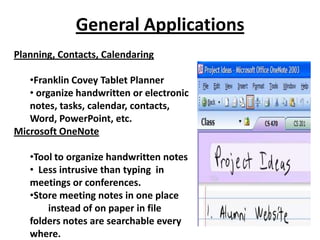
Microsoft OneNote

   •Tool to organize handwritten notes
   • Less intrusive than typing in
   meetings or conferences.
   •Store meeting notes in one place
       instead of on paper in file
   folders notes are searchable every
   where.
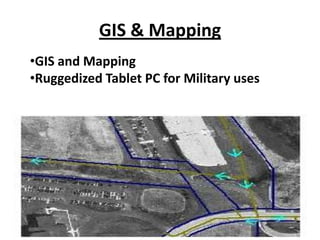
GIS & Mapping
•GIS and Mapping
•Ruggedized Tablet PC for Military uses
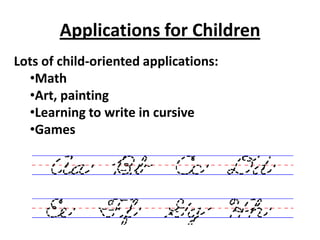
Applications for Children
Lots of child-oriented applications:
  •Math
  •Art, painting
  •Learning to write in cursive
  •Games
Summary of Benefits
• Many benefits of Tablet PC technology for
  educators and administrators
  – Digital Ink more powerful than a blackboard
     • Don’t need erasers, pens, or chalk
  – Collaboration possible
  – Some content more easily created
  – Content can be archived and broadcast
  – Discipline-specific tools emerging (e.g. Math Journal)
  – General tools already available (e.g. Outlook)
  – Tablet PC just as capable as any notebook, plus more
Issues With Tablet Pc..
• Some disadvantages of Tablet Technology
  – Keyboards mostly small
  – Screen resolution limited on most models to 1024x768
  – Software applications limited, but growing
  – Handwriting recognition average
  – Clicking a little tricky
  – More expensive
  – Requires projector in classroom, may have difficulty using,
    setting up, smaller writing area than large
    black/whiteboard
  – Learning curve, around four days
  – Most require external CD-ROM
  – Display viewing angles often poor
Bibliography
•   Microsoft Tablet PC home
•    http://www.tabletpc.com
•   Tablet PC Talk
•   http://www.tabletpctalk.com
•    Tablet PC hardware
•   http://www.microsoft.com/windowsxp/tabletpc/evaluation/
    tours/default.asp
•    3rd-party applications
•    http://www.tabletpctalk.com/faqs/apps.html
•   Microsoft Tablet PC newsgroup
•   http://www.microsoft.com/windowsxp/tabletpc/using/news
    groups/default.asp
•   TabletPCHome.com -- http://www.tabletpchome.com
THANK YOU

Tablet pc

  • 1.
    Tablet PC Presented By Dadhichi Kumar J.Govinda Bhuwan Bisht Javed Mohd.
  • 2.
    What is aTablet PC ? • It is an optimized version of Desktop Pc and light weight Notebook Pc. • An Advanced version of the latest IT- Technology. • An Extension of OS and Hardware.
  • 3.
    Types of TabletPc SLATE-STYLE MODEL CONVERTIBLE MODEL SLATE-STYLE MODEL CONVERTIBLE MODEL CONVERTIBLE MODEL
  • 4.
    Convertible Model • ConvertibleModel • Like conventional notebook computers • With attached keyboards and screens that turn and flip • to cover the keyboards and have the touch- sensitive • screens face up for pen user interface
  • 5.
    Slate-Style Model • Morelightweight units • Without integrated keyboards (use optional detachable • USB-connected or wireless keyboards • Other external peripherals typically required
  • 6.
    Technical Feasibility • 10” to 14” screen, mostly 1024x768 Resolution. • Mostly 1.0-1.6 GHz Pentium M Processor. • $300+ more than non-tablet notebook. • Detachable keyboard. • 512 MB RAM. • DVD. • SXGA. • 60 - 64Gb Flash Drive
  • 7.
    Uses Of TabletPc Supports real-time writing; everything does not need to be done in advance, as in PowerPoint: • Some material difficult to do in PowerPoint (e.g. equations, Chinese) • Material can still be prepared in advance Can archive lecture content, don’t need tablet PC to view Face toward class instead of toward the board. No messy chalk, markers, or erasers needed • Can return to material that would be erased on a board • But do need a projector
  • 8.
    Uses Of TabletPc (Cont.) • Reading digital content: Web pages, Acrobat and Word documents, eBooks, etc. • Taking notes at meetings, classrooms, hallways, anywhere-anytime ,working notes in searchable format. • Comfortable computing: walk-around , standing, reclining position, laying down, resting on lap, held with one hand. • Collaborative capabilities via integrated wireless networking and collaborative apps like Groove.
  • 9.
    Tablet Pc InHigher Education • Both, students and teachers are mobile users. • Revolutionary digital note-taking in the classroom: take, keep, organize, search and manipulate digital notes in one’s own handwriting, inc. diagrams and doodles . • Windows Journal provides unlimited anytime-editable sheets of paper to capture what is on the blackboard . • Students expected to be attracted by sleek designs, portable form factors and better ergonomics . • You cannot hold a laptop with one hand, while talking to a professor, in the hallway, and jotting down a note Teachers might be lured to mark-up live presentations.
  • 10.
    Entering Data Stylus servesas a mouse Ink - when application supports it Text Input Panel (TIP) when application does not support ink Handwriting recognition Speech recognition
  • 11.
    Art Pen is pressure- sensitive on mostmodels. Alias Sketchbook Pro.
  • 12.
  • 13.
    Health Care Tablet PC’sincreasingly popular among physicians Access to EMR (Electronic Medical Records) over the Tablet and wireless LAN View, update chart, digital images, write Rx, send to billing all while with the patient “Replacement of handwritten charts and scattered medical files with a unified system of computer records.”
  • 14.
    Discipline-Specific Applications • TabletPC applications for specific disciplines are just emerging • Mathematics – xThink calculator – Upcoming Math Journal product • Physics – Magic Paper
  • 15.
    General Applications Planning, Contacts,Calendaring •Franklin Covey Tablet Planner • organize handwritten or electronic notes, tasks, calendar, contacts, Word, PowerPoint, etc. Microsoft OneNote •Tool to organize handwritten notes • Less intrusive than typing in meetings or conferences. •Store meeting notes in one place instead of on paper in file folders notes are searchable every where.
  • 16.
    GIS & Mapping •GISand Mapping •Ruggedized Tablet PC for Military uses
  • 17.
    Applications for Children Lotsof child-oriented applications: •Math •Art, painting •Learning to write in cursive •Games
  • 18.
    Summary of Benefits •Many benefits of Tablet PC technology for educators and administrators – Digital Ink more powerful than a blackboard • Don’t need erasers, pens, or chalk – Collaboration possible – Some content more easily created – Content can be archived and broadcast – Discipline-specific tools emerging (e.g. Math Journal) – General tools already available (e.g. Outlook) – Tablet PC just as capable as any notebook, plus more
  • 19.
    Issues With TabletPc.. • Some disadvantages of Tablet Technology – Keyboards mostly small – Screen resolution limited on most models to 1024x768 – Software applications limited, but growing – Handwriting recognition average – Clicking a little tricky – More expensive – Requires projector in classroom, may have difficulty using, setting up, smaller writing area than large black/whiteboard – Learning curve, around four days – Most require external CD-ROM – Display viewing angles often poor
  • 20.
    Bibliography • Microsoft Tablet PC home • http://www.tabletpc.com • Tablet PC Talk • http://www.tabletpctalk.com • Tablet PC hardware • http://www.microsoft.com/windowsxp/tabletpc/evaluation/ tours/default.asp • 3rd-party applications • http://www.tabletpctalk.com/faqs/apps.html • Microsoft Tablet PC newsgroup • http://www.microsoft.com/windowsxp/tabletpc/using/news groups/default.asp • TabletPCHome.com -- http://www.tabletpchome.com
  • 21.