What’s New?
September 2012

  Abi James
Tablets as an assistive technology
       - New story or old?
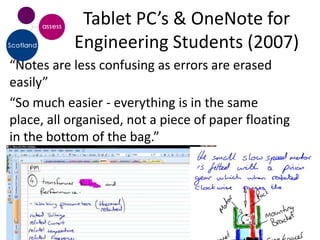
Tablet PC’s & OneNote for
           Engineering Students (2007)
“Notes are less confusing as errors are erased
easily”
“So much easier - everything is in the same
place, all organised, not a piece of paper floating
in the bottom of the bag.”
But Tablet PC had
         shortcomings…
• Weight: ~2kg
• Battery power: ~ 3 hours
• Performance affected when running many
  apps
• Interface – pen driven devices running
  Windows
• Screen size too small required external
  monitor
• Expense – more than standard laptop
Is a Tablet the same as a
          Personal Computer? No
• The devices have
  different feature and        e-book
  function                     reader
• They are designed
  for different
  purposes                PC        Tablet
• How are they best
  used for those
  studying at HE level?
Where do we use these
          devices in studying?
On the next slide…
• 2 stars = a task this device is designed to do
  and it does it well
• 1 star = a task you can achieve with the device
  but it can be a complicated (and possibly
  unreliable) process
• No star = a task the device can not achieve
  without additional devices or too many
  compromises
Usage                         E-book   Tablet e.g. Touch,   Desktop / laptop with
                              device   ipad, Android        AT software
Purchase ebooks
Search & download
academic papers
Read aloud text books
Read aloud papers &
learning resources
Record audio and
graphical notes
Take text notes in lectures
Research on the internet
Create a mind map
Make notes from a text
book
Draft an assignment
Proof read an assignment
But its more about the
                 practicalities of the device….
Practicalities      E-book device       Tablet e.g. Touch,      Desktop / laptop
                                        ipad                    with AT software

Battery life        30 – 100 hours (only 5- 10 hours            1.5 – 4 hours (some
                    uses power when                             lightweight models
                    change page)                                may go to 8 hours)
Performance         N/A                 basic TTS, internet ,   Possible to run all
                                        word processing,        applications
                                        online tools
Weight              0.2-0.3kg           0.35 – 0.8Kg            1.5 – 3.0 kg
Screen              E-ink, 6-7 inches   High resolution, full   13 – 17 inches
                                        colour 7 – 10 inches    (laptop)
                                                                19+ inches desktop
Interface           Buttons and arrow   Touch interface;        Keyboard and mouse
                    keys                external keyboard,
                                        mouse
Windows 8 on Tablets
Assistive Technology & Mobile
Tablets: Don’t forget they are not
computers

       One       One
     app at a   task at
      time      a time


     Simple      Simple
     to use     to move
Why do tablet devices work as
           assistive technology or learning
           device?

•   Instant on, discrete yet
•   Powerful and long battery life
•   Wide range of apps and resources available
•   Mainstream device with mainstream support
•   But not all tablets are the same….
Android vs. iOS tablets
                    Android                      iOS
File Management     More like a PC               Difficult, requires cloud tools

Range of tools      Limited but growing          500 000+ but AT mainly aimed at
                                                 ASD and communication support
Multi-tasking       Can offer a range of tools   Apps are Sandboxed, often
                    in one app or that link      focussed on a single task
                    together
Accessibility       Improving but still          Built-in, good support particular
                    requires additional apps     for VI
Assistive           Can provide an AT            Range of education focussed tools.
Technology          supported working            Reading/Writing support tools
                    environment with a range     hampered by Sandboxing but
                    of At tools                  improving e.g. ClaroSpeak
Accessing web       High-spec tablets can        Limited by lack of Flash support
content             access Flash content

Range of devices    7 – 13 inch screens. Wide    iPad only
                    range of quality and
                    power
CapturaTalk for Android:
           Reading & Writing Support on a
           tablet
CapturaTalk for Android provides a range of reading
& writing support tools for Android devices :
• Reading aloud with highlighting web pages, text
  documents, PDF files and eBooks
• OCR photos and images & hear text read aloud.
• Talking word processor to assist editing, proofing
  and writing of text.
• File management tools and integrated dictionary
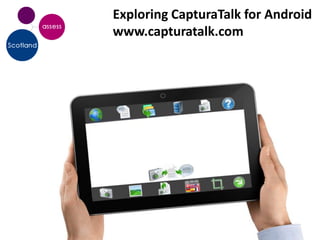
Exploring CapturaTalk for Android
www.capturatalk.com
Assistive Technology & the Cloud
Office 15 / 2013
• All about document sharing on the Cloud via
  SkyDrive & other Microsoft services
• Using the ribbon interface but also hints that
  it is designed more for reading content with
  PowerPoint “Read” view & reflowing PDFs in
  Word
• AT packages that integrate with Office will
  need to be extensively tested
Cloud, eBooks & accessible
        content
• Mobile devices & touch interfaces are all
  about accessing content
• For disabled students content must be
  accessible and personalised to suite their
  individual needs.
• eBook & content providers e.g. journals do
  not always match these needs
• Accessible services like azzapt being launched
  to fill this gap.
azzapt service
          www.azzapt.com

• Web portal and iPhone app acts as
  front-end for cloud storage          azzapt.com/login
                                       ...
  provider
• Files automatically convert to
  users preferred format on upload
• Format preferences by devices
  type – desktop, tablet or mobile
  devices
In beta, will be launched early 2013
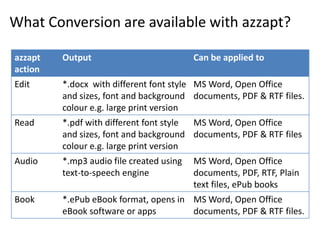
What Conversion are available with azzapt?

azzapt   Output                           Can be applied to
action
Edit     *.docx with different font style MS Word, Open Office
         and sizes, font and background documents, PDF & RTF files.
         colour e.g. large print version
Read     *.pdf with different font style MS Word, Open Office
         and sizes, font and background documents, PDF & RTF files
         colour e.g. large print version
Audio    *.mp3 audio file created using   MS Word, Open Office
         text-to-speech engine            documents, PDF, RTF, Plain
                                          text files, ePub books
Book     *.ePub eBook format, opens in MS Word, Open Office
         eBook software or apps        documents, PDF & RTF files.
Example of an azzapt service
             user
• Emma, studying part time & travelling to college and
  to different locations for work.
   – Prefers to work on mobile or tablet whilst travelling
   – Slow reader, prefers to absorb information via audio.
• Gets emailed PDF from tutor/colleague.
   – Uploads PDF using azzapt web site on her desktop computer.
   – On the way home she access her azzapt enabled app on her
     tablet and accesses ePub version which is read aloud and
     can be annotated
   – While at the gym she listens to MP3 audio version on her
     mobile
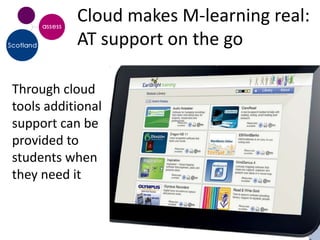
Cloud makes M-learning real:
           AT support on the go

Through cloud
tools additional
support can be
provided to
students when
they need it
Further information


Iansyst Ltd
Fen House
Fen Road
Cambridge CB4 1UN
Tel: 01223 420101

Abi James abi@iansyst.co.uk

What's new? September 2012

  • 1.
  • 2.
    Tablets as anassistive technology - New story or old?
  • 4.
    Tablet PC’s &OneNote for Engineering Students (2007) “Notes are less confusing as errors are erased easily” “So much easier - everything is in the same place, all organised, not a piece of paper floating in the bottom of the bag.”
  • 5.
    But Tablet PChad shortcomings… • Weight: ~2kg • Battery power: ~ 3 hours • Performance affected when running many apps • Interface – pen driven devices running Windows • Screen size too small required external monitor • Expense – more than standard laptop
  • 6.
    Is a Tabletthe same as a Personal Computer? No • The devices have different feature and e-book function reader • They are designed for different purposes PC Tablet • How are they best used for those studying at HE level?
  • 7.
    Where do weuse these devices in studying? On the next slide… • 2 stars = a task this device is designed to do and it does it well • 1 star = a task you can achieve with the device but it can be a complicated (and possibly unreliable) process • No star = a task the device can not achieve without additional devices or too many compromises
  • 8.
    Usage E-book Tablet e.g. Touch, Desktop / laptop with device ipad, Android AT software Purchase ebooks Search & download academic papers Read aloud text books Read aloud papers & learning resources Record audio and graphical notes Take text notes in lectures Research on the internet Create a mind map Make notes from a text book Draft an assignment Proof read an assignment
  • 9.
    But its moreabout the practicalities of the device…. Practicalities E-book device Tablet e.g. Touch, Desktop / laptop ipad with AT software Battery life 30 – 100 hours (only 5- 10 hours 1.5 – 4 hours (some uses power when lightweight models change page) may go to 8 hours) Performance N/A basic TTS, internet , Possible to run all word processing, applications online tools Weight 0.2-0.3kg 0.35 – 0.8Kg 1.5 – 3.0 kg Screen E-ink, 6-7 inches High resolution, full 13 – 17 inches colour 7 – 10 inches (laptop) 19+ inches desktop Interface Buttons and arrow Touch interface; Keyboard and mouse keys external keyboard, mouse
  • 10.
    Windows 8 onTablets
  • 11.
    Assistive Technology &Mobile Tablets: Don’t forget they are not computers One One app at a task at time a time Simple Simple to use to move
  • 12.
    Why do tabletdevices work as assistive technology or learning device? • Instant on, discrete yet • Powerful and long battery life • Wide range of apps and resources available • Mainstream device with mainstream support • But not all tablets are the same….
  • 13.
    Android vs. iOStablets Android iOS File Management More like a PC Difficult, requires cloud tools Range of tools Limited but growing 500 000+ but AT mainly aimed at ASD and communication support Multi-tasking Can offer a range of tools Apps are Sandboxed, often in one app or that link focussed on a single task together Accessibility Improving but still Built-in, good support particular requires additional apps for VI Assistive Can provide an AT Range of education focussed tools. Technology supported working Reading/Writing support tools environment with a range hampered by Sandboxing but of At tools improving e.g. ClaroSpeak Accessing web High-spec tablets can Limited by lack of Flash support content access Flash content Range of devices 7 – 13 inch screens. Wide iPad only range of quality and power
  • 14.
    CapturaTalk for Android: Reading & Writing Support on a tablet CapturaTalk for Android provides a range of reading & writing support tools for Android devices : • Reading aloud with highlighting web pages, text documents, PDF files and eBooks • OCR photos and images & hear text read aloud. • Talking word processor to assist editing, proofing and writing of text. • File management tools and integrated dictionary
  • 15.
    Exploring CapturaTalk forAndroid www.capturatalk.com
  • 16.
  • 17.
    Office 15 /2013 • All about document sharing on the Cloud via SkyDrive & other Microsoft services • Using the ribbon interface but also hints that it is designed more for reading content with PowerPoint “Read” view & reflowing PDFs in Word • AT packages that integrate with Office will need to be extensively tested
  • 18.
    Cloud, eBooks &accessible content • Mobile devices & touch interfaces are all about accessing content • For disabled students content must be accessible and personalised to suite their individual needs. • eBook & content providers e.g. journals do not always match these needs • Accessible services like azzapt being launched to fill this gap.
  • 19.
    azzapt service www.azzapt.com • Web portal and iPhone app acts as front-end for cloud storage azzapt.com/login ... provider • Files automatically convert to users preferred format on upload • Format preferences by devices type – desktop, tablet or mobile devices In beta, will be launched early 2013
  • 20.
    What Conversion areavailable with azzapt? azzapt Output Can be applied to action Edit *.docx with different font style MS Word, Open Office and sizes, font and background documents, PDF & RTF files. colour e.g. large print version Read *.pdf with different font style MS Word, Open Office and sizes, font and background documents, PDF & RTF files colour e.g. large print version Audio *.mp3 audio file created using MS Word, Open Office text-to-speech engine documents, PDF, RTF, Plain text files, ePub books Book *.ePub eBook format, opens in MS Word, Open Office eBook software or apps documents, PDF & RTF files.
  • 21.
    Example of anazzapt service user • Emma, studying part time & travelling to college and to different locations for work. – Prefers to work on mobile or tablet whilst travelling – Slow reader, prefers to absorb information via audio. • Gets emailed PDF from tutor/colleague. – Uploads PDF using azzapt web site on her desktop computer. – On the way home she access her azzapt enabled app on her tablet and accesses ePub version which is read aloud and can be annotated – While at the gym she listens to MP3 audio version on her mobile
  • 22.
    Cloud makes M-learningreal: AT support on the go Through cloud tools additional support can be provided to students when they need it
  • 23.
    Further information Iansyst Ltd FenHouse Fen Road Cambridge CB4 1UN Tel: 01223 420101 Abi James abi@iansyst.co.uk

Editor's Notes

  • #3 Where do we use these devices in studying?2stars = a task this device is designed to do and it does it well1 star = a task you can achieve with the device but it can be a complicated (and possibly unreliable) processNo star = a task the device can not achieve without additional devices or too many compromisesNB – iPad now acceptable device for exam arrangements and delivering digital examsGraphical notes in a lecture.Review