TABLET PC
• A tablet personal computer or tablet PC is a tablet-sized
  computer that also has the key features of a full-
  size personal computer.
• A tablet PC is essentially a small laptop computer,
  equipped with a rotatable touch screen as an
  additional input device, and running a standard (or
  lightly adapted) PC operating system.
• Today, the term tablet is also used to refer to computer-
  like devices operated primarily by a touch screen but not
  intended to run general PC operating systems or
  applications. Tablet PCs use the same hardware as
  normal laptops but add support for pen input.
The History of Tablet PCs

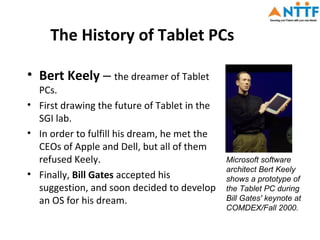
• Bert Keely – the dreamer of Tablet
  PCs.
• First drawing the future of Tablet in the
  SGI lab.
• In order to fulfill his dream, he met the
  CEOs of Apple and Dell, but all of them
  refused Keely.                              Microsoft software
                                              architect Bert Keely
• Finally, Bill Gates accepted his            shows a prototype of
  suggestion, and soon decided to develop     the Tablet PC during
  an OS for his dream.                        Bill Gates' keynote at
                                              COMDEX/Fall 2000.
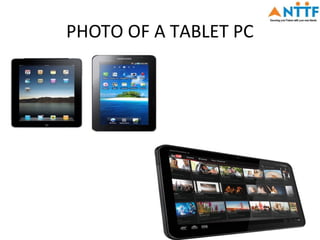
PHOTO OF A TABLET PC
The Appearance of Tablet PCs
• Some tablets are like an LCD maybe just thicker than a
  general LCD, and they come with hard disk and other
  necessary hardware device. There are some which have the
  similar appearance of that of a notebook.
• The use of “pen”, an input device of the tablet PC is the most
  convenient and attractive part of the whole tablet. It
  functions same as a pen on a paper.
• Portable and mobile, it’s like a notebook light and small, can
  move anytime.
• Digital laptop- the tablet PC is the same with PDA and hand
  computer, like a common laptop can note anytime, create
  self word, chart and picture.
• You can use the tablet PC in any way. You can use the pen or
  your hand for controlling the PC. Pen is used for resistive
  display .Not required for capacitative displays.
If all students in the class have Tablet PC’s then
interesting collaboration opportunities are possible
with the wireless networking(WIFI)
  Classroom Presenter
     Students submit answers to questions, instructor can select
     submissions to display to the class
  Collaboration via Synchronous Course Management
  System
     E.g. Shared Whiteboard in Blackboard
     Possible over distance with systems that share audio as well as
     whiteboard/slide content
  Groove Workspace
     Shared files, instant messaging, project management, Office
     integration
The Impact of Tablet Pc on
                    Education/training
•    With the release of the Tablet PC, we are now seeing a significant shift in
     the dynamics of computer purchase and practice – moving away from
     desktops and laptops to Tablet PCs and other mobile devices. Their cost
     relative to laptops along with the promise of mobile computing has raised
     tremendous interest in Tablet PC use in education.
•    The other factors which has further increased the impact of tablet PCs on
     education are briefly as follows:
1.   On line access of e content
2.   Long Battery and Instant-On
3.   Price
4.   Touch interface
5.   Improved Digital Reading
6.   Integrating Multimedia
7.   Special Education
8.   E book reader
The Impact of Tablet Pc on
               Education/Training

• Faculty can interact with a presentation by scribbling onto a
  slide .The trainees can store this edited version onto the
  tablet without having to write it down separately.
• They are lightweight and can be easily stored.
• These have very high interactive capabilities.
• Online access of e-content is possible
• Academic tools like calculators can be downloaded.
• Many applications (aps) can either be downloaded free or
  purchased.
• Online conversation/chat etc is possible
• Online assignments and submission is possible.
• Assessments and feedback is also possible.
The Impact of Tablet Pc on
                  Education/Training
• Real-Time Grading?
   – Could feasibly complete exams on the computer (both multiple choice
     and essay) and upload to instructor
• Brainstorming and Design
• Note Sharing
   – Various applications developed
• Instructor feedback?
   – Could provide instant feedback to gauge audience’s comprehension
• Distance Education?
   – Possibilities for distance education, can share data across a network with
     tools such as Media Encoder or NetMeeting
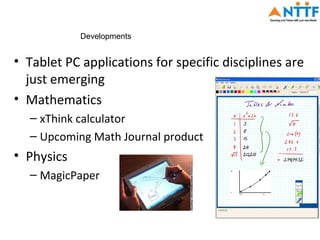
Developments


• Tablet PC applications for specific disciplines are
  just emerging
• Mathematics
  – xThink calculator
  – Upcoming Math Journal product
• Physics
  – MagicPaper
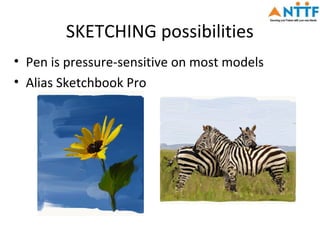
SKETCHING possibilities
• Pen is pressure-sensitive on most models
• Alias Sketchbook Pro
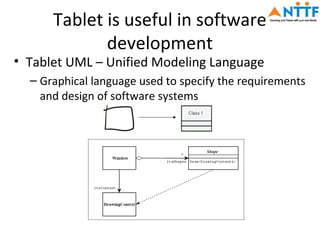
Tablet is useful in software
             development
• Tablet UML – Unified Modeling Language
  – Graphical language used to specify the requirements
    and design of software systems
Tablet PC Applications for
                   Children
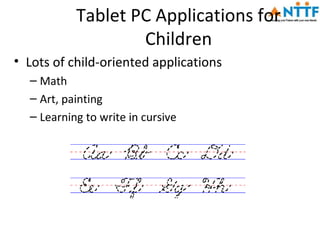
• Lots of child-oriented applications
  – Math
  – Art, painting
  – Learning to write in cursive
NTTF plan
• We are planning to procure tablets from HCL a
  reputed manufacturer.
• Specs are given below:
CONFIGURATION
HCL Me TAB U1
Android 4.0.3(Ice cream Sandwich),High Performance Cortex A8
  1 GHZ processor,Multiple connectivity options,USB Port,WIFI
  and 3G USB Dongle enabled,Capacitive touch display,7 Inches
  screen,800X480 pixels.
Warranty—standard one year warranty
THANK YOU


PL CONTACT K R RAJASEKAR FOR CLARIFICATIONS/QUESTIONS

Benefits of tablets

  • 1.
    TABLET PC • Atablet personal computer or tablet PC is a tablet-sized computer that also has the key features of a full- size personal computer. • A tablet PC is essentially a small laptop computer, equipped with a rotatable touch screen as an additional input device, and running a standard (or lightly adapted) PC operating system. • Today, the term tablet is also used to refer to computer- like devices operated primarily by a touch screen but not intended to run general PC operating systems or applications. Tablet PCs use the same hardware as normal laptops but add support for pen input.
  • 2.
    The History ofTablet PCs • Bert Keely – the dreamer of Tablet PCs. • First drawing the future of Tablet in the SGI lab. • In order to fulfill his dream, he met the CEOs of Apple and Dell, but all of them refused Keely. Microsoft software architect Bert Keely • Finally, Bill Gates accepted his shows a prototype of suggestion, and soon decided to develop the Tablet PC during an OS for his dream. Bill Gates' keynote at COMDEX/Fall 2000.
  • 3.
    PHOTO OF ATABLET PC
  • 4.
    The Appearance ofTablet PCs • Some tablets are like an LCD maybe just thicker than a general LCD, and they come with hard disk and other necessary hardware device. There are some which have the similar appearance of that of a notebook. • The use of “pen”, an input device of the tablet PC is the most convenient and attractive part of the whole tablet. It functions same as a pen on a paper. • Portable and mobile, it’s like a notebook light and small, can move anytime. • Digital laptop- the tablet PC is the same with PDA and hand computer, like a common laptop can note anytime, create self word, chart and picture. • You can use the tablet PC in any way. You can use the pen or your hand for controlling the PC. Pen is used for resistive display .Not required for capacitative displays.
  • 5.
    If all studentsin the class have Tablet PC’s then interesting collaboration opportunities are possible with the wireless networking(WIFI) Classroom Presenter Students submit answers to questions, instructor can select submissions to display to the class Collaboration via Synchronous Course Management System E.g. Shared Whiteboard in Blackboard Possible over distance with systems that share audio as well as whiteboard/slide content Groove Workspace Shared files, instant messaging, project management, Office integration
  • 6.
    The Impact ofTablet Pc on Education/training • With the release of the Tablet PC, we are now seeing a significant shift in the dynamics of computer purchase and practice – moving away from desktops and laptops to Tablet PCs and other mobile devices. Their cost relative to laptops along with the promise of mobile computing has raised tremendous interest in Tablet PC use in education. • The other factors which has further increased the impact of tablet PCs on education are briefly as follows: 1. On line access of e content 2. Long Battery and Instant-On 3. Price 4. Touch interface 5. Improved Digital Reading 6. Integrating Multimedia 7. Special Education 8. E book reader
  • 7.
    The Impact ofTablet Pc on Education/Training • Faculty can interact with a presentation by scribbling onto a slide .The trainees can store this edited version onto the tablet without having to write it down separately. • They are lightweight and can be easily stored. • These have very high interactive capabilities. • Online access of e-content is possible • Academic tools like calculators can be downloaded. • Many applications (aps) can either be downloaded free or purchased. • Online conversation/chat etc is possible • Online assignments and submission is possible. • Assessments and feedback is also possible.
  • 8.
    The Impact ofTablet Pc on Education/Training • Real-Time Grading? – Could feasibly complete exams on the computer (both multiple choice and essay) and upload to instructor • Brainstorming and Design • Note Sharing – Various applications developed • Instructor feedback? – Could provide instant feedback to gauge audience’s comprehension • Distance Education? – Possibilities for distance education, can share data across a network with tools such as Media Encoder or NetMeeting
  • 9.
    Developments • Tablet PCapplications for specific disciplines are just emerging • Mathematics – xThink calculator – Upcoming Math Journal product • Physics – MagicPaper
  • 10.
    SKETCHING possibilities • Penis pressure-sensitive on most models • Alias Sketchbook Pro
  • 11.
    Tablet is usefulin software development • Tablet UML – Unified Modeling Language – Graphical language used to specify the requirements and design of software systems
  • 12.
    Tablet PC Applicationsfor Children • Lots of child-oriented applications – Math – Art, painting – Learning to write in cursive
  • 13.
    NTTF plan • Weare planning to procure tablets from HCL a reputed manufacturer. • Specs are given below: CONFIGURATION HCL Me TAB U1 Android 4.0.3(Ice cream Sandwich),High Performance Cortex A8 1 GHZ processor,Multiple connectivity options,USB Port,WIFI and 3G USB Dongle enabled,Capacitive touch display,7 Inches screen,800X480 pixels. Warranty—standard one year warranty
  • 14.
    THANK YOU PL CONTACTK R RAJASEKAR FOR CLARIFICATIONS/QUESTIONS