


Tableau + Redshift views
for dummies
GOAL
Generate a new table with the desired data
No, no, no, no
We are not going to:
• Delete
• Insert
• Update
(for the moment…)
What we use
Redshift (PostgreSQL 8.0.2)
Tableau 8.1
Workbench / Navicat / Aginity workbench (for
previous exploration)
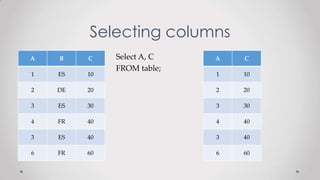
Selecting columns
Select A, C
FROM table;
A B C
1 ES 10
2 DE 20
3 ES 30
4 FR 40
3 ES 40
6 FR 60
A C
1 10
2 20
3 30
4 40
3 40
6 60
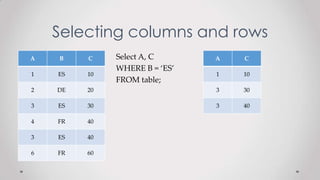
Selecting columns and rows
A B C
1 ES 10
2 DE 20
3 ES 30
4 FR 40
3 ES 40
6 FR 60
A C
1 10
3 30
3 40
Select A, C
WHERE B = ‘ES’
FROM table;
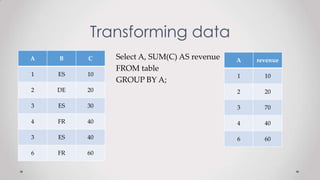
Transforming data
A B C
1 ES 10
2 DE 20
3 ES 30
4 FR 40
3 ES 40
6 FR 60
Select A, SUM(C) AS revenue
FROM table
GROUP BY A;
A revenue
1 10
2 20
3 70
4 40
6 60
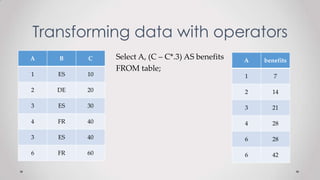
Transforming data with operators
A B C
1 ES 10
2 DE 20
3 ES 30
4 FR 40
3 ES 40
6 FR 60
Select A, (C – C*.3) AS benefits
FROM table;
A benefits
1 7
2 14
3 21
4 28
6 28
6 42
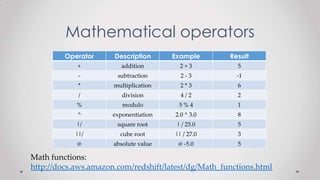
Mathematical operators
Select A, (C – C*.3) AS benefits
FROM table;
Operator Description Example Result
+ addition 2 + 3 5
- subtraction 2 - 3 -1
* multiplication 2 * 3 6
/ division 4 / 2 2
% modulo 5 % 4 1
^ exponentiation 2.0 ^ 3.0 8
|/ square root | / 25.0 5
||/ cube root || / 27.0 3
@ absolute value @ -5.0 5
Math functions:
http://docs.aws.amazon.com/redshift/latest/dg/Math_functions.html
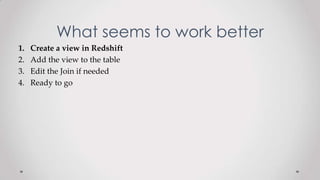
What seems to work better
1. Create a view in Redshift
2. Add the view to the table
3. Edit the Join if needed
4. Ready to go
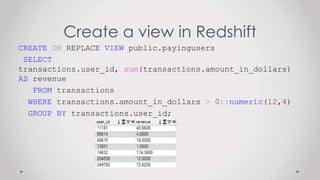
Create a view in Redshift
CREATE OR REPLACE VIEW public.payingusers
SELECT
transactions.user_id, sum(transactions.amount_in_dollars)
AS revenue
FROM transactions
WHERE transactions.amount_in_dollars > 0::numeric(12,4)
GROUP BY transactions.user_id;
What seems to work better
1. Create a view in Redshift
2. Add the view to the table
3. Edit the Join if needed
4. Ready to go
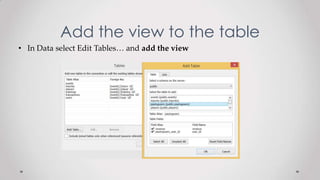
Add the view to the table
• In Data select Edit Tables… and add the view
What seems to work better
1. Create a view in Redshift
2. Add the view to the table
3. Edit the Join if needed
4. Ready to go
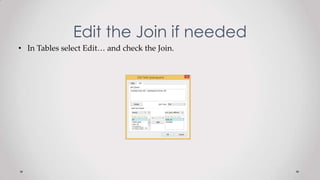
Edit the Join if needed
• In Tables select Edit… and check the Join.
Ready to go
Links
• http://www.w3schools.com/sql/
• http://sqlzoo.net
• http://aws.amazon.com/es/documentation/redshift/
• http://www.postgresql.org/docs/8.0/interactive/index.html
• http://www.aginity.com/workbench/redshift/
• http://www.navicat.com/
Thanks !
Ivan Magrans
Product Owner
Golden Manager
@ivan_mv
ivan@mediavida.com

Tableau + Redshift views for dummies

  • 1.
    Tableau + Redshiftviews for dummies
  • 2.
    GOAL Generate a newtable with the desired data
  • 3.
    No, no, no,no We are not going to: • Delete • Insert • Update (for the moment…)
  • 4.
    What we use Redshift(PostgreSQL 8.0.2) Tableau 8.1 Workbench / Navicat / Aginity workbench (for previous exploration)
  • 5.
    Selecting columns Select A,C FROM table; A B C 1 ES 10 2 DE 20 3 ES 30 4 FR 40 3 ES 40 6 FR 60 A C 1 10 2 20 3 30 4 40 3 40 6 60
  • 6.
    Selecting columns androws A B C 1 ES 10 2 DE 20 3 ES 30 4 FR 40 3 ES 40 6 FR 60 A C 1 10 3 30 3 40 Select A, C WHERE B = ‘ES’ FROM table;
  • 7.
    Transforming data A BC 1 ES 10 2 DE 20 3 ES 30 4 FR 40 3 ES 40 6 FR 60 Select A, SUM(C) AS revenue FROM table GROUP BY A; A revenue 1 10 2 20 3 70 4 40 6 60
  • 8.
    Transforming data withoperators A B C 1 ES 10 2 DE 20 3 ES 30 4 FR 40 3 ES 40 6 FR 60 Select A, (C – C*.3) AS benefits FROM table; A benefits 1 7 2 14 3 21 4 28 6 28 6 42
  • 9.
    Mathematical operators Select A,(C – C*.3) AS benefits FROM table; Operator Description Example Result + addition 2 + 3 5 - subtraction 2 - 3 -1 * multiplication 2 * 3 6 / division 4 / 2 2 % modulo 5 % 4 1 ^ exponentiation 2.0 ^ 3.0 8 |/ square root | / 25.0 5 ||/ cube root || / 27.0 3 @ absolute value @ -5.0 5 Math functions: http://docs.aws.amazon.com/redshift/latest/dg/Math_functions.html
  • 10.
    What seems towork better 1. Create a view in Redshift 2. Add the view to the table 3. Edit the Join if needed 4. Ready to go
  • 11.
    Create a viewin Redshift CREATE OR REPLACE VIEW public.payingusers SELECT transactions.user_id, sum(transactions.amount_in_dollars) AS revenue FROM transactions WHERE transactions.amount_in_dollars > 0::numeric(12,4) GROUP BY transactions.user_id;
  • 12.
    What seems towork better 1. Create a view in Redshift 2. Add the view to the table 3. Edit the Join if needed 4. Ready to go
  • 13.
    Add the viewto the table • In Data select Edit Tables… and add the view
  • 14.
    What seems towork better 1. Create a view in Redshift 2. Add the view to the table 3. Edit the Join if needed 4. Ready to go
  • 15.
    Edit the Joinif needed • In Tables select Edit… and check the Join.
  • 16.
  • 17.
    Links • http://www.w3schools.com/sql/ • http://sqlzoo.net •http://aws.amazon.com/es/documentation/redshift/ • http://www.postgresql.org/docs/8.0/interactive/index.html • http://www.aginity.com/workbench/redshift/ • http://www.navicat.com/
  • 18.
    Thanks ! Ivan Magrans ProductOwner Golden Manager @ivan_mv ivan@mediavida.com