
Using Tableau with PowerPivotAuthor: Jen StirrupTwitter: @jenstirrupEmail: Jenstirrup@jenstirrup.comwww.jenstirrup.com
AgendaCapabilities of Microsoft PowerPivot and TableauCreating and sharing visualizations with drag and drop easeRe-doing PowerPivot samples in TableauScalable and empowering access to data 26/6/2011Using Tableau with PowerPivot
PowerPivotWhat is PowerPivot?Two types: Free Excel add-inSharepoint presentation layerStrength: Vertipaq column-oriented data storeScaleability36/6/2011Using Tableau with PowerPivot
TableauTableau’s strengths:Visualisation, visualisation, visualisation! ease-of-use for business usersLeveraging the power of DAX to build complex calculationsIn itself, low reliance on IT46/6/2011Using Tableau with PowerPivot
Tableau & PowerPivotThe key advantage is that business users have the power of analysing their own data; no requirement to go to ITCreate DAX expressions in PowerPivotTableau then consumes the DAX expressions56/6/2011Using Tableau with PowerPivot
DemosPowerPivot sample visualisations are not best practiceWe will re-visualise the sample PowerPivot visualisations in TableauDemonstrate rapid-fire data visualisation improvementsVisualisations in accordance with data visualisation best practices 66/6/2011Using Tableau with PowerPivot
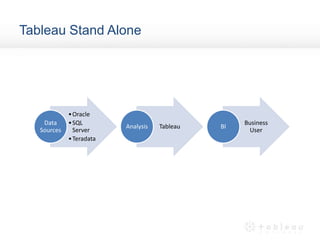
Tableau Stand Alone
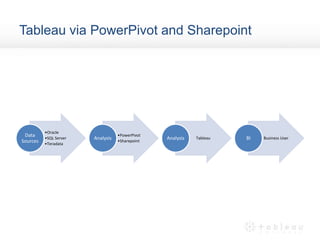
Tableau via PowerPivot and Sharepoint
PowerPivot Sample 196/6/2011Using Tableau with PowerPivot
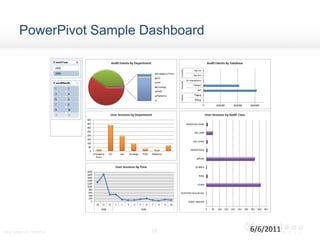
PowerPivot Sample Dashboard106/6/2011Using Tableau with PowerPivot
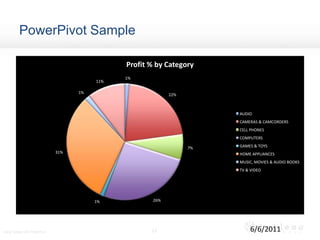
PowerPivot Sample116/6/2011Using Tableau with PowerPivot
Empowering UsersThe key advantage is that business users have the power of analysing their own data in PowerPivotAnd then visualising their data, in accordance with data visualisation best practices, using Tableau126/6/2011Using Tableau with PowerPivot
TipsIf the dataset contains > 1 million sets of data, then it’s more efficient to use x64 PowerPivotIf the enterprise doesn’t use Sharepoint, then the workbooks can be shared using Tableau Server136/6/2011Using Tableau with PowerPivot
SummaryPowerPivot Reference: Microsoft PowerPivot for Excel 2010 by Marco Russo and Alberto FerrariQuestionsAuthor: Jen StirrupTwitter: @jenstirrupEmail: Jenstirrup@jenstirrup.comwww.tableausoftware.com146/6/2011Using Tableau with PowerPivot

Tableau and PowerPivot jenstirrup

  • 1.
    Using Tableau withPowerPivotAuthor: Jen StirrupTwitter: @jenstirrupEmail: Jenstirrup@jenstirrup.comwww.jenstirrup.com
  • 2.
    AgendaCapabilities of MicrosoftPowerPivot and TableauCreating and sharing visualizations with drag and drop easeRe-doing PowerPivot samples in TableauScalable and empowering access to data 26/6/2011Using Tableau with PowerPivot
  • 3.
    PowerPivotWhat is PowerPivot?Twotypes: Free Excel add-inSharepoint presentation layerStrength: Vertipaq column-oriented data storeScaleability36/6/2011Using Tableau with PowerPivot
  • 4.
    TableauTableau’s strengths:Visualisation, visualisation,visualisation! ease-of-use for business usersLeveraging the power of DAX to build complex calculationsIn itself, low reliance on IT46/6/2011Using Tableau with PowerPivot
  • 5.
    Tableau & PowerPivotThekey advantage is that business users have the power of analysing their own data; no requirement to go to ITCreate DAX expressions in PowerPivotTableau then consumes the DAX expressions56/6/2011Using Tableau with PowerPivot
  • 6.
    DemosPowerPivot sample visualisationsare not best practiceWe will re-visualise the sample PowerPivot visualisations in TableauDemonstrate rapid-fire data visualisation improvementsVisualisations in accordance with data visualisation best practices 66/6/2011Using Tableau with PowerPivot
  • 7.
  • 8.
  • 9.
    PowerPivot Sample 196/6/2011UsingTableau with PowerPivot
  • 10.
  • 11.
  • 12.
    Empowering UsersThe keyadvantage is that business users have the power of analysing their own data in PowerPivotAnd then visualising their data, in accordance with data visualisation best practices, using Tableau126/6/2011Using Tableau with PowerPivot
  • 13.
    TipsIf the datasetcontains > 1 million sets of data, then it’s more efficient to use x64 PowerPivotIf the enterprise doesn’t use Sharepoint, then the workbooks can be shared using Tableau Server136/6/2011Using Tableau with PowerPivot
  • 14.
    SummaryPowerPivot Reference: MicrosoftPowerPivot for Excel 2010 by Marco Russo and Alberto FerrariQuestionsAuthor: Jen StirrupTwitter: @jenstirrupEmail: Jenstirrup@jenstirrup.comwww.tableausoftware.com146/6/2011Using Tableau with PowerPivot

Editor's Notes

  • #4 - fast manipulation of large data sets (often millions of rows)- streamlined integration of data-the ability to effortlessly share your analysisSupport for slicers Takes data from ATOM feedsTakes from OLEDB Source as standard/* Potential issue for desktop version since PowerPivot takes from OLEDB */Highly scaleable
  • #5 Low IT Reliance for a business intelligence solutionBest practices inherent in Tableau‘wow’! factor
  • #7 Apologise for the PowerPivotchartjunk
  • #10 How can we make this look better in Tableau (quite easily!)The sample chart is supposed to show off what PowerPivot can do; however, it fails because it breaks best practices in datavisualisation, which come naturally in Tableau.
  • #11 How can we make this look better in Tableau (quite easily!)The sample dashboard is supposed to show off what PowerPivot can do; however, it fails because it breaks best practices in datavisualisation, which come naturally in Tableau.
  • #12 How can we make this look better in Tableau (quite easily!)The sample visualisation is supposed to show off what PowerPivot can do; however, it fails because it breaks best practices in datavisualisation, which come naturally in Tableau.