Preview Release 6.5Release date: 1st of October 2013
Project Management
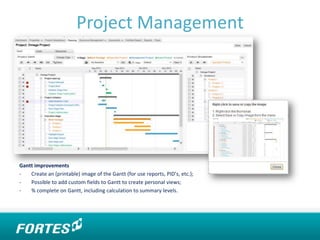
Gantt improvements
- Create an (printable) image of the Gantt (for use reports, PID’s, etc.);
- Possible to add custom fields to Gantt to create personal views;
- % complete on Gantt, including calculation to summary levels.
Document Management
Document Management improvements
It will be possible to upload multiple documents at
once by using drag and drop functionality.
A ‘Documents’ tab has been made available on
Single Sheet projects.
Logs
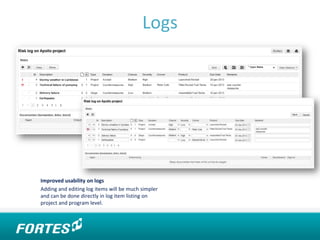
Improved usability on logs
Adding and editing log items will be much simpler
and can be done directly in log item listing on
project and program level.
Resource Management
Resource management improvements
- New tab for improved usability (Resource → Projects);
- Copy request to allocation;
- Simplified browsing to next/previous month or 3 months ahead/back;
- Integration with project model;
- Performance improvements.
Excel Reporting
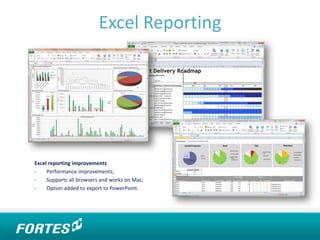
Excel reporting improvements
- Performance improvements;
- Supports all browsers and works on Mac;
- Option added to export to PowerPoint.
Graphical Reporting
New graphical reports
- Gauge widget;
- Scatterplot widget;
- Hour Report widget;
- Other widgets have been improved (i.e.
filters, dates & selectable persons).
Migration Support
Migration of project model
With release 6.5 we will offer a migration option to
migrate projects based on the ‘old’ project model to
the generic PRINCE2 project model. This is the new
project plan which is more user-friendly and offers
more flexibility.
Other
Custom field type ‘image’
It is now possible to create custom
fields with images.
‘Back’ button
It is now possible to use the ‘back’ button in
your web browser to go to the previous page in
the Principal Toolbox.
Other
Portfolio Dashboards
Portfolio dashboards are now generally
available in the add-on ‘Portfolio Management’.
Portfolio Dashboards enable customers to
create different groupings of projects within
portfolio management.
Dependencies
It will be possible to create reports based on
dependencies between products and projects.
Other
User Group support
The Principal Toolbox will support user
groups to improve usability when
adding users to projects, programs,
portfolios, time registration groups, etc.
Import/Export page layout
The export and import of page lay-outs of
plan items, products and single sheets will
be enabled.
PRINCE2® and MSP® are a Registered Trade Mark sof the Cabinet Office.
ContactFortes Solutions Benelux (HQ)
Business & Science Park
Capitool 50 - 3
7521 PL Enschede
Tel: +31 (0)53 43 17 450
Fax: +31 (0)53 43 45 578
Support: +31 (0)88 888 4 222
Email: info@principaltoolbox.com
Fortes Solutions Netherlands
Spacelab 9C
3824 MR Amersfoort
Tel: +31 (0)33 45 70 027
Email: info@principaltoolbox.com
Fortes Solutions Scandinavia
Tel: +45 23 73 38 87
Email: k.baek@fortesglobal.com
Fortes Solutions UK
Tel: +44 (0) 2071 834111
Email: info@fortesglobal.com
Australia
Tel: +61 (0)8 7129 4414
info@fortes.com.au
www.principaltoolbox.com

Preview release 6.5

  • 1.
    Preview Release 6.5Releasedate: 1st of October 2013
  • 2.
    Project Management Gantt improvements -Create an (printable) image of the Gantt (for use reports, PID’s, etc.); - Possible to add custom fields to Gantt to create personal views; - % complete on Gantt, including calculation to summary levels.
  • 3.
    Document Management Document Managementimprovements It will be possible to upload multiple documents at once by using drag and drop functionality. A ‘Documents’ tab has been made available on Single Sheet projects.
  • 4.
    Logs Improved usability onlogs Adding and editing log items will be much simpler and can be done directly in log item listing on project and program level.
  • 5.
    Resource Management Resource managementimprovements - New tab for improved usability (Resource → Projects); - Copy request to allocation; - Simplified browsing to next/previous month or 3 months ahead/back; - Integration with project model; - Performance improvements.
  • 6.
    Excel Reporting Excel reportingimprovements - Performance improvements; - Supports all browsers and works on Mac; - Option added to export to PowerPoint.
  • 7.
    Graphical Reporting New graphicalreports - Gauge widget; - Scatterplot widget; - Hour Report widget; - Other widgets have been improved (i.e. filters, dates & selectable persons).
  • 8.
    Migration Support Migration ofproject model With release 6.5 we will offer a migration option to migrate projects based on the ‘old’ project model to the generic PRINCE2 project model. This is the new project plan which is more user-friendly and offers more flexibility.
  • 9.
    Other Custom field type‘image’ It is now possible to create custom fields with images. ‘Back’ button It is now possible to use the ‘back’ button in your web browser to go to the previous page in the Principal Toolbox.
  • 10.
    Other Portfolio Dashboards Portfolio dashboardsare now generally available in the add-on ‘Portfolio Management’. Portfolio Dashboards enable customers to create different groupings of projects within portfolio management. Dependencies It will be possible to create reports based on dependencies between products and projects.
  • 11.
    Other User Group support ThePrincipal Toolbox will support user groups to improve usability when adding users to projects, programs, portfolios, time registration groups, etc. Import/Export page layout The export and import of page lay-outs of plan items, products and single sheets will be enabled.
  • 12.
    PRINCE2® and MSP®are a Registered Trade Mark sof the Cabinet Office. ContactFortes Solutions Benelux (HQ) Business & Science Park Capitool 50 - 3 7521 PL Enschede Tel: +31 (0)53 43 17 450 Fax: +31 (0)53 43 45 578 Support: +31 (0)88 888 4 222 Email: info@principaltoolbox.com Fortes Solutions Netherlands Spacelab 9C 3824 MR Amersfoort Tel: +31 (0)33 45 70 027 Email: info@principaltoolbox.com Fortes Solutions Scandinavia Tel: +45 23 73 38 87 Email: k.baek@fortesglobal.com Fortes Solutions UK Tel: +44 (0) 2071 834111 Email: info@fortesglobal.com Australia Tel: +61 (0)8 7129 4414 info@fortes.com.au www.principaltoolbox.com