Workshop Slides Follow-Up:
Comparing Technologies
Jen Stirrup
Data Whisperer,
Data Relish
Level: 300
Big Data
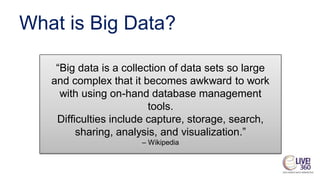
What is Big Data?
“Big data is a collection of data sets so large
and complex that it becomes awkward to work
with using on-hand database management
tools.
Difficulties include capture, storage, search,
sharing, analysis, and visualization.”
– Wikipedia
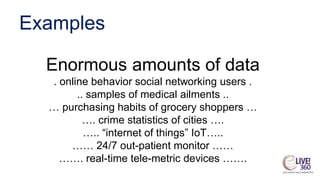
Examples
Enormous amounts of data
. online behavior social networking users .
.. samples of medical ailments ..
… purchasing habits of grocery shoppers …
…. crime statistics of cities ….
….. “internet of things” IoT…..
…… 24/7 out-patient monitor ……
……. real-time tele-metric devices …….
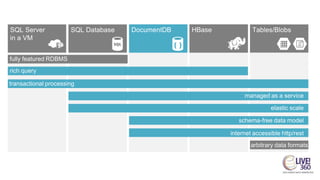
fully featured RDBMS
transactional processing
rich query
managed as a service
elastic scale
internet accessible http/rest
schema-free data model
arbitrary data formats
Apache Spark
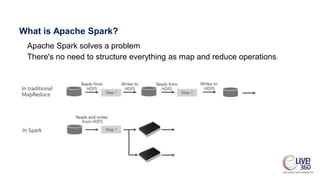
What is Apache Spark?
Apache Spark solves a problem
There's no need to structure everything as map and reduce operations.
Apache Spark
• Interactive manipulation and visualization
of data
– Scala, Python, and R Interactive Shells
– Jupyter Notebook with PySpark (Python) and
Spark (Scala) kernels provide in-browser
interaction
Apache Spark
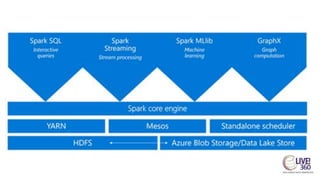
• Unified platform for processing multiple
workloads
– Real-time processing, Machine Learning,
Stream Analytics, Interactive Querying,
Graphing
Apache Spark
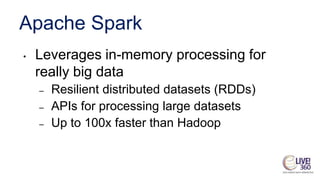
• Leverages in-memory processing for
really big data
– Resilient distributed datasets (RDDs)
– APIs for processing large datasets
– Up to 100x faster than Hadoop
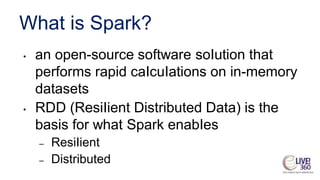
What is Spark?
• an open-source software soIution that
performs rapid caIcuIations on in-memory
datasets
• RDD (ResiIient Distributed Data) is the
basis for what Spark enabIes
– ResiIient
– Distributed
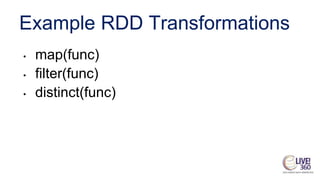
Example RDD Transformations
• map(func)
• filter(func)
• distinct(func)
Example RDD Actions
• count()
• reduce(func)
• collect()
• take()
HDInsight
HDInsight Cluster Types
• Hadoop: Query workloads
– Reliable data storage, simple MapReduce
• HBase: NoSQL workloads
– Distributed database offering random access to large
amounts of data
• Apache Storm: Stream workloads
– Real-time analysis of moving data streams
• Apache Spark: High-performance workloads
– In-memory parallel processing
Azure Databricks
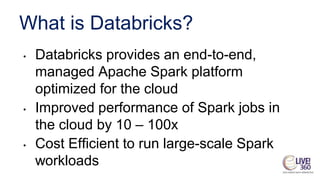
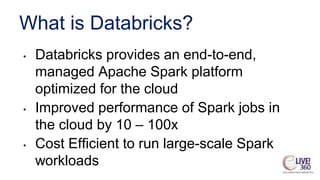
What is Databricks?
• Databricks provides an end-to-end,
managed Apache Spark platform
optimized for the cloud
• Improved performance of Spark jobs in
the cloud by 10 – 100x
• Cost Efficient to run large-scale Spark
workloads
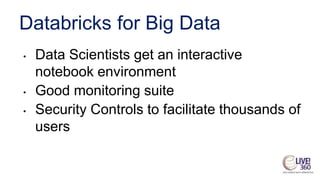
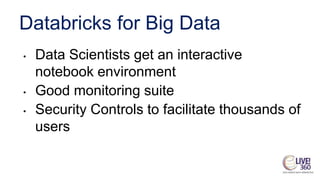
Databricks for Big Data
• Data Scientists get an interactive
notebook environment
• Good monitoring suite
• Security Controls to facilitate thousands of
users
Databricks for Data Engineers
• Databricks Runtime adds increased
performance to Apache Spark workloads
when running on Azure
• Auto-scaling and auto-termination for
Spark clusters to automatically minimize
costs
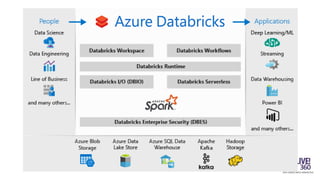
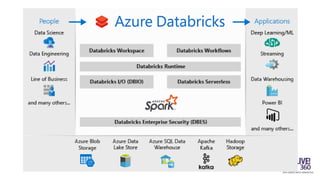
Databricks for Data Science
• Notebooks have real-time collaboration
and are multi-editable for productivity
• Integration with Power BI for data
visualization
• Supported by Azure Database
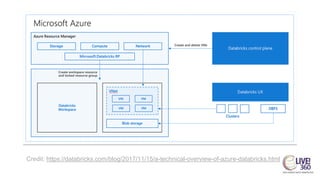
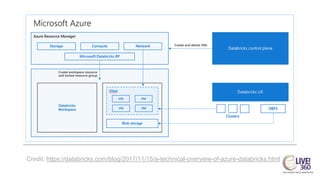
Credit: https://databricks.com/blog/2017/11/15/a-technical-overview-of-azure-databricks.html
Why is Databricks in Azure?
• Close integration with Azure services
• Optimized connectors
• One-click management directly from the
Azure console
• Azure Databricks will greatly simplify building
enterprise-grade production data
applications
Azure and Databricks together
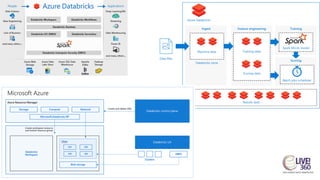
• Azure launches and manages worker
nodes in the customer subscriptions
• Customer launches a cluster, which
initiates a Databricks appliance
• A managed resource group is deployed
with a Vnet, Security Group and a
Storage account
Azure and Databricks Together
• Close Integration to provide an enterprise
platform
• Use all existing VMs
• Security and Privacy remains with
customer
• Network topology is flexible
Azure and Databricks together
• Azure Storage and Azure Data Lake
integration
• Azure Power BI
• Azure Active Directory
• Azure SQL Data Warehouse, Azure SQL
DB, Azure Cosmos DB
Azure and Databricks Together
• Metadata is stored in an Azure Database
with geo-replication
• Databricks cluster is managed through
Azure Databricks UI
Azure and Databricks Together
• Azure Container Services to run the
control plane and data planes via

containers
• Accelerated Networking
• Latest generation Azure hardware for
performance
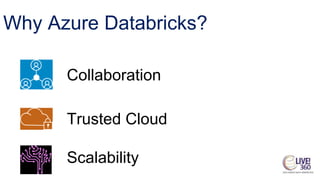
Why Azure Databricks?
Collaboration
Why Azure Databricks?
Collaboration
Trusted Cloud
Why Azure Databricks?
Collaboration
Trusted Cloud
Scalability
Azure
Databricks
Fast, easy and collaborative Apache Spark-based analytics service
https://blogs.microsoft.com/ai/shell-iot-ai-safety-intelligent-tools/
Shell Case Study
Shell Case Study
Azure Databricks
● Unlock insights from all your data and build
artificial intelligence (AI) solutions with
Azure Databricks
● Azure Databricks supports Python, Scala,
R, Java and SQL, as well as data science
frameworks and libraries including
TensorFlow, PyTorch and scikit-learn.
Azure Databricks
● Fast, optimised Apache Spark environment
● Interactive workspace with built-in support
for popular tools, languages and
frameworks
Azure Databricks
● Supercharged machine learning on big data
with native Azure Machine Learning
integration
● High-performance modern data
warehousing in conjunction with Azure SQL
Data Warehouse
Azure Databricks
● Start quickly with an optimised Apache
Spark environment
● Spin up clusters and build quickly in a fully
managed Apache Spark environment with
the global scale and availability of Azure
● autoscaling and auto-termination to
improve total cost of ownership (TCO)
Azure Databricks
● Turbocharge machine learning on big data
● Get high-performance modern data
warehousing
Azure Databricks
What is Databricks?
• Databricks provides an end-to-end,
managed Apache Spark platform
optimized for the cloud
• Improved performance of Spark jobs in
the cloud by 10 – 100x
• Cost Efficient to run large-scale Spark
workloads
Databricks for Big Data
• Data Scientists get an interactive
notebook environment
• Good monitoring suite
• Security Controls to facilitate thousands of
users
Databricks for Data Engineers
• Databricks Runtime adds increased
performance to Apache Spark workloads
when running on Azure
• Auto-scaling and auto-termination for
Spark clusters to automatically minimize
costs
Databricks for Data Science
• Notebooks have real-time collaboration
and are multi-editable for productivity
• Integration with Power BI for data
visualization
• Supported by Azure Database
Credit: https://databricks.com/blog/2017/11/15/a-technical-overview-of-azure-databricks.html
Why is Databricks in Azure?
• Close integration with Azure services
• Optimized connectors
• One-click management directly from the
Azure console
• Azure Databricks will greatly simplify building
enterprise-grade production data
applications
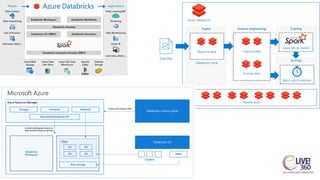
Azure and Databricks together
• Azure launches and manages worker
nodes in the customer subscriptions
• Customer launches a cluster, which
initiates a Databricks appliance
• A managed resource group is deployed
with a Vnet, Security Group and a
Storage account
Azure and Databricks Together
• Close Integration to provide an enterprise
platform
• Use all existing VMs
• Security and Privacy remains with
customer
• Network topology is flexible
Azure and Databricks together
• Azure Storage and Azure Data Lake
integration
• Azure Power BI
• Azure Active Directory
• Azure SQL Data Warehouse, Azure SQL
DB, Azure Cosmos DB
Azure and Databricks Together
• Metadata is stored in an Azure Database
with geo-replication
• Databricks cluster is managed through
Azure Databricks UI
Azure and Databricks Together
• Azure Container Services to run the
control plane and data planes via
containers
• Accelerated Networking
• Latest generation Azure hardware for
performance
Why Azure Databricks?
Collaboration
Why Azure Databricks?
Collaboration
Trusted Cloud
Why Azure Databricks?
Collaboration
Trusted Cloud
Scalability
Azure
Databricks
Fast, easy and collaborative Apache Spark-based analytics service
https://blogs.microsoft.com/ai/shell-iot-ai-safety-intelligent-tools/
Shell Case Study
Shell Case Study
Azure Databricks
● Unlock insights from all your data and build
artificial intelligence (AI) solutions with
Azure Databricks
● Azure Databricks supports Python, Scala,
R, Java and SQL, as well as data science
frameworks and libraries including
TensorFlow, PyTorch and scikit-learn.
Azure Databricks
● Fast, optimised Apache Spark environment
● Interactive workspace with built-in support
for popular tools, languages and
frameworks
Azure Databricks
● Supercharged machine learning on big data
with native Azure Machine Learning
integration
● High-performance modern data
warehousing in conjunction with Azure SQL
Data Warehouse
Azure Databricks
● Start quickly with an optimised Apache
Spark environment
● Spin up clusters and build quickly in a fully
managed Apache Spark environment with
the global scale and availability of Azure
● autoscaling and auto-termination to
improve total cost of ownership (TCO)
Azure Databricks
● Turbocharge machine learning on big data
● Get high-performance modern data
warehousing
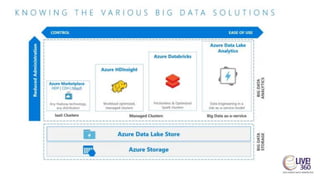
Azure Databricks & HDInsight
● Databricks is focused on collaboration, streaming and batch with a notebook
experience for the user. It integrates well with Azure, has AAD authentication, and
can export to SQL DWH, Cosmos DB, Power BI, etc. Databricks’ greatest strengths
are its zero-management cloud solution and the collaborative, interactive
environment it provides in the form of notebooks.
● HDInsight has Kafka, Storm and Hive LLAP, which Databricks doesn’t have. It is
better for processing very large datasets and in a way that allows the user to just “let
it run”.
● Sometimes a mix of both these technologies occurs. Databricks is more user-
friendly and easier to work with, so is better for exploration, whereas HDInsight is
better for processing data.
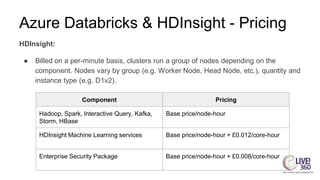
Azure Databricks & HDInsight - Pricing
HDInsight:
● Billed on a per-minute basis, clusters run a group of nodes depending on the
component. Nodes vary by group (e.g. Worker Node, Head Node, etc.), quantity and
instance type (e.g. D1v2).
Component Pricing
Hadoop, Spark, Interactive Query, Kafka,
Storm, HBase
Base price/node-hour
HDInsight Machine Learning services Base price/node-hour + £0.012/core-hour
Enterprise Security Package Base price/node-hour + £0.008/core-hour
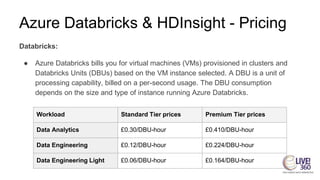
Azure Databricks & HDInsight - Pricing
Databricks:
● Azure Databricks bills you for virtual machines (VMs) provisioned in clusters and
Databricks Units (DBUs) based on the VM instance selected. A DBU is a unit of
processing capability, billed on a per-second usage. The DBU consumption
depends on the size and type of instance running Azure Databricks.
Workload Standard Tier prices Premium Tier prices
Data Analytics £0.30/DBU-hour £0.410/DBU-hour
Data Engineering £0.12/DBU-hour £0.224/DBU-hour
Data Engineering Light £0.06/DBU-hour £0.164/DBU-hour
Azure Databricks & HDInsight - Pricing
Azure Databricks also offers a pre-purchase plan. You can get up to 37% savings
over pay-as-you-go DBU prices when you pre-purchase Azure Databricks Units
(DBU) as Databricks Commit Units (DBCU) for either 1 or 3 years.
HDInsight does not offer a pre-purchase plan.
Azure Databricks & HDInsight - Speed
Azure Databricks is even faster than Apache Spark, which can run 100 x faster than
Hadoop MapReduce. It is a very fast system, and provides a series of performance
enhancements on top of regular Apache Spark.
HDInsight is very effective at rapidly collecting large amounts of data, and with it you can
quickly spin up open source projects and clusters, with no hardware to install or
infrastructure to manage. However, some processes can be slightly slower with
HDInsight than with Databricks.
Azure Databricks & HDInsight - Hadoop
HDInsight uses Apache Hadoop, which is an open-source distributed
data analysis solution. Hadoop manages the processing of large
datasets across large clusters of computers and it detects and
handles failures.
Why Hadoop?
Azure provides dynamic machines that are billed only when active.
This enables elastic computing, where you can add machines for
particular workloads or projects and then remove them when not
needed. HDInsight can take advantage of this scalable platform. It can
also capitalize on the security and management features of Azure,
integration with Azure Active Directory and Log Analytics.
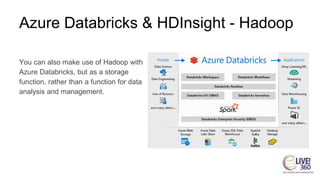
Azure Databricks & HDInsight - Hadoop
You can also make use of Hadoop with
Azure Databricks, but as a storage
function, rather than a function for data
analysis and management.
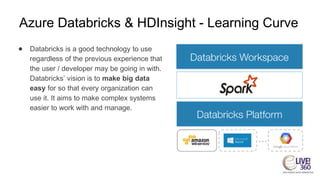
Azure Databricks & HDInsight - Learning Curve
● Databricks is a good technology to use
regardless of the previous experience that
the user / developer may be going in with.
Databricks’ vision is to make big data
easy for so that every organization can
use it. It aims to make complex systems
easier to work with and manage.
Azure Databricks & HDInsight -
Learning Curve
• There is more of a learning curve when it
comes to HDInsight.
• Generally, comprehensive training is
required, and a background knowledge of
SQL is very helpful.
Azure Databricks & HDInsight -
Languages
• While Azure Databricks is Spark based, it
allows commonly-used programming
languages like Python, R, and SQL to be
used. These languages are converted in
the backend through APIs, to interact with
Spark.
Azure Databricks & HDInsight - Languages
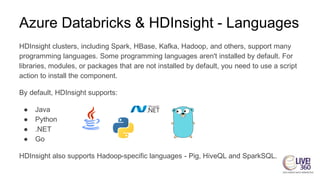
HDInsight clusters, including Spark, HBase, Kafka, Hadoop, and others, support many
programming languages. Some programming languages aren't installed by default. For
libraries, modules, or packages that are not installed by default, you need to use a script
action to install the component.
By default, HDInsight supports:
● Java
● Python
● .NET
● Go
HDInsight also supports Hadoop-specific languages - Pig, HiveQL and SparkSQL.
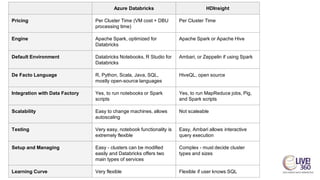
Azure Databricks HDInsight
Pricing Per Cluster Time (VM cost + DBU
processing time)
Per Cluster Time
Engine Apache Spark, optimized for
Databricks
Apache Spark or Apache Hive
Default Environment Databricks Notebooks, R Studio for
Databricks
Ambari, or Zeppelin if using Spark
De Facto Language R, Python, Scala, Java, SQL,
mostly open-source languages
HiveQL, open source
Integration with Data Factory Yes, to run notebooks or Spark
scripts
Yes, to run MapReduce jobs, Pig,
and Spark scripts
Scalability Easy to change machines, allows
autoscaling
Not scaleable
Testing Very easy, notebook functionality is
extremely flexible
Easy, Ambari allows interactive
query execution
Setup and Managing Easy - clusters can be modified
easily and Databricks offers two
main types of services
Complex - must decide cluster
types and sizes
Learning Curve Very flexible Flexible if user knows SQL
Azure Databricks and Data Lake Analytics
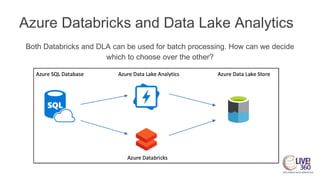
Both Databricks and DLA can be used for batch processing. How can we decide
which to choose over the other?
Azure Databricks and Data Lake Analytics
Data Lake Analytics is a distributed computing resource, which uses its strong U-SQL
language to assist in carrying out complex transformations and loading the data in
Azure/Non-Azure databases and file systems. Data Lake Analytics combines the power
of distributed processing with ease of SQL-like language, making it suitable for Ad-hoc
data processing.
Preferred use cases for DLA:
● Large amounts of data where conversion and loading are the only actions needed
● Processing data from relational databases into Azure
● Repetitive loads with no intermediary action
Azure Databricks and Data Lake Analytics
Azure Databricks is a Notebook type resource which allows setting up of high-
performance clusters which perform computing using its in-memory architecture. Users
can choose from a wide variety of programming languages and use their favorite libraries
to perform transformations, data type conversions and modeling. Databricks also comes
with infinite API connectivity options, which enables connection to various data sources
that include SQL/No-SQL/File systems and a lot more.
Preferred use cases for Databricks:
● Processes that require intermediary analysis of data
● ETL that requires more visibility during data transformation and modeling
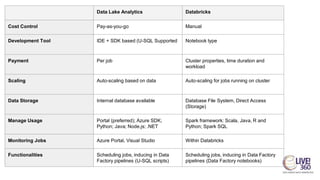
Data Lake Analytics Databricks
Cost Control Pay-as-you-go Manual
Development Tool IDE + SDK based (U-SQL Supported Notebook type
Payment Per job Cluster properties, time duration and
workload
Scaling Auto-scaling based on data Auto-scaling for jobs running on cluster
Data Storage Internal database available Database File System, Direct Access
(Storage)
Manage Usage Portal (preferred); Azure SDK;
Python; Java; Node.js; .NET
Spark framework: Scala, Java, R and
Python; Spark SQL
Monitoring Jobs Azure Portal, Visual Studio Within Databricks
Functionalities Scheduling jobs, inducing in Data
Factory pipelines (U-SQL scripts)
Scheduling jobs, inducing in Data Factory
pipelines (Data Factory notebooks)
Data Lake Analytics and HDInsight
In the case of these technologies, they can actually be used together.
HDInsight is the analytics service whereas the Azure Data Lake Storage is the storage
service. You most likely need both to have functional analytics cluster.
HDInsight provides the cluster, fully manages the open-source packages for analytics
(Hadoop, Spark, etc), and you set up your cluster to use Azure Data Lake Storage which
support HDFS API (Hadoop FileSystem) on top of Cloud Storage.
Essentially, Hdinsight is a managed Hadoop service to provide compute support, and
DLA is a managed storage service to provide large amount of storage support.

Comparing Microsoft Big Data Platform Technologies

  • 1.
    Workshop Slides Follow-Up: ComparingTechnologies Jen Stirrup Data Whisperer, Data Relish Level: 300
  • 2.
  • 3.
    What is BigData? “Big data is a collection of data sets so large and complex that it becomes awkward to work with using on-hand database management tools. Difficulties include capture, storage, search, sharing, analysis, and visualization.” – Wikipedia
  • 4.
    Examples Enormous amounts ofdata . online behavior social networking users . .. samples of medical ailments .. … purchasing habits of grocery shoppers … …. crime statistics of cities …. ….. “internet of things” IoT….. …… 24/7 out-patient monitor …… ……. real-time tele-metric devices …….
  • 6.
    fully featured RDBMS transactionalprocessing rich query managed as a service elastic scale internet accessible http/rest schema-free data model arbitrary data formats
  • 7.
  • 8.
    What is ApacheSpark? Apache Spark solves a problem There's no need to structure everything as map and reduce operations.
  • 9.
    Apache Spark • Interactivemanipulation and visualization of data – Scala, Python, and R Interactive Shells – Jupyter Notebook with PySpark (Python) and Spark (Scala) kernels provide in-browser interaction
  • 10.
    Apache Spark • Unifiedplatform for processing multiple workloads – Real-time processing, Machine Learning, Stream Analytics, Interactive Querying, Graphing
  • 11.
    Apache Spark • Leveragesin-memory processing for really big data – Resilient distributed datasets (RDDs) – APIs for processing large datasets – Up to 100x faster than Hadoop
  • 12.
    What is Spark? •an open-source software soIution that performs rapid caIcuIations on in-memory datasets • RDD (ResiIient Distributed Data) is the basis for what Spark enabIes – ResiIient – Distributed
  • 14.
    Example RDD Transformations •map(func) • filter(func) • distinct(func)
  • 15.
    Example RDD Actions •count() • reduce(func) • collect() • take()
  • 16.
  • 17.
    HDInsight Cluster Types •Hadoop: Query workloads – Reliable data storage, simple MapReduce • HBase: NoSQL workloads – Distributed database offering random access to large amounts of data • Apache Storm: Stream workloads – Real-time analysis of moving data streams • Apache Spark: High-performance workloads – In-memory parallel processing
  • 20.
  • 21.
    What is Databricks? •Databricks provides an end-to-end, managed Apache Spark platform optimized for the cloud • Improved performance of Spark jobs in the cloud by 10 – 100x • Cost Efficient to run large-scale Spark workloads
  • 23.
    Databricks for BigData • Data Scientists get an interactive notebook environment • Good monitoring suite • Security Controls to facilitate thousands of users
  • 24.
    Databricks for DataEngineers • Databricks Runtime adds increased performance to Apache Spark workloads when running on Azure • Auto-scaling and auto-termination for Spark clusters to automatically minimize costs
  • 25.
    Databricks for DataScience • Notebooks have real-time collaboration and are multi-editable for productivity • Integration with Power BI for data visualization • Supported by Azure Database
  • 26.
  • 27.
    Why is Databricksin Azure? • Close integration with Azure services • Optimized connectors • One-click management directly from the Azure console • Azure Databricks will greatly simplify building enterprise-grade production data applications
  • 28.
    Azure and Databrickstogether • Azure launches and manages worker nodes in the customer subscriptions • Customer launches a cluster, which initiates a Databricks appliance • A managed resource group is deployed with a Vnet, Security Group and a Storage account
  • 29.
    Azure and DatabricksTogether • Close Integration to provide an enterprise platform • Use all existing VMs • Security and Privacy remains with customer • Network topology is flexible
  • 30.
    Azure and Databrickstogether • Azure Storage and Azure Data Lake integration • Azure Power BI • Azure Active Directory • Azure SQL Data Warehouse, Azure SQL DB, Azure Cosmos DB
  • 31.
    Azure and DatabricksTogether • Metadata is stored in an Azure Database with geo-replication • Databricks cluster is managed through Azure Databricks UI
  • 32.
    Azure and DatabricksTogether • Azure Container Services to run the control plane and data planes via containers • Accelerated Networking • Latest generation Azure hardware for performance
  • 33.
  • 34.
  • 35.
  • 36.
    Azure Databricks Fast, easy andcollaborative Apache Spark-based analytics service https://blogs.microsoft.com/ai/shell-iot-ai-safety-intelligent-tools/ Shell Case Study
  • 37.
  • 38.
    Azure Databricks ● Unlockinsights from all your data and build artificial intelligence (AI) solutions with Azure Databricks ● Azure Databricks supports Python, Scala, R, Java and SQL, as well as data science frameworks and libraries including TensorFlow, PyTorch and scikit-learn.
  • 39.
    Azure Databricks ● Fast,optimised Apache Spark environment ● Interactive workspace with built-in support for popular tools, languages and frameworks
  • 40.
    Azure Databricks ● Superchargedmachine learning on big data with native Azure Machine Learning integration ● High-performance modern data warehousing in conjunction with Azure SQL Data Warehouse
  • 41.
    Azure Databricks ● Startquickly with an optimised Apache Spark environment ● Spin up clusters and build quickly in a fully managed Apache Spark environment with the global scale and availability of Azure ● autoscaling and auto-termination to improve total cost of ownership (TCO)
  • 42.
    Azure Databricks ● Turbochargemachine learning on big data ● Get high-performance modern data warehousing
  • 44.
  • 45.
    What is Databricks? •Databricks provides an end-to-end, managed Apache Spark platform optimized for the cloud • Improved performance of Spark jobs in the cloud by 10 – 100x • Cost Efficient to run large-scale Spark workloads
  • 47.
    Databricks for BigData • Data Scientists get an interactive notebook environment • Good monitoring suite • Security Controls to facilitate thousands of users
  • 48.
    Databricks for DataEngineers • Databricks Runtime adds increased performance to Apache Spark workloads when running on Azure • Auto-scaling and auto-termination for Spark clusters to automatically minimize costs
  • 49.
    Databricks for DataScience • Notebooks have real-time collaboration and are multi-editable for productivity • Integration with Power BI for data visualization • Supported by Azure Database
  • 50.
  • 51.
    Why is Databricksin Azure? • Close integration with Azure services • Optimized connectors • One-click management directly from the Azure console • Azure Databricks will greatly simplify building enterprise-grade production data applications
  • 52.
    Azure and Databrickstogether • Azure launches and manages worker nodes in the customer subscriptions • Customer launches a cluster, which initiates a Databricks appliance • A managed resource group is deployed with a Vnet, Security Group and a Storage account
  • 53.
    Azure and DatabricksTogether • Close Integration to provide an enterprise platform • Use all existing VMs • Security and Privacy remains with customer • Network topology is flexible
  • 54.
    Azure and Databrickstogether • Azure Storage and Azure Data Lake integration • Azure Power BI • Azure Active Directory • Azure SQL Data Warehouse, Azure SQL DB, Azure Cosmos DB
  • 55.
    Azure and DatabricksTogether • Metadata is stored in an Azure Database with geo-replication • Databricks cluster is managed through Azure Databricks UI
  • 56.
    Azure and DatabricksTogether • Azure Container Services to run the control plane and data planes via containers • Accelerated Networking • Latest generation Azure hardware for performance
  • 57.
  • 58.
  • 59.
  • 60.
    Azure Databricks Fast, easy andcollaborative Apache Spark-based analytics service https://blogs.microsoft.com/ai/shell-iot-ai-safety-intelligent-tools/ Shell Case Study
  • 61.
  • 62.
    Azure Databricks ● Unlockinsights from all your data and build artificial intelligence (AI) solutions with Azure Databricks ● Azure Databricks supports Python, Scala, R, Java and SQL, as well as data science frameworks and libraries including TensorFlow, PyTorch and scikit-learn.
  • 63.
    Azure Databricks ● Fast,optimised Apache Spark environment ● Interactive workspace with built-in support for popular tools, languages and frameworks
  • 64.
    Azure Databricks ● Superchargedmachine learning on big data with native Azure Machine Learning integration ● High-performance modern data warehousing in conjunction with Azure SQL Data Warehouse
  • 65.
    Azure Databricks ● Startquickly with an optimised Apache Spark environment ● Spin up clusters and build quickly in a fully managed Apache Spark environment with the global scale and availability of Azure ● autoscaling and auto-termination to improve total cost of ownership (TCO)
  • 66.
    Azure Databricks ● Turbochargemachine learning on big data ● Get high-performance modern data warehousing
  • 68.
    Azure Databricks &HDInsight ● Databricks is focused on collaboration, streaming and batch with a notebook experience for the user. It integrates well with Azure, has AAD authentication, and can export to SQL DWH, Cosmos DB, Power BI, etc. Databricks’ greatest strengths are its zero-management cloud solution and the collaborative, interactive environment it provides in the form of notebooks. ● HDInsight has Kafka, Storm and Hive LLAP, which Databricks doesn’t have. It is better for processing very large datasets and in a way that allows the user to just “let it run”. ● Sometimes a mix of both these technologies occurs. Databricks is more user- friendly and easier to work with, so is better for exploration, whereas HDInsight is better for processing data.
  • 70.
    Azure Databricks &HDInsight - Pricing HDInsight: ● Billed on a per-minute basis, clusters run a group of nodes depending on the component. Nodes vary by group (e.g. Worker Node, Head Node, etc.), quantity and instance type (e.g. D1v2). Component Pricing Hadoop, Spark, Interactive Query, Kafka, Storm, HBase Base price/node-hour HDInsight Machine Learning services Base price/node-hour + £0.012/core-hour Enterprise Security Package Base price/node-hour + £0.008/core-hour
  • 71.
    Azure Databricks &HDInsight - Pricing Databricks: ● Azure Databricks bills you for virtual machines (VMs) provisioned in clusters and Databricks Units (DBUs) based on the VM instance selected. A DBU is a unit of processing capability, billed on a per-second usage. The DBU consumption depends on the size and type of instance running Azure Databricks. Workload Standard Tier prices Premium Tier prices Data Analytics £0.30/DBU-hour £0.410/DBU-hour Data Engineering £0.12/DBU-hour £0.224/DBU-hour Data Engineering Light £0.06/DBU-hour £0.164/DBU-hour
  • 72.
    Azure Databricks &HDInsight - Pricing Azure Databricks also offers a pre-purchase plan. You can get up to 37% savings over pay-as-you-go DBU prices when you pre-purchase Azure Databricks Units (DBU) as Databricks Commit Units (DBCU) for either 1 or 3 years. HDInsight does not offer a pre-purchase plan.
  • 73.
    Azure Databricks &HDInsight - Speed Azure Databricks is even faster than Apache Spark, which can run 100 x faster than Hadoop MapReduce. It is a very fast system, and provides a series of performance enhancements on top of regular Apache Spark. HDInsight is very effective at rapidly collecting large amounts of data, and with it you can quickly spin up open source projects and clusters, with no hardware to install or infrastructure to manage. However, some processes can be slightly slower with HDInsight than with Databricks.
  • 74.
    Azure Databricks &HDInsight - Hadoop HDInsight uses Apache Hadoop, which is an open-source distributed data analysis solution. Hadoop manages the processing of large datasets across large clusters of computers and it detects and handles failures. Why Hadoop? Azure provides dynamic machines that are billed only when active. This enables elastic computing, where you can add machines for particular workloads or projects and then remove them when not needed. HDInsight can take advantage of this scalable platform. It can also capitalize on the security and management features of Azure, integration with Azure Active Directory and Log Analytics.
  • 75.
    Azure Databricks &HDInsight - Hadoop You can also make use of Hadoop with Azure Databricks, but as a storage function, rather than a function for data analysis and management.
  • 76.
    Azure Databricks &HDInsight - Learning Curve ● Databricks is a good technology to use regardless of the previous experience that the user / developer may be going in with. Databricks’ vision is to make big data easy for so that every organization can use it. It aims to make complex systems easier to work with and manage.
  • 77.
    Azure Databricks &HDInsight - Learning Curve • There is more of a learning curve when it comes to HDInsight. • Generally, comprehensive training is required, and a background knowledge of SQL is very helpful.
  • 78.
    Azure Databricks &HDInsight - Languages • While Azure Databricks is Spark based, it allows commonly-used programming languages like Python, R, and SQL to be used. These languages are converted in the backend through APIs, to interact with Spark.
  • 79.
    Azure Databricks &HDInsight - Languages HDInsight clusters, including Spark, HBase, Kafka, Hadoop, and others, support many programming languages. Some programming languages aren't installed by default. For libraries, modules, or packages that are not installed by default, you need to use a script action to install the component. By default, HDInsight supports: ● Java ● Python ● .NET ● Go HDInsight also supports Hadoop-specific languages - Pig, HiveQL and SparkSQL.
  • 80.
    Azure Databricks HDInsight PricingPer Cluster Time (VM cost + DBU processing time) Per Cluster Time Engine Apache Spark, optimized for Databricks Apache Spark or Apache Hive Default Environment Databricks Notebooks, R Studio for Databricks Ambari, or Zeppelin if using Spark De Facto Language R, Python, Scala, Java, SQL, mostly open-source languages HiveQL, open source Integration with Data Factory Yes, to run notebooks or Spark scripts Yes, to run MapReduce jobs, Pig, and Spark scripts Scalability Easy to change machines, allows autoscaling Not scaleable Testing Very easy, notebook functionality is extremely flexible Easy, Ambari allows interactive query execution Setup and Managing Easy - clusters can be modified easily and Databricks offers two main types of services Complex - must decide cluster types and sizes Learning Curve Very flexible Flexible if user knows SQL
  • 81.
    Azure Databricks andData Lake Analytics Both Databricks and DLA can be used for batch processing. How can we decide which to choose over the other?
  • 82.
    Azure Databricks andData Lake Analytics Data Lake Analytics is a distributed computing resource, which uses its strong U-SQL language to assist in carrying out complex transformations and loading the data in Azure/Non-Azure databases and file systems. Data Lake Analytics combines the power of distributed processing with ease of SQL-like language, making it suitable for Ad-hoc data processing. Preferred use cases for DLA: ● Large amounts of data where conversion and loading are the only actions needed ● Processing data from relational databases into Azure ● Repetitive loads with no intermediary action
  • 83.
    Azure Databricks andData Lake Analytics Azure Databricks is a Notebook type resource which allows setting up of high- performance clusters which perform computing using its in-memory architecture. Users can choose from a wide variety of programming languages and use their favorite libraries to perform transformations, data type conversions and modeling. Databricks also comes with infinite API connectivity options, which enables connection to various data sources that include SQL/No-SQL/File systems and a lot more. Preferred use cases for Databricks: ● Processes that require intermediary analysis of data ● ETL that requires more visibility during data transformation and modeling
  • 84.
    Data Lake AnalyticsDatabricks Cost Control Pay-as-you-go Manual Development Tool IDE + SDK based (U-SQL Supported Notebook type Payment Per job Cluster properties, time duration and workload Scaling Auto-scaling based on data Auto-scaling for jobs running on cluster Data Storage Internal database available Database File System, Direct Access (Storage) Manage Usage Portal (preferred); Azure SDK; Python; Java; Node.js; .NET Spark framework: Scala, Java, R and Python; Spark SQL Monitoring Jobs Azure Portal, Visual Studio Within Databricks Functionalities Scheduling jobs, inducing in Data Factory pipelines (U-SQL scripts) Scheduling jobs, inducing in Data Factory pipelines (Data Factory notebooks)
  • 85.
    Data Lake Analyticsand HDInsight In the case of these technologies, they can actually be used together. HDInsight is the analytics service whereas the Azure Data Lake Storage is the storage service. You most likely need both to have functional analytics cluster. HDInsight provides the cluster, fully manages the open-source packages for analytics (Hadoop, Spark, etc), and you set up your cluster to use Azure Data Lake Storage which support HDFS API (Hadoop FileSystem) on top of Cloud Storage. Essentially, Hdinsight is a managed Hadoop service to provide compute support, and DLA is a managed storage service to provide large amount of storage support.