© ABB University
February 13, 2024 | Slide 1
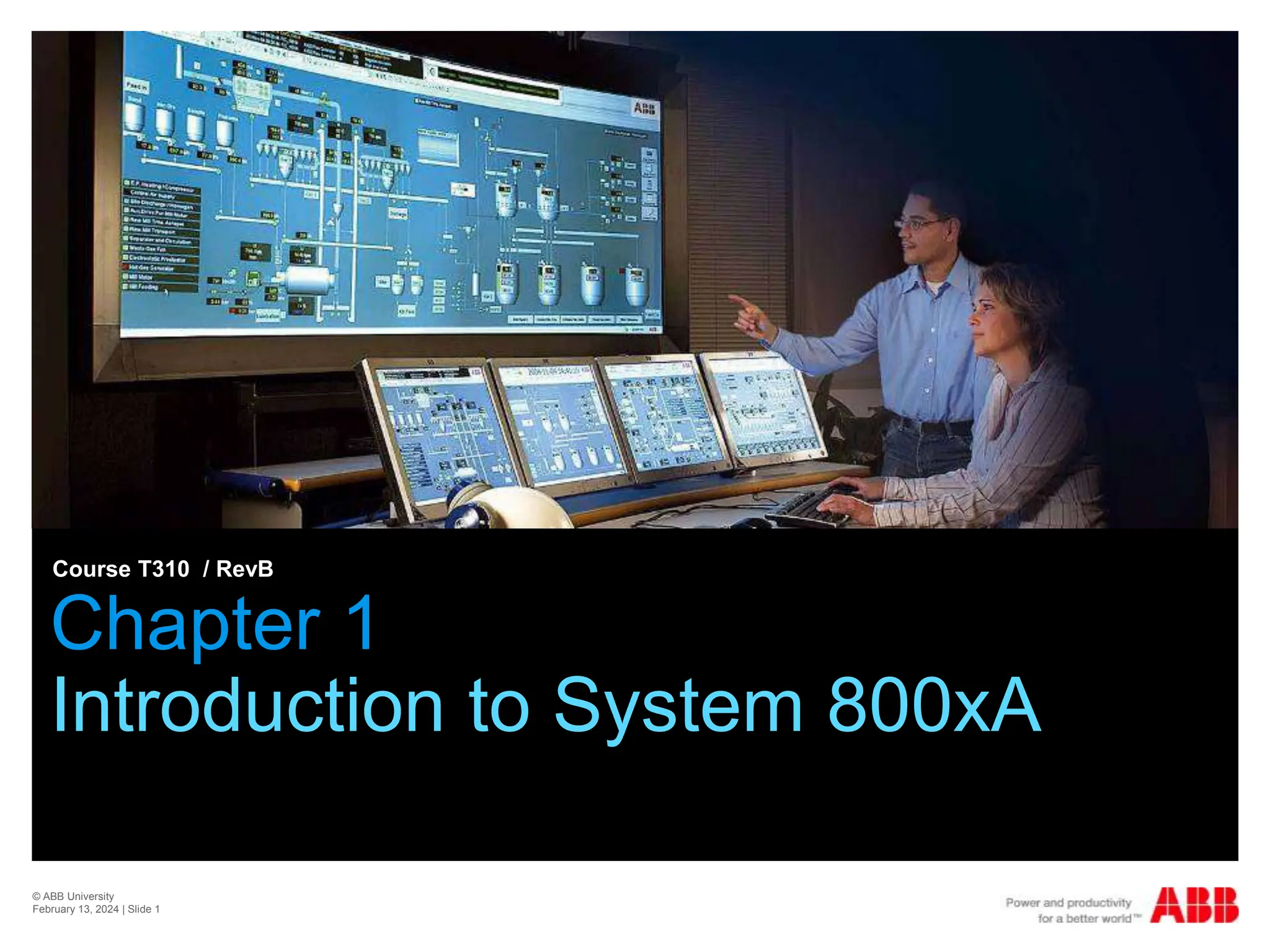
Chapter 1
Introduction to System 800xA
Course T310 / RevB
© ABB University
February 13, 2024 | Slide 2
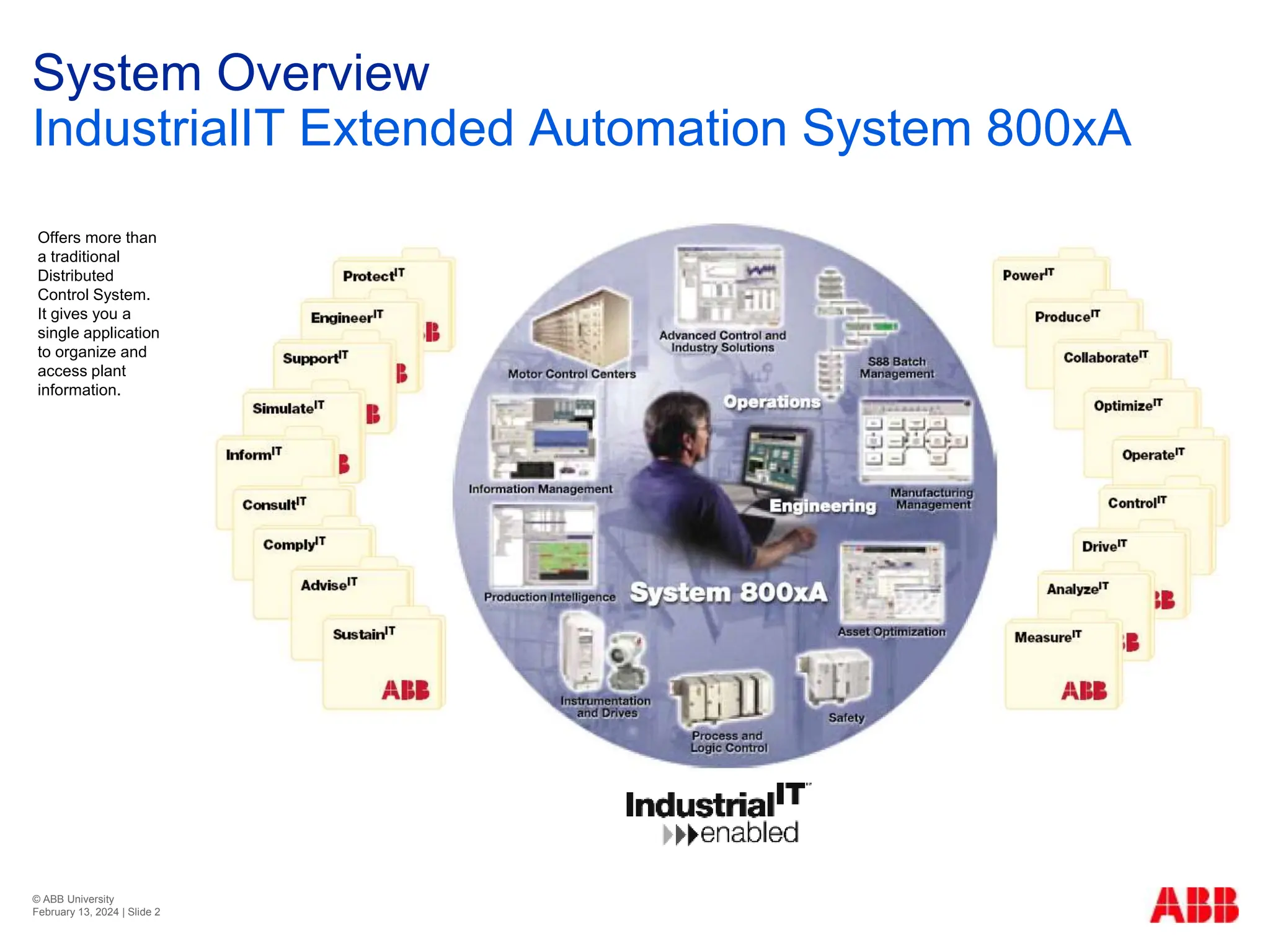
System Overview
IndustrialIT Extended Automation System 800xA
Offers more than
a traditional
Distributed
Control System.
It gives you a
single application
to organize and
access plant
information.
© ABB University
February 13, 2024 | Slide 3
Introduction to 800xA
Workplaces
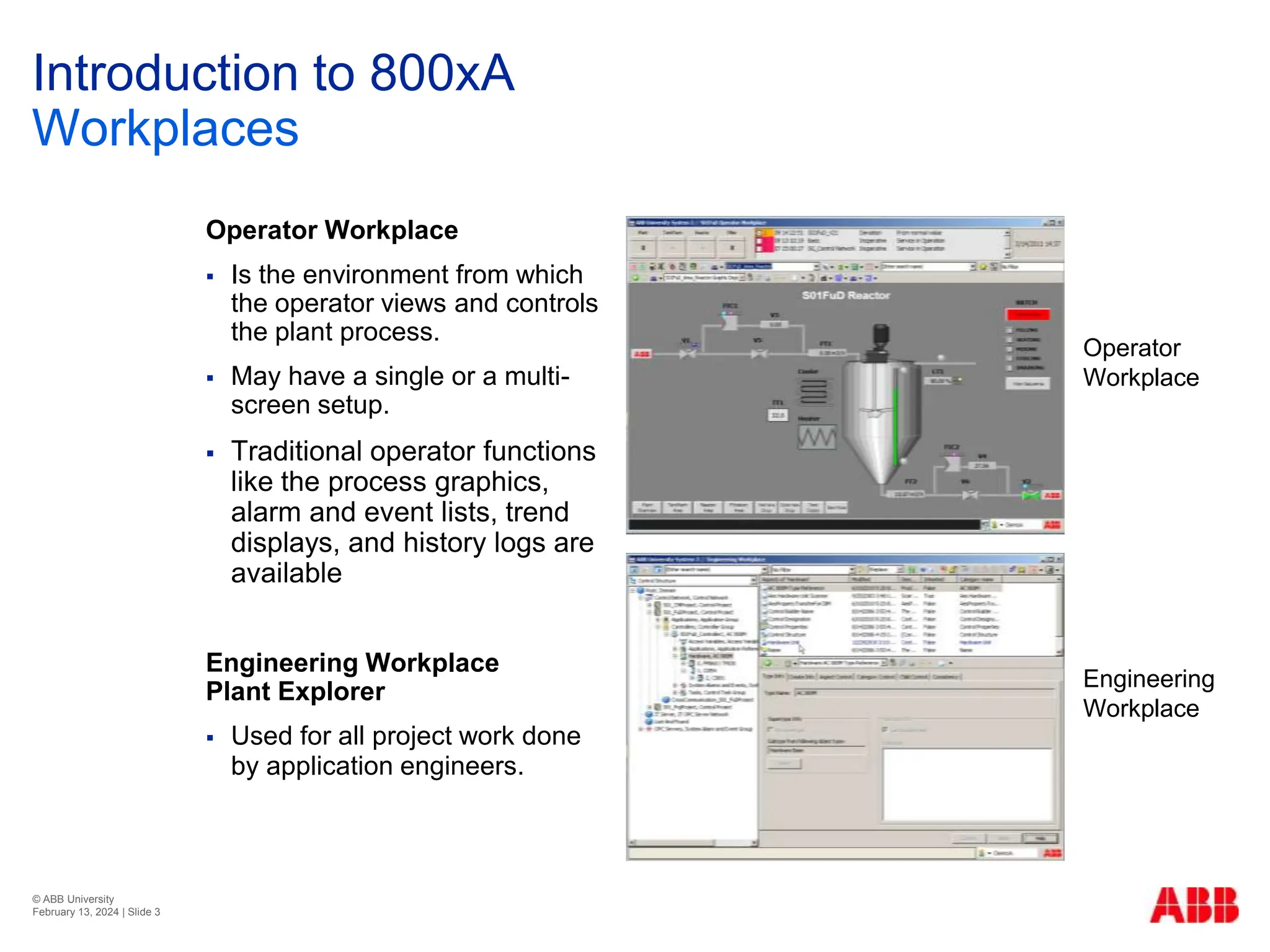
Operator Workplace
 Is the environment from which
the operator views and controls
the plant process.
 May have a single or a multi-
screen setup.
 Traditional operator functions
like the process graphics,
alarm and event lists, trend
displays, and history logs are
available
Engineering Workplace
Plant Explorer
 Used for all project work done
by application engineers.
Operator
Workplace
Engineering
Workplace
© ABB University
February 13, 2024 | Slide 4
Introduction to 800xA
Aspect Object Concept
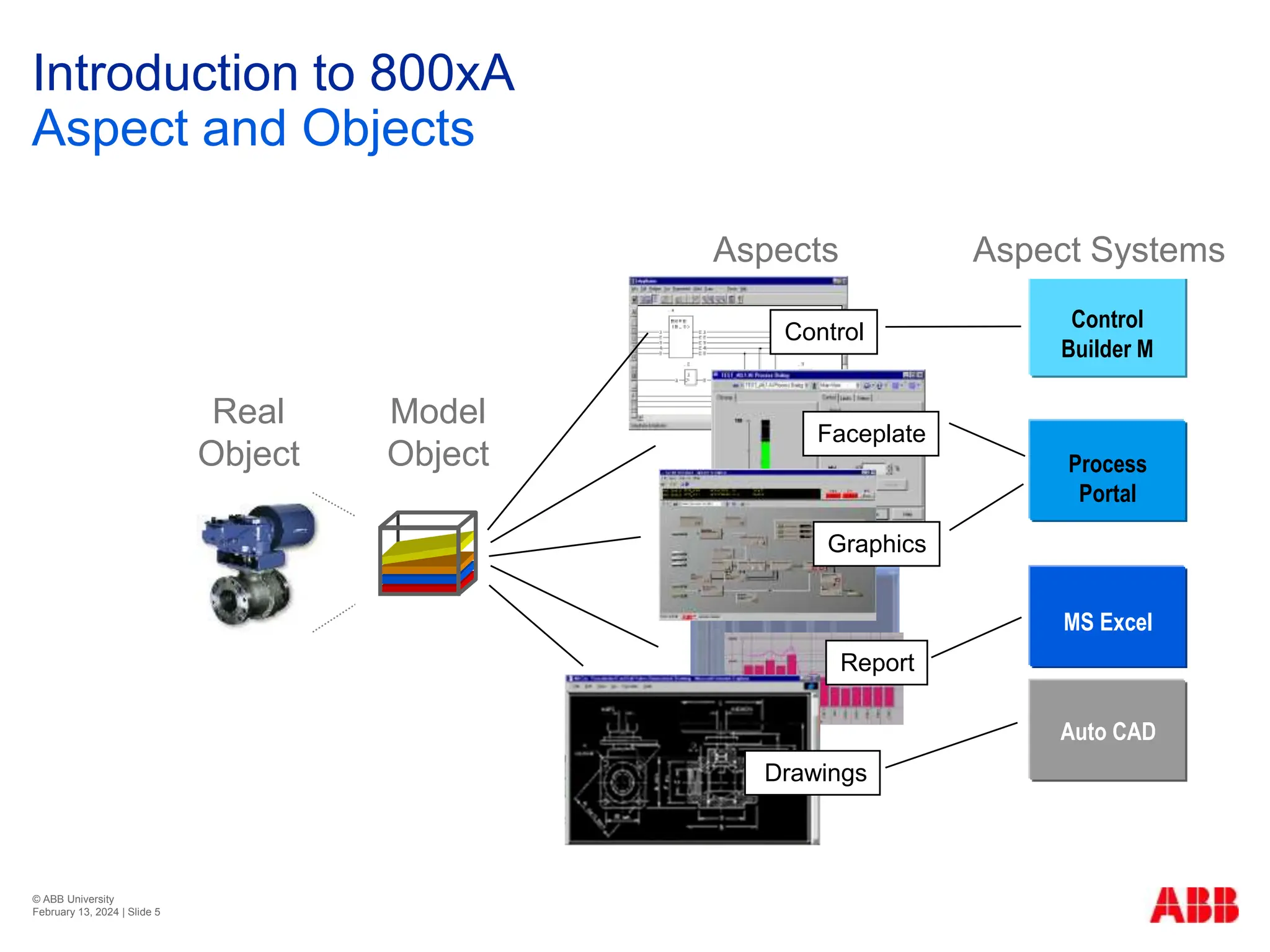
 A plant of today is made up of many real entities, such as
pipes, tanks, valves, motors etc. In System 800xA these
entities or objects are modeled in the control system, and
called Aspect Objects.
 There are a number of different types of information
connected to each object. These types of information are
called Aspects.
© ABB University
February 13, 2024 | Slide 5
Introduction to 800xA
Aspect and Objects
Model
Object
Real
Object
Applications
Control
Builder M
Process
Portal
MS Excel
Auto CAD
Aspect Systems
Aspects
Control
Faceplate
Graphics
Report
Drawings
© ABB University
February 13, 2024 | Slide 6
Introduction to 800xA
Example of a Control Valve
Maintenance Record
Operator Notes
P & I Diagram
Product Description
Simulation Model
Control Logic
Control Dialog
Process Graphics
© ABB University
February 13, 2024 | Slide 7
Introduction to 800xA
Structures
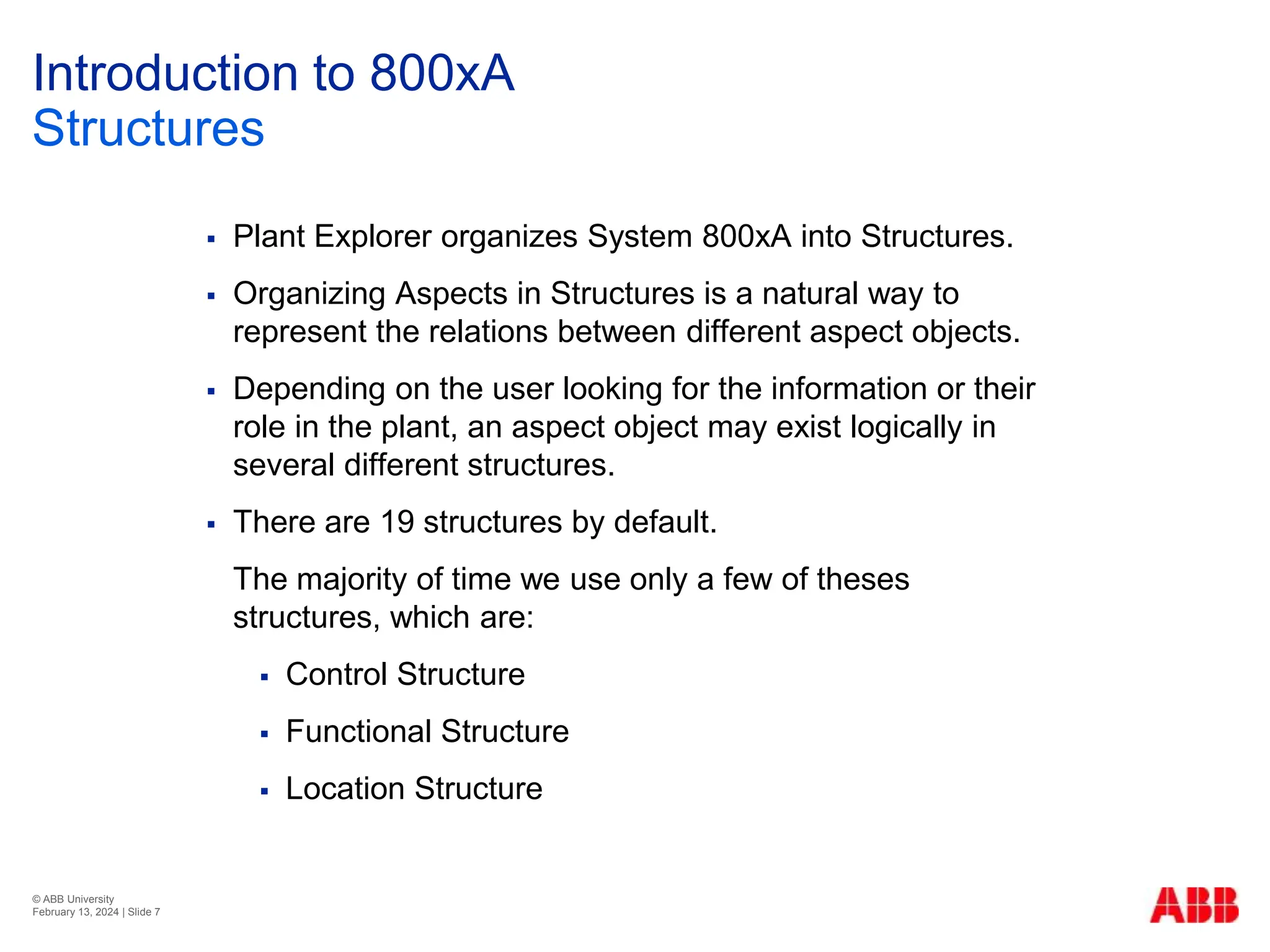
 Plant Explorer organizes System 800xA into Structures.
 Organizing Aspects in Structures is a natural way to
represent the relations between different aspect objects.
 Depending on the user looking for the information or their
role in the plant, an aspect object may exist logically in
several different structures.
 There are 19 structures by default.
The majority of time we use only a few of theses
structures, which are:
 Control Structure
 Functional Structure
 Location Structure
© ABB University
February 13, 2024 | Slide 8
Introduction to 800xA
Control Structure
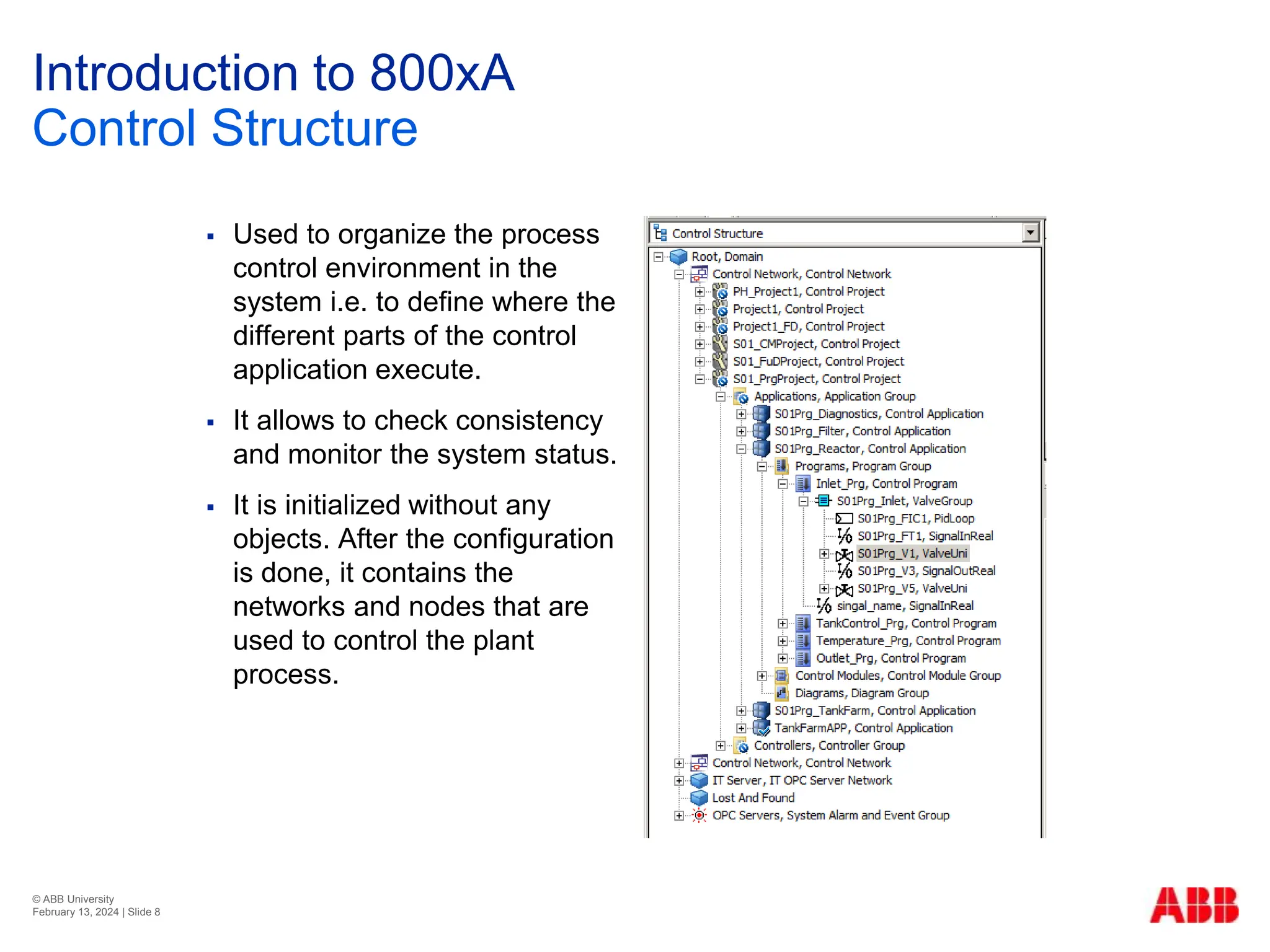
 Used to organize the process
control environment in the
system i.e. to define where the
different parts of the control
application execute.
 It allows to check consistency
and monitor the system status.
 It is initialized without any
objects. After the configuration
is done, it contains the
networks and nodes that are
used to control the plant
process.
© ABB University
February 13, 2024 | Slide 9
Introduction to 800xA
Functional Structure
 Describes the functionality of
the plant.
 Used to structure the plant into
systems and subsystems
according to the plant
equipment.
 It can also be used to organize
displays, alarm sectioning and
other functions that are related
to the structure of the plant.
© ABB University
February 13, 2024 | Slide 10
Introduction to 800xA
Location Structure
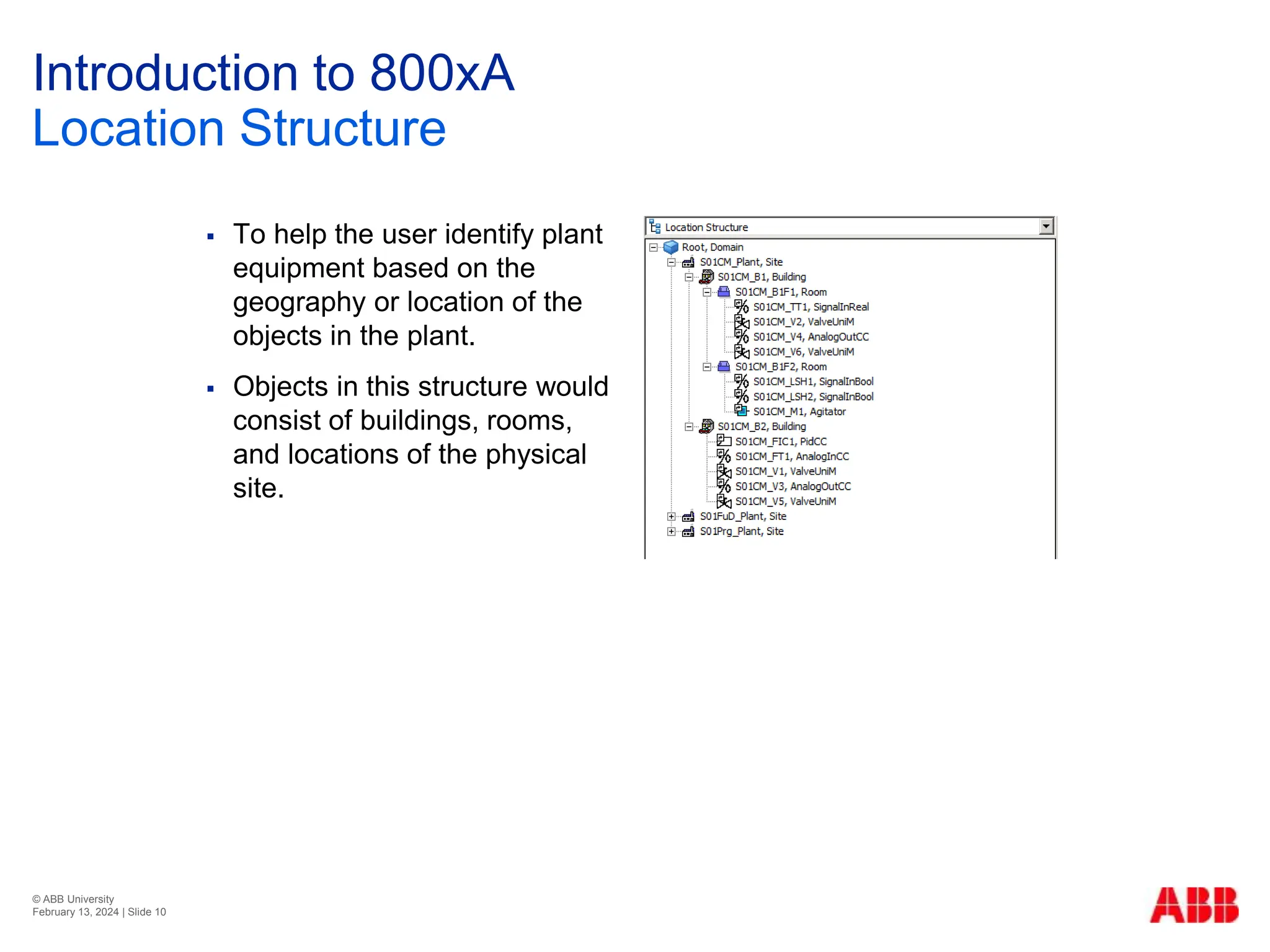
 To help the user identify plant
equipment based on the
geography or location of the
objects in the plant.
 Objects in this structure would
consist of buildings, rooms,
and locations of the physical
site.
© ABB University
February 13, 2024 | Slide 11
Introduction to 800xA
System Topology
 The System 800xA architecture assumes a system of
computers and devices that communicate with each other
over different types of communication networks, as
illustrated conceptually in the next page.
 The Workplaces uses either dedicated client computers or
combined client/server machines.
 System communication in the 800xA System is based on
Ethernet and TCP/IP networks.
 Servers run software that provides system functionality,
Workplaces run software that provides various forms of
user interaction.
© ABB University
February 13, 2024 | Slide 12
Introduction to 800xA
System Topology
Aspect Server
 It is the heart of the 800xA system. As such it
must be accessible to all nodes all of the time.
 Supports “1 out of 2” or “2 out of 3”
redundancy.
Connectivity Server
 Provides access to the controllers and other
data sources.
 Several groups of Connectivity Servers may
exist in a system, each serving one set of data
sources.
Application Server
Run various types of system application, such as:
 Batch management
 Asset optimization
Fieldbus
Client/server Network #1
Client/server Network #2
Control Network #1
Control Network #2
Field
Devices
Domain
Server(s)
Controllers
Connectivity
Server(s)
Aspect
Server(s)
Application
Server(s)
Workplaces
Single
1oo2
2oo3
Single
1oo2
© ABB University
February 13, 2024 | Slide 13
Introduction to 800xA
Single Node System
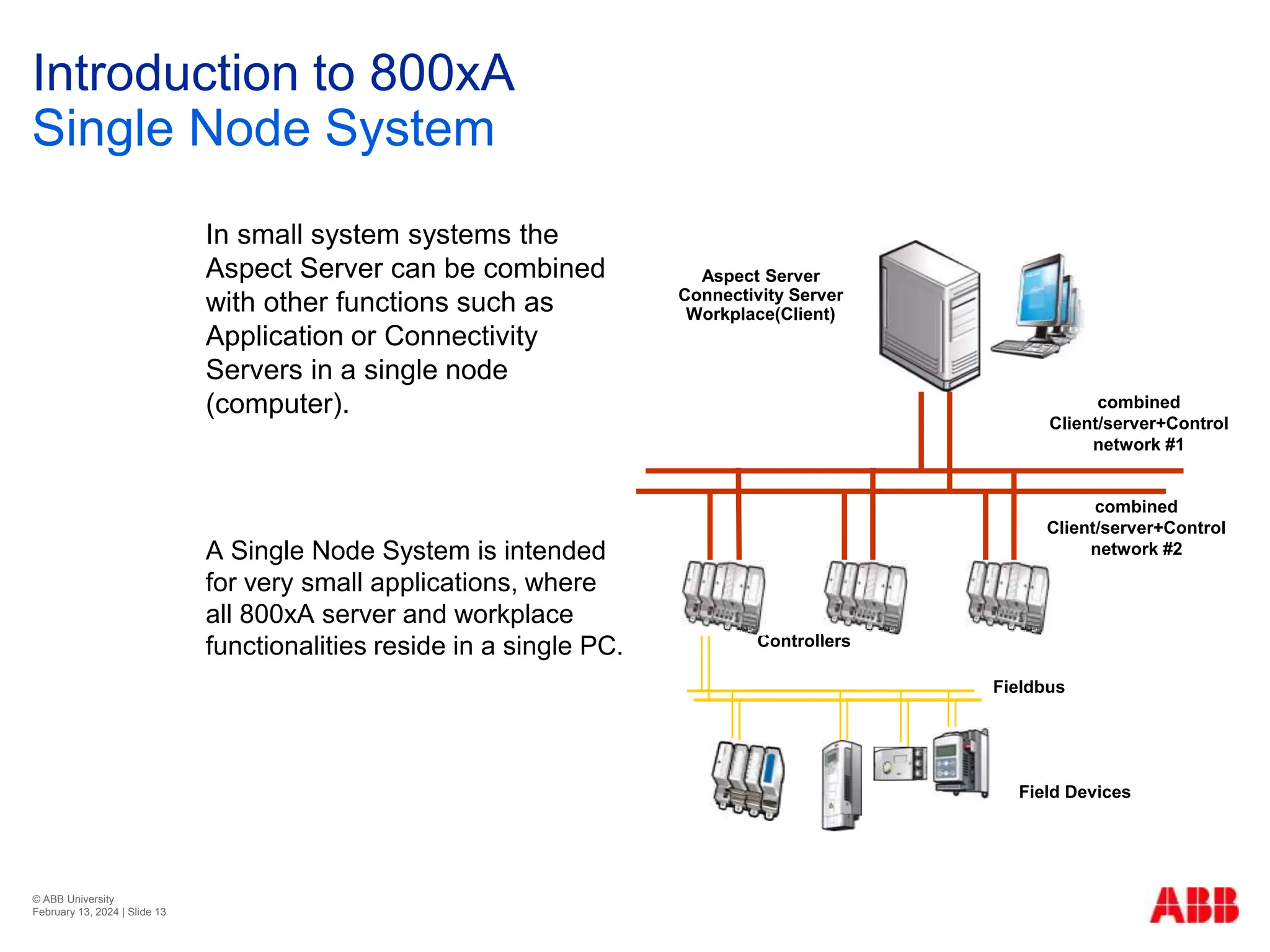
In small system systems the
Aspect Server can be combined
with other functions such as
Application or Connectivity
Servers in a single node
(computer).
A Single Node System is intended
for very small applications, where
all 800xA server and workplace
functionalities reside in a single PC.
Fieldbus
combined
Client/server+Control
network #1
combined
Client/server+Control
network #2
Field Devices
Aspect Server
Connectivity Server
Workplace(Client)
Controllers
© ABB University
February 13, 2024 | Slide 14
Introduction to 800xA
Network Structure
Client/Server Network
 Used for communication between servers, and between client
workplaces and servers.
 Can be connected to a plant intranet, and via a firewall to the
Internet.
 The Client/Server network can optionally be made redundant.
Control Network
 Connects controllers to the servers .
 Optimized for high performance and reliable communication.
 Predictable response times in real time.
 Can optionally be made redundant.
© ABB University
February 13, 2024 | Slide 15
Introduction to 800xA
Network Structure
Field buses
 Used to interconnect field devices, and to connect these devices
to the system, either via a controller or directly to a server.
 Examples of field devices are: I/O modules, smart sensors
and actuators, variable speed drives, PLCs, etc.
© ABB University
February 13, 2024 | Slide 16
Introduction to 800xA
Exercise – Draw a System Architecture
Draw the logical system configuration and network structure
of a separated Control and Client/Server network with the
following specifications:
 2 x AC800M controllers
 Redundant Connectivity Servers
 Redundant Aspect Servers - 2oo3 redundancy (2 out of 3)
 Redundant Domain Controllers.
 Two Operator Workplaces (Clients).
 Two Engineering Workplaces (Clients).
 Redundant Client/Server and Control Networks.
© ABB University
February 13, 2024 | Slide 17

T310-01 Introduction to System 800xA - RevB.pptx

  • 1.
    © ABB University February13, 2024 | Slide 1 Chapter 1 Introduction to System 800xA Course T310 / RevB
  • 2.
    © ABB University February13, 2024 | Slide 2 System Overview IndustrialIT Extended Automation System 800xA Offers more than a traditional Distributed Control System. It gives you a single application to organize and access plant information.
  • 3.
    © ABB University February13, 2024 | Slide 3 Introduction to 800xA Workplaces Operator Workplace  Is the environment from which the operator views and controls the plant process.  May have a single or a multi- screen setup.  Traditional operator functions like the process graphics, alarm and event lists, trend displays, and history logs are available Engineering Workplace Plant Explorer  Used for all project work done by application engineers. Operator Workplace Engineering Workplace
  • 4.
    © ABB University February13, 2024 | Slide 4 Introduction to 800xA Aspect Object Concept  A plant of today is made up of many real entities, such as pipes, tanks, valves, motors etc. In System 800xA these entities or objects are modeled in the control system, and called Aspect Objects.  There are a number of different types of information connected to each object. These types of information are called Aspects.
  • 5.
    © ABB University February13, 2024 | Slide 5 Introduction to 800xA Aspect and Objects Model Object Real Object Applications Control Builder M Process Portal MS Excel Auto CAD Aspect Systems Aspects Control Faceplate Graphics Report Drawings
  • 6.
    © ABB University February13, 2024 | Slide 6 Introduction to 800xA Example of a Control Valve Maintenance Record Operator Notes P & I Diagram Product Description Simulation Model Control Logic Control Dialog Process Graphics
  • 7.
    © ABB University February13, 2024 | Slide 7 Introduction to 800xA Structures  Plant Explorer organizes System 800xA into Structures.  Organizing Aspects in Structures is a natural way to represent the relations between different aspect objects.  Depending on the user looking for the information or their role in the plant, an aspect object may exist logically in several different structures.  There are 19 structures by default. The majority of time we use only a few of theses structures, which are:  Control Structure  Functional Structure  Location Structure
  • 8.
    © ABB University February13, 2024 | Slide 8 Introduction to 800xA Control Structure  Used to organize the process control environment in the system i.e. to define where the different parts of the control application execute.  It allows to check consistency and monitor the system status.  It is initialized without any objects. After the configuration is done, it contains the networks and nodes that are used to control the plant process.
  • 9.
    © ABB University February13, 2024 | Slide 9 Introduction to 800xA Functional Structure  Describes the functionality of the plant.  Used to structure the plant into systems and subsystems according to the plant equipment.  It can also be used to organize displays, alarm sectioning and other functions that are related to the structure of the plant.
  • 10.
    © ABB University February13, 2024 | Slide 10 Introduction to 800xA Location Structure  To help the user identify plant equipment based on the geography or location of the objects in the plant.  Objects in this structure would consist of buildings, rooms, and locations of the physical site.
  • 11.
    © ABB University February13, 2024 | Slide 11 Introduction to 800xA System Topology  The System 800xA architecture assumes a system of computers and devices that communicate with each other over different types of communication networks, as illustrated conceptually in the next page.  The Workplaces uses either dedicated client computers or combined client/server machines.  System communication in the 800xA System is based on Ethernet and TCP/IP networks.  Servers run software that provides system functionality, Workplaces run software that provides various forms of user interaction.
  • 12.
    © ABB University February13, 2024 | Slide 12 Introduction to 800xA System Topology Aspect Server  It is the heart of the 800xA system. As such it must be accessible to all nodes all of the time.  Supports “1 out of 2” or “2 out of 3” redundancy. Connectivity Server  Provides access to the controllers and other data sources.  Several groups of Connectivity Servers may exist in a system, each serving one set of data sources. Application Server Run various types of system application, such as:  Batch management  Asset optimization Fieldbus Client/server Network #1 Client/server Network #2 Control Network #1 Control Network #2 Field Devices Domain Server(s) Controllers Connectivity Server(s) Aspect Server(s) Application Server(s) Workplaces Single 1oo2 2oo3 Single 1oo2
  • 13.
    © ABB University February13, 2024 | Slide 13 Introduction to 800xA Single Node System In small system systems the Aspect Server can be combined with other functions such as Application or Connectivity Servers in a single node (computer). A Single Node System is intended for very small applications, where all 800xA server and workplace functionalities reside in a single PC. Fieldbus combined Client/server+Control network #1 combined Client/server+Control network #2 Field Devices Aspect Server Connectivity Server Workplace(Client) Controllers
  • 14.
    © ABB University February13, 2024 | Slide 14 Introduction to 800xA Network Structure Client/Server Network  Used for communication between servers, and between client workplaces and servers.  Can be connected to a plant intranet, and via a firewall to the Internet.  The Client/Server network can optionally be made redundant. Control Network  Connects controllers to the servers .  Optimized for high performance and reliable communication.  Predictable response times in real time.  Can optionally be made redundant.
  • 15.
    © ABB University February13, 2024 | Slide 15 Introduction to 800xA Network Structure Field buses  Used to interconnect field devices, and to connect these devices to the system, either via a controller or directly to a server.  Examples of field devices are: I/O modules, smart sensors and actuators, variable speed drives, PLCs, etc.
  • 16.
    © ABB University February13, 2024 | Slide 16 Introduction to 800xA Exercise – Draw a System Architecture Draw the logical system configuration and network structure of a separated Control and Client/Server network with the following specifications:  2 x AC800M controllers  Redundant Connectivity Servers  Redundant Aspect Servers - 2oo3 redundancy (2 out of 3)  Redundant Domain Controllers.  Two Operator Workplaces (Clients).  Two Engineering Workplaces (Clients).  Redundant Client/Server and Control Networks.
  • 17.
    © ABB University February13, 2024 | Slide 17