Course 
Objective 
Customize your own shirt 
Create your own design
Make your own Design 
Design Finalization 
Printing 
Preparation 
Steps in Printing 
a Shirt
Make your own Design 
 Make the design or layout according to your 
taste and wants 
 Think of something that can be attractive
Design Finalization 
 Finalize your design with no further changes 
 Make it unique 
 Finalize the color of the design
Printing 
 The area must be air ventilated 
 Start Printing
T-SHIRT printing 
silk screen, digital 
cheaper but QUALITY 
printing 
Come, try and see the difference …
Steps to consider 
and 
follow when 
printing shirts 
 Imaginative 
 Shirt 
 Printing 
 Adjusting 
 Transferring 
 Ironing 
 Removing
Imaginative 
You should know or create a picture or logo to print 
on your shirt. Don't forget it could also be a word or a statement.
Shirt 
Bring the shirt you really wish to print on and be ready 
to make your wishes come true. 
You need to wash your shirt first to make sure it's extra 
clean so that no dirt can get trapped between the shirt 
and the picture.
printing 
After knowing your picture or statement you want, 
print it from your computer through a normal printer 
and make sure it is the size you want.
Adjusting 
Cut through the borders of your picture from the paper 
and adjust the picture on the shirt in the same way you 
want it to appear to the people.
Transferring 
Using the transfer paper you have, take one paper and lay it 
up over the picture on your shirt.
Ironing 
Using the iron, gently press over the picture with the 
transfer paper over it on your shirt and move the iron 
over all places in the picture and keep the iron for 2-3 
seconds on each section of the picture.
Removing 
Gently remove the transfer paper from your shirt and 
you can see the picture you want printed on your shirt.
Digital Printing 
Digital printing a type of t-shirt printing that offers an alternative to 
the traditional screen printing method. 
Image quality is one of the biggest reasons that many businesses 
choose to digitally print their t-shirts. Digital printing simply allows 
for a higher resolution, giving your shirts a cleaner overall 
appearance.
Materials 
Needed for 
digital Printing 
 Printers: 
Lasers, Inkjet, Sublimation and Solvent 
 Computer 
 Graphics Program 
 Quality Transfer Paper 
 Heat Press 
 Cutter / Plotter
Efficiency 
 One of the biggest perks that comes along with 
digital printing t-shirts for your business is an 
increased level of efficiency. 
This efficiency means that you are able to get your t-shirts 
produced with a much faster turn around 
time. If you need custom t-shirts fast, digital 
printing will likely be the best way to accomplish 
that.
Variation 
 Variation is great because it will give you a chance 
to test out different designs that you might have in 
mind. 
 Whether you are looking for multiple shirts 
commemorating the same events or just trying to get 
a number of different branding methods out there, 
producing a variety of custom design t-shirts is a 
great way to go.
Cost 
 The decision about whether or not to digitally 
print t-shirts for your business will likely come down 
to price considerations.
Disadvantages of digital printing 
 More equipment needed to startup 
 More expensive with smaller orders 
 Not as good with photo reproductions
 More equipment needed to startup 
 More expensive with smaller orders 
 Not as good with photo reproductions
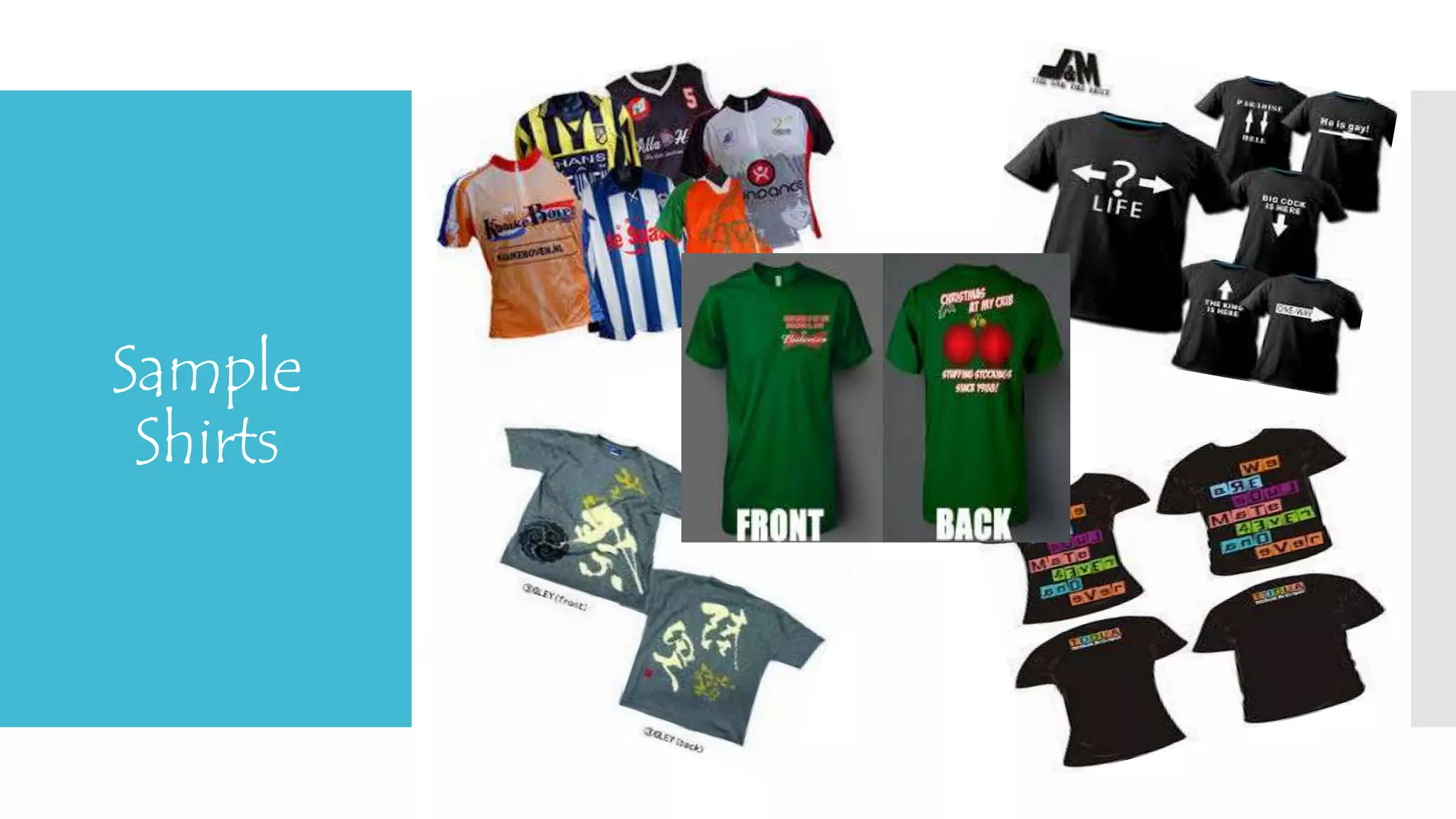
Sample 
Shirts
We 
PROMISE
Contact 
Details 
Contact us at 
 410-592-2394 
Follow us on: 
 Facebook 
 Twitter 
 LinkedIn 
 YouTube 
 Google+

T shirt printing (Project Presentation)

  • 2.
    Course Objective Customizeyour own shirt Create your own design
  • 3.
    Make your ownDesign Design Finalization Printing Preparation Steps in Printing a Shirt
  • 4.
    Make your ownDesign  Make the design or layout according to your taste and wants  Think of something that can be attractive
  • 5.
    Design Finalization Finalize your design with no further changes  Make it unique  Finalize the color of the design
  • 6.
    Printing  Thearea must be air ventilated  Start Printing
  • 7.
    T-SHIRT printing silkscreen, digital cheaper but QUALITY printing Come, try and see the difference …
  • 9.
    Steps to consider and follow when printing shirts  Imaginative  Shirt  Printing  Adjusting  Transferring  Ironing  Removing
  • 10.
    Imaginative You shouldknow or create a picture or logo to print on your shirt. Don't forget it could also be a word or a statement.
  • 11.
    Shirt Bring theshirt you really wish to print on and be ready to make your wishes come true. You need to wash your shirt first to make sure it's extra clean so that no dirt can get trapped between the shirt and the picture.
  • 12.
    printing After knowingyour picture or statement you want, print it from your computer through a normal printer and make sure it is the size you want.
  • 13.
    Adjusting Cut throughthe borders of your picture from the paper and adjust the picture on the shirt in the same way you want it to appear to the people.
  • 14.
    Transferring Using thetransfer paper you have, take one paper and lay it up over the picture on your shirt.
  • 15.
    Ironing Using theiron, gently press over the picture with the transfer paper over it on your shirt and move the iron over all places in the picture and keep the iron for 2-3 seconds on each section of the picture.
  • 16.
    Removing Gently removethe transfer paper from your shirt and you can see the picture you want printed on your shirt.
  • 17.
    Digital Printing Digitalprinting a type of t-shirt printing that offers an alternative to the traditional screen printing method. Image quality is one of the biggest reasons that many businesses choose to digitally print their t-shirts. Digital printing simply allows for a higher resolution, giving your shirts a cleaner overall appearance.
  • 18.
    Materials Needed for digital Printing  Printers: Lasers, Inkjet, Sublimation and Solvent  Computer  Graphics Program  Quality Transfer Paper  Heat Press  Cutter / Plotter
  • 20.
    Efficiency  Oneof the biggest perks that comes along with digital printing t-shirts for your business is an increased level of efficiency. This efficiency means that you are able to get your t-shirts produced with a much faster turn around time. If you need custom t-shirts fast, digital printing will likely be the best way to accomplish that.
  • 21.
    Variation  Variationis great because it will give you a chance to test out different designs that you might have in mind.  Whether you are looking for multiple shirts commemorating the same events or just trying to get a number of different branding methods out there, producing a variety of custom design t-shirts is a great way to go.
  • 22.
    Cost  Thedecision about whether or not to digitally print t-shirts for your business will likely come down to price considerations.
  • 23.
    Disadvantages of digitalprinting  More equipment needed to startup  More expensive with smaller orders  Not as good with photo reproductions
  • 24.
     More equipmentneeded to startup  More expensive with smaller orders  Not as good with photo reproductions
  • 25.
  • 27.
  • 28.
    Contact Details Contactus at  410-592-2394 Follow us on:  Facebook  Twitter  LinkedIn  YouTube  Google+

Editor's Notes

  • #21 Efficiency or Competence, Effectiveness Perks or Bonus, Plus, Benefit