System Installation  Suite
Who Am I Linux and Open Source Consultant „ Infrastructure Architect“ Linux since 0.98 IANAKH Senior Consultant/CTO @ x-tend.be
WARNING Or Credits ;) Sean Dague : OLS2002 Talk Thomas Lange : Fai talk at UKUUG 2005 Own previous talks infrastructures.org
Today: Automating Machine Installs Reproducable Distro Independent FAST No Vendor Lock In!
Common Problems Accidental Identical Installs Many manual changes to systems Many undocumented changes  Emergency Administration only Computers don’t work hard enough for us
Investing in Automation How long does it take to reinstall a machine from 0 To the exact same point as before ? With different Hardware ?  What about  customer/personal data  ?
Facts! Data Backup is only a part Sysadmin backup needs to be done also Manual Installations = bad Bad installations = unusable infrastructure Manual efforts = no time Bad installations = unproductive users Bad installations= manual efforts No time = no updates no patches no security Manual work = high costs
Do you want to ? (2) Install the previous racks manually Over and over again ?  And can you guarantee that installs are identical ?  Sysadmins are Lazy (by default)
Do you want to ? (3) “ No simple admin taks is fun more than twice”  s/twice/once/g; Repeating installs are boring and prone to errors Each installation is unintentionally Unique Manual installs DO NOT scale
Planning your infrastructure(s.org) Look at the infrastructure, not at 1 machine Plan changes in advance Version Control ! {SystemAdminstration,Security} is a process, not a product, or even a LifeStyle Look for Similarities And differences
The 10 th  floor test Grab a random machine  (don’t take a backup before) Throw it out a 10 th  floor window Can you recover it in 10 minutes ?
Imaging vs Installing Imaging  - Speed - Identical machines - Multicasting Installing - Finegrained - “slower” - Then install the delta's
Imaging Stinks ? “ Imaging sucks unless you create your image with FAI” Thomas Lange (FAI Presentation UKUUG 2005)
Sisuite History Spring 2000 , SF Was just announced by VA Linux , RH 6.2 , Xfree86 4.0 Not many clusters (no Scyld Beowulf 2 yet) RedHat had kickstart  IBM: Lui  Linux Utility For Cluster Installation (v1.0 April 200) Rich Ferri , IBM RH Only SystemImager v1.0 (May 2000) Brian Finley, VA Linux System Redhat and Debian only
Systemimager Suite: systemimager Image Base Captures Images from a golden client All images stored on a central server Image is a complete copy of all disks on client Linuxbased autoinstall system Install from Floppy, CD, Harddrive or Network
SystemImager Suite (2) SystemInstaller Evolved from LUI  Generates Images based on  Packagelist Distro type Partition Definition
` SystemImager Suite (3) SystemConfigurator Post install configuration Hardware detection / bootloader config Distro integration
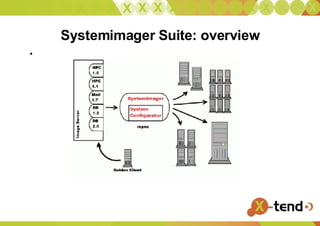
Systemimager Suite: overview
SIS Image  A Directory that contains the entire contents of the filesystems of a live machines Stored in /var/lib/systemimager/images/$NAME Exported as an rsync module $NAME You can chroot into it  Not as unchangeable as other imaging tools
Fetching an  Image  Install golden client as you would install any other server Install systemimager_client on that machine Prepare client Run si_prepareclient  Captures all partition info in to /etc/systemimager/ Starts rsync daemon as rsync module “root” Capture Image from server Run si_getimage  Connects via rsync to rsync://golden-client/root and transfers to /var/lib/systemimager/images/$imagename Calls mkautoinstallscript to build the autoinstallscript
My Advise: this is not the way! Perfect for Quick and Dirty backups Disaster recovery for single image setups !!  Don’t build your infrastructure on this method !! Reproducability is low Package management is better these days. Minimal changes in chroot are still undocumented and error prone
si_mksiimage Takes parameters such as  Packages list Partition list Determines the distribution based on the packages Determines”best” version to install of a package (version/architecture) Issues: Keep track of every distro ? Staged installes ? Ordering ? Post installscripts fail in chroot  Building an Image
Yum –installroot=/path/ -y groupinstall Base Debootstrap Urpmi –root=/path basesystem urpmi ssh-server Yast  Rpmstrap Building an Image in 2005
Other Clues Mksidisk Addclients Mksimachine Mksirange (haven’t used them lately might have si_ prepended these days)
Boel Autoinstall is driven by Brian’s Own Embedded Linux Special kernel and ramdisk Boots from floppy,cd, harddrive or pxe Kernel + initrd Tarbal with busybox,  extra modules , other tools are being rsynced over the network
Image Server SystemImager repository in  var/lib/systemimager images/images overrides/hostname : configfiles per host containing network and hardware configs and custom scripts scripts/  the actual machine dependent install scripts with partition information etc.
Image server (2) DHCP Server PXE Boot environment /usr/share/systemimager Boel environment (mini embedded environment) Rsync server
Bootstrap Procedure Create a dhcp config file with the appropriate entries Machine PXE Boots over the network and downloads the initial kernel and initrd Creates an initial ramdisk and asks ip addres, hostinfo, and installserver information. download boel image and setup a minimal environment  (rsync) Based on the hostinfo downloads the host specific script (autoinstallscript) (hostnameXY.(sh/master))
AutoInstallScript Partition the harddisk  create the filesystems  mount them rsync the $image to the harddisk. Run systemconfigurator Run postinstall script Reboot
Systemconfigurator Problem: Network configs Hardware config Bootloader Solution ? Build a huge matrix  Unmaintainable Footprinting  detect similar configs If /etc/sysconfig/network-scripts then create ifcfg-$ETH If /sbin/lilo and /etc/lilo.conf exist then configure lilo
Systemconfigurator Further problems Uses perl Can grow big Needs other tools ==> Chroot into the freshly installed system Modular approach --confighw , --confignet , --configrd , --configboot , --runboot etc Or combinations –configsi ==  --confighw –confignet –runboot
Image Maintenance Updateclient Please don’t Use package management tools
Misc Facts and Figures OSCAR : Uses SIS Installs as fast as < 4 minutes Flamethrower adds multicast features Xen integration
Alternative Tools ! Commercial : RedHat Network : Satellite Novell Zenworks Open Source Fai
Links http://sisuite.org/ http://wiki.sisuite.org http://planet.grep.be /
? ! Questions ?

System Imager.20051215

  • 1.
  • 2.
    Who Am ILinux and Open Source Consultant „ Infrastructure Architect“ Linux since 0.98 IANAKH Senior Consultant/CTO @ x-tend.be
  • 3.
    WARNING Or Credits;) Sean Dague : OLS2002 Talk Thomas Lange : Fai talk at UKUUG 2005 Own previous talks infrastructures.org
  • 4.
    Today: Automating MachineInstalls Reproducable Distro Independent FAST No Vendor Lock In!
  • 5.
    Common Problems AccidentalIdentical Installs Many manual changes to systems Many undocumented changes Emergency Administration only Computers don’t work hard enough for us
  • 6.
    Investing in AutomationHow long does it take to reinstall a machine from 0 To the exact same point as before ? With different Hardware ? What about customer/personal data ?
  • 7.
    Facts! Data Backupis only a part Sysadmin backup needs to be done also Manual Installations = bad Bad installations = unusable infrastructure Manual efforts = no time Bad installations = unproductive users Bad installations= manual efforts No time = no updates no patches no security Manual work = high costs
  • 8.
    Do you wantto ? (2) Install the previous racks manually Over and over again ? And can you guarantee that installs are identical ? Sysadmins are Lazy (by default)
  • 9.
    Do you wantto ? (3) “ No simple admin taks is fun more than twice” s/twice/once/g; Repeating installs are boring and prone to errors Each installation is unintentionally Unique Manual installs DO NOT scale
  • 10.
    Planning your infrastructure(s.org)Look at the infrastructure, not at 1 machine Plan changes in advance Version Control ! {SystemAdminstration,Security} is a process, not a product, or even a LifeStyle Look for Similarities And differences
  • 11.
    The 10 th floor test Grab a random machine (don’t take a backup before) Throw it out a 10 th floor window Can you recover it in 10 minutes ?
  • 12.
    Imaging vs InstallingImaging - Speed - Identical machines - Multicasting Installing - Finegrained - “slower” - Then install the delta's
  • 13.
    Imaging Stinks ?“ Imaging sucks unless you create your image with FAI” Thomas Lange (FAI Presentation UKUUG 2005)
  • 14.
    Sisuite History Spring2000 , SF Was just announced by VA Linux , RH 6.2 , Xfree86 4.0 Not many clusters (no Scyld Beowulf 2 yet) RedHat had kickstart IBM: Lui Linux Utility For Cluster Installation (v1.0 April 200) Rich Ferri , IBM RH Only SystemImager v1.0 (May 2000) Brian Finley, VA Linux System Redhat and Debian only
  • 15.
    Systemimager Suite: systemimagerImage Base Captures Images from a golden client All images stored on a central server Image is a complete copy of all disks on client Linuxbased autoinstall system Install from Floppy, CD, Harddrive or Network
  • 16.
    SystemImager Suite (2)SystemInstaller Evolved from LUI Generates Images based on Packagelist Distro type Partition Definition
  • 17.
    ` SystemImager Suite(3) SystemConfigurator Post install configuration Hardware detection / bootloader config Distro integration
  • 18.
  • 19.
    SIS Image A Directory that contains the entire contents of the filesystems of a live machines Stored in /var/lib/systemimager/images/$NAME Exported as an rsync module $NAME You can chroot into it Not as unchangeable as other imaging tools
  • 20.
    Fetching an Image Install golden client as you would install any other server Install systemimager_client on that machine Prepare client Run si_prepareclient Captures all partition info in to /etc/systemimager/ Starts rsync daemon as rsync module “root” Capture Image from server Run si_getimage Connects via rsync to rsync://golden-client/root and transfers to /var/lib/systemimager/images/$imagename Calls mkautoinstallscript to build the autoinstallscript
  • 21.
    My Advise: thisis not the way! Perfect for Quick and Dirty backups Disaster recovery for single image setups !! Don’t build your infrastructure on this method !! Reproducability is low Package management is better these days. Minimal changes in chroot are still undocumented and error prone
  • 22.
    si_mksiimage Takes parameterssuch as Packages list Partition list Determines the distribution based on the packages Determines”best” version to install of a package (version/architecture) Issues: Keep track of every distro ? Staged installes ? Ordering ? Post installscripts fail in chroot Building an Image
  • 23.
    Yum –installroot=/path/ -ygroupinstall Base Debootstrap Urpmi –root=/path basesystem urpmi ssh-server Yast Rpmstrap Building an Image in 2005
  • 24.
    Other Clues MksidiskAddclients Mksimachine Mksirange (haven’t used them lately might have si_ prepended these days)
  • 25.
    Boel Autoinstall isdriven by Brian’s Own Embedded Linux Special kernel and ramdisk Boots from floppy,cd, harddrive or pxe Kernel + initrd Tarbal with busybox, extra modules , other tools are being rsynced over the network
  • 26.
    Image Server SystemImagerrepository in var/lib/systemimager images/images overrides/hostname : configfiles per host containing network and hardware configs and custom scripts scripts/ the actual machine dependent install scripts with partition information etc.
  • 27.
    Image server (2)DHCP Server PXE Boot environment /usr/share/systemimager Boel environment (mini embedded environment) Rsync server
  • 28.
    Bootstrap Procedure Createa dhcp config file with the appropriate entries Machine PXE Boots over the network and downloads the initial kernel and initrd Creates an initial ramdisk and asks ip addres, hostinfo, and installserver information. download boel image and setup a minimal environment (rsync) Based on the hostinfo downloads the host specific script (autoinstallscript) (hostnameXY.(sh/master))
  • 29.
    AutoInstallScript Partition theharddisk create the filesystems mount them rsync the $image to the harddisk. Run systemconfigurator Run postinstall script Reboot
  • 30.
    Systemconfigurator Problem: Networkconfigs Hardware config Bootloader Solution ? Build a huge matrix Unmaintainable Footprinting detect similar configs If /etc/sysconfig/network-scripts then create ifcfg-$ETH If /sbin/lilo and /etc/lilo.conf exist then configure lilo
  • 31.
    Systemconfigurator Further problemsUses perl Can grow big Needs other tools ==> Chroot into the freshly installed system Modular approach --confighw , --confignet , --configrd , --configboot , --runboot etc Or combinations –configsi == --confighw –confignet –runboot
  • 32.
    Image Maintenance UpdateclientPlease don’t Use package management tools
  • 33.
    Misc Facts andFigures OSCAR : Uses SIS Installs as fast as < 4 minutes Flamethrower adds multicast features Xen integration
  • 34.
    Alternative Tools !Commercial : RedHat Network : Satellite Novell Zenworks Open Source Fai
  • 35.
  • 36.