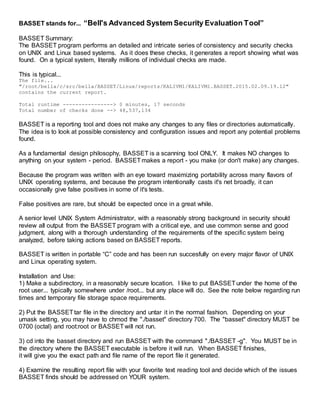
BASSET stands for... “Bell's Advanced System Security Evaluation Tool”
BASSET Summary:
The BASSET program performs an detailed and intricate series of consistency and security checks
on UNIX and Linux based systems. As it does these checks, it generates a report showing what was
found. On a typical system, literally millions of individual checks are made.
This is typical...
The file...
"/root/bella/c/src/bella/BASSET/Linux/reports/KALIVM1/KALIVM1.BASSET.2015.02.09.19.12"
contains the current report.
Total runtime ----------------> 0 minutes, 17 seconds
Total number of checks done --> 48,537,134
BASSET is a reporting tool and does not make any changes to any files or directories automatically.
The idea is to look at possible consistency and configuration issues and report any potential problems
found.
As a fundamental design philosophy, BASSET is a scanning tool ONLY. It makes NO changes to
anything on your system - period. BASSETmakes a report - you make (or don't make) any changes.
Because the program was written with an eye toward maximizing portability across many flavors of
UNIX operating systems, and because the program intentionally casts it's net broadly, it can
occasionally give false positives in some of it's tests.
False positives are rare, but should be expected once in a great while.
A senior level UNIX System Administrator, with a reasonably strong background in security should
review all output from the BASSET program with a critical eye, and use common sense and good
judgment, along with a thorough understanding of the requirements of the specific system being
analyzed, before taking actions based on BASSET reports.
BASSET is written in portable “C” code and has been run succesfully on every major flavor of UNIX
and Linux operating system.
Installation and Use:
1) Make a subdirectory, in a reasonably secure location. I like to put BASSETunder the home of the
root user... typically somewhere under /root... but any place will do. See the note below regarding run
times and temporary file storage space requirements.
2) Put the BASSETtar file in the directory and untar it in the normal fashion. Depending on your
umask setting, you may have to chmod the "./basset" directory 700. The "basset" directory MUST be
0700 (octal) and root:root or BASSETwill not run.
3) cd into the basset directory and run BASSET with the command "./BASSET -g". You MUST be in
the directory where the BASSET executable is before it will run. When BASSET finishes,
it will give you the exact path and file name of the report file it generated.
4) Examine the resulting report file with your favorite text reading tool and decide which of the issues
BASSET finds should be addressed on YOUR system.
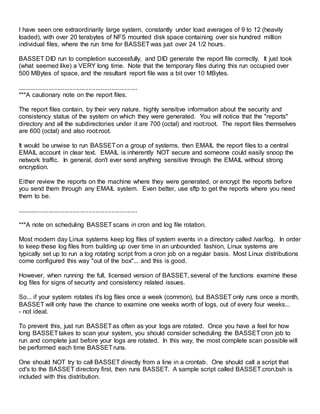
USAGE: BASSET [ -f | -g | -r | -n | -s ]
-f => Turn ON file system object based tests (default is off). The -f option does an intensive series of
tests on every file on the local file systems. It can uncover some serious problems. Be aware that
the run time will increase. But these tests are well worth the time they take to run.
Please NOTE: By default, BASSETwill NOT traverse any "remote" file systems over "NFS" or
"SMB".
This "-f" switch IMPLIES the "-g" switch.
-g => GO... just run the program.
-r => Get a detailed listing of the rpm based software installed on this system. Default is do NOT get
the rpm listing.
-n => Turn ON the traversal of "NFS" and "SMB" type remote file systems (see the "-f" switch
above). Be aware that the run time will increase, perhaps dramatically. And you will almost surely
get MANY more hits in any function that is checking file ownership or group affiliation, etc.
This "-n" switch IMPLIES the "-f" switch, which in turn IMPLIES the "-g" switch.
-s => Turn ON the get_sys_info function. This gathers up quite a lot of usefull information about the
hardware and software, and appends it to the end of the report. You should run this at least once...
and save the report for future reference.
Why use BASSET?
If you don't understand why BASSETis good, and what it can do to help you secure your systems,
you probably should NOT try to use it. You will only find it confusing. I suggest you hire a UNIX
security expert instead. Let them run BASSETfor you, interpret the results, and make
recommendations.
***A cautionary note on the run time of BASSET, and the amount of temporary file system space
needed while BASSETis executing.
BASSET should run just fine with 20 MBytes or so of free disk space on the file system where it is
located.
All the temporary files are created in the directory from which BASSET is being run. All the temporary
files are removed as BASSETfinishes with them. The report files themselves are generally small -
something on the order of 70 KBytes to 200 KBytes depending on the number of issues found.
BASSET keeps the report files from building up over time in an unbounded fashion by removing any
reports over 120 days old.
The run time is dependent on CPU speed, available free memory, the speed of the disk(s), the load
on the system, the type and number of NFS, SMB, or other remotely mounted file systems, etc.
I have seen one extraordinarily large system, constantly under load averages of 9 to 12 (heavily
loaded), with over 20 terabytes of NFS mounted disk space containing over six hundred million
individual files, where the run time for BASSETwas just over 24 1/2 hours.
BASSET DID run to completion successfully, and DID generate the report file correctly. It just took
(what seemed like) a VERY long time. Note that the temporary files during this run occupied over
500 MBytes of space, and the resultant report file was a bit over 10 MBytes.
.....................................................................
***A cautionary note on the report files.
The report files contain, by their very nature, highly sensitive information about the security and
consistency status of the system on which they were generated. You will notice that the "reports"
directory and all the subdirectories under it are 700 (octal) and root:root. The report files themselves
are 600 (octal) and also root:root.
It would be unwise to run BASSETon a group of systems, then EMAIL the report files to a central
EMAIL account in clear text. EMAIL is inherently NOT secure and someone could easily snoop the
network traffic. In general, don't ever send anything sensitive through the EMAIL without strong
encryption.
Either review the reports on the machine where they were generated, or encrypt the reports before
you send them through any EMAIL system. Even better, use sftp to get the reports where you need
them to be.
.....................................................................
***A note on scheduling BASSETscans in cron and log file rotation.
Most modern day Linux systems keep log files of system events in a directory called /var/log. In order
to keep these log files from building up over time in an unbounded fashion, Linux systems are
typically set up to run a log rotating script from a cron job on a regular basis. Most Linux distributions
come configured this way "out of the box"... and this is good.
However, when running the full, licensed version of BASSET, several of the functions examine these
log files for signs of security and consistency related issues.
So... if your system rotates it's log files once a week (common), but BASSET only runs once a month,
BASSET will only have the chance to examine one weeks worth of logs, out of every four weeks...
- not ideal.
To prevent this, just run BASSETas often as your logs are rotated. Once you have a feel for how
long BASSETtakes to scan your system, you should consider scheduling the BASSETcron job to
run and complete just before your logs are rotated. In this way, the most complete scan possible will
be performed each time BASSETruns.
One should NOT try to call BASSET directly from a line in a crontab. One should call a script that
cd's to the BASSET directory first, then runs BASSET. A sample script called BASSET.cron.bsh is
included with this distribution.
Warranty:
THIS SOFTWARE IS PROVIDED BY Arthur H. Bell "AS IS'' AND ANY EXPRESS OR IMPLIED
WARRANTIES, INCLUDING, BUT NOT LIMITED TO, THE IMPLIED WARRANTIES OF
MERCHANTABILITY AND FITNESS FOR A PARTICULAR PURPOSE PURPOSE ARE
DISCLAIMED. IN NO EVENT SHALL Arthur H. Bell BE LIABLE FOR ANY DIRECT, INDIRECT,
INCIDENTAL, SPECIAL, EXEMPLARY, OR CONSEQUENTIAL DAMAGES (INCLUDING, BUT NOT
LIMITED TO, PROCUREMENT OF SUBSTITUTE GOODS OR SERVICES; LOSS OF USE, DATA,
OR PROFITS; OR BUSINESS INTERRUPTION) HOWEVER CAUSED AND ON ANY THEORY OF
LIABILITY, WHETHER IN CONTRACT, STRICT LIABILITY, OR TORT (INCLUDING NEGLIGENCE
OR OTHERWISE) ARISING IN ANY WAY OUT OF THE USE OF THIS SOFTWARE, EVEN IF
ADVISED OF THE POSSIBILITY OF SUCH DAMAGE.
Licensing:
Any commercial or government use of this program for any purpose must be
licensed. To obtain a license for a machine send an EMAIL to artbellproductions@gmail.com.
Include your human name, return EMAIL address, and voice phone number... and state that you are
interested in a professional license for this software. I'll contact you, and we'll work out the details.
The process is generally simple.
***NOTE: Discounts on the license fee will be considered for
charitable and humanitarian organizations, religious groups,
schools and other educational organizations, and for bulk
license purchases.
Your comments, critique, and suggestions are ALWAYS welcome.
Arthur Bell
EMAIL -> artbellproductions@gmail.com
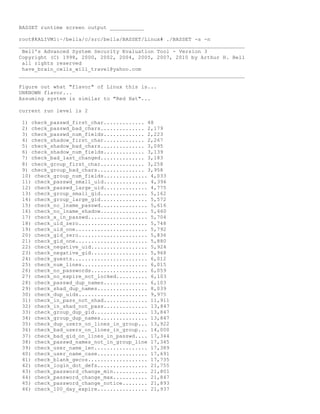
BASSET runtime screen output ___________
root@KALIVM1:~/bella/c/src/bella/BASSET/Linux# ./BASSET -s -n
________________________________________________________________________
Bell's Advanced System Security Evaluation Tool - Version 3
Copyright (C) 1998, 2000, 2002, 2004, 2005, 2007, 2010 by Arthur H. Bell
all rights reserved
have_brain_cells_will_travel@yahoo.com
________________________________________________________________________
Figure out what "flavor" of Linux this is...
UNKNOWN flavor...
Assuming system is similar to "Red Hat"...
current run level is 2
1) check_passwd_first_char............. 48
2) check_passwd_bad_chars.............. 2,179
3) check_passwd_num_fields............. 2,223
4) check_shadow_first_char............. 2,267
5) check_shadow_bad_chars.............. 3,095
6) check_shadow_num_fields............. 3,139
7) check_bad_last_changed.............. 3,183
8) check_group_first_char.............. 3,258
9) check_group_bad_chars............... 3,958
10) check_group_num_fields.............. 4,033
11) check_passwd_small_uid.............. 4,396
12) check_passwd_large_uid.............. 4,775
13) check_group_small_gid............... 5,162
14) check_group_large_gid............... 5,572
15) check_no_lname_passwd............... 5,616
16) check_no_lname_shadow............... 5,660
17) check_x_in_passwd................... 5,704
18) check_uid_zero...................... 5,748
19) check_uid_one....................... 5,792
20) check_gid_zero...................... 5,836
21) check_gid_one....................... 5,880
22) check_negative_uid.................. 5,924
23) check_negative_gid.................. 5,968
24) check_guests........................ 6,012
25) check_num_lines..................... 6,015
26) check_no_passwords.................. 6,059
27) check_no_expire_not_locked.......... 6,103
28) check_passwd_dup_names.............. 6,103
29) check_shad_dup_names................ 8,039
30) check_dup_uids...................... 9,975
31) check_in_pass_not_shad.............. 11,911
32) check_in_shad_not_pass.............. 13,847
33) check_group_dup_gid................. 13,847
34) check_group_dup_names............... 13,847
35) check_dup_users_on_lines_in_group... 13,922
36) check_bad_users_on_lines_in_group... 14,000
37) check_bad_gid_on_lines_in_passwd.... 17,344
38) check_passwd_names_not_in_group_line 17,345
39) check_user_name_len................. 17,389
40) check_user_name_case................ 17,691
41) check_blank_gecos................... 17,735
42) check_login_dot_defs................ 21,755
43) check_password_change_min........... 21,801
44) check_password_change_max........... 21,847
45) check_password_change_notice........ 21,893
46) check_100_day_expire................ 21,937
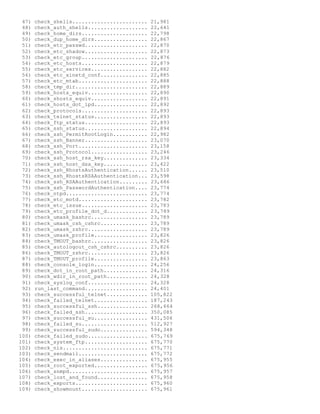
47) check_shells........................ 21,981
48) check_auth_shells................... 22,641
49) check_home_dirs..................... 22,798
50) check_dup_home_dirs................. 22,867
51) check_etc_passwd.................... 22,870
52) check_etc_shadow.................... 22,873
53) check_etc_group..................... 22,876
54) check_etc_hosts..................... 22,879
55) check_etc_services.................. 22,882
56) check_etc_xinetd_conf............... 22,885
57) check_etc_mtab...................... 22,888
58) check_tmp_dir....................... 22,889
59) check_hosts_equiv................... 22,890
60) check_shosts_equiv.................. 22,891
61) check_hosts_dot_lpd................. 22,892
62) check_protocols..................... 22,893
63) check_telnet_status................. 22,893
64) check_ftp_status.................... 22,893
65) check_ssh_status.................... 22,894
66) check_ssh_PermitRootLogin........... 22,982
67) check_ssh_Banner.................... 23,070
68) check_ssh_Port...................... 23,158
69) check_ssh_Protocol.................. 23,246
70) check_ssh_host_rsa_key.............. 23,334
71) check_ssh_host_dsa_key.............. 23,422
72) check_ssh_RhostsAuthentication...... 23,510
73) check_ssh_RhostsRSAAuthentication... 23,598
74) check_ssh_RSAAuthentication......... 23,686
75) check_ssh_PasswordAuthentication.... 23,774
76) check_ntpd.......................... 23,774
77) check_etc_motd...................... 23,782
78) check_etc_issue..................... 23,783
79) check_etc_profile_dot_d............. 23,789
80) check_umask_bashrc.................. 23,789
81) check_umask_csh_cshrc............... 23,789
82) check_umask_zshrc................... 23,789
83) check_umask_profile................. 23,826
84) check_TMOUT_bashrc.................. 23,826
85) check_autologout_csh_cshrc.......... 23,826
86) check_TMOUT_zshrc................... 23,826
87) check_TMOUT_profile................. 23,863
88) check_console_login................. 24,256
89) check_dot_in_root_path.............. 24,316
90) check_wdir_in_root_path............. 24,328
91) check_syslog_conf................... 24,328
92) run_last_command.................... 24,401
93) check_successful_telnet............. 105,822
94) check_failed_telnet................. 187,243
95) check_successful_ssh................ 268,664
96) check_failed_ssh.................... 350,085
97) check_successful_su................. 431,506
98) check_failed_su..................... 512,927
99) check_successful_sudo............... 594,348
100) check_failed_sudo................... 675,769
101) check_system_ftp.................... 675,770
102) check_nis........................... 675,771
103) check_sendmail...................... 675,772
104) check_exec_in_aliases............... 675,955
105) check_root_exported................. 675,956
106) check_snmpd......................... 675,957
107) check_lost_and_found................ 675,958
108) check_exports....................... 675,960
109) check_showmount..................... 675,961
110) check_nfs_mount..................... 675,962
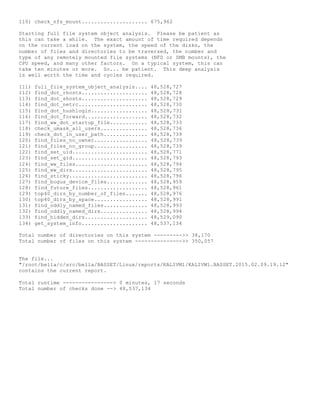
Starting full file system object analysis. Please be patient as
this can take a while. The exact amount of time required depends
on the current load on the system, the speed of the disks, the
number of files and directories to be traversed, the number and
type of any remotely mounted file systems (NFS or SMB mounts), the
CPU speed, and many other factors. On a typical system, this can
take ten minutes or more. So... be patient. This deep analysis
is well worth the time and cycles required.
111) full_file_system_object_analysis.... 48,528,727
112) find_dot_rhosts..................... 48,528,728
113) find_dot_shosts..................... 48,528,729
114) find_dot_netrc...................... 48,528,730
115) find_dot_hushlogin.................. 48,528,731
116) find_dot_forward.................... 48,528,732
117) find_ww_dot_startup_file............ 48,528,733
118) check_umask_all_users............... 48,528,736
119) check_dot_in_user_path.............. 48,528,739
120) find_files_no_owner................. 48,528,739
121) find_files_no_group................. 48,528,739
122) find_set_uid........................ 48,528,771
123) find_set_gid........................ 48,528,793
124) find_ww_files....................... 48,528,794
125) find_ww_dirs........................ 48,528,795
126) find_sticky......................... 48,528,796
127) find_bogus_device_files............. 48,528,959
128) find_future_files................... 48,528,961
129) top40_dirs_by_number_of_files....... 48,528,976
130) top40_dirs_by_space................. 48,528,991
131) find_oddly_named_files.............. 48,528,993
132) find_oddly_named_dirs............... 48,528,994
133) find_hidden_dirs.................... 48,529,090
134) get_system_info..................... 48,537,134
Total number of directories on this system --------->> 38,170
Total number of files on this system --------------->> 350,057
The file...
"/root/bella/c/src/bella/BASSET/Linux/reports/KALIVM1/KALIVM1.BASSET.2015.02.09.19.12"
contains the current report.
Total runtime ----------------> 0 minutes, 17 seconds
Total number of checks done --> 48,537,134

BASSET_README

  • 1.
    BASSET stands for...“Bell's Advanced System Security Evaluation Tool” BASSET Summary: The BASSET program performs an detailed and intricate series of consistency and security checks on UNIX and Linux based systems. As it does these checks, it generates a report showing what was found. On a typical system, literally millions of individual checks are made. This is typical... The file... "/root/bella/c/src/bella/BASSET/Linux/reports/KALIVM1/KALIVM1.BASSET.2015.02.09.19.12" contains the current report. Total runtime ----------------> 0 minutes, 17 seconds Total number of checks done --> 48,537,134 BASSET is a reporting tool and does not make any changes to any files or directories automatically. The idea is to look at possible consistency and configuration issues and report any potential problems found. As a fundamental design philosophy, BASSET is a scanning tool ONLY. It makes NO changes to anything on your system - period. BASSETmakes a report - you make (or don't make) any changes. Because the program was written with an eye toward maximizing portability across many flavors of UNIX operating systems, and because the program intentionally casts it's net broadly, it can occasionally give false positives in some of it's tests. False positives are rare, but should be expected once in a great while. A senior level UNIX System Administrator, with a reasonably strong background in security should review all output from the BASSET program with a critical eye, and use common sense and good judgment, along with a thorough understanding of the requirements of the specific system being analyzed, before taking actions based on BASSET reports. BASSET is written in portable “C” code and has been run succesfully on every major flavor of UNIX and Linux operating system. Installation and Use: 1) Make a subdirectory, in a reasonably secure location. I like to put BASSETunder the home of the root user... typically somewhere under /root... but any place will do. See the note below regarding run times and temporary file storage space requirements. 2) Put the BASSETtar file in the directory and untar it in the normal fashion. Depending on your umask setting, you may have to chmod the "./basset" directory 700. The "basset" directory MUST be 0700 (octal) and root:root or BASSETwill not run. 3) cd into the basset directory and run BASSET with the command "./BASSET -g". You MUST be in the directory where the BASSET executable is before it will run. When BASSET finishes, it will give you the exact path and file name of the report file it generated. 4) Examine the resulting report file with your favorite text reading tool and decide which of the issues BASSET finds should be addressed on YOUR system.
  • 2.
    USAGE: BASSET [-f | -g | -r | -n | -s ] -f => Turn ON file system object based tests (default is off). The -f option does an intensive series of tests on every file on the local file systems. It can uncover some serious problems. Be aware that the run time will increase. But these tests are well worth the time they take to run. Please NOTE: By default, BASSETwill NOT traverse any "remote" file systems over "NFS" or "SMB". This "-f" switch IMPLIES the "-g" switch. -g => GO... just run the program. -r => Get a detailed listing of the rpm based software installed on this system. Default is do NOT get the rpm listing. -n => Turn ON the traversal of "NFS" and "SMB" type remote file systems (see the "-f" switch above). Be aware that the run time will increase, perhaps dramatically. And you will almost surely get MANY more hits in any function that is checking file ownership or group affiliation, etc. This "-n" switch IMPLIES the "-f" switch, which in turn IMPLIES the "-g" switch. -s => Turn ON the get_sys_info function. This gathers up quite a lot of usefull information about the hardware and software, and appends it to the end of the report. You should run this at least once... and save the report for future reference. Why use BASSET? If you don't understand why BASSETis good, and what it can do to help you secure your systems, you probably should NOT try to use it. You will only find it confusing. I suggest you hire a UNIX security expert instead. Let them run BASSETfor you, interpret the results, and make recommendations. ***A cautionary note on the run time of BASSET, and the amount of temporary file system space needed while BASSETis executing. BASSET should run just fine with 20 MBytes or so of free disk space on the file system where it is located. All the temporary files are created in the directory from which BASSET is being run. All the temporary files are removed as BASSETfinishes with them. The report files themselves are generally small - something on the order of 70 KBytes to 200 KBytes depending on the number of issues found. BASSET keeps the report files from building up over time in an unbounded fashion by removing any reports over 120 days old. The run time is dependent on CPU speed, available free memory, the speed of the disk(s), the load on the system, the type and number of NFS, SMB, or other remotely mounted file systems, etc.
  • 3.
    I have seenone extraordinarily large system, constantly under load averages of 9 to 12 (heavily loaded), with over 20 terabytes of NFS mounted disk space containing over six hundred million individual files, where the run time for BASSETwas just over 24 1/2 hours. BASSET DID run to completion successfully, and DID generate the report file correctly. It just took (what seemed like) a VERY long time. Note that the temporary files during this run occupied over 500 MBytes of space, and the resultant report file was a bit over 10 MBytes. ..................................................................... ***A cautionary note on the report files. The report files contain, by their very nature, highly sensitive information about the security and consistency status of the system on which they were generated. You will notice that the "reports" directory and all the subdirectories under it are 700 (octal) and root:root. The report files themselves are 600 (octal) and also root:root. It would be unwise to run BASSETon a group of systems, then EMAIL the report files to a central EMAIL account in clear text. EMAIL is inherently NOT secure and someone could easily snoop the network traffic. In general, don't ever send anything sensitive through the EMAIL without strong encryption. Either review the reports on the machine where they were generated, or encrypt the reports before you send them through any EMAIL system. Even better, use sftp to get the reports where you need them to be. ..................................................................... ***A note on scheduling BASSETscans in cron and log file rotation. Most modern day Linux systems keep log files of system events in a directory called /var/log. In order to keep these log files from building up over time in an unbounded fashion, Linux systems are typically set up to run a log rotating script from a cron job on a regular basis. Most Linux distributions come configured this way "out of the box"... and this is good. However, when running the full, licensed version of BASSET, several of the functions examine these log files for signs of security and consistency related issues. So... if your system rotates it's log files once a week (common), but BASSET only runs once a month, BASSET will only have the chance to examine one weeks worth of logs, out of every four weeks... - not ideal. To prevent this, just run BASSETas often as your logs are rotated. Once you have a feel for how long BASSETtakes to scan your system, you should consider scheduling the BASSETcron job to run and complete just before your logs are rotated. In this way, the most complete scan possible will be performed each time BASSETruns. One should NOT try to call BASSET directly from a line in a crontab. One should call a script that cd's to the BASSET directory first, then runs BASSET. A sample script called BASSET.cron.bsh is included with this distribution.
  • 4.
    Warranty: THIS SOFTWARE ISPROVIDED BY Arthur H. Bell "AS IS'' AND ANY EXPRESS OR IMPLIED WARRANTIES, INCLUDING, BUT NOT LIMITED TO, THE IMPLIED WARRANTIES OF MERCHANTABILITY AND FITNESS FOR A PARTICULAR PURPOSE PURPOSE ARE DISCLAIMED. IN NO EVENT SHALL Arthur H. Bell BE LIABLE FOR ANY DIRECT, INDIRECT, INCIDENTAL, SPECIAL, EXEMPLARY, OR CONSEQUENTIAL DAMAGES (INCLUDING, BUT NOT LIMITED TO, PROCUREMENT OF SUBSTITUTE GOODS OR SERVICES; LOSS OF USE, DATA, OR PROFITS; OR BUSINESS INTERRUPTION) HOWEVER CAUSED AND ON ANY THEORY OF LIABILITY, WHETHER IN CONTRACT, STRICT LIABILITY, OR TORT (INCLUDING NEGLIGENCE OR OTHERWISE) ARISING IN ANY WAY OUT OF THE USE OF THIS SOFTWARE, EVEN IF ADVISED OF THE POSSIBILITY OF SUCH DAMAGE. Licensing: Any commercial or government use of this program for any purpose must be licensed. To obtain a license for a machine send an EMAIL to artbellproductions@gmail.com. Include your human name, return EMAIL address, and voice phone number... and state that you are interested in a professional license for this software. I'll contact you, and we'll work out the details. The process is generally simple. ***NOTE: Discounts on the license fee will be considered for charitable and humanitarian organizations, religious groups, schools and other educational organizations, and for bulk license purchases. Your comments, critique, and suggestions are ALWAYS welcome. Arthur Bell EMAIL -> artbellproductions@gmail.com
  • 5.
    BASSET runtime screenoutput ___________ root@KALIVM1:~/bella/c/src/bella/BASSET/Linux# ./BASSET -s -n ________________________________________________________________________ Bell's Advanced System Security Evaluation Tool - Version 3 Copyright (C) 1998, 2000, 2002, 2004, 2005, 2007, 2010 by Arthur H. Bell all rights reserved have_brain_cells_will_travel@yahoo.com ________________________________________________________________________ Figure out what "flavor" of Linux this is... UNKNOWN flavor... Assuming system is similar to "Red Hat"... current run level is 2 1) check_passwd_first_char............. 48 2) check_passwd_bad_chars.............. 2,179 3) check_passwd_num_fields............. 2,223 4) check_shadow_first_char............. 2,267 5) check_shadow_bad_chars.............. 3,095 6) check_shadow_num_fields............. 3,139 7) check_bad_last_changed.............. 3,183 8) check_group_first_char.............. 3,258 9) check_group_bad_chars............... 3,958 10) check_group_num_fields.............. 4,033 11) check_passwd_small_uid.............. 4,396 12) check_passwd_large_uid.............. 4,775 13) check_group_small_gid............... 5,162 14) check_group_large_gid............... 5,572 15) check_no_lname_passwd............... 5,616 16) check_no_lname_shadow............... 5,660 17) check_x_in_passwd................... 5,704 18) check_uid_zero...................... 5,748 19) check_uid_one....................... 5,792 20) check_gid_zero...................... 5,836 21) check_gid_one....................... 5,880 22) check_negative_uid.................. 5,924 23) check_negative_gid.................. 5,968 24) check_guests........................ 6,012 25) check_num_lines..................... 6,015 26) check_no_passwords.................. 6,059 27) check_no_expire_not_locked.......... 6,103 28) check_passwd_dup_names.............. 6,103 29) check_shad_dup_names................ 8,039 30) check_dup_uids...................... 9,975 31) check_in_pass_not_shad.............. 11,911 32) check_in_shad_not_pass.............. 13,847 33) check_group_dup_gid................. 13,847 34) check_group_dup_names............... 13,847 35) check_dup_users_on_lines_in_group... 13,922 36) check_bad_users_on_lines_in_group... 14,000 37) check_bad_gid_on_lines_in_passwd.... 17,344 38) check_passwd_names_not_in_group_line 17,345 39) check_user_name_len................. 17,389 40) check_user_name_case................ 17,691 41) check_blank_gecos................... 17,735 42) check_login_dot_defs................ 21,755 43) check_password_change_min........... 21,801 44) check_password_change_max........... 21,847 45) check_password_change_notice........ 21,893 46) check_100_day_expire................ 21,937
  • 6.
    47) check_shells........................ 21,981 48)check_auth_shells................... 22,641 49) check_home_dirs..................... 22,798 50) check_dup_home_dirs................. 22,867 51) check_etc_passwd.................... 22,870 52) check_etc_shadow.................... 22,873 53) check_etc_group..................... 22,876 54) check_etc_hosts..................... 22,879 55) check_etc_services.................. 22,882 56) check_etc_xinetd_conf............... 22,885 57) check_etc_mtab...................... 22,888 58) check_tmp_dir....................... 22,889 59) check_hosts_equiv................... 22,890 60) check_shosts_equiv.................. 22,891 61) check_hosts_dot_lpd................. 22,892 62) check_protocols..................... 22,893 63) check_telnet_status................. 22,893 64) check_ftp_status.................... 22,893 65) check_ssh_status.................... 22,894 66) check_ssh_PermitRootLogin........... 22,982 67) check_ssh_Banner.................... 23,070 68) check_ssh_Port...................... 23,158 69) check_ssh_Protocol.................. 23,246 70) check_ssh_host_rsa_key.............. 23,334 71) check_ssh_host_dsa_key.............. 23,422 72) check_ssh_RhostsAuthentication...... 23,510 73) check_ssh_RhostsRSAAuthentication... 23,598 74) check_ssh_RSAAuthentication......... 23,686 75) check_ssh_PasswordAuthentication.... 23,774 76) check_ntpd.......................... 23,774 77) check_etc_motd...................... 23,782 78) check_etc_issue..................... 23,783 79) check_etc_profile_dot_d............. 23,789 80) check_umask_bashrc.................. 23,789 81) check_umask_csh_cshrc............... 23,789 82) check_umask_zshrc................... 23,789 83) check_umask_profile................. 23,826 84) check_TMOUT_bashrc.................. 23,826 85) check_autologout_csh_cshrc.......... 23,826 86) check_TMOUT_zshrc................... 23,826 87) check_TMOUT_profile................. 23,863 88) check_console_login................. 24,256 89) check_dot_in_root_path.............. 24,316 90) check_wdir_in_root_path............. 24,328 91) check_syslog_conf................... 24,328 92) run_last_command.................... 24,401 93) check_successful_telnet............. 105,822 94) check_failed_telnet................. 187,243 95) check_successful_ssh................ 268,664 96) check_failed_ssh.................... 350,085 97) check_successful_su................. 431,506 98) check_failed_su..................... 512,927 99) check_successful_sudo............... 594,348 100) check_failed_sudo................... 675,769 101) check_system_ftp.................... 675,770 102) check_nis........................... 675,771 103) check_sendmail...................... 675,772 104) check_exec_in_aliases............... 675,955 105) check_root_exported................. 675,956 106) check_snmpd......................... 675,957 107) check_lost_and_found................ 675,958 108) check_exports....................... 675,960 109) check_showmount..................... 675,961
  • 7.
    110) check_nfs_mount..................... 675,962 Startingfull file system object analysis. Please be patient as this can take a while. The exact amount of time required depends on the current load on the system, the speed of the disks, the number of files and directories to be traversed, the number and type of any remotely mounted file systems (NFS or SMB mounts), the CPU speed, and many other factors. On a typical system, this can take ten minutes or more. So... be patient. This deep analysis is well worth the time and cycles required. 111) full_file_system_object_analysis.... 48,528,727 112) find_dot_rhosts..................... 48,528,728 113) find_dot_shosts..................... 48,528,729 114) find_dot_netrc...................... 48,528,730 115) find_dot_hushlogin.................. 48,528,731 116) find_dot_forward.................... 48,528,732 117) find_ww_dot_startup_file............ 48,528,733 118) check_umask_all_users............... 48,528,736 119) check_dot_in_user_path.............. 48,528,739 120) find_files_no_owner................. 48,528,739 121) find_files_no_group................. 48,528,739 122) find_set_uid........................ 48,528,771 123) find_set_gid........................ 48,528,793 124) find_ww_files....................... 48,528,794 125) find_ww_dirs........................ 48,528,795 126) find_sticky......................... 48,528,796 127) find_bogus_device_files............. 48,528,959 128) find_future_files................... 48,528,961 129) top40_dirs_by_number_of_files....... 48,528,976 130) top40_dirs_by_space................. 48,528,991 131) find_oddly_named_files.............. 48,528,993 132) find_oddly_named_dirs............... 48,528,994 133) find_hidden_dirs.................... 48,529,090 134) get_system_info..................... 48,537,134 Total number of directories on this system --------->> 38,170 Total number of files on this system --------------->> 350,057 The file... "/root/bella/c/src/bella/BASSET/Linux/reports/KALIVM1/KALIVM1.BASSET.2015.02.09.19.12" contains the current report. Total runtime ----------------> 0 minutes, 17 seconds Total number of checks done --> 48,537,134