System Date & Time


 http://improvec.blogspot.in/   1
Objective

On completion of this period, you will be able to
Know

 System date and time


                http://improvec.blogspot.in/        2
Recap


 Accessing Display Properties

 Changing screen Resolution

 Changing screen colors

 Set Up a Screen Saver


            http://improvec.blogspot.in/   3
Prerequisite
System date and time

 Date/time properties dialog box sets date, time and time
  zone

 To get the dialog box double click time button extreme
  right end on the task bar


                     http://improvec.blogspot.in/        4
System Date & Time

 Date/time properties dialog box sets date, time and time
  zone


 To get the dialog box double click time button extreme
  right end on the task bar
       or
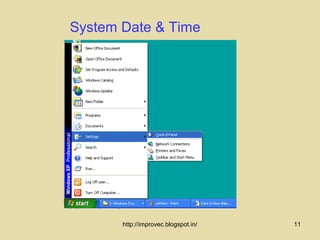
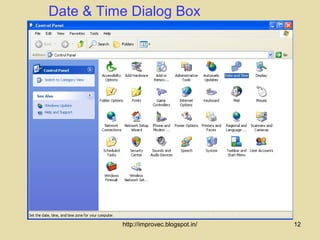
 Click start, select settings, click control panel and then
  double-click Date/Time icon


                      http://improvec.blogspot.in/         5
System Date & Time                   Contd..


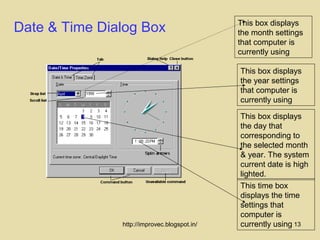
 On this dialog box we have three frames: Date, time and
  Time zone frames

 Steps to change date, time and time zone are explained
  as follows


                     http://improvec.blogspot.in/             6
System Date


 Double click time button on the task bar

 In the Date area, select the correct month, year,
  and day

 Click on Apply


               http://improvec.blogspot.in/       7
System Time


 Double click time button on the task bar


 In the time area, select the correct hour, minute, second
  and meridian


 Click on Apply


                     http://improvec.blogspot.in/         8
Time Zone


 Double click time button on the task bar


 Click time zone area; select the correct zone that we are
  located


 Click Apply


                     http://improvec.blogspot.in/         9
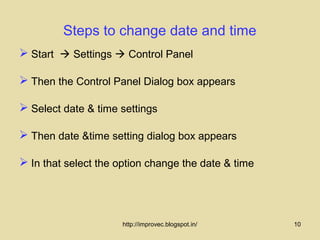
Steps to change date and time
 Start  Settings  Control Panel

 Then the Control Panel Dialog box appears

 Select date & time settings

 Then date &time setting dialog box appears

 In that select the option change the date & time


                      http://improvec.blogspot.in/   10
System Date & Time


       http://improvec.blogspot.in/   11
Date & Time Dialog Box


          http://improvec.blogspot.in/   12
This box displays
Date & Time Dialog Box                        the month settings
                                              that computer is
                                              currently using

                                              This box displays
                                              the year settings
                                              that computer is
                                              currently using

                                              This box displays
                                              the day that
                                              corresponding to
                                              the selected month
                                              & year. The system
                                              current date is high
                                              lighted.
                                              This time box
                                              displays the time
                                              settings that
                                              computer is
               http://improvec.blogspot.in/   currently using 13
Summary

 System date and time
 Time zone
 How to change data and time


              http://improvec.blogspot.in/   14
Frequently asked questions

1.Write the procedure to change System date and time ?

2.What is system data and time?

3. What is time zone?


                        http://improvec.blogspot.in/     15
Quiz

1.To get the dialog box double click time button extreme
  right end on the

     (a) task bar
     (b) shift key
     (c) tab key


                     http://improvec.blogspot.in/           16
                                                           16
Quiz

2.Under data / time tab there are two areas one for date
  setting and another for ____________
       (a) month
        (b) year
        (c) time


                      http://improvec.blogspot.in/         17

System date and time.50

  • 1.
    System Date &Time http://improvec.blogspot.in/ 1
  • 2.
    Objective On completion ofthis period, you will be able to Know  System date and time http://improvec.blogspot.in/ 2
  • 3.
    Recap  Accessing DisplayProperties  Changing screen Resolution  Changing screen colors  Set Up a Screen Saver http://improvec.blogspot.in/ 3
  • 4.
    Prerequisite System date andtime  Date/time properties dialog box sets date, time and time zone  To get the dialog box double click time button extreme right end on the task bar http://improvec.blogspot.in/ 4
  • 5.
    System Date &Time  Date/time properties dialog box sets date, time and time zone  To get the dialog box double click time button extreme right end on the task bar or  Click start, select settings, click control panel and then double-click Date/Time icon http://improvec.blogspot.in/ 5
  • 6.
    System Date &Time Contd..  On this dialog box we have three frames: Date, time and Time zone frames  Steps to change date, time and time zone are explained as follows http://improvec.blogspot.in/ 6
  • 7.
    System Date  Doubleclick time button on the task bar  In the Date area, select the correct month, year, and day  Click on Apply http://improvec.blogspot.in/ 7
  • 8.
    System Time  Doubleclick time button on the task bar  In the time area, select the correct hour, minute, second and meridian  Click on Apply http://improvec.blogspot.in/ 8
  • 9.
    Time Zone  Doubleclick time button on the task bar  Click time zone area; select the correct zone that we are located  Click Apply http://improvec.blogspot.in/ 9
  • 10.
    Steps to changedate and time  Start  Settings  Control Panel  Then the Control Panel Dialog box appears  Select date & time settings  Then date &time setting dialog box appears  In that select the option change the date & time http://improvec.blogspot.in/ 10
  • 11.
    System Date &Time http://improvec.blogspot.in/ 11
  • 12.
    Date & TimeDialog Box http://improvec.blogspot.in/ 12
  • 13.
    This box displays Date& Time Dialog Box the month settings that computer is currently using This box displays the year settings that computer is currently using This box displays the day that corresponding to the selected month & year. The system current date is high lighted. This time box displays the time settings that computer is http://improvec.blogspot.in/ currently using 13
  • 14.
    Summary  System dateand time  Time zone  How to change data and time http://improvec.blogspot.in/ 14
  • 15.
    Frequently asked questions 1.Writethe procedure to change System date and time ? 2.What is system data and time? 3. What is time zone? http://improvec.blogspot.in/ 15
  • 16.
    Quiz 1.To get thedialog box double click time button extreme right end on the (a) task bar (b) shift key (c) tab key http://improvec.blogspot.in/ 16 16
  • 17.
    Quiz 2.Under data /time tab there are two areas one for date setting and another for ____________ (a) month (b) year (c) time http://improvec.blogspot.in/ 17