1
System Benchmark
raghav.nayak@st.com
2
What is Benchmarking?
Defining Performance in Numeric Format
3
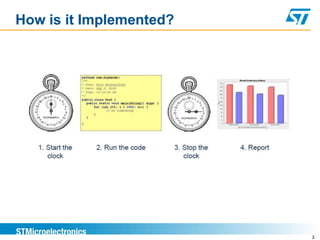
How is it Implemented?
4
WHY BENCHMARKING???
5
Fact : IP’s are from different provider. We Integrate IP’s to
create one SoC.
It is important to prove our New SoC gives same or better
Performance compared to existing competitor SoC
Why Benchmarking?
6
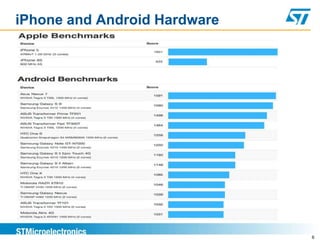
iPhone and Android Hardware
7
Does the difference come from:
 operating system (Windows, Linux, ...; 32/64 bit),
 compiler (GCC, Intel, PathScale, ...), - options,
 optimized libs (Libc...)?
Validating hardware configuration
Benchmarking Goals
8
 Comparing two systems
 Checking for regressions
 Capacity planning
 Reproducing bad behaviour to solve it
 Stress-testing to find bottlenecks
Benchmarking Goals
9
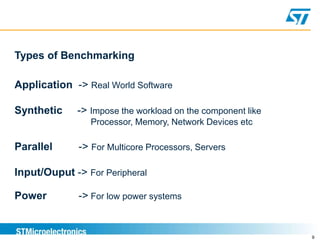
Types of Benchmarking
Application -> Real World Software
Synthetic -> Impose the workload on the component like
Processor, Memory, Network Devices etc
Parallel -> For Multicore Processors, Servers
Input/Ouput -> For Peripheral
Power -> For low power systems
10
What is Performance?
Two Metrics
 Response Time (time per task) -> User Experience
 Throughput (tasks per time) -> Benchmarking
Performance
11
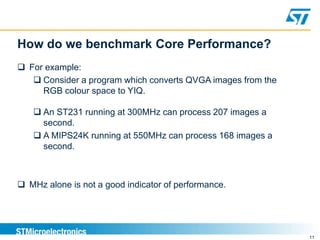
 For example:
 Consider a program which converts QVGA images from the
RGB colour space to YIQ.
 An ST231 running at 300MHz can process 207 images a
second.
 A MIPS24K running at 550MHz can process 168 images a
second.
 MHz alone is not a good indicator of performance.
How do we benchmark Core Performance?
12
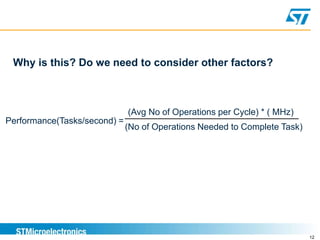
Performance(Tasks/second) =
(Avg No of Operations per Cycle) * ( MHz)
(No of Operations Needed to Complete Task)
Why is this? Do we need to consider other factors?
13
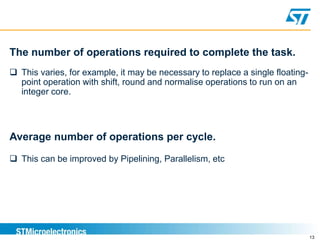
The number of operations required to complete the task.
 This varies, for example, it may be necessary to replace a single floating-
point operation with shift, round and normalise operations to run on an
integer core.
Average number of operations per cycle.
 This can be improved by Pipelining, Parallelism, etc
14
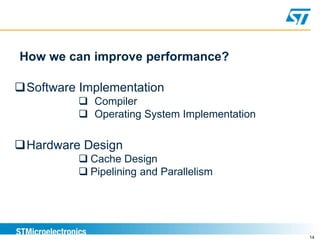
How we can improve performance?
Software Implementation
 Compiler
 Operating System Implementation
Hardware Design
 Cache Design
 Pipelining and Parallelism
15
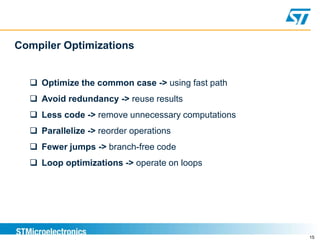
Compiler Optimizations
 Optimize the common case -> using fast path
 Avoid redundancy -> reuse results
 Less code -> remove unnecessary computations
 Parallelize -> reorder operations
 Fewer jumps -> branch-free code
 Loop optimizations -> operate on loops
16
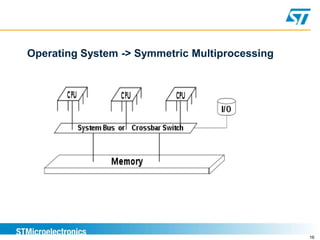
Operating System -> Symmetric Multiprocessing
17
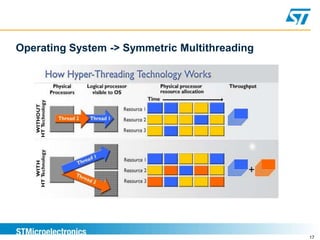
Operating System -> Symmetric Multithreading
18
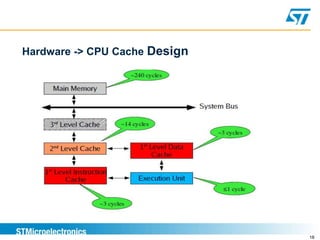
Hardware -> CPU Cache Design
19
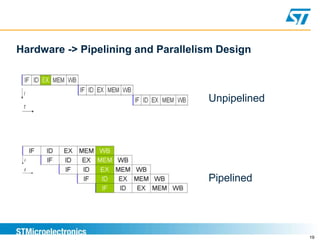
Hardware -> Pipelining and Parallelism Design
Unpipelined
Pipelined
20
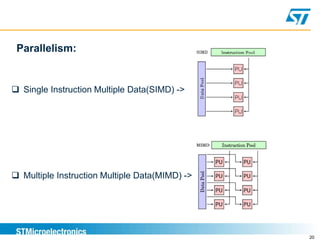
Parallelism:
 Single Instruction Multiple Data(SIMD) ->
 Multiple Instruction Multiple Data(MIMD) ->
21
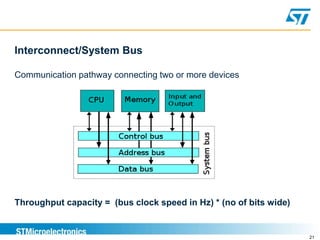
Interconnect/System Bus
Communication pathway connecting two or more devices
Throughput capacity = (bus clock speed in Hz) * (no of bits wide)
22
Newman Performance Analysis
23
Summary
 Benchmarks are for comparing different hardware
architectures.
 Do not rely solely on microbenchmark results, also check
 Sanity check results
 Use a profiler
 Test your code in real life scenarios under
realistic load (macro-benchmark)
24
QUESTIONS????

System Benchmarking

  • 1.
  • 2.
    2 What is Benchmarking? DefiningPerformance in Numeric Format
  • 3.
    3 How is itImplemented?
  • 4.
  • 5.
    5 Fact : IP’sare from different provider. We Integrate IP’s to create one SoC. It is important to prove our New SoC gives same or better Performance compared to existing competitor SoC Why Benchmarking?
  • 6.
  • 7.
    7 Does the differencecome from:  operating system (Windows, Linux, ...; 32/64 bit),  compiler (GCC, Intel, PathScale, ...), - options,  optimized libs (Libc...)? Validating hardware configuration Benchmarking Goals
  • 8.
    8  Comparing twosystems  Checking for regressions  Capacity planning  Reproducing bad behaviour to solve it  Stress-testing to find bottlenecks Benchmarking Goals
  • 9.
    9 Types of Benchmarking Application-> Real World Software Synthetic -> Impose the workload on the component like Processor, Memory, Network Devices etc Parallel -> For Multicore Processors, Servers Input/Ouput -> For Peripheral Power -> For low power systems
  • 10.
    10 What is Performance? TwoMetrics  Response Time (time per task) -> User Experience  Throughput (tasks per time) -> Benchmarking Performance
  • 11.
    11  For example: Consider a program which converts QVGA images from the RGB colour space to YIQ.  An ST231 running at 300MHz can process 207 images a second.  A MIPS24K running at 550MHz can process 168 images a second.  MHz alone is not a good indicator of performance. How do we benchmark Core Performance?
  • 12.
    12 Performance(Tasks/second) = (Avg Noof Operations per Cycle) * ( MHz) (No of Operations Needed to Complete Task) Why is this? Do we need to consider other factors?
  • 13.
    13 The number ofoperations required to complete the task.  This varies, for example, it may be necessary to replace a single floating- point operation with shift, round and normalise operations to run on an integer core. Average number of operations per cycle.  This can be improved by Pipelining, Parallelism, etc
  • 14.
    14 How we canimprove performance? Software Implementation  Compiler  Operating System Implementation Hardware Design  Cache Design  Pipelining and Parallelism
  • 15.
    15 Compiler Optimizations  Optimizethe common case -> using fast path  Avoid redundancy -> reuse results  Less code -> remove unnecessary computations  Parallelize -> reorder operations  Fewer jumps -> branch-free code  Loop optimizations -> operate on loops
  • 16.
    16 Operating System ->Symmetric Multiprocessing
  • 17.
    17 Operating System ->Symmetric Multithreading
  • 18.
    18 Hardware -> CPUCache Design
  • 19.
    19 Hardware -> Pipeliningand Parallelism Design Unpipelined Pipelined
  • 20.
    20 Parallelism:  Single InstructionMultiple Data(SIMD) ->  Multiple Instruction Multiple Data(MIMD) ->
  • 21.
    21 Interconnect/System Bus Communication pathwayconnecting two or more devices Throughput capacity = (bus clock speed in Hz) * (no of bits wide)
  • 22.
  • 23.
    23 Summary  Benchmarks arefor comparing different hardware architectures.  Do not rely solely on microbenchmark results, also check  Sanity check results  Use a profiler  Test your code in real life scenarios under realistic load (macro-benchmark)
  • 24.

Editor's Notes

  • #3 PCMARK and 3DMARK Video Card Example
  • #8 Operating System-> Windows Vs Linux Implementation CPU 32 bit and OS64 bit Example Compiler -> arm+gnu Vs armcc Libc -> memcpy -> SH4 uses FPU 64bit register – 450MHz - 1MB - 128.39MB/s ARM uses 32bit CPU register – 1.2GHz – 1MB - 190.59MB/s – nearly ~332MB/s 128bit NEON coprocessor register - ~750MB/s Use hardware accelerator like jazelle, neon, fpu etc.,
  • #9 Comparing two systems-> ISA and microarchitecture Regressions -> patches Capacity Planning -> future
  • #10 Application -> real time tracing Power -> power consumption system reliability and performance power states system transition
  • #16 Cheating -> can optimize benchmark software
  • #17 Parallel Programming -> Operating System or Software people Two or more processes
  • #18 2 or more threads for a Process Resource Utilization CPU not IDLE DMA and CPU Example
  • #19 Cache Coherency ->challenging Cache Protocols SCU in ARM
  • #20 Fetch -> predictions Decode ->control unit, ISA, brain of brain, microprogramming Execute -> ALU,GPU,FPU Data and Branch Hazards -> Compiler
  • #21 SIMD ->parallel execution MIMD ->Superscalar, Multiple fetch and execution units
  • #22 Control Bus-> control signal(r/w)+Clock(timing)+Interrupt
  • #23 LMBENCH-> with and without L2 Cache + Compare DHRYSTONE -> ST40 Vs ARM scores Compilation order