Migration to POWER8 
How to get prepared for migration to POWER8 
pavel.hampl@lpar2rrd.com
Every migration is a risk by nature and is usually driven by something. In these days the 
most common driver is money. Every single IT Manager is facing the “cost reduction” 
challenges which need to be handled. In case you are running the IBM Power Systems™ or 
other Unix systems, the migration to POWER8 could be your solution. Reasons for migrating 
to POWER8 may vary from only replacing deprecated hardware to a multi-platform migration 
solution. 
1. Reasons and preparation for migration 
Purpose of the new server has to be carefully considered from different perspectives for 
each case. For example, another type of server should be used for a web / application layer 
and another type for a large database in a mission critical environment. 
Since multiple attributes need to be considered, an appropriate setup has to be chosen. And 
there is no universal design in place which can apply to all solutions. 
Here is a list of important points, which should be taken into account in case of migration 
planning: 
 RAS features - will it be possible, from a business point of view, to easily switch off 
the server off for maintenance? Is it just a part of an application farm and it can be 
easily switched off or is it a mission critical application in a single instance? Do I 
need high-availability and on which level? What about DR solution and disaster 
recovery plans? How much will it cost me, if this application is down and, on the 
other hand, how much will it cost me to keep this application running? Should I take 
live partition mobility into account? 
 I/O adapters - Which kind of I/O operations will be handled and what about volume? 
Could all adapters be virtualized and shared or do I need dedicated adapters for any 
reason such as heavy load on SAN or LAN? Alternatively, do I need isolated / 
dedicated adapters for security reasons (corporate rules to isolate environments / 
landscapes and so on)? Can I use my multi-path drivers and what are their 
requirements? 
 CPU workload - How will the target load look like? Which benchmark should I use 
for proper sizing? Especially in case of migration from another platform, proper 
analysis has to be done. When are the utilization peaks for particular LPARs to 
maximize the efficient load on a physical machine and, on the other hand, not to 
overload it? Which SMT should I use? There could be a significant difference in 
performance based on the SMT settings, type of application, application settings and 
type of workload. 
 RAM - How much memory will I need? In case of migration from another platform, 
proper analysis has to be done to ensure difference in memory consumption on the 
IBM Power Systems platform. 
 Security - Might I run all LPARs on one physical box? Is the provided security 
certification for Hypervisor sufficient? Do I need any extra security features? 
 Compatibility - In case of a new physical server installation, the required minimal 
version of operating system has to be considered every time. It is not only important 
to have an appropriate OS level for installed hardware and firmware, you also have
to consider an appropriate or certified version of OS for running your applications. Do 
I have an adequate version of the HMC software? 
Once you have defined the memory, security, compatibility, HA, DR and all others, then the 
question is which POWER8 model with how many CPUs to choose to be safe? This one 
appears to be really difficult. Will I need to upgrade CPU capacity of the server in the future? 
How much? Small entry-level and midrange servers can be extended by a second CPU or 
up to 4 CPUs depending on the server type. Some of them cannot be upgraded. All installed 
resources on small servers are automatically activated. On the other hand, these servers 
are much cheaper than enterprise class servers what allows incremental HW upgrade, 
providing also CUoD (Capacity Upgrade on Demand) for CPU cores and memory. 
And finally, there are software licenses which also have to be looked at from different angles 
as listed below: 
 Licensing model - per core, per user, etc … 
 Price of license per unit 
 Performance per core 
 Licensing tier per server class i.e. PVU - blade and entry level, midrange and 
enterprise class have different PVU values 
 Usage of CPU shared pools for licensing optimization purposes 
2. How to get guidance for CPU sizing 
In case you are considering migration from an older POWER CPU to the newest one – 
POWER8 - for whatever reason, you can easily plan this migration with LPAR2RRD tool 
using the CPU Workload Estimator (CWE) function. This function helps you especially with 
projection of your current (and / or historical) CPU workload which you have on your current 
infrastructure, to new machines. 
The benefit of using the LPAR2RRD CWE is a really simple projection of current workload 
(and / or historical) to a new physical box or boxes based on your real CPU workload data 
already collected by the tool. All projections are based on official IBM benchmarks rPerf 
(AIX) and CPW (i5/OS). 
The tool allows you to easily select current servers considered for migration. These servers 
could be either whole physical boxes (one or more) or only selected LPARs from one or 
more physical boxes. This allows you to create many different scenarios for considered 
migration and consolidation.
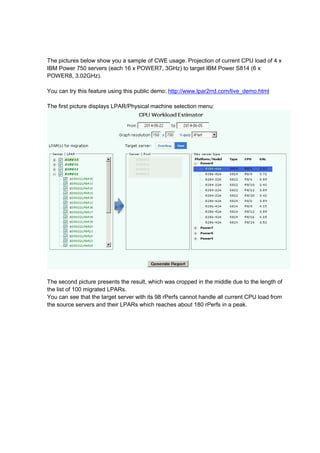
The pictures below show you a sample of CWE usage. Projection of current CPU load of 4 x 
IBM Power 750 servers (each 16 x POWER7, 3GHz) to target IBM Power S814 (6 x 
POWER8, 3.02GHz). 
You can try this feature using this public demo: http://www.lpar2rrd.com/live_demo.html 
The first picture displays LPAR/Physical machine selection menu: 
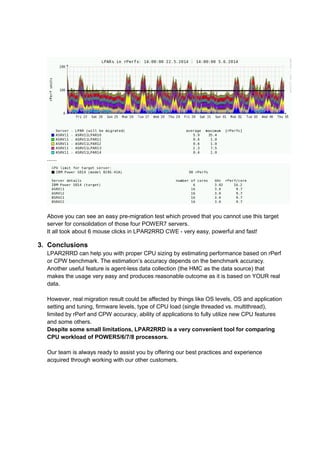
The second picture presents the result, which was cropped in the middle due to the length of 
the list of 100 migrated LPARs. 
You can see that the target server with its 98 rPerfs cannot handle all current CPU load from 
the source servers and their LPARs which reaches about 180 rPerfs in a peak.
...... 
Above you can see an easy pre-migration test which proved that you cannot use this target 
server for consolidation of those four POWER7 servers. 
It all took about 6 mouse clicks in LPAR2RRD CWE - very easy, powerful and fast! 
3. Conclusions 
LPAR2RRD can help you with proper CPU sizing by estimating performance based on rPerf 
or CPW benchmark. The estimation’s accuracy depends on the benchmark accuracy. 
Another useful feature is agent-less data collection (the HMC as the data source) that 
makes the usage very easy and produces reasonable outcome as it is based on YOUR real 
data. 
However, real migration result could be affected by things like OS levels, OS and application 
setting and tuning, firmware levels, type of CPU load (single threaded vs. multithread), 
limited by rPerf and CPW accuracy, ability of applications to fully utilize new CPU features 
and some others. 
Despite some small limitations, LPAR2RRD is a very convenient tool for comparing 
CPU workload of POWER5/6/7/8 processors. 
Our team is always ready to assist you by offering our best practices and experience 
acquired through working with our other customers.

Migration to IBM POWER8

  • 1.
    Migration to POWER8 How to get prepared for migration to POWER8 pavel.hampl@lpar2rrd.com
  • 2.
    Every migration isa risk by nature and is usually driven by something. In these days the most common driver is money. Every single IT Manager is facing the “cost reduction” challenges which need to be handled. In case you are running the IBM Power Systems™ or other Unix systems, the migration to POWER8 could be your solution. Reasons for migrating to POWER8 may vary from only replacing deprecated hardware to a multi-platform migration solution. 1. Reasons and preparation for migration Purpose of the new server has to be carefully considered from different perspectives for each case. For example, another type of server should be used for a web / application layer and another type for a large database in a mission critical environment. Since multiple attributes need to be considered, an appropriate setup has to be chosen. And there is no universal design in place which can apply to all solutions. Here is a list of important points, which should be taken into account in case of migration planning:  RAS features - will it be possible, from a business point of view, to easily switch off the server off for maintenance? Is it just a part of an application farm and it can be easily switched off or is it a mission critical application in a single instance? Do I need high-availability and on which level? What about DR solution and disaster recovery plans? How much will it cost me, if this application is down and, on the other hand, how much will it cost me to keep this application running? Should I take live partition mobility into account?  I/O adapters - Which kind of I/O operations will be handled and what about volume? Could all adapters be virtualized and shared or do I need dedicated adapters for any reason such as heavy load on SAN or LAN? Alternatively, do I need isolated / dedicated adapters for security reasons (corporate rules to isolate environments / landscapes and so on)? Can I use my multi-path drivers and what are their requirements?  CPU workload - How will the target load look like? Which benchmark should I use for proper sizing? Especially in case of migration from another platform, proper analysis has to be done. When are the utilization peaks for particular LPARs to maximize the efficient load on a physical machine and, on the other hand, not to overload it? Which SMT should I use? There could be a significant difference in performance based on the SMT settings, type of application, application settings and type of workload.  RAM - How much memory will I need? In case of migration from another platform, proper analysis has to be done to ensure difference in memory consumption on the IBM Power Systems platform.  Security - Might I run all LPARs on one physical box? Is the provided security certification for Hypervisor sufficient? Do I need any extra security features?  Compatibility - In case of a new physical server installation, the required minimal version of operating system has to be considered every time. It is not only important to have an appropriate OS level for installed hardware and firmware, you also have
  • 3.
    to consider anappropriate or certified version of OS for running your applications. Do I have an adequate version of the HMC software? Once you have defined the memory, security, compatibility, HA, DR and all others, then the question is which POWER8 model with how many CPUs to choose to be safe? This one appears to be really difficult. Will I need to upgrade CPU capacity of the server in the future? How much? Small entry-level and midrange servers can be extended by a second CPU or up to 4 CPUs depending on the server type. Some of them cannot be upgraded. All installed resources on small servers are automatically activated. On the other hand, these servers are much cheaper than enterprise class servers what allows incremental HW upgrade, providing also CUoD (Capacity Upgrade on Demand) for CPU cores and memory. And finally, there are software licenses which also have to be looked at from different angles as listed below:  Licensing model - per core, per user, etc …  Price of license per unit  Performance per core  Licensing tier per server class i.e. PVU - blade and entry level, midrange and enterprise class have different PVU values  Usage of CPU shared pools for licensing optimization purposes 2. How to get guidance for CPU sizing In case you are considering migration from an older POWER CPU to the newest one – POWER8 - for whatever reason, you can easily plan this migration with LPAR2RRD tool using the CPU Workload Estimator (CWE) function. This function helps you especially with projection of your current (and / or historical) CPU workload which you have on your current infrastructure, to new machines. The benefit of using the LPAR2RRD CWE is a really simple projection of current workload (and / or historical) to a new physical box or boxes based on your real CPU workload data already collected by the tool. All projections are based on official IBM benchmarks rPerf (AIX) and CPW (i5/OS). The tool allows you to easily select current servers considered for migration. These servers could be either whole physical boxes (one or more) or only selected LPARs from one or more physical boxes. This allows you to create many different scenarios for considered migration and consolidation.
  • 4.
    The pictures belowshow you a sample of CWE usage. Projection of current CPU load of 4 x IBM Power 750 servers (each 16 x POWER7, 3GHz) to target IBM Power S814 (6 x POWER8, 3.02GHz). You can try this feature using this public demo: http://www.lpar2rrd.com/live_demo.html The first picture displays LPAR/Physical machine selection menu: The second picture presents the result, which was cropped in the middle due to the length of the list of 100 migrated LPARs. You can see that the target server with its 98 rPerfs cannot handle all current CPU load from the source servers and their LPARs which reaches about 180 rPerfs in a peak.
  • 5.
    ...... Above youcan see an easy pre-migration test which proved that you cannot use this target server for consolidation of those four POWER7 servers. It all took about 6 mouse clicks in LPAR2RRD CWE - very easy, powerful and fast! 3. Conclusions LPAR2RRD can help you with proper CPU sizing by estimating performance based on rPerf or CPW benchmark. The estimation’s accuracy depends on the benchmark accuracy. Another useful feature is agent-less data collection (the HMC as the data source) that makes the usage very easy and produces reasonable outcome as it is based on YOUR real data. However, real migration result could be affected by things like OS levels, OS and application setting and tuning, firmware levels, type of CPU load (single threaded vs. multithread), limited by rPerf and CPW accuracy, ability of applications to fully utilize new CPU features and some others. Despite some small limitations, LPAR2RRD is a very convenient tool for comparing CPU workload of POWER5/6/7/8 processors. Our team is always ready to assist you by offering our best practices and experience acquired through working with our other customers.