Synchronize your data
between MySQL
and MongoDB
using Tungsten Replicator
Giuseppe Maxia, Director of QA
Continuent, Inc

©Continuent 2013
Tuesday, October 15, 13

1
About me

•

Giuseppe Maxia, a.k.a. "The Data Charmer"

• Director of Quality Assurance, Continuent, Inc
• 25+ years development and DB experience
• Long timer MySQL community member.
• Oracle ACE Director
• Blog: http://datacharmer.blogspot.com
• Twitter: @datacharmer

©Continuent 2013
Tuesday, October 15, 13

2
2
Introducing Continuent

•

The leading provider of clustering and
replication for open source DBMS

•

Our Product: Continuent Tungsten

• Clustering - Commercial-grade HA, performance
scaling and data management for MySQL

• Replication - Flexible, high-performance data
movement

©Continuent 2013
Tuesday, October 15, 13

3
3
A Review of Tungsten Replicator

©Continuent 2013
Tuesday, October 15, 13

4
4
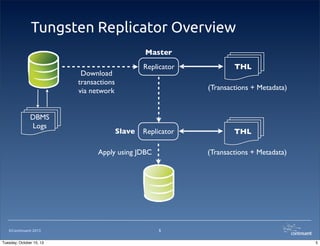
Tungsten Replicator Overview
Master
Replicator

Download
transactions
via network
DBMS
Logs

(Transactions + Metadata)

Slave

Replicator

Apply using JDBC

©Continuent 2013
Tuesday, October 15, 13

THL

THL
(Transactions + Metadata)

5
5
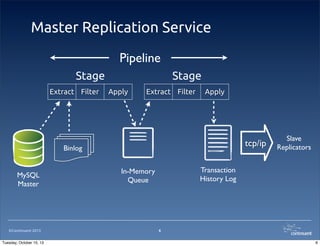
Master Replication Service
Pipeline
Stage
Extract Filter

Stage
Apply

Extract Filter

Apply

tcp/ip

Binlog
MySQL
Master

©Continuent 2013
Tuesday, October 15, 13

Slave
Replicators

Transaction
History Log

In-Memory
Queue

6
6
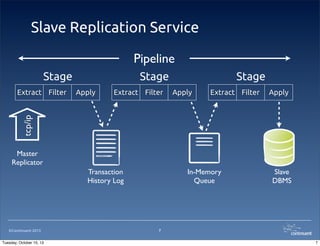
Slave Replication Service
Pipeline
Stage
Apply

Extract Filter

Stage
Apply

Extract Filter

Apply

tcp/ip

Extract Filter

Stage

Master
Replicator
Transaction
History Log

©Continuent 2013
Tuesday, October 15, 13

In-Memory
Queue

Slave
DBMS

7
7
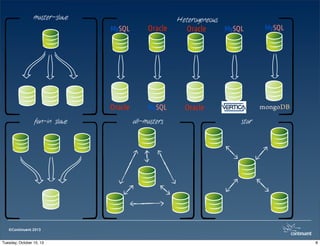
master-slave
MySQL

Oracle
fan-in slave

Oracle

MySQL
all-masters

Heterogeneous

Oracle

MySQL

MySQL

Oracle
star

©Continuent 2013
Tuesday, October 15, 13

8
MongoDB in a nutshell

©Continuent 2013
Tuesday, October 15, 13

9
9
What is MongoDB

•
•
•
•
•
•
•
©Continuent 2013
Tuesday, October 15, 13

A non-relational database
A document-oriented database
Schema-free
Open source
High performance
Scalable
Developer-friendly (sort of)

10
10
What is MongoDB good for?

•
•
•

Storing large amount of unrelated data

•

IT IS NOT a drop-in replacement for a
relational database

©Continuent 2013
Tuesday, October 15, 13

Data that can't be constrained in a schema
Complement to relational data

11
11
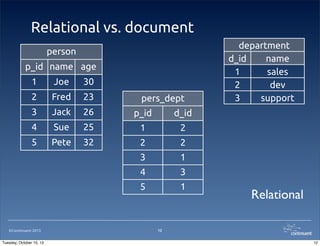
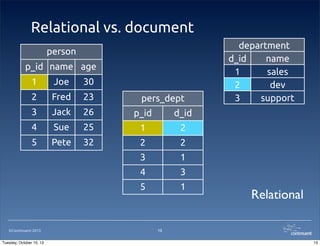
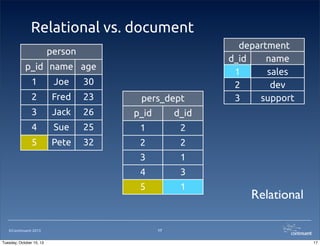
Relational vs. document
person
p_id name age
1

Joe

30

2

Fred

23

3

Jack

26

p_id

d_id

4

Sue

25

1

2

5

Pete

32

2

2

3

1

4

3

5

1

department
d_id
name
1
sales
2
dev
3
support

©Continuent 2013
Tuesday, October 15, 13

pers_dept

Relational

12
12
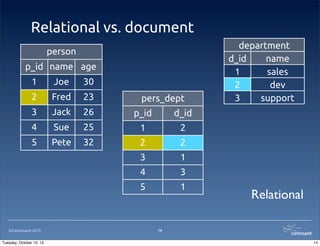
Relational vs. document
person
p_id name age
1

Joe

30

2

Fred

23

3

Jack

26

p_id

d_id

4

Sue

25

1

2

5

Pete

32

2

2

3

1

4

3

5

1

department
d_id
name
1
sales
2
dev
3
support

©Continuent 2013
Tuesday, October 15, 13

pers_dept

Relational

13
13
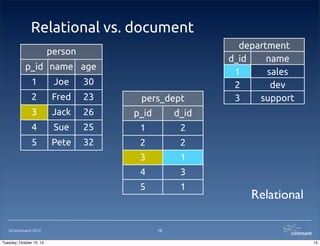
Relational vs. document
person
p_id name age
1

Joe

30

2

Fred

23

3

Jack

26

p_id

d_id

4

Sue

25

1

2

5

Pete

32

2

2

3

1

4

3

5

1

department
d_id
name
1
sales
2
dev
3
support

©Continuent 2013
Tuesday, October 15, 13

pers_dept

Relational

14
14
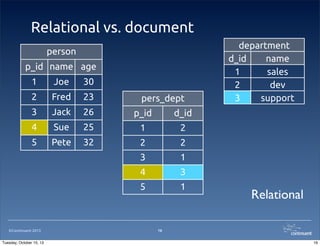
Relational vs. document
person
p_id name age
1

Joe

30

2

Fred

23

3

Jack

26

p_id

d_id

4

Sue

25

1

2

5

Pete

32

2

2

3

1

4

3

5

1

department
d_id
name
1
sales
2
dev
3
support

©Continuent 2013
Tuesday, October 15, 13

pers_dept

Relational

15
15
Relational vs. document
person
p_id name age
1

Joe

30

2

Fred

23

3

Jack

26

p_id

d_id

4

Sue

25

1

2

5

Pete

32

2

2

3

1

4

3

5

1

department
d_id
name
1
sales
2
dev
3
support

©Continuent 2013
Tuesday, October 15, 13

pers_dept

Relational

16
16
Relational vs. document
person
p_id name age
1

Joe

30

2

Fred

23

3

Jack

26

p_id

d_id

4

Sue

25

1

2

5

Pete

32

2

2

3

1

4

3

5

1

department
d_id
name
1
sales
2
dev
3
support

©Continuent 2013
Tuesday, October 15, 13

pers_dept

Relational

17
17
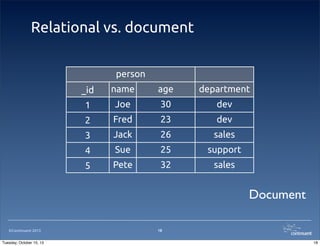
Relational vs. document
person
_id

name

age

department

1

Joe

30

dev

2

Fred

23

dev

3

Jack

26

sales

4

Sue

25

support

5

Pete

32

sales

Document
©Continuent 2013
Tuesday, October 15, 13

18
18
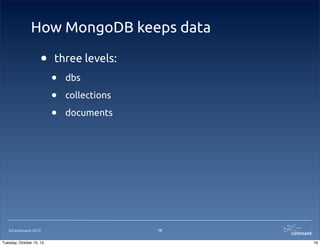
How MongoDB keeps data

•

©Continuent 2013
Tuesday, October 15, 13

three levels:

•
•
•

dbs
collections
documents

19
19
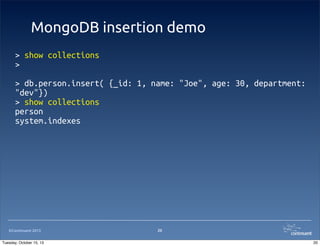
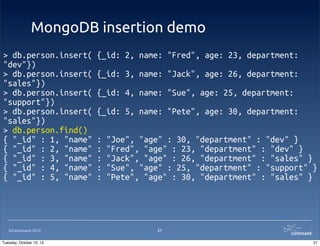
MongoDB insertion demo
> show collections
>
> db.person.insert( {_id: 1, name: "Joe", age: 30, department:
"dev"})
> show collections
person
system.indexes

©Continuent 2013
Tuesday, October 15, 13

20
20
MongoDB insertion demo
> db.person.insert(
"dev"})
> db.person.insert(
"sales"})
> db.person.insert(
"support"})
> db.person.insert(
"sales"})
> db.person.find()
{ "_id" : 1, "name"
{ "_id" : 2, "name"
{ "_id" : 3, "name"
{ "_id" : 4, "name"
{ "_id" : 5, "name"

©Continuent 2013
Tuesday, October 15, 13

{_id: 2, name: "Fred", age: 23, department:
{_id: 3, name: "Jack", age: 26, department:
{_id: 4, name: "Sue", age: 25, department:
{_id: 5, name: "Pete", age: 30, department:
:
:
:
:
:

"Joe", "age" : 30, "department" : "dev" }
"Fred", "age" : 23, "department" : "dev" }
"Jack", "age" : 26, "department" : "sales" }
"Sue", "age" : 25, "department" : "support" }
"Pete", "age" : 30, "department" : "sales" }

21
21
MySQL to MongoDB basics

©Continuent 2013
Tuesday, October 15, 13

22
22
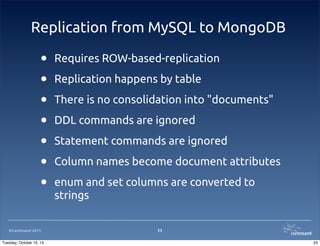
Replication from MySQL to MongoDB

•
•
•
•
•
•
•
©Continuent 2013
Tuesday, October 15, 13

Requires ROW-based-replication
Replication happens by table
There is no consolidation into "documents"
DDL commands are ignored
Statement commands are ignored
Column names become document attributes
enum and set columns are converted to
strings
23
23
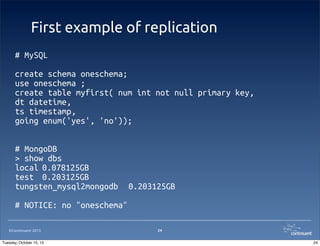
First example of replication
# MySQL
create schema oneschema;
use oneschema ;
create table myfirst( num int not null primary key,
dt datetime,
ts timestamp,
going enum('yes', 'no'));
# MongoDB
> show dbs
local 0.078125GB
test 0.203125GB
tungsten_mysql2mongodb

0.203125GB

# NOTICE: no "oneschema"
©Continuent 2013
Tuesday, October 15, 13

24
24
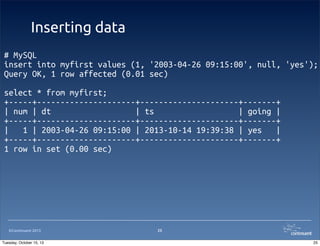
Inserting data
# MySQL
insert into myfirst values (1, '2003-04-26 09:15:00', null, 'yes');
Query OK, 1 row affected (0.01 sec)
select * from myfirst;
+-----+---------------------+---------------------+-------+
| num | dt
| ts
| going |
+-----+---------------------+---------------------+-------+
|
1 | 2003-04-26 09:15:00 | 2013-10-14 19:39:38 | yes
|
+-----+---------------------+---------------------+-------+
1 row in set (0.00 sec)

©Continuent 2013
Tuesday, October 15, 13

25
25
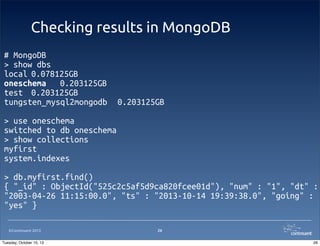
Checking results in MongoDB
# MongoDB
> show dbs
local 0.078125GB
oneschema 0.203125GB
test 0.203125GB
tungsten_mysql2mongodb

0.203125GB

> use oneschema
switched to db oneschema
> show collections
myfirst
system.indexes
> db.myfirst.find()
{ "_id" : ObjectId("525c2c5af5d9ca820fcee01d"), "num" : "1", "dt" :
"2003-04-26 11:15:00.0", "ts" : "2013-10-14 19:39:38.0", "going" :
"yes" }
©Continuent 2013
Tuesday, October 15, 13

26
26
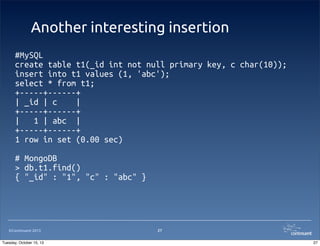
Another interesting insertion
#MySQL
create table t1(_id int not null primary key, c char(10));
insert into t1 values (1, 'abc');
select * from t1;
+-----+------+
| _id | c
|
+-----+------+
|
1 | abc |
+-----+------+
1 row in set (0.00 sec)
# MongoDB
> db.t1.find()
{ "_id" : "1", "c" : "abc" }

©Continuent 2013
Tuesday, October 15, 13

27
27
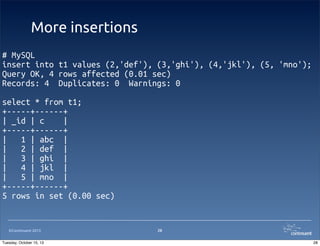
More insertions
# MySQL
insert into t1 values (2,'def'), (3,'ghi'), (4,'jkl'), (5, 'mno');
Query OK, 4 rows affected (0.01 sec)
Records: 4 Duplicates: 0 Warnings: 0
select * from t1;
+-----+------+
| _id | c
|
+-----+------+
|
1 | abc |
|
2 | def |
|
3 | ghi |
|
4 | jkl |
|
5 | mno |
+-----+------+
5 rows in set (0.00 sec)

©Continuent 2013
Tuesday, October 15, 13

28
28
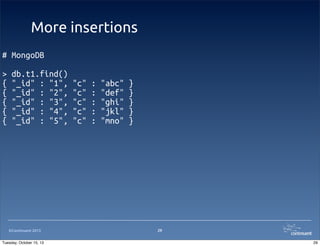
More insertions
# MongoDB
>
{
{
{
{
{

db.t1.find()
"_id" : "1",
"_id" : "2",
"_id" : "3",
"_id" : "4",
"_id" : "5",

©Continuent 2013
Tuesday, October 15, 13

"c"
"c"
"c"
"c"
"c"

:
:
:
:
:

"abc"
"def"
"ghi"
"jkl"
"mno"

}
}
}
}
}

29
29
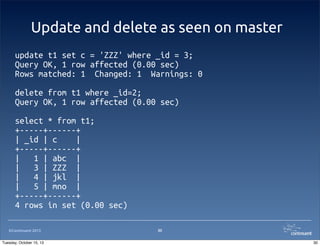
Update and delete as seen on master
update t1 set c = 'ZZZ' where _id = 3;
Query OK, 1 row affected (0.00 sec)
Rows matched: 1 Changed: 1 Warnings: 0
delete from t1 where _id=2;
Query OK, 1 row affected (0.00 sec)
select * from t1;
+-----+------+
| _id | c
|
+-----+------+
|
1 | abc |
|
3 | ZZZ |
|
4 | jkl |
|
5 | mno |
+-----+------+
4 rows in set (0.00 sec)
©Continuent 2013
Tuesday, October 15, 13

30
30
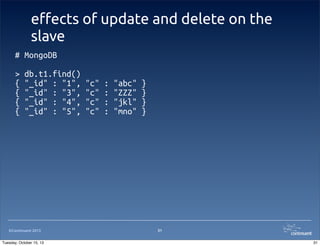
e!ects of update and delete on the
slave
# MongoDB
>
{
{
{
{

db.t1.find()
"_id" : "1",
"_id" : "3",
"_id" : "4",
"_id" : "5",

©Continuent 2013
Tuesday, October 15, 13

"c"
"c"
"c"
"c"

:
:
:
:

"abc"
"ZZZ"
"jkl"
"mno"

}
}
}
}

31
31
Overview of Tungsten installer

©Continuent 2013
Tuesday, October 15, 13

32
32
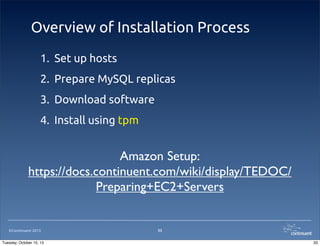
Overview of Installation Process
1. Set up hosts
2. Prepare MySQL replicas
3. Download software
4. Install using tpm

Amazon Setup:
https://docs.continuent.com/wiki/display/TEDOC/
Preparing+EC2+Servers

©Continuent 2013
Tuesday, October 15, 13

33
33
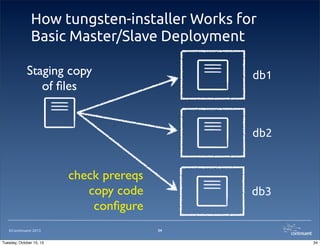
How tungsten-installer Works for
Basic Master/Slave Deployment
Staging copy
of files

db1

db2

check prereqs
copy code
configure
©Continuent 2013
Tuesday, October 15, 13

db3

34
34
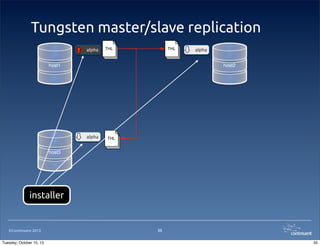
Tungsten master/slave replication
alpha

THL

THL

host1

alpha

host2

alpha

THL

host3

installer

©Continuent 2013
Tuesday, October 15, 13

35
35
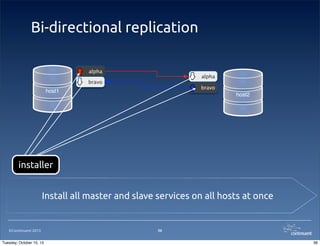
Bi-directional replication
alpha

alpha

bravo

bravo

host1

host2

installer
Install all master and slave services on all hosts at once

©Continuent 2013
Tuesday, October 15, 13

36
36
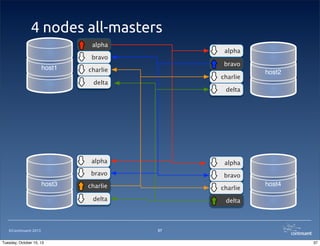
4 nodes all-masters
alpha

alpha

bravo

host1

bravo

charlie

charlie

delta

host2

delta

alpha
bravo

©Continuent 2013
Tuesday, October 15, 13

bravo

charlie

charlie

delta

host3

alpha

delta

host4

37
37
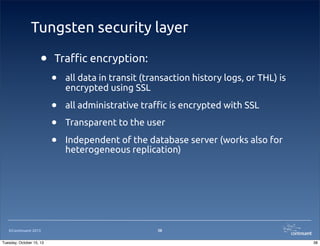
Tungsten security layer

•

Tra!c encryption:

Tuesday, October 15, 13

all data in transit (transaction history logs, or THL) is
encrypted using SSL

•
•
•

©Continuent 2013

•

all administrative tra!c is encrypted with SSL
Transparent to the user
Independent of the database server (works also for
heterogeneous replication)

38
38
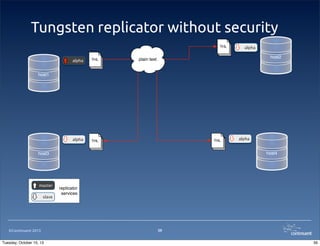
Tungsten replicator without security
THL

alpha

THL

alpha

alpha

host2

plain text

THL

host1

THL

host4

host3

master
slave

©Continuent 2013
Tuesday, October 15, 13

alpha

replicator
services

39
39
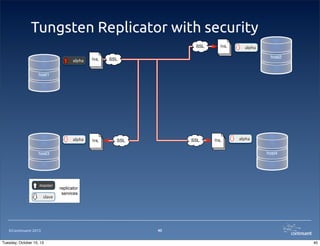
Tungsten Replicator with security
SSL
alpha

THL

alpha

THL

THL

alpha

host2

SSL

host1

SSL

SSL

slave

©Continuent 2013
Tuesday, October 15, 13

alpha

host4

host3

master

THL

replicator
services

40
40
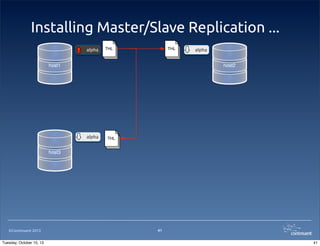
Installing Master/Slave Replication ...
alpha

THL

THL

host1

alpha

host2

alpha

THL

host3

©Continuent 2013
Tuesday, October 15, 13

41
41
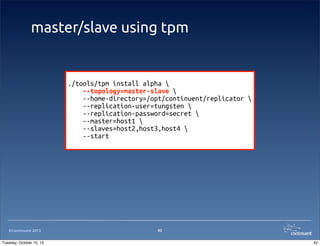
master/slave using tpm

./tools/tpm install alpha 
--topology=master-slave 
--home-directory=/opt/continuent/replicator 
--replication-user=tungsten 
--replication-password=secret 
--master=host1 
--slaves=host2,host3,host4 
--start

©Continuent 2013
Tuesday, October 15, 13

42
42
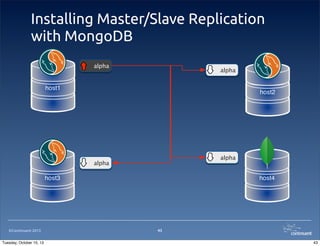
Installing Master/Slave Replication
with MongoDB
alpha

alpha

host1

host2

alpha

alpha

host3

©Continuent 2013
Tuesday, October 15, 13

host4

43
43
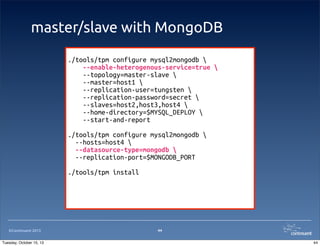
master/slave with MongoDB
./tools/tpm configure mysql2mongodb 
--enable-heterogenous-service=true 
--topology=master-slave 
--master=host1 
--replication-user=tungsten 
--replication-password=secret 
--slaves=host2,host3,host4 
--home-directory=$MYSQL_DEPLOY 
--start-and-report
./tools/tpm configure mysql2mongodb 
--hosts=host4 
--datasource-type=mongodb 
--replication-port=$MONGODB_PORT
./tools/tpm install

©Continuent 2013
Tuesday, October 15, 13

44
44
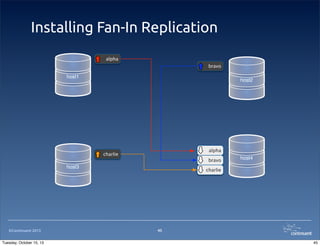
Installing Fan-In Replication
alpha
bravo

host1

host2

alpha

charlie

bravo

host3

©Continuent 2013
Tuesday, October 15, 13

host4

charlie

45
45
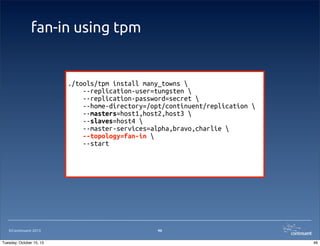
fan-in using tpm

./tools/tpm install many_towns 
--replication-user=tungsten 
--replication-password=secret 
--home-directory=/opt/continuent/replication 
--masters=host1,host2,host3 
--slaves=host4 
--master-services=alpha,bravo,charlie 
--topology=fan-in 
--start

©Continuent 2013
Tuesday, October 15, 13

46
46
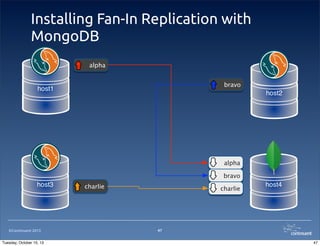
Installing Fan-In Replication with
MongoDB
alpha
bravo

host1

host2

alpha
bravo

host3

©Continuent 2013
Tuesday, October 15, 13

charlie

charlie

host4

47
47
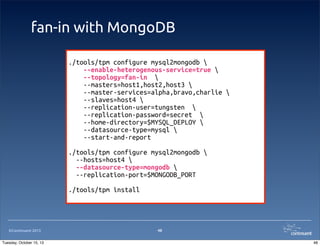
fan-in with MongoDB
./tools/tpm configure mysql2mongodb 
--enable-heterogenous-service=true 
--topology=fan-in 
--masters=host1,host2,host3 
--master-services=alpha,bravo,charlie 
--slaves=host4 
--replication-user=tungsten 
--replication-password=secret 
--home-directory=$MYSQL_DEPLOY 
--datasource-type=mysql 
--start-and-report
./tools/tpm configure mysql2mongodb 
--hosts=host4 
--datasource-type=mongodb 
--replication-port=$MONGODB_PORT
./tools/tpm install

©Continuent 2013
Tuesday, October 15, 13

48
48
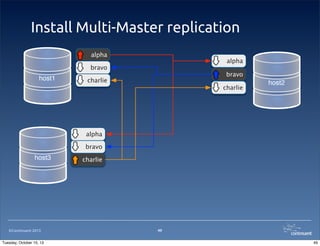
Install Multi-Master replication
alpha

alpha

bravo

host1

bravo

charlie

charlie

host2

alpha
bravo

host3

©Continuent 2013
Tuesday, October 15, 13

charlie

49
49
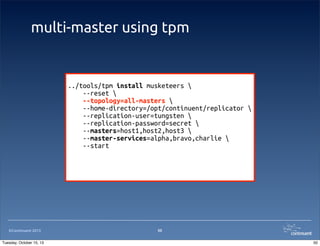
multi-master using tpm

../tools/tpm install musketeers 
--reset 
--topology=all-masters 
--home-directory=/opt/continuent/replicator 
--replication-user=tungsten 
--replication-password=secret 
--masters=host1,host2,host3 
--master-services=alpha,bravo,charlie 
--start

©Continuent 2013
Tuesday, October 15, 13

50
50
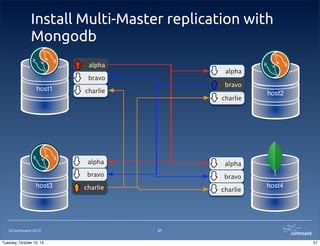
Install Multi-Master replication with
Mongodb
alpha

alpha

bravo

host1

bravo

charlie

charlie

alpha

host3

©Continuent 2013
Tuesday, October 15, 13

alpha

bravo

bravo

charlie

charlie

host2

host4

51
51
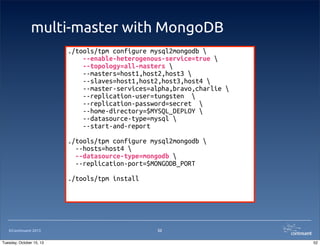
multi-master with MongoDB
./tools/tpm configure mysql2mongodb 
--enable-heterogenous-service=true 
--topology=all-masters 
--masters=host1,host2,host3 
--slaves=host1,host2,host3,host4 
--master-services=alpha,bravo,charlie 
--replication-user=tungsten 
--replication-password=secret 
--home-directory=$MYSQL_DEPLOY 
--datasource-type=mysql 
--start-and-report
./tools/tpm configure mysql2mongodb 
--hosts=host4 
--datasource-type=mongodb 
--replication-port=$MONGODB_PORT
./tools/tpm install

©Continuent 2013
Tuesday, October 15, 13

52
52
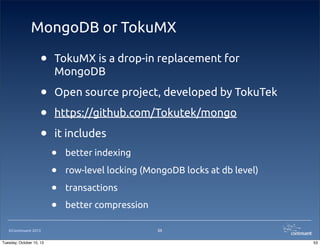
MongoDB or TokuMX

•

TokuMX is a drop-in replacement for
MongoDB

•
•
•

Open source project, developed by TokuTek

©Continuent 2013
Tuesday, October 15, 13

https://github.com/Tokutek/mongo
it includes

•
•
•
•

better indexing
row-level locking (MongoDB locks at db level)
transactions
better compression
53
53
DEMO:
MongoDB
and multi master
installation

©Continuent 2013
Tuesday, October 15, 13

54
54
Joining the Community

©Continuent 2013
Tuesday, October 15, 13

55
55
Tungsten Replicator is Open Source

•

Project home:
http://code.google.com/p/tungsten-replicator/

•

Log bugs, "nd builds, post in replicator discussion
group

•

Documentation:
https://docs.continuent.com/wiki/display/TEDOC/
Tungsten+Documentation+Home
https://docs.continuent.com/wiki/display/TEDOC/
Deploying+MongoDB+Replication

©Continuent 2013
Tuesday, October 15, 13

56
56
560 S. Winchester Blvd., Suite 500
San Jose, CA 95128
Tel +1 (866) 998-3642
Fax +1 (408) 668-1009
e-mail: sales@continuent.com

Our Blogs:
http://scale-out-blog.blogspot.com
http://datacharmer.blogspot.com
http://www.continuent.com/news/blogs

Continuent Web Page:
http://www.continuent.com
Tungsten Replicator 2.1:
http://code.google.com/p/tungsten-replicator

©Continuent 2012.
Tuesday, October 15, 13

57

Synchronise your data between MySQL and MongoDB

  • 1.
    Synchronize your data betweenMySQL and MongoDB using Tungsten Replicator Giuseppe Maxia, Director of QA Continuent, Inc ©Continuent 2013 Tuesday, October 15, 13 1
  • 2.
    About me • Giuseppe Maxia,a.k.a. "The Data Charmer" • Director of Quality Assurance, Continuent, Inc • 25+ years development and DB experience • Long timer MySQL community member. • Oracle ACE Director • Blog: http://datacharmer.blogspot.com • Twitter: @datacharmer ©Continuent 2013 Tuesday, October 15, 13 2 2
  • 3.
    Introducing Continuent • The leadingprovider of clustering and replication for open source DBMS • Our Product: Continuent Tungsten • Clustering - Commercial-grade HA, performance scaling and data management for MySQL • Replication - Flexible, high-performance data movement ©Continuent 2013 Tuesday, October 15, 13 3 3
  • 4.
    A Review ofTungsten Replicator ©Continuent 2013 Tuesday, October 15, 13 4 4
  • 5.
    Tungsten Replicator Overview Master Replicator Download transactions vianetwork DBMS Logs (Transactions + Metadata) Slave Replicator Apply using JDBC ©Continuent 2013 Tuesday, October 15, 13 THL THL (Transactions + Metadata) 5 5
  • 6.
    Master Replication Service Pipeline Stage ExtractFilter Stage Apply Extract Filter Apply tcp/ip Binlog MySQL Master ©Continuent 2013 Tuesday, October 15, 13 Slave Replicators Transaction History Log In-Memory Queue 6 6
  • 7.
    Slave Replication Service Pipeline Stage Apply ExtractFilter Stage Apply Extract Filter Apply tcp/ip Extract Filter Stage Master Replicator Transaction History Log ©Continuent 2013 Tuesday, October 15, 13 In-Memory Queue Slave DBMS 7 7
  • 8.
  • 9.
    MongoDB in anutshell ©Continuent 2013 Tuesday, October 15, 13 9 9
  • 10.
    What is MongoDB • • • • • • • ©Continuent2013 Tuesday, October 15, 13 A non-relational database A document-oriented database Schema-free Open source High performance Scalable Developer-friendly (sort of) 10 10
  • 11.
    What is MongoDBgood for? • • • Storing large amount of unrelated data • IT IS NOT a drop-in replacement for a relational database ©Continuent 2013 Tuesday, October 15, 13 Data that can't be constrained in a schema Complement to relational data 11 11
  • 12.
    Relational vs. document person p_idname age 1 Joe 30 2 Fred 23 3 Jack 26 p_id d_id 4 Sue 25 1 2 5 Pete 32 2 2 3 1 4 3 5 1 department d_id name 1 sales 2 dev 3 support ©Continuent 2013 Tuesday, October 15, 13 pers_dept Relational 12 12
  • 13.
    Relational vs. document person p_idname age 1 Joe 30 2 Fred 23 3 Jack 26 p_id d_id 4 Sue 25 1 2 5 Pete 32 2 2 3 1 4 3 5 1 department d_id name 1 sales 2 dev 3 support ©Continuent 2013 Tuesday, October 15, 13 pers_dept Relational 13 13
  • 14.
    Relational vs. document person p_idname age 1 Joe 30 2 Fred 23 3 Jack 26 p_id d_id 4 Sue 25 1 2 5 Pete 32 2 2 3 1 4 3 5 1 department d_id name 1 sales 2 dev 3 support ©Continuent 2013 Tuesday, October 15, 13 pers_dept Relational 14 14
  • 15.
    Relational vs. document person p_idname age 1 Joe 30 2 Fred 23 3 Jack 26 p_id d_id 4 Sue 25 1 2 5 Pete 32 2 2 3 1 4 3 5 1 department d_id name 1 sales 2 dev 3 support ©Continuent 2013 Tuesday, October 15, 13 pers_dept Relational 15 15
  • 16.
    Relational vs. document person p_idname age 1 Joe 30 2 Fred 23 3 Jack 26 p_id d_id 4 Sue 25 1 2 5 Pete 32 2 2 3 1 4 3 5 1 department d_id name 1 sales 2 dev 3 support ©Continuent 2013 Tuesday, October 15, 13 pers_dept Relational 16 16
  • 17.
    Relational vs. document person p_idname age 1 Joe 30 2 Fred 23 3 Jack 26 p_id d_id 4 Sue 25 1 2 5 Pete 32 2 2 3 1 4 3 5 1 department d_id name 1 sales 2 dev 3 support ©Continuent 2013 Tuesday, October 15, 13 pers_dept Relational 17 17
  • 18.
  • 19.
    How MongoDB keepsdata • ©Continuent 2013 Tuesday, October 15, 13 three levels: • • • dbs collections documents 19 19
  • 20.
    MongoDB insertion demo >show collections > > db.person.insert( {_id: 1, name: "Joe", age: 30, department: "dev"}) > show collections person system.indexes ©Continuent 2013 Tuesday, October 15, 13 20 20
  • 21.
    MongoDB insertion demo >db.person.insert( "dev"}) > db.person.insert( "sales"}) > db.person.insert( "support"}) > db.person.insert( "sales"}) > db.person.find() { "_id" : 1, "name" { "_id" : 2, "name" { "_id" : 3, "name" { "_id" : 4, "name" { "_id" : 5, "name" ©Continuent 2013 Tuesday, October 15, 13 {_id: 2, name: "Fred", age: 23, department: {_id: 3, name: "Jack", age: 26, department: {_id: 4, name: "Sue", age: 25, department: {_id: 5, name: "Pete", age: 30, department: : : : : : "Joe", "age" : 30, "department" : "dev" } "Fred", "age" : 23, "department" : "dev" } "Jack", "age" : 26, "department" : "sales" } "Sue", "age" : 25, "department" : "support" } "Pete", "age" : 30, "department" : "sales" } 21 21
  • 22.
    MySQL to MongoDBbasics ©Continuent 2013 Tuesday, October 15, 13 22 22
  • 23.
    Replication from MySQLto MongoDB • • • • • • • ©Continuent 2013 Tuesday, October 15, 13 Requires ROW-based-replication Replication happens by table There is no consolidation into "documents" DDL commands are ignored Statement commands are ignored Column names become document attributes enum and set columns are converted to strings 23 23
  • 24.
    First example ofreplication # MySQL create schema oneschema; use oneschema ; create table myfirst( num int not null primary key, dt datetime, ts timestamp, going enum('yes', 'no')); # MongoDB > show dbs local 0.078125GB test 0.203125GB tungsten_mysql2mongodb 0.203125GB # NOTICE: no "oneschema" ©Continuent 2013 Tuesday, October 15, 13 24 24
  • 25.
    Inserting data # MySQL insertinto myfirst values (1, '2003-04-26 09:15:00', null, 'yes'); Query OK, 1 row affected (0.01 sec) select * from myfirst; +-----+---------------------+---------------------+-------+ | num | dt | ts | going | +-----+---------------------+---------------------+-------+ | 1 | 2003-04-26 09:15:00 | 2013-10-14 19:39:38 | yes | +-----+---------------------+---------------------+-------+ 1 row in set (0.00 sec) ©Continuent 2013 Tuesday, October 15, 13 25 25
  • 26.
    Checking results inMongoDB # MongoDB > show dbs local 0.078125GB oneschema 0.203125GB test 0.203125GB tungsten_mysql2mongodb 0.203125GB > use oneschema switched to db oneschema > show collections myfirst system.indexes > db.myfirst.find() { "_id" : ObjectId("525c2c5af5d9ca820fcee01d"), "num" : "1", "dt" : "2003-04-26 11:15:00.0", "ts" : "2013-10-14 19:39:38.0", "going" : "yes" } ©Continuent 2013 Tuesday, October 15, 13 26 26
  • 27.
    Another interesting insertion #MySQL createtable t1(_id int not null primary key, c char(10)); insert into t1 values (1, 'abc'); select * from t1; +-----+------+ | _id | c | +-----+------+ | 1 | abc | +-----+------+ 1 row in set (0.00 sec) # MongoDB > db.t1.find() { "_id" : "1", "c" : "abc" } ©Continuent 2013 Tuesday, October 15, 13 27 27
  • 28.
    More insertions # MySQL insertinto t1 values (2,'def'), (3,'ghi'), (4,'jkl'), (5, 'mno'); Query OK, 4 rows affected (0.01 sec) Records: 4 Duplicates: 0 Warnings: 0 select * from t1; +-----+------+ | _id | c | +-----+------+ | 1 | abc | | 2 | def | | 3 | ghi | | 4 | jkl | | 5 | mno | +-----+------+ 5 rows in set (0.00 sec) ©Continuent 2013 Tuesday, October 15, 13 28 28
  • 29.
    More insertions # MongoDB > { { { { { db.t1.find() "_id": "1", "_id" : "2", "_id" : "3", "_id" : "4", "_id" : "5", ©Continuent 2013 Tuesday, October 15, 13 "c" "c" "c" "c" "c" : : : : : "abc" "def" "ghi" "jkl" "mno" } } } } } 29 29
  • 30.
    Update and deleteas seen on master update t1 set c = 'ZZZ' where _id = 3; Query OK, 1 row affected (0.00 sec) Rows matched: 1 Changed: 1 Warnings: 0 delete from t1 where _id=2; Query OK, 1 row affected (0.00 sec) select * from t1; +-----+------+ | _id | c | +-----+------+ | 1 | abc | | 3 | ZZZ | | 4 | jkl | | 5 | mno | +-----+------+ 4 rows in set (0.00 sec) ©Continuent 2013 Tuesday, October 15, 13 30 30
  • 31.
    e!ects of updateand delete on the slave # MongoDB > { { { { db.t1.find() "_id" : "1", "_id" : "3", "_id" : "4", "_id" : "5", ©Continuent 2013 Tuesday, October 15, 13 "c" "c" "c" "c" : : : : "abc" "ZZZ" "jkl" "mno" } } } } 31 31
  • 32.
    Overview of Tungsteninstaller ©Continuent 2013 Tuesday, October 15, 13 32 32
  • 33.
    Overview of InstallationProcess 1. Set up hosts 2. Prepare MySQL replicas 3. Download software 4. Install using tpm Amazon Setup: https://docs.continuent.com/wiki/display/TEDOC/ Preparing+EC2+Servers ©Continuent 2013 Tuesday, October 15, 13 33 33
  • 34.
    How tungsten-installer Worksfor Basic Master/Slave Deployment Staging copy of files db1 db2 check prereqs copy code configure ©Continuent 2013 Tuesday, October 15, 13 db3 34 34
  • 35.
  • 36.
    Bi-directional replication alpha alpha bravo bravo host1 host2 installer Install allmaster and slave services on all hosts at once ©Continuent 2013 Tuesday, October 15, 13 36 36
  • 37.
    4 nodes all-masters alpha alpha bravo host1 bravo charlie charlie delta host2 delta alpha bravo ©Continuent2013 Tuesday, October 15, 13 bravo charlie charlie delta host3 alpha delta host4 37 37
  • 38.
    Tungsten security layer • Tra!cencryption: Tuesday, October 15, 13 all data in transit (transaction history logs, or THL) is encrypted using SSL • • • ©Continuent 2013 • all administrative tra!c is encrypted with SSL Transparent to the user Independent of the database server (works also for heterogeneous replication) 38 38
  • 39.
    Tungsten replicator withoutsecurity THL alpha THL alpha alpha host2 plain text THL host1 THL host4 host3 master slave ©Continuent 2013 Tuesday, October 15, 13 alpha replicator services 39 39
  • 40.
    Tungsten Replicator withsecurity SSL alpha THL alpha THL THL alpha host2 SSL host1 SSL SSL slave ©Continuent 2013 Tuesday, October 15, 13 alpha host4 host3 master THL replicator services 40 40
  • 41.
    Installing Master/Slave Replication... alpha THL THL host1 alpha host2 alpha THL host3 ©Continuent 2013 Tuesday, October 15, 13 41 41
  • 42.
    master/slave using tpm ./tools/tpminstall alpha --topology=master-slave --home-directory=/opt/continuent/replicator --replication-user=tungsten --replication-password=secret --master=host1 --slaves=host2,host3,host4 --start ©Continuent 2013 Tuesday, October 15, 13 42 42
  • 43.
    Installing Master/Slave Replication withMongoDB alpha alpha host1 host2 alpha alpha host3 ©Continuent 2013 Tuesday, October 15, 13 host4 43 43
  • 44.
    master/slave with MongoDB ./tools/tpmconfigure mysql2mongodb --enable-heterogenous-service=true --topology=master-slave --master=host1 --replication-user=tungsten --replication-password=secret --slaves=host2,host3,host4 --home-directory=$MYSQL_DEPLOY --start-and-report ./tools/tpm configure mysql2mongodb --hosts=host4 --datasource-type=mongodb --replication-port=$MONGODB_PORT ./tools/tpm install ©Continuent 2013 Tuesday, October 15, 13 44 44
  • 45.
  • 46.
    fan-in using tpm ./tools/tpminstall many_towns --replication-user=tungsten --replication-password=secret --home-directory=/opt/continuent/replication --masters=host1,host2,host3 --slaves=host4 --master-services=alpha,bravo,charlie --topology=fan-in --start ©Continuent 2013 Tuesday, October 15, 13 46 46
  • 47.
    Installing Fan-In Replicationwith MongoDB alpha bravo host1 host2 alpha bravo host3 ©Continuent 2013 Tuesday, October 15, 13 charlie charlie host4 47 47
  • 48.
    fan-in with MongoDB ./tools/tpmconfigure mysql2mongodb --enable-heterogenous-service=true --topology=fan-in --masters=host1,host2,host3 --master-services=alpha,bravo,charlie --slaves=host4 --replication-user=tungsten --replication-password=secret --home-directory=$MYSQL_DEPLOY --datasource-type=mysql --start-and-report ./tools/tpm configure mysql2mongodb --hosts=host4 --datasource-type=mongodb --replication-port=$MONGODB_PORT ./tools/tpm install ©Continuent 2013 Tuesday, October 15, 13 48 48
  • 49.
  • 50.
    multi-master using tpm ../tools/tpminstall musketeers --reset --topology=all-masters --home-directory=/opt/continuent/replicator --replication-user=tungsten --replication-password=secret --masters=host1,host2,host3 --master-services=alpha,bravo,charlie --start ©Continuent 2013 Tuesday, October 15, 13 50 50
  • 51.
    Install Multi-Master replicationwith Mongodb alpha alpha bravo host1 bravo charlie charlie alpha host3 ©Continuent 2013 Tuesday, October 15, 13 alpha bravo bravo charlie charlie host2 host4 51 51
  • 52.
    multi-master with MongoDB ./tools/tpmconfigure mysql2mongodb --enable-heterogenous-service=true --topology=all-masters --masters=host1,host2,host3 --slaves=host1,host2,host3,host4 --master-services=alpha,bravo,charlie --replication-user=tungsten --replication-password=secret --home-directory=$MYSQL_DEPLOY --datasource-type=mysql --start-and-report ./tools/tpm configure mysql2mongodb --hosts=host4 --datasource-type=mongodb --replication-port=$MONGODB_PORT ./tools/tpm install ©Continuent 2013 Tuesday, October 15, 13 52 52
  • 53.
    MongoDB or TokuMX • TokuMXis a drop-in replacement for MongoDB • • • Open source project, developed by TokuTek ©Continuent 2013 Tuesday, October 15, 13 https://github.com/Tokutek/mongo it includes • • • • better indexing row-level locking (MongoDB locks at db level) transactions better compression 53 53
  • 54.
  • 55.
    Joining the Community ©Continuent2013 Tuesday, October 15, 13 55 55
  • 56.
    Tungsten Replicator isOpen Source • Project home: http://code.google.com/p/tungsten-replicator/ • Log bugs, "nd builds, post in replicator discussion group • Documentation: https://docs.continuent.com/wiki/display/TEDOC/ Tungsten+Documentation+Home https://docs.continuent.com/wiki/display/TEDOC/ Deploying+MongoDB+Replication ©Continuent 2013 Tuesday, October 15, 13 56 56
  • 57.
    560 S. WinchesterBlvd., Suite 500 San Jose, CA 95128 Tel +1 (866) 998-3642 Fax +1 (408) 668-1009 e-mail: sales@continuent.com Our Blogs: http://scale-out-blog.blogspot.com http://datacharmer.blogspot.com http://www.continuent.com/news/blogs Continuent Web Page: http://www.continuent.com Tungsten Replicator 2.1: http://code.google.com/p/tungsten-replicator ©Continuent 2012. Tuesday, October 15, 13 57