adRotator.aspx 
(3 of 4) 
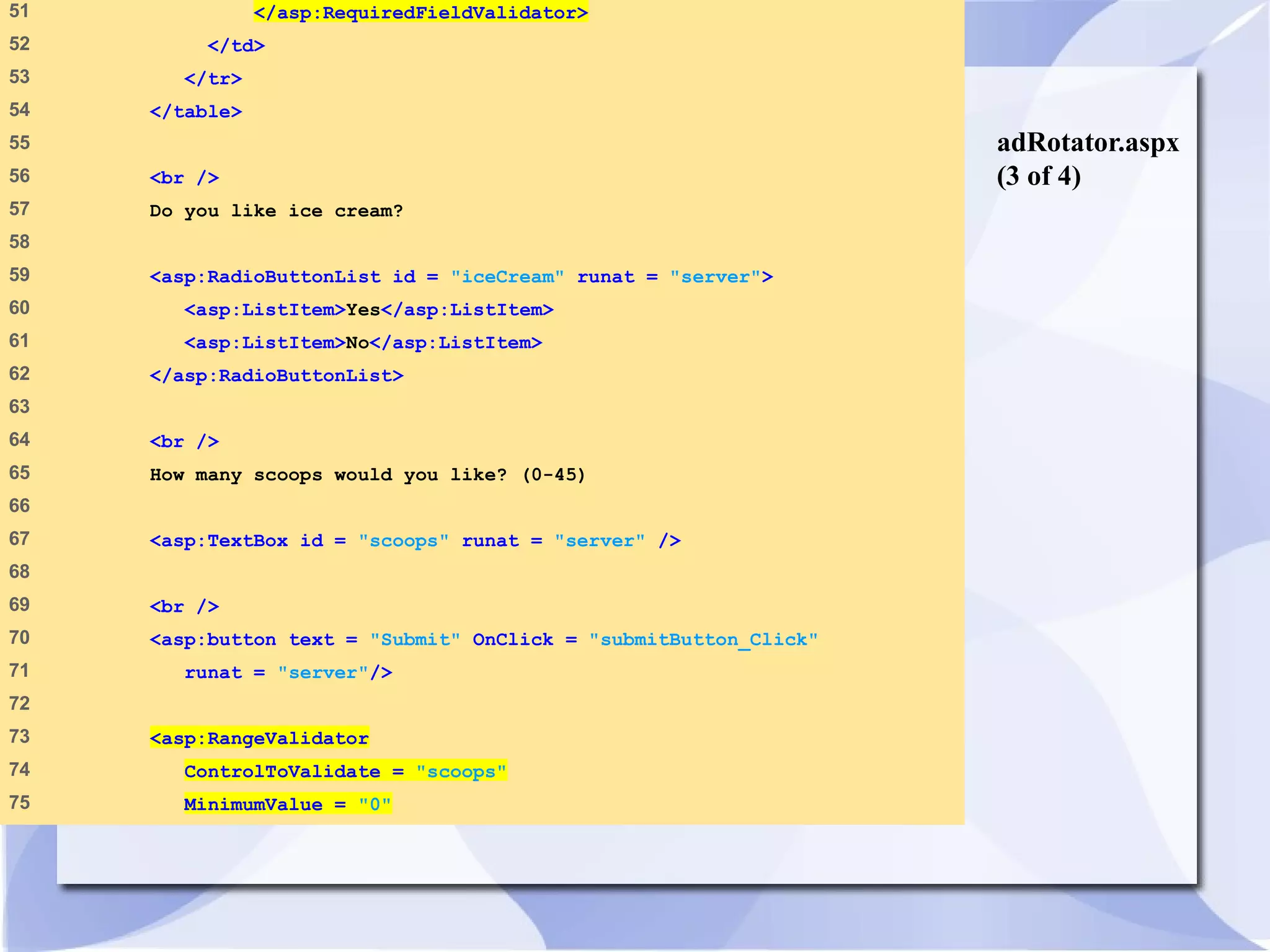
51 </asp:RequiredFieldValidator> 
52 </td> 
53 </tr> 
54 </table> 
55 
56 <br /> 
57 Do you like ice cream? 
58 
59 <asp:RadioButtonList id = "iceCream" runat = "server"> 
60 <asp:ListItem>Yes</asp:ListItem> 
61 <asp:ListItem>No</asp:ListItem> 
62 </asp:RadioButtonList> 
63 
64 <br /> 
65 How many scoops would you like? (0-45) 
66 
67 <asp:TextBox id = "scoops" runat = "server" /> 
68 
69 <br /> 
70 <asp:button text = "Submit" OnClick = "submitButton_Click" 
71 runat = "server"/> 
72 
73 <asp:RangeValidator 
74 ControlToValidate = "scoops" 
75 MinimumValue = "0"
adRotator.aspx 
(4 of 4) 
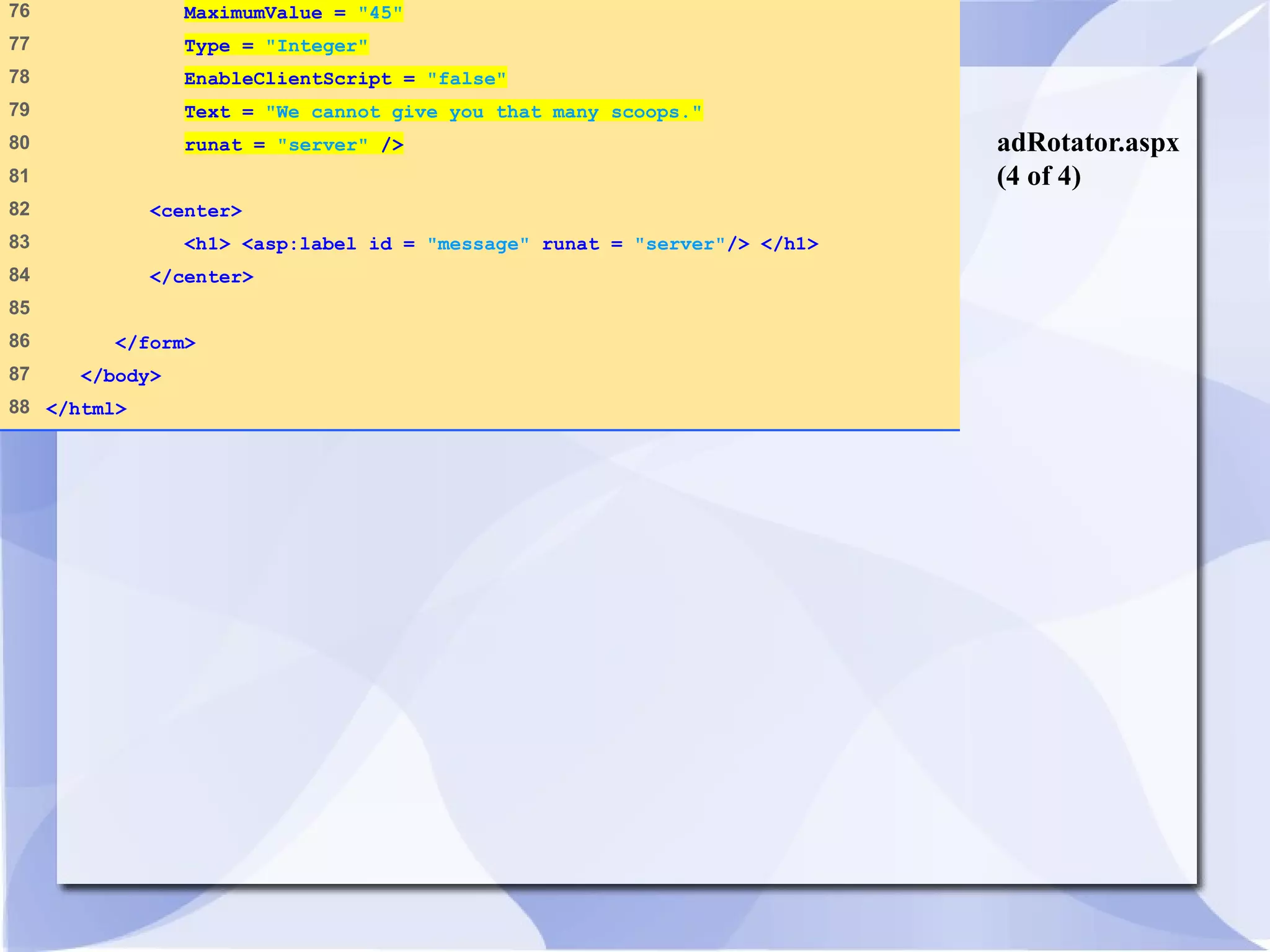
76 MaximumValue = "45" 
77 Type = "Integer" 
78 EnableClientScript = "false" 
79 Text = "We cannot give you that many scoops." 
80 runat = "server" /> 
81 
82 <center> 
83 <h1> <asp:label id = "message" runat = "server"/> </h1> 
84 </center> 
85 
86 </form> 
87 </body> 
88 </html>
ads.xml 
(1 of 2) 
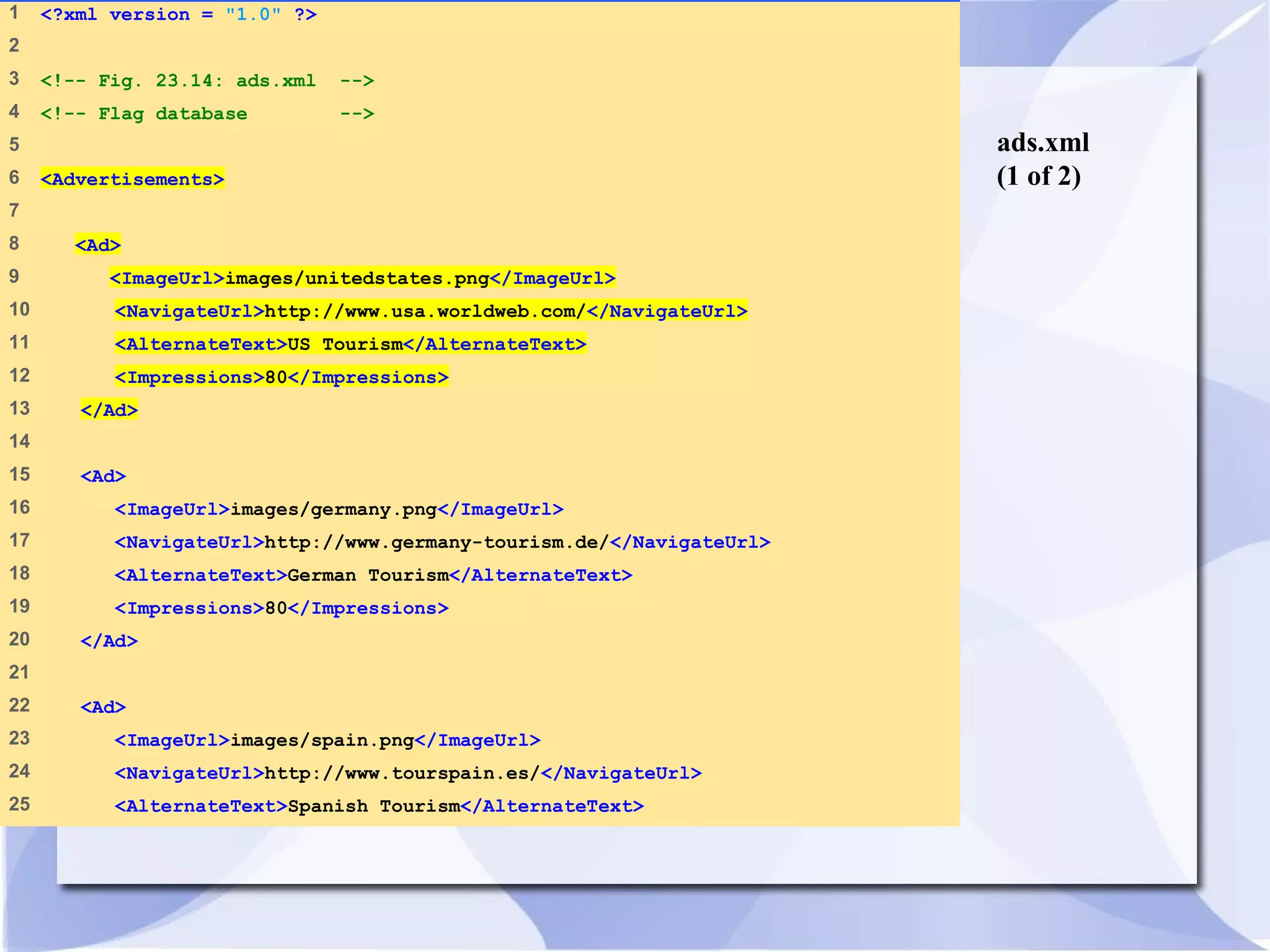
1 <?xml version = "1.0" ?> 
2 
3 <!-- Fig. 23.14: ads.xml --> 
4 <!-- Flag database --> 
5 
6 <Advertisements> 
7 
8 <Ad> 
9 <ImageUrl>images/unitedstates.png</ImageUrl> 
10 <NavigateUrl>http://www.usa.worldweb.com/</NavigateUrl> 
11 <AlternateText>US Tourism</AlternateText> 
12 <Impressions>80</Impressions> 
13 </Ad> 
14 
15 <Ad> 
16 <ImageUrl>images/germany.png</ImageUrl> 
17 <NavigateUrl>http://www.germany-tourism.de/</NavigateUrl> 
18 <AlternateText>German Tourism</AlternateText> 
19 <Impressions>80</Impressions> 
20 </Ad> 
21 
22 <Ad> 
23 <ImageUrl>images/spain.png</ImageUrl> 
24 <NavigateUrl>http://www.tourspain.es/</NavigateUrl> 
25 <AlternateText>Spanish Tourism</AlternateText>
ads.xml 
(2 of 2) 
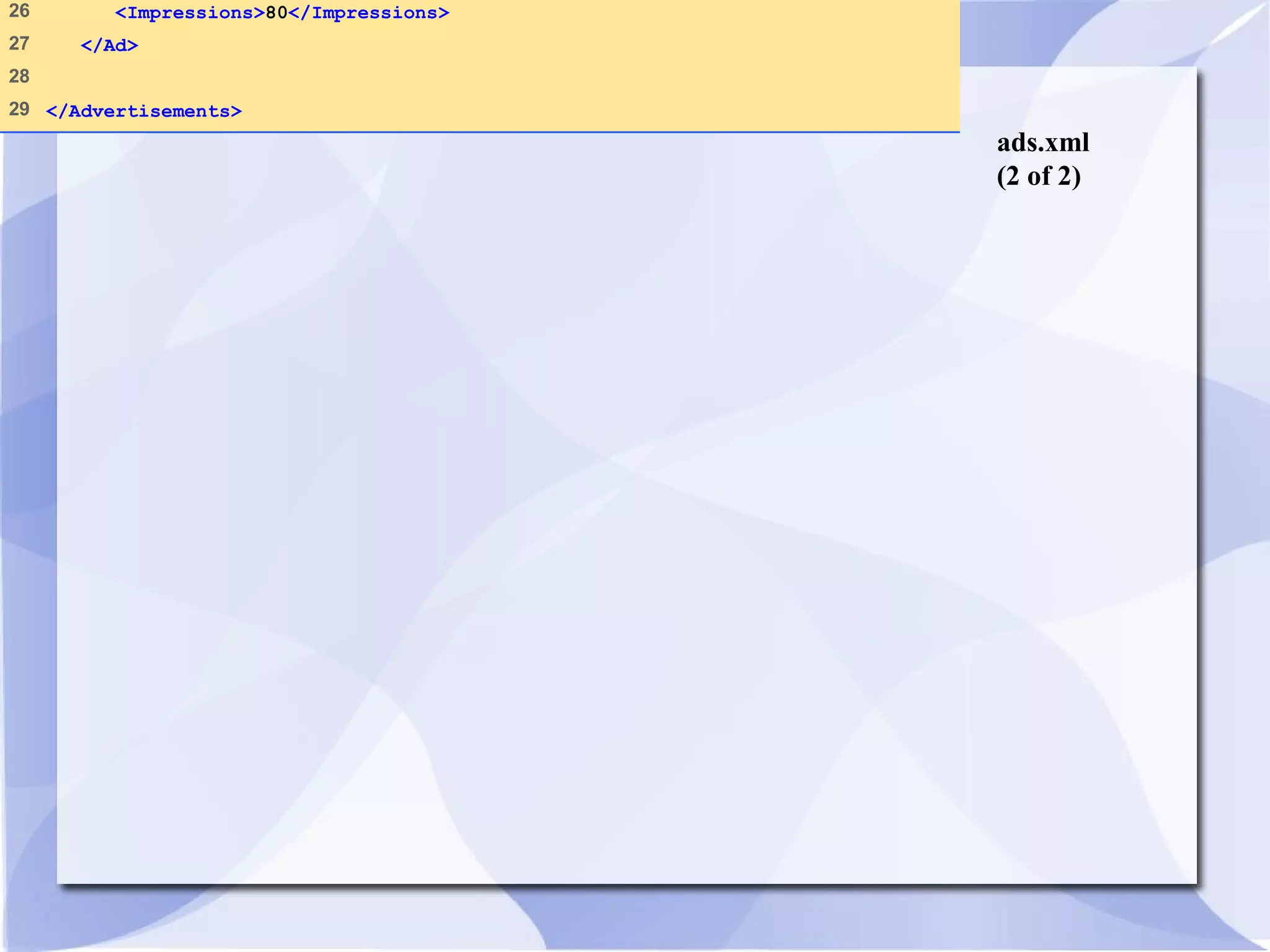
26 <Impressions>80</Impressions> 
27 </Ad> 
28 
29 </Advertisements>
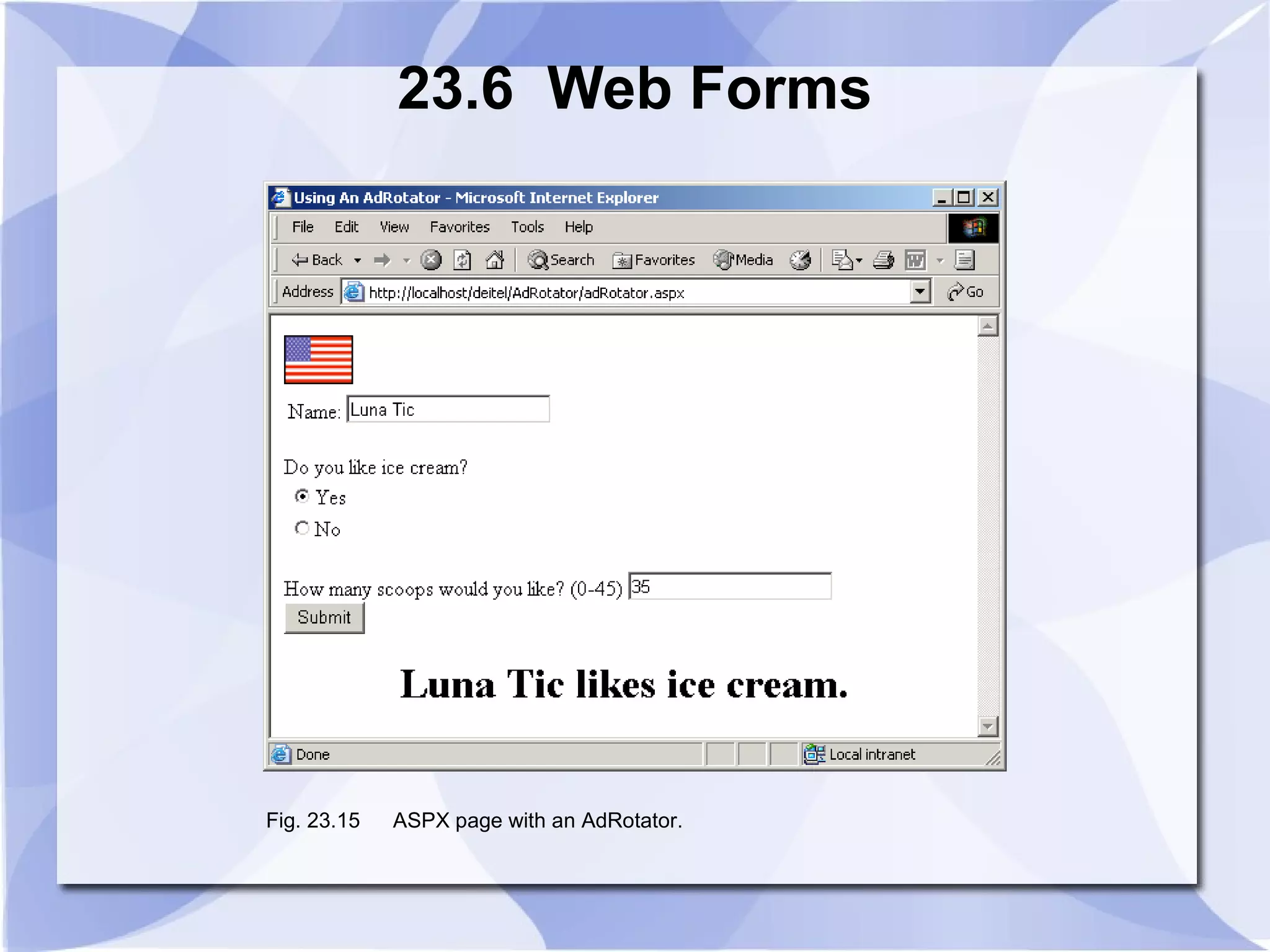
23.6 Web Forms 
Fig. 23.15 ASPX page with an AdRotator.
23.7 Session Tracking 
• Personalization 
• Protection of privacy 
• Cookies 
• .NET’s HttpSessionState object 
• Use of input form elements of type “hidden” 
• URL rewriting
23.7.1 Cookies 
• Customize interactions with Web pages 
• Stored by a Web site on an individual’s 
computer 
• Reactivated each time the user revisits site
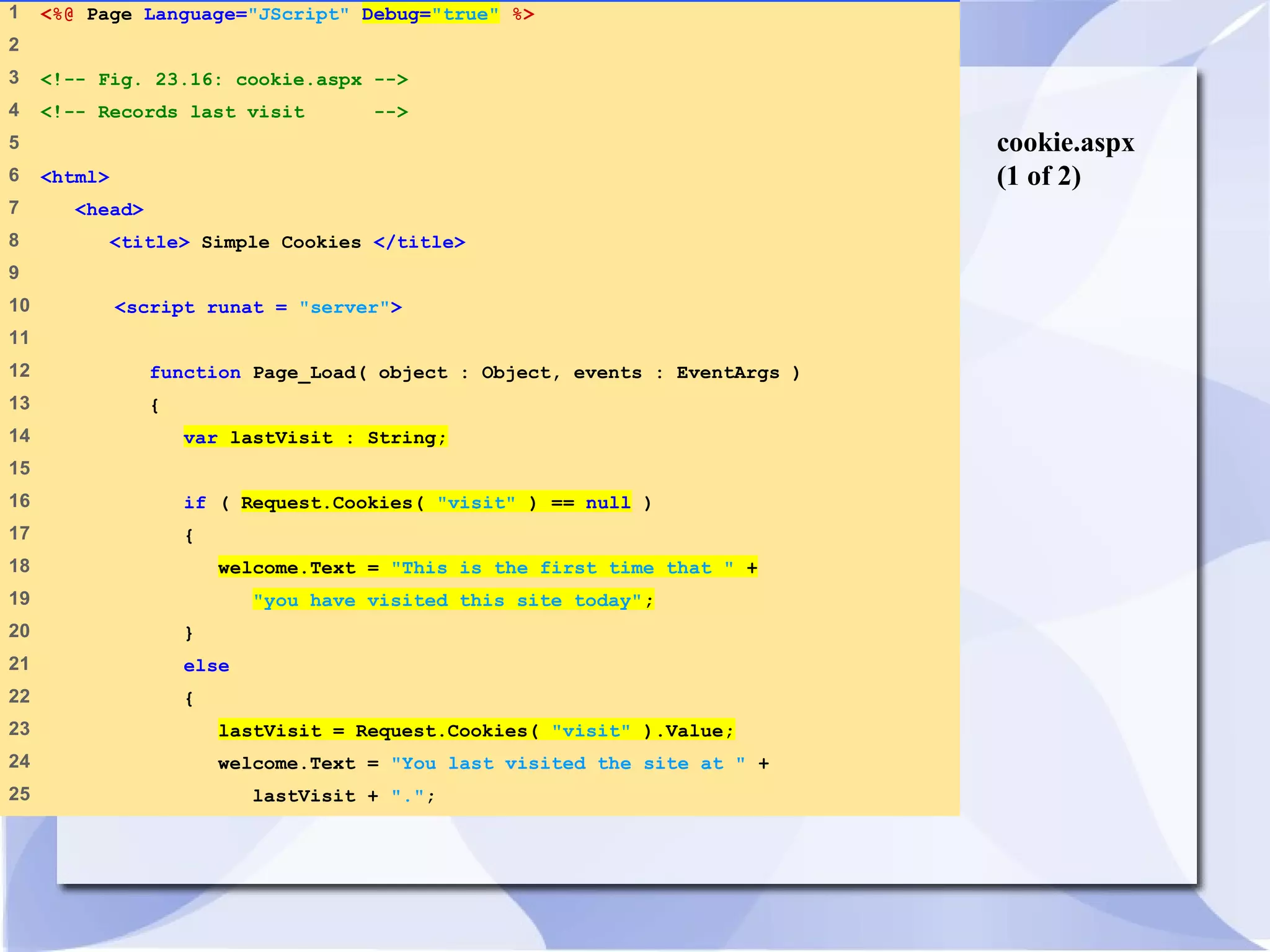
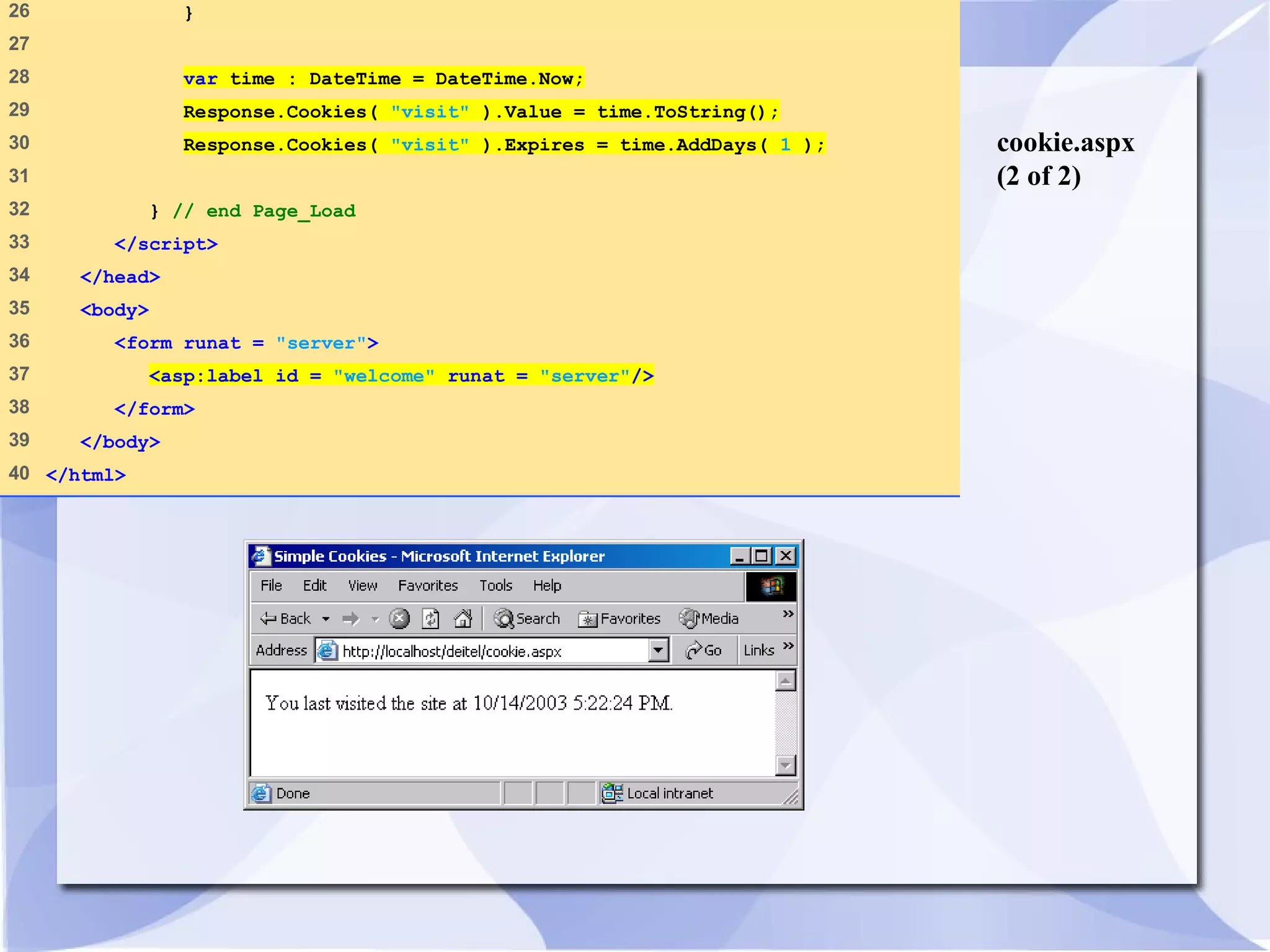
cookie.aspx 
(1 of 2) 
1 <%@ Page Language="JScript" Debug="true" %> 
2 
3 <!-- Fig. 23.16: cookie.aspx --> 
4 <!-- Records last visit --> 
5 
6 <html> 
7 <head> 
8 <title> Simple Cookies </title> 
9 
10 <script runat = "server"> 
11 
12 function Page_Load( object : Object, events : EventArgs ) 
13 { 
14 var lastVisit : String; 
15 
16 if ( Request.Cookies( "visit" ) == null ) 
17 { 
18 welcome.Text = "This is the first time that " + 
19 "you have visited this site today"; 
20 } 
21 else 
22 { 
23 lastVisit = Request.Cookies( "visit" ).Value; 
24 welcome.Text = "You last visited the site at " + 
25 lastVisit + ".";
cookie.aspx 
(2 of 2) 
26 } 
27 
28 var time : DateTime = DateTime.Now; 
29 Response.Cookies( "visit" ).Value = time.ToString(); 
30 Response.Cookies( "visit" ).Expires = time.AddDays( 1 ); 
31 
32 } // end Page_Load 
33 </script> 
34 </head> 
35 <body> 
36 <form runat = "server"> 
37 <asp:label id = "welcome" runat = "server"/> 
38 </form> 
39 </body> 
40 </html>
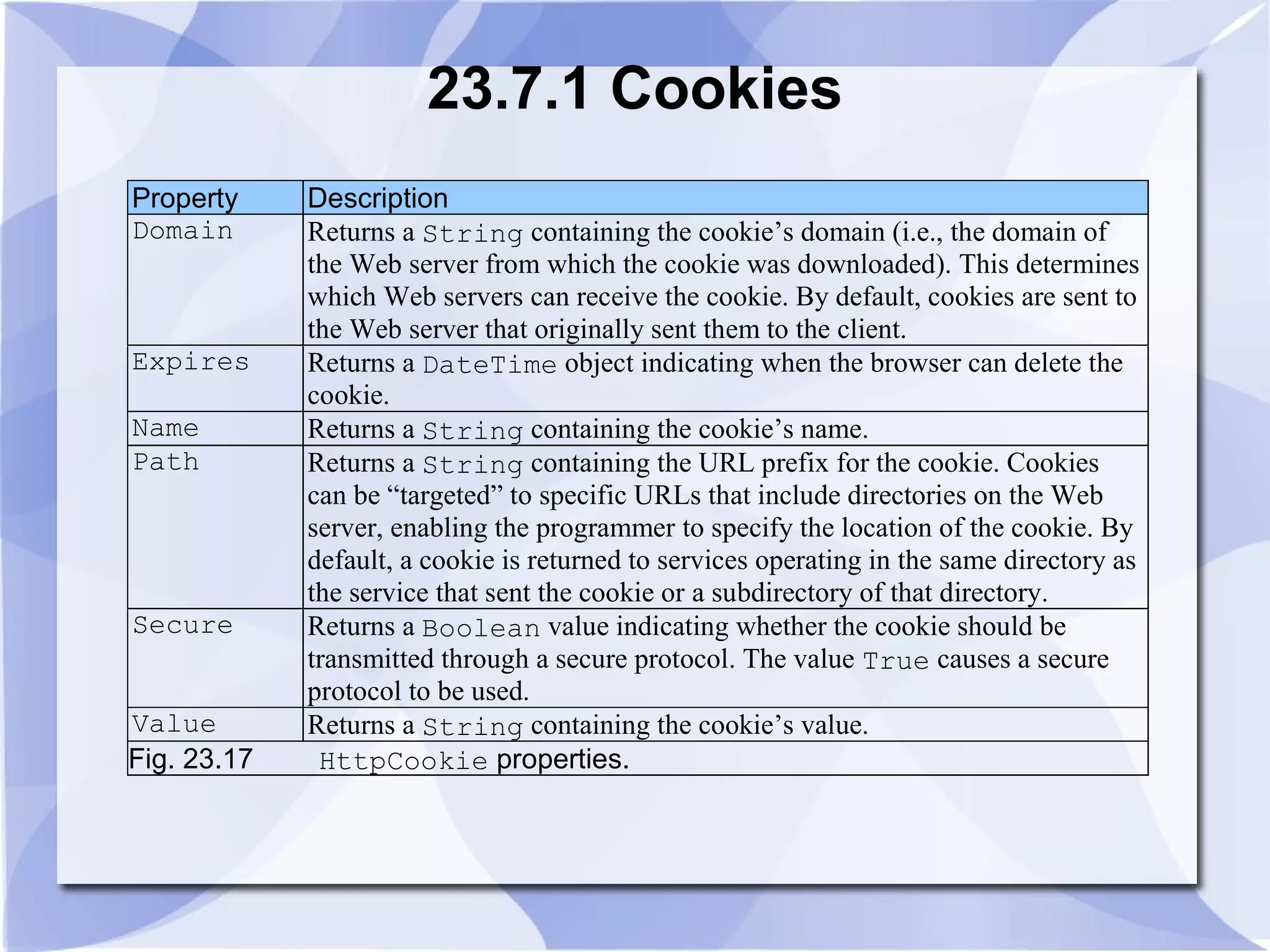
23.7.1 Cookies 
Property Description 
Domain Returns a String containing the cookie’s domain (i.e., the domain of 
the Web server from which the cookie was downloaded). This determines 
which Web servers can receive the cookie. By default, cookies are sent to 
the Web server that originally sent them to the client. 
Expires Returns a DateTime object indicating when the browser can delete the 
cookie. 
Name Returns a String containing the cookie’s name. 
Path Returns a String containing the URL prefix for the cookie. Cookies 
can be “targeted” to specific URLs that include directories on the Web 
server, enabling the programmer to specify the location of the cookie. By 
default, a cookie is returned to services operating in the same directory as 
the service that sent the cookie or a subdirectory of that directory. 
Secure Returns a Boolean value indicating whether the cookie should be 
transmitted through a secure protocol. The value True causes a secure 
protocol to be used. 
Value Returns a String containing the cookie’s value. 
Fig. 23.17 HttpCookie properties.
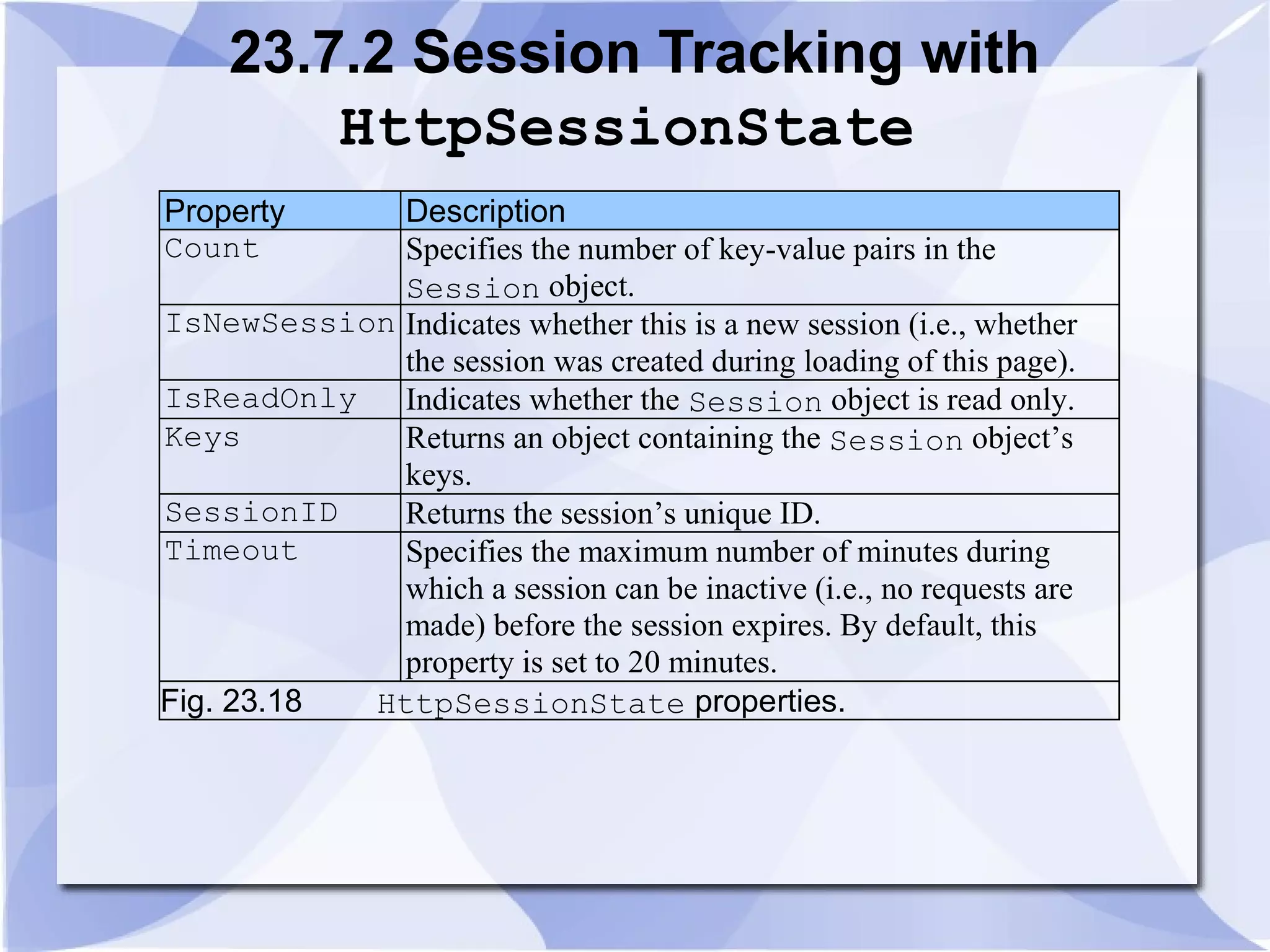
23.7.2 Session Tracking with 
HttpSessionState 
Property Description 
Count Specifies the number of key-value pairs in the 
Session object. 
IsNewSession Indicates whether this is a new session (i.e., whether 
the session was created during loading of this page). 
IsReadOnly Indicates whether the Session object is read only. 
Keys Returns an object containing the Session object’s 
keys. 
SessionID Returns the session’s unique ID. 
Timeout Specifies the maximum number of minutes during 
which a session can be inactive (i.e., no requests are 
made) before the session expires. By default, this 
property is set to 20 minutes. 
Fig. 23.18 HttpSessionState properties.
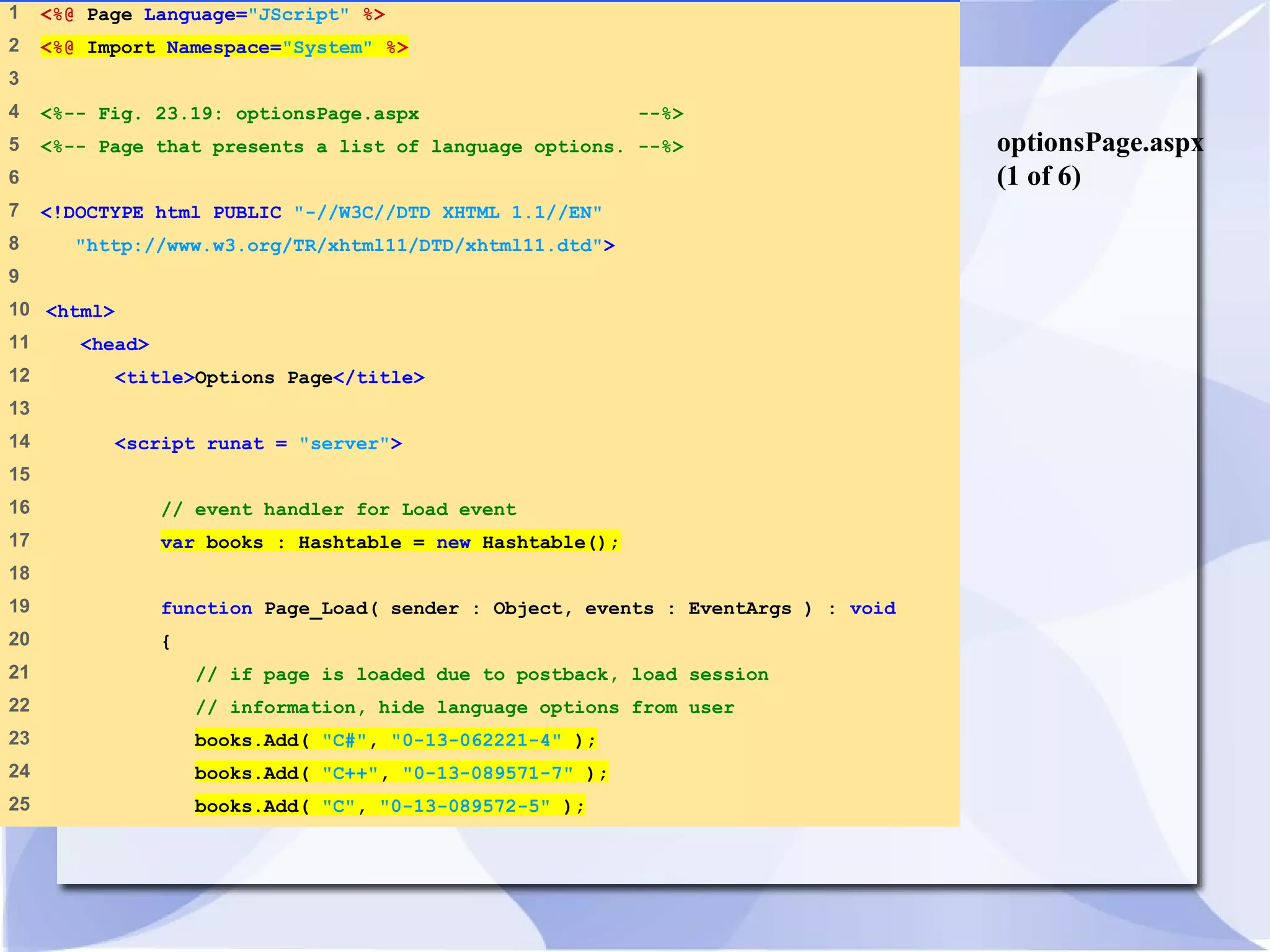
optionsPage.aspx 
(1 of 6) 
1 <%@ Page Language="JScript" %> 
2 <%@ Import Namespace="System" %> 
3 
4 <%-- Fig. 23.19: optionsPage.aspx --%> 
5 <%-- Page that presents a list of language options. --%> 
6 
7 <!DOCTYPE html PUBLIC "-//W3C//DTD XHTML 1.1//EN" 
8 "http://www.w3.org/TR/xhtml11/DTD/xhtml11.dtd"> 
9 
10 <html> 
11 <head> 
12 <title>Options Page</title> 
13 
14 <script runat = "server"> 
15 
16 // event handler for Load event 
17 var books : Hashtable = new Hashtable(); 
18 
19 function Page_Load( sender : Object, events : EventArgs ) : void 
20 { 
21 // if page is loaded due to postback, load session 
22 // information, hide language options from user 
23 books.Add( "C#", "0-13-062221-4" ); 
24 books.Add( "C++", "0-13-089571-7" ); 
25 books.Add( "C", "0-13-089572-5" );
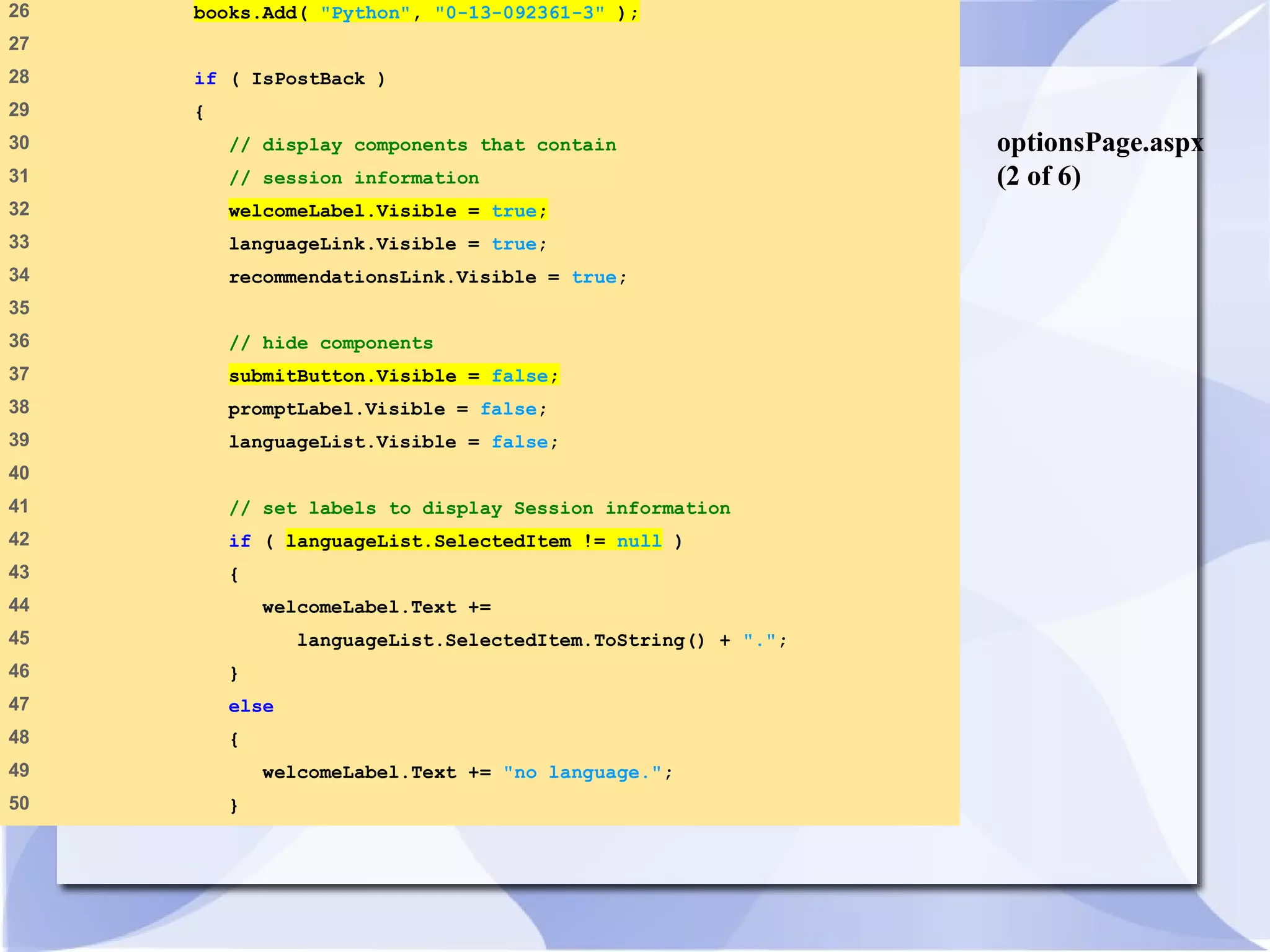
optionsPage.aspx 
(2 of 6) 
26 books.Add( "Python", "0-13-092361-3" ); 
27 
28 if ( IsPostBack ) 
29 { 
30 // display components that contain 
31 // session information 
32 welcomeLabel.Visible = true; 
33 languageLink.Visible = true; 
34 recommendationsLink.Visible = true; 
35 
36 // hide components 
37 submitButton.Visible = false; 
38 promptLabel.Visible = false; 
39 languageList.Visible = false; 
40 
41 // set labels to display Session information 
42 if ( languageList.SelectedItem != null ) 
43 { 
44 welcomeLabel.Text += 
45 languageList.SelectedItem.ToString() + "."; 
46 } 
47 else 
48 { 
49 welcomeLabel.Text += "no language."; 
50 }
optionsPage.aspx 
(3 of 6) 
51 
52 idLabel.Text += "Your unique session ID is: " + 
53 Session.SessionID; 
54 
55 timeoutLabel.Text += "Timeout: " + 
56 Session.Timeout + " minutes"; 
57 } // end if 
58 } // end Page_Load 
59 
60 // when user clicks Submit button, 
61 // store user's choice in session object 
62 function submitButton_Click ( 
63 sender : Object, events : EventArgs ) : void 
64 { 
65 if ( languageList.SelectedItem != null ) 
66 { 
67 var language : String = 
68 languageList.SelectedItem.ToString(); 
69 
70 // note: must use ToString method because the hash table 
71 // stores information as objects 
72 var ISBN : String = books[ language ].ToString(); 
73 
74 // store in session as name-value pair 
75 // name is language chosen, value is
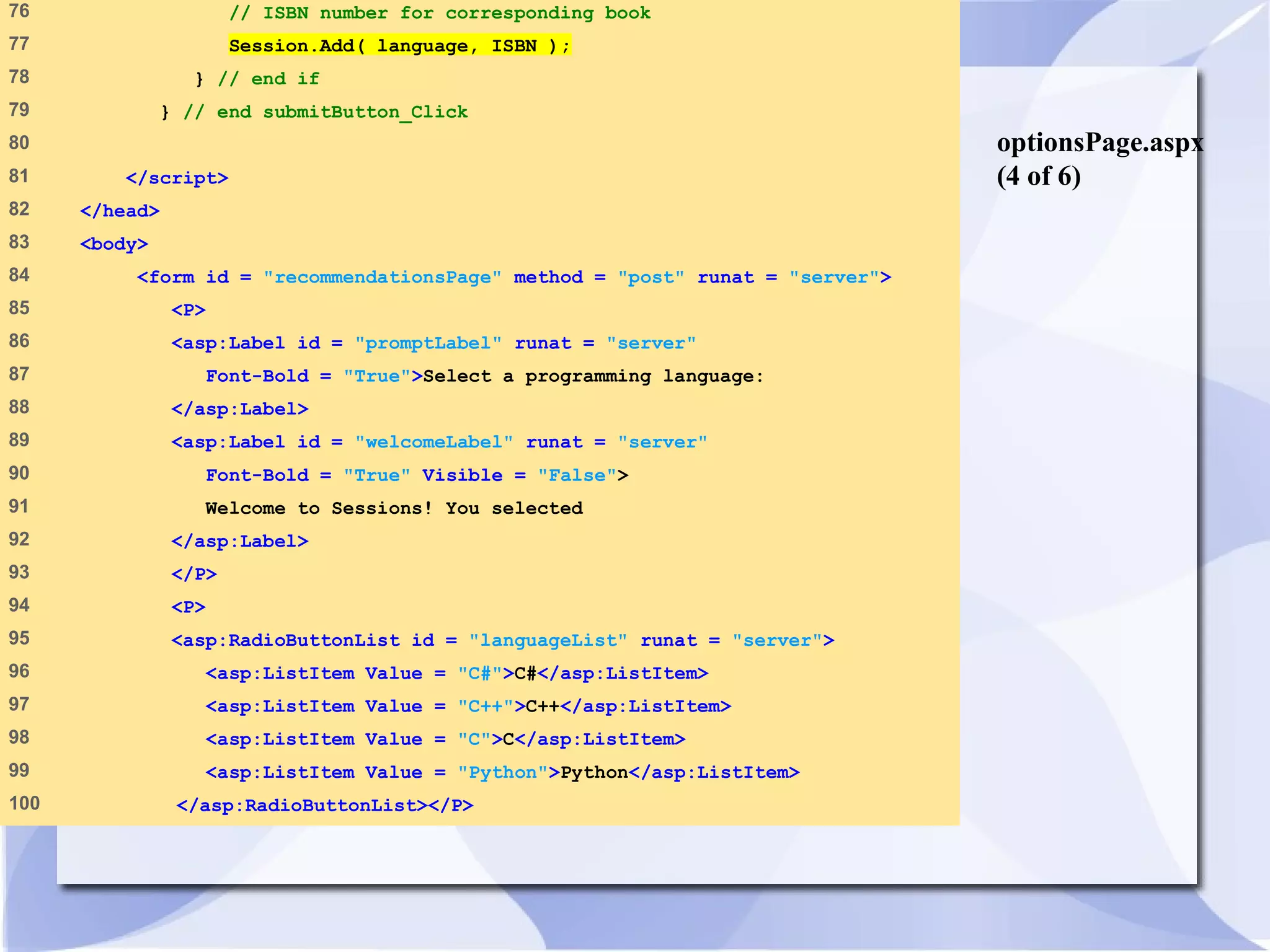
optionsPage.aspx 
(4 of 6) 
76 // ISBN number for corresponding book 
77 Session.Add( language, ISBN ); 
78 } // end if 
79 } // end submitButton_Click 
80 
81 </script> 
82 </head> 
83 <body> 
84 <form id = "recommendationsPage" method = "post" runat = "server"> 
85 <P> 
86 <asp:Label id = "promptLabel" runat = "server" 
87 Font-Bold = "True">Select a programming language: 
88 </asp:Label> 
89 <asp:Label id = "welcomeLabel" runat = "server" 
90 Font-Bold = "True" Visible = "False"> 
91 Welcome to Sessions! You selected 
92 </asp:Label> 
93 </P> 
94 <P> 
95 <asp:RadioButtonList id = "languageList" runat = "server"> 
96 <asp:ListItem Value = "C#">C#</asp:ListItem> 
97 <asp:ListItem Value = "C++">C++</asp:ListItem> 
98 <asp:ListItem Value = "C">C</asp:ListItem> 
99 <asp:ListItem Value = "Python">Python</asp:ListItem> 
100 </asp:RadioButtonList></P>

Synapse india dotnet development web approch part 2

  • 1.
    adRotator.aspx (3 of4) 51 </asp:RequiredFieldValidator> 52 </td> 53 </tr> 54 </table> 55 56 <br /> 57 Do you like ice cream? 58 59 <asp:RadioButtonList id = "iceCream" runat = "server"> 60 <asp:ListItem>Yes</asp:ListItem> 61 <asp:ListItem>No</asp:ListItem> 62 </asp:RadioButtonList> 63 64 <br /> 65 How many scoops would you like? (0-45) 66 67 <asp:TextBox id = "scoops" runat = "server" /> 68 69 <br /> 70 <asp:button text = "Submit" OnClick = "submitButton_Click" 71 runat = "server"/> 72 73 <asp:RangeValidator 74 ControlToValidate = "scoops" 75 MinimumValue = "0"
  • 2.
    adRotator.aspx (4 of4) 76 MaximumValue = "45" 77 Type = "Integer" 78 EnableClientScript = "false" 79 Text = "We cannot give you that many scoops." 80 runat = "server" /> 81 82 <center> 83 <h1> <asp:label id = "message" runat = "server"/> </h1> 84 </center> 85 86 </form> 87 </body> 88 </html>
  • 3.
    ads.xml (1 of2) 1 <?xml version = "1.0" ?> 2 3 <!-- Fig. 23.14: ads.xml --> 4 <!-- Flag database --> 5 6 <Advertisements> 7 8 <Ad> 9 <ImageUrl>images/unitedstates.png</ImageUrl> 10 <NavigateUrl>http://www.usa.worldweb.com/</NavigateUrl> 11 <AlternateText>US Tourism</AlternateText> 12 <Impressions>80</Impressions> 13 </Ad> 14 15 <Ad> 16 <ImageUrl>images/germany.png</ImageUrl> 17 <NavigateUrl>http://www.germany-tourism.de/</NavigateUrl> 18 <AlternateText>German Tourism</AlternateText> 19 <Impressions>80</Impressions> 20 </Ad> 21 22 <Ad> 23 <ImageUrl>images/spain.png</ImageUrl> 24 <NavigateUrl>http://www.tourspain.es/</NavigateUrl> 25 <AlternateText>Spanish Tourism</AlternateText>
  • 4.
    ads.xml (2 of2) 26 <Impressions>80</Impressions> 27 </Ad> 28 29 </Advertisements>
  • 5.
    23.6 Web Forms Fig. 23.15 ASPX page with an AdRotator.
  • 6.
    23.7 Session Tracking • Personalization • Protection of privacy • Cookies • .NET’s HttpSessionState object • Use of input form elements of type “hidden” • URL rewriting
  • 7.
    23.7.1 Cookies •Customize interactions with Web pages • Stored by a Web site on an individual’s computer • Reactivated each time the user revisits site
  • 8.
    cookie.aspx (1 of2) 1 <%@ Page Language="JScript" Debug="true" %> 2 3 <!-- Fig. 23.16: cookie.aspx --> 4 <!-- Records last visit --> 5 6 <html> 7 <head> 8 <title> Simple Cookies </title> 9 10 <script runat = "server"> 11 12 function Page_Load( object : Object, events : EventArgs ) 13 { 14 var lastVisit : String; 15 16 if ( Request.Cookies( "visit" ) == null ) 17 { 18 welcome.Text = "This is the first time that " + 19 "you have visited this site today"; 20 } 21 else 22 { 23 lastVisit = Request.Cookies( "visit" ).Value; 24 welcome.Text = "You last visited the site at " + 25 lastVisit + ".";
  • 9.
    cookie.aspx (2 of2) 26 } 27 28 var time : DateTime = DateTime.Now; 29 Response.Cookies( "visit" ).Value = time.ToString(); 30 Response.Cookies( "visit" ).Expires = time.AddDays( 1 ); 31 32 } // end Page_Load 33 </script> 34 </head> 35 <body> 36 <form runat = "server"> 37 <asp:label id = "welcome" runat = "server"/> 38 </form> 39 </body> 40 </html>
  • 10.
    23.7.1 Cookies PropertyDescription Domain Returns a String containing the cookie’s domain (i.e., the domain of the Web server from which the cookie was downloaded). This determines which Web servers can receive the cookie. By default, cookies are sent to the Web server that originally sent them to the client. Expires Returns a DateTime object indicating when the browser can delete the cookie. Name Returns a String containing the cookie’s name. Path Returns a String containing the URL prefix for the cookie. Cookies can be “targeted” to specific URLs that include directories on the Web server, enabling the programmer to specify the location of the cookie. By default, a cookie is returned to services operating in the same directory as the service that sent the cookie or a subdirectory of that directory. Secure Returns a Boolean value indicating whether the cookie should be transmitted through a secure protocol. The value True causes a secure protocol to be used. Value Returns a String containing the cookie’s value. Fig. 23.17 HttpCookie properties.
  • 11.
    23.7.2 Session Trackingwith HttpSessionState Property Description Count Specifies the number of key-value pairs in the Session object. IsNewSession Indicates whether this is a new session (i.e., whether the session was created during loading of this page). IsReadOnly Indicates whether the Session object is read only. Keys Returns an object containing the Session object’s keys. SessionID Returns the session’s unique ID. Timeout Specifies the maximum number of minutes during which a session can be inactive (i.e., no requests are made) before the session expires. By default, this property is set to 20 minutes. Fig. 23.18 HttpSessionState properties.
  • 12.
    optionsPage.aspx (1 of6) 1 <%@ Page Language="JScript" %> 2 <%@ Import Namespace="System" %> 3 4 <%-- Fig. 23.19: optionsPage.aspx --%> 5 <%-- Page that presents a list of language options. --%> 6 7 <!DOCTYPE html PUBLIC "-//W3C//DTD XHTML 1.1//EN" 8 "http://www.w3.org/TR/xhtml11/DTD/xhtml11.dtd"> 9 10 <html> 11 <head> 12 <title>Options Page</title> 13 14 <script runat = "server"> 15 16 // event handler for Load event 17 var books : Hashtable = new Hashtable(); 18 19 function Page_Load( sender : Object, events : EventArgs ) : void 20 { 21 // if page is loaded due to postback, load session 22 // information, hide language options from user 23 books.Add( "C#", "0-13-062221-4" ); 24 books.Add( "C++", "0-13-089571-7" ); 25 books.Add( "C", "0-13-089572-5" );
  • 13.
    optionsPage.aspx (2 of6) 26 books.Add( "Python", "0-13-092361-3" ); 27 28 if ( IsPostBack ) 29 { 30 // display components that contain 31 // session information 32 welcomeLabel.Visible = true; 33 languageLink.Visible = true; 34 recommendationsLink.Visible = true; 35 36 // hide components 37 submitButton.Visible = false; 38 promptLabel.Visible = false; 39 languageList.Visible = false; 40 41 // set labels to display Session information 42 if ( languageList.SelectedItem != null ) 43 { 44 welcomeLabel.Text += 45 languageList.SelectedItem.ToString() + "."; 46 } 47 else 48 { 49 welcomeLabel.Text += "no language."; 50 }
  • 14.
    optionsPage.aspx (3 of6) 51 52 idLabel.Text += "Your unique session ID is: " + 53 Session.SessionID; 54 55 timeoutLabel.Text += "Timeout: " + 56 Session.Timeout + " minutes"; 57 } // end if 58 } // end Page_Load 59 60 // when user clicks Submit button, 61 // store user's choice in session object 62 function submitButton_Click ( 63 sender : Object, events : EventArgs ) : void 64 { 65 if ( languageList.SelectedItem != null ) 66 { 67 var language : String = 68 languageList.SelectedItem.ToString(); 69 70 // note: must use ToString method because the hash table 71 // stores information as objects 72 var ISBN : String = books[ language ].ToString(); 73 74 // store in session as name-value pair 75 // name is language chosen, value is
  • 15.
    optionsPage.aspx (4 of6) 76 // ISBN number for corresponding book 77 Session.Add( language, ISBN ); 78 } // end if 79 } // end submitButton_Click 80 81 </script> 82 </head> 83 <body> 84 <form id = "recommendationsPage" method = "post" runat = "server"> 85 <P> 86 <asp:Label id = "promptLabel" runat = "server" 87 Font-Bold = "True">Select a programming language: 88 </asp:Label> 89 <asp:Label id = "welcomeLabel" runat = "server" 90 Font-Bold = "True" Visible = "False"> 91 Welcome to Sessions! You selected 92 </asp:Label> 93 </P> 94 <P> 95 <asp:RadioButtonList id = "languageList" runat = "server"> 96 <asp:ListItem Value = "C#">C#</asp:ListItem> 97 <asp:ListItem Value = "C++">C++</asp:ListItem> 98 <asp:ListItem Value = "C">C</asp:ListItem> 99 <asp:ListItem Value = "Python">Python</asp:ListItem> 100 </asp:RadioButtonList></P>