VBA API for
ScriptDB
Google Apps ScriptDB from Excel
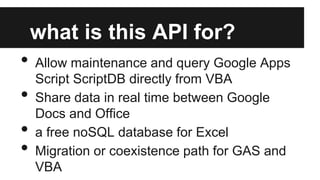
what is this API for?

•
•
•
•

Allow maintenance and query Google Apps
Script ScriptDB directly from VBA
Share data in real time between Google
Docs and Office
a free noSQL database for Excel
Migration or coexistence path for GAS and
VBA
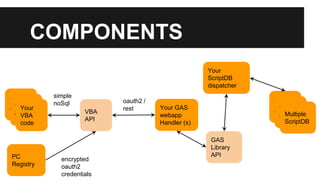
COMPONENTS
Your
ScriptDB
dispatcher
Your
Your
Your
code
code
VBA
code

PC
Registry

simple
noSql
VBA
API

encrypted
oauth2
credentials

oauth2 /
rest

Your
Your
code
Multiple
code
ScriptDB

Your GAS
webapp
Handler (s)
GAS
Library
API
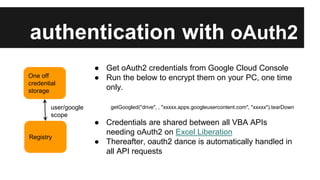
authentication with oAuth2
One off
credential
storage

user/google
scope

Registry

● Get oAuth2 credentials from Google Cloud Console
● Run the below to encrypt them on your PC, one time
only.
getGoogled("drive", , "xxxxx.apps.googleusercontent.com", "xxxxx").tearDown

● Credentials are shared between all VBA APIs
needing oAuth2 on Excel Liberation
● Thereafter, oauth2 dance is automatically handled in
all API requests
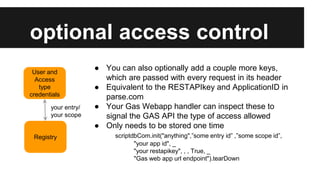
optional access control
User and
Access
type
credentials
your entry/
your scope

Registry

● You can also optionally add a couple more keys,
which are passed with every request in its header
● Equivalent to the RESTAPIkey and ApplicationID in
parse.com
● Your Gas Webapp handler can inspect these to
signal the GAS API the type of access allowed
● Only needs to be stored one time
scriptdbCom.init("anything",”some entry id” ,”some scope id”,
"your app id", _
"your restapikey", , , True, _
"Gas web app url endpoint").tearDown
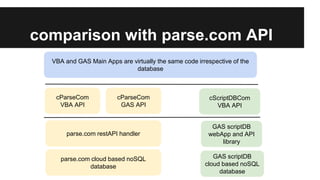
comparison with parse.com API
VBA and GAS Main Apps are virtually the same code irrespective of the
database

cParseCom
VBA API

cParseCom
GAS API

cScriptDBCom
VBA API

parse.com restAPI handler

GAS scriptDB
webApp and API
library

parse.com cloud based noSQL
database

GAS scriptDB
cloud based noSQL
database
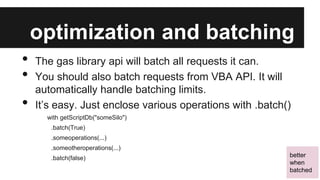
optimization and batching
•
•
•

The gas library api will batch all requests it can.
You should also batch requests from VBA API. It will
automatically handle batching limits.
It’s easy. Just enclose various operations with .batch()
with getScriptDb("someSilo")
.batch(True)
.someoperations(...)
.someotheroperations(...)
.batch(false)

better
when
batched
example - create an object
Data is stored in silos within one or more ScriptDb
code
getScriptDb("somesilo") _
.createObject(JSONParse("{'customerid':1}"))

response (.jObject.stringify)
{

"status":"good",
"results":[]
}

better
when
batched
example - do a query
Queries are by example, and can include limit/skip
code
getScriptDb("somesilo") _
.getObjectsByQuery(JSONParse("{'customerid':1}"), JSONParse("{'limit':10}"))

response (.jObject.stringify)
{"status":"good","count":1,"results":[ {
"siloId":"somesilo",
"customerid":1,
"objectId":"S320799307189"
}]
}
example - update objects
All matching objects are updated to the given value. New
fields are created, existing fields are replaced
code
getScriptDb("somesilo") _
.updateObjects(JSONParse("{'customerid':1}"), JSONParse("{'name':'john'}"))

response (.jObject.stringify)
{ "status":"good","results":[]}
better
when
batched
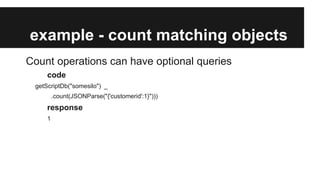
example - count matching objects
Count operations can have optional queries
code
getScriptDb("somesilo") _
.count(JSONParse("{'customerid':1}")))

response
1
example - get object by id
Each object is assigned a unique Id returned by queries
code
getScriptDb("someSilo")
.getObjectById ("S320802188977")

response (.jObject.stringify)
{"status":"good","count":1,"results":[ {
"siloId":"somesilo",
"customerid":1,
"name":"john"
}]
}
example - delete objects
All objects matching the query are deleted
code
getScriptDb("somesilo").deleteObjects(JSONParse("{'customerid':1}"))

response (.jObject.stringify)
{"status":"good","count":0,"results":[ ]}

better
when
batched
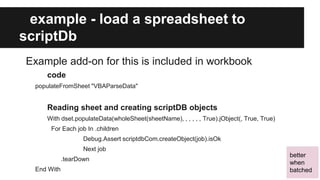
example - load a spreadsheet to
scriptDb
Example add-on for this is included in workbook
code
populateFromSheet "VBAParseData"

Reading sheet and creating scriptDB objects
With dset.populateData(wholeSheet(sheetName), , , , , , True).jObject(, True, True)
For Each job In .children
Debug.Assert scriptdbCom.createObject(job).isOk
Next job
.tearDown
End With

better
when
batched
limits and skipping
Queries are subject to limits, so you need to work multiple
passes for big queries using skip/limit
Do
With sdb.getObjectsByQuery(Nothing, jobskip).jObject.child("results")
If .children.count = 0 Or Not sdb.isOk Then Exit Do
jobskip.child("skip").value = jobskip.child("skip").value + .children.count
For Each job In .children
jobStore.add , job.toString("objectId")
Next job

End With
Loop

{"results":["S320923864193","S320923308803", …. ]}

this is
automatically
handled for update
and delete
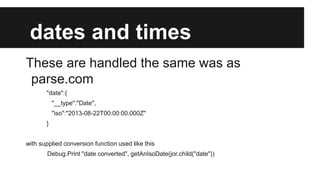
dates and times
These are handled the same was as
parse.com
"date":{

"__type":"Date",
"iso":"2013-08-22T00:00:00.000Z"
}

with supplied conversion function used like this
Debug.Print "date converted", getAnIsoDate(jor.child("date"))
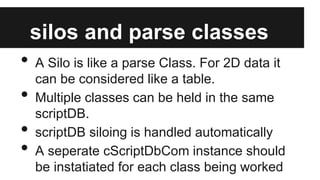
silos and parse classes

•
•
•
•

A Silo is like a parse Class. For 2D data it
can be considered like a table.
Multiple classes can be held in the same
scriptDB.
scriptDB siloing is handled automatically
A seperate cScriptDbCom instance should
be instatiated for each class being worked
multiple scriptDB
•
•
•

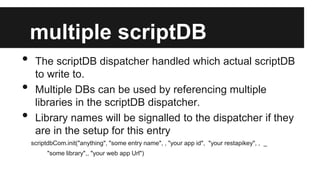
The scriptDB dispatcher handled which actual scriptDB
to write to.
Multiple DBs can be used by referencing multiple
libraries in the scriptDB dispatcher.
Library names will be signalled to the dispatcher if they
are in the setup for this entry
scriptdbCom.init("anything", "some entry name", , "your app id", "your restapikey", , _
"some library",, "your web app Url")
restricting operations
You may want to allow a different kind of access to certain
users.
provide a different URL or use the app keys to signal
some restricted access , and include something like this
in the doGet() and doPost() functions

•
•

var whatsAllowed = ['query','count','getbyid'];

setting that configuration up under a different entry
scriptdbCom.init("anything", "some restricted entry", , "your app id", "your restapikey", , _
, "your restricted web app Url")
performance versus parse.com

•
•

Performance of parse.com as a rest API
handler seems to be much better than
scriptDB for most operations.
A full analysis will be published on Excel
Liberation and associated blog at some
future date
accessing from other apps

•
•
•

The scriptDB GAS handler API can be
accessed using any rest query mechanism.
The VBA API just manages the conversation
with the scriptDB GAS handler
Examples of other languages will be on
Excel Liberation at a later date.
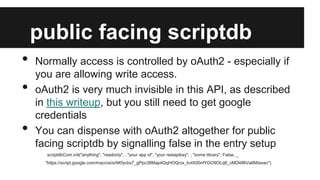
public facing scriptdb
•
•
•

Normally access is controlled by oAuth2 - especially if
you are allowing write access.
oAuth2 is very much invisible in this API, as described
in this writeup, but you still need to get google
credentials
You can dispense with oAuth2 altogether for public
facing scriptdb by signalling false in the entry setup
scriptdbCom.init("anything", "readonly", , "your app id", "your restapikey", , "some library", False, _
"https://script.google.com/macros/s/AKfycbx7_gPpc38Map4QqHOQrzx_kvIX00nfYGO9OLq8_cMD486Va6M/exec")
further detail
All this code is downloadable or copyable from
Google Apps Script Libraries.
For more information see Excel Liberation

VBA API for scriptDB primer

  • 1.
    VBA API for ScriptDB GoogleApps ScriptDB from Excel
  • 2.
    what is thisAPI for? • • • • Allow maintenance and query Google Apps Script ScriptDB directly from VBA Share data in real time between Google Docs and Office a free noSQL database for Excel Migration or coexistence path for GAS and VBA
  • 3.
  • 4.
    authentication with oAuth2 Oneoff credential storage user/google scope Registry ● Get oAuth2 credentials from Google Cloud Console ● Run the below to encrypt them on your PC, one time only. getGoogled("drive", , "xxxxx.apps.googleusercontent.com", "xxxxx").tearDown ● Credentials are shared between all VBA APIs needing oAuth2 on Excel Liberation ● Thereafter, oauth2 dance is automatically handled in all API requests
  • 5.
    optional access control Userand Access type credentials your entry/ your scope Registry ● You can also optionally add a couple more keys, which are passed with every request in its header ● Equivalent to the RESTAPIkey and ApplicationID in parse.com ● Your Gas Webapp handler can inspect these to signal the GAS API the type of access allowed ● Only needs to be stored one time scriptdbCom.init("anything",”some entry id” ,”some scope id”, "your app id", _ "your restapikey", , , True, _ "Gas web app url endpoint").tearDown
  • 6.
    comparison with parse.comAPI VBA and GAS Main Apps are virtually the same code irrespective of the database cParseCom VBA API cParseCom GAS API cScriptDBCom VBA API parse.com restAPI handler GAS scriptDB webApp and API library parse.com cloud based noSQL database GAS scriptDB cloud based noSQL database
  • 7.
    optimization and batching • • • Thegas library api will batch all requests it can. You should also batch requests from VBA API. It will automatically handle batching limits. It’s easy. Just enclose various operations with .batch() with getScriptDb("someSilo") .batch(True) .someoperations(...) .someotheroperations(...) .batch(false) better when batched
  • 8.
    example - createan object Data is stored in silos within one or more ScriptDb code getScriptDb("somesilo") _ .createObject(JSONParse("{'customerid':1}")) response (.jObject.stringify) { "status":"good", "results":[] } better when batched
  • 9.
    example - doa query Queries are by example, and can include limit/skip code getScriptDb("somesilo") _ .getObjectsByQuery(JSONParse("{'customerid':1}"), JSONParse("{'limit':10}")) response (.jObject.stringify) {"status":"good","count":1,"results":[ { "siloId":"somesilo", "customerid":1, "objectId":"S320799307189" }] }
  • 10.
    example - updateobjects All matching objects are updated to the given value. New fields are created, existing fields are replaced code getScriptDb("somesilo") _ .updateObjects(JSONParse("{'customerid':1}"), JSONParse("{'name':'john'}")) response (.jObject.stringify) { "status":"good","results":[]} better when batched
  • 11.
    example - countmatching objects Count operations can have optional queries code getScriptDb("somesilo") _ .count(JSONParse("{'customerid':1}"))) response 1
  • 12.
    example - getobject by id Each object is assigned a unique Id returned by queries code getScriptDb("someSilo") .getObjectById ("S320802188977") response (.jObject.stringify) {"status":"good","count":1,"results":[ { "siloId":"somesilo", "customerid":1, "name":"john" }] }
  • 13.
    example - deleteobjects All objects matching the query are deleted code getScriptDb("somesilo").deleteObjects(JSONParse("{'customerid':1}")) response (.jObject.stringify) {"status":"good","count":0,"results":[ ]} better when batched
  • 14.
    example - loada spreadsheet to scriptDb Example add-on for this is included in workbook code populateFromSheet "VBAParseData" Reading sheet and creating scriptDB objects With dset.populateData(wholeSheet(sheetName), , , , , , True).jObject(, True, True) For Each job In .children Debug.Assert scriptdbCom.createObject(job).isOk Next job .tearDown End With better when batched
  • 15.
    limits and skipping Queriesare subject to limits, so you need to work multiple passes for big queries using skip/limit Do With sdb.getObjectsByQuery(Nothing, jobskip).jObject.child("results") If .children.count = 0 Or Not sdb.isOk Then Exit Do jobskip.child("skip").value = jobskip.child("skip").value + .children.count For Each job In .children jobStore.add , job.toString("objectId") Next job End With Loop {"results":["S320923864193","S320923308803", …. ]} this is automatically handled for update and delete
  • 16.
    dates and times Theseare handled the same was as parse.com "date":{ "__type":"Date", "iso":"2013-08-22T00:00:00.000Z" } with supplied conversion function used like this Debug.Print "date converted", getAnIsoDate(jor.child("date"))
  • 17.
    silos and parseclasses • • • • A Silo is like a parse Class. For 2D data it can be considered like a table. Multiple classes can be held in the same scriptDB. scriptDB siloing is handled automatically A seperate cScriptDbCom instance should be instatiated for each class being worked
  • 18.
    multiple scriptDB • • • The scriptDBdispatcher handled which actual scriptDB to write to. Multiple DBs can be used by referencing multiple libraries in the scriptDB dispatcher. Library names will be signalled to the dispatcher if they are in the setup for this entry scriptdbCom.init("anything", "some entry name", , "your app id", "your restapikey", , _ "some library",, "your web app Url")
  • 19.
    restricting operations You maywant to allow a different kind of access to certain users. provide a different URL or use the app keys to signal some restricted access , and include something like this in the doGet() and doPost() functions • • var whatsAllowed = ['query','count','getbyid']; setting that configuration up under a different entry scriptdbCom.init("anything", "some restricted entry", , "your app id", "your restapikey", , _ , "your restricted web app Url")
  • 20.
    performance versus parse.com • • Performanceof parse.com as a rest API handler seems to be much better than scriptDB for most operations. A full analysis will be published on Excel Liberation and associated blog at some future date
  • 21.
    accessing from otherapps • • • The scriptDB GAS handler API can be accessed using any rest query mechanism. The VBA API just manages the conversation with the scriptDB GAS handler Examples of other languages will be on Excel Liberation at a later date.
  • 22.
    public facing scriptdb • • • Normallyaccess is controlled by oAuth2 - especially if you are allowing write access. oAuth2 is very much invisible in this API, as described in this writeup, but you still need to get google credentials You can dispense with oAuth2 altogether for public facing scriptdb by signalling false in the entry setup scriptdbCom.init("anything", "readonly", , "your app id", "your restapikey", , "some library", False, _ "https://script.google.com/macros/s/AKfycbx7_gPpc38Map4QqHOQrzx_kvIX00nfYGO9OLq8_cMD486Va6M/exec")
  • 23.
    further detail All thiscode is downloadable or copyable from Google Apps Script Libraries. For more information see Excel Liberation