• The Problem of State
• View State
• The ViewState Collection
• Cross-Page Posting
• The Query String
• Cookies
• Session State
• Using Session Object to display
  Session Details
• Stateless HTTP connection.

• Additional steps required to retain information for
  a longer period of time or over the lifetime of the
  application.

• The information can be as simple as a user’s
  name or as complex as a stuffed full shopping
  cart for an ecommerce site.
View state uses a hidden field that ASP.NET automatically
inserts in the final, rendered HTML of a web page.

It’s a perfect place to store information that’s used for
multiple postbacks in a single web page.

The Web Server stores most of the properties of the Web
Controls of a requested page directly to its view state and
retrieve it later when the page is posted back.
• Every item in a View State is stored in a separate “slot”
  using a unique string name.

• ViewState["Counter"] = 1;

• ViewState collection stores all items as basic objects
  so you also need to cast the retrieved value to the
  appropriate data type using the casting syntax

• int counter;
• counter = (int)ViewState["Counter"];
ASP.NET runs the view state through a hashing
algorithm (with the help of a secret key value). The
hashing algorithm creates a hash code. Which is
added at the end of the view state data and sent to the
browser.

When the page is posted back, ASP.NET then checks
whether the checksum it calculated matches the hash
code. If a malicious user changes part of the view
state data, that doesn’t match.
If your view state contains some information you want
to keep secret, you can enable view state encryption.
You can turn on encryption for an individual page
using the ViewStateEncryptionMode property of
the Page directive:

<%@Page ViewStateEncryptionMode="Always" %>
Or

<configuration>
<system.web>
<pages viewStateEncryptionMode="Always" />
...
</system.web>
</configuration>
You can store your own objects in view state just as
easily as you store numeric and string types.

However, to store an item in view state, ASP.NET
must be able to convert it into a stream of bytes so
that it can be added to the hidden input field in the
page. This process is called serialization.

If your objects aren’t serializable (and by default
they’re not), you’ll receive an error message when
you attempt to place them in view state.

To make your objects serializable, you need to add a
Serializable attribute before your class declaration.
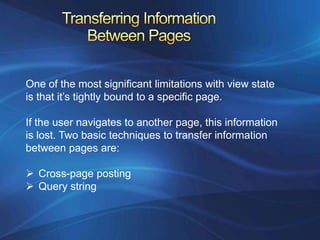
One of the most significant limitations with view state
is that it’s tightly bound to a specific page.

If the user navigates to another page, this information
is lost. Two basic techniques to transfer information
between pages are:

 Cross-page posting
 Query string
With Cross-Page Posting one page can send the user to
another page, complete with all the information for that
Page.

The infrastructure that supports cross-page postbacks is a
property named PostBackUrl which comes with
 ImageButton, LinkButton, and Button

To use cross-posting, you simply set PostBackUrl to the
name of another web form.

When the user clicks the button, the page will be posted to
that new URL with the values from all the input controls on
the current page.
Response.Redirect("newpage.aspx?recordID=10");

You can send multiple parameters as long as
they’re separated with an ampersand (&):

Response.Redirect("newpage.aspx?recordID=10&
mode=full");

The receiving can receive the values from
the QueryString dictionary collection exposed by
the built-in Request object:

string ID = Request.QueryString["recordID"];
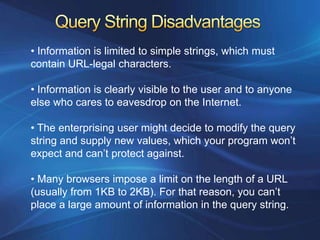
• Information is limited to simple strings, which must
contain URL-legal characters.

• Information is clearly visible to the user and to anyone
else who cares to eavesdrop on the Internet.

• The enterprising user might decide to modify the query
string and supply new values, which your program won’t
expect and can’t protect against.

• Many browsers impose a limit on the length of a URL
(usually from 1KB to 2KB). For that reason, you can’t
place a large amount of information in the query string.
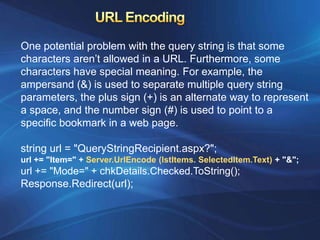
One potential problem with the query string is that some
characters aren’t allowed in a URL. Furthermore, some
characters have special meaning. For example, the
ampersand (&) is used to separate multiple query string
parameters, the plus sign (+) is an alternate way to represent
a space, and the number sign (#) is used to point to a
specific bookmark in a web page.

string url = "QueryStringRecipient.aspx?";
url += "Item=" + Server.UrlEncode (lstItems. SelectedItem.Text) + "&";
url += "Mode=" + chkDetails.Checked.ToString();
Response.Redirect(url);
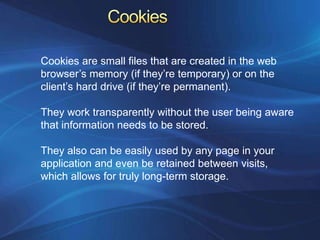
Cookies are small files that are created in the web
browser’s memory (if they’re temporary) or on the
client’s hard drive (if they’re permanent).

They work transparently without the user being aware
that information needs to be stored.

They also can be easily used by any page in your
application and even be retained between visits,
which allows for truly long-term storage.
•   They’re limited to simple string information

•   They’re easily accessible and readable if the user
    finds and opens the corresponding file.

•   Some users disable cookies on their browsers,
    which will cause problems for web applications
    that require them.

•   Users might manually delete the cookie files
    stored on their hard drives.
using System.Net;

// Create the cookie object.
HttpCookie cookie = new HttpCookie("Preferences");

// Set a value in it.
cookie["LanguagePref"] = "English";

// Add another value.
cookie["Country"] = "US";

// Add it to the current web response.
Response.Cookies.Add(cookie);

// This cookie lives for one year.
cookie.Expires = DateTime.Now.AddYears(1);
You retrieve cookies by cookie name using the
Request.Cookies collection:

HttpCookie cookie = Request.Cookies["Preferences"];
if (cookie != null)
{
language = cookie["LanguagePref"];
}
The only way to remove a cookie is by replacing it
with a cookie that has an expiration date that has
already passed.

HttpCookie cookie = new HttpCookie("Preferences");
cookie.Expires = DateTime.Now.AddDays(-1);
Response.Cookies.Add(cookie);
An application might need to store and access complex
information such as custom data objects, which can’t
be sent through a query string.

Or the application might have stringent security
requirements that prevent it from storing information
about a client in view state or in a custom cookie.

Session state management allows you to store any
type of data in memory on the server. Every client that
accesses the application is given a distinct session ID.
ASP.NET tracks each session using a unique 120-bit
identifier.

ASP.NET uses a proprietary algorithm to generate this value,
thereby guaranteeing (statistically speaking) that the number
is unique and it’s random enough that a malicious user can’t
reverse-engineer or “guess” what session ID a given client
will be using.

This ID is the only piece of session-related information that is
transmitted between the web server and the client.

When the client presents the session ID, ASP.NET looks up
the corresponding session, retrieves the objects you stored
previously, and places them into a special collection so they
can be accessed in your code.
Using cookies: In this case, the session ID is transmitted in
a special cookie (named ASP.NET_SessionId), which
ASP.NET creates automatically when the session collection
is used. This is the default.

Using modified URLs: In this case, the session ID is
transmitted in a specially modified (or munged) URL.
This allows you to create applications that use session
state with clients that don’t support cookies.
• If the user closes and restarts the browser.

• If the user accesses the same page through a
  different browser window, although the session
  will still exist if a web page is accessed through
  the original browser window. Browsers differ on
  how they handle this situation.

• If the session times out due to inactivity.

• If your web page code ends the session by
  calling the Session.Abandon() method.
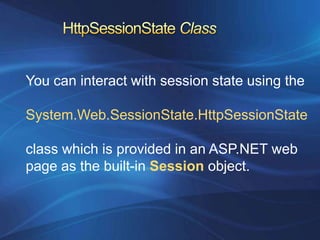
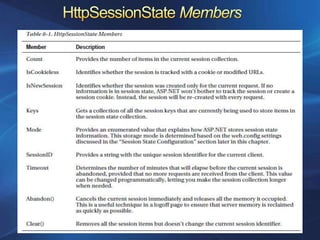
You can interact with session state using the

System.Web.SessionState.HttpSessionState

class which is provided in an ASP.NET web
page as the built-in Session object.
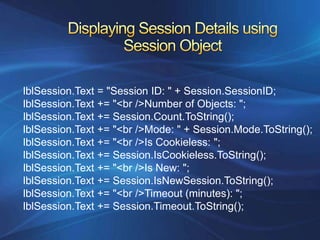
lblSession.Text = "Session ID: " + Session.SessionID;
lblSession.Text += "<br />Number of Objects: ";
lblSession.Text += Session.Count.ToString();
lblSession.Text += "<br />Mode: " + Session.Mode.ToString();
lblSession.Text += "<br />Is Cookieless: ";
lblSession.Text += Session.IsCookieless.ToString();
lblSession.Text += "<br />Is New: ";
lblSession.Text += Session.IsNewSession.ToString();
lblSession.Text += "<br />Timeout (minutes): ";
lblSession.Text += Session.Timeout.ToString();

Chapter 8 part1

  • 1.
    • The Problemof State • View State • The ViewState Collection • Cross-Page Posting • The Query String • Cookies • Session State • Using Session Object to display Session Details
  • 2.
    • Stateless HTTPconnection. • Additional steps required to retain information for a longer period of time or over the lifetime of the application. • The information can be as simple as a user’s name or as complex as a stuffed full shopping cart for an ecommerce site.
  • 3.
    View state usesa hidden field that ASP.NET automatically inserts in the final, rendered HTML of a web page. It’s a perfect place to store information that’s used for multiple postbacks in a single web page. The Web Server stores most of the properties of the Web Controls of a requested page directly to its view state and retrieve it later when the page is posted back.
  • 4.
    • Every itemin a View State is stored in a separate “slot” using a unique string name. • ViewState["Counter"] = 1; • ViewState collection stores all items as basic objects so you also need to cast the retrieved value to the appropriate data type using the casting syntax • int counter; • counter = (int)ViewState["Counter"];
  • 5.
    ASP.NET runs theview state through a hashing algorithm (with the help of a secret key value). The hashing algorithm creates a hash code. Which is added at the end of the view state data and sent to the browser. When the page is posted back, ASP.NET then checks whether the checksum it calculated matches the hash code. If a malicious user changes part of the view state data, that doesn’t match.
  • 6.
    If your viewstate contains some information you want to keep secret, you can enable view state encryption. You can turn on encryption for an individual page using the ViewStateEncryptionMode property of the Page directive: <%@Page ViewStateEncryptionMode="Always" %> Or <configuration> <system.web> <pages viewStateEncryptionMode="Always" /> ... </system.web> </configuration>
  • 7.
    You can storeyour own objects in view state just as easily as you store numeric and string types. However, to store an item in view state, ASP.NET must be able to convert it into a stream of bytes so that it can be added to the hidden input field in the page. This process is called serialization. If your objects aren’t serializable (and by default they’re not), you’ll receive an error message when you attempt to place them in view state. To make your objects serializable, you need to add a Serializable attribute before your class declaration.
  • 8.
    One of themost significant limitations with view state is that it’s tightly bound to a specific page. If the user navigates to another page, this information is lost. Two basic techniques to transfer information between pages are:  Cross-page posting  Query string
  • 9.
    With Cross-Page Postingone page can send the user to another page, complete with all the information for that Page. The infrastructure that supports cross-page postbacks is a property named PostBackUrl which comes with  ImageButton, LinkButton, and Button To use cross-posting, you simply set PostBackUrl to the name of another web form. When the user clicks the button, the page will be posted to that new URL with the values from all the input controls on the current page.
  • 10.
    Response.Redirect("newpage.aspx?recordID=10"); You can sendmultiple parameters as long as they’re separated with an ampersand (&): Response.Redirect("newpage.aspx?recordID=10& mode=full"); The receiving can receive the values from the QueryString dictionary collection exposed by the built-in Request object: string ID = Request.QueryString["recordID"];
  • 11.
    • Information islimited to simple strings, which must contain URL-legal characters. • Information is clearly visible to the user and to anyone else who cares to eavesdrop on the Internet. • The enterprising user might decide to modify the query string and supply new values, which your program won’t expect and can’t protect against. • Many browsers impose a limit on the length of a URL (usually from 1KB to 2KB). For that reason, you can’t place a large amount of information in the query string.
  • 12.
    One potential problemwith the query string is that some characters aren’t allowed in a URL. Furthermore, some characters have special meaning. For example, the ampersand (&) is used to separate multiple query string parameters, the plus sign (+) is an alternate way to represent a space, and the number sign (#) is used to point to a specific bookmark in a web page. string url = "QueryStringRecipient.aspx?"; url += "Item=" + Server.UrlEncode (lstItems. SelectedItem.Text) + "&"; url += "Mode=" + chkDetails.Checked.ToString(); Response.Redirect(url);
  • 13.
    Cookies are smallfiles that are created in the web browser’s memory (if they’re temporary) or on the client’s hard drive (if they’re permanent). They work transparently without the user being aware that information needs to be stored. They also can be easily used by any page in your application and even be retained between visits, which allows for truly long-term storage.
  • 14.
    They’re limited to simple string information • They’re easily accessible and readable if the user finds and opens the corresponding file. • Some users disable cookies on their browsers, which will cause problems for web applications that require them. • Users might manually delete the cookie files stored on their hard drives.
  • 15.
    using System.Net; // Createthe cookie object. HttpCookie cookie = new HttpCookie("Preferences"); // Set a value in it. cookie["LanguagePref"] = "English"; // Add another value. cookie["Country"] = "US"; // Add it to the current web response. Response.Cookies.Add(cookie); // This cookie lives for one year. cookie.Expires = DateTime.Now.AddYears(1);
  • 16.
    You retrieve cookiesby cookie name using the Request.Cookies collection: HttpCookie cookie = Request.Cookies["Preferences"]; if (cookie != null) { language = cookie["LanguagePref"]; } The only way to remove a cookie is by replacing it with a cookie that has an expiration date that has already passed. HttpCookie cookie = new HttpCookie("Preferences"); cookie.Expires = DateTime.Now.AddDays(-1); Response.Cookies.Add(cookie);
  • 17.
    An application mightneed to store and access complex information such as custom data objects, which can’t be sent through a query string. Or the application might have stringent security requirements that prevent it from storing information about a client in view state or in a custom cookie. Session state management allows you to store any type of data in memory on the server. Every client that accesses the application is given a distinct session ID.
  • 18.
    ASP.NET tracks eachsession using a unique 120-bit identifier. ASP.NET uses a proprietary algorithm to generate this value, thereby guaranteeing (statistically speaking) that the number is unique and it’s random enough that a malicious user can’t reverse-engineer or “guess” what session ID a given client will be using. This ID is the only piece of session-related information that is transmitted between the web server and the client. When the client presents the session ID, ASP.NET looks up the corresponding session, retrieves the objects you stored previously, and places them into a special collection so they can be accessed in your code.
  • 19.
    Using cookies: Inthis case, the session ID is transmitted in a special cookie (named ASP.NET_SessionId), which ASP.NET creates automatically when the session collection is used. This is the default. Using modified URLs: In this case, the session ID is transmitted in a specially modified (or munged) URL. This allows you to create applications that use session state with clients that don’t support cookies.
  • 20.
    • If theuser closes and restarts the browser. • If the user accesses the same page through a different browser window, although the session will still exist if a web page is accessed through the original browser window. Browsers differ on how they handle this situation. • If the session times out due to inactivity. • If your web page code ends the session by calling the Session.Abandon() method.
  • 21.
    You can interactwith session state using the System.Web.SessionState.HttpSessionState class which is provided in an ASP.NET web page as the built-in Session object.
  • 23.
    lblSession.Text = "SessionID: " + Session.SessionID; lblSession.Text += "<br />Number of Objects: "; lblSession.Text += Session.Count.ToString(); lblSession.Text += "<br />Mode: " + Session.Mode.ToString(); lblSession.Text += "<br />Is Cookieless: "; lblSession.Text += Session.IsCookieless.ToString(); lblSession.Text += "<br />Is New: "; lblSession.Text += Session.IsNewSession.ToString(); lblSession.Text += "<br />Timeout (minutes): "; lblSession.Text += Session.Timeout.ToString();