0
Seoul National University of Science and Technology
Professor Eun-Sung Chung
1
1
1. Introduction
2
2
1. Introduction
3
3
2. Backgrounds of SWMM
4
4
2. Backgrounds of SWMM
5
5
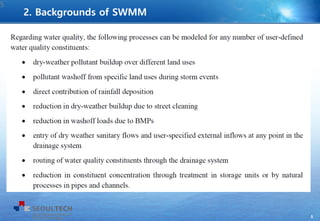
2. Backgrounds of SWMM
6
6
7
7
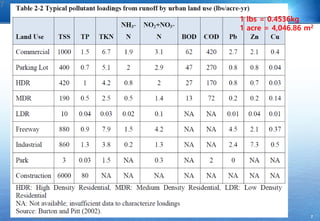
1 lbs = 0.4536kg
1 acre = 4,046.86 m2
8
8
9
9
10
10
11
11
12
12
13
13
14
14
15
15
16
16
17
17
18
18
19
19
20
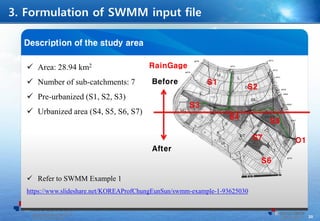
Before
After
S1
S2
S3
S4
S5
S7
S6
O1
RainGage
21
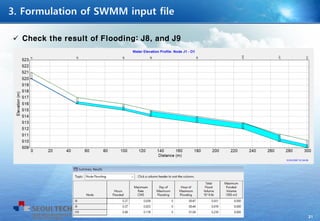
 Check the result of Flooding: J8, and J9
22
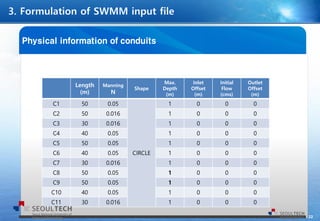
Length
(m)
Manning
N
Shape
Max.
Depth
(m)
Inlet
Offset
(m)
Initial
Flow
(cms)
Outlet
Offset
(m)
C1 50 0.05
CIRCLE
1 0 0 0
C2 50 0.016 1 0 0 0
C3 30 0.016 1 0 0 0
C4 40 0.05 1 0 0 0
C5 50 0.05 1 0 0 0
C6 40 0.05 1 0 0 0
C7 30 0.016 1 0 0 0
C8 50 0.05 1 0 0 0
C9 50 0.05 1 0 0 0
C10 40 0.05 1 0 0 0
C11 30 0.016 1 0 0 0
23
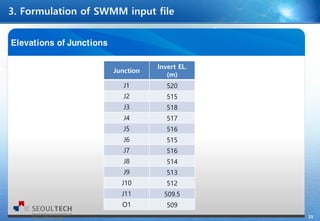
Junction
Invert EL.
(m)
J1 520
J2 515
J3 518
J4 517
J5 516
J6 515
J7 516
J8 514
J9 513
J10 512
J11 509.5
O1 509
24
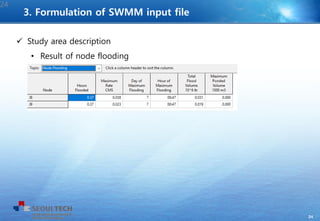
 Study area description
• Result of node flooding
24
3. Formulation of SWMM input file
25
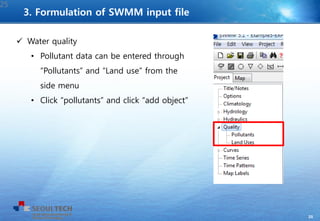
 Water quality
• Pollutant data can be entered through
“Pollutants” and “Land use” from the
side menu
• Click “pollutants” and click “add object”
25
3. Formulation of SWMM input file
26
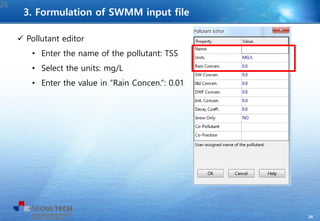
 Pollutant editor
• Enter the name of the pollutant: TSS
• Select the units: mg/L
• Enter the value in “Rain Concen.”: 0.01
26
3. Formulation of SWMM input file
27
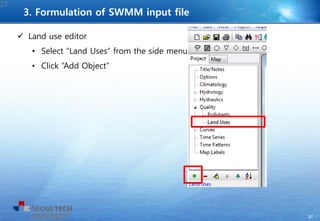
 Land use editor
• Select “Land Uses” from the side menu
• Click “Add Object”
27
3. Formulation of SWMM input file
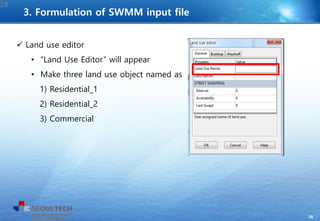
28
 Land use editor
• “Land Use Editor” will appear
• Make three land use object named as
1) Residential_1
2) Residential_2
3) Commercial
28
3. Formulation of SWMM input file
29
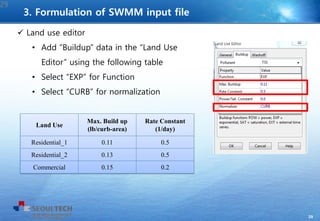
 Land use editor
• Add “Buildup” data in the “Land Use
Editor” using the following table
• Select “EXP” for Function
• Select “CURB” for normalization
29
Land Use
Max. Build up
(lb/curb-area)
Rate Constant
(1/day)
Residential_1 0.11 0.5
Residential_2 0.13 0.5
Commercial 0.15 0.2
3. Formulation of SWMM input file
30
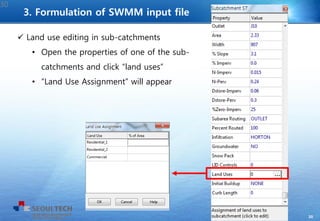
 Land use editing in sub-catchments
• Open the properties of one of the sub-
catchments and click “land uses”
• “Land Use Assignment” will appear
30
3. Formulation of SWMM input file
31
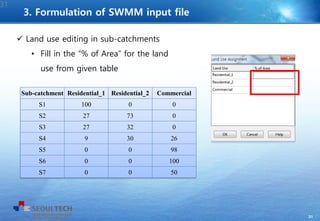
 Land use editing in sub-catchments
• Fill in the “% of Area” for the land
use from given table
31
Sub-catchment Residential_1 Residential_2 Commercial
S1 100 0 0
S2 27 73 0
S3 27 32 0
S4 9 30 26
S5 0 0 98
S6 0 0 100
S7 0 0 50
3. Formulation of SWMM input file
32
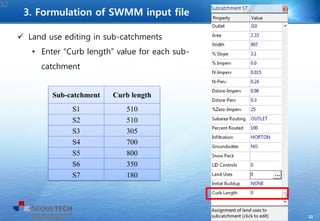
 Land use editing in sub-catchments
• Enter “Curb length” value for each sub-
catchment
32
Sub-catchment Curb length
S1 510
S2 510
S3 305
S4 700
S5 800
S6 350
S7 180
3. Formulation of SWMM input file
33
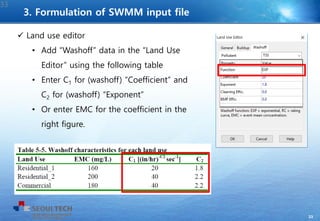
 Land use editor
• Add “Washoff” data in the “Land Use
Editor” using the following table
• Enter C1 for (washoff) “Coefficient” and
C2 for (washoff) “Exponent”
• Or enter EMC for the coefficient in the
right figure.
33
3. Formulation of SWMM input file
34
34
3. Formulation of SWMM input file
35
35
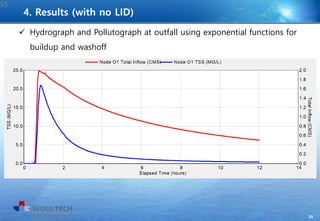
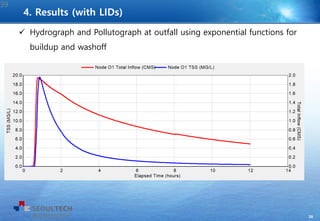
 Hydrograph and Pollutograph at outfall using exponential functions for
buildup and washoff
4. Results (with no LID)
36
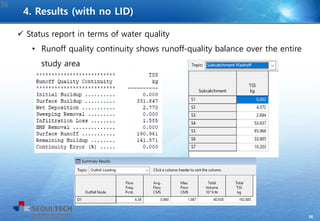
 Status report in terms of water quality
• Runoff quality continuity shows runoff-quality balance over the entire
study area
36
4. Results (with no LID)
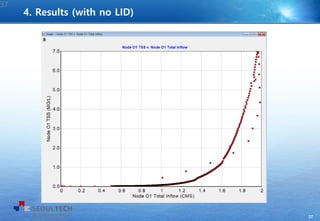
37
37
4. Results (with no LID)
38
Subcatchment LID Process
Area of
Each Unit
(m2)
Numb
of Unit
Surface
Width
per Unit
% Initially
Saturated
% of
Imperv
Area
Treated
Return
all
outflow
to perv
S4 Bio-retention cell 4,750 1 0 0 10 O
S5 Permeable pavement 2,000 12 30 0 0.3 o
S5 Green roof 1,840 8 136 0 0.184 X
S6 Rain garden 820 4 20 0 1.5 X
S7 Infiltration trench 2,320 4 133 0 40 O
S7 Rain barrel 100 100 0 0 4 X
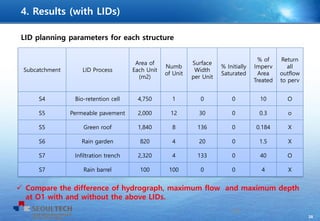
LID planning parameters for each structure
38
4. Results (with LIDs)
 Compare the difference of hydrograph, maximum flow and maximum depth
at O1 with and without the above LIDs.
39
39
 Hydrograph and Pollutograph at outfall using exponential functions for
buildup and washoff
4. Results (with LIDs)
40
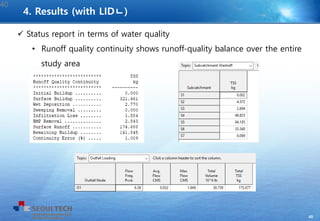
 Status report in terms of water quality
• Runoff quality continuity shows runoff-quality balance over the entire
study area
40
4. Results (with LIDㄴ)
41
41
5. Exercise
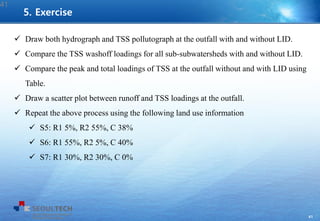
 Draw both hydrograph and TSS pollutograph at the outfall with and without LID.
 Compare the TSS washoff loadings for all sub-subwatersheds with and without LID.
 Compare the peak and total loadings of TSS at the outfall without and with LID using
Table.
 Draw a scatter plot between runoff and TSS loadings at the outfall.
 Repeat the above process using the following land use information
 S5: R1 5%, R2 55%, C 38%
 S6: R1 55%, R2 5%, C 40%
 S7: R1 30%, R2 30%, C 0%
42

Swmm Example 4 - Water Quality

  • 1.
    0 Seoul National Universityof Science and Technology Professor Eun-Sung Chung
  • 2.
  • 3.
  • 4.
  • 5.
  • 6.
  • 7.
  • 8.
    7 7 1 lbs =0.4536kg 1 acre = 4,046.86 m2
  • 9.
  • 10.
  • 11.
  • 12.
  • 13.
  • 14.
  • 15.
  • 16.
  • 17.
  • 18.
  • 19.
  • 20.
  • 21.
  • 22.
    21  Check theresult of Flooding: J8, and J9
  • 23.
    22 Length (m) Manning N Shape Max. Depth (m) Inlet Offset (m) Initial Flow (cms) Outlet Offset (m) C1 50 0.05 CIRCLE 10 0 0 C2 50 0.016 1 0 0 0 C3 30 0.016 1 0 0 0 C4 40 0.05 1 0 0 0 C5 50 0.05 1 0 0 0 C6 40 0.05 1 0 0 0 C7 30 0.016 1 0 0 0 C8 50 0.05 1 0 0 0 C9 50 0.05 1 0 0 0 C10 40 0.05 1 0 0 0 C11 30 0.016 1 0 0 0
  • 24.
    23 Junction Invert EL. (m) J1 520 J2515 J3 518 J4 517 J5 516 J6 515 J7 516 J8 514 J9 513 J10 512 J11 509.5 O1 509
  • 25.
    24  Study areadescription • Result of node flooding 24 3. Formulation of SWMM input file
  • 26.
    25  Water quality •Pollutant data can be entered through “Pollutants” and “Land use” from the side menu • Click “pollutants” and click “add object” 25 3. Formulation of SWMM input file
  • 27.
    26  Pollutant editor •Enter the name of the pollutant: TSS • Select the units: mg/L • Enter the value in “Rain Concen.”: 0.01 26 3. Formulation of SWMM input file
  • 28.
    27  Land useeditor • Select “Land Uses” from the side menu • Click “Add Object” 27 3. Formulation of SWMM input file
  • 29.
    28  Land useeditor • “Land Use Editor” will appear • Make three land use object named as 1) Residential_1 2) Residential_2 3) Commercial 28 3. Formulation of SWMM input file
  • 30.
    29  Land useeditor • Add “Buildup” data in the “Land Use Editor” using the following table • Select “EXP” for Function • Select “CURB” for normalization 29 Land Use Max. Build up (lb/curb-area) Rate Constant (1/day) Residential_1 0.11 0.5 Residential_2 0.13 0.5 Commercial 0.15 0.2 3. Formulation of SWMM input file
  • 31.
    30  Land useediting in sub-catchments • Open the properties of one of the sub- catchments and click “land uses” • “Land Use Assignment” will appear 30 3. Formulation of SWMM input file
  • 32.
    31  Land useediting in sub-catchments • Fill in the “% of Area” for the land use from given table 31 Sub-catchment Residential_1 Residential_2 Commercial S1 100 0 0 S2 27 73 0 S3 27 32 0 S4 9 30 26 S5 0 0 98 S6 0 0 100 S7 0 0 50 3. Formulation of SWMM input file
  • 33.
    32  Land useediting in sub-catchments • Enter “Curb length” value for each sub- catchment 32 Sub-catchment Curb length S1 510 S2 510 S3 305 S4 700 S5 800 S6 350 S7 180 3. Formulation of SWMM input file
  • 34.
    33  Land useeditor • Add “Washoff” data in the “Land Use Editor” using the following table • Enter C1 for (washoff) “Coefficient” and C2 for (washoff) “Exponent” • Or enter EMC for the coefficient in the right figure. 33 3. Formulation of SWMM input file
  • 35.
    34 34 3. Formulation ofSWMM input file
  • 36.
    35 35  Hydrograph andPollutograph at outfall using exponential functions for buildup and washoff 4. Results (with no LID)
  • 37.
    36  Status reportin terms of water quality • Runoff quality continuity shows runoff-quality balance over the entire study area 36 4. Results (with no LID)
  • 38.
  • 39.
    38 Subcatchment LID Process Areaof Each Unit (m2) Numb of Unit Surface Width per Unit % Initially Saturated % of Imperv Area Treated Return all outflow to perv S4 Bio-retention cell 4,750 1 0 0 10 O S5 Permeable pavement 2,000 12 30 0 0.3 o S5 Green roof 1,840 8 136 0 0.184 X S6 Rain garden 820 4 20 0 1.5 X S7 Infiltration trench 2,320 4 133 0 40 O S7 Rain barrel 100 100 0 0 4 X LID planning parameters for each structure 38 4. Results (with LIDs)  Compare the difference of hydrograph, maximum flow and maximum depth at O1 with and without the above LIDs.
  • 40.
    39 39  Hydrograph andPollutograph at outfall using exponential functions for buildup and washoff 4. Results (with LIDs)
  • 41.
    40  Status reportin terms of water quality • Runoff quality continuity shows runoff-quality balance over the entire study area 40 4. Results (with LIDㄴ)
  • 42.
    41 41 5. Exercise  Drawboth hydrograph and TSS pollutograph at the outfall with and without LID.  Compare the TSS washoff loadings for all sub-subwatersheds with and without LID.  Compare the peak and total loadings of TSS at the outfall without and with LID using Table.  Draw a scatter plot between runoff and TSS loadings at the outfall.  Repeat the above process using the following land use information  S5: R1 5%, R2 55%, C 38%  S6: R1 55%, R2 5%, C 40%  S7: R1 30%, R2 30%, C 0%
  • 43.