0
Seoul National University of Science and Technology
Professor Eun-Sung Chung
1
2
1. Introduction
Floods and Droughts
Imperviousness in urban areas are increasing due to climate change and urbanization
Flood, drought, water quality problems are occurring and urged to be managed
2
3
1. Introduction
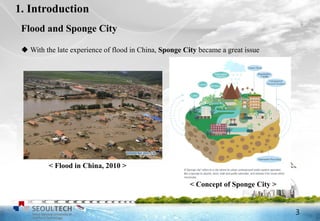
 With the late experience of flood in China, Sponge City became a great issue
< Flood in China, 2010 >
< Concept of Sponge City >
Flood and Sponge City
3
4
1. Introduction
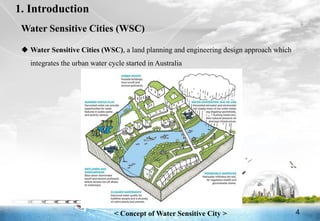
 Water Sensitive Cities (WSC), a land planning and engineering design approach which
integrates the urban water cycle started in Australia
< Concept of Water Sensitive City >
Water Sensitive Cities (WSC)
4
5
1. Introduction
Low Impact Development (LID)
 Low Impact Development (LID) (Prince George’s County, 1999)
 Best Management Planning (BMP), Green Infrastructure (GI)
 Maintain and capture stormwater to reduce negative effects on receiving water
 LID can be a method to mitigate water related problems
 LID concepts can be used as basic principles for the achievement of Sponge
Cities and Water Sensitive Cities
 Several hydrological models that can simulate the performance of LIDs
5
6
7
SWMM (Storm Water Management Model)
 Developed by EPA (Environmental Protection Agency), US
 Dynamic rainfall-runoff simulation model, used for simulation of runoff and qua
lity from urban areas
 Used in thousands of sewer and stormwater studies throughout the world
 Recently extended to model the hydrologic performance of specific types of LID
controls
 Eight types of LIDs: bio-retention cells, rain gardens, green roofs, rain barrels,
infiltration trenches, permeable pavements,
rooftop disconnections, vegetative swales
Storm Water Management Model
7
8
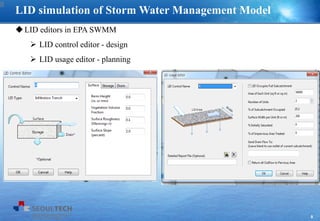
LID editors in EPA SWMM
 LID control editor - design
 LID usage editor - planning
LID simulation of Storm Water Management Model
8
9
LID types and layers for each LID practices
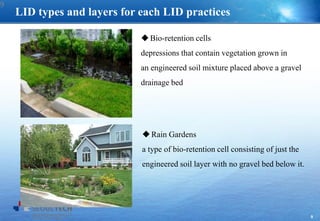
Bio-retention cells
depressions that contain vegetation grown in
an engineered soil mixture placed above a gravel
drainage bed
Rain Gardens
a type of bio-retention cell consisting of just the
engineered soil layer with no gravel bed below it.
9
10
LID types and layers for each LID practices
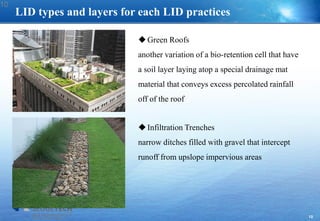
Green Roofs
another variation of a bio-retention cell that have
a soil layer laying atop a special drainage mat
material that conveys excess percolated rainfall
off of the roof
Infiltration Trenches
narrow ditches filled with gravel that intercept
runoff from upslope impervious areas
10
11
LID types and layers for each LID practices
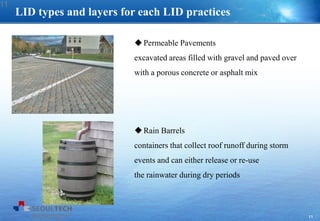
Permeable Pavements
excavated areas filled with gravel and paved over
with a porous concrete or asphalt mix
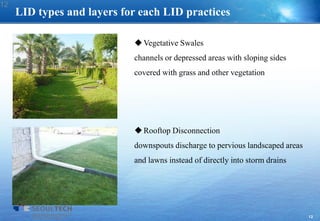
Rain Barrels
containers that collect roof runoff during storm
events and can either release or re-use
the rainwater during dry periods
11
12
LID types and layers for each LID practices
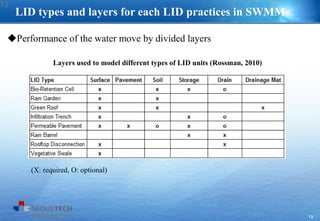
Vegetative Swales
channels or depressed areas with sloping sides
covered with grass and other vegetation
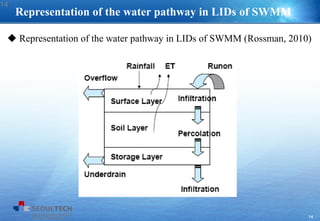
Rooftop Disconnection
downspouts discharge to pervious landscaped areas
and lawns instead of directly into storm drains
12
13
LID types and layers for each LID practices in SWMM
Layers used to model different types of LID units (Rossman, 2010)
(X: required, O: optional)
Performance of the water move by divided layers
13
14
Representation of the water pathway in LIDs of SWMM
 Representation of the water pathway in LIDs of SWMM (Rossman, 2010)
14
15
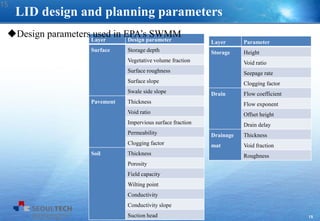
Layer Parameter
Storage Height
Void ratio
Seepage rate
Clogging factor
Drain Flow coefficient
Flow exponent
Offset height
Drain delay
Drainage
mat
Thickness
Void fraction
Roughness
LID design and planning parameters
Layer Design parameter
Surface Storage depth
Vegetative volume fraction
Surface roughness
Surface slope
Swale side slope
Pavement Thickness
Void ratio
Impervious surface fraction
Permeability
Clogging factor
Soil Thickness
Porosity
Field capacity
Wilting point
Conductivity
Conductivity slope
Suction head
Design parameters used in EPA’s SWMM
15
16
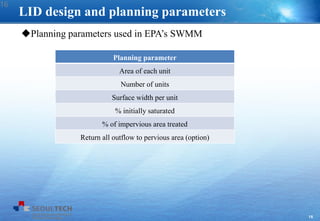
LID design and planning parameters
Planning parameter
Area of each unit
Number of units
Surface width per unit
% initially saturated
% of impervious area treated
Return all outflow to pervious area (option)
Planning parameters used in EPA’s SWMM
16
17
18
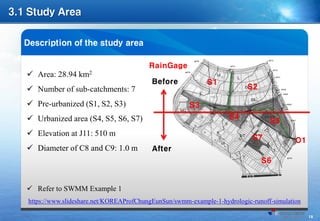
Before
After
S1
S2
S3
S4
S5
S7
S6
O1
RainGage
19
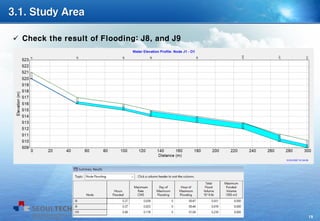
 Check the result of Flooding: J8, and J9
20
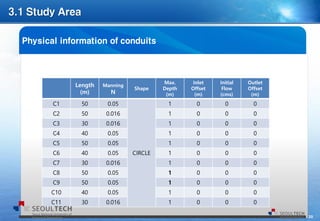
Length
(m)
Manning
N
Shape
Max.
Depth
(m)
Inlet
Offset
(m)
Initial
Flow
(cms)
Outlet
Offset
(m)
C1 50 0.05
CIRCLE
1 0 0 0
C2 50 0.016 1 0 0 0
C3 30 0.016 1 0 0 0
C4 40 0.05 1 0 0 0
C5 50 0.05 1 0 0 0
C6 40 0.05 1 0 0 0
C7 30 0.016 1 0 0 0
C8 50 0.05 1 0 0 0
C9 50 0.05 1 0 0 0
C10 40 0.05 1 0 0 0
C11 30 0.016 1 0 0 0
21
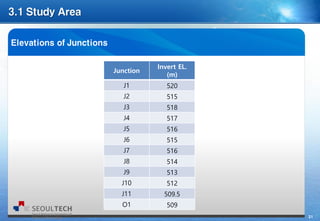
Junction
Invert EL.
(m)
J1 520
J2 515
J3 518
J4 517
J5 516
J6 515
J7 516
J8 514
J9 513
J10 512
J11 509.5
O1 509
22
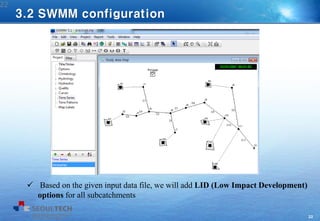
 Based on the given input data file, we will add LID (Low Impact Development)
options for all subcatchments
22
3.2 SWMM configuration
23
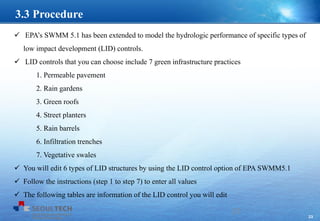
 EPA’s SWMM 5.1 has been extended to model the hydrologic performance of specific types of
low impact development (LID) controls.
 LID controls that you can choose include 7 green infrastructure practices
1. Permeable pavement
2. Rain gardens
3. Green roofs
4. Street planters
5. Rain barrels
6. Infiltration trenches
7. Vegetative swales
 You will edit 6 types of LID structures by using the LID control option of EPA SWMM5.1
 Follow the instructions (step 1 to step 7) to enter all values
 The following tables are information of the LID control you will edit
23
3.3 Procedure
24
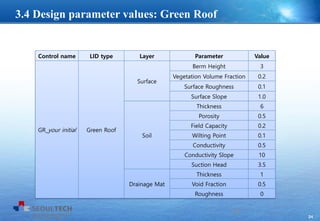
Control name LID type Layer Parameter Value
GR_your initial Green Roof
Surface
Berm Height 3
Vegetation Volume Fraction 0.2
Surface Roughness 0.1
Surface Slope 1.0
Soil
Thickness 6
Porosity 0.5
Field Capacity 0.2
Wilting Point 0.1
Conductivity 0.5
Conductivity Slope 10
Suction Head 3.5
Drainage Mat
Thickness 1
Void Fraction 0.5
Roughness 0
24
3.4 Design parameter values: Green Roof
25
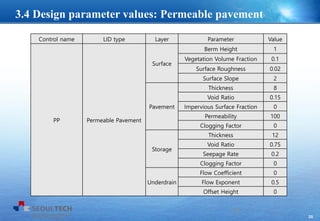
Control name LID type Layer Parameter Value
PP Permeable Pavement
Surface
Berm Height 1
Vegetation Volume Fraction 0.1
Surface Roughness 0.02
Surface Slope 2
Pavement
Thickness 8
Void Ratio 0.15
Impervious Surface Fraction 0
Permeability 100
Clogging Factor 0
Storage
Thickness 12
Void Ratio 0.75
Seepage Rate 0.2
Clogging Factor 0
Underdrain
Flow Coefficient 0
Flow Exponent 0.5
Offset Height 0
25
3.4 Design parameter values: Permeable pavement
26
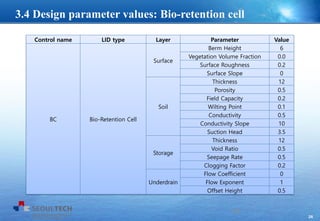
Control name LID type Layer Parameter Value
BC Bio-Retention Cell
Surface
Berm Height 6
Vegetation Volume Fraction 0.0
Surface Roughness 0.2
Surface Slope 0
Soil
Thickness 12
Porosity 0.5
Field Capacity 0.2
Wilting Point 0.1
Conductivity 0.5
Conductivity Slope 10
Suction Head 3.5
Storage
Thickness 12
Void Ratio 0.5
Seepage Rate 0.5
Clogging Factor 0.2
Underdrain
Flow Coefficient 0
Flow Exponent 1
Offset Height 0.5
26
3.4 Design parameter values: Bio-retention cell
27
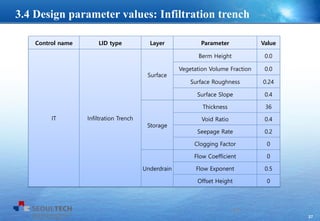
Control name LID type Layer Parameter Value
IT Infiltration Trench
Surface
Berm Height 0.0
Vegetation Volume Fraction 0.0
Surface Roughness 0.24
Surface Slope 0.4
Storage
Thickness 36
Void Ratio 0.4
Seepage Rate 0.2
Clogging Factor 0
Underdrain
Flow Coefficient 0
Flow Exponent 0.5
Offset Height 0
27
3.4 Design parameter values: Infiltration trench
28
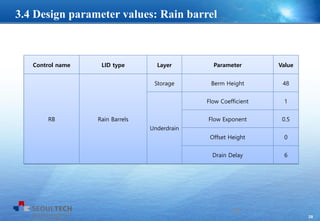
Control name LID type Layer Parameter Value
RB Rain Barrels
Storage Berm Height 48
Underdrain
Flow Coefficient 1
Flow Exponent 0.5
Offset Height 0
Drain Delay 6
28
3.4 Design parameter values: Rain barrel
29
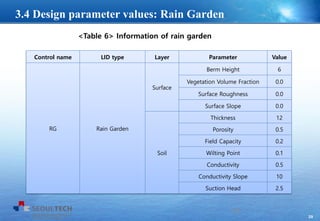
<Table 6> Information of rain garden
Control name LID type Layer Parameter Value
RG Rain Garden
Surface
Berm Height 6
Vegetation Volume Fraction 0.0
Surface Roughness 0.0
Surface Slope 0.0
Soil
Thickness 12
Porosity 0.5
Field Capacity 0.2
Wilting Point 0.1
Conductivity 0.5
Conductivity Slope 10
Suction Head 2.5
29
3.4 Design parameter values: Rain Garden
30
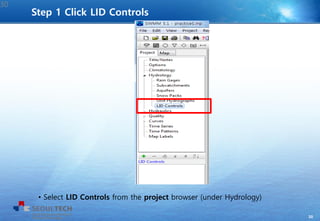
• Select LID Controls from the project browser (under Hydrology)
Step 1 Click LID Controls
30
31
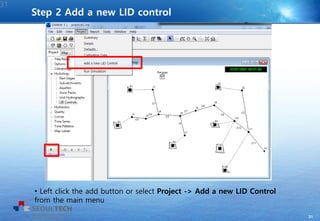
• Left click the add button or select Project -> Add a new LID Control
from the main menu
Step 2 Add a new LID control
31
32
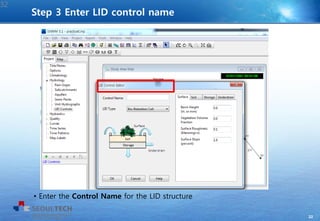
• Enter the Control Name for the LID structure
Step 3 Enter LID control name
32
33
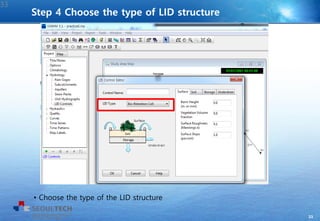
• Choose the type of the LID structure
Step 4 Choose the type of LID structure
33
34
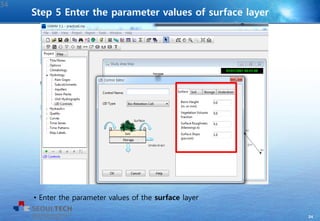
• Enter the parameter values of the surface layer
Step 5 Enter the parameter values of surface layer
34
35
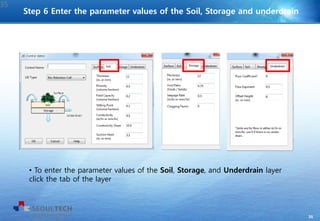
• To enter the parameter values of the Soil, Storage, and Underdrain layer
click the tab of the layer
Step 6 Enter the parameter values of the Soil, Storage and underdrain
35
36
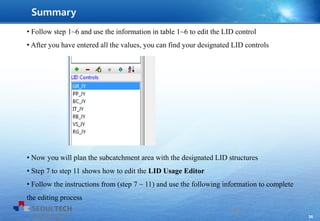
• Follow step 1~6 and use the information in table 1~6 to edit the LID control
• After you have entered all the values, you can find your designated LID controls
• Now you will plan the subcatchment area with the designated LID structures
• Step 7 to step 11 shows how to edit the LID Usage Editor
• Follow the instructions from (step 7 ~ 11) and use the following information to complete
the editing process
36
Summary
37
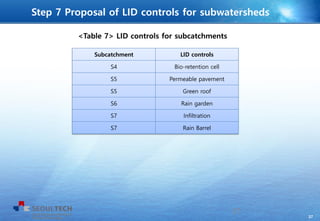
Subcatchment LID controls
S4 Bio-retention cell
S5 Permeable pavement
S5 Green roof
S6 Rain garden
S7 Infiltration
S7 Rain Barrel
<Table 7> LID controls for subcatchments
37
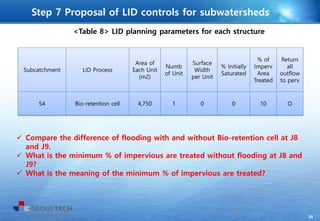
Step 7 Proposal of LID controls for subwatersheds
38
Subcatchment LID Process
Area of
Each Unit
(m2)
Numb
of Unit
Surface
Width
per Unit
% Initially
Saturated
% of
Imperv
Area
Treated
Return
all
outflow
to perv
S4 Bio-retention cell 4,750 1 0 0 10 O
<Table 8> LID planning parameters for each structure
38
Step 7 Proposal of LID controls for subwatersheds
 Compare the difference of flooding with and without Bio-retention cell at J8
and J9.
 What is the minimum % of impervious are treated without flooding at J8 and
J9?
 What is the meaning of the minimum % of impervious are treated?
39
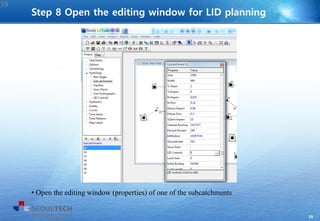
• Open the editing window (properties) of one of the subcatchments
Step 8 Open the editing window for LID planning
39
40
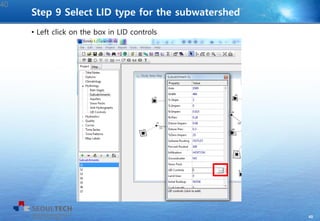
• Left click on the box in LID controls
Step 9 Select LID type for the subwatershed
40
41
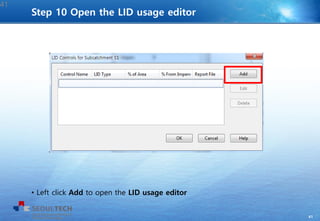
• Left click Add to open the LID usage editor
41
Step 10 Open the LID usage editor
42
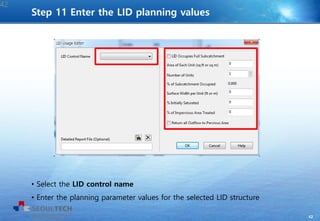
• Select the LID control name
• Enter the planning parameter values for the selected LID structure
42
Step 11 Enter the LID planning values
43
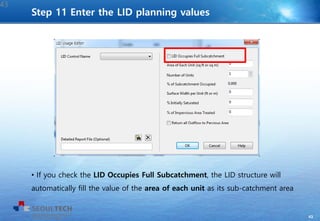
• If you check the LID Occupies Full Subcatchment, the LID structure will
automatically fill the value of the area of each unit as its sub-catchment area
43
Step 11 Enter the LID planning values
44
44
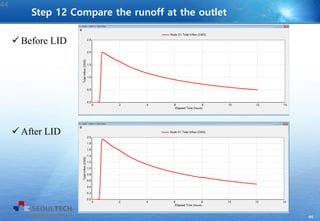
Step 12 Compare the runoff at the outlet
 Before LID
 After LID
45
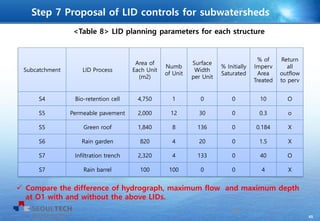
Subcatchment LID Process
Area of
Each Unit
(m2)
Numb
of Unit
Surface
Width
per Unit
% Initially
Saturated
% of
Imperv
Area
Treated
Return
all
outflow
to perv
S4 Bio-retention cell 4,750 1 0 0 10 O
S5 Permeable pavement 2,000 12 30 0 0.3 o
S5 Green roof 1,840 8 136 0 0.184 X
S6 Rain garden 820 4 20 0 1.5 X
S7 Infiltration trench 2,320 4 133 0 40 O
S7 Rain barrel 100 100 0 0 4 X
<Table 8> LID planning parameters for each structure
45
Step 7 Proposal of LID controls for subwatersheds
 Compare the difference of hydrograph, maximum flow and maximum depth
at O1 with and without the above LIDs.
46
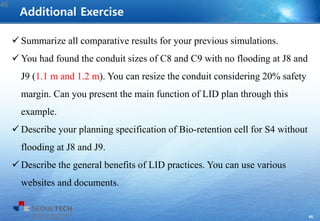
 Summarize all comparative results for your previous simulations.
 You had found the conduit sizes of C8 and C9 with no flooding at J8 and
J9 (1.1 m and 1.2 m). You can resize the conduit considering 20% safety
margin. Can you present the main function of LID plan through this
example.
 Describe your planning specification of Bio-retention cell for S4 without
flooding at J8 and J9.
 Describe the general benefits of LID practices. You can use various
websites and documents.
Additional Exercise
46
47

SWMM - Example 3 - Low Impact Development

  • 1.
    0 Seoul National Universityof Science and Technology Professor Eun-Sung Chung
  • 2.
  • 3.
    2 1. Introduction Floods andDroughts Imperviousness in urban areas are increasing due to climate change and urbanization Flood, drought, water quality problems are occurring and urged to be managed 2
  • 4.
    3 1. Introduction  Withthe late experience of flood in China, Sponge City became a great issue < Flood in China, 2010 > < Concept of Sponge City > Flood and Sponge City 3
  • 5.
    4 1. Introduction  WaterSensitive Cities (WSC), a land planning and engineering design approach which integrates the urban water cycle started in Australia < Concept of Water Sensitive City > Water Sensitive Cities (WSC) 4
  • 6.
    5 1. Introduction Low ImpactDevelopment (LID)  Low Impact Development (LID) (Prince George’s County, 1999)  Best Management Planning (BMP), Green Infrastructure (GI)  Maintain and capture stormwater to reduce negative effects on receiving water  LID can be a method to mitigate water related problems  LID concepts can be used as basic principles for the achievement of Sponge Cities and Water Sensitive Cities  Several hydrological models that can simulate the performance of LIDs 5
  • 7.
  • 8.
    7 SWMM (Storm WaterManagement Model)  Developed by EPA (Environmental Protection Agency), US  Dynamic rainfall-runoff simulation model, used for simulation of runoff and qua lity from urban areas  Used in thousands of sewer and stormwater studies throughout the world  Recently extended to model the hydrologic performance of specific types of LID controls  Eight types of LIDs: bio-retention cells, rain gardens, green roofs, rain barrels, infiltration trenches, permeable pavements, rooftop disconnections, vegetative swales Storm Water Management Model 7
  • 9.
    8 LID editors inEPA SWMM  LID control editor - design  LID usage editor - planning LID simulation of Storm Water Management Model 8
  • 10.
    9 LID types andlayers for each LID practices Bio-retention cells depressions that contain vegetation grown in an engineered soil mixture placed above a gravel drainage bed Rain Gardens a type of bio-retention cell consisting of just the engineered soil layer with no gravel bed below it. 9
  • 11.
    10 LID types andlayers for each LID practices Green Roofs another variation of a bio-retention cell that have a soil layer laying atop a special drainage mat material that conveys excess percolated rainfall off of the roof Infiltration Trenches narrow ditches filled with gravel that intercept runoff from upslope impervious areas 10
  • 12.
    11 LID types andlayers for each LID practices Permeable Pavements excavated areas filled with gravel and paved over with a porous concrete or asphalt mix Rain Barrels containers that collect roof runoff during storm events and can either release or re-use the rainwater during dry periods 11
  • 13.
    12 LID types andlayers for each LID practices Vegetative Swales channels or depressed areas with sloping sides covered with grass and other vegetation Rooftop Disconnection downspouts discharge to pervious landscaped areas and lawns instead of directly into storm drains 12
  • 14.
    13 LID types andlayers for each LID practices in SWMM Layers used to model different types of LID units (Rossman, 2010) (X: required, O: optional) Performance of the water move by divided layers 13
  • 15.
    14 Representation of thewater pathway in LIDs of SWMM  Representation of the water pathway in LIDs of SWMM (Rossman, 2010) 14
  • 16.
    15 Layer Parameter Storage Height Voidratio Seepage rate Clogging factor Drain Flow coefficient Flow exponent Offset height Drain delay Drainage mat Thickness Void fraction Roughness LID design and planning parameters Layer Design parameter Surface Storage depth Vegetative volume fraction Surface roughness Surface slope Swale side slope Pavement Thickness Void ratio Impervious surface fraction Permeability Clogging factor Soil Thickness Porosity Field capacity Wilting point Conductivity Conductivity slope Suction head Design parameters used in EPA’s SWMM 15
  • 17.
    16 LID design andplanning parameters Planning parameter Area of each unit Number of units Surface width per unit % initially saturated % of impervious area treated Return all outflow to pervious area (option) Planning parameters used in EPA’s SWMM 16
  • 18.
  • 19.
  • 20.
    19  Check theresult of Flooding: J8, and J9
  • 21.
    20 Length (m) Manning N Shape Max. Depth (m) Inlet Offset (m) Initial Flow (cms) Outlet Offset (m) C1 50 0.05 CIRCLE 10 0 0 C2 50 0.016 1 0 0 0 C3 30 0.016 1 0 0 0 C4 40 0.05 1 0 0 0 C5 50 0.05 1 0 0 0 C6 40 0.05 1 0 0 0 C7 30 0.016 1 0 0 0 C8 50 0.05 1 0 0 0 C9 50 0.05 1 0 0 0 C10 40 0.05 1 0 0 0 C11 30 0.016 1 0 0 0
  • 22.
    21 Junction Invert EL. (m) J1 520 J2515 J3 518 J4 517 J5 516 J6 515 J7 516 J8 514 J9 513 J10 512 J11 509.5 O1 509
  • 23.
    22  Based onthe given input data file, we will add LID (Low Impact Development) options for all subcatchments 22 3.2 SWMM configuration
  • 24.
    23  EPA’s SWMM5.1 has been extended to model the hydrologic performance of specific types of low impact development (LID) controls.  LID controls that you can choose include 7 green infrastructure practices 1. Permeable pavement 2. Rain gardens 3. Green roofs 4. Street planters 5. Rain barrels 6. Infiltration trenches 7. Vegetative swales  You will edit 6 types of LID structures by using the LID control option of EPA SWMM5.1  Follow the instructions (step 1 to step 7) to enter all values  The following tables are information of the LID control you will edit 23 3.3 Procedure
  • 25.
    24 Control name LIDtype Layer Parameter Value GR_your initial Green Roof Surface Berm Height 3 Vegetation Volume Fraction 0.2 Surface Roughness 0.1 Surface Slope 1.0 Soil Thickness 6 Porosity 0.5 Field Capacity 0.2 Wilting Point 0.1 Conductivity 0.5 Conductivity Slope 10 Suction Head 3.5 Drainage Mat Thickness 1 Void Fraction 0.5 Roughness 0 24 3.4 Design parameter values: Green Roof
  • 26.
    25 Control name LIDtype Layer Parameter Value PP Permeable Pavement Surface Berm Height 1 Vegetation Volume Fraction 0.1 Surface Roughness 0.02 Surface Slope 2 Pavement Thickness 8 Void Ratio 0.15 Impervious Surface Fraction 0 Permeability 100 Clogging Factor 0 Storage Thickness 12 Void Ratio 0.75 Seepage Rate 0.2 Clogging Factor 0 Underdrain Flow Coefficient 0 Flow Exponent 0.5 Offset Height 0 25 3.4 Design parameter values: Permeable pavement
  • 27.
    26 Control name LIDtype Layer Parameter Value BC Bio-Retention Cell Surface Berm Height 6 Vegetation Volume Fraction 0.0 Surface Roughness 0.2 Surface Slope 0 Soil Thickness 12 Porosity 0.5 Field Capacity 0.2 Wilting Point 0.1 Conductivity 0.5 Conductivity Slope 10 Suction Head 3.5 Storage Thickness 12 Void Ratio 0.5 Seepage Rate 0.5 Clogging Factor 0.2 Underdrain Flow Coefficient 0 Flow Exponent 1 Offset Height 0.5 26 3.4 Design parameter values: Bio-retention cell
  • 28.
    27 Control name LIDtype Layer Parameter Value IT Infiltration Trench Surface Berm Height 0.0 Vegetation Volume Fraction 0.0 Surface Roughness 0.24 Surface Slope 0.4 Storage Thickness 36 Void Ratio 0.4 Seepage Rate 0.2 Clogging Factor 0 Underdrain Flow Coefficient 0 Flow Exponent 0.5 Offset Height 0 27 3.4 Design parameter values: Infiltration trench
  • 29.
    28 Control name LIDtype Layer Parameter Value RB Rain Barrels Storage Berm Height 48 Underdrain Flow Coefficient 1 Flow Exponent 0.5 Offset Height 0 Drain Delay 6 28 3.4 Design parameter values: Rain barrel
  • 30.
    29 <Table 6> Informationof rain garden Control name LID type Layer Parameter Value RG Rain Garden Surface Berm Height 6 Vegetation Volume Fraction 0.0 Surface Roughness 0.0 Surface Slope 0.0 Soil Thickness 12 Porosity 0.5 Field Capacity 0.2 Wilting Point 0.1 Conductivity 0.5 Conductivity Slope 10 Suction Head 2.5 29 3.4 Design parameter values: Rain Garden
  • 31.
    30 • Select LIDControls from the project browser (under Hydrology) Step 1 Click LID Controls 30
  • 32.
    31 • Left clickthe add button or select Project -> Add a new LID Control from the main menu Step 2 Add a new LID control 31
  • 33.
    32 • Enter theControl Name for the LID structure Step 3 Enter LID control name 32
  • 34.
    33 • Choose thetype of the LID structure Step 4 Choose the type of LID structure 33
  • 35.
    34 • Enter theparameter values of the surface layer Step 5 Enter the parameter values of surface layer 34
  • 36.
    35 • To enterthe parameter values of the Soil, Storage, and Underdrain layer click the tab of the layer Step 6 Enter the parameter values of the Soil, Storage and underdrain 35
  • 37.
    36 • Follow step1~6 and use the information in table 1~6 to edit the LID control • After you have entered all the values, you can find your designated LID controls • Now you will plan the subcatchment area with the designated LID structures • Step 7 to step 11 shows how to edit the LID Usage Editor • Follow the instructions from (step 7 ~ 11) and use the following information to complete the editing process 36 Summary
  • 38.
    37 Subcatchment LID controls S4Bio-retention cell S5 Permeable pavement S5 Green roof S6 Rain garden S7 Infiltration S7 Rain Barrel <Table 7> LID controls for subcatchments 37 Step 7 Proposal of LID controls for subwatersheds
  • 39.
    38 Subcatchment LID Process Areaof Each Unit (m2) Numb of Unit Surface Width per Unit % Initially Saturated % of Imperv Area Treated Return all outflow to perv S4 Bio-retention cell 4,750 1 0 0 10 O <Table 8> LID planning parameters for each structure 38 Step 7 Proposal of LID controls for subwatersheds  Compare the difference of flooding with and without Bio-retention cell at J8 and J9.  What is the minimum % of impervious are treated without flooding at J8 and J9?  What is the meaning of the minimum % of impervious are treated?
  • 40.
    39 • Open theediting window (properties) of one of the subcatchments Step 8 Open the editing window for LID planning 39
  • 41.
    40 • Left clickon the box in LID controls Step 9 Select LID type for the subwatershed 40
  • 42.
    41 • Left clickAdd to open the LID usage editor 41 Step 10 Open the LID usage editor
  • 43.
    42 • Select theLID control name • Enter the planning parameter values for the selected LID structure 42 Step 11 Enter the LID planning values
  • 44.
    43 • If youcheck the LID Occupies Full Subcatchment, the LID structure will automatically fill the value of the area of each unit as its sub-catchment area 43 Step 11 Enter the LID planning values
  • 45.
    44 44 Step 12 Comparethe runoff at the outlet  Before LID  After LID
  • 46.
    45 Subcatchment LID Process Areaof Each Unit (m2) Numb of Unit Surface Width per Unit % Initially Saturated % of Imperv Area Treated Return all outflow to perv S4 Bio-retention cell 4,750 1 0 0 10 O S5 Permeable pavement 2,000 12 30 0 0.3 o S5 Green roof 1,840 8 136 0 0.184 X S6 Rain garden 820 4 20 0 1.5 X S7 Infiltration trench 2,320 4 133 0 40 O S7 Rain barrel 100 100 0 0 4 X <Table 8> LID planning parameters for each structure 45 Step 7 Proposal of LID controls for subwatersheds  Compare the difference of hydrograph, maximum flow and maximum depth at O1 with and without the above LIDs.
  • 47.
    46  Summarize allcomparative results for your previous simulations.  You had found the conduit sizes of C8 and C9 with no flooding at J8 and J9 (1.1 m and 1.2 m). You can resize the conduit considering 20% safety margin. Can you present the main function of LID plan through this example.  Describe your planning specification of Bio-retention cell for S4 without flooding at J8 and J9.  Describe the general benefits of LID practices. You can use various websites and documents. Additional Exercise 46
  • 48.