SF SPUG - 01/09/2014
Introduction to SharePoint 2013 Content Management
(Key new features for Power/Business Users)

Surya Penmetsa
Principal Consultant
My Bio
• 14 years of hands on technical consulting experience
• Enterprise and Solution Architecture, Focused in
Microsoft Technology Stack, MCTS - SharePoint

• Portal and Enterprise Content Management (ECM), BPM
and Custom business solutions
spenmetsa@netwoven.com
http://www.linkedin.com/in/suryapenmetsa

Slide #

Enabling Intelligent Enterprises
Agenda – SharePoint 2013
• Content Management
– Document Management
– Web Content Management
– Demos

• Q&A

Slide #

Enabling Intelligent Enterprises
Document Management

Slide #

Enabling Intelligent Enterprises
Document Management
•
•
•
•

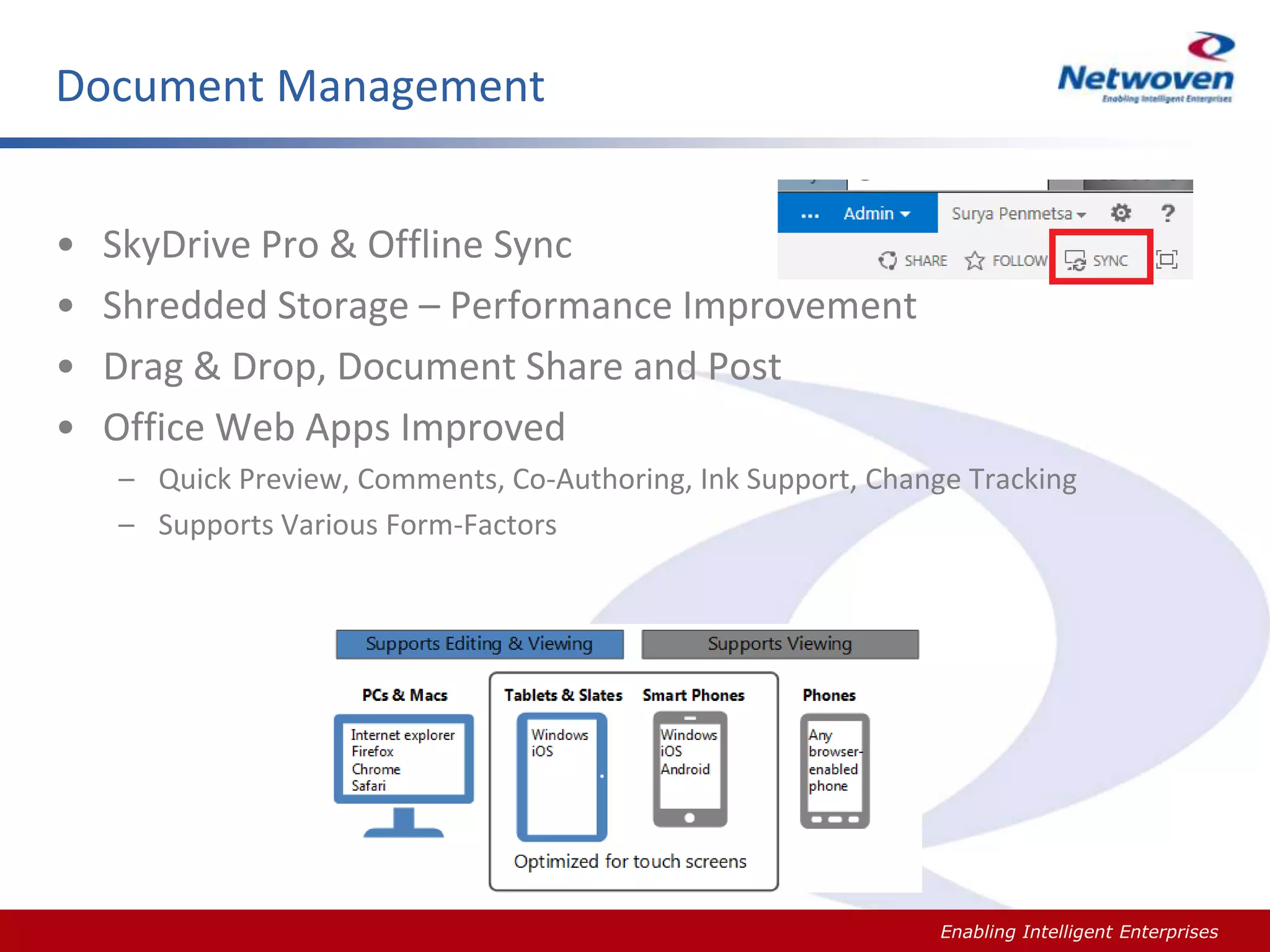
SkyDrive Pro & Offline Sync
Shredded Storage – Performance Improvement
Drag & Drop, Document Share and Post
Office Web Apps Improved
– Quick Preview, Comments, Co-Authoring, Ink Support, Change Tracking
– Supports Various Form-Factors

Slide #

Enabling Intelligent Enterprises
DEMO

Slide #

Enabling Intelligent Enterprises
Document Management
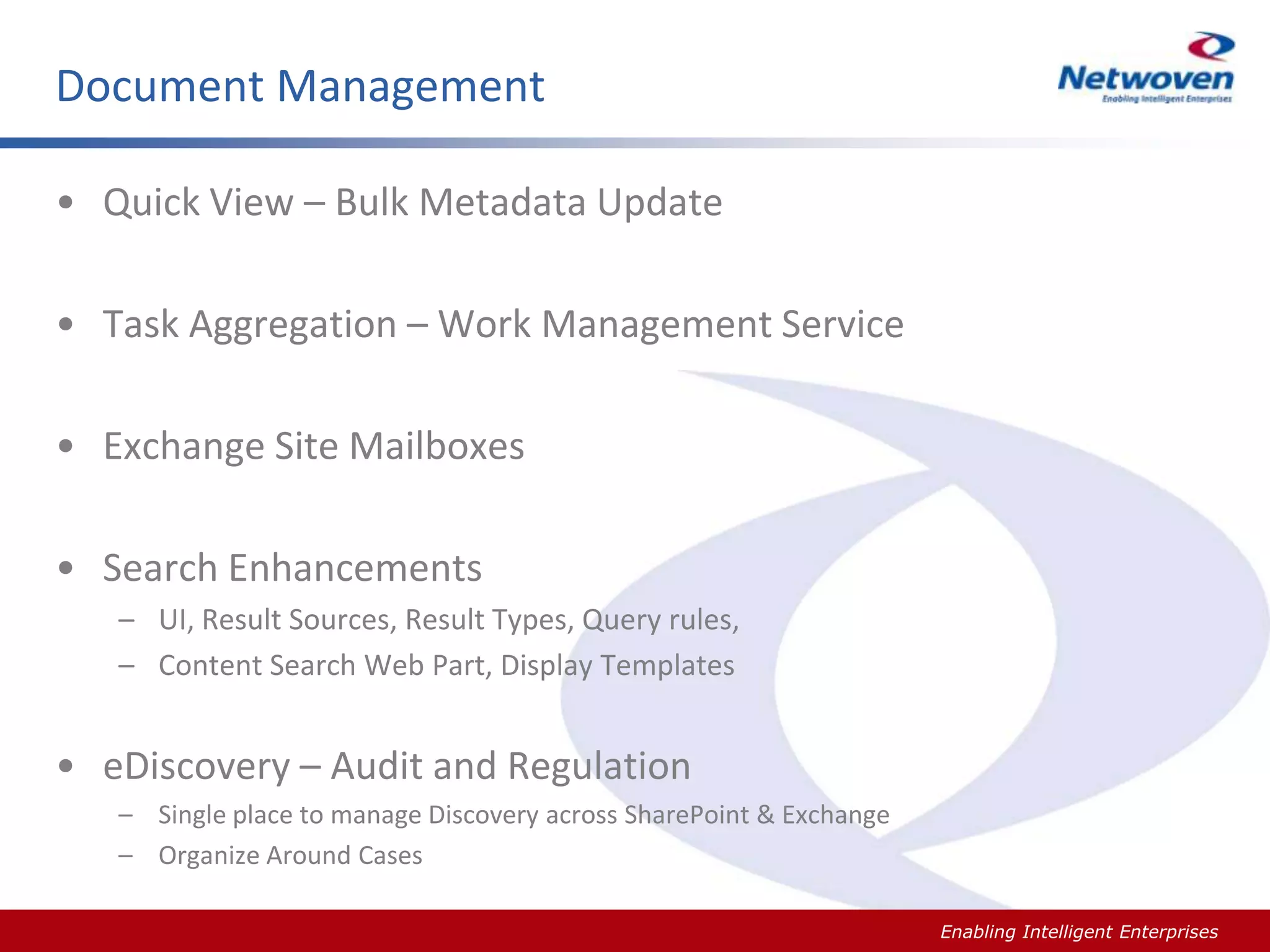
• Quick View – Bulk Metadata Update

• Task Aggregation – Work Management Service
• Exchange Site Mailboxes

• Search Enhancements
– UI, Result Sources, Result Types, Query rules,
– Content Search Web Part, Display Templates

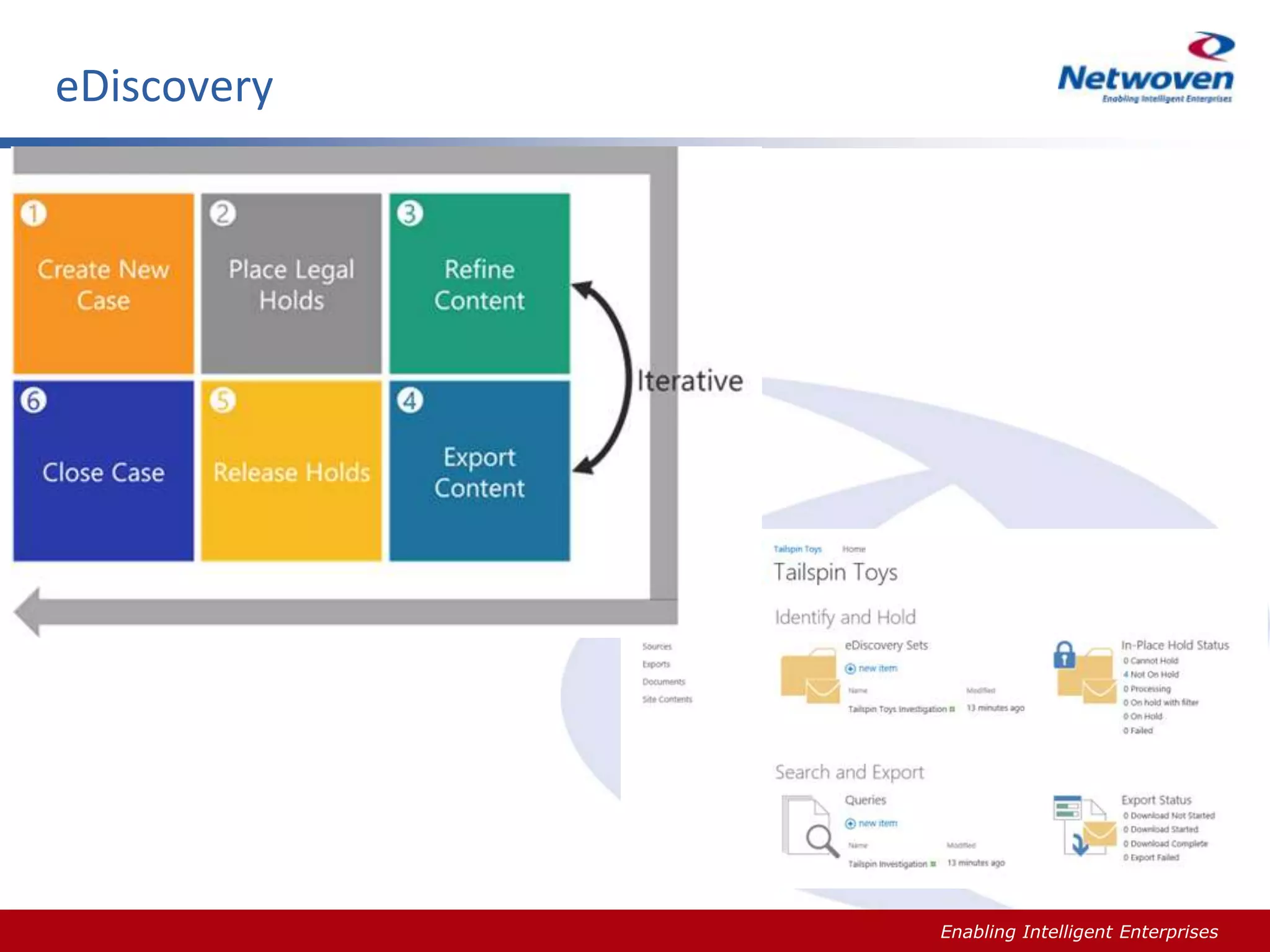
• eDiscovery – Audit and Regulation
– Single place to manage Discovery across SharePoint & Exchange
– Organize Around Cases
Slide #

Enabling Intelligent Enterprises
eDiscovery

Slide #

Enabling Intelligent Enterprises
DEMO

Slide #

Enabling Intelligent Enterprises
Recap of Document Management
•
•
•
•

Office Web Apps
Search
SkyDrive
Task Aggregation

Slide #

Enabling Intelligent Enterprises
Web Content Management

Slide #

Enabling Intelligent Enterprises
Web Content Management
• Build Great Sites – Internet, Intranet and Extranet
• Design Manager
– Your choice of tool Visual Studio, Dreamweaver, Notepad …

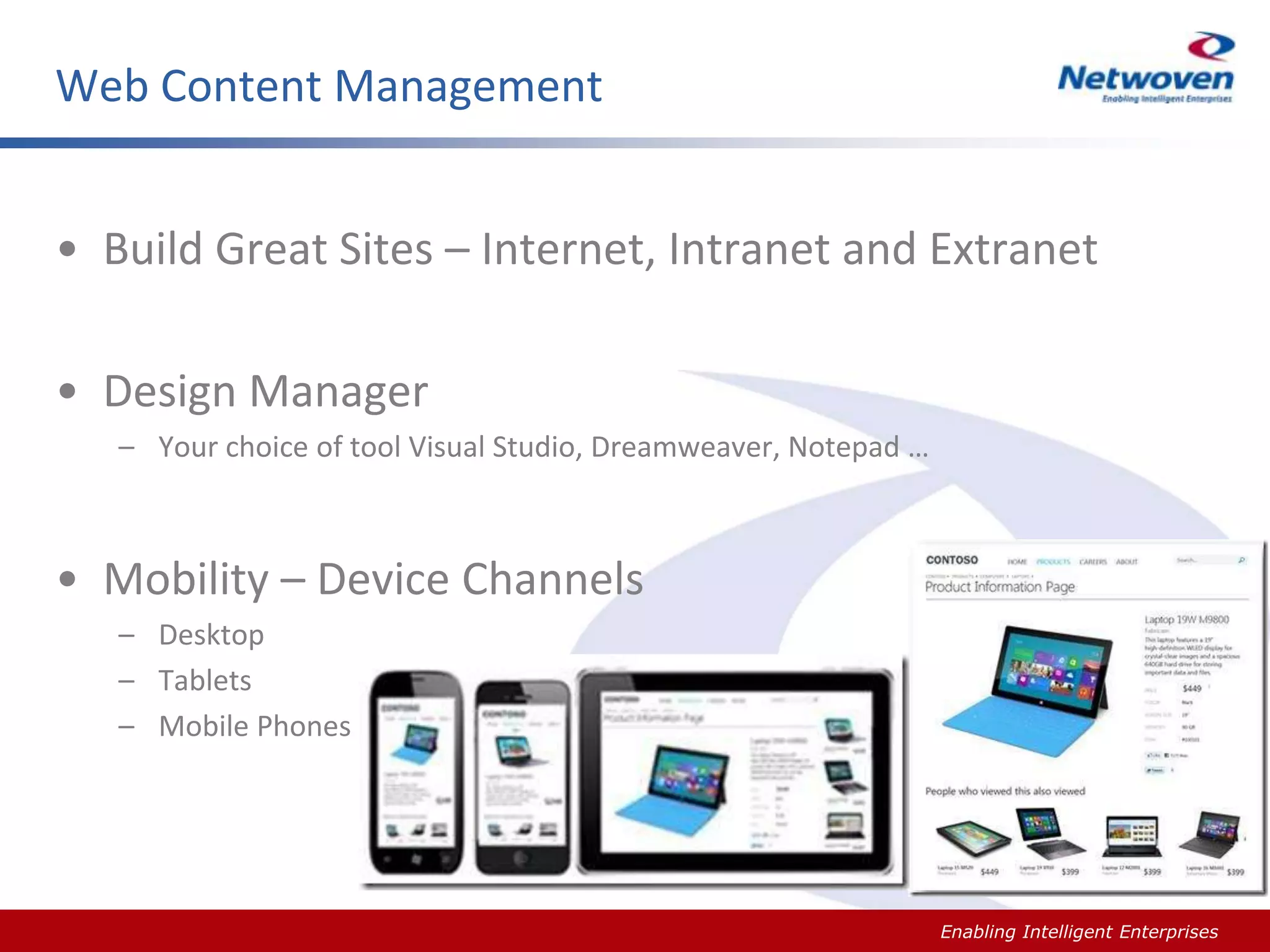
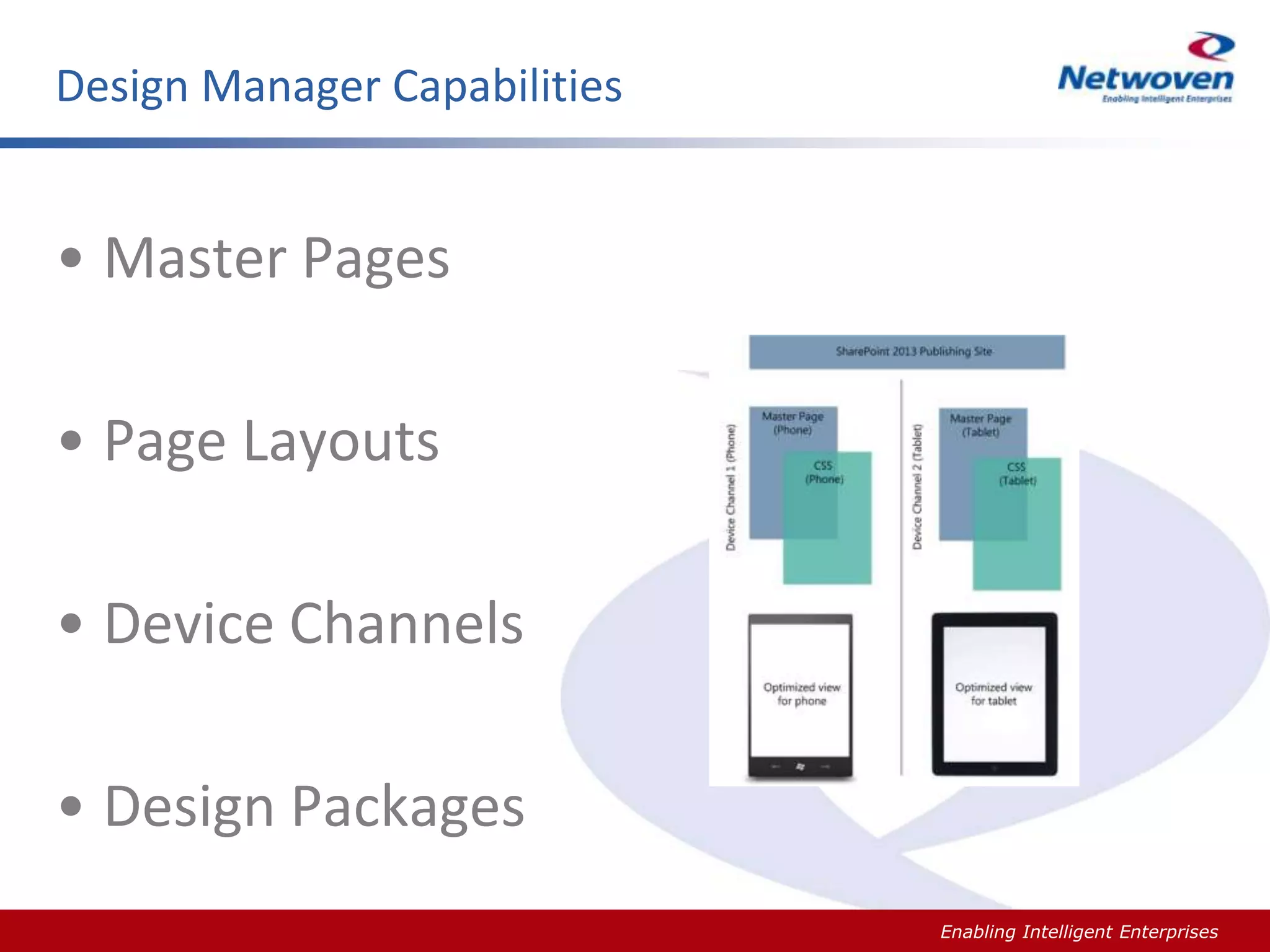
• Mobility – Device Channels
– Desktop
– Tablets
– Mobile Phones

Slide #

Enabling Intelligent Enterprises
Design Manager Capabilities

• Master Pages
• Page Layouts
• Device Channels
• Design Packages
Slide #

Enabling Intelligent Enterprises
Design Manager Capabilities

DEMO

Slide #

Enabling Intelligent Enterprises
Content Authoring
• Rich Text Editing
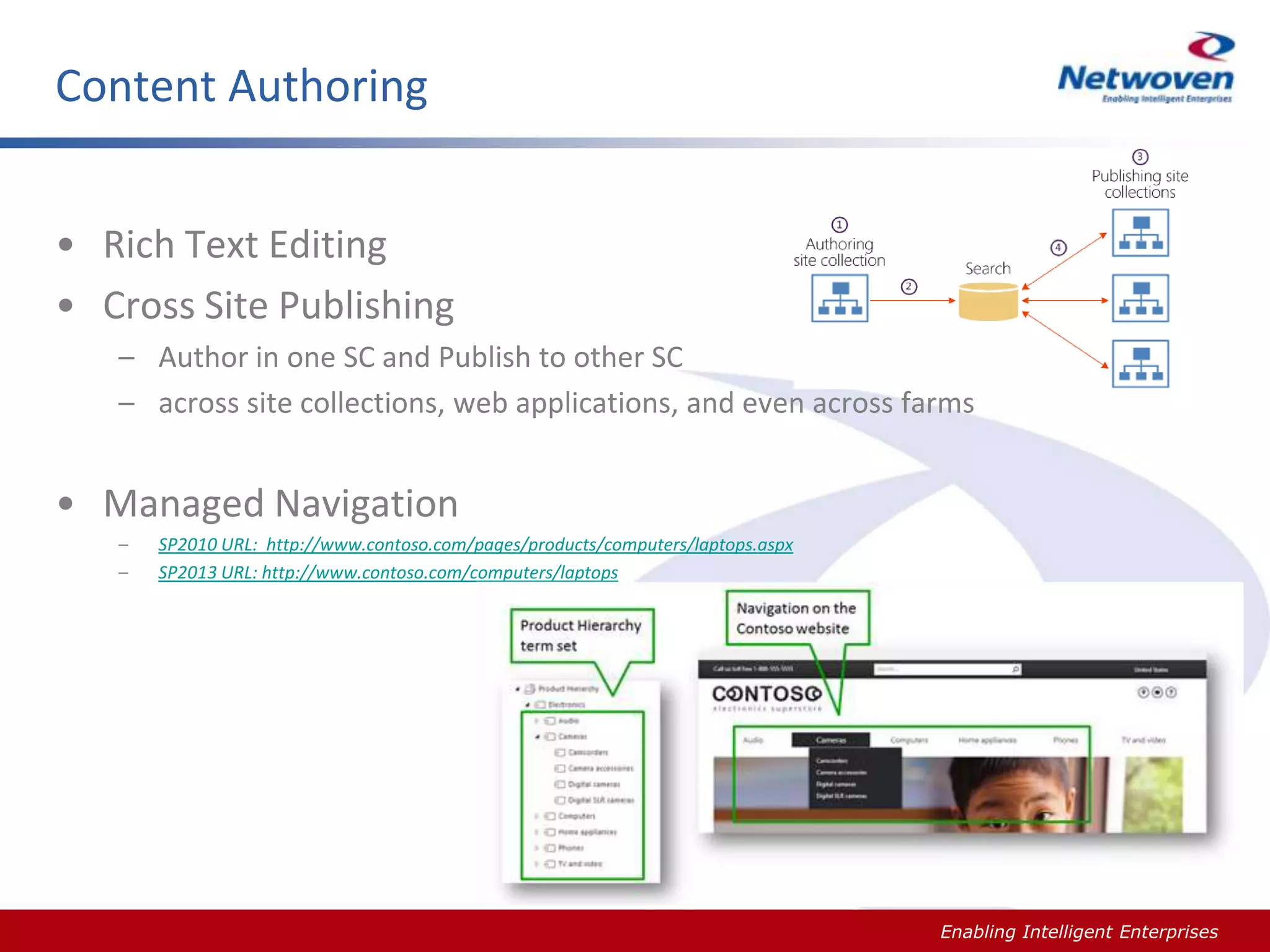
• Cross Site Publishing
– Author in one SC and Publish to other SC
– across site collections, web applications, and even across farms

• Managed Navigation
–
–

Slide #

SP2010 URL: http://www.contoso.com/pages/products/computers/laptops.aspx
SP2013 URL: http://www.contoso.com/computers/laptops

Enabling Intelligent Enterprises
Slide #

Enabling Intelligent Enterprises
Content Authoring
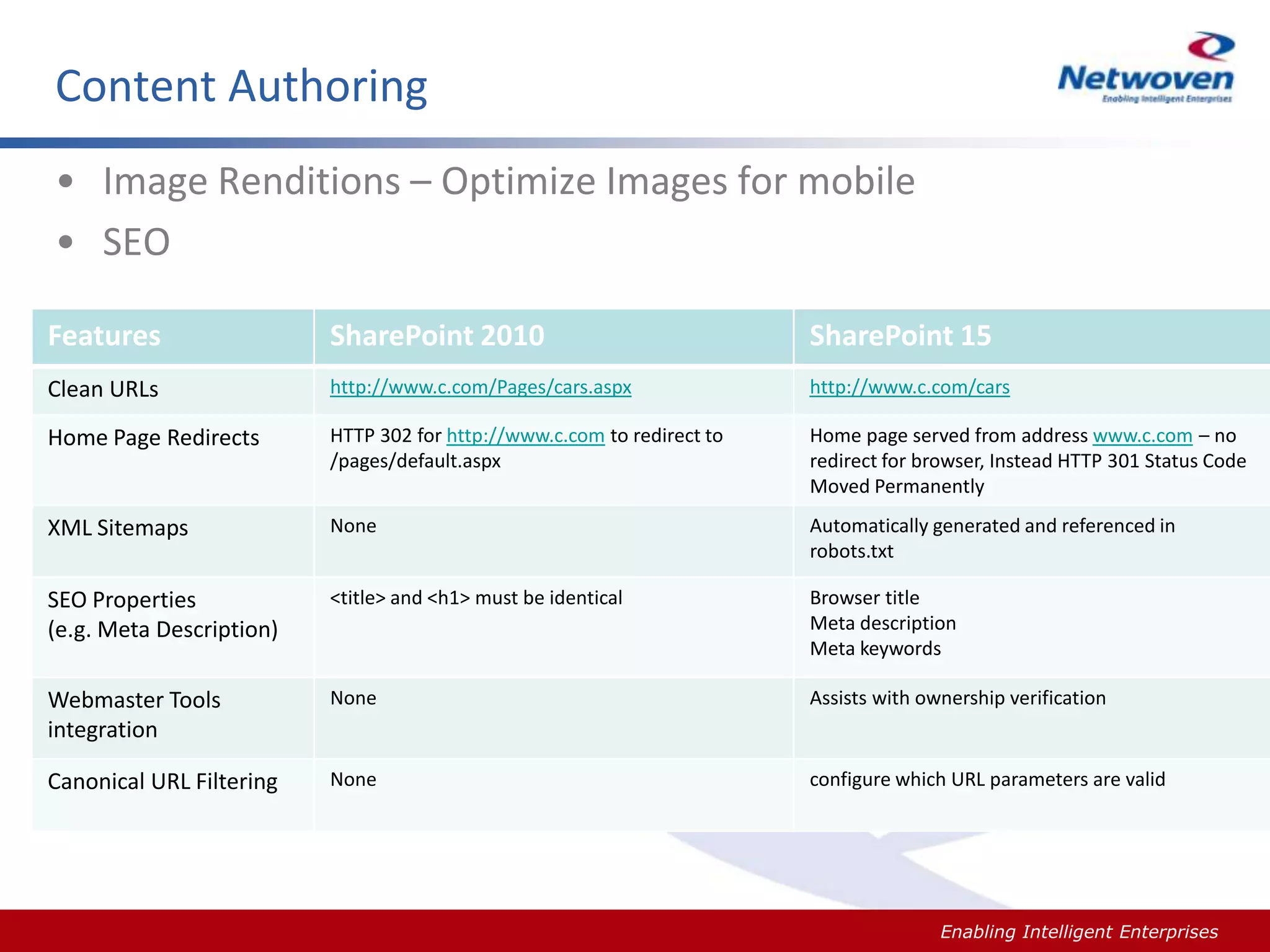
• Image Renditions – Optimize Images for mobile
• SEO
Features

SharePoint 2010

SharePoint 15

Clean URLs

http://www.c.com/Pages/cars.aspx

http://www.c.com/cars

Home Page Redirects

HTTP 302 for http://www.c.com to redirect to
/pages/default.aspx

Home page served from address www.c.com – no
redirect for browser, Instead HTTP 301 Status Code
Moved Permanently

XML Sitemaps

None

Automatically generated and referenced in
robots.txt

SEO Properties
(e.g. Meta Description)

<title> and <h1> must be identical

Browser title
Meta description
Meta keywords

Webmaster Tools
integration

None

Assists with ownership verification

Canonical URL Filtering

None

configure which URL parameters are valid

Slide #

Enabling Intelligent Enterprises
RECAP - WCM
•
•
•
•

Design Manager & Tools Support
Cross-Site Publishing
Multi-Lingual & Image Renditions
Search Engine Optimization

Slide #

Enabling Intelligent Enterprises
Q&A

Slide #

Enabling Intelligent Enterprises

Introduction to SharePoint 2013 Content Management

  • 1.
    SF SPUG -01/09/2014 Introduction to SharePoint 2013 Content Management (Key new features for Power/Business Users) Surya Penmetsa Principal Consultant
  • 2.
    My Bio • 14years of hands on technical consulting experience • Enterprise and Solution Architecture, Focused in Microsoft Technology Stack, MCTS - SharePoint • Portal and Enterprise Content Management (ECM), BPM and Custom business solutions spenmetsa@netwoven.com http://www.linkedin.com/in/suryapenmetsa Slide # Enabling Intelligent Enterprises
  • 3.
    Agenda – SharePoint2013 • Content Management – Document Management – Web Content Management – Demos • Q&A Slide # Enabling Intelligent Enterprises
  • 4.
    Document Management Slide # EnablingIntelligent Enterprises
  • 5.
    Document Management • • • • SkyDrive Pro& Offline Sync Shredded Storage – Performance Improvement Drag & Drop, Document Share and Post Office Web Apps Improved – Quick Preview, Comments, Co-Authoring, Ink Support, Change Tracking – Supports Various Form-Factors Slide # Enabling Intelligent Enterprises
  • 6.
  • 7.
    Document Management • QuickView – Bulk Metadata Update • Task Aggregation – Work Management Service • Exchange Site Mailboxes • Search Enhancements – UI, Result Sources, Result Types, Query rules, – Content Search Web Part, Display Templates • eDiscovery – Audit and Regulation – Single place to manage Discovery across SharePoint & Exchange – Organize Around Cases Slide # Enabling Intelligent Enterprises
  • 8.
  • 9.
  • 10.
    Recap of DocumentManagement • • • • Office Web Apps Search SkyDrive Task Aggregation Slide # Enabling Intelligent Enterprises
  • 11.
    Web Content Management Slide# Enabling Intelligent Enterprises
  • 12.
    Web Content Management •Build Great Sites – Internet, Intranet and Extranet • Design Manager – Your choice of tool Visual Studio, Dreamweaver, Notepad … • Mobility – Device Channels – Desktop – Tablets – Mobile Phones Slide # Enabling Intelligent Enterprises
  • 13.
    Design Manager Capabilities •Master Pages • Page Layouts • Device Channels • Design Packages Slide # Enabling Intelligent Enterprises
  • 14.
    Design Manager Capabilities DEMO Slide# Enabling Intelligent Enterprises
  • 15.
    Content Authoring • RichText Editing • Cross Site Publishing – Author in one SC and Publish to other SC – across site collections, web applications, and even across farms • Managed Navigation – – Slide # SP2010 URL: http://www.contoso.com/pages/products/computers/laptops.aspx SP2013 URL: http://www.contoso.com/computers/laptops Enabling Intelligent Enterprises
  • 16.
  • 17.
    Content Authoring • ImageRenditions – Optimize Images for mobile • SEO Features SharePoint 2010 SharePoint 15 Clean URLs http://www.c.com/Pages/cars.aspx http://www.c.com/cars Home Page Redirects HTTP 302 for http://www.c.com to redirect to /pages/default.aspx Home page served from address www.c.com – no redirect for browser, Instead HTTP 301 Status Code Moved Permanently XML Sitemaps None Automatically generated and referenced in robots.txt SEO Properties (e.g. Meta Description) <title> and <h1> must be identical Browser title Meta description Meta keywords Webmaster Tools integration None Assists with ownership verification Canonical URL Filtering None configure which URL parameters are valid Slide # Enabling Intelligent Enterprises
  • 18.
    RECAP - WCM • • • • DesignManager & Tools Support Cross-Site Publishing Multi-Lingual & Image Renditions Search Engine Optimization Slide # Enabling Intelligent Enterprises
  • 19.

Editor's Notes

  • #16 http://blog.mastykarz.nl/search-engine-optimization-sharepoint-2013/