
SharePoint 2013 Admin
in the Hybrid World

Jason Himmelstein
Senior Technical Director, SharePoint
@sharepointlhorn
http://www.sharepointlonghorn.com
• Senior Technical Director, SharePoint at Atrion
• Microsoft vTSP
– virtual Technology Solutions Professional

• SharePoint Foundation Logger
– http://spflogger.codeplex.com

•
•
•
•
•

Blog: www.sharepointlonghorn.com
Twitter: @sharepointlhorn
LinkedIn: www.linkedin.com/in/jasonhimmelstein
SlideShare: http://www.slideshare.net/jasonhimmelstein
Email: jase@sharepointlonghorn.com

• Author of Developing Business Intelligence Apps for SharePoint
– http://bit.ly/SharePointBI

2009 Atrion Networking Corporation
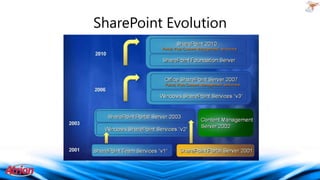
SharePoint Evolution
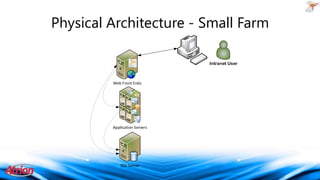
Physical Architecture - Small Farm
Intranet User

Web Front Ends

Application Servers

SQL Server
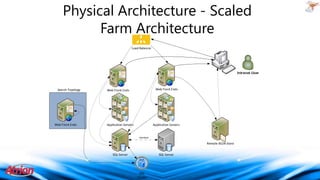
Physical Architecture - Scaled
Farm Architecture
Load Balancer

Intranet User

Search Topology

Web Front Ends

Web Front Ends

Web Front Ends

Application Servers

Application Servers

Heartbeat

Remote BLOB Store

SQL Server

SQL Server

SQL
Cluster
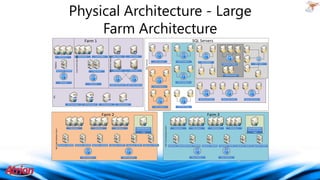
Physical Architecture - Large
Farm Architecture
Server configuration – Large Farm
SQL Servers

App Server - OWA/XLS

Central Admin

2 App Servers

Query Server

Query Server

Index Server

Index Server

SQL Servers

Web Servers

SharePoint Search

MySites

Web Servers

Cross Farm Services

Farm 1

Farm 1 Cluster

Farm 3 Cluster 1

SQL DataMart

SSRS Cluster

SSAS Query Cluster

SSAS Processing

Farm 3 Cluster 2

SQL Cluster

SQL Cluster

Search SQL Cluster 2

Farm 2 Cluster 1

TFS

Search SQL Cluster 1

MySites SQL Cluster

TFS Proxy Server

TFS Proxy Server

TFS App Server

OLTP SQL Cluster

App Server - OWA/XLS

App Server - OWA/XLS

App Server - OWA/XLS

Farm 2 Cluster 1

Farm 3
Web Servers

App Server - PP/PPS

Patch Web Server/
Central Admin/Crawl
Target

App Server - PP/PPS

Farm 2 Cluster 2

App Server - PP/PPS

Full Trust Solution Farm

No-Code Solution Farm

Farm 2
Web Servers

Search SQL Cluster 2

TFS App Server
Farm 2 Cluster 2

Web Servers

Search SQL Cluster 1

Web Servers

Web Servers

App Server - OWA/XLS App Server - OWA/XLS

Web Servers

App Server - OWA/XLS

Farm 3 Cluster 1

Web Servers

App Server - PP/PPS

Farm 3 Cluster 2

Patch Web Server/
Central Admin/Crawl
Target

App Server - PP/PPS

App Server - PP/PPS
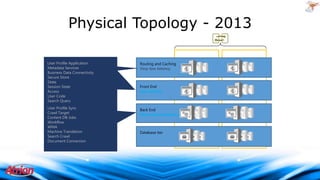
Physical Topology - 2013
Request Management
User Profile Application
Distributed Cache
Metadata Services
Business Data Connectivity
Secure Store
State
Session State
Access
User Code
Search Query
PerformancePoint
User Profile Sync
Visio
Crawl Target
Excel Services
Content DB Jobs
PowerPivot
Workflow
Project
WMA
Machine Translation
Search Crawl
Document Conversion

Routing and Caching
Very low latency

Front End
Low latency

Back End
More tolerant latency

Database tier
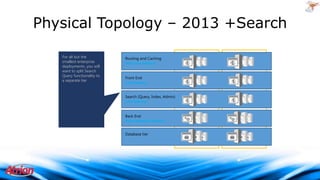
Physical Topology – 2013 +Search
For all but the
smallest enterprise
deployments, you will
want to split Search
Query functionality to
a separate tier

Routing and Caching
Very low latency
Front End
Low latency
Search (Query, Index, Admin)
Low latency
Back End
More tolerant latency
Database tier
Begin with a single “Primary” Content
and Services Farm

• Add additional farms based on DOCUMENTED business
or governance requirements
• Simplifies operations, maintenance and patching for all
but the most complex environments
• Predictability in sizing and capacity
• Reduced complexity for vast majority of implementations
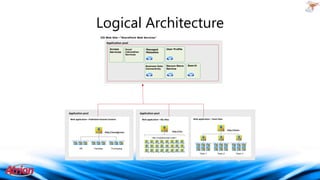
Logical Architecture
IIS Web Site—“SharePoint Web Services”
Application pool

Application pool

Excel
Calculation
Services

Managed
Metadata

User Profile

Business Data
Connectivity

Access
Services

Secure Store
Service

Search

Application pool

Web application—Published Intranet Content

Http://woodgrove/

Web application—Team Sites

Web application—My Sites

http://team

http://my
http://my/personal/<user>

HR

Facilities

Purchasing
Team 1

Team 2

Team 3
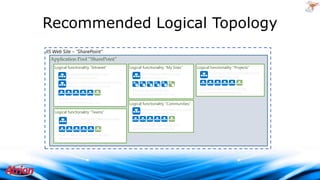
Recommended Logical Topology
IIS Web Site – ”SharePoint”
Application Pool ”SharePoint”
Logical functionality ”Intranet”

Logical functionality ”My Sites”

Logical functionality ”Communities”
Logical functionality ”Teams”

Logical functionality ”Projects”
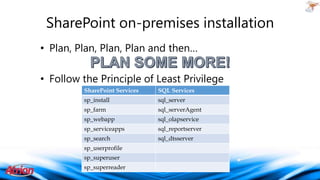
SharePoint on-premises installation
• Plan, Plan, Plan, Plan and then…
• Follow the Principle of Least Privilege
SharePoint Services

SQL Services

sp_install

sql_server

sp_farm

sql_serverAgent

sp_webapp

sql_olapservice

sp_serviceapps

sql_reportserver

sp_search

sql_dtsserver

sp_userprofile
sp_superuser
sp_superreader
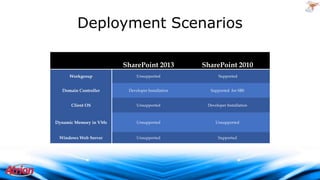
Deployment Scenarios
SharePoint 2013

SharePoint 2010

Workgroup

Unsupported

Supported

Domain Controller

Developer Installation

Supported for SBS

Client OS

Unsupported

Developer Installation

Dynamic Memory in VMs

Unsupported

Unsupported

Windows Web Server

Unsupported

Supported
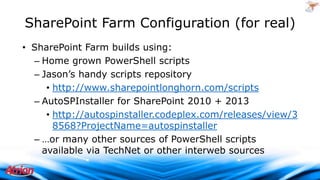
SharePoint Farm Configuration (for real)
• SharePoint Farm builds using:
– Home grown PowerShell scripts
– Jason’s handy scripts repository
• http://www.sharepointlonghorn.com/scripts
– AutoSPInstaller for SharePoint 2010 + 2013
• http://autospinstaller.codeplex.com/releases/view/3
8568?ProjectName=autospinstaller
– …or many other sources of PowerShell scripts
available via TechNet or other interweb sources
2009 Atrion Networking Corporation
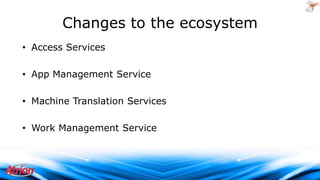
Changes to the ecosystem
• Access Services
• App Management Service
• Machine Translation Services
• Work Management Service

2009 Atrion Networking Corporation
What is the Cloud?
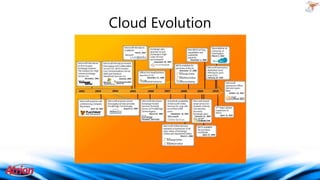
Cloud Evolution
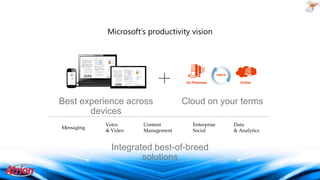
Microsoft’s productivity vision

Hybrid

On Premises

Best experience across
devices
Messaging

Voice
& Video

Content
Management

Online

Cloud on your terms
Enterprise
Social

Integrated best-of-breed
solutions

Data
& Analytics
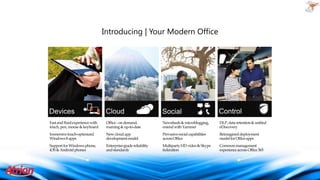
Introducing | Your Modern Office

Fast and fluid experience with
touch, pen, mouse & keyboard

Office - on demand,
roaming & up-to-date

Newsfeeds & microblogging,
extend with Yammer

DLP, data retention & unified
eDiscovery

Immersive touch-optimized
Windows 8 apps

New cloud app
development model

Pervasive social capabilities
across Office

Reimagined deployment
model for Office apps

Support for Windows phone,
iOS & Android phones

Enterprise-grade reliability
and standards

Multiparty HD video & Skype
federation

Common management
experience across Office 365
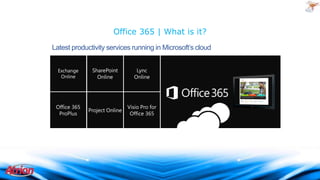
Office 365 | What is it?
Latest productivity services running in Microsoft’s cloud
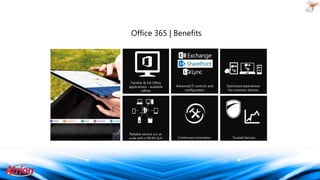
Office 365 | Benefits
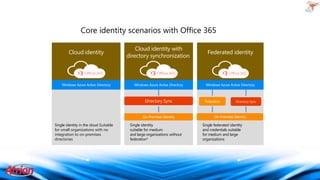
Core identity scenarios with Office 365
Cloud identity

Single identity in the cloud Suitable
for small organizations with no
integration to on-premises
directories

Cloud identity with
directory synchronization

Single identity
suitable for medium
and large organizations without
federation*

Federated identity

Single federated identity
and credentials suitable
for medium and large
organizations
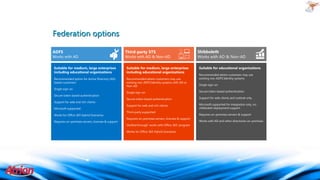
Federation options
Works with AD

Works with AD & Non-AD

Suitable for medium, large enterprises
including educational organizations

Suitable for medium, large enterprises
including educational organizations

Recommended option for Active Directory (AD)
based customers

Recommended where customers may use
existing non-ADFS Identity systems with AD or
Non-AD

Single sign-on
Secure token based authentication
Support for web and rich clients
Microsoft supported
Works for Office 365 Hybrid Scenarios
Requires on-premises servers, licenses & support

Shibboleth
Works with AD & Non-AD
Suitable for educational organizations j
Recommended where customers may use
existing non-ADFS Identity systems
Single sign-on

Single sign-on

Secure token based authentication

Secure token based authentication

Support for web clients and outlook only

Support for web and rich clients

Microsoft supported for integration only, no
shibboleth deployment support

Third-party supported
Requires on-premises servers, licenses & support
Verified through ‘works with Office 365’ program
Works for Office 365 Hybrid Scenarios

Requires on-premises servers & support
Works with AD and other directories on-premises
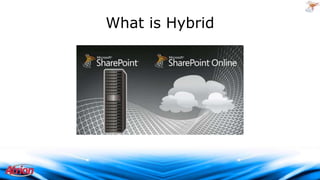
What is Hybrid

2009 Atrion Networking Corporation
Hybrid Administration approach
•
•
•
•
•
•
•
•
•

SharePoint Online Administration
SharePoint On-Premises Administration
Credential Administration
SharePoint Apps Administration
SQL Administration
SDLC Administration
Site Collection Administration
DNS Administration
UX Governence
2009 Atrion Networking Corporation
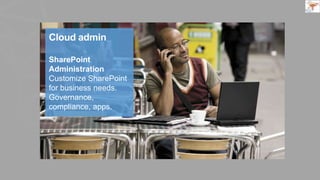
The Cloud Admin
Microsoft’s story
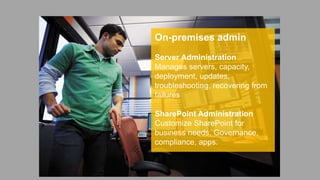
On-premises admin
Server Administration
Manages servers, capacity,
deployment, updates,
troubleshooting, recovering from
failures

SharePoint Administration
Customize SharePoint for
business needs. Governance,
compliance, apps.
SharePoint
Administration
Customize SharePoint
for business needs.
Governance,
compliance, apps.
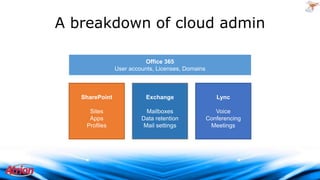
A breakdown of cloud admin
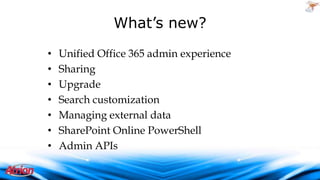
What’s new?
•
•
•
•
•
•
•

Unified Office 365 admin experience
Sharing
Upgrade
Search customization
Managing external data
SharePoint Online PowerShell
Admin APIs

2009 Atrion Networking Corporation
Key Factors to take into consideration
•
•
•
•

SLA
Backups
User locale
Integration with other systems

2009 Atrion Networking Corporation
Hybrid Environment topologies
• On-Premises & Office 365
• On-Premises & Hosted
• On-Premises & Azure IaaS
• Hosted & Azure Iaas

• Azure IaaS & Office 365
2009 Atrion Networking Corporation
Application Lifecycle
Management
• Code reviews
• Team Foundation Server
• Governance plans
• Written policy based controls

• Achievable & agreed uponSLAs
2009 Atrion Networking Corporation
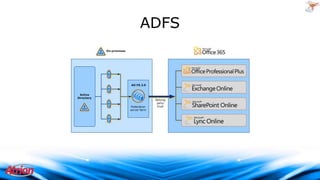
Understanding the Authentication
Scheme
• On-Premises
– Corporate Active Directory
– SAML Claims
• Online
– Organization account
• Azure Active Directory: O365 accounts, Windows
Live, Microsoft Accounts, etc
– Corporate Active Directory
• ADFS 2.0
2009 Atrion Networking Corporation
ADFS

2009 Atrion Networking Corporation
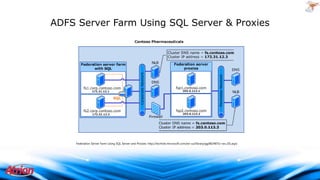
ADFS Server Farm Using SQL Server & Proxies

Federation Server Farm Using SQL Server and Proxies: http://technet.microsoft.com/en-us/library/gg982487(v=ws.10).aspx

2009 Atrion Networking Corporation
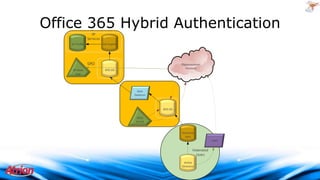
Office 365 Hybrid Authentication
SP
Services
SP Profile

AD Import

SPO
SP Web
App

Organizational
Account

SPO-DS

Sync
Daemon

SPO-DS
MSO
Portal

Directory
Sync
ADFS

Federated
Users
Active
Directory
Other Factors
• Backup Scenarios
• Disaster Recovery Planning
• Third Party Tools – Governance

2009 Atrion Networking Corporation
• Senior Technical Director, SharePoint at Atrion
• Microsoft vTSP
– virtual Technology Solutions Professional

• SharePoint Foundation Logger
– http://spflogger.codeplex.com

•
•
•
•
•

Blog: www.sharepointlonghorn.com
Twitter: @sharepointlhorn
LinkedIn: www.linkedin.com/in/jasonhimmelstein
SlideShare: http://www.slideshare.net/jasonhimmelstein
Email: jase@sharepointlonghorn.com

• Author of Developing Business Intelligence Apps for SharePoint
– http://bit.ly/SharePointBI

2009 Atrion Networking Corporation

SharePoint 2013 Admin in the Hybrid World

  • 1.
    SharePoint 2013 Admin inthe Hybrid World Jason Himmelstein Senior Technical Director, SharePoint @sharepointlhorn http://www.sharepointlonghorn.com
  • 2.
    • Senior TechnicalDirector, SharePoint at Atrion • Microsoft vTSP – virtual Technology Solutions Professional • SharePoint Foundation Logger – http://spflogger.codeplex.com • • • • • Blog: www.sharepointlonghorn.com Twitter: @sharepointlhorn LinkedIn: www.linkedin.com/in/jasonhimmelstein SlideShare: http://www.slideshare.net/jasonhimmelstein Email: jase@sharepointlonghorn.com • Author of Developing Business Intelligence Apps for SharePoint – http://bit.ly/SharePointBI 2009 Atrion Networking Corporation
  • 3.
  • 4.
    Physical Architecture -Small Farm Intranet User Web Front Ends Application Servers SQL Server
  • 5.
    Physical Architecture -Scaled Farm Architecture Load Balancer Intranet User Search Topology Web Front Ends Web Front Ends Web Front Ends Application Servers Application Servers Heartbeat Remote BLOB Store SQL Server SQL Server SQL Cluster
  • 6.
    Physical Architecture -Large Farm Architecture Server configuration – Large Farm SQL Servers App Server - OWA/XLS Central Admin 2 App Servers Query Server Query Server Index Server Index Server SQL Servers Web Servers SharePoint Search MySites Web Servers Cross Farm Services Farm 1 Farm 1 Cluster Farm 3 Cluster 1 SQL DataMart SSRS Cluster SSAS Query Cluster SSAS Processing Farm 3 Cluster 2 SQL Cluster SQL Cluster Search SQL Cluster 2 Farm 2 Cluster 1 TFS Search SQL Cluster 1 MySites SQL Cluster TFS Proxy Server TFS Proxy Server TFS App Server OLTP SQL Cluster App Server - OWA/XLS App Server - OWA/XLS App Server - OWA/XLS Farm 2 Cluster 1 Farm 3 Web Servers App Server - PP/PPS Patch Web Server/ Central Admin/Crawl Target App Server - PP/PPS Farm 2 Cluster 2 App Server - PP/PPS Full Trust Solution Farm No-Code Solution Farm Farm 2 Web Servers Search SQL Cluster 2 TFS App Server Farm 2 Cluster 2 Web Servers Search SQL Cluster 1 Web Servers Web Servers App Server - OWA/XLS App Server - OWA/XLS Web Servers App Server - OWA/XLS Farm 3 Cluster 1 Web Servers App Server - PP/PPS Farm 3 Cluster 2 Patch Web Server/ Central Admin/Crawl Target App Server - PP/PPS App Server - PP/PPS
  • 7.
    Physical Topology -2013 Request Management User Profile Application Distributed Cache Metadata Services Business Data Connectivity Secure Store State Session State Access User Code Search Query PerformancePoint User Profile Sync Visio Crawl Target Excel Services Content DB Jobs PowerPivot Workflow Project WMA Machine Translation Search Crawl Document Conversion Routing and Caching Very low latency Front End Low latency Back End More tolerant latency Database tier
  • 8.
    Physical Topology –2013 +Search For all but the smallest enterprise deployments, you will want to split Search Query functionality to a separate tier Routing and Caching Very low latency Front End Low latency Search (Query, Index, Admin) Low latency Back End More tolerant latency Database tier
  • 9.
    Begin with asingle “Primary” Content and Services Farm • Add additional farms based on DOCUMENTED business or governance requirements • Simplifies operations, maintenance and patching for all but the most complex environments • Predictability in sizing and capacity • Reduced complexity for vast majority of implementations
  • 10.
    Logical Architecture IIS WebSite—“SharePoint Web Services” Application pool Application pool Excel Calculation Services Managed Metadata User Profile Business Data Connectivity Access Services Secure Store Service Search Application pool Web application—Published Intranet Content Http://woodgrove/ Web application—Team Sites Web application—My Sites http://team http://my http://my/personal/<user> HR Facilities Purchasing Team 1 Team 2 Team 3
  • 11.
    Recommended Logical Topology IISWeb Site – ”SharePoint” Application Pool ”SharePoint” Logical functionality ”Intranet” Logical functionality ”My Sites” Logical functionality ”Communities” Logical functionality ”Teams” Logical functionality ”Projects”
  • 12.
    SharePoint on-premises installation •Plan, Plan, Plan, Plan and then… • Follow the Principle of Least Privilege SharePoint Services SQL Services sp_install sql_server sp_farm sql_serverAgent sp_webapp sql_olapservice sp_serviceapps sql_reportserver sp_search sql_dtsserver sp_userprofile sp_superuser sp_superreader
  • 13.
    Deployment Scenarios SharePoint 2013 SharePoint2010 Workgroup Unsupported Supported Domain Controller Developer Installation Supported for SBS Client OS Unsupported Developer Installation Dynamic Memory in VMs Unsupported Unsupported Windows Web Server Unsupported Supported
  • 14.
    SharePoint Farm Configuration(for real) • SharePoint Farm builds using: – Home grown PowerShell scripts – Jason’s handy scripts repository • http://www.sharepointlonghorn.com/scripts – AutoSPInstaller for SharePoint 2010 + 2013 • http://autospinstaller.codeplex.com/releases/view/3 8568?ProjectName=autospinstaller – …or many other sources of PowerShell scripts available via TechNet or other interweb sources 2009 Atrion Networking Corporation
  • 15.
    Changes to theecosystem • Access Services • App Management Service • Machine Translation Services • Work Management Service 2009 Atrion Networking Corporation
  • 16.
  • 17.
  • 18.
    Microsoft’s productivity vision Hybrid OnPremises Best experience across devices Messaging Voice & Video Content Management Online Cloud on your terms Enterprise Social Integrated best-of-breed solutions Data & Analytics
  • 19.
    Introducing | YourModern Office Fast and fluid experience with touch, pen, mouse & keyboard Office - on demand, roaming & up-to-date Newsfeeds & microblogging, extend with Yammer DLP, data retention & unified eDiscovery Immersive touch-optimized Windows 8 apps New cloud app development model Pervasive social capabilities across Office Reimagined deployment model for Office apps Support for Windows phone, iOS & Android phones Enterprise-grade reliability and standards Multiparty HD video & Skype federation Common management experience across Office 365
  • 20.
    Office 365 |What is it? Latest productivity services running in Microsoft’s cloud
  • 21.
    Office 365 |Benefits
  • 22.
    Core identity scenarioswith Office 365 Cloud identity Single identity in the cloud Suitable for small organizations with no integration to on-premises directories Cloud identity with directory synchronization Single identity suitable for medium and large organizations without federation* Federated identity Single federated identity and credentials suitable for medium and large organizations
  • 23.
    Federation options Works withAD Works with AD & Non-AD Suitable for medium, large enterprises including educational organizations Suitable for medium, large enterprises including educational organizations Recommended option for Active Directory (AD) based customers Recommended where customers may use existing non-ADFS Identity systems with AD or Non-AD Single sign-on Secure token based authentication Support for web and rich clients Microsoft supported Works for Office 365 Hybrid Scenarios Requires on-premises servers, licenses & support Shibboleth Works with AD & Non-AD Suitable for educational organizations j Recommended where customers may use existing non-ADFS Identity systems Single sign-on Single sign-on Secure token based authentication Secure token based authentication Support for web clients and outlook only Support for web and rich clients Microsoft supported for integration only, no shibboleth deployment support Third-party supported Requires on-premises servers, licenses & support Verified through ‘works with Office 365’ program Works for Office 365 Hybrid Scenarios Requires on-premises servers & support Works with AD and other directories on-premises
  • 24.
    What is Hybrid 2009Atrion Networking Corporation
  • 25.
    Hybrid Administration approach • • • • • • • • • SharePointOnline Administration SharePoint On-Premises Administration Credential Administration SharePoint Apps Administration SQL Administration SDLC Administration Site Collection Administration DNS Administration UX Governence 2009 Atrion Networking Corporation
  • 26.
  • 29.
    On-premises admin Server Administration Managesservers, capacity, deployment, updates, troubleshooting, recovering from failures SharePoint Administration Customize SharePoint for business needs. Governance, compliance, apps.
  • 30.
  • 31.
    A breakdown ofcloud admin
  • 32.
    What’s new? • • • • • • • Unified Office365 admin experience Sharing Upgrade Search customization Managing external data SharePoint Online PowerShell Admin APIs 2009 Atrion Networking Corporation
  • 33.
    Key Factors totake into consideration • • • • SLA Backups User locale Integration with other systems 2009 Atrion Networking Corporation
  • 34.
    Hybrid Environment topologies •On-Premises & Office 365 • On-Premises & Hosted • On-Premises & Azure IaaS • Hosted & Azure Iaas • Azure IaaS & Office 365 2009 Atrion Networking Corporation
  • 35.
    Application Lifecycle Management • Codereviews • Team Foundation Server • Governance plans • Written policy based controls • Achievable & agreed uponSLAs 2009 Atrion Networking Corporation
  • 36.
    Understanding the Authentication Scheme •On-Premises – Corporate Active Directory – SAML Claims • Online – Organization account • Azure Active Directory: O365 accounts, Windows Live, Microsoft Accounts, etc – Corporate Active Directory • ADFS 2.0 2009 Atrion Networking Corporation
  • 37.
  • 38.
    ADFS Server FarmUsing SQL Server & Proxies Federation Server Farm Using SQL Server and Proxies: http://technet.microsoft.com/en-us/library/gg982487(v=ws.10).aspx 2009 Atrion Networking Corporation
  • 39.
    Office 365 HybridAuthentication SP Services SP Profile AD Import SPO SP Web App Organizational Account SPO-DS Sync Daemon SPO-DS MSO Portal Directory Sync ADFS Federated Users Active Directory
  • 40.
    Other Factors • BackupScenarios • Disaster Recovery Planning • Third Party Tools – Governance 2009 Atrion Networking Corporation
  • 41.
    • Senior TechnicalDirector, SharePoint at Atrion • Microsoft vTSP – virtual Technology Solutions Professional • SharePoint Foundation Logger – http://spflogger.codeplex.com • • • • • Blog: www.sharepointlonghorn.com Twitter: @sharepointlhorn LinkedIn: www.linkedin.com/in/jasonhimmelstein SlideShare: http://www.slideshare.net/jasonhimmelstein Email: jase@sharepointlonghorn.com • Author of Developing Business Intelligence Apps for SharePoint – http://bit.ly/SharePointBI 2009 Atrion Networking Corporation