Container & Kubernetes
Written by Ted Jung (jongnag@gmail.com)
(Cloud Native Engineer)
I. Base Techs(container)
FS
CGroups
Namespaces
COW
II. Kubernetes (service networking)
What is Container?
Lightweight VM. But, It’s not quite like a VM
1 Uses the host kernel
2 Does not need to boot a different OS
3 Does not have its own modules
4 Does not need init as PID 1
It’s just normal processes on a host machine
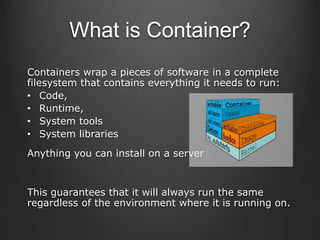
What is Container?
Containers wrap a pieces of software in a complete
filesystem that contains everything it needs to run:
• Code,
• Runtime,
• System tools
• System libraries
Anything you can install on a server
This guarantees that it will always run the same
regardless of the environment where it is running on.
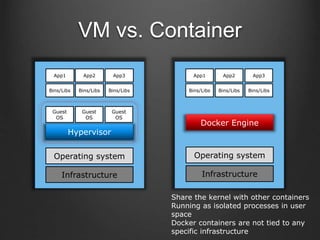
VM vs. Container
Infrastructure
Operating system
Hypervisor
Guest
OS
Guest
OS
Guest
OS
Bins/Libs
App1
Bins/Libs
App2
Bins/Libs
App3
Infrastructure
Operating system
Docker Engine
Bins/Libs
App1
Bins/Libs
App2
Bins/Libs
App3
Share the kernel with other containers
Running as isolated processes in user
space
Docker containers are not tied to any
specific infrastructure
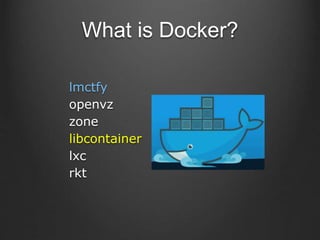
What is Docker?
lmctfy
openvz
zone
libcontainer
lxc
rkt
Why Docker?
• Easy to use
: Simple and accessible tooling
• High degree of reuse and
extensibility
: stackable file system
Before go ahead further..
FS
Cgroups
Namespaces
Base tech of container(AUFS)
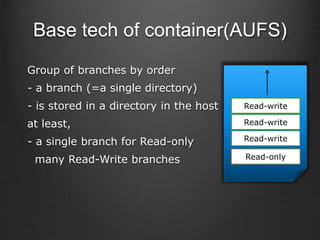
Group of branches by order
- a branch (=a single directory)
- is stored in a directory in the host
at least,
- a single branch for Read-only
many Read-Write branches Read-only
Read-write
Read-write
Read-write
Base tech of container(AUFS)
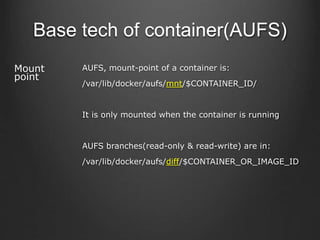
Mount
point
AUFS, mount-point of a container is:
/var/lib/docker/aufs/mnt/$CONTAINER_ID/
It is only mounted when the container is running
AUFS branches(read-only & read-write) are in:
/var/lib/docker/aufs/diff/$CONTAINER_OR_IMAGE_ID
Base tech of container(AUFS)
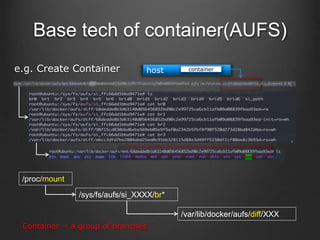
e.g. Create Container
/proc/mount
/sys/fs/aufs/si_XXXX/br*
/var/lib/docker/aufs/diff/XXX
Container = a group of branches
host container
Base tech of container(AUFS)
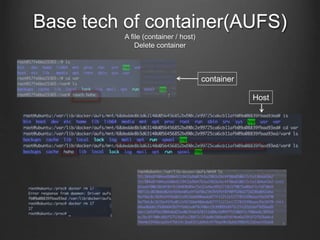
A file (container / host)
Delete container
container
Host
Base tech of container(AUFS)
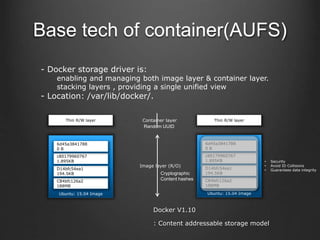
Docker V1.10
: Content addressable storage model
Ubuntu: 15.04 Image
C84bfc126a2
188MB
D14bfc54ea1
194.5KB
c80179960767
1.895KB
6d45a3841788
0 B
Thin R/W layer Container layer
Image layer (R/O)
- Docker storage driver is:
enabling and managing both image layer & container layer.
stacking layers , providing a single unified view
- Location: /var/lib/docker/.
Ubuntu: 15.04 Image
C84bfc126a2
188MB
D14bfc54ea1
194.5KB
c80179960767
1.895KB
6d45a3841788
0 B
Thin R/W layer
• Security
• Avoid ID Collisions
• Guarantees data integrity
Random UUID
Cryptographic
Content hashes
Storage Driver
AUFS
Btrfs
Device mapper
OverlayFS
ZFS
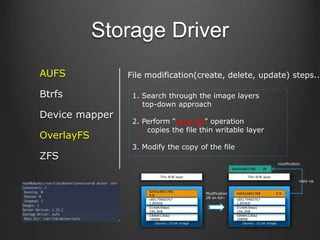
1. Search through the image layers
top-down approach
2. Perform “copy-up” operation
copies the file thin writable layer
3. Modify the copy of the file
File modification(create, delete, update) steps..
Ubuntu: 15.04 Image
C84bfc126a2
188MB
D14bfc54ea1
194.5KB
c80179960767
1.895KB
6d45a3841788
0 B
Thin R/W layer
Ubuntu: 15.04 Image
C84bfc126a2
188MB
D14bfc54ea1
194.5KB
c80179960767
1.895KB
6d45a3841788 0 B
Thin R/W layer
6d45a3841788 2B
Modification
2B on 6d~
copy-up
modification
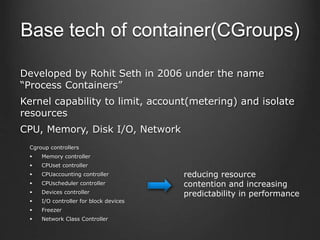
Developed by Rohit Seth in 2006 under the name
“Process Containers”
Kernel capability to limit, account(metering) and isolate
resources
CPU, Memory, Disk I/O, Network
Base tech of container(CGroups)
Cgroup controllers
 Memory controller
 CPUset controller
 CPUaccounting controller
 CPUscheduler controller
 Devices controller
 I/O controller for block devices
 Freezer
 Network Class Controller
reducing resource
contention and increasing
predictability in performance
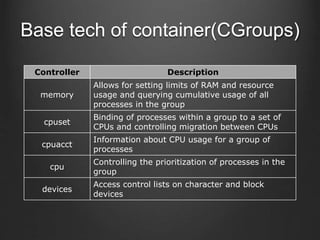
Controller Description
memory
Allows for setting limits of RAM and resource
usage and querying cumulative usage of all
processes in the group
cpuset
Binding of processes within a group to a set of
CPUs and controlling migration between CPUs
cpuacct
Information about CPU usage for a group of
processes
cpu
Controlling the prioritization of processes in the
group
devices
Access control lists on character and block
devices
Base tech of container(CGroups)
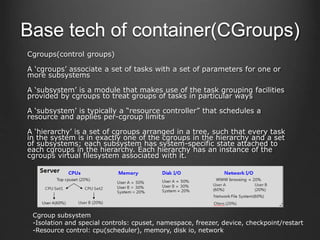
Cgroups(control groups)
A ‘cgroups’ associate a set of tasks with a set of parameters for one or
more subsystems
A ‘subsystem’ is a module that makes use of the task grouping facilities
provided by cgroups to treat groups of tasks in particular ways
A ‘subsystem’ is typically a “resource controller” that schedules a
resource and applies per-cgroup limits
A ‘hierarchy’ is a set of cgroups arranged in a tree, such that every task
in the system is in exactly one of the cgroups in the hierarchy and a set
of subsystems; each subsystem has system-specific state attached to
each cgroups in the hierarchy. Each hierarchy has an instance of the
cgroups virtual filesystem associated with it.
Cgroup subsystem
-Isolation and special controls: cpuset, namespace, freezer, device, checkpoint/restart
-Resource control: cpu(scheduler), memory, disk io, network
Base tech of
container(Namespace)
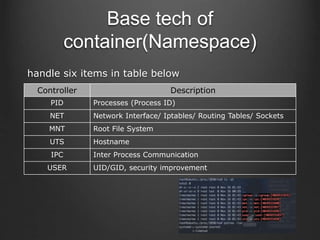
handle six items in table below
Controller Description
PID Processes (Process ID)
NET Network Interface/ Iptables/ Routing Tables/ Sockets
MNT Root File System
UTS Hostname
IPC Inter Process Communication
USER UID/GID, security improvement
Base tech of
container(Namespace)
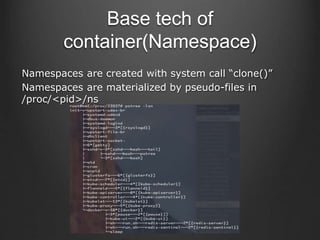
Namespaces are created with system call “clone()”
Namespaces are materialized by pseudo-files in
/proc/<pid>/ns
Base tech of container(Summarize)
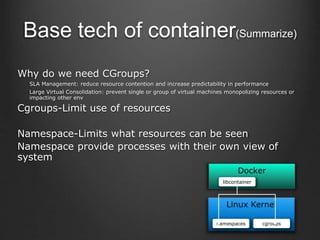
Why do we need CGroups?
SLA Management: reduce resource contention and increase predictability in performance
Large Virtual Consolidation: prevent single or group of virtual machines monopolizing resources or
impacting other env
Cgroups-Limit use of resources
Namespace-Limits what resources can be seen
Namespace provide processes with their own view of
system
Docker
namespaces cgroups
libcontainer
Base tech of container(COW)
Everyone has a single shared copy of the same data until
it’s over written, and then a copy is made.
Docker uses COW, which essentially means that every
instance of your docker image uses the same files until
one of them needs to change a file.
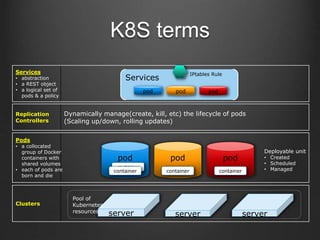
K8S terms
Replication
Controllers
Dynamically manage(create, kill, etc) the lifecycle of pods
(Scaling up/down, rolling updates)
Clusters
Services
• abstraction
• a REST object
• a logical set of
pods & a policy
Services
pod pod pod
pod pod pod
Pods
• a collocated
group of Docker
containers with
shared volumes
• each of pods are
born and die
container container
server server server
Deployable unit
• Created
• Scheduled
• Managed
Pool of
Kubernetes
resources
IPtables Rule
container
container
endpoints
K8S terms
{
“kind”: ”Service”,
“apiVersion”:”v1”,
“metadata”:{
“name”: ”my-service”
},
“spec”:{
“selector”: {
“app”: ”MyApp”
},
“ports”:[{
“protocol”: ”TCP”,
“port”:”80”,
“targetPort”:9376”
}]
}
}
service
pod pod
endpoint
Selector = “app: MyApp”
Cluster IP my-service
targetPort:9376
Service
proxy
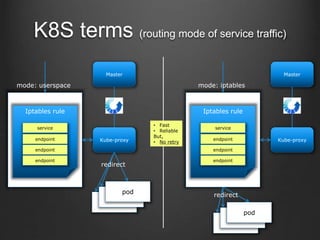
K8S terms (routing mode of service traffic)
Iptables rule
service
endpoint
endpoint
endpoint
Kube-proxy
Master
mode: userspace
pod
redirect
Iptables rule
service
endpoint
endpoint
endpoint
Kube-proxy
Master
mode: iptables
pod
redirect
• Fast
• Reliable
But,
• No retry
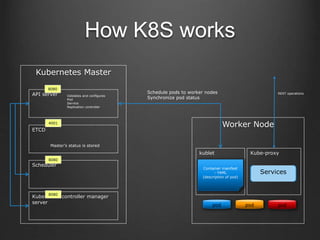
How K8S works
Kubernetes Master
Worker Node
API server
ETCD
Scheduler
Kubernetes controller manager
server
kublet Kube-proxy
Master’s status is stored
Validates and configures
Pod
Service
Replication controller
REST operations
Container manifest
: YAML
(description of pod)
Services
pod pod pod
8080
4001
8080
8080
Schedule pods to worker nodes
Synchronize pod status
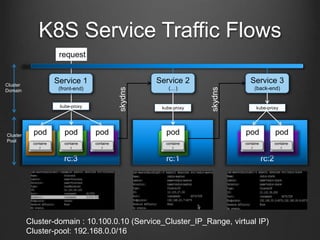
K8S Service Traffic Flows
rc:3 rc:1 rc:2
Service 2
(…)
Service 3
(back-end)
kube-proxy kube-proxy
Service 1
(front-end)
kube-proxy
request
Cluster-domain : 10.100.0.10 (Service_Cluster_IP_Range, virtual IP)
Cluster-pool: 192.168.0.0/16
Cluster
Domain
Cluster
Pool
skydns
skydns
pod
containe
r
pod pod
containe
r
containe
r
pod pod pod
containe
r
containe
r
containe
r
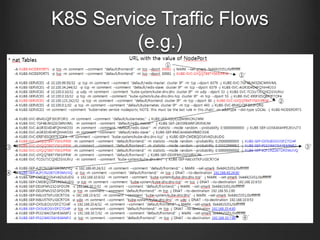
K8S Service Traffic Flows
(e.g.)
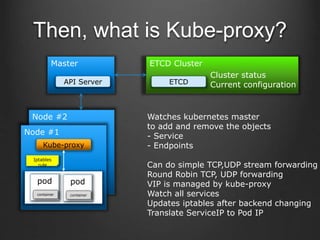
Then, what is Kube-proxy?
Node #2
Node #1
Kube-proxy
pod
container
pod
container
Iptables
rule
Watches kubernetes master
to add and remove the objects
- Service
- Endpoints
Can do simple TCP,UDP stream forwarding
Round Robin TCP, UDP forwarding
VIP is managed by kube-proxy
Watch all services
Updates iptables after backend changing
Translate ServiceIP to Pod IP
Master ETCD Cluster
API Server ETCD
Cluster status
Current configuration
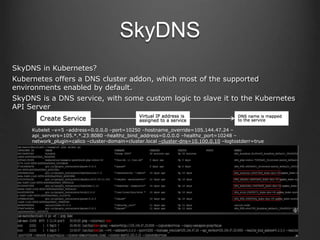
SkyDNS
SkyDNS in Kubernetes?
Kubernetes offers a DNS cluster addon, which most of the supported
environments enabled by default.
SkyDNS is a DNS service, with some custom logic to slave it to the Kubernetes
API Server
Create Service DNS name is mapped
to the service
Virtual IP address is
assigned to a service
Kubelet –v=5 –address=0.0.0.0 –port=10250 –hostname_override=105.144.47.24 –
api_servers=105.*.*.23:8080 –healthz_bind_address=0.0.0.0 –healthz_port=10248 –
network_plugin=calico –cluster-domain=cluster.local –cluster-dns=10.100.0.10 –logtostderr=true
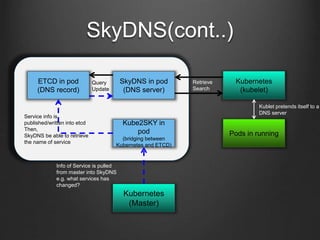
SkyDNS(cont..)
ETCD in pod
(DNS record)
SkyDNS in pod
(DNS server)
Kube2SKY in
pod
(bridging between
Kubernetes and ETCD)
Kubernetes
(kubelet)
Pods in running
Kubernetes
(Master)
Service info is
published/written into etcd
Then,
SkyDNS be able to retrieve
the name of service
Kublet pretends itself to a
DNS server
Info of Service is pulled
from master into SkyDNS
e.g. what services has
changed?
Retrieve
Search
Query
Update
Container & kubernetes

Container & kubernetes

  • 1.
    Container & Kubernetes Writtenby Ted Jung (jongnag@gmail.com) (Cloud Native Engineer)
  • 2.
  • 3.
    What is Container? LightweightVM. But, It’s not quite like a VM 1 Uses the host kernel 2 Does not need to boot a different OS 3 Does not have its own modules 4 Does not need init as PID 1 It’s just normal processes on a host machine
  • 4.
    What is Container? Containerswrap a pieces of software in a complete filesystem that contains everything it needs to run: • Code, • Runtime, • System tools • System libraries Anything you can install on a server This guarantees that it will always run the same regardless of the environment where it is running on.
  • 5.
    VM vs. Container Infrastructure Operatingsystem Hypervisor Guest OS Guest OS Guest OS Bins/Libs App1 Bins/Libs App2 Bins/Libs App3 Infrastructure Operating system Docker Engine Bins/Libs App1 Bins/Libs App2 Bins/Libs App3 Share the kernel with other containers Running as isolated processes in user space Docker containers are not tied to any specific infrastructure
  • 6.
  • 7.
    Why Docker? • Easyto use : Simple and accessible tooling • High degree of reuse and extensibility : stackable file system
  • 8.
    Before go aheadfurther.. FS Cgroups Namespaces
  • 9.
    Base tech ofcontainer(AUFS) Group of branches by order - a branch (=a single directory) - is stored in a directory in the host at least, - a single branch for Read-only many Read-Write branches Read-only Read-write Read-write Read-write
  • 10.
    Base tech ofcontainer(AUFS) Mount point AUFS, mount-point of a container is: /var/lib/docker/aufs/mnt/$CONTAINER_ID/ It is only mounted when the container is running AUFS branches(read-only & read-write) are in: /var/lib/docker/aufs/diff/$CONTAINER_OR_IMAGE_ID
  • 11.
    Base tech ofcontainer(AUFS) e.g. Create Container /proc/mount /sys/fs/aufs/si_XXXX/br* /var/lib/docker/aufs/diff/XXX Container = a group of branches host container
  • 12.
    Base tech ofcontainer(AUFS) A file (container / host) Delete container container Host
  • 13.
    Base tech ofcontainer(AUFS) Docker V1.10 : Content addressable storage model Ubuntu: 15.04 Image C84bfc126a2 188MB D14bfc54ea1 194.5KB c80179960767 1.895KB 6d45a3841788 0 B Thin R/W layer Container layer Image layer (R/O) - Docker storage driver is: enabling and managing both image layer & container layer. stacking layers , providing a single unified view - Location: /var/lib/docker/. Ubuntu: 15.04 Image C84bfc126a2 188MB D14bfc54ea1 194.5KB c80179960767 1.895KB 6d45a3841788 0 B Thin R/W layer • Security • Avoid ID Collisions • Guarantees data integrity Random UUID Cryptographic Content hashes
  • 14.
    Storage Driver AUFS Btrfs Device mapper OverlayFS ZFS 1.Search through the image layers top-down approach 2. Perform “copy-up” operation copies the file thin writable layer 3. Modify the copy of the file File modification(create, delete, update) steps.. Ubuntu: 15.04 Image C84bfc126a2 188MB D14bfc54ea1 194.5KB c80179960767 1.895KB 6d45a3841788 0 B Thin R/W layer Ubuntu: 15.04 Image C84bfc126a2 188MB D14bfc54ea1 194.5KB c80179960767 1.895KB 6d45a3841788 0 B Thin R/W layer 6d45a3841788 2B Modification 2B on 6d~ copy-up modification
  • 15.
    Developed by RohitSeth in 2006 under the name “Process Containers” Kernel capability to limit, account(metering) and isolate resources CPU, Memory, Disk I/O, Network Base tech of container(CGroups) Cgroup controllers  Memory controller  CPUset controller  CPUaccounting controller  CPUscheduler controller  Devices controller  I/O controller for block devices  Freezer  Network Class Controller reducing resource contention and increasing predictability in performance
  • 16.
    Controller Description memory Allows forsetting limits of RAM and resource usage and querying cumulative usage of all processes in the group cpuset Binding of processes within a group to a set of CPUs and controlling migration between CPUs cpuacct Information about CPU usage for a group of processes cpu Controlling the prioritization of processes in the group devices Access control lists on character and block devices Base tech of container(CGroups)
  • 17.
    Base tech ofcontainer(CGroups) Cgroups(control groups) A ‘cgroups’ associate a set of tasks with a set of parameters for one or more subsystems A ‘subsystem’ is a module that makes use of the task grouping facilities provided by cgroups to treat groups of tasks in particular ways A ‘subsystem’ is typically a “resource controller” that schedules a resource and applies per-cgroup limits A ‘hierarchy’ is a set of cgroups arranged in a tree, such that every task in the system is in exactly one of the cgroups in the hierarchy and a set of subsystems; each subsystem has system-specific state attached to each cgroups in the hierarchy. Each hierarchy has an instance of the cgroups virtual filesystem associated with it. Cgroup subsystem -Isolation and special controls: cpuset, namespace, freezer, device, checkpoint/restart -Resource control: cpu(scheduler), memory, disk io, network
  • 18.
    Base tech of container(Namespace) handlesix items in table below Controller Description PID Processes (Process ID) NET Network Interface/ Iptables/ Routing Tables/ Sockets MNT Root File System UTS Hostname IPC Inter Process Communication USER UID/GID, security improvement
  • 19.
    Base tech of container(Namespace) Namespacesare created with system call “clone()” Namespaces are materialized by pseudo-files in /proc/<pid>/ns
  • 20.
    Base tech ofcontainer(Summarize) Why do we need CGroups? SLA Management: reduce resource contention and increase predictability in performance Large Virtual Consolidation: prevent single or group of virtual machines monopolizing resources or impacting other env Cgroups-Limit use of resources Namespace-Limits what resources can be seen Namespace provide processes with their own view of system Docker namespaces cgroups libcontainer
  • 21.
    Base tech ofcontainer(COW) Everyone has a single shared copy of the same data until it’s over written, and then a copy is made. Docker uses COW, which essentially means that every instance of your docker image uses the same files until one of them needs to change a file.
  • 22.
    K8S terms Replication Controllers Dynamically manage(create,kill, etc) the lifecycle of pods (Scaling up/down, rolling updates) Clusters Services • abstraction • a REST object • a logical set of pods & a policy Services pod pod pod pod pod pod Pods • a collocated group of Docker containers with shared volumes • each of pods are born and die container container server server server Deployable unit • Created • Scheduled • Managed Pool of Kubernetes resources IPtables Rule container container
  • 23.
    endpoints K8S terms { “kind”: ”Service”, “apiVersion”:”v1”, “metadata”:{ “name”:”my-service” }, “spec”:{ “selector”: { “app”: ”MyApp” }, “ports”:[{ “protocol”: ”TCP”, “port”:”80”, “targetPort”:9376” }] } } service pod pod endpoint Selector = “app: MyApp” Cluster IP my-service targetPort:9376 Service proxy
  • 24.
    K8S terms (routingmode of service traffic) Iptables rule service endpoint endpoint endpoint Kube-proxy Master mode: userspace pod redirect Iptables rule service endpoint endpoint endpoint Kube-proxy Master mode: iptables pod redirect • Fast • Reliable But, • No retry
  • 25.
    How K8S works KubernetesMaster Worker Node API server ETCD Scheduler Kubernetes controller manager server kublet Kube-proxy Master’s status is stored Validates and configures Pod Service Replication controller REST operations Container manifest : YAML (description of pod) Services pod pod pod 8080 4001 8080 8080 Schedule pods to worker nodes Synchronize pod status
  • 26.
    K8S Service TrafficFlows rc:3 rc:1 rc:2 Service 2 (…) Service 3 (back-end) kube-proxy kube-proxy Service 1 (front-end) kube-proxy request Cluster-domain : 10.100.0.10 (Service_Cluster_IP_Range, virtual IP) Cluster-pool: 192.168.0.0/16 Cluster Domain Cluster Pool skydns skydns pod containe r pod pod containe r containe r pod pod pod containe r containe r containe r
  • 27.
    K8S Service TrafficFlows (e.g.)
  • 28.
    Then, what isKube-proxy? Node #2 Node #1 Kube-proxy pod container pod container Iptables rule Watches kubernetes master to add and remove the objects - Service - Endpoints Can do simple TCP,UDP stream forwarding Round Robin TCP, UDP forwarding VIP is managed by kube-proxy Watch all services Updates iptables after backend changing Translate ServiceIP to Pod IP Master ETCD Cluster API Server ETCD Cluster status Current configuration
  • 29.
    SkyDNS SkyDNS in Kubernetes? Kubernetesoffers a DNS cluster addon, which most of the supported environments enabled by default. SkyDNS is a DNS service, with some custom logic to slave it to the Kubernetes API Server Create Service DNS name is mapped to the service Virtual IP address is assigned to a service Kubelet –v=5 –address=0.0.0.0 –port=10250 –hostname_override=105.144.47.24 – api_servers=105.*.*.23:8080 –healthz_bind_address=0.0.0.0 –healthz_port=10248 – network_plugin=calico –cluster-domain=cluster.local –cluster-dns=10.100.0.10 –logtostderr=true
  • 30.
    SkyDNS(cont..) ETCD in pod (DNSrecord) SkyDNS in pod (DNS server) Kube2SKY in pod (bridging between Kubernetes and ETCD) Kubernetes (kubelet) Pods in running Kubernetes (Master) Service info is published/written into etcd Then, SkyDNS be able to retrieve the name of service Kublet pretends itself to a DNS server Info of Service is pulled from master into SkyDNS e.g. what services has changed? Retrieve Search Query Update

Editor's Notes

  • #4 순서에 의해 나열된 브랜치들의 묶음, 각각의 브랜치는 디렉토리를 의미, 이들은 호스트 머쉰내 디렉토리에 저장
  • #5 순서에 의해 나열된 브랜치들의 묶음, 각각의 브랜치는 디렉토리를 의미, 이들은 호스트 머쉰내 디렉토리에 저장
  • #10 순서에 의해 나열된 브랜치들의 묶음, 각각의 브랜치는 디렉토리를 의미, 이들은 호스트 머쉰내 디렉토리에 저장
  • #15 How many copy up on the same file in thin R/W layer if it is required to modify? No copy-up …just one time… Where a container is deleted,,,any data written to the container that is not stored in a data volume is deleted along with the container. Data volume(directly mounted into a container) is required to keep data eternally , Data volume is not controlled by storage driver.