Pratical traning session
I did my traning in
Objective of traning


I want to do my summer training in any useful and new
technology.



So I choosed new mobile technology “ANDROID”.
About hp


Hewlett-Packard Company or HP is an American
multinational hardware and software corporation
headquartered in Palo Alto, California, United States.



It provides products, technologies, software, solutions and
services to consumers, small- and medium-sized
businesses (SMBs) and large enterprises, including
customers in the government, health and education
sectors.



HP has successful lines of printers, scanners, digital
cameras, calculators, PDAs, servers, workstation
computers, and computers for home and small business
use.
About hpes


Hpes stands for hp education services.



HP Education Services is the most reputed name in the
Technical Education.



Hp is largest IT solution and largest UNIX training company
worldwide.



hp Has been in the education business for over 28 years.
Present in more than 400 HP education centers and partner
locations.



Hp has trained professionals and provide training for soft
skills and technical and also customized program according
to need of fresher's.
ANDROID


Android is mobile operating system such as smart phones
and tablet computers.



Based on modified version of Linux.



Android developed the Google and later Open Handset
Alliance(OHA).



Android is open source apache license, means open
technology.



Android allows developers to write managed code in java
language.



Supports DVM.
HISTORY


2005 -Google acquired android inc.



5 nov 2007 –OHA formed



12 nov 2007-OHA released preview of the OHA android.



23 sep 2008- android’s first mobile lunched.



First product of OHA is android.
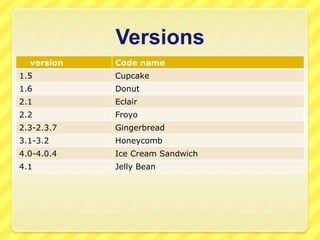
Versions
version

Code name

1.5

Cupcake

1.6

Donut

2.1

Eclair

2.2

Froyo

2.3-2.3.7

Gingerbread

3.1-3.2

Honeycomb

4.0-4.0.4

Ice Cream Sandwich

4.1

Jelly Bean
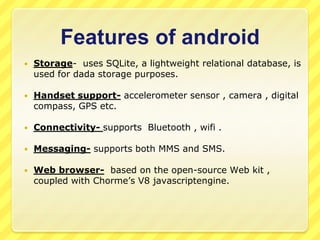
Features of android


Storage- uses SQLite, a lightweight relational database, is
used for dada storage purposes.



Handset support- accelerometer sensor , camera , digital
compass, GPS etc.



Connectivity- supports Bluetooth , wifi .



Messaging- supports both MMS and SMS.



Web browser- based on the open-source Web kit ,
coupled with Chorme’s V8 javascriptengine.


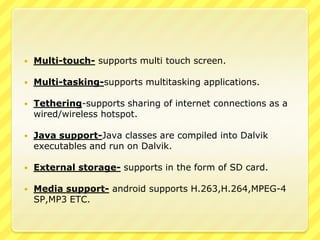
Multi-touch- supports multi touch screen.



Multi-tasking-supports multitasking applications.



Tethering-supports sharing of internet connections as a
wired/wireless hotspot.



Java support-Java classes are compiled into Dalvik
executables and run on Dalvik.



External storage- supports in the form of SD card.



Media support- android supports H.263,H.264,MPEG-4
SP,MP3 ETC.
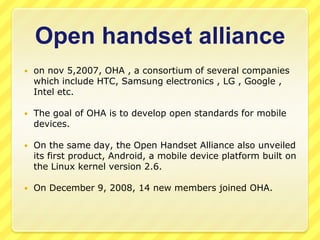
Open handset alliance


on nov 5,2007, OHA , a consortium of several companies
which include HTC, Samsung electronics , LG , Google ,
Intel etc.



The goal of OHA is to develop open standards for mobile
devices.



On the same day, the Open Handset Alliance also unveiled
its first product, Android, a mobile device platform built on
the Linux kernel version 2.6.



On December 9, 2008, 14 new members joined OHA.
Open source technology


The Android Open Source project(AOSP) is led by Google,
and is tasked with the maintenance and development of

Android.


The goal of the AOSP is to create a successful real-world
product that improves the mobile experience for end users.



AOSP creates Android Compatibility as can run any
application written by third-party developers using the
Android SDK .
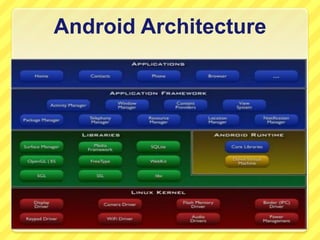
Android Architecture
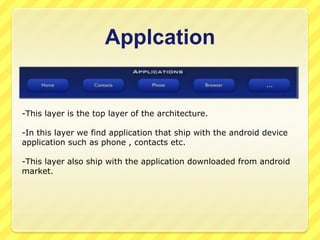
Applcation

-This layer is the top layer of the architecture.
-In this layer we find application that ship with the android device
application such as phone , contacts etc.
-This layer also ship with the application downloaded from android
market.
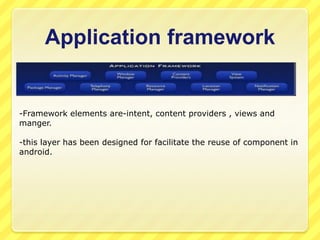
Application framework

-Framework elements are-intent, content providers , views and
manger.
-this layer has been designed for facilitate the reuse of component in
android.
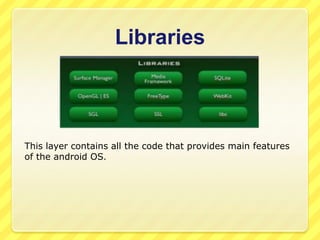
Libraries

This layer contains all the code that provides main features
of the android OS.
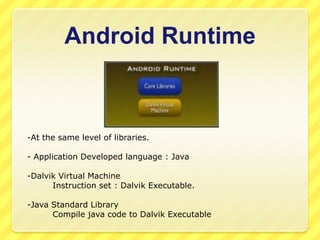
Android Runtime

-At the same level of libraries.
- Application Developed language : Java
-Dalvik Virtual Machine
Instruction set : Dalvik Executable.
-Java Standard Library
Compile java code to Dalvik Executable
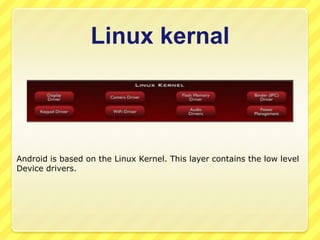
Linux kernal

Android is based on the Linux Kernel. This layer contains the low level
Device drivers.
Development tools


Eclipse



Android SDK



ADT



Emulator
Eclipse


As a IDE(integrated development environment) android
use ECLIPSE.



Eclipse is multi language development environment,
develop many applications using various languages such as
java, c , cpp etc.



For android development we should have eclipse IDE for
java EE developers.



Six editions are available such as windows(32 and 64 bit),
Linux(32 and 64 bit) etc.
Android SDK


SDK stands for software development kit.



A SDK that enables developers to create application for the
Android platform.



The Android SDK includes sample projects with source code
, development tools, an emulator , documentation ,
tutorials and required libraries to build Android applications.



We can download SDK from
http://developer.android.com/sdk/index.html
ADT


ADT stands for android development tools.



ADT plug-in for eclipse is an extension to the eclipse IDE
that supports the creation and debugging of apps.

Using ADT in eclipse we can(a) Create new android app.
(b) Access the tools for accessing our android emulators and
devise.
(c) Compile and debug android app.
(d) Export android apps into APK.

Emulator

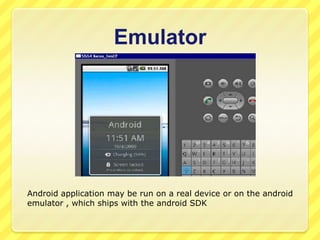
Android application may be run on a real device or on the android
emulator , which ships with the android SDK
DVM


DVM is open source software.



DVM stands for Dalvik virtual machine Google's Android
operating system.



It is the software that runs the apps on Android devices.



Dalvik is thus an integral part of Android, which is typically
used on mobile devices such as mobile phones and tablet
computers.
Steps of creating new
android project


To creating new android project select-project.



Give project name then select finish.



Then do coding in .java file, layout file, main XML file.



After completion project is ready to run on emulator.



Then run it thorough selecting run as –android project.


Then project runs on android emulator.
Activity


An activity is a single, focused thing that the user can do.



Almost all activities interact with the user, so the Activity
class takes care of creating a window for us in which we
can place our UI with setContentView(View).



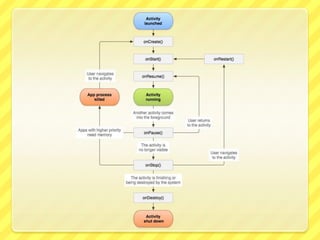
Activity life cycle-Activities in the system are managed as
an activity stack. When a new activity is started, it is
placed on the top of the stack and becomes the running
activity -- the previous activity always remains below it in
the stack, and will not come to the foreground again until
the new activity exits.
Phonebook


During my training I create android project “phonebook”.
Introduction to the project


This project aims at storing our important contacts on our
android device.



This application is mainly designed for those who want to
store there important contacts on their mobile device itself.
SOME SPECIAL FEATURES


We can create , delete , view and search our contacts
which we have stored earlier.



It helps in easily remembering our important contacts
which we want to use in our daily work.



In this project we can easily set our important contact
details like birthday , email address , home and office
phone number separately and much more .
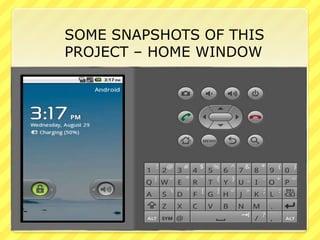
SOME SNAPSHOTS OF THIS
PROJECT – HOME WINDOW
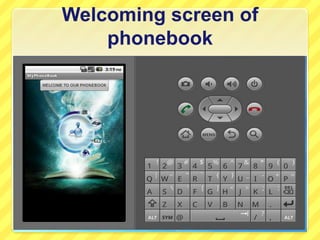
Welcoming screen of
phonebook
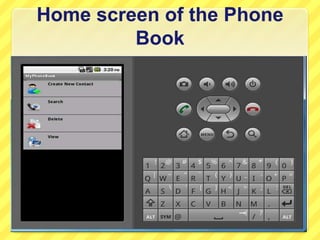
Home screen of the Phone
Book
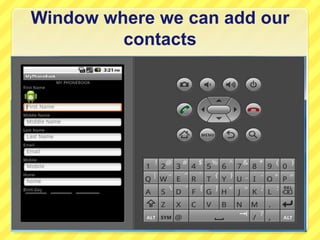
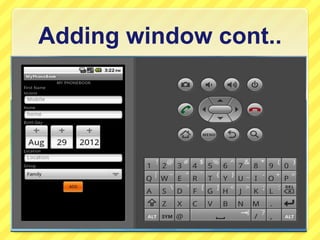
Window where we can add our
contacts
Adding window cont..
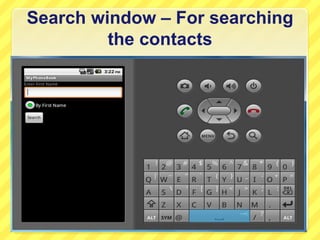
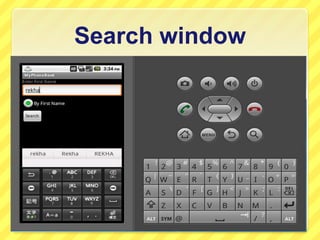
Search window – For searching
the contacts
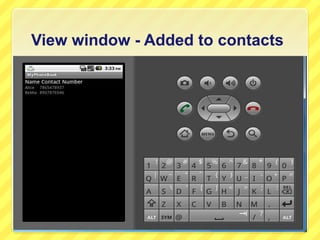
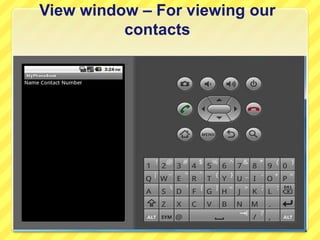
View window – For viewing our
contacts
View window - Added to contacts
Search window
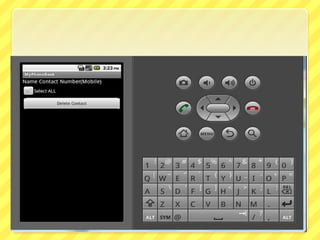
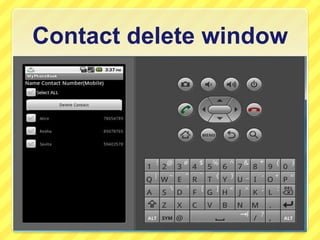
Contact delete window
Thank you

Sumbited by heena saini

  • 1.
  • 2.
    I did mytraning in
  • 3.
    Objective of traning  Iwant to do my summer training in any useful and new technology.  So I choosed new mobile technology “ANDROID”.
  • 4.
    About hp  Hewlett-Packard Companyor HP is an American multinational hardware and software corporation headquartered in Palo Alto, California, United States.  It provides products, technologies, software, solutions and services to consumers, small- and medium-sized businesses (SMBs) and large enterprises, including customers in the government, health and education sectors.  HP has successful lines of printers, scanners, digital cameras, calculators, PDAs, servers, workstation computers, and computers for home and small business use.
  • 5.
    About hpes  Hpes standsfor hp education services.  HP Education Services is the most reputed name in the Technical Education.  Hp is largest IT solution and largest UNIX training company worldwide.  hp Has been in the education business for over 28 years. Present in more than 400 HP education centers and partner locations.  Hp has trained professionals and provide training for soft skills and technical and also customized program according to need of fresher's.
  • 6.
    ANDROID  Android is mobileoperating system such as smart phones and tablet computers.  Based on modified version of Linux.  Android developed the Google and later Open Handset Alliance(OHA).  Android is open source apache license, means open technology.  Android allows developers to write managed code in java language.  Supports DVM.
  • 7.
    HISTORY  2005 -Google acquiredandroid inc.  5 nov 2007 –OHA formed  12 nov 2007-OHA released preview of the OHA android.  23 sep 2008- android’s first mobile lunched.  First product of OHA is android.
  • 8.
  • 9.
    Features of android  Storage-uses SQLite, a lightweight relational database, is used for dada storage purposes.  Handset support- accelerometer sensor , camera , digital compass, GPS etc.  Connectivity- supports Bluetooth , wifi .  Messaging- supports both MMS and SMS.  Web browser- based on the open-source Web kit , coupled with Chorme’s V8 javascriptengine.
  • 10.
     Multi-touch- supports multitouch screen.  Multi-tasking-supports multitasking applications.  Tethering-supports sharing of internet connections as a wired/wireless hotspot.  Java support-Java classes are compiled into Dalvik executables and run on Dalvik.  External storage- supports in the form of SD card.  Media support- android supports H.263,H.264,MPEG-4 SP,MP3 ETC.
  • 11.
    Open handset alliance  onnov 5,2007, OHA , a consortium of several companies which include HTC, Samsung electronics , LG , Google , Intel etc.  The goal of OHA is to develop open standards for mobile devices.  On the same day, the Open Handset Alliance also unveiled its first product, Android, a mobile device platform built on the Linux kernel version 2.6.  On December 9, 2008, 14 new members joined OHA.
  • 12.
    Open source technology  TheAndroid Open Source project(AOSP) is led by Google, and is tasked with the maintenance and development of Android.  The goal of the AOSP is to create a successful real-world product that improves the mobile experience for end users.  AOSP creates Android Compatibility as can run any application written by third-party developers using the Android SDK .
  • 13.
  • 14.
    Applcation -This layer isthe top layer of the architecture. -In this layer we find application that ship with the android device application such as phone , contacts etc. -This layer also ship with the application downloaded from android market.
  • 15.
    Application framework -Framework elementsare-intent, content providers , views and manger. -this layer has been designed for facilitate the reuse of component in android.
  • 16.
    Libraries This layer containsall the code that provides main features of the android OS.
  • 17.
    Android Runtime -At thesame level of libraries. - Application Developed language : Java -Dalvik Virtual Machine Instruction set : Dalvik Executable. -Java Standard Library Compile java code to Dalvik Executable
  • 18.
    Linux kernal Android isbased on the Linux Kernel. This layer contains the low level Device drivers.
  • 19.
  • 20.
    Eclipse  As a IDE(integrateddevelopment environment) android use ECLIPSE.  Eclipse is multi language development environment, develop many applications using various languages such as java, c , cpp etc.  For android development we should have eclipse IDE for java EE developers.  Six editions are available such as windows(32 and 64 bit), Linux(32 and 64 bit) etc.
  • 21.
    Android SDK  SDK standsfor software development kit.  A SDK that enables developers to create application for the Android platform.  The Android SDK includes sample projects with source code , development tools, an emulator , documentation , tutorials and required libraries to build Android applications.  We can download SDK from http://developer.android.com/sdk/index.html
  • 22.
    ADT  ADT stands forandroid development tools.  ADT plug-in for eclipse is an extension to the eclipse IDE that supports the creation and debugging of apps. Using ADT in eclipse we can(a) Create new android app. (b) Access the tools for accessing our android emulators and devise. (c) Compile and debug android app. (d) Export android apps into APK. 
  • 23.
    Emulator Android application maybe run on a real device or on the android emulator , which ships with the android SDK
  • 24.
    DVM  DVM is opensource software.  DVM stands for Dalvik virtual machine Google's Android operating system.  It is the software that runs the apps on Android devices.  Dalvik is thus an integral part of Android, which is typically used on mobile devices such as mobile phones and tablet computers.
  • 25.
    Steps of creatingnew android project  To creating new android project select-project.  Give project name then select finish.  Then do coding in .java file, layout file, main XML file.  After completion project is ready to run on emulator.  Then run it thorough selecting run as –android project.  Then project runs on android emulator.
  • 26.
    Activity  An activity isa single, focused thing that the user can do.  Almost all activities interact with the user, so the Activity class takes care of creating a window for us in which we can place our UI with setContentView(View).  Activity life cycle-Activities in the system are managed as an activity stack. When a new activity is started, it is placed on the top of the stack and becomes the running activity -- the previous activity always remains below it in the stack, and will not come to the foreground again until the new activity exits.
  • 28.
    Phonebook  During my trainingI create android project “phonebook”.
  • 29.
    Introduction to theproject  This project aims at storing our important contacts on our android device.  This application is mainly designed for those who want to store there important contacts on their mobile device itself.
  • 30.
    SOME SPECIAL FEATURES  Wecan create , delete , view and search our contacts which we have stored earlier.  It helps in easily remembering our important contacts which we want to use in our daily work.  In this project we can easily set our important contact details like birthday , email address , home and office phone number separately and much more .
  • 31.
    SOME SNAPSHOTS OFTHIS PROJECT – HOME WINDOW
  • 32.
  • 33.
    Home screen ofthe Phone Book
  • 34.
    Window where wecan add our contacts
  • 35.
  • 36.
    Search window –For searching the contacts
  • 38.
    View window –For viewing our contacts
  • 39.
    View window -Added to contacts
  • 40.
  • 41.
  • 42.