Android Programming
Introdution
What is Android?
A software platform and operating system for mobile devices
Based on the Linux kernel
Developed by the Open Handset Alliance (OHA) and later
Google
Google is the principle maintainer
Allows writing managed code in the Java / Kotlin languages
Dr. M.Pyingkodi, MCA Department, Kongu Engineering College, Erode,Tamilnadu.
Why Android ?
Android is open
Android is free
Reduced cost of Development
Inter App Integration
Rich Development Environment
Easy Adoption
Large developer Community support
 Java, Kotlin
Dr. M.Pyingkodi, MCA Department, Kongu Engineering College, Erode,Tamilnadu.
Integrated browser based on the open source WebKit engine
SQLite for relational data storage
Media support for common audio, video, and still image
formats(MPEG4, H.264, MP3, AAC, AMR, JPG, PNG, GIF)
Dalvik Virtual Machine optimized for mobile devices.
Widgets (weather,calendar,stock market,switches to turn
on/off WiFi, GPS, Bluetooth etc)
Android Features –S/W
Dr. M.Pyingkodi, MCA Department, Kongu Engineering College, Erode,Tamilnadu.
Cellular networking : GSM, EDGE, 5G
LAN : Bluetooth, and Wi-Fi (hardware dependent)
Graphics Hardware Acceleration(3D graphics processing)
Camera, GPS and Compass
Touch screen and accelerometer for motion sensing
 FaceDetector
 MediaRecorder- putting voice as password
 Sensor(intimating climate change,walking, no of hours used)
Android Features – H/W
Dr. M.Pyingkodi, MCA Department, Kongu Engineering College, Erode,Tamilnadu.
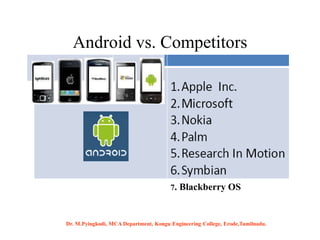
Android vs. Competitors
7. Blackberry OS
Dr. M.Pyingkodi, MCA Department, Kongu Engineering College, Erode,Tamilnadu.
7
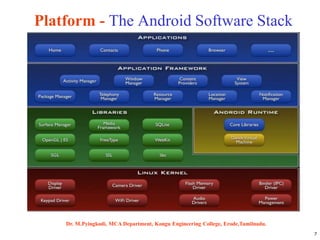
Platform - The Android Software Stack
Dr. M.Pyingkodi, MCA Department, Kongu Engineering College, Erode,Tamilnadu.
8
Android S/W Stack - Application
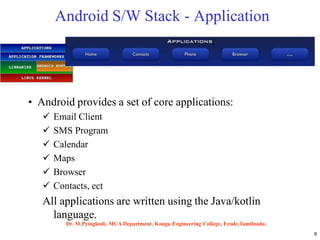
• Android provides a set of core applications:
 Email Client
 SMS Program
 Calendar
 Maps
 Browser
 Contacts, ect
All applications are written using the Java/kotlin
language.
Dr. M.Pyingkodi, MCA Department, Kongu Engineering College, Erode,Tamilnadu.
9
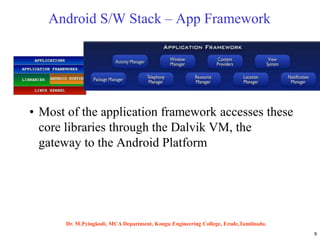
Android S/W Stack – App Framework
• Most of the application framework accesses these
core libraries through the Dalvik VM, the
gateway to the Android Platform
Dr. M.Pyingkodi, MCA Department, Kongu Engineering College, Erode,Tamilnadu.
10
Android S/W Stack –
App Framework (Cont)
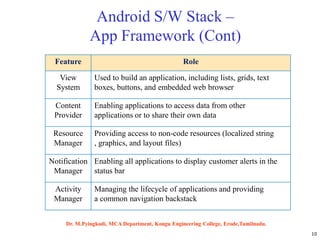
Feature Role
View
System
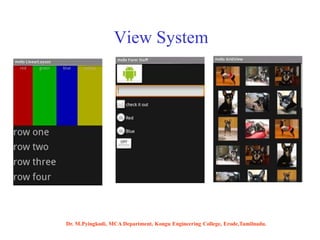
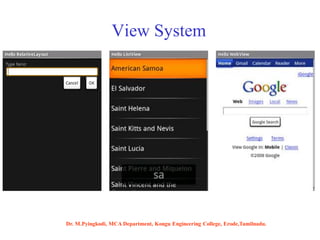
Used to build an application, including lists, grids, text
boxes, buttons, and embedded web browser
Content
Provider
Enabling applications to access data from other
applications or to share their own data
Resource
Manager
Providing access to non-code resources (localized string
, graphics, and layout files)
Notification
Manager
Enabling all applications to display customer alerts in the
status bar
Activity
Manager
Managing the lifecycle of applications and providing
a common navigation backstack
Dr. M.Pyingkodi, MCA Department, Kongu Engineering College, Erode,Tamilnadu.
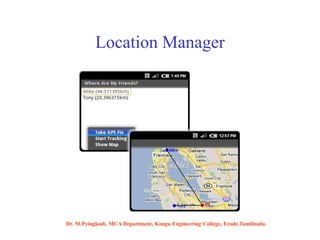
Location Manager
Dr. M.Pyingkodi, MCA Department, Kongu Engineering College, Erode,Tamilnadu.
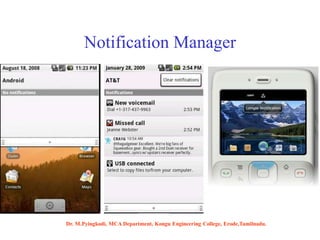
Notification Manager
Dr. M.Pyingkodi, MCA Department, Kongu Engineering College, Erode,Tamilnadu.
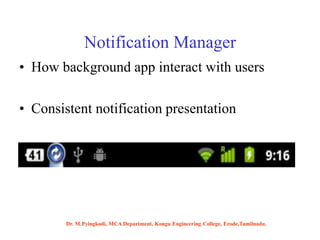
Notification Manager
• How background app interact with users
• Consistent notification presentation
Dr. M.Pyingkodi, MCA Department, Kongu Engineering College, Erode,Tamilnadu.
View System
Dr. M.Pyingkodi, MCA Department, Kongu Engineering College, Erode,Tamilnadu.
View System
Dr. M.Pyingkodi, MCA Department, Kongu Engineering College, Erode,Tamilnadu.
16
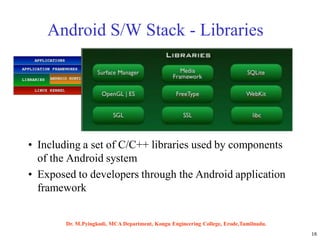
Android S/W Stack - Libraries
• Including a set of C/C++ libraries used by components
of the Android system
• Exposed to developers through the Android application
framework
Dr. M.Pyingkodi, MCA Department, Kongu Engineering College, Erode,Tamilnadu.
Written in C/C++ - System C Library(libc)
 Display/Graphics
Media Libraries
SQLite –RDB engine-light weight
LibWebCore–web browser engine–embeddable web
view
Libraries
Dr. M.Pyingkodi, MCA Department, Kongu Engineering College, Erode,Tamilnadu.
18
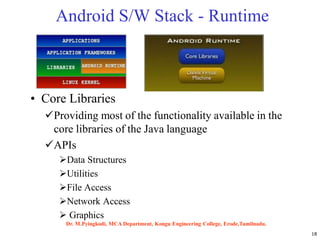
Android S/W Stack - Runtime
• Core Libraries
Providing most of the functionality available in the
core libraries of the Java language
APIs
Data Structures
Utilities
File Access
Network Access
 Graphics
Dr. M.Pyingkodi, MCA Department, Kongu Engineering College, Erode,Tamilnadu.
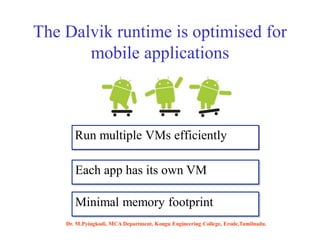
The Dalvik runtime is optimised for
mobile applications
Run multiple VMs efficiently
Each app has its own VM
Minimal memory footprint
Dr. M.Pyingkodi, MCA Department, Kongu Engineering College, Erode,Tamilnadu.
20
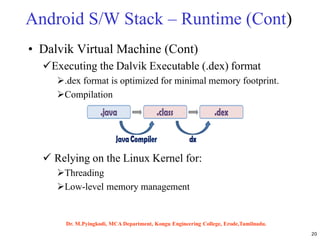
Android S/W Stack – Runtime (Cont)
• Dalvik Virtual Machine (Cont)
Executing the Dalvik Executable (.dex) format
.dex format is optimized for minimal memory footprint.
Compilation
 Relying on the Linux Kernel for:
Threading
Low-level memory management
Dr. M.Pyingkodi, MCA Department, Kongu Engineering College, Erode,Tamilnadu.
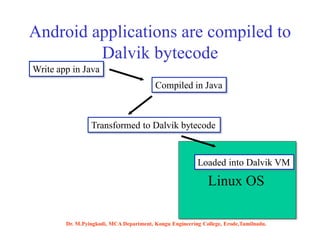
Android applications are compiled to
Dalvik bytecode
Write app in Java
Compiled in Java
Transformed to Dalvik bytecode
Linux OS
Loaded into Dalvik VM
Dr. M.Pyingkodi, MCA Department, Kongu Engineering College, Erode,Tamilnadu.
22
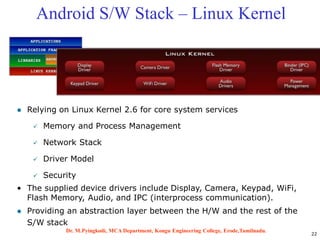
Android S/W Stack – Linux Kernel
 Relying on Linux Kernel 2.6 for core system services
 Memory and Process Management
 Network Stack
 Driver Model
 Security
• The supplied device drivers include Display, Camera, Keypad, WiFi,
Flash Memory, Audio, and IPC (interprocess communication).
 Providing an abstraction layer between the H/W and the rest of the
S/W stack
Dr. M.Pyingkodi, MCA Department, Kongu Engineering College, Erode,Tamilnadu.
Development requirements
• Java JDK
• Android SDK
Software development
Dr. M.Pyingkodi, MCA Department, Kongu Engineering College, Erode,Tamilnadu.
Android SDK
• Class Library
• Developer Tools
• Emulator and System Images
• Documentation and Sample Code
Eclipse IDE + ADT (Android Development Tools)
• Reduces Development and Testing Time
• Makes User Interface-Creation easier
• Makes Application Description Easier
Android Studio, Zamarin etc.,
Software development
Dr. M.Pyingkodi, MCA Department, Kongu Engineering College, Erode,Tamilnadu.
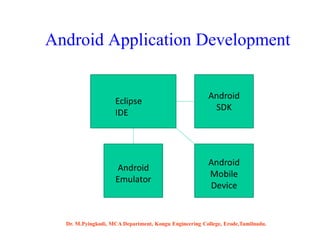
Android Application Development
Eclipse
IDE
Android
SDK
Android
Emulator
Android
Mobile
Device
Dr. M.Pyingkodi, MCA Department, Kongu Engineering College, Erode,Tamilnadu.
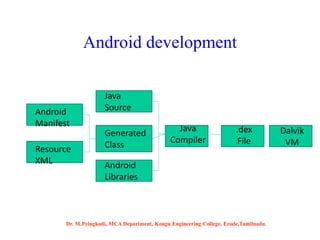
Android development
Android
Manifest
Resource
XML
Java
Source
Generated
Class
Java
Compiler
Android
Libraries
.dex
File
Dalvik
VM
Dr. M.Pyingkodi, MCA Department, Kongu Engineering College, Erode,Tamilnadu.
Anatomy of an Android Application
• Activity -UI
• Intent –Message Passing
• Service –Run on background
• ContentProvider –Data Sharing
Component(gallery,contacts)
• Broadcast Receivers -Receive and react
(OS-generated--Battery empty,Camera button pressed,New app installed,
Wifi connection established)
Dr. M.Pyingkodi, MCA Department, Kongu Engineering College, Erode,Tamilnadu.
Services
• Faceless components that run in the background
– E.g. music player, network download etc…
-code that is long-lived and runs without a UI(Media
Player)
Dr. M.Pyingkodi, MCA Department, Kongu Engineering College, Erode,Tamilnadu.
ContentProviders
• Enables sharing of data across applications
– E.g. address book, photo gallery
• -an application's data to be shared with other
applications
• Provides uniform APIs for:
– querying
– delete, update and insert.
• Content is represented by URI and MIME type
Dr. M.Pyingkodi, MCA Department, Kongu Engineering College, Erode,Tamilnadu.
Android Building Blocks
AndroidManifest.xml
The control file-tells the system what to do with the top-level
components
Activities
An object that has a life cycle-is a chunk of code that does some
work
Views
An object that knows how to draw itself to the screen
Intents
A simple message object that represents an "intention" to do something
Notifications
A small icon that appears in the status bar(SMS messages)
Services
A body of code that runs in the background
Dr. M.Pyingkodi, MCA Department, Kongu Engineering College, Erode,Tamilnadu.
Development Tools
The Android SDK includes a variety of custom tools that help you
develop mobile applications on the Android platform.Three of the
most significant tools are:
1. Android Emulator -A virtual mobile device that runs on our
computer -use to design, debug, and test our applications in an
actual Android run-time environment
2. Android Development Tools Plugin -for the Eclipse IDE - adds
powerful extensions to the Eclipse integrated environment
3. Dalvik Debug Monitor Service (DDMS) -Integrated with Dalvik -
this tool let us manage processes on an emulator and assists in
debugging
Dr. M.Pyingkodi, MCA Department, Kongu Engineering College, Erode,Tamilnadu.
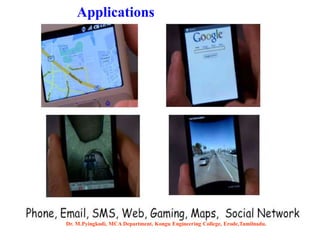
Applications
Dr. M.Pyingkodi, MCA Department, Kongu Engineering College, Erode,Tamilnadu.
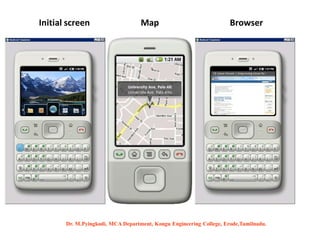
Initial screen BrowserMap
Dr. M.Pyingkodi, MCA Department, Kongu Engineering College, Erode,Tamilnadu.
Android & iOS
Dr. M.Pyingkodi, MCA Department,
Kongu Engineering College,
Erode,Tamilnadu.

Introduction to Android Programming by Dr.M.Pyingkodi-kongu engineering college-erode

  • 1.
  • 2.
    What is Android? Asoftware platform and operating system for mobile devices Based on the Linux kernel Developed by the Open Handset Alliance (OHA) and later Google Google is the principle maintainer Allows writing managed code in the Java / Kotlin languages Dr. M.Pyingkodi, MCA Department, Kongu Engineering College, Erode,Tamilnadu.
  • 3.
    Why Android ? Androidis open Android is free Reduced cost of Development Inter App Integration Rich Development Environment Easy Adoption Large developer Community support  Java, Kotlin Dr. M.Pyingkodi, MCA Department, Kongu Engineering College, Erode,Tamilnadu.
  • 4.
    Integrated browser basedon the open source WebKit engine SQLite for relational data storage Media support for common audio, video, and still image formats(MPEG4, H.264, MP3, AAC, AMR, JPG, PNG, GIF) Dalvik Virtual Machine optimized for mobile devices. Widgets (weather,calendar,stock market,switches to turn on/off WiFi, GPS, Bluetooth etc) Android Features –S/W Dr. M.Pyingkodi, MCA Department, Kongu Engineering College, Erode,Tamilnadu.
  • 5.
    Cellular networking :GSM, EDGE, 5G LAN : Bluetooth, and Wi-Fi (hardware dependent) Graphics Hardware Acceleration(3D graphics processing) Camera, GPS and Compass Touch screen and accelerometer for motion sensing  FaceDetector  MediaRecorder- putting voice as password  Sensor(intimating climate change,walking, no of hours used) Android Features – H/W Dr. M.Pyingkodi, MCA Department, Kongu Engineering College, Erode,Tamilnadu.
  • 6.
    Android vs. Competitors 7.Blackberry OS Dr. M.Pyingkodi, MCA Department, Kongu Engineering College, Erode,Tamilnadu.
  • 7.
    7 Platform - TheAndroid Software Stack Dr. M.Pyingkodi, MCA Department, Kongu Engineering College, Erode,Tamilnadu.
  • 8.
    8 Android S/W Stack- Application • Android provides a set of core applications:  Email Client  SMS Program  Calendar  Maps  Browser  Contacts, ect All applications are written using the Java/kotlin language. Dr. M.Pyingkodi, MCA Department, Kongu Engineering College, Erode,Tamilnadu.
  • 9.
    9 Android S/W Stack– App Framework • Most of the application framework accesses these core libraries through the Dalvik VM, the gateway to the Android Platform Dr. M.Pyingkodi, MCA Department, Kongu Engineering College, Erode,Tamilnadu.
  • 10.
    10 Android S/W Stack– App Framework (Cont) Feature Role View System Used to build an application, including lists, grids, text boxes, buttons, and embedded web browser Content Provider Enabling applications to access data from other applications or to share their own data Resource Manager Providing access to non-code resources (localized string , graphics, and layout files) Notification Manager Enabling all applications to display customer alerts in the status bar Activity Manager Managing the lifecycle of applications and providing a common navigation backstack Dr. M.Pyingkodi, MCA Department, Kongu Engineering College, Erode,Tamilnadu.
  • 11.
    Location Manager Dr. M.Pyingkodi,MCA Department, Kongu Engineering College, Erode,Tamilnadu.
  • 12.
    Notification Manager Dr. M.Pyingkodi,MCA Department, Kongu Engineering College, Erode,Tamilnadu.
  • 13.
    Notification Manager • Howbackground app interact with users • Consistent notification presentation Dr. M.Pyingkodi, MCA Department, Kongu Engineering College, Erode,Tamilnadu.
  • 14.
    View System Dr. M.Pyingkodi,MCA Department, Kongu Engineering College, Erode,Tamilnadu.
  • 15.
    View System Dr. M.Pyingkodi,MCA Department, Kongu Engineering College, Erode,Tamilnadu.
  • 16.
    16 Android S/W Stack- Libraries • Including a set of C/C++ libraries used by components of the Android system • Exposed to developers through the Android application framework Dr. M.Pyingkodi, MCA Department, Kongu Engineering College, Erode,Tamilnadu.
  • 17.
    Written in C/C++- System C Library(libc)  Display/Graphics Media Libraries SQLite –RDB engine-light weight LibWebCore–web browser engine–embeddable web view Libraries Dr. M.Pyingkodi, MCA Department, Kongu Engineering College, Erode,Tamilnadu.
  • 18.
    18 Android S/W Stack- Runtime • Core Libraries Providing most of the functionality available in the core libraries of the Java language APIs Data Structures Utilities File Access Network Access  Graphics Dr. M.Pyingkodi, MCA Department, Kongu Engineering College, Erode,Tamilnadu.
  • 19.
    The Dalvik runtimeis optimised for mobile applications Run multiple VMs efficiently Each app has its own VM Minimal memory footprint Dr. M.Pyingkodi, MCA Department, Kongu Engineering College, Erode,Tamilnadu.
  • 20.
    20 Android S/W Stack– Runtime (Cont) • Dalvik Virtual Machine (Cont) Executing the Dalvik Executable (.dex) format .dex format is optimized for minimal memory footprint. Compilation  Relying on the Linux Kernel for: Threading Low-level memory management Dr. M.Pyingkodi, MCA Department, Kongu Engineering College, Erode,Tamilnadu.
  • 21.
    Android applications arecompiled to Dalvik bytecode Write app in Java Compiled in Java Transformed to Dalvik bytecode Linux OS Loaded into Dalvik VM Dr. M.Pyingkodi, MCA Department, Kongu Engineering College, Erode,Tamilnadu.
  • 22.
    22 Android S/W Stack– Linux Kernel  Relying on Linux Kernel 2.6 for core system services  Memory and Process Management  Network Stack  Driver Model  Security • The supplied device drivers include Display, Camera, Keypad, WiFi, Flash Memory, Audio, and IPC (interprocess communication).  Providing an abstraction layer between the H/W and the rest of the S/W stack Dr. M.Pyingkodi, MCA Department, Kongu Engineering College, Erode,Tamilnadu.
  • 23.
    Development requirements • JavaJDK • Android SDK Software development Dr. M.Pyingkodi, MCA Department, Kongu Engineering College, Erode,Tamilnadu.
  • 24.
    Android SDK • ClassLibrary • Developer Tools • Emulator and System Images • Documentation and Sample Code Eclipse IDE + ADT (Android Development Tools) • Reduces Development and Testing Time • Makes User Interface-Creation easier • Makes Application Description Easier Android Studio, Zamarin etc., Software development Dr. M.Pyingkodi, MCA Department, Kongu Engineering College, Erode,Tamilnadu.
  • 25.
    Android Application Development Eclipse IDE Android SDK Android Emulator Android Mobile Device Dr.M.Pyingkodi, MCA Department, Kongu Engineering College, Erode,Tamilnadu.
  • 26.
  • 27.
    Anatomy of anAndroid Application • Activity -UI • Intent –Message Passing • Service –Run on background • ContentProvider –Data Sharing Component(gallery,contacts) • Broadcast Receivers -Receive and react (OS-generated--Battery empty,Camera button pressed,New app installed, Wifi connection established) Dr. M.Pyingkodi, MCA Department, Kongu Engineering College, Erode,Tamilnadu.
  • 28.
    Services • Faceless componentsthat run in the background – E.g. music player, network download etc… -code that is long-lived and runs without a UI(Media Player) Dr. M.Pyingkodi, MCA Department, Kongu Engineering College, Erode,Tamilnadu.
  • 29.
    ContentProviders • Enables sharingof data across applications – E.g. address book, photo gallery • -an application's data to be shared with other applications • Provides uniform APIs for: – querying – delete, update and insert. • Content is represented by URI and MIME type Dr. M.Pyingkodi, MCA Department, Kongu Engineering College, Erode,Tamilnadu.
  • 30.
    Android Building Blocks AndroidManifest.xml Thecontrol file-tells the system what to do with the top-level components Activities An object that has a life cycle-is a chunk of code that does some work Views An object that knows how to draw itself to the screen Intents A simple message object that represents an "intention" to do something Notifications A small icon that appears in the status bar(SMS messages) Services A body of code that runs in the background Dr. M.Pyingkodi, MCA Department, Kongu Engineering College, Erode,Tamilnadu.
  • 31.
    Development Tools The AndroidSDK includes a variety of custom tools that help you develop mobile applications on the Android platform.Three of the most significant tools are: 1. Android Emulator -A virtual mobile device that runs on our computer -use to design, debug, and test our applications in an actual Android run-time environment 2. Android Development Tools Plugin -for the Eclipse IDE - adds powerful extensions to the Eclipse integrated environment 3. Dalvik Debug Monitor Service (DDMS) -Integrated with Dalvik - this tool let us manage processes on an emulator and assists in debugging Dr. M.Pyingkodi, MCA Department, Kongu Engineering College, Erode,Tamilnadu.
  • 32.
    Applications Dr. M.Pyingkodi, MCADepartment, Kongu Engineering College, Erode,Tamilnadu.
  • 33.
    Initial screen BrowserMap Dr.M.Pyingkodi, MCA Department, Kongu Engineering College, Erode,Tamilnadu.
  • 34.
    Android & iOS Dr.M.Pyingkodi, MCA Department, Kongu Engineering College, Erode,Tamilnadu.