Successful Project Estimation:

How to GetYour Weekends Back
Thursday, July 25th

Drupal GovCon 2019


David Minton @DH_David
@DH_Stephen
@DesignHammer
1
Overview
• Introduction
• Let’s agree on a few things
• Project Estimation
• Plan for the Unknown
• DetermineYour Team’s Capacity
• Allocate, Predict,Track, & Iterate
• Conclusion
2
3
Introduction
Stephen
Pashby
Account Manager
@DH_Stephen
Over eight years

industry experience
Stephen Pashby
Account Manager
5
David
Minton
Managing Partner
@DH_David
Over twenty years

industry experience
6
Ready for

the weekend?
What do you do?
• Project Manager?
• Designer?
• Developer?
• Other?
7
Where do you do it?
• Government?
• Nonprofit?
• Digital agency?
• Other?
8
Who works weekends?
• Never?
• Sometimes?
• Often?
• Always?
9
“Each person deserves a day away
in which no problems are
confronted, no solutions searched
for. Each of us needs to withdraw
from the cares which will not
withdraw from us.”
– Maya Angelou

Poet, author, singer
10
“Traditional”

scheduling
A Drupal developer walks into a bar…
11
Traditional scheduling
• Pick an arbitrary date
• Throw resources at the problem
• Rinse and repeat
12
Upside
• Planning is easy
13
Downside
• Missed deadlines
• Staff burnout
• Quality problems
• Technical debt from cutting corners
• Budget overruns
14
Estimating projects and
managing capacity…
Why is it so hard?
15
Scheduling is hard because
• You have not done similar work before
• Scope creep is a thing
• Competition for staff resources
• Emergencies can divert resources
16
There has to be

a better way…
17
18
Let’s agree on a few things
Assumptions
• Your team needs to complete multiple
projects with independent budgets &
timelines
• Maintaining a good work-life balance
improves team’s longterm efficiency and
sustainability
19
Work-life balance
• It’s good for your organization, your team,
your stakeholders, andYOU
• Lower burnout (your team and you)
• Lower turnover (your organization, your
team, and you)
• More consistent schedule expectations
(your organization, your stakeholders, your
team, and you)
20
“I believe that being successful
means having a balance of success
stories across the many areas of
your life.You can’t truly be
considered successful in your
business life if your home life is in
shambles.”
– Hilary Hinton “Zig” Ziglar 

Author, motivational speaker
21
How do we do it?
22
Method
• Estimate/re-estimate based on historical
data and current understanding
• Plan for the unknown
• Determine team capacity based on historic
staff productivity data
• Allocate capacity
• Iterate weekly/monthly/yearly
23
Tools of the Trade
• Historic time tracking system
• Data from past projects
• As granular as possible
• Capacity projection and tracking system
• From Google sheets to complex systems
24
Good data is critical…
Bad data can lead you to making poor planning decisions
as quickly as no data can
25
26
Project Estimation
Measure twice (or more)
• Estimate the project several times,
depending upon its stage and how much
information your know:
• Initial scoping
• Prior to discovery and planning
• Following discovery and planning
27
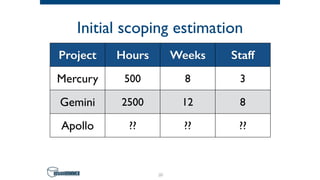
Initial scoping estimation
• Determine if you should undertake a project
• Often you don’t know enough detail for
granular estimates
• Look at other projects that feel similar in
scope and complexity
28
Initial scoping estimation
29
Project Hours Weeks Staff
Mercury 500 8 3
Gemini 2500 12 8
Apollo ?? ?? ??
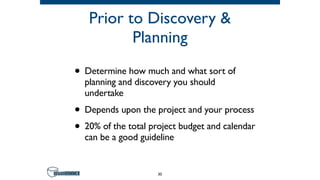
Prior to Discovery &
Planning
• Determine how much and what sort of
planning and discovery you should
undertake
• Depends upon the project and your process
• 20% of the total project budget and calendar
can be a good guideline
30
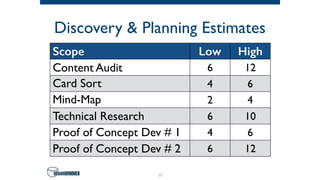
Discovery & Planning Estimates
31
Scope Low High
Content Audit 6 12
Card Sort 4 6
Mind-Map 2 4
Technical Research 6 10
Proof of Concept Dev # 1 4 6
Proof of Concept Dev # 2 6 12
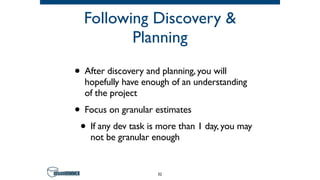
Following Discovery &
Planning
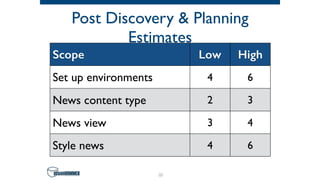
• After discovery and planning, you will
hopefully have enough of an understanding
of the project
• Focus on granular estimates
• If any dev task is more than 1 day, you may
not be granular enough
32
Post Discovery & Planning
Estimates
33
Scope Low High
Set up environments 4 6
News content type 2 3
News view 3 4
Style news 4 6
34
Plan for the Unknown
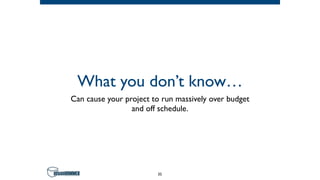
What you don’t know…
Can cause your project to run massively over budget
and off schedule.
35
“As we know, there are known knowns;
there are things we know we know.We
also know there are known unknowns;
that is to say we know there are some
things we do not know. But there are
also unknown unknowns—the ones we
don’t know we don’t know.”
– Donald Rumsfeld

US Secretary of Defense (2001–2006)
36
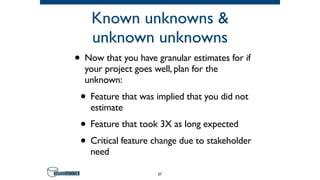
Known unknowns &
unknown unknowns
• Now that you have granular estimates for if
your project goes well, plan for the
unknown:
• Feature that was implied that you did not
estimate
• Feature that took 3X as long expected
• Critical feature change due to stakeholder
need
37
Known unknowns &
unknown unknowns
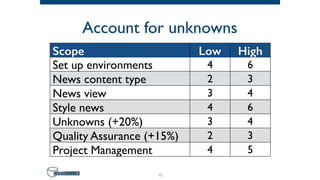
• Several ways to capture uncertainty:
• Ranges on estimates
• Uncertainty modifiers per task estimate
• Percentage estimate on all or select tasks
(e.g. all dev tasks, etc.)
38
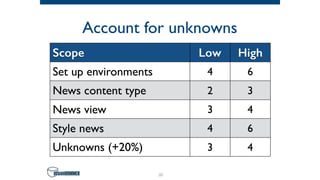
Account for unknowns
39
Scope Low High
Set up environments 4 6
News content type 2 3
News view 3 4
Style news 4 6
Unknowns (+20%) 3 4
Don’t forget QA & PM
Quality Assurance and Project Management—
your keys to success
40
Account for unknowns
41
Scope Low High
Set up environments 4 6
News content type 2 3
News view 3 4
Style news 4 6
Unknowns (+20%) 3 4
Quality Assurance (+15%) 2 3
Project Management 4 5
You have a realistic
estimate, now what?
42
43
DetermineYour Team’s Capacity
What is capacity?
44
Lets define some terms…
• Non-productiveTime
• Time not directly associated with
manufacturing operations or performance
of a job or task.
• Contrasted with ProductiveTime which is
associated with performance of a job or
task
45
Non-Productive Time
• Non-productive time examples:
• Waiting for work
• Coffee break
46
Let’s define some terms…
• Overhead
• Resource consumed or lost in completing
a process, that does not contribute directly
to the end-product.
• For our purposes, overhead is productive
work that is not directly related to work
on specific projects.
47
Overhead
• Overhead examples:
• Team meetings
• Training
• Conference attendance
48
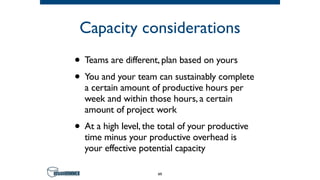
Capacity considerations
• Teams are different, plan based on yours
• You and your team can sustainably complete
a certain amount of productive hours per
week and within those hours, a certain
amount of project work
• At a high level, the total of your productive
time minus your productive overhead is
your effective potential capacity
49
So, what is your team’s
capacity?
50
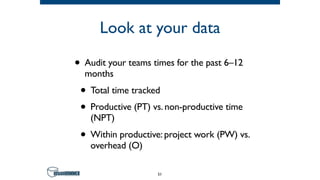
Look at your data
• Audit your teams times for the past 6–12
months
• Total time tracked
• Productive (PT) vs. non-productive time
(NPT)
• Within productive: project work (PW) vs.
overhead (O)
51
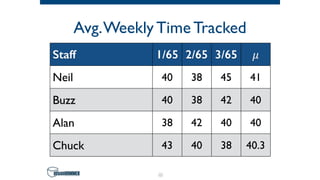
Avg.Weekly Time Tracked
52
Staff 1/65 2/65 3/65 𝜇
Neil 40 38 45 41
Buzz 40 38 42 40
Alan 38 42 40 40
Chuck 43 40 38 40.3
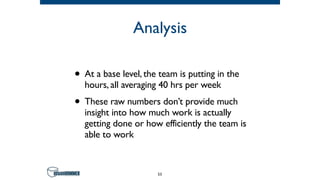
Analysis
• At a base level, the team is putting in the
hours, all averaging 40 hrs per week
• These raw numbers don’t provide much
insight into how much work is actually
getting done or how efficiently the team is
able to work
53
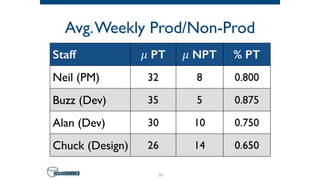
Avg.Weekly Prod/Non-Prod
54
Staff 𝜇 PT 𝜇 NPT % PT
Neil (PM) 32 8 0.800
Buzz (Dev) 35 5 0.875
Alan (Dev) 30 10 0.750
Chuck (Design) 26 14 0.650
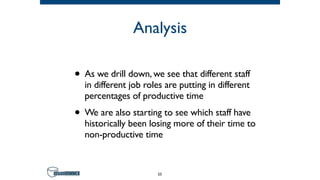
Analysis
• As we drill down, we see that different staff
in different job roles are putting in different
percentages of productive time
• We are also starting to see which staff have
historically been losing more of their time to
non-productive time
55
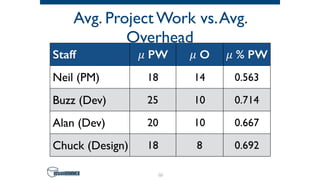
Avg. Project Work vs.Avg.
Overhead
56
Staff 𝜇 PW 𝜇 O 𝜇 % PW
Neil (PM) 18 14 0.563
Buzz (Dev) 25 10 0.714
Alan (Dev) 20 10 0.667
Chuck (Design) 18 8 0.692
Analysis
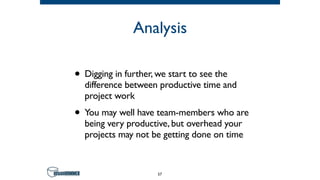
• Digging in further, we start to see the
difference between productive time and
project work
• You may well have team-members who are
being very productive, but overhead your
projects may not be getting done on time
57
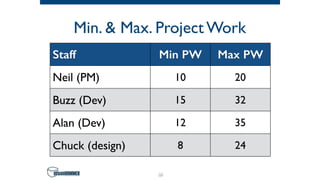
Min. & Max. Project Work
58
Staff Min PW Max PW
Neil (PM) 10 20
Buzz (Dev) 15 32
Alan (Dev) 12 35
Chuck (design) 8 24
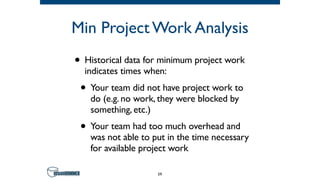
Min Project Work Analysis
• Historical data for minimum project work
indicates times when:
• Your team did not have project work to
do (e.g. no work, they were blocked by
something, etc.)
• Your team had too much overhead and
was not able to put in the time necessary
for available project work
59
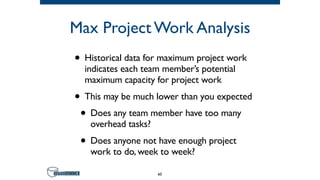
Max Project Work Analysis
• Historical data for maximum project work
indicates each team member’s potential
maximum capacity for project work
• This may be much lower than you expected
• Does any team member have too many
overhead tasks?
• Does anyone not have enough project
work to do, week to week?
60
Let’s put that data into a
capacity framework!
61
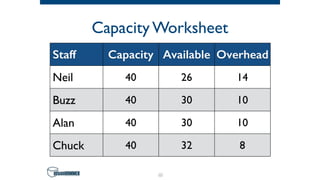
Capacity Worksheet
62
Staff Capacity Available Overhead
Neil 40 26 14
Buzz 40 30 10
Alan 40 30 10
Chuck 40 32 8
Capacity Worksheet
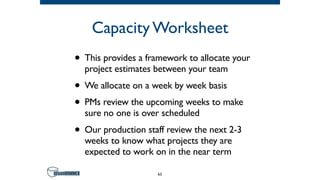
• This provides a framework to allocate your
project estimates between your team
• We allocate on a week by week basis
• PMs review the upcoming weeks to make
sure no one is over scheduled
• Our production staff review the next 2-3
weeks to know what projects they are
expected to work on in the near term
63
This is great, but what
about emergencies?
Reserve time for the expected unknowns
64
“I am prepared for the worst, 

but hope for the best.”
– Benjamin Disraeli

Prime Minister, United Kingdom
65
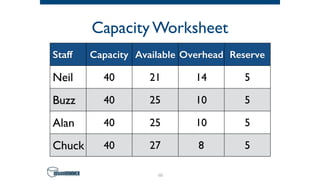
Capacity Worksheet
66
Staff Capacity Available Overhead Reserve
Neil 40 21 14 5
Buzz 40 25 10 5
Alan 40 25 10 5
Chuck 40 27 8 5
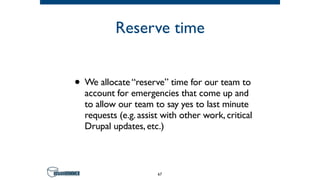
Reserve time
• We allocate “reserve” time for our team to
account for emergencies that come up and
to allow our team to say yes to last minute
requests (e.g. assist with other work, critical
Drupal updates, etc.)
67
68
Allocate, Predict,Track, & Iterate
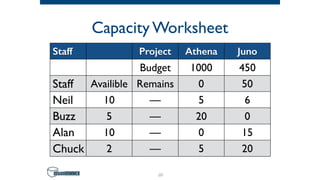
Capacity Worksheet
69
Staff Project Athena Juno
Budget 1000 450
Staff Availible Remains 0 50
Neil 10 — 5 6
Buzz 5 — 20 0
Alan 10 — 0 15
Chuck 2 — 5 20
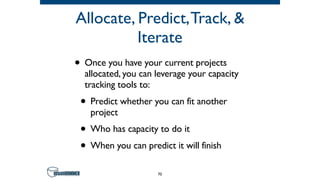
Allocate, Predict,Track, &
Iterate
• Once you have your current projects
allocated, you can leverage your capacity
tracking tools to:
• Predict whether you can fit another
project
• Who has capacity to do it
• When you can predict it will finish
70
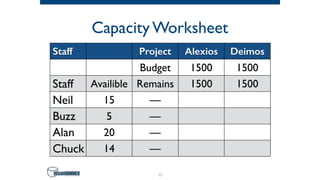
Capacity Worksheet
71
Staff Project Alexios Deimos
Budget 1500 1500
Staff Availible Remains 1500 1500
Neil 15 —
Buzz 5 —
Alan 20 —
Chuck 14 —
Allocate, Predict,Track, &
Iterate
• Depending on your capacity tool, you may
be able to test allocate potential projects
based on your currently allocated capacity
data
• If you will need to reallocate other projects,
you now have visibility and can discuss
schedule or resource changes with your
team
72
Don’t stop there…
73
Allocate, Predict,Track, &
Iterate
• Keep tracking your team’s times and review
periodically to update your assumptions
• As you can increase your efficiency, you can
adjust your estimates and capacity
74
75
Conclusion
Conclusion
• Start with data
• Use your data to establish a realistic baseline
• Review and iterate regularly to improve your
team’s efficiency
76
Special thanks
77
David Minton
Stephen Pashby
Follow us!
@DesignHammer

facebook.com/DesignHammer
www.designhammer.com
78

Successful Project Estimation: How to Get Your Weekends Back

  • 1.
    Successful Project Estimation:
 Howto GetYour Weekends Back Thursday, July 25th
 Drupal GovCon 2019 
 David Minton @DH_David @DH_Stephen @DesignHammer 1
  • 2.
    Overview • Introduction • Let’sagree on a few things • Project Estimation • Plan for the Unknown • DetermineYour Team’s Capacity • Allocate, Predict,Track, & Iterate • Conclusion 2
  • 3.
  • 4.
  • 5.
    Stephen Pashby Account Manager 5 David Minton ManagingPartner @DH_David Over twenty years
 industry experience
  • 6.
  • 7.
    What do youdo? • Project Manager? • Designer? • Developer? • Other? 7
  • 8.
    Where do youdo it? • Government? • Nonprofit? • Digital agency? • Other? 8
  • 9.
    Who works weekends? •Never? • Sometimes? • Often? • Always? 9
  • 10.
    “Each person deservesa day away in which no problems are confronted, no solutions searched for. Each of us needs to withdraw from the cares which will not withdraw from us.” – Maya Angelou
 Poet, author, singer 10
  • 11.
  • 12.
    Traditional scheduling • Pickan arbitrary date • Throw resources at the problem • Rinse and repeat 12
  • 13.
  • 14.
    Downside • Missed deadlines •Staff burnout • Quality problems • Technical debt from cutting corners • Budget overruns 14
  • 15.
    Estimating projects and managingcapacity… Why is it so hard? 15
  • 16.
    Scheduling is hardbecause • You have not done similar work before • Scope creep is a thing • Competition for staff resources • Emergencies can divert resources 16
  • 17.
    There has tobe
 a better way… 17
  • 18.
    18 Let’s agree ona few things
  • 19.
    Assumptions • Your teamneeds to complete multiple projects with independent budgets & timelines • Maintaining a good work-life balance improves team’s longterm efficiency and sustainability 19
  • 20.
    Work-life balance • It’sgood for your organization, your team, your stakeholders, andYOU • Lower burnout (your team and you) • Lower turnover (your organization, your team, and you) • More consistent schedule expectations (your organization, your stakeholders, your team, and you) 20
  • 21.
    “I believe thatbeing successful means having a balance of success stories across the many areas of your life.You can’t truly be considered successful in your business life if your home life is in shambles.” – Hilary Hinton “Zig” Ziglar 
 Author, motivational speaker 21
  • 22.
    How do wedo it? 22
  • 23.
    Method • Estimate/re-estimate basedon historical data and current understanding • Plan for the unknown • Determine team capacity based on historic staff productivity data • Allocate capacity • Iterate weekly/monthly/yearly 23
  • 24.
    Tools of theTrade • Historic time tracking system • Data from past projects • As granular as possible • Capacity projection and tracking system • From Google sheets to complex systems 24
  • 25.
    Good data iscritical… Bad data can lead you to making poor planning decisions as quickly as no data can 25
  • 26.
  • 27.
    Measure twice (ormore) • Estimate the project several times, depending upon its stage and how much information your know: • Initial scoping • Prior to discovery and planning • Following discovery and planning 27
  • 28.
    Initial scoping estimation •Determine if you should undertake a project • Often you don’t know enough detail for granular estimates • Look at other projects that feel similar in scope and complexity 28
  • 29.
    Initial scoping estimation 29 ProjectHours Weeks Staff Mercury 500 8 3 Gemini 2500 12 8 Apollo ?? ?? ??
  • 30.
    Prior to Discovery& Planning • Determine how much and what sort of planning and discovery you should undertake • Depends upon the project and your process • 20% of the total project budget and calendar can be a good guideline 30
  • 31.
    Discovery & PlanningEstimates 31 Scope Low High Content Audit 6 12 Card Sort 4 6 Mind-Map 2 4 Technical Research 6 10 Proof of Concept Dev # 1 4 6 Proof of Concept Dev # 2 6 12
  • 32.
    Following Discovery & Planning •After discovery and planning, you will hopefully have enough of an understanding of the project • Focus on granular estimates • If any dev task is more than 1 day, you may not be granular enough 32
  • 33.
    Post Discovery &Planning Estimates 33 Scope Low High Set up environments 4 6 News content type 2 3 News view 3 4 Style news 4 6
  • 34.
  • 35.
    What you don’tknow… Can cause your project to run massively over budget and off schedule. 35
  • 36.
    “As we know,there are known knowns; there are things we know we know.We also know there are known unknowns; that is to say we know there are some things we do not know. But there are also unknown unknowns—the ones we don’t know we don’t know.” – Donald Rumsfeld
 US Secretary of Defense (2001–2006) 36
  • 37.
    Known unknowns & unknownunknowns • Now that you have granular estimates for if your project goes well, plan for the unknown: • Feature that was implied that you did not estimate • Feature that took 3X as long expected • Critical feature change due to stakeholder need 37
  • 38.
    Known unknowns & unknownunknowns • Several ways to capture uncertainty: • Ranges on estimates • Uncertainty modifiers per task estimate • Percentage estimate on all or select tasks (e.g. all dev tasks, etc.) 38
  • 39.
    Account for unknowns 39 ScopeLow High Set up environments 4 6 News content type 2 3 News view 3 4 Style news 4 6 Unknowns (+20%) 3 4
  • 40.
    Don’t forget QA& PM Quality Assurance and Project Management— your keys to success 40
  • 41.
    Account for unknowns 41 ScopeLow High Set up environments 4 6 News content type 2 3 News view 3 4 Style news 4 6 Unknowns (+20%) 3 4 Quality Assurance (+15%) 2 3 Project Management 4 5
  • 42.
    You have arealistic estimate, now what? 42
  • 43.
  • 44.
  • 45.
    Lets define someterms… • Non-productiveTime • Time not directly associated with manufacturing operations or performance of a job or task. • Contrasted with ProductiveTime which is associated with performance of a job or task 45
  • 46.
    Non-Productive Time • Non-productivetime examples: • Waiting for work • Coffee break 46
  • 47.
    Let’s define someterms… • Overhead • Resource consumed or lost in completing a process, that does not contribute directly to the end-product. • For our purposes, overhead is productive work that is not directly related to work on specific projects. 47
  • 48.
    Overhead • Overhead examples: •Team meetings • Training • Conference attendance 48
  • 49.
    Capacity considerations • Teamsare different, plan based on yours • You and your team can sustainably complete a certain amount of productive hours per week and within those hours, a certain amount of project work • At a high level, the total of your productive time minus your productive overhead is your effective potential capacity 49
  • 50.
    So, what isyour team’s capacity? 50
  • 51.
    Look at yourdata • Audit your teams times for the past 6–12 months • Total time tracked • Productive (PT) vs. non-productive time (NPT) • Within productive: project work (PW) vs. overhead (O) 51
  • 52.
    Avg.Weekly Time Tracked 52 Staff1/65 2/65 3/65 𝜇 Neil 40 38 45 41 Buzz 40 38 42 40 Alan 38 42 40 40 Chuck 43 40 38 40.3
  • 53.
    Analysis • At abase level, the team is putting in the hours, all averaging 40 hrs per week • These raw numbers don’t provide much insight into how much work is actually getting done or how efficiently the team is able to work 53
  • 54.
    Avg.Weekly Prod/Non-Prod 54 Staff 𝜇PT 𝜇 NPT % PT Neil (PM) 32 8 0.800 Buzz (Dev) 35 5 0.875 Alan (Dev) 30 10 0.750 Chuck (Design) 26 14 0.650
  • 55.
    Analysis • As wedrill down, we see that different staff in different job roles are putting in different percentages of productive time • We are also starting to see which staff have historically been losing more of their time to non-productive time 55
  • 56.
    Avg. Project Workvs.Avg. Overhead 56 Staff 𝜇 PW 𝜇 O 𝜇 % PW Neil (PM) 18 14 0.563 Buzz (Dev) 25 10 0.714 Alan (Dev) 20 10 0.667 Chuck (Design) 18 8 0.692
  • 57.
    Analysis • Digging infurther, we start to see the difference between productive time and project work • You may well have team-members who are being very productive, but overhead your projects may not be getting done on time 57
  • 58.
    Min. & Max.Project Work 58 Staff Min PW Max PW Neil (PM) 10 20 Buzz (Dev) 15 32 Alan (Dev) 12 35 Chuck (design) 8 24
  • 59.
    Min Project WorkAnalysis • Historical data for minimum project work indicates times when: • Your team did not have project work to do (e.g. no work, they were blocked by something, etc.) • Your team had too much overhead and was not able to put in the time necessary for available project work 59
  • 60.
    Max Project WorkAnalysis • Historical data for maximum project work indicates each team member’s potential maximum capacity for project work • This may be much lower than you expected • Does any team member have too many overhead tasks? • Does anyone not have enough project work to do, week to week? 60
  • 61.
    Let’s put thatdata into a capacity framework! 61
  • 62.
    Capacity Worksheet 62 Staff CapacityAvailable Overhead Neil 40 26 14 Buzz 40 30 10 Alan 40 30 10 Chuck 40 32 8
  • 63.
    Capacity Worksheet • Thisprovides a framework to allocate your project estimates between your team • We allocate on a week by week basis • PMs review the upcoming weeks to make sure no one is over scheduled • Our production staff review the next 2-3 weeks to know what projects they are expected to work on in the near term 63
  • 64.
    This is great,but what about emergencies? Reserve time for the expected unknowns 64
  • 65.
    “I am preparedfor the worst, 
 but hope for the best.” – Benjamin Disraeli
 Prime Minister, United Kingdom 65
  • 66.
    Capacity Worksheet 66 Staff CapacityAvailable Overhead Reserve Neil 40 21 14 5 Buzz 40 25 10 5 Alan 40 25 10 5 Chuck 40 27 8 5
  • 67.
    Reserve time • Weallocate “reserve” time for our team to account for emergencies that come up and to allow our team to say yes to last minute requests (e.g. assist with other work, critical Drupal updates, etc.) 67
  • 68.
  • 69.
    Capacity Worksheet 69 Staff ProjectAthena Juno Budget 1000 450 Staff Availible Remains 0 50 Neil 10 — 5 6 Buzz 5 — 20 0 Alan 10 — 0 15 Chuck 2 — 5 20
  • 70.
    Allocate, Predict,Track, & Iterate •Once you have your current projects allocated, you can leverage your capacity tracking tools to: • Predict whether you can fit another project • Who has capacity to do it • When you can predict it will finish 70
  • 71.
    Capacity Worksheet 71 Staff ProjectAlexios Deimos Budget 1500 1500 Staff Availible Remains 1500 1500 Neil 15 — Buzz 5 — Alan 20 — Chuck 14 —
  • 72.
    Allocate, Predict,Track, & Iterate •Depending on your capacity tool, you may be able to test allocate potential projects based on your currently allocated capacity data • If you will need to reallocate other projects, you now have visibility and can discuss schedule or resource changes with your team 72
  • 73.
  • 74.
    Allocate, Predict,Track, & Iterate •Keep tracking your team’s times and review periodically to update your assumptions • As you can increase your efficiency, you can adjust your estimates and capacity 74
  • 75.
  • 76.
    Conclusion • Start withdata • Use your data to establish a realistic baseline • Review and iterate regularly to improve your team’s efficiency 76
  • 77.
  • 78.
    David Minton Stephen Pashby Followus! @DesignHammer
 facebook.com/DesignHammer www.designhammer.com 78