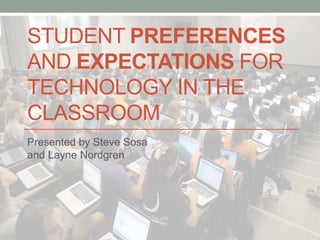






STUDENT PREFERENCES
AND EXPECTATIONS FOR
TECHNOLOGY IN THE
CLASSROOM
Presented by Steve Sosa
and Layne Nordgren
ABOUT THIS WORKSHOP
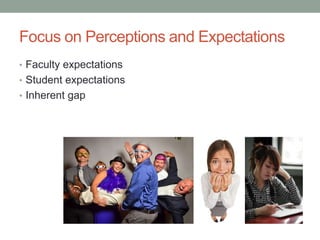
Focus on Perceptions and Expectations
• Faculty expectations
• Student expectations
• Inherent gap
Technology In the Classroom
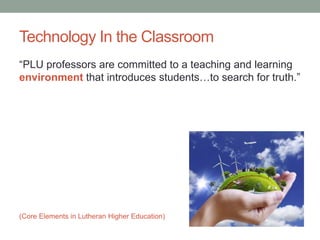
“PLU professors are committed to a teaching and learning
environment that introduces students…to search for truth.”
(Core Elements in Lutheran Higher Education)
Technology In the Classroom
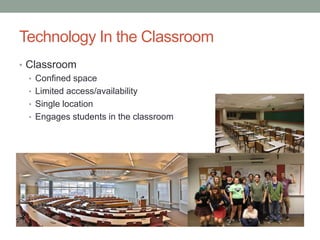
• Classroom
• Confined space
• Limited access/availability
• Single location
• Engages students in the classroom
Technology In the Classroom
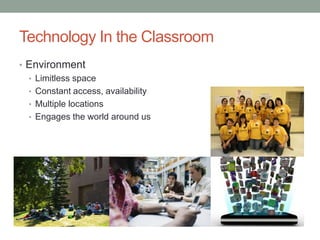
• Environment
• Limitless space
• Constant access, availability
• Multiple locations
• Engages the world around us
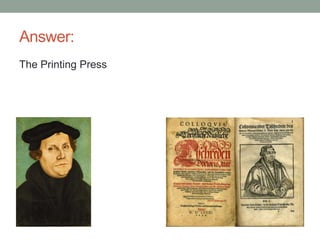
Pop Quiz:
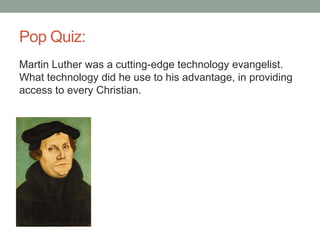
Martin Luther was a cutting-edge technology evangelist.
What technology did he use to his advantage, in providing
access to every Christian.
Answer:
The Printing Press
Advancement of Knowledge
• Collect research
• Spot trends
• Analyze data
• MISO
• ECAR
• Foster better decision making
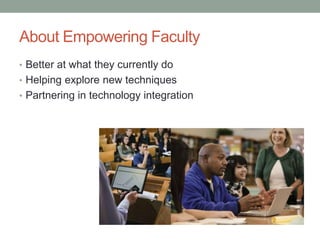
About Empowering Faculty
• Better at what they currently do
• Helping explore new techniques
• Partnering in technology integration
WHY SHOULD WE CARE
WHAT STUDENTS WANT?
Why Should We Care?
• Part of our contract
“…will do what I see will be needful, advantageous, and wholesome
for my neighbor.”
“…profound commitment to the common good.”
• Better educators, innovators, and role models
• It can make a difference
THEY’RE JUST STUDENTS
(AFTER ALL)…
Defining Attributes
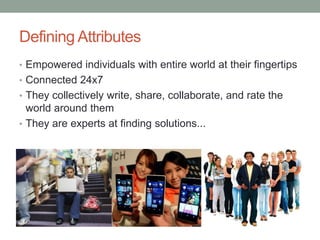
• Empowered individuals with entire world at their fingertips
• Connected 24x7
• They collectively write, share, collaborate, and rate the
world around them
• They are experts at finding solutions...
We Could Learn From Them
• Strong sense of community
• Their community is local and global
• Know people sometimes better online than in real life (IRL)
• Technology is a naturally integrated part of their lives
• Promised, “There’s an app for that.”
• They expect it
BY THE NUMBERS
A Numeric Call to Action..?
Survey Comparisons
• 184 Institutions (2012)
• Across Carnegie classes
• 10,000 Students
• No PLU students
• 98 Institutions (2005-2014)
• Primarily liberal arts
• PLU Students
• 25% sample, ~ 700
• Participation in 2012: 60.3%
BYOE
Bring Your Own Everything
ECARDatafrom:ECARStudyofUndergraduateStudentsandInformationTechnology,2012.
http://net.educause.edu/ir/library/pdf/ERS1208/ERS1208.pdfFigure4.p.13
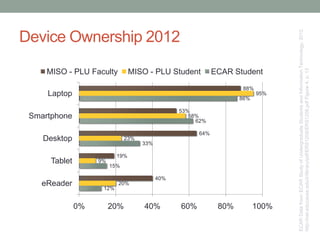
12%
15%
33%
62%
86%
20%
9%
23%
58%
95%
40%
19%
64%
53%
88%
0% 20% 40% 60% 80% 100%
eReader
Tablet
Desktop
Smartphone
Laptop
MISO - PLU Faculty MISO - PLU Student ECAR Student
Device Ownership 2012
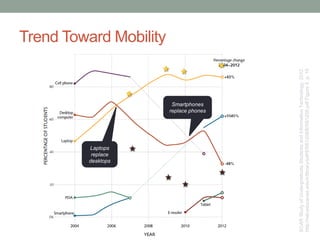
Smartphones
replace phones
Laptops
replace
desktops
ECARStudyofUndergraduateStudentsandInformationTechnology,2012.
http://net.educause.edu/ir/library/pdf/ERS1208/ERS1208.pdfFigure5.p.15
Trend Toward Mobility
ECAR:TheConsumerismofTechnologyandtheBYOEEraofHigherEducation.
http://net.educause.edu/ir/library/pdf/ERS1301/ERS1301.pdfFigure1.p.6
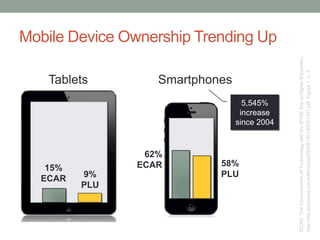
15%
ECAR 9%
PLU
62%
ECAR 58%
PLU
Tablets Smartphones
5,545%
increase
since 2004
Mobile Device Ownership Trending Up
ECAR:TheConsumerismofTechnologyandtheBYOEEraofHigherEducation.
http://net.educause.edu/ir/library/pdf/ERS1301/ERS1301.pdfFigure3.p.10
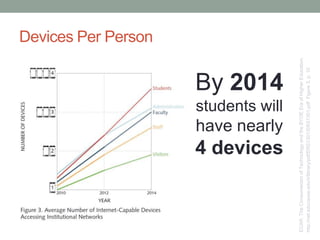
By 2014
students will
have nearly
4 devices
Devices Per Person
©2011 EDUCAUSE. CC by-nc-nd 24
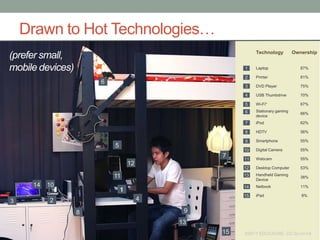
Technology Ownership
Laptop 87%
Printer 81%
DVD Player 75%
USB Thumbdrive 70%
Wi-Fi* 67%
Stationary gaming
device
66%
iPod 62%
HDTV 56%
Smartphone 55%
Digital Camera 55%
Webcam 55%
Desktop Computer 53%
Handheld Gaming
Device
38%
Netbook 11%
iPad 8%
1
8
23 4
5
7
9
10
11
12
13
14
15
1
2
3
4
5
6
7
8
9
10
11
12
13
14
15
6
©2011 EDUCAUSE. CC by-nc-nd
Drawn to Hot Technologies…
(prefer small,
mobile devices)
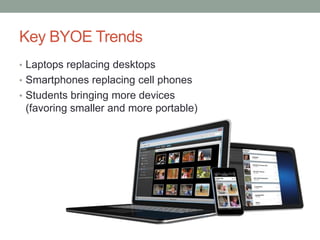
Key BYOE Trends
• Laptops replacing desktops
• Smartphones replacing cell phones
• Students bringing more devices
(favoring smaller and more portable)
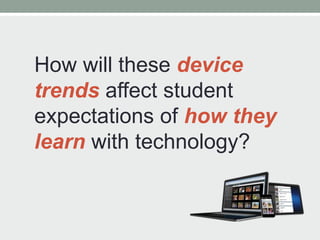
How will these device
trends affect student
expectations of how they
learn with technology?
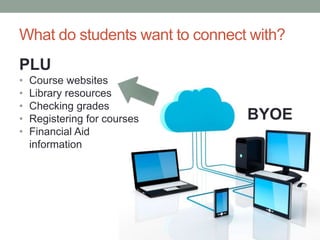
What do students want to connect with?
BYOE
PLU
• Course websites
• Library resources
• Checking grades
• Registering for courses
• Financial Aid
information
WHAT DO STUDENTS
USE THE DEVICES FOR?
Personal and Academic
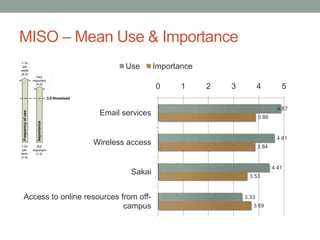
4.87
4.61
4.41
3.33
3.86
3.84
3.53
3.69
0 1 2 3 4 5
Email services
Wireless access
Sakai
Access to online resources from off-
campus
Use Importance
MISO – Mean Use & Importance
ECARStudyofUndergraduateStudentsandInformationTechnology,2012.
http://net.educause.edu/ir/library/pdf/ERS1208/ERS1208.pdfFigure4.p.13
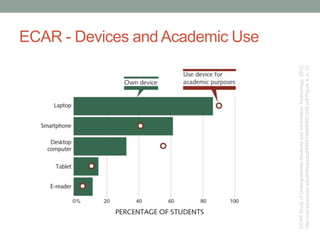
ECAR - Devices and Academic Use
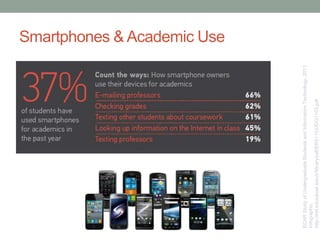
Smartphones & Academic Use
ECARStudyofUndergraduateStudentsandInformationTechnology,2011.
Infographic.
http://net.educause.edu/ir/library/pdf/ERS1103/EIG1103.pdf
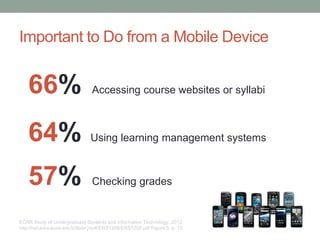
ECAR Study of Undergraduate Students and Information Technology, 2012.
http://net.educause.edu/ir/library/pdf/ERS1208/ERS1208.pdf Figure 5. p. 15
66% Accessing course websites or syllabi
64% Using learning management systems
57% Checking grades
Important to Do from a Mobile Device
HOW DO STUDENTS
PERCEIVE TECHNOLOGY
AFFECTING THEIR
ACADEMIC SUCCESS?
Technology and Student Success
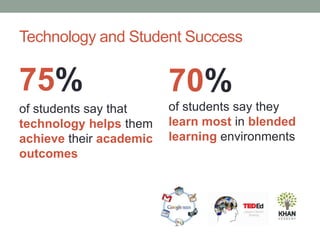
75%
of students say that
technology helps them
achieve their academic
outcomes
70%
of students say they
learn most in blended
learning environments
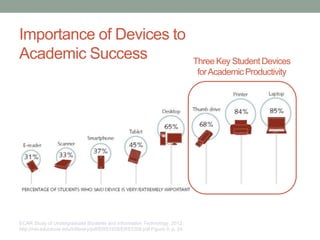
ECAR Study of Undergraduate Students and Information Technology, 2012.
http://net.educause.edu/ir/library/pdf/ERS1208/ERS1208.pdf Figure 9. p. 24
Importance of Devices to
Academic Success Three Key Student Devices
forAcademic Productivity
Line between mobile
convenience and
productivity getting
blurry…
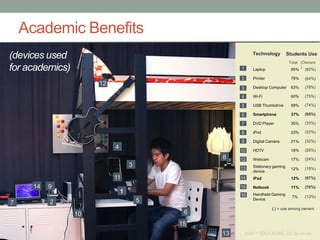
Academic Benefits
Technology
Laptop 85%
Printer 79%
Desktop Computer 63%
Wi-Fi 60%
USB Thumbdrive 59%
Smartphone 37%
DVD Player 30%
iPod 23%
Digital Camera 21%
HDTV 18%
Webcam 17%
Stationary gaming
device
12%
iPad 12%
Netbook 11%
Handheld Gaming
Device
7%
( ) = use among owners
(67%)
(70%)
(60%)
1
10
27 5
4
8
6
9
11
3
15
14
13
12
(92%)
(84%)
(78%)
(75%)
(74%)
(33%)
(22%)
(32%)
(26%)
(24%)
(15%)
(13%)
Students Use
Total (Owners
)1
2
3
4
5
6
7
8
9
10
12
13
14
15
©2011 EDUCAUSE. CC by-nc-nd
(devices used
for academics)
16
ECAR Study of Undergraduate Students and Information Technology, 2011.
http://net.educause.edu/ir/library/pdf/ERS1103/EIG1103.pdf
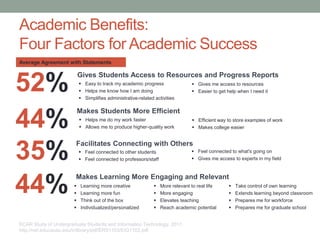
Gives Students Access to Resources and Progress Reports
 Easy to track my academic progress
 Helps me know how I am doing
 Simplifies administrative-related activities
 Gives me access to resources
 Easier to get help when I need it
Average Agreement with Statements
52%
Makes Students More Efficient
 Helps me do my work faster
 Allows me to produce higher-quality work
 Efficient way to store examples of work
 Makes college easier44%
Facilitates Connecting with Others
 Feel connected to other students
 Feel connected to professors/staff
 Feel connected to what's going on
 Gives me access to experts in my field35%
Makes Learning More Engaging and Relevant
 Learning more creative
 Learning more fun
 Think out of the box
 Individualized/personalized
 More relevant to real life
 More engaging
 Elevates teaching
 Reach academic potential
 Take control of own learning
 Extends learning beyond classroom
 Prepares me for workforce
 Prepares me for graduate school
44%
Academic Benefits:
Four Factors for Academic Success
WHAT EFFECT DOES
TECHNOLOOGY USE HAVE
ON STUDENT
ENGAGEMENT?
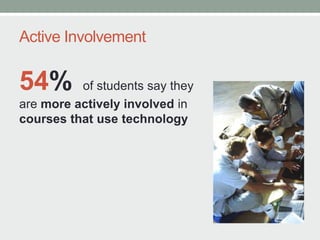
Active Involvement
54% of students say they
are more actively involved in
courses that use technology
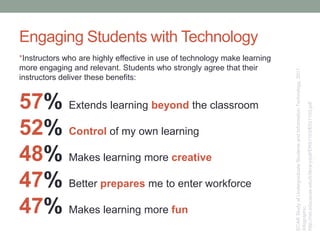
*Instructors who are highly effective in use of technology make learning
more engaging and relevant. Students who strongly agree that their
instructors deliver these benefits:
ECARStudyofUndergraduateStudentsandInformationTechnology,2011.
Infographic.
http://net.educause.edu/ir/library/pdf/ERS1103/EIG1103.pdf
Engaging Students with Technology
57% Extends learning beyond the classroom
52% Control of my own learning
48% Makes learning more creative
47% Better prepares me to enter workforce
47% Makes learning more fun
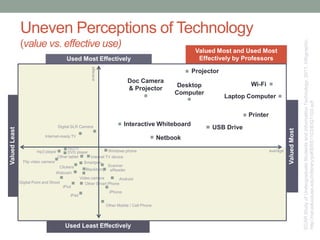
Uneven Perceptions of Technology
(value vs. effective use)
Internet TV deviceOther tablet
DVD player
Doc Camera
& Projector
Projector
Desktop
Computer
USB Drive
Printer
Laptop Computer
Wi-Fi
Interactive Whiteboard
Netbook
Digital SLR Camera
Internet-ready TV
Windows phone
HDTV
mp3 player
Flip video camera
Clickers
Blackberry
Webcam
Digital Point and Shoot
iPod
iPad
Other Mobile / Cell Phone
Android
Smartpen
Scanner
eReader
Video camera
Other Smart Phone
iPhone
Used Most Effectively
Used Least Effectively
ValuedLeast
ValuedMost
Valued Most and Used Most
Effectively by Professors
average
average
ECARStudyofUndergraduateStudentsandInformationTechnology,2011.Infographic.
http://net.educause.edu/ir/library/pdf/ERS1103/EIG1103.pdf
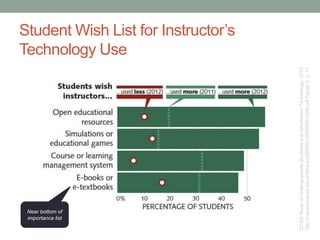
Student Wish List for Instructor’s
Technology Use
ECARStudyofUndergraduateStudentsandInformationTechnology,2012.
http://net.educause.edu/ir/library/pdf/ERS1208/ERS1208.pdfFigure3.p.11
Near bottom of
importance list
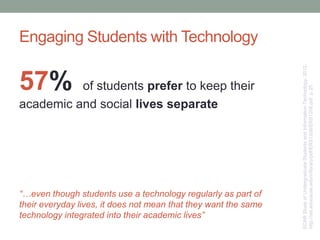
Engaging Students with Technology
57% of students prefer to keep their
academic and social lives separate
“…even though students use a technology regularly as part of
their everyday lives, it does not mean that they want the same
technology integrated into their academic lives”
ECARStudyofUndergraduateStudentsandInformationTechnology,2012.
http://net.educause.edu/ir/library/pdf/ERS1208/ERS1208.pdfp.25
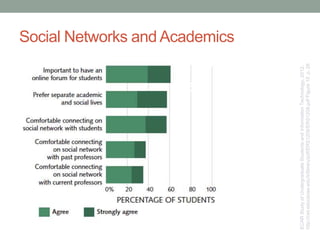
Social Networks and Academics
ECARStudyofUndergraduateStudentsandInformationTechnology,2012.
http://net.educause.edu/ir/library/pdf/ERS1208/ERS1208.pdfFigure10.p.26
57%
60%
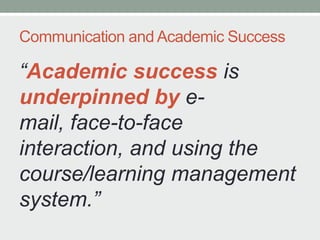
Communication and Academic Success
“Academic success is
underpinned by e-
mail, face-to-face
interaction, and using the
course/learning management
system.”
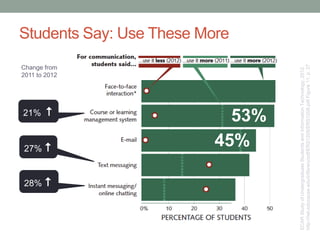
Students Say: Use These More
28% 
27% 
21% 
Change from
2011 to 2012
ECARStudyofUndergraduateStudentsandInformationTechnology,2012.
http://net.educause.edu/ir/library/pdf/ERS1208/ERS1208.pdfFigure11.p.27
53%
45%
KEY TAKEAWAYS
Key Takeaways
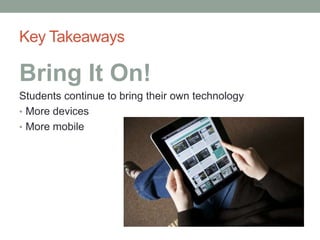
Bring It On!
Students continue to bring their own technology
• More devices
• More mobile
Key Takeaways
Students Are Shrewd
Technology Consumers
Students have strong and positive perceptions about how
technology benefits them
75% say technology helps them achieve
their academic outcomes
Key Takeaways
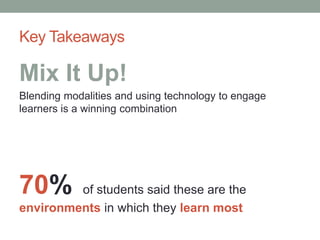
Mix It Up!
Blending modalities and using technology to engage
learners is a winning combination
70% of students said these are the
environments in which they learn most
HOW DO WE RESPOND
AS AN INSTITUTION?
How will you respond as an individual?
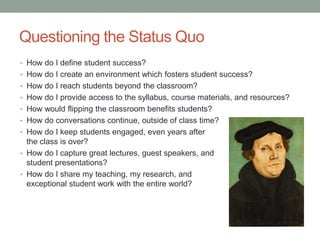
Questioning the Status Quo
• How do I define student success?
• How do I create an environment which fosters student success?
• How do I reach students beyond the classroom?
• How do I provide access to the syllabus, course materials, and resources?
• How would flipping the classroom benefits students?
• How do conversations continue, outside of class time?
• How do I keep students engaged, even years after
the class is over?
• How do I capture great lectures, guest speakers, and
student presentations?
• How do I share my teaching, my research, and
exceptional student work with the entire world?
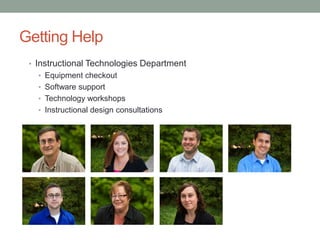
Getting Help
• Instructional Technologies Department
• Equipment checkout
• Software support
• Technology workshops
• Instructional design consultations
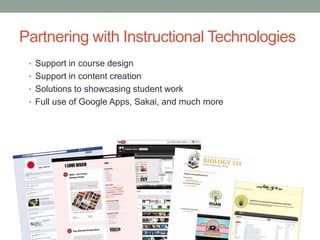
Partnering with Instructional Technologies
• Support in course design
• Support in content creation
• Solutions to showcasing student work
• Full use of Google Apps, Sakai, and much more
Seeking Out Your Peers
• Office of Professional Development
• Peer faculty across PLU
NOW, KNOWING THESE
PREFERENCES, WHAT
WILL I DO WITH THIS
INFORMATION?
THANK YOU.
El Fin.
Resources
• ECAR Study Undergraduate Students & Information Technology, 2012.
http://net.educause.edu/ir/library/pdf/ERS1208/ERS1208.pdf
• ECAR Study of Undergraduate Students & Information Technology, 2011
http://www.educause.edu/library/resources/ecar-national-study-undergraduate-students-and-
information-technology-2011-report
• ECAR: The Consumerism of Technology and the Bring-Your-Own-Everything
(BYOE) Era of Higher Education.
http://net.educause.edu/ir/library/pdf/ERS1301/ERS1301.pdf
• MISO Survey
http://www.misosurvey.org/
• Seven Principles at WPI: Technology as a Lever
http://wp.wpi.edu/atc-ttl/2012/02/09/seven-principles-at-wpi-technology-as-a-lever/
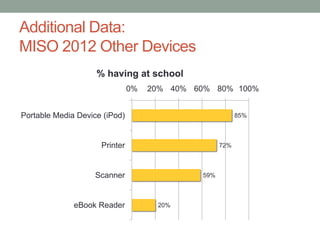
Additional Data:
MISO 2012 Other Devices
85%
72%
59%
20%
0% 20% 40% 60% 80% 100%
Portable Media Device (iPod)
Printer
Scanner
eBook Reader
% having at school
Additional Data:
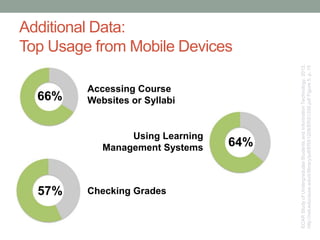
Top Usage from Mobile Devices
ECARStudyofUndergraduateStudentsandInformationTechnology,2012.
http://net.educause.edu/ir/library/pdf/ERS1208/ERS1208.pdfFigure5.p.15
Accessing Course
Websites or Syllabi
64%
Using Learning
Management Systems
Checking Grades
66%
57%
Additional Data:
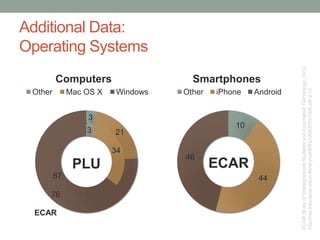
Operating Systems
ECARStudyofUndergraduateStudentsandInformationTechnology,2012.
http://net.educause.edu/ir/library/pdf/ERS1208/ERS1208.pdfp.13
3
34
67
3
21
76
Other Mac OS X Windows
10
44
46
Other iPhone Android
SmartphonesComputers
PLU
ECAR
ECAR
Additional Data:
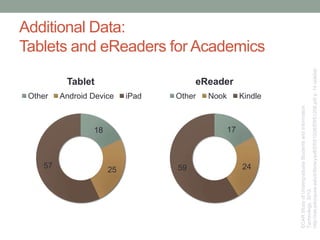
Tablets and eReaders for Academics
ECARStudyofUndergraduateStudentsandInformation
Technology,2012.
http://net.educause.edu/ir/library/pdf/ERS1208/ERS1208.pdfp.14sidebar
18
25
57
Tablet
Other Android Device iPad
17
2459
eReader
Other Nook Kindle
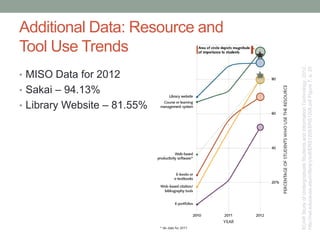
• MISO Data for 2012
• Sakai – 94.13%
• Library Website – 81.55%
ECARStudyofUndergraduateStudentsandInformationTechnology,2012.
http://net.educause.edu/ir/library/pdf/ERS1208/ERS1208.pdfFigure7.p.20
Additional Data: Resource and
Tool Use Trends
59%
54%
56%
48%
46%
47%
45%
43%
44%
41%
41%
37%
37%
37%
35%
35%
33%
31%
33%
31%
31%
30%
30%
29%
29%
23%
26%
22%
30%
30%
27%
29%
31%
29%
31%
28%
30%
29%
29%
30%
30%
30%
30%
27%
29%
27%
27%
27%
27%
27%
82%
80%
78%
78%
76%
74%
74%
74%
73%
72%
69%
67%
66%
66%
65%
65%
63%
61%
60%
60%
58%
57%
57%
56%
56%
5 (out of 5)
4 (out of 5)
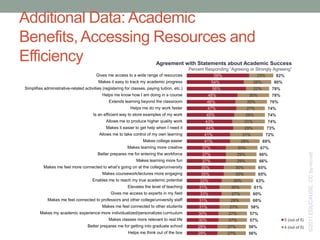
Gives me access to a wide range of resources
Makes it easy to track my academic progress
Simplifies administrative-related activities (registering for classes, paying tuition, etc.)
Helps me know how I am doing in a course
Extends learning beyond the classroom
Helps me do my work faster
Is an efficient way to store examples of my work
Allows me to produce higher quality work
Makes it easier to get help when I need it
Allows me to take control of my own learning
Makes college easier
Makes learning more creative
Better prepares me for entering the workforce
Makes learning more fun
Makes me feel more connected to what’s going on at the college/university
Makes coursework/lectures more engaging
Enables me to reach my true academic potential
Elevates the level of teaching
Gives me access to experts in my field
Makes me feel connected to professors and other college/university staff
Makes me feel connected to other students
Makes my academic experience more individualized/personalizes curriculum
Makes classes more relevant to real life
Better prepares me for getting into graduate school
Helps me think out of the box
Agreement with Statements about Academic Success
Percent Responding “Agreeing or Strongly Agreeing”
Additional Data: Academic
Benefits, Accessing Resources and
Efficiency
©2011EDUCAUSE.CCby-nc-nd
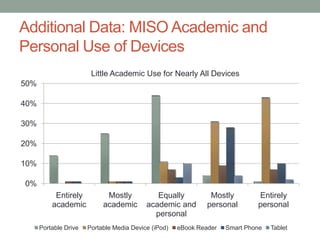
0%
10%
20%
30%
40%
50%
Entirely
academic
Mostly
academic
Equally
academic and
personal
Mostly
personal
Entirely
personal
Portable Drive Portable Media Device (iPod) eBook Reader Smart Phone Tablet
Little Academic Use for Nearly All Devices
Additional Data: MISO Academic and
Personal Use of Devices
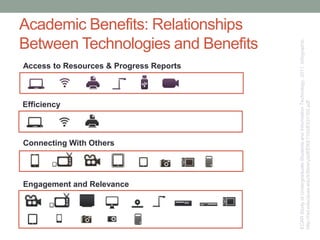
Academic Benefits: Relationships
Between Technologies and Benefits
Access to Resources & Progress Reports
ECARStudyofUndergraduateStudentsandInformationTechnology,2011.Infographic.
http://net.educause.edu/ir/library/pdf/ERS1103/EIG1103.pdf
Engagement and Relevance
Connecting With Others
Efficiency
THE END.
No, Really.

PLU: Student Preferences for Tech in the Classroom

  • 1.
    STUDENT PREFERENCES AND EXPECTATIONSFOR TECHNOLOGY IN THE CLASSROOM Presented by Steve Sosa and Layne Nordgren
  • 2.
  • 3.
    Focus on Perceptionsand Expectations • Faculty expectations • Student expectations • Inherent gap
  • 4.
    Technology In theClassroom “PLU professors are committed to a teaching and learning environment that introduces students…to search for truth.” (Core Elements in Lutheran Higher Education)
  • 5.
    Technology In theClassroom • Classroom • Confined space • Limited access/availability • Single location • Engages students in the classroom
  • 6.
    Technology In theClassroom • Environment • Limitless space • Constant access, availability • Multiple locations • Engages the world around us
  • 7.
    Pop Quiz: Martin Lutherwas a cutting-edge technology evangelist. What technology did he use to his advantage, in providing access to every Christian.
  • 8.
  • 9.
    Advancement of Knowledge •Collect research • Spot trends • Analyze data • MISO • ECAR • Foster better decision making
  • 10.
    About Empowering Faculty •Better at what they currently do • Helping explore new techniques • Partnering in technology integration
  • 11.
    WHY SHOULD WECARE WHAT STUDENTS WANT?
  • 12.
    Why Should WeCare? • Part of our contract “…will do what I see will be needful, advantageous, and wholesome for my neighbor.” “…profound commitment to the common good.” • Better educators, innovators, and role models • It can make a difference
  • 13.
  • 14.
    Defining Attributes • Empoweredindividuals with entire world at their fingertips • Connected 24x7 • They collectively write, share, collaborate, and rate the world around them • They are experts at finding solutions...
  • 16.
    We Could LearnFrom Them • Strong sense of community • Their community is local and global • Know people sometimes better online than in real life (IRL) • Technology is a naturally integrated part of their lives • Promised, “There’s an app for that.” • They expect it
  • 17.
    BY THE NUMBERS ANumeric Call to Action..?
  • 18.
    Survey Comparisons • 184Institutions (2012) • Across Carnegie classes • 10,000 Students • No PLU students • 98 Institutions (2005-2014) • Primarily liberal arts • PLU Students • 25% sample, ~ 700 • Participation in 2012: 60.3%
  • 19.
  • 20.
  • 21.
  • 22.
  • 23.
  • 24.
    ©2011 EDUCAUSE. CCby-nc-nd 24 Technology Ownership Laptop 87% Printer 81% DVD Player 75% USB Thumbdrive 70% Wi-Fi* 67% Stationary gaming device 66% iPod 62% HDTV 56% Smartphone 55% Digital Camera 55% Webcam 55% Desktop Computer 53% Handheld Gaming Device 38% Netbook 11% iPad 8% 1 8 23 4 5 7 9 10 11 12 13 14 15 1 2 3 4 5 6 7 8 9 10 11 12 13 14 15 6 ©2011 EDUCAUSE. CC by-nc-nd Drawn to Hot Technologies… (prefer small, mobile devices)
  • 25.
    Key BYOE Trends •Laptops replacing desktops • Smartphones replacing cell phones • Students bringing more devices (favoring smaller and more portable)
  • 26.
    How will thesedevice trends affect student expectations of how they learn with technology?
  • 27.
    What do studentswant to connect with? BYOE PLU • Course websites • Library resources • Checking grades • Registering for courses • Financial Aid information
  • 28.
    WHAT DO STUDENTS USETHE DEVICES FOR? Personal and Academic
  • 29.
    4.87 4.61 4.41 3.33 3.86 3.84 3.53 3.69 0 1 23 4 5 Email services Wireless access Sakai Access to online resources from off- campus Use Importance MISO – Mean Use & Importance
  • 30.
  • 31.
    Smartphones & AcademicUse ECARStudyofUndergraduateStudentsandInformationTechnology,2011. Infographic. http://net.educause.edu/ir/library/pdf/ERS1103/EIG1103.pdf
  • 32.
    ECAR Study ofUndergraduate Students and Information Technology, 2012. http://net.educause.edu/ir/library/pdf/ERS1208/ERS1208.pdf Figure 5. p. 15 66% Accessing course websites or syllabi 64% Using learning management systems 57% Checking grades Important to Do from a Mobile Device
  • 33.
    HOW DO STUDENTS PERCEIVETECHNOLOGY AFFECTING THEIR ACADEMIC SUCCESS?
  • 34.
    Technology and StudentSuccess 75% of students say that technology helps them achieve their academic outcomes 70% of students say they learn most in blended learning environments
  • 35.
    ECAR Study ofUndergraduate Students and Information Technology, 2012. http://net.educause.edu/ir/library/pdf/ERS1208/ERS1208.pdf Figure 9. p. 24 Importance of Devices to Academic Success Three Key Student Devices forAcademic Productivity
  • 36.
    Line between mobile convenienceand productivity getting blurry…
  • 37.
    Academic Benefits Technology Laptop 85% Printer79% Desktop Computer 63% Wi-Fi 60% USB Thumbdrive 59% Smartphone 37% DVD Player 30% iPod 23% Digital Camera 21% HDTV 18% Webcam 17% Stationary gaming device 12% iPad 12% Netbook 11% Handheld Gaming Device 7% ( ) = use among owners (67%) (70%) (60%) 1 10 27 5 4 8 6 9 11 3 15 14 13 12 (92%) (84%) (78%) (75%) (74%) (33%) (22%) (32%) (26%) (24%) (15%) (13%) Students Use Total (Owners )1 2 3 4 5 6 7 8 9 10 12 13 14 15 ©2011 EDUCAUSE. CC by-nc-nd (devices used for academics) 16
  • 38.
    ECAR Study ofUndergraduate Students and Information Technology, 2011. http://net.educause.edu/ir/library/pdf/ERS1103/EIG1103.pdf Gives Students Access to Resources and Progress Reports  Easy to track my academic progress  Helps me know how I am doing  Simplifies administrative-related activities  Gives me access to resources  Easier to get help when I need it Average Agreement with Statements 52% Makes Students More Efficient  Helps me do my work faster  Allows me to produce higher-quality work  Efficient way to store examples of work  Makes college easier44% Facilitates Connecting with Others  Feel connected to other students  Feel connected to professors/staff  Feel connected to what's going on  Gives me access to experts in my field35% Makes Learning More Engaging and Relevant  Learning more creative  Learning more fun  Think out of the box  Individualized/personalized  More relevant to real life  More engaging  Elevates teaching  Reach academic potential  Take control of own learning  Extends learning beyond classroom  Prepares me for workforce  Prepares me for graduate school 44% Academic Benefits: Four Factors for Academic Success
  • 39.
    WHAT EFFECT DOES TECHNOLOOGYUSE HAVE ON STUDENT ENGAGEMENT?
  • 40.
    Active Involvement 54% ofstudents say they are more actively involved in courses that use technology
  • 41.
    *Instructors who arehighly effective in use of technology make learning more engaging and relevant. Students who strongly agree that their instructors deliver these benefits: ECARStudyofUndergraduateStudentsandInformationTechnology,2011. Infographic. http://net.educause.edu/ir/library/pdf/ERS1103/EIG1103.pdf Engaging Students with Technology 57% Extends learning beyond the classroom 52% Control of my own learning 48% Makes learning more creative 47% Better prepares me to enter workforce 47% Makes learning more fun
  • 42.
    Uneven Perceptions ofTechnology (value vs. effective use) Internet TV deviceOther tablet DVD player Doc Camera & Projector Projector Desktop Computer USB Drive Printer Laptop Computer Wi-Fi Interactive Whiteboard Netbook Digital SLR Camera Internet-ready TV Windows phone HDTV mp3 player Flip video camera Clickers Blackberry Webcam Digital Point and Shoot iPod iPad Other Mobile / Cell Phone Android Smartpen Scanner eReader Video camera Other Smart Phone iPhone Used Most Effectively Used Least Effectively ValuedLeast ValuedMost Valued Most and Used Most Effectively by Professors average average ECARStudyofUndergraduateStudentsandInformationTechnology,2011.Infographic. http://net.educause.edu/ir/library/pdf/ERS1103/EIG1103.pdf
  • 43.
    Student Wish Listfor Instructor’s Technology Use ECARStudyofUndergraduateStudentsandInformationTechnology,2012. http://net.educause.edu/ir/library/pdf/ERS1208/ERS1208.pdfFigure3.p.11 Near bottom of importance list
  • 44.
    Engaging Students withTechnology 57% of students prefer to keep their academic and social lives separate “…even though students use a technology regularly as part of their everyday lives, it does not mean that they want the same technology integrated into their academic lives” ECARStudyofUndergraduateStudentsandInformationTechnology,2012. http://net.educause.edu/ir/library/pdf/ERS1208/ERS1208.pdfp.25
  • 45.
    Social Networks andAcademics ECARStudyofUndergraduateStudentsandInformationTechnology,2012. http://net.educause.edu/ir/library/pdf/ERS1208/ERS1208.pdfFigure10.p.26 57% 60%
  • 46.
    Communication and AcademicSuccess “Academic success is underpinned by e- mail, face-to-face interaction, and using the course/learning management system.”
  • 47.
    Students Say: UseThese More 28%  27%  21%  Change from 2011 to 2012 ECARStudyofUndergraduateStudentsandInformationTechnology,2012. http://net.educause.edu/ir/library/pdf/ERS1208/ERS1208.pdfFigure11.p.27 53% 45%
  • 48.
  • 49.
    Key Takeaways Bring ItOn! Students continue to bring their own technology • More devices • More mobile
  • 50.
    Key Takeaways Students AreShrewd Technology Consumers Students have strong and positive perceptions about how technology benefits them 75% say technology helps them achieve their academic outcomes
  • 51.
    Key Takeaways Mix ItUp! Blending modalities and using technology to engage learners is a winning combination 70% of students said these are the environments in which they learn most
  • 52.
    HOW DO WERESPOND AS AN INSTITUTION? How will you respond as an individual?
  • 53.
    Questioning the StatusQuo • How do I define student success? • How do I create an environment which fosters student success? • How do I reach students beyond the classroom? • How do I provide access to the syllabus, course materials, and resources? • How would flipping the classroom benefits students? • How do conversations continue, outside of class time? • How do I keep students engaged, even years after the class is over? • How do I capture great lectures, guest speakers, and student presentations? • How do I share my teaching, my research, and exceptional student work with the entire world?
  • 54.
    Getting Help • InstructionalTechnologies Department • Equipment checkout • Software support • Technology workshops • Instructional design consultations
  • 55.
    Partnering with InstructionalTechnologies • Support in course design • Support in content creation • Solutions to showcasing student work • Full use of Google Apps, Sakai, and much more
  • 56.
    Seeking Out YourPeers • Office of Professional Development • Peer faculty across PLU
  • 57.
    NOW, KNOWING THESE PREFERENCES,WHAT WILL I DO WITH THIS INFORMATION?
  • 58.
  • 59.
    Resources • ECAR StudyUndergraduate Students & Information Technology, 2012. http://net.educause.edu/ir/library/pdf/ERS1208/ERS1208.pdf • ECAR Study of Undergraduate Students & Information Technology, 2011 http://www.educause.edu/library/resources/ecar-national-study-undergraduate-students-and- information-technology-2011-report • ECAR: The Consumerism of Technology and the Bring-Your-Own-Everything (BYOE) Era of Higher Education. http://net.educause.edu/ir/library/pdf/ERS1301/ERS1301.pdf • MISO Survey http://www.misosurvey.org/ • Seven Principles at WPI: Technology as a Lever http://wp.wpi.edu/atc-ttl/2012/02/09/seven-principles-at-wpi-technology-as-a-lever/
  • 60.
    Additional Data: MISO 2012Other Devices 85% 72% 59% 20% 0% 20% 40% 60% 80% 100% Portable Media Device (iPod) Printer Scanner eBook Reader % having at school
  • 61.
    Additional Data: Top Usagefrom Mobile Devices ECARStudyofUndergraduateStudentsandInformationTechnology,2012. http://net.educause.edu/ir/library/pdf/ERS1208/ERS1208.pdfFigure5.p.15 Accessing Course Websites or Syllabi 64% Using Learning Management Systems Checking Grades 66% 57%
  • 62.
  • 63.
    Additional Data: Tablets andeReaders for Academics ECARStudyofUndergraduateStudentsandInformation Technology,2012. http://net.educause.edu/ir/library/pdf/ERS1208/ERS1208.pdfp.14sidebar 18 25 57 Tablet Other Android Device iPad 17 2459 eReader Other Nook Kindle
  • 64.
    • MISO Datafor 2012 • Sakai – 94.13% • Library Website – 81.55% ECARStudyofUndergraduateStudentsandInformationTechnology,2012. http://net.educause.edu/ir/library/pdf/ERS1208/ERS1208.pdfFigure7.p.20 Additional Data: Resource and Tool Use Trends
  • 65.
    59% 54% 56% 48% 46% 47% 45% 43% 44% 41% 41% 37% 37% 37% 35% 35% 33% 31% 33% 31% 31% 30% 30% 29% 29% 23% 26% 22% 30% 30% 27% 29% 31% 29% 31% 28% 30% 29% 29% 30% 30% 30% 30% 27% 29% 27% 27% 27% 27% 27% 82% 80% 78% 78% 76% 74% 74% 74% 73% 72% 69% 67% 66% 66% 65% 65% 63% 61% 60% 60% 58% 57% 57% 56% 56% 5 (out of5) 4 (out of 5) Gives me access to a wide range of resources Makes it easy to track my academic progress Simplifies administrative-related activities (registering for classes, paying tuition, etc.) Helps me know how I am doing in a course Extends learning beyond the classroom Helps me do my work faster Is an efficient way to store examples of my work Allows me to produce higher quality work Makes it easier to get help when I need it Allows me to take control of my own learning Makes college easier Makes learning more creative Better prepares me for entering the workforce Makes learning more fun Makes me feel more connected to what’s going on at the college/university Makes coursework/lectures more engaging Enables me to reach my true academic potential Elevates the level of teaching Gives me access to experts in my field Makes me feel connected to professors and other college/university staff Makes me feel connected to other students Makes my academic experience more individualized/personalizes curriculum Makes classes more relevant to real life Better prepares me for getting into graduate school Helps me think out of the box Agreement with Statements about Academic Success Percent Responding “Agreeing or Strongly Agreeing” Additional Data: Academic Benefits, Accessing Resources and Efficiency ©2011EDUCAUSE.CCby-nc-nd
  • 66.
    0% 10% 20% 30% 40% 50% Entirely academic Mostly academic Equally academic and personal Mostly personal Entirely personal Portable DrivePortable Media Device (iPod) eBook Reader Smart Phone Tablet Little Academic Use for Nearly All Devices Additional Data: MISO Academic and Personal Use of Devices
  • 67.
    Academic Benefits: Relationships BetweenTechnologies and Benefits Access to Resources & Progress Reports ECARStudyofUndergraduateStudentsandInformationTechnology,2011.Infographic. http://net.educause.edu/ir/library/pdf/ERS1103/EIG1103.pdf Engagement and Relevance Connecting With Others Efficiency
  • 68.

Editor's Notes

  • #8 Need to buy reward gift!
  • #9 Need to buy reward gift!
  • #21 ANIMATED
  • #22 ANIMATED
  • #23 ANIMATED
  • #25 Students are still attached to “standard issue” technology. A majority of students own a printer (81%), a DVD player (75%), a stationary gaming device (66%), an HDTV (56%), and a desktop computer (53%). Graphic depicts 15 of the 34 devices that students were asked about owning.
  • #30 ANIMATED
  • #33 ANIMATED
  • #36 Tech has a democratizing effectBy providing access to info on demandThe effect can be harnessed when “access to info” is streamlined THEORETICALLY creating a scenario where students have more time to “use the info”75% say tech helps them achieve their ac outcomes, 75% say it preps them for future ed plans, 63% say it prepares them for the workforceWinning tech trifecta:Laptops – to producePrinters – review and submitThumb drives – to transport and share
  • #38 Small, mobile devices (laptops, smartphones, iPads, thumbdrives, and netbooks) as well as traditional devices (printers, desktops, Wi-Fi access) are used for academic work.
  • #39 Explaining how factor analysis was used to identify benefits of technology in academic success:A statistical technique used to reduce a large number of attributes into a smaller set of “factors” based on response patterns.A factor consists of a number of attributes that are rated in a similar way.Factor analysis is extremely useful when dealing with a very large number of attributes that would be cumbersome to analyze individually.The names of the factors are subjective and are intended to describe the common theme shared by all of the attributes within that factor.
  • #43 Students who rate their instructors as highly effective in their use of technology are significantly more likely to agree that technology delivers substantial benefits to their academic experience. These benefits include basic access to resources and information, simpler administrative activities, and increased productivity. These benefits extend to more transformative learning experiences, such as extended learning beyond the classroom; better preparation for the workforce; more creative, engaging and fun experiences; and the capacity to reach their true academic potential.Not surprisingly, students at doctoral institutions believe that they are experiencing more of technology’s benefits.
  • #48 ANIMATEDStudents want to interact with instructors using direct forms of interaction (f2f, email) and the cms/LMSEven students for who have taken online courses 8 out of 10 say F2F interaction is very/extremely importantDon’t know if they consider f2f as physically f2f or f2f 1:1 interaction remotelyEmail provides a passive, but highly documentable way to connect with instructorsEmail topped this list in 2011…didn’t ask about F2F
  • #66 The major academic benefits of technology, in decreasing magnitude of students’ experience, encompass four areas.Above all else, technology makes it easier to access a wide range of resources, track academic progress, dispense with administrative tasks, and work faster.
  • #67 Little academic use of mobile device… lack of useful academic opportunities? Show of hands of those integrating mobile devices?
  • #68 Continuing with the factor analysis, there are relationships between selected technologies and certain benefits.