Network	
  Mul,tenancy	
  in	
  Xen-­‐
based	
  Clouds	
  
Chiradeep	
  Vi;al	
  
CloudStack	
  Commi;er	
  
Citrix	
  Systems	
  
@chiradeep	
  
Sep	
  18	
  2013	


Agenda	
  
•  Introduc,on	
  to	
  CloudStack	
  	
  
•  Mul,-­‐tenant	
  IAAS	
  	
  
•  Network	
  Virtualiza,on	
  /	
  SDN	
  
•  L3	
  isola,on	
  
•  CloudStack’s	
  Network	
  Model	
  
•  CloudStack’s	
  na,ve	
  SDN	
  approach	
  
!
•  Product from Cloud.com /
Citrix (thru acquisition)!
•  Open Source since May 2010!
•  Donated by Citrix to the ASF
(Apr 2012)!
•  Graduated as Top-level
Project in March 2013!
•  In production since 2009!
•  Tons of deployments,
including large-scale
commercial ones!
Apache	
  CloudStack	
  
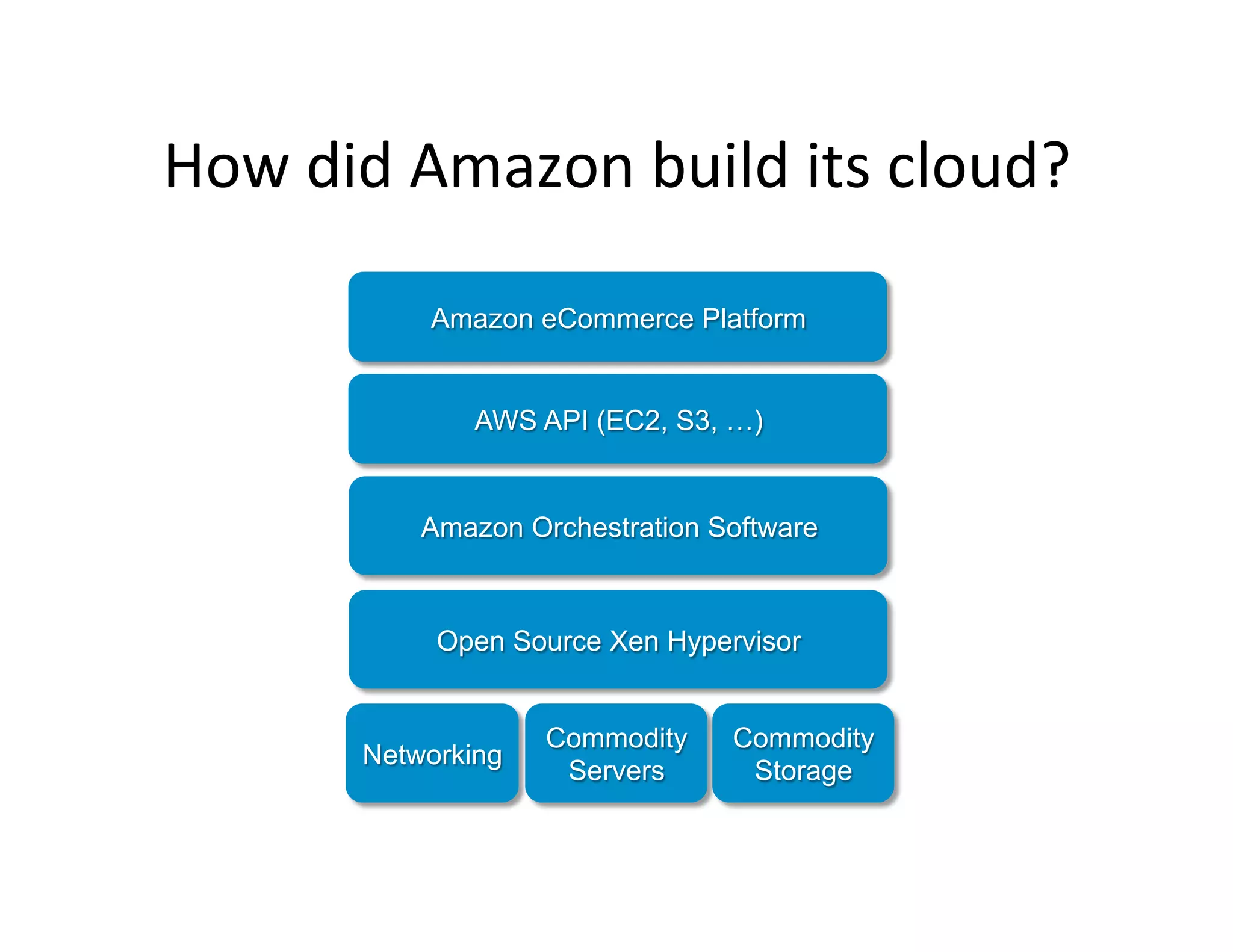
How	
  did	
  Amazon	
  build	
  its	
  cloud?	
  
Commodity
Servers
Commodity
Storage
Networking
Open Source Xen Hypervisor
Amazon Orchestration Software
AWS API (EC2, S3, …)
Amazon eCommerce Platform
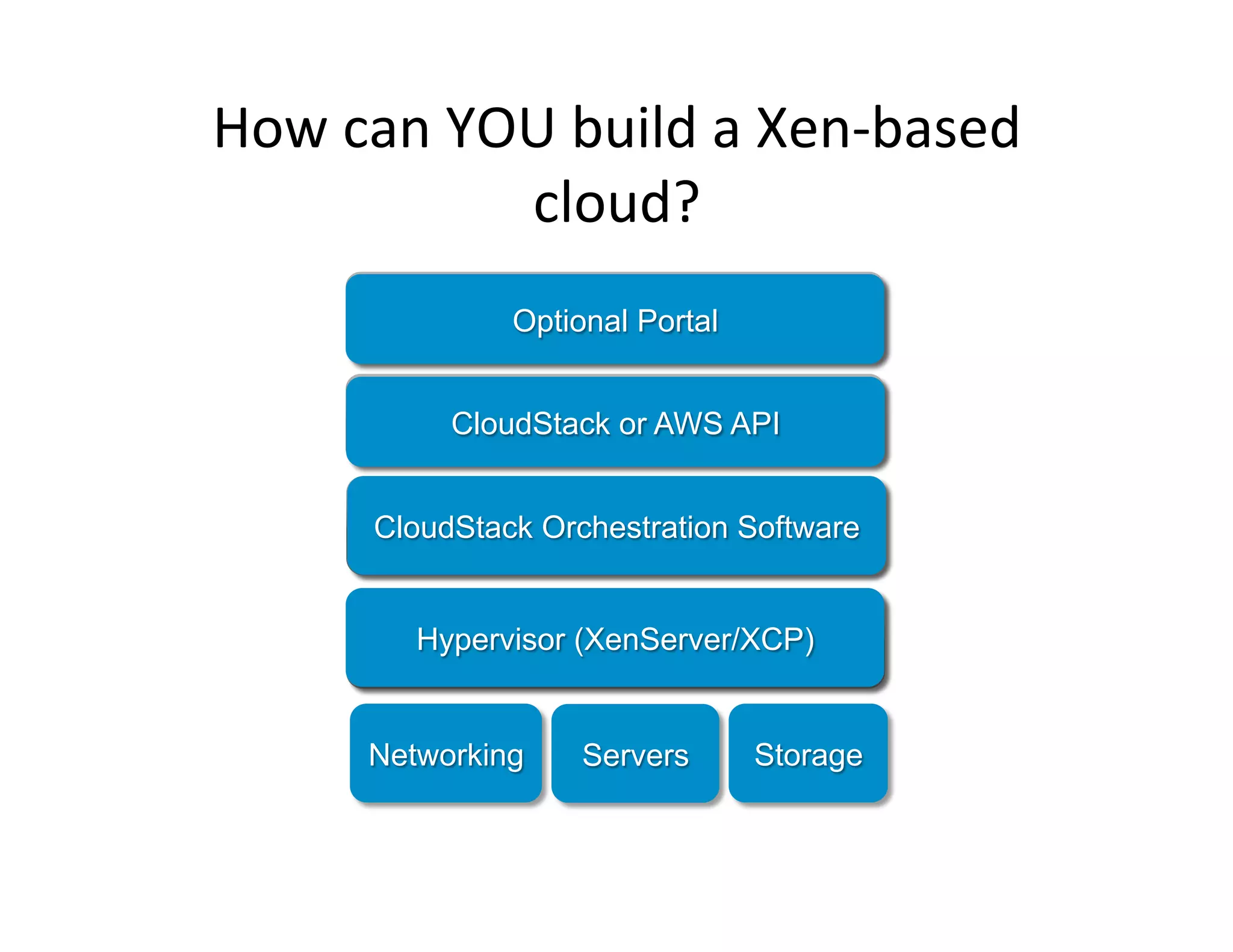
How	
  can	
  YOU	
  build	
  a	
  Xen-­‐based	
  
cloud?	
  
Servers StorageNetworking
Open Source Xen Hypervisor
Amazon Orchestration Software
AWS API (EC2, S3, …)
Amazon eCommerce Platform
Hypervisor (XenServer/XCP)
CloudStack Orchestration Software
Optional Portal
CloudStack or AWS API
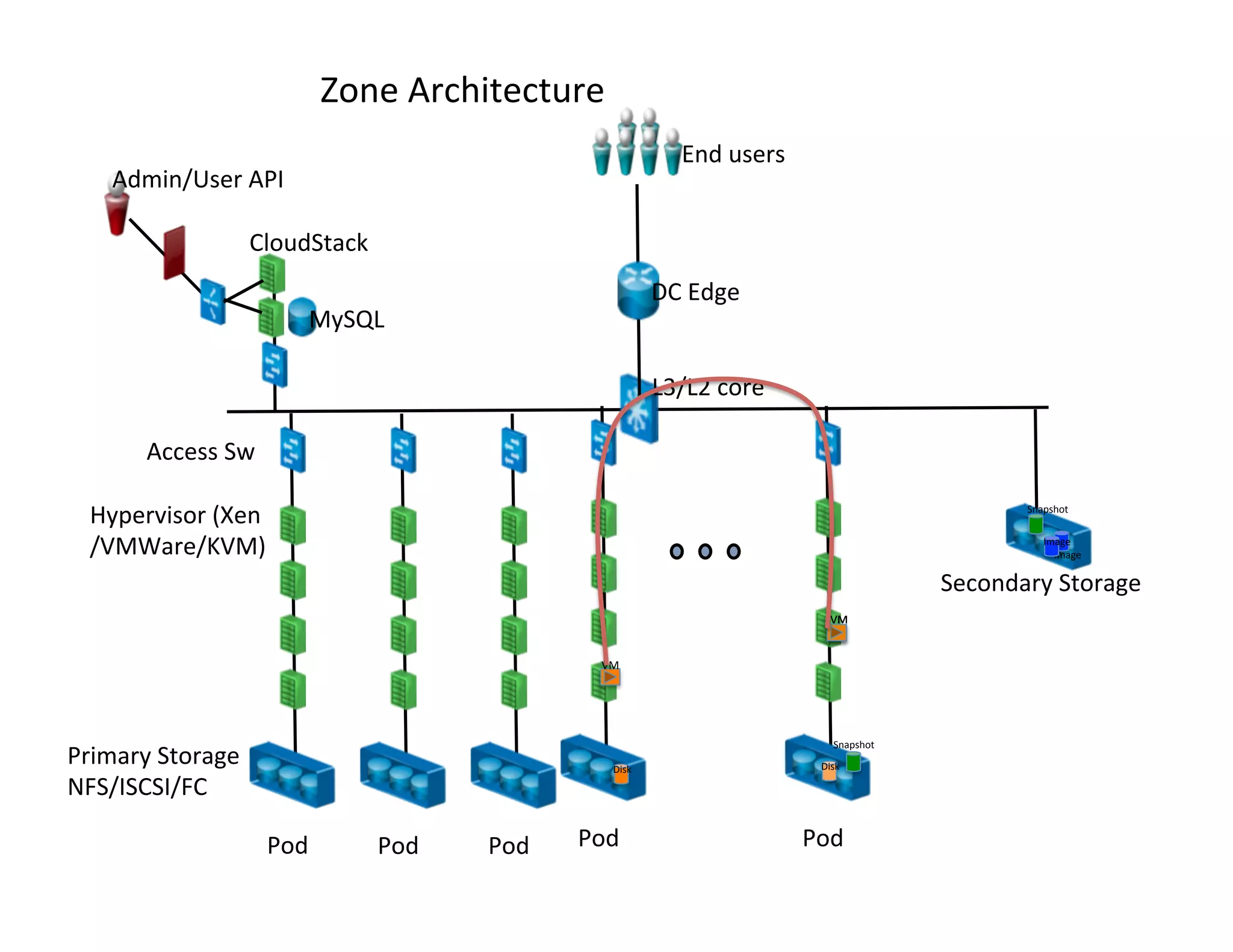
Secondary	
  Storage	
  
Image	
  
L3/L2	
  core	
  	
  
DC	
  Edge	
  
End	
  users	
  
Pod	
   Pod	
   Pod	
   Pod	
  
Zone	
  Architecture	
  
Pod	
  
Access	
  Sw	
  
MySQL	
  
CloudStack	
  
Admin/User	
  API	
  
Primary	
  Storage	
  
NFS/ISCSI/FC	
  
Hypervisor	
  (Xen	
  
/VMWare/KVM)	
  
VM	
  
VM	
  
Snapshot	
  
Snapshot	
  
Image	
  
Disk	
   Disk	
  
VM	
  
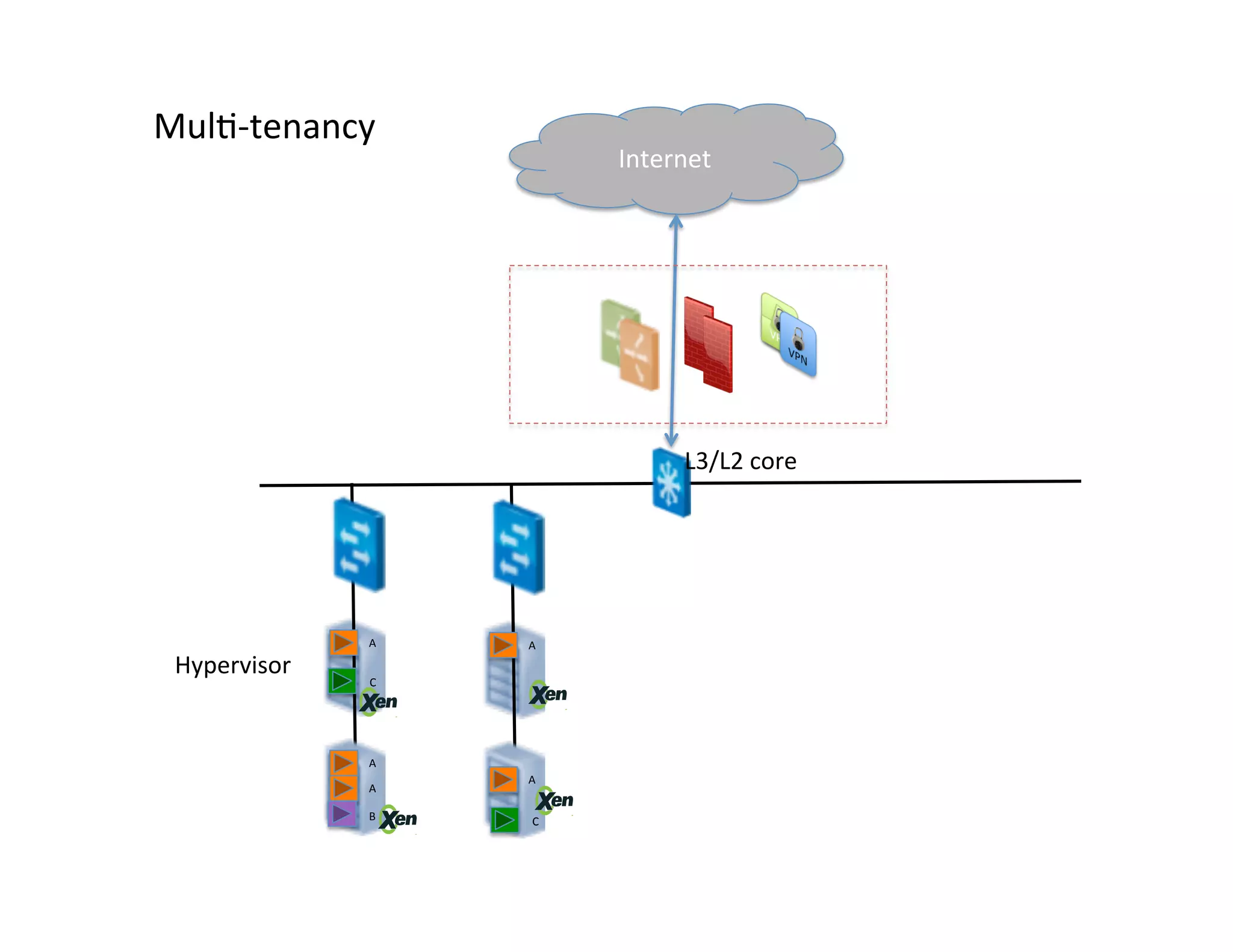
L3/L2	
  core	
  	
  
Mul,-­‐tenancy	
  
Hypervisor	
  
A	
  
C	
  
A	
  
B	
  
A	
  
C	
  
A	
  
A	
  
Internet	
  
Mul,-­‐,er	
  virtual	
  networking	
  
!
Virtual appliance/!
Hardware Devices!
Customer!
Premises!
IPSec or SSL site-to-site VPN!
Internet!
Network Services!
•  IPAM!
•  DNS!
•  LB [intra]!
•  S-2-S VPN!
•  Static Routes!
•  ACLs!
•  NAT, PF!
•  FW [ingress & egress]!
Loadbalancer
(virtual or HW)!
MPLS VLAN!
Web VM
1!
Web VM
2!
Web VM
3!
Web VM
4!
Web subnet !
10.1.1.0/24!
App subnet
10.1.2.0/24!
App VM
1!
App VM
2!
DB Subnet!
10.1.3.0/24!
DB VM
1!
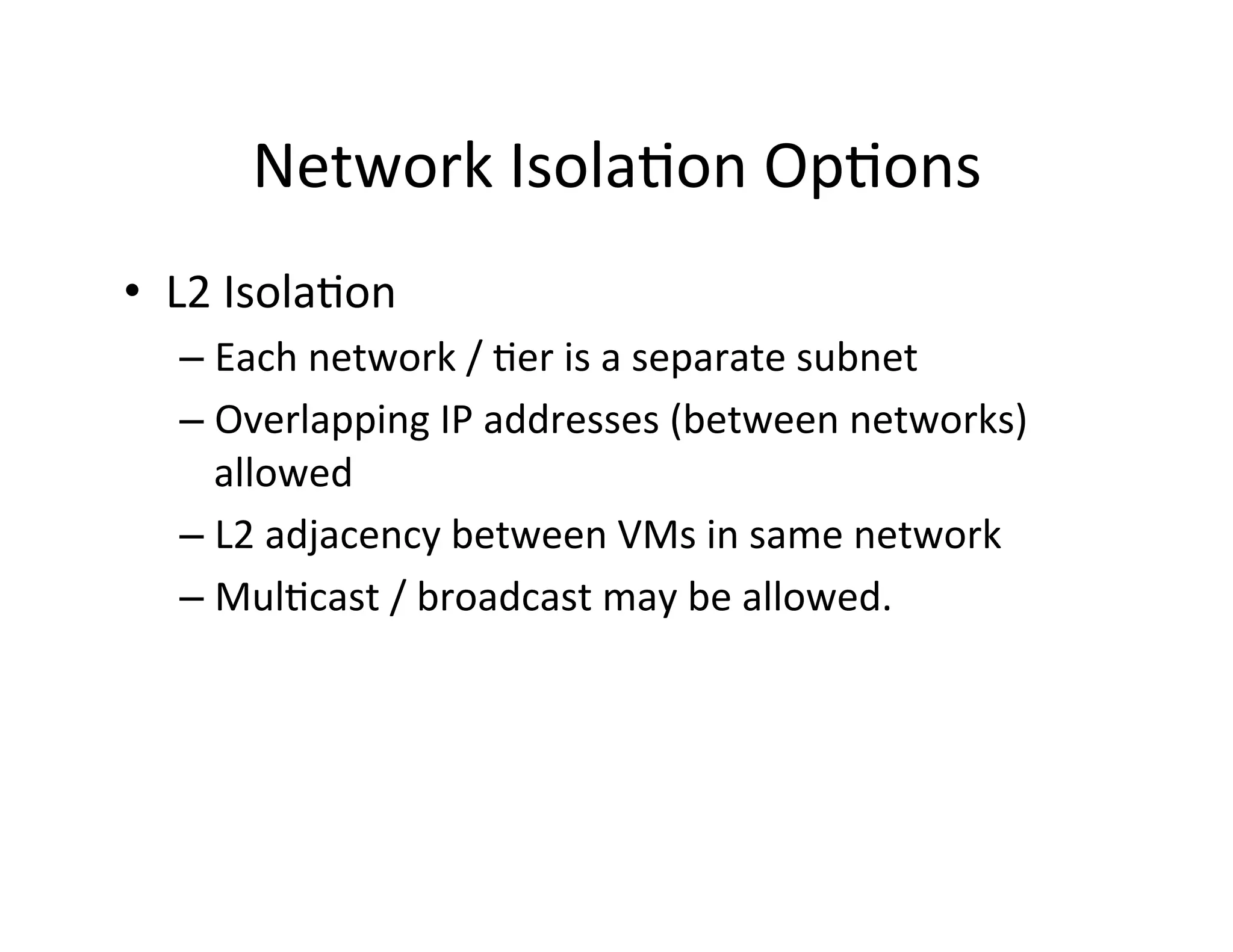
Network	
  Isola,on	
  Op,ons	
  
•  L2	
  Isola,on	
  
– Each	
  network	
  /	
  ,er	
  is	
  a	
  separate	
  subnet	
  
– Overlapping	
  IP	
  addresses	
  (between	
  networks)	
  
allowed	
  
– L2	
  adjacency	
  between	
  VMs	
  in	
  same	
  network	
  
– Mul,cast	
  /	
  broadcast	
  may	
  be	
  allowed.	
  
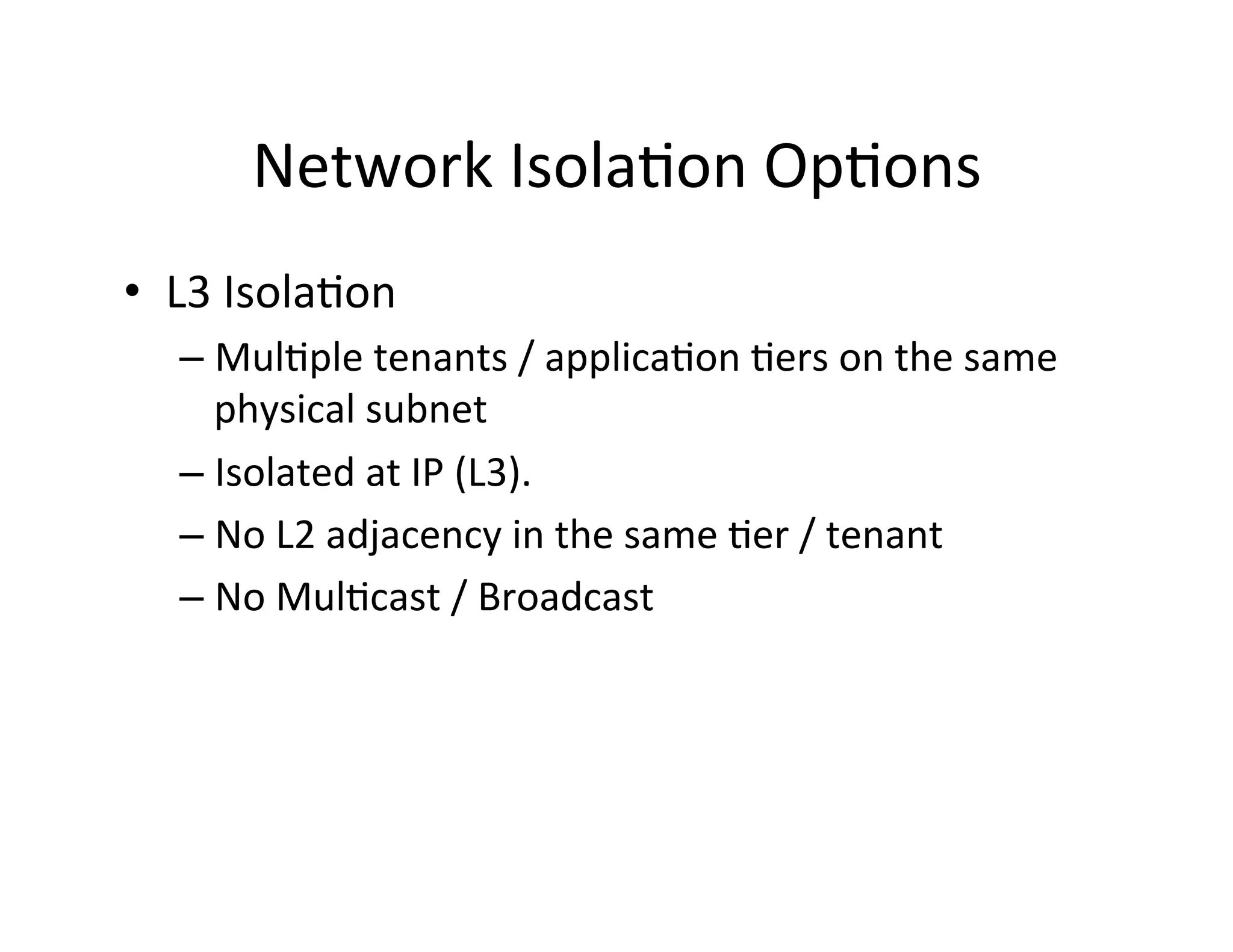
Network	
  Isola,on	
  Op,ons	
  
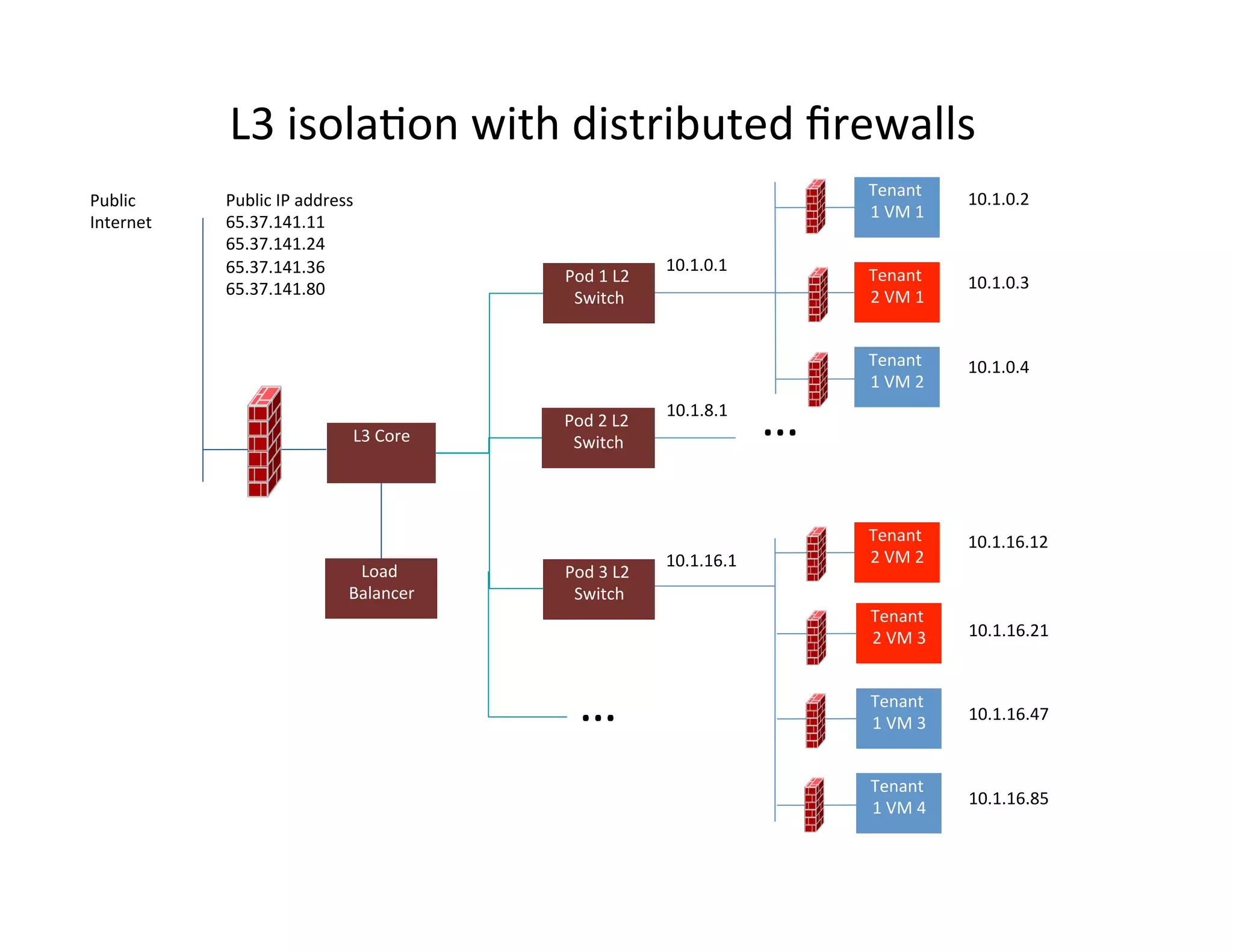
•  L3	
  Isola,on	
  
– Mul,ple	
  tenants	
  /	
  applica,on	
  ,ers	
  on	
  the	
  same	
  
physical	
  subnet	
  
– Isolated	
  at	
  IP	
  (L3).	
  	
  
– No	
  L2	
  adjacency	
  in	
  the	
  same	
  ,er	
  /	
  tenant	
  
– No	
  Mul,cast	
  /	
  Broadcast	
  
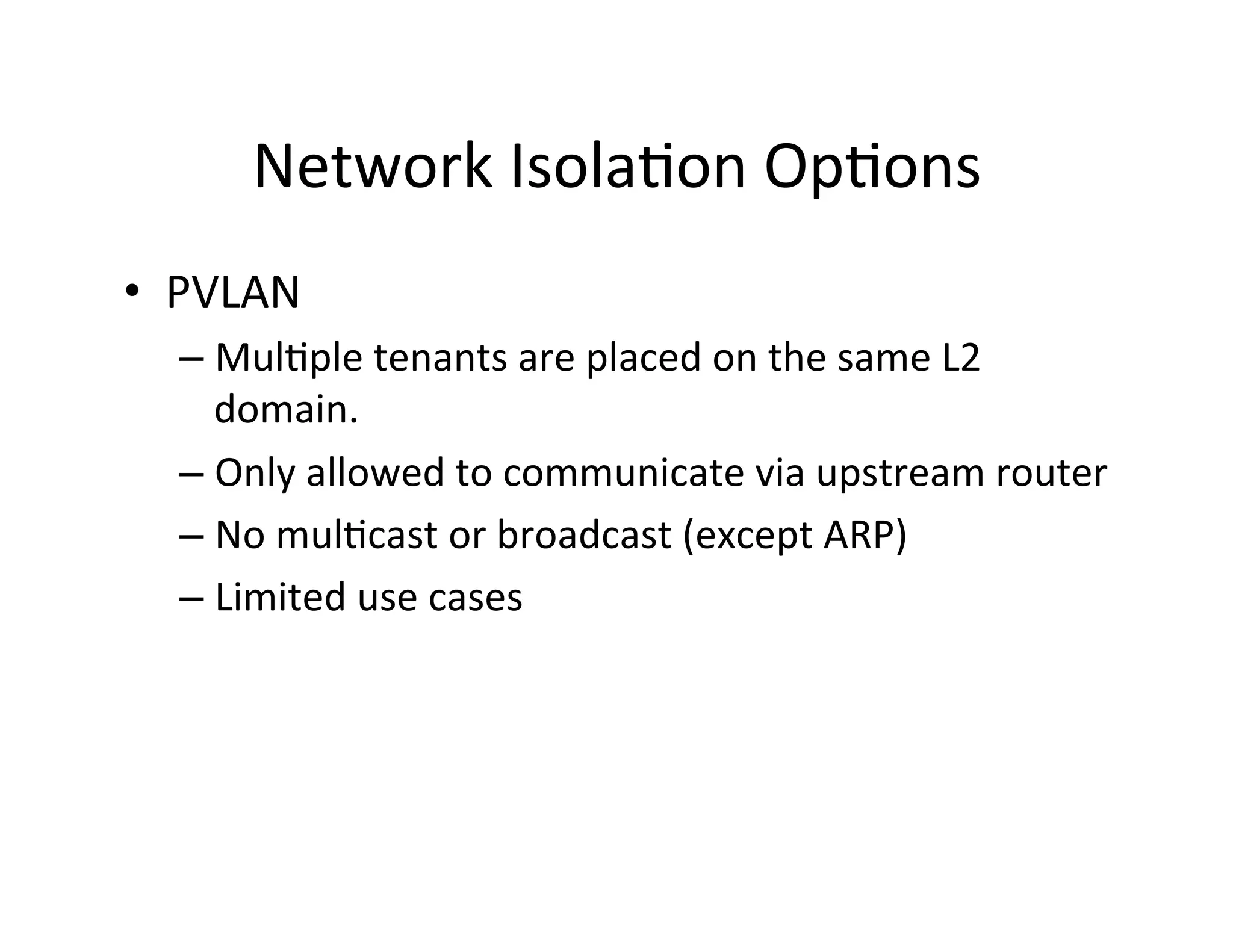
Network	
  Isola,on	
  Op,ons	
  
•  PVLAN	
  
– Mul,ple	
  tenants	
  are	
  placed	
  on	
  the	
  same	
  L2	
  
domain.	
  	
  
– Only	
  allowed	
  to	
  communicate	
  via	
  upstream	
  router	
  
– No	
  mul,cast	
  or	
  broadcast	
  (except	
  ARP)	
  
– Limited	
  use	
  cases	
  
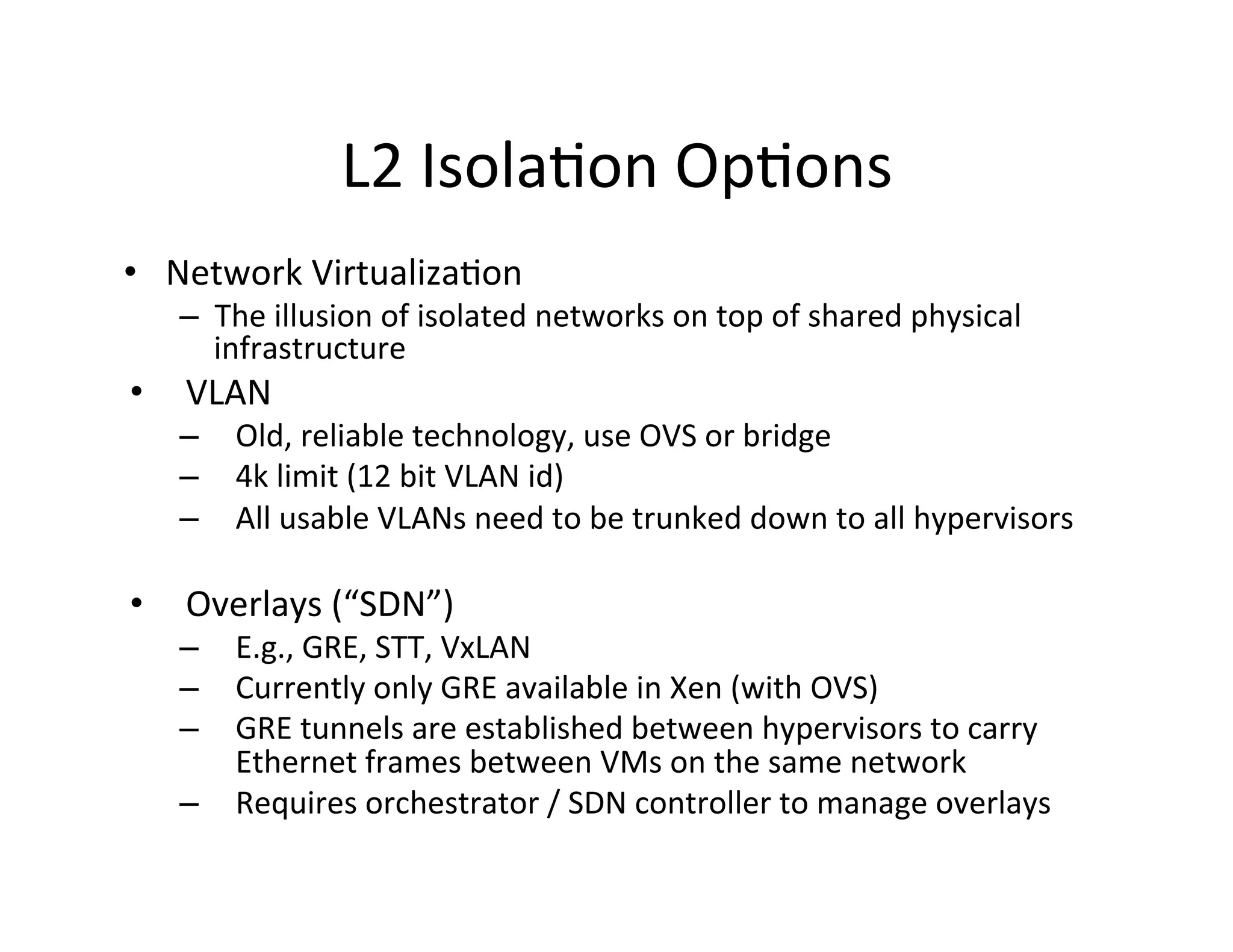
L2	
  Isola,on	
  Op,ons	
  
•  Network	
  Virtualiza,on	
  
–  The	
  illusion	
  of	
  isolated	
  networks	
  on	
  top	
  of	
  shared	
  physical	
  
infrastructure	
  
•  VLAN	
  
–  Old,	
  reliable	
  technology,	
  use	
  OVS	
  or	
  bridge	
  
–  4k	
  limit	
  (12	
  bit	
  VLAN	
  id)	
  
–  All	
  usable	
  VLANs	
  need	
  to	
  be	
  trunked	
  down	
  to	
  all	
  hypervisors	


•  Overlays	
  (“SDN”)	
  
–  E.g.,	
  GRE,	
  STT,	
  VxLAN	
  
–  Currently	
  only	
  GRE	
  available	
  in	
  Xen	
  (with	
  OVS)	
  
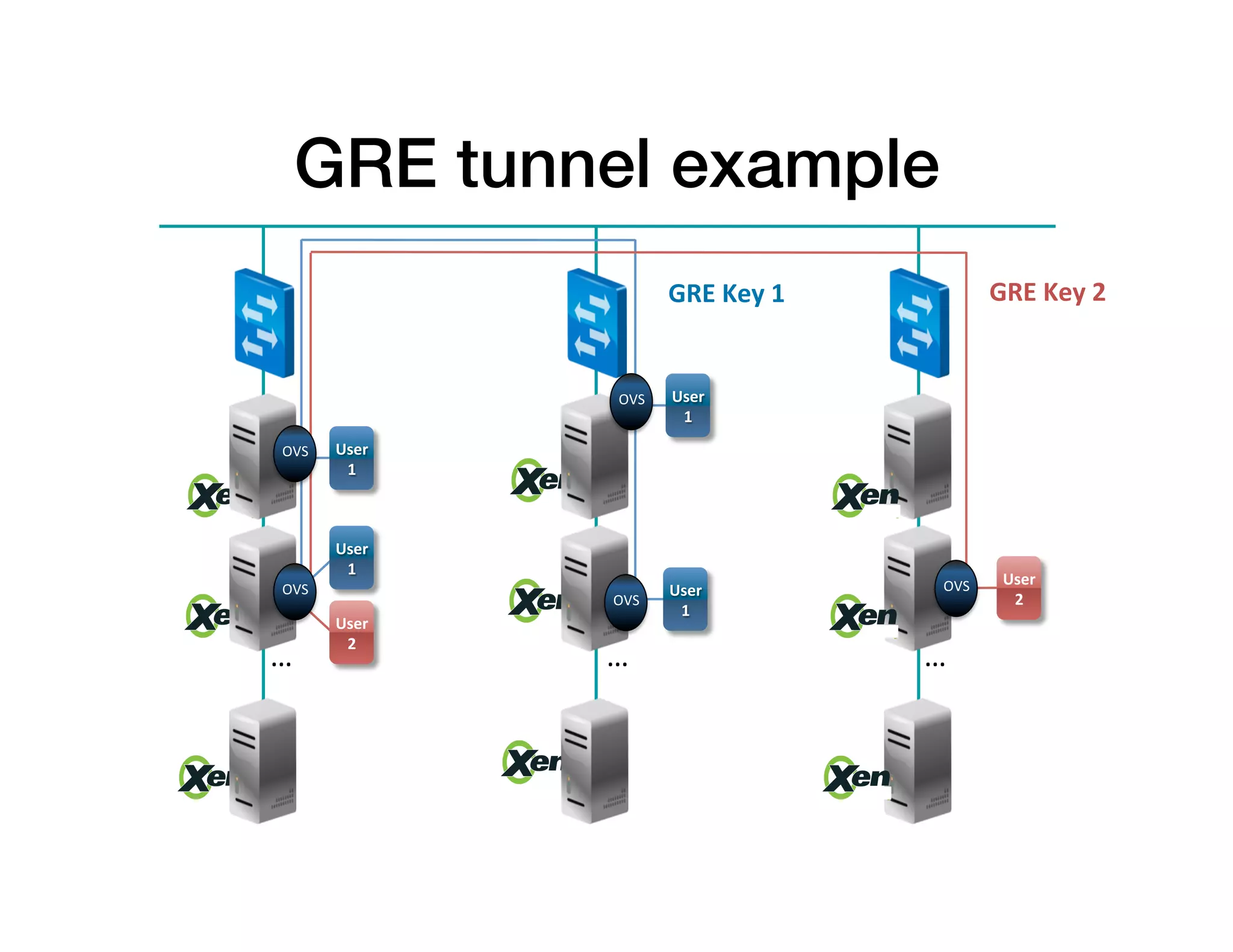
–  GRE	
  tunnels	
  are	
  established	
  between	
  hypervisors	
  to	
  carry	
  
Ethernet	
  frames	
  between	
  VMs	
  on	
  the	
  same	
  network	
  
–  Requires	
  orchestrator	
  /	
  SDN	
  controller	
  to	
  manage	
  overlays	
  
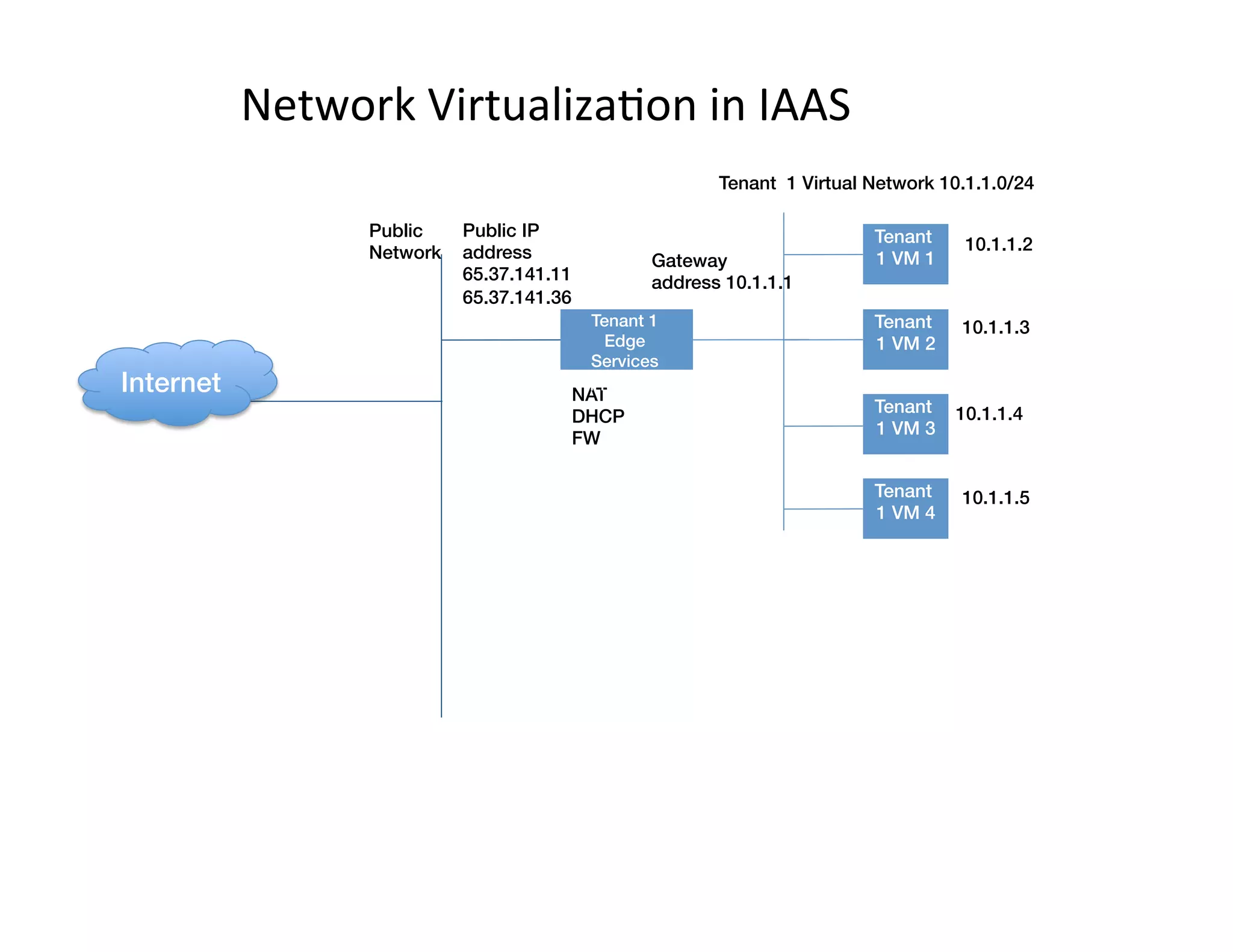
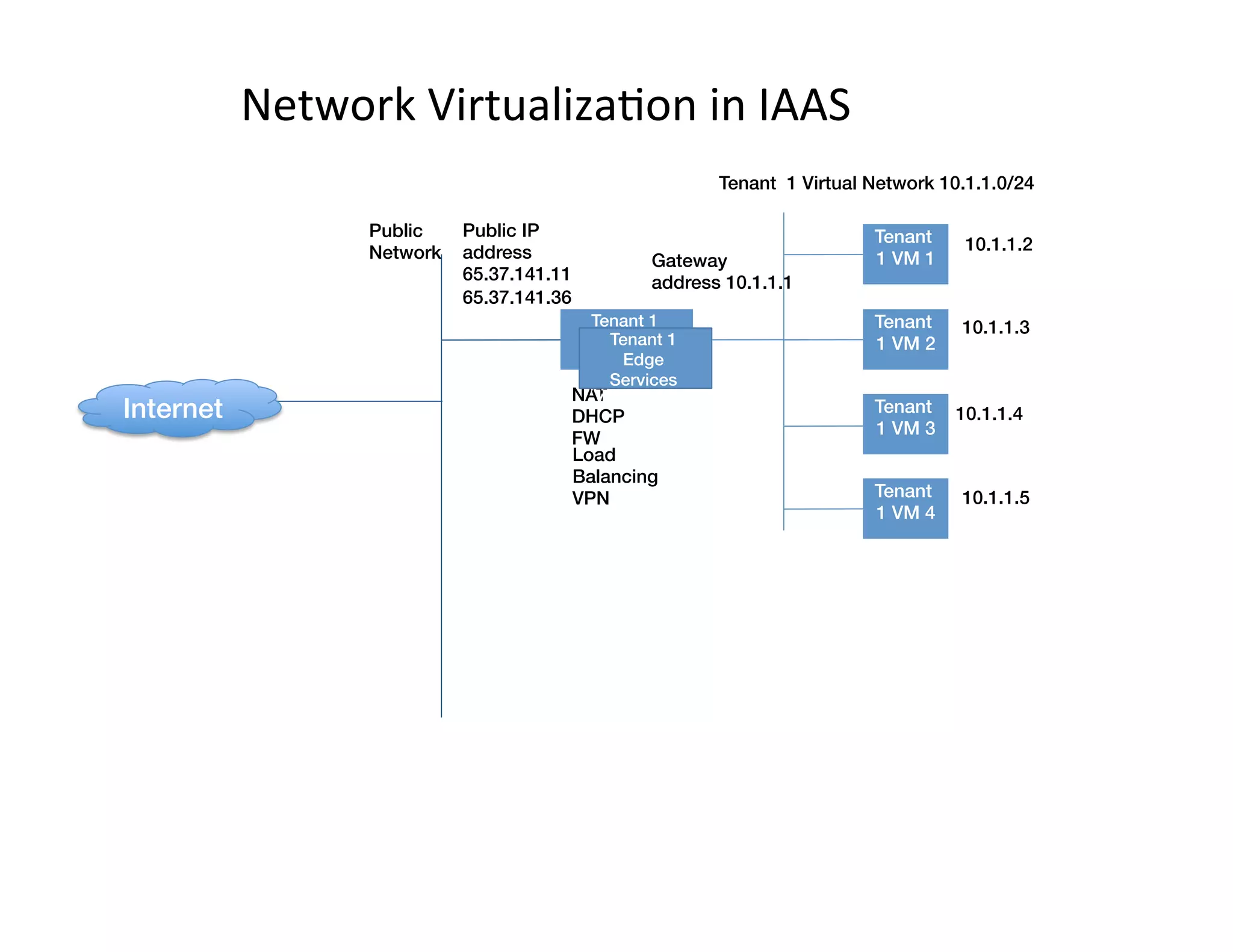
Network	
  Virtualiza,on	
  in	
  IAAS	
  
Tenant
1 VM 1!
Tenant
1 VM 2!
Tenant
1 VM 3!
Tenant
1 VM 4!
Public
Network
Tenant 1 Virtual Network 10.1.1.0/24
Gateway
address 10.1.1.1
NAT!
DHCP!
FW
Public IP
address
65.37.141.11!
65.37.141.36
10.1.1.2
10.1.1.3
10.1.1.4
10.1.1.5
Tenant 1 !
Edge
Services
Appliance(s)!Internet!
Network	
  Virtualiza,on	
  in	
  IAAS	
  
Tenant
1 VM 1!
Tenant
1 VM 2!
Tenant
1 VM 3!
Tenant
1 VM 4!
Public
Network
Tenant 1 Virtual Network 10.1.1.0/24
Gateway
address 10.1.1.1
NAT!
DHCP!
FW
Public IP
address
65.37.141.11!
65.37.141.36
10.1.1.2
10.1.1.3
10.1.1.4
10.1.1.5
Tenant 1 !
Edge
Services
Appliance(s)!
Internet!
Tenant 1 !
Edge
Services
Appliance(s)!
Load
Balancing!
VPN
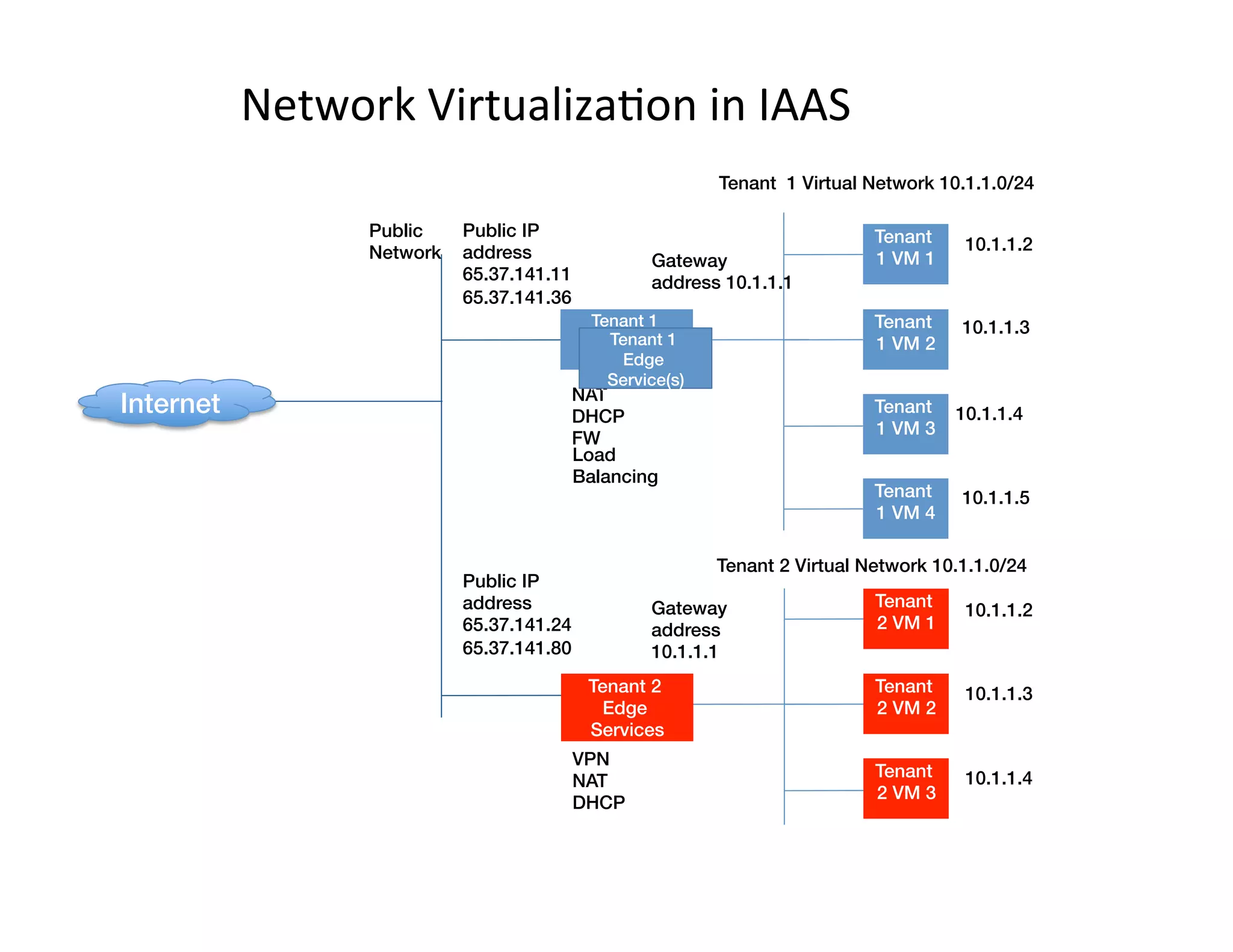
Network	
  Virtualiza,on	
  in	
  IAAS	
  
Internet!
Tenant
1 VM 1!
Tenant
1 VM 2!
Tenant
1 VM 3!
Tenant
1 VM 4!
Public
Network
Tenant 1 Virtual Network 10.1.1.0/24
Gateway
address 10.1.1.1
NAT!
DHCP!
FW
Public IP
address
65.37.141.11!
65.37.141.36
10.1.1.2
10.1.1.3
10.1.1.4
10.1.1.5
Tenant 1 !
Edge
Services
Appliance(s)!
Tenant
2 VM 2!
Tenant
2 VM 3!
Tenant
2 VM 1!
Tenant 2 Virtual Network 10.1.1.0/24
Gateway
address
10.1.1.1
VPN!
NAT!
DHCP
10.1.1.2
10.1.1.3
10.1.1.4
Tenant 2 !
Edge
Services!
Public IP
address
65.37.141.24!
65.37.141.80
Tenant 1 !
Edge
Service(s)!
Load
Balancing!
L3/L2	
  core	
  	
  
DC	
  Edge	
  
Pod	
   Pod	
   Pod	
   Pod	
  Pod	
  
Access	
  Sw	
  
Internet!
Tenant
1 VM 1!
Tenant
1 VM 2!
Tenant
1 VM 3!
Tenant
1 VM 4!
Public
Network
Tenant 1 Virtual Network 10.1.1.0/24
Gateway address
10.1.1.1
NAT!
DHCP!
FW
Public IP
address
65.37.141.11!
65.37.141.36
10.1.1.2
10.1.1.3
10.1.1.4
10.1.1.5
Tenant 1 !
Edge Services
Appliance(s)!
Tenant
2 VM 2!
Tenant
2 VM 3!
Tenant
2 VM 1!
Tenant 2 Virtual Network 10.1.1.0/24
Gateway
address
10.1.1.1
VPN!
NAT!
DHCP
10.1.1.2
10.1.1.3
10.1.1.4
Tenant 2 !
Edge
Services!
Public IP
address
65.37.141.24!
65.37.141.80
Tenant 1 !
Edge
Service(s)!
Load
Balancing!
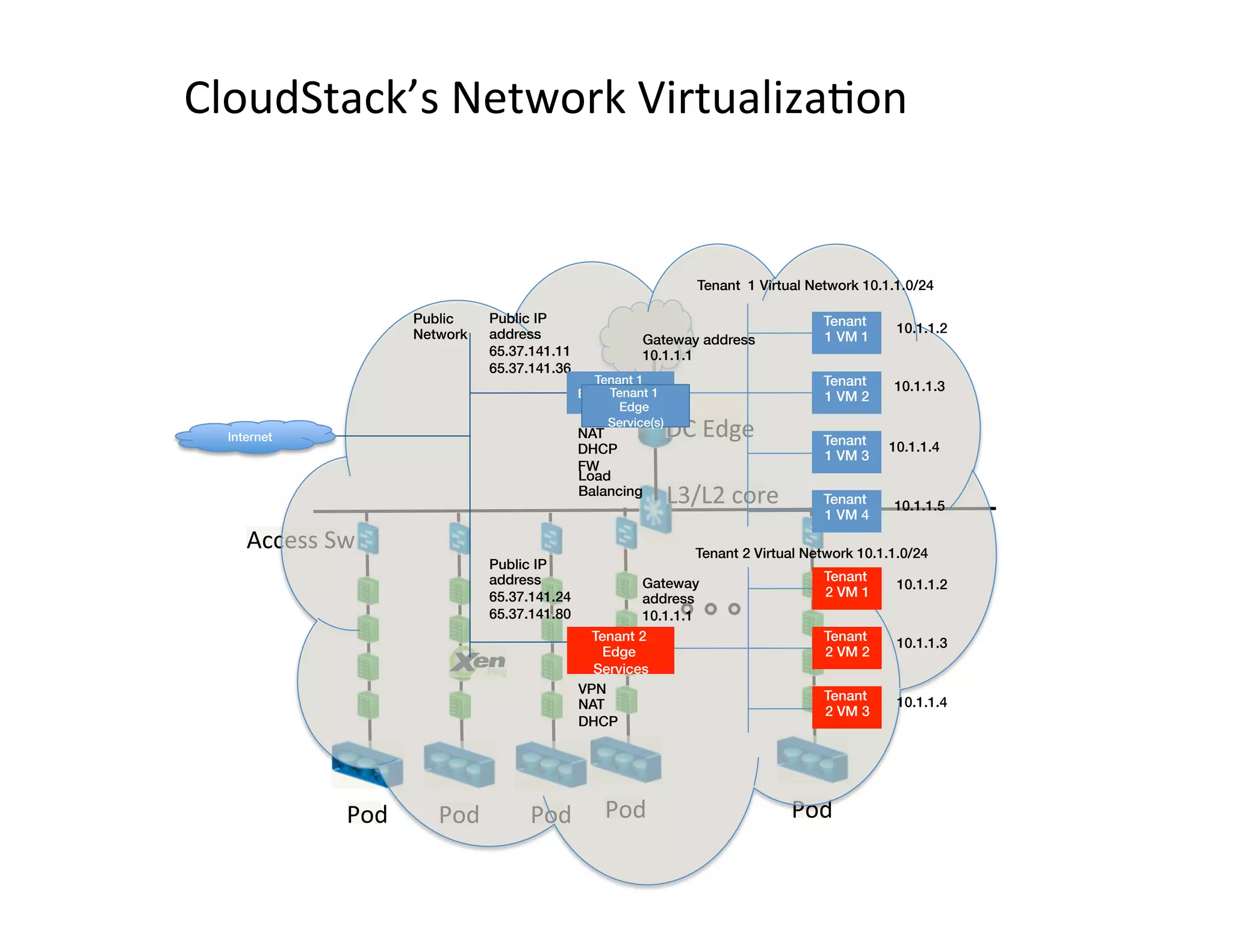
CloudStack’s	
  Network	
  Virtualiza,on	
  
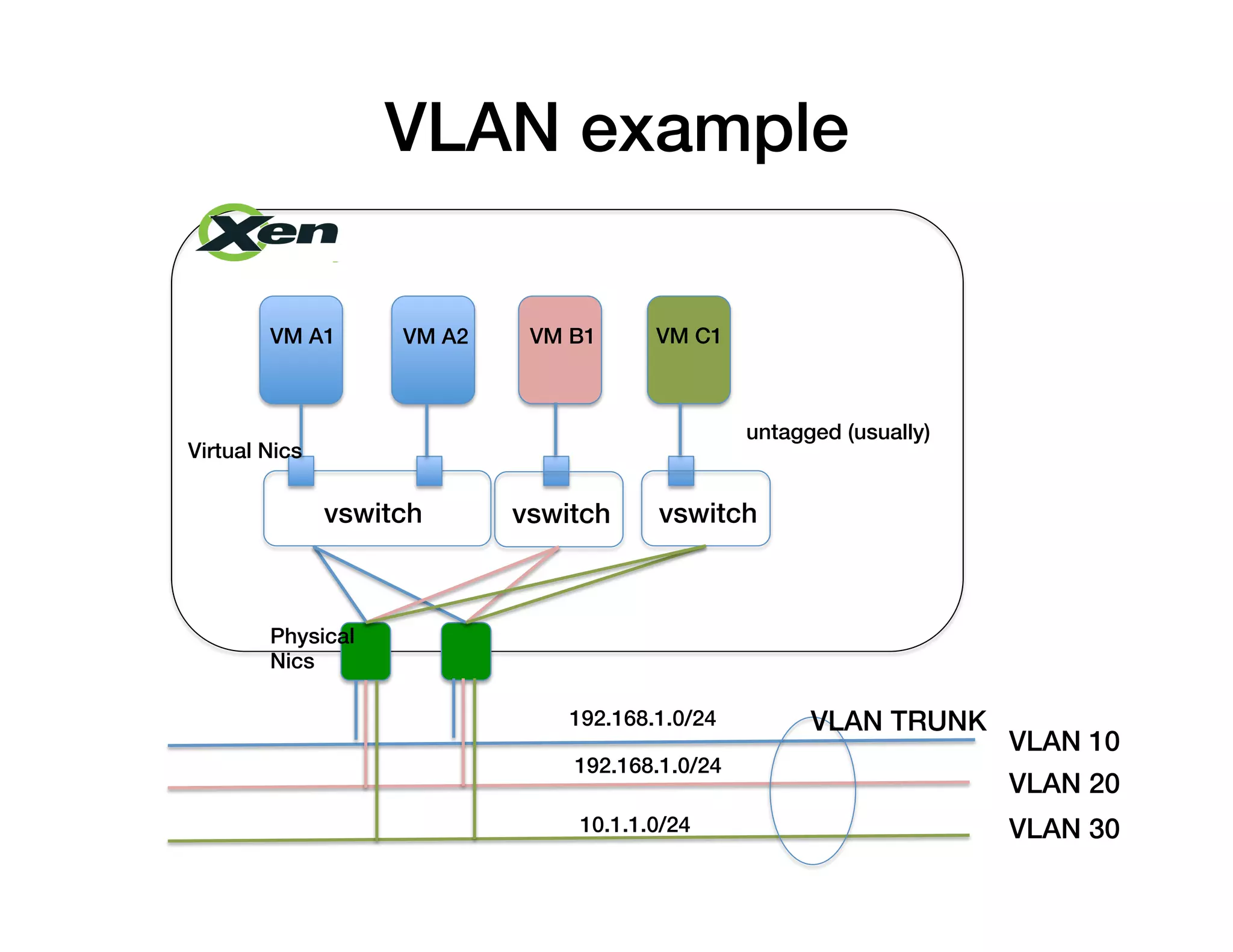
VM A1! VM A2! VM B1! VM C1!
vswitch!
Physical !
Nics!
Virtual Nics!
vswitch! vswitch!
VLAN 10!
VLAN 20!
VLAN 30!
untagged (usually)!
VLAN TRUNK!192.168.1.0/24!
192.168.1.0/24!
10.1.1.0/24!
VLAN example!
…	
  
GRE tunnel example!
…	
   …	
  
User	
  
2	
  
User	
  
1	
  
User	
  
1	
  
User	
  
1	
  
User	
  
1	
  
User	
  
2	
  
OVS	
  
OVS	
  
OVS	
  
OVS	
  
OVS	
  
GRE	
  Key	
  2	
  GRE	
  Key	
  1	
  
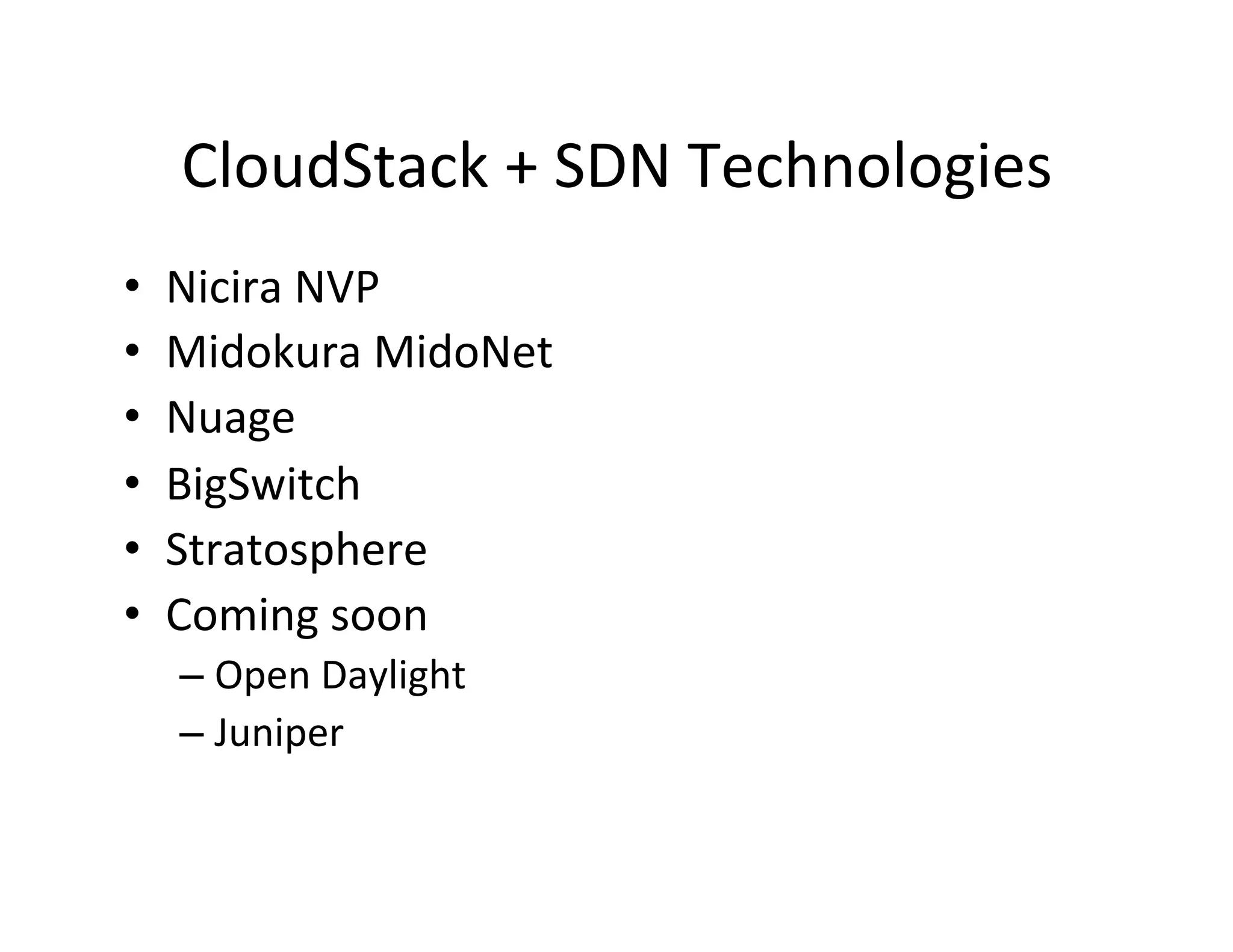
CloudStack	
  +	
  SDN	
  Technologies	
  
•  Nicira	
  NVP	
  
•  Midokura	
  MidoNet	
  
•  Nuage	
  
•  BigSwitch	
  
•  Stratosphere	
  
•  Coming	
  soon	
  
– Open	
  Daylight	
  
– Juniper	
  
L3	
  isola,on	
  with	
  distributed	
  firewalls	
  
Tenant	
  
1	
  VM	
  1	
   	
  10.1.0.2
Tenant	
  
2	
  VM	
  1	
   	
  10.1.0.3
Tenant	
  
1	
  VM	
  2	
   	
  10.1.0.4
Tenant	
  
2	
  VM	
  2	
   	
  10.1.16.12
Tenant	
  
2	
  VM	
  3	
   	
  10.1.16.21
Tenant	
  
1	
  VM	
  3	
   	
  10.1.16.47
Tenant	
  
1	
  VM	
  4	
   	
  10.1.16.85
Public	
  
Internet
10.1.0.1
Public	
  IP	
  address	
  
65.37.141.11	
  
65.37.141.24	
  
65.37.141.36	
  
65.37.141.80	


Load	
  
Balancer	
  
L3	
  Core	
  
Pod	
  1	
  L2	
  
Switch	
  
Pod	
  3	
  L2	
  
Switch	
  
10.1.16.1
…	
  
…	
  
10.1.8.1
Pod	
  2	
  L2	
  
Switch	
  
L3	
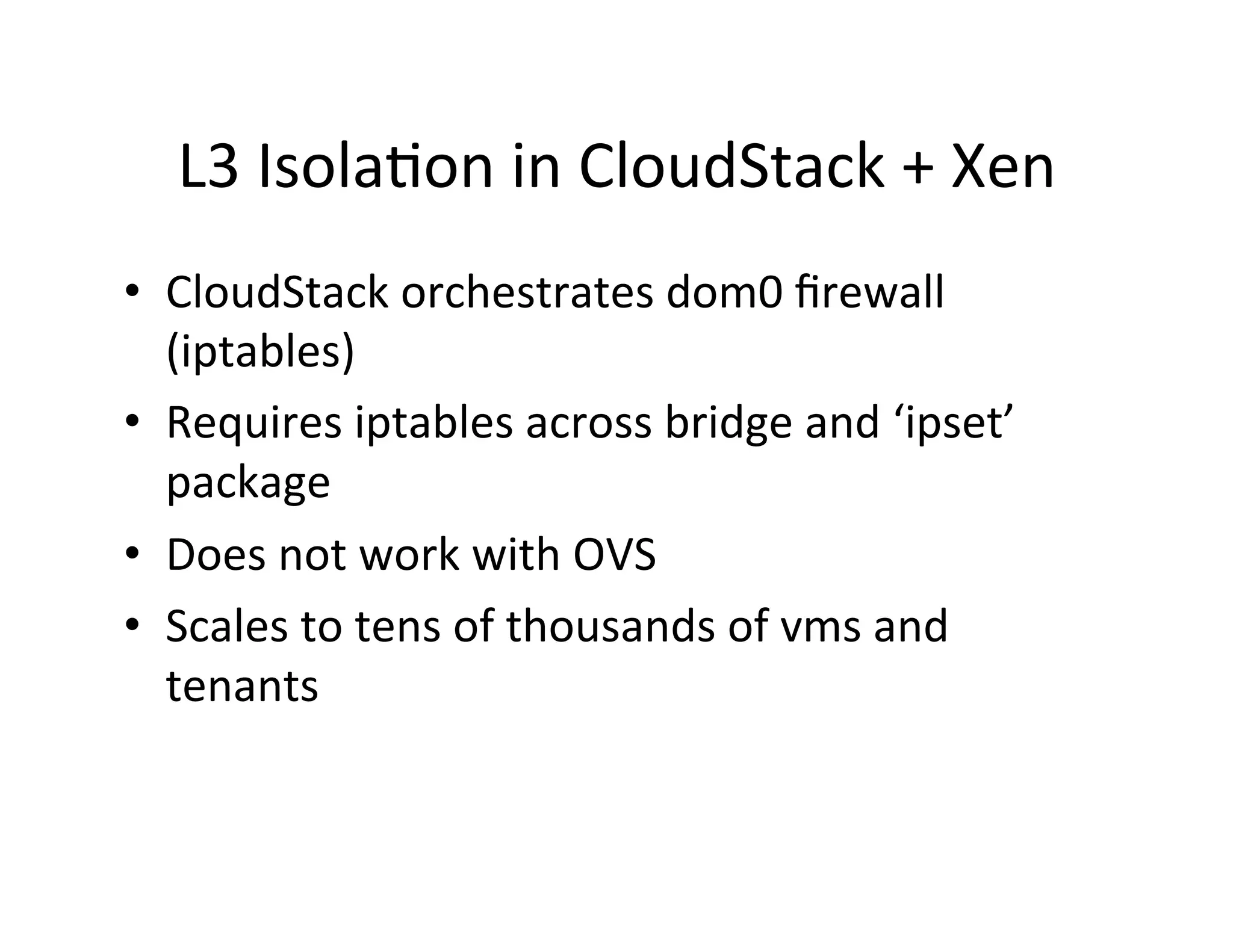
  Isola,on	
  in	
  CloudStack	
  +	
  Xen	
  
•  CloudStack	
  orchestrates	
  dom0	
  firewall	
  
(iptables)	
  
•  Requires	
  iptables	
  across	
  bridge	
  and	
  ‘ipset’	
  
package	
  
•  Does	
  not	
  work	
  with	
  OVS	
  
•  Scales	
  to	
  tens	
  of	
  thousands	
  of	
  vms	
  and	
  
tenants	


CloudStack	
  Network	
  Model:	
  	
  
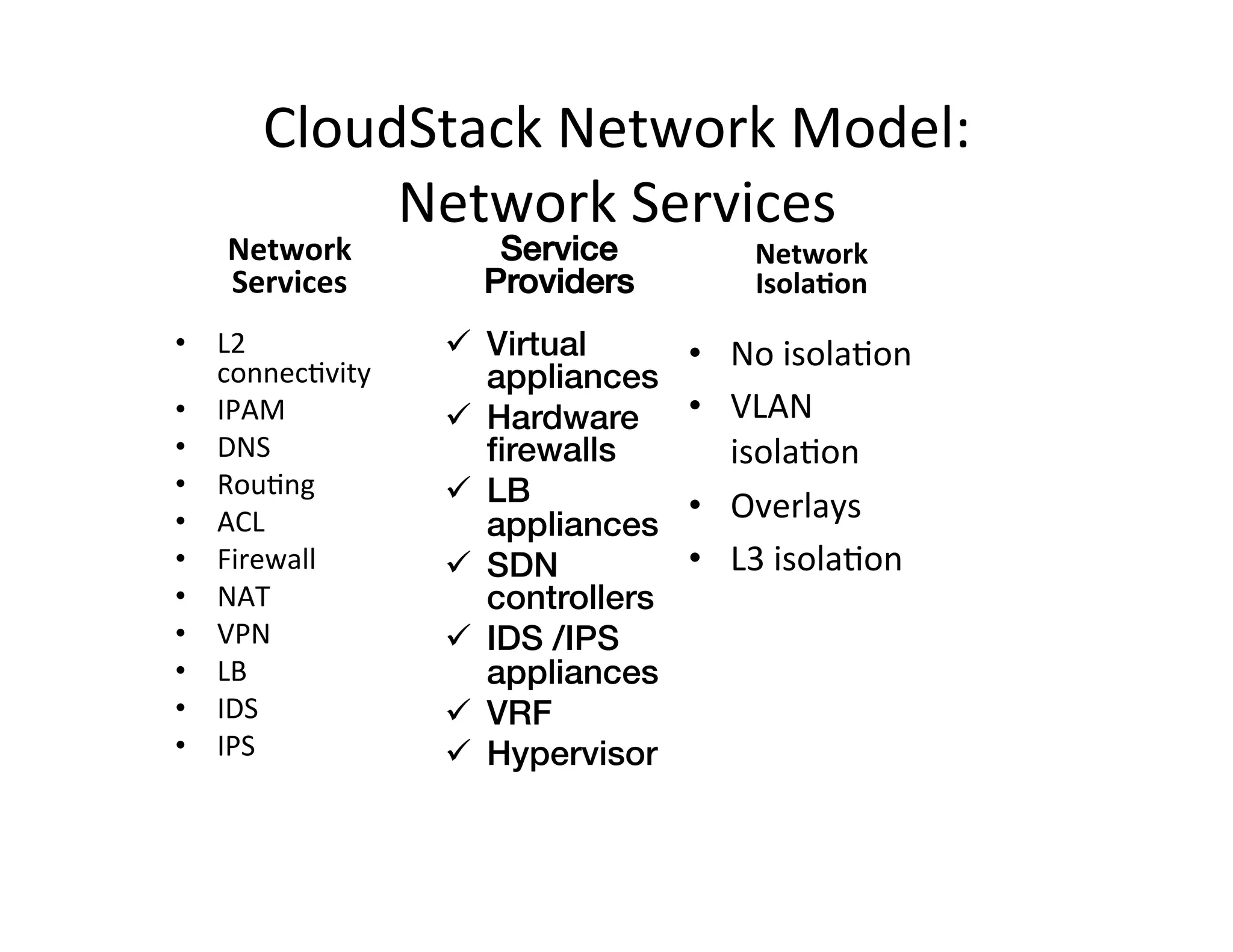
Network	
  Services	
  
Network	
  
Services	
  
•  L2	
  
connec,vity	
  
•  IPAM	
  
•  DNS	
  
•  Rou,ng	
  
•  ACL	
  
•  Firewall	
  
•  NAT	
  
•  VPN	
  
•  LB	
  
•  IDS	
  
•  IPS	


Network	
  
Isola?on	
  
•  No	
  isola,on	
  
•  VLAN	
  
isola,on	
  
•  Overlays	
  
•  L3	
  isola,on	
  
Service
Providers!
ü  Virtual
appliances!
ü  Hardware
firewalls!
ü  LB
appliances!
ü  SDN
controllers!
ü  IDS /IPS
appliances!
ü  VRF!
ü  Hypervisor!
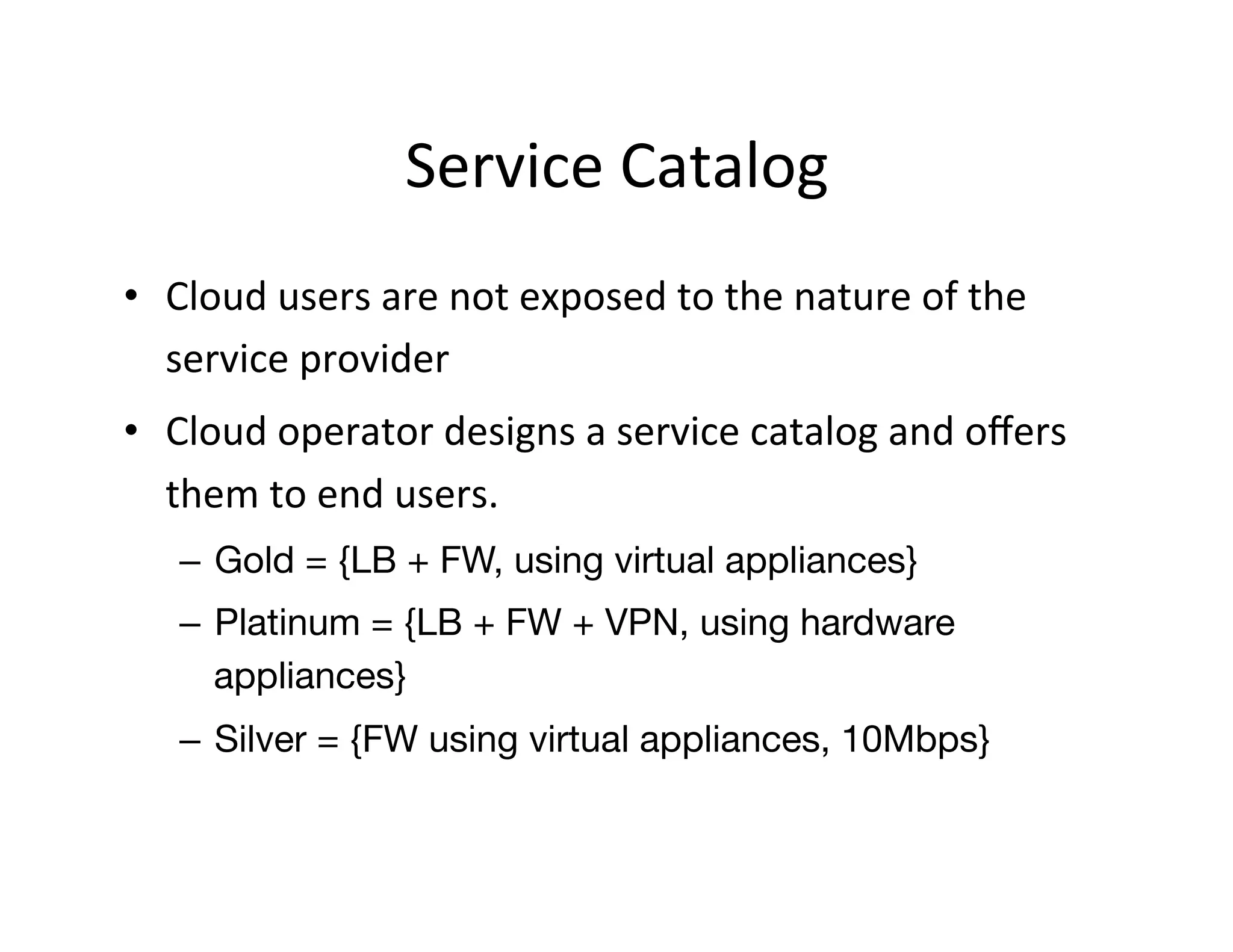
Service	
  Catalog	
  
•  Cloud	
  users	
  are	
  not	
  exposed	
  to	
  the	
  nature	
  of	
  the	
  
service	
  provider	
  
•  Cloud	
  operator	
  designs	
  a	
  service	
  catalog	
  and	
  offers	
  
them	
  to	
  end	
  users.	
  
–  Gold = {LB + FW, using virtual appliances}
–  Platinum = {LB + FW + VPN, using hardware
appliances}
–  Silver = {FW using virtual appliances, 10Mbps}
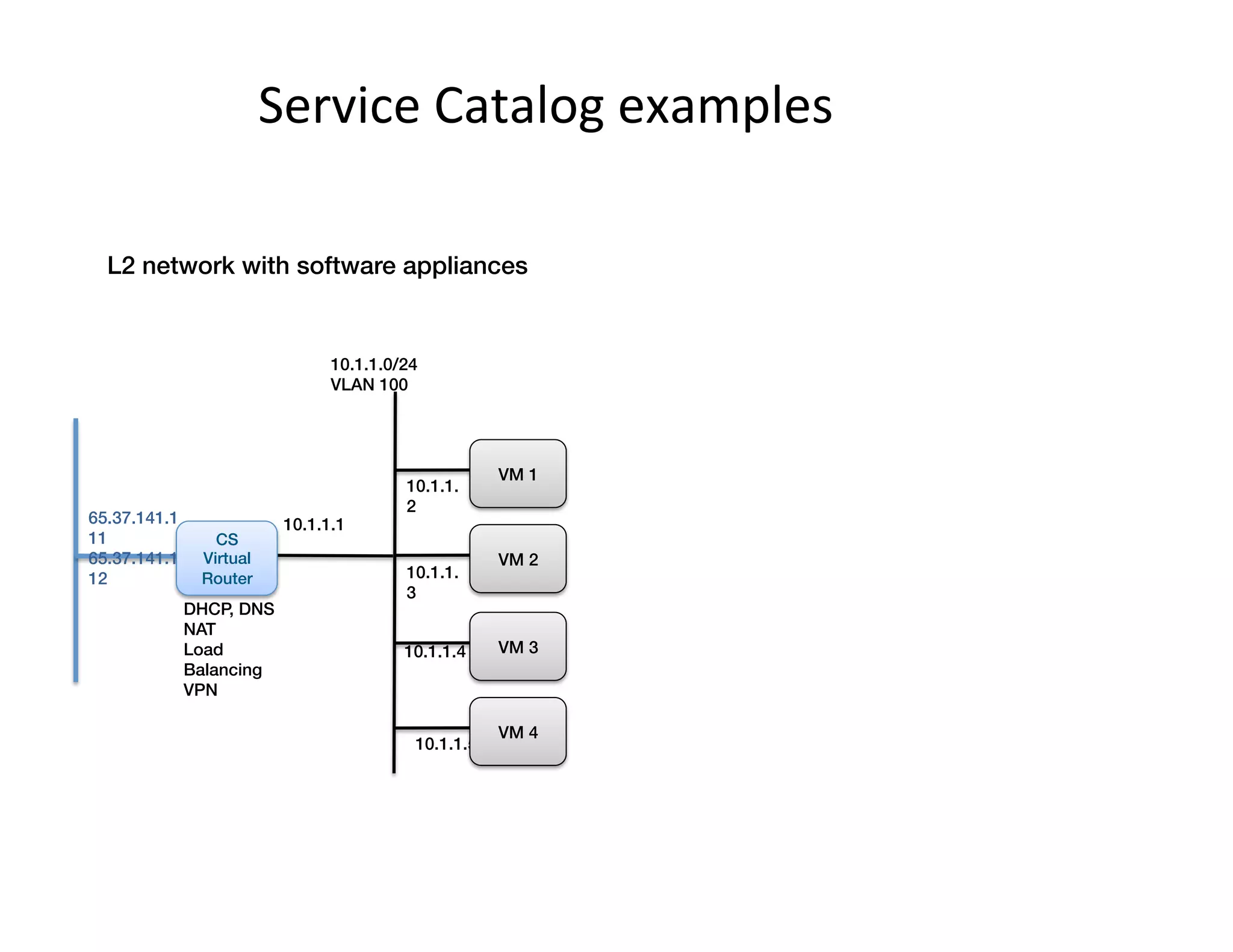
Service	
  Catalog	
  examples	
  
10.1.1.0/24!
VLAN 100
10.1.1.1
DHCP, DNS!
NAT!
Load
Balancing!
VPN
10.1.1.
2
VM 1!
10.1.1.
3
VM 2!
10.1.1.4 VM 3!
10.1.1.5
VM 4!
CS!
Virtual
Router!
L2 network with software appliances!
65.37.141.1
11!
65.37.141.1
12
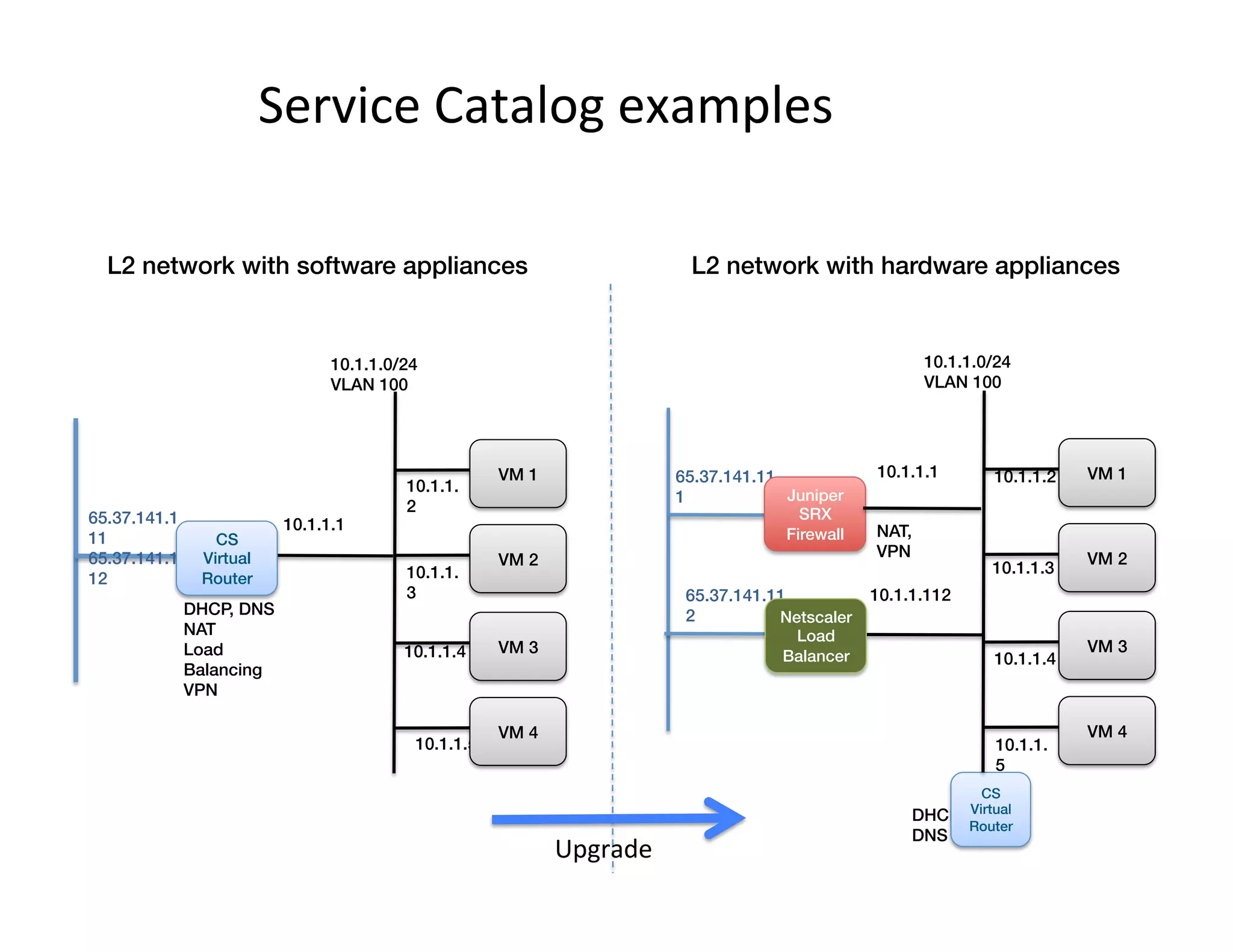
Service	
  Catalog	
  examples	
  
10.1.1.0/24!
VLAN 100
10.1.1.1
DHCP, DNS!
NAT!
Load
Balancing!
VPN
10.1.1.
2
VM 1!
10.1.1.
3
VM 2!
10.1.1.4 VM 3!
10.1.1.5
VM 4!
CS!
Virtual
Router!
L2 network with software appliances!
65.37.141.1
11!
65.37.141.1
12
10.1.1.0/24!
VLAN 100
DHCP,
DNS!
CS!
Virtual
Router!
10.1.1.11265.37.141.11
2
10.1.1.2 VM 1!
10.1.1.3
VM 2!
10.1.1.4
VM 3!
10.1.1.
5
VM 4!
Netscaler!
Load
Balancer!
10.1.1.165.37.141.11
1 Juniper
SRX!
Firewall!
L2 network with hardware appliances!
NAT,
VPN!
Upgrade	
  
More	
  Info	
  
•  CloudStack	
  Wiki	
  
– h;ps://cwiki.apache.org/confluence/x/fwDFAQ	
  
•  CloudStack	
  Docs	
  
– h;p://cloudstack.apache.org/docs/en-­‐US/
index.html	
  
•  Mailing	
  Lists	
  
– h;p://cloudstack.apache.org/mailing-­‐lists.html	
  
•  IRC	
  
– Freenode	
  #cloudstack-­‐dev,	
  #cloudstack	
  

Network Multitenancy in Xen-Based Clouds-XPUS13 Vittal

  • 1.
    Network  Mul,tenancy  in  Xen-­‐ based  Clouds   Chiradeep  Vi;al   CloudStack  Commi;er   Citrix  Systems   @chiradeep   Sep  18  2013      
  • 2.
    Agenda   •  Introduc,on  to  CloudStack     •  Mul,-­‐tenant  IAAS     •  Network  Virtualiza,on  /  SDN   •  L3  isola,on   •  CloudStack’s  Network  Model   •  CloudStack’s  na,ve  SDN  approach  
  • 3.
    ! •  Product fromCloud.com / Citrix (thru acquisition)! •  Open Source since May 2010! •  Donated by Citrix to the ASF (Apr 2012)! •  Graduated as Top-level Project in March 2013! •  In production since 2009! •  Tons of deployments, including large-scale commercial ones! Apache  CloudStack  
  • 4.
    How  did  Amazon  build  its  cloud?   Commodity Servers Commodity Storage Networking Open Source Xen Hypervisor Amazon Orchestration Software AWS API (EC2, S3, …) Amazon eCommerce Platform
  • 5.
    How  can  YOU  build  a  Xen-­‐based   cloud?   Servers StorageNetworking Open Source Xen Hypervisor Amazon Orchestration Software AWS API (EC2, S3, …) Amazon eCommerce Platform Hypervisor (XenServer/XCP) CloudStack Orchestration Software Optional Portal CloudStack or AWS API
  • 6.
    Secondary  Storage   Image   L3/L2  core     DC  Edge   End  users   Pod   Pod   Pod   Pod   Zone  Architecture   Pod   Access  Sw   MySQL   CloudStack   Admin/User  API   Primary  Storage   NFS/ISCSI/FC   Hypervisor  (Xen   /VMWare/KVM)   VM   VM   Snapshot   Snapshot   Image   Disk   Disk   VM  
  • 7.
    L3/L2  core     Mul,-­‐tenancy   Hypervisor   A   C   A   B   A   C   A   A   Internet  
  • 8.
    Mul,-­‐,er  virtual  networking   ! Virtual appliance/! Hardware Devices! Customer! Premises! IPSec or SSL site-to-site VPN! Internet! Network Services! •  IPAM! •  DNS! •  LB [intra]! •  S-2-S VPN! •  Static Routes! •  ACLs! •  NAT, PF! •  FW [ingress & egress]! Loadbalancer (virtual or HW)! MPLS VLAN! Web VM 1! Web VM 2! Web VM 3! Web VM 4! Web subnet ! 10.1.1.0/24! App subnet 10.1.2.0/24! App VM 1! App VM 2! DB Subnet! 10.1.3.0/24! DB VM 1!
  • 9.
    Network  Isola,on  Op,ons   •  L2  Isola,on   – Each  network  /  ,er  is  a  separate  subnet   – Overlapping  IP  addresses  (between  networks)   allowed   – L2  adjacency  between  VMs  in  same  network   – Mul,cast  /  broadcast  may  be  allowed.  
  • 10.
    Network  Isola,on  Op,ons   •  L3  Isola,on   – Mul,ple  tenants  /  applica,on  ,ers  on  the  same   physical  subnet   – Isolated  at  IP  (L3).     – No  L2  adjacency  in  the  same  ,er  /  tenant   – No  Mul,cast  /  Broadcast  
  • 11.
    Network  Isola,on  Op,ons   •  PVLAN   – Mul,ple  tenants  are  placed  on  the  same  L2   domain.     – Only  allowed  to  communicate  via  upstream  router   – No  mul,cast  or  broadcast  (except  ARP)   – Limited  use  cases  
  • 12.
    L2  Isola,on  Op,ons   •  Network  Virtualiza,on   –  The  illusion  of  isolated  networks  on  top  of  shared  physical   infrastructure   •  VLAN   –  Old,  reliable  technology,  use  OVS  or  bridge   –  4k  limit  (12  bit  VLAN  id)   –  All  usable  VLANs  need  to  be  trunked  down  to  all  hypervisors     •  Overlays  (“SDN”)   –  E.g.,  GRE,  STT,  VxLAN   –  Currently  only  GRE  available  in  Xen  (with  OVS)   –  GRE  tunnels  are  established  between  hypervisors  to  carry   Ethernet  frames  between  VMs  on  the  same  network   –  Requires  orchestrator  /  SDN  controller  to  manage  overlays  
  • 13.
    Network  Virtualiza,on  in  IAAS   Tenant 1 VM 1! Tenant 1 VM 2! Tenant 1 VM 3! Tenant 1 VM 4! Public Network Tenant 1 Virtual Network 10.1.1.0/24 Gateway address 10.1.1.1 NAT! DHCP! FW Public IP address 65.37.141.11! 65.37.141.36 10.1.1.2 10.1.1.3 10.1.1.4 10.1.1.5 Tenant 1 ! Edge Services Appliance(s)!Internet!
  • 14.
    Network  Virtualiza,on  in  IAAS   Tenant 1 VM 1! Tenant 1 VM 2! Tenant 1 VM 3! Tenant 1 VM 4! Public Network Tenant 1 Virtual Network 10.1.1.0/24 Gateway address 10.1.1.1 NAT! DHCP! FW Public IP address 65.37.141.11! 65.37.141.36 10.1.1.2 10.1.1.3 10.1.1.4 10.1.1.5 Tenant 1 ! Edge Services Appliance(s)! Internet! Tenant 1 ! Edge Services Appliance(s)! Load Balancing! VPN
  • 15.
    Network  Virtualiza,on  in  IAAS   Internet! Tenant 1 VM 1! Tenant 1 VM 2! Tenant 1 VM 3! Tenant 1 VM 4! Public Network Tenant 1 Virtual Network 10.1.1.0/24 Gateway address 10.1.1.1 NAT! DHCP! FW Public IP address 65.37.141.11! 65.37.141.36 10.1.1.2 10.1.1.3 10.1.1.4 10.1.1.5 Tenant 1 ! Edge Services Appliance(s)! Tenant 2 VM 2! Tenant 2 VM 3! Tenant 2 VM 1! Tenant 2 Virtual Network 10.1.1.0/24 Gateway address 10.1.1.1 VPN! NAT! DHCP 10.1.1.2 10.1.1.3 10.1.1.4 Tenant 2 ! Edge Services! Public IP address 65.37.141.24! 65.37.141.80 Tenant 1 ! Edge Service(s)! Load Balancing!
  • 16.
    L3/L2  core     DC  Edge   Pod   Pod   Pod   Pod  Pod   Access  Sw   Internet! Tenant 1 VM 1! Tenant 1 VM 2! Tenant 1 VM 3! Tenant 1 VM 4! Public Network Tenant 1 Virtual Network 10.1.1.0/24 Gateway address 10.1.1.1 NAT! DHCP! FW Public IP address 65.37.141.11! 65.37.141.36 10.1.1.2 10.1.1.3 10.1.1.4 10.1.1.5 Tenant 1 ! Edge Services Appliance(s)! Tenant 2 VM 2! Tenant 2 VM 3! Tenant 2 VM 1! Tenant 2 Virtual Network 10.1.1.0/24 Gateway address 10.1.1.1 VPN! NAT! DHCP 10.1.1.2 10.1.1.3 10.1.1.4 Tenant 2 ! Edge Services! Public IP address 65.37.141.24! 65.37.141.80 Tenant 1 ! Edge Service(s)! Load Balancing! CloudStack’s  Network  Virtualiza,on  
  • 17.
    VM A1! VMA2! VM B1! VM C1! vswitch! Physical ! Nics! Virtual Nics! vswitch! vswitch! VLAN 10! VLAN 20! VLAN 30! untagged (usually)! VLAN TRUNK!192.168.1.0/24! 192.168.1.0/24! 10.1.1.0/24! VLAN example!
  • 18.
    …   GRE tunnelexample! …   …   User   2   User   1   User   1   User   1   User   1   User   2   OVS   OVS   OVS   OVS   OVS   GRE  Key  2  GRE  Key  1  
  • 19.
    CloudStack  +  SDN  Technologies   •  Nicira  NVP   •  Midokura  MidoNet   •  Nuage   •  BigSwitch   •  Stratosphere   •  Coming  soon   – Open  Daylight   – Juniper  
  • 20.
    L3  isola,on  with  distributed  firewalls   Tenant   1  VM  1    10.1.0.2 Tenant   2  VM  1    10.1.0.3 Tenant   1  VM  2    10.1.0.4 Tenant   2  VM  2    10.1.16.12 Tenant   2  VM  3    10.1.16.21 Tenant   1  VM  3    10.1.16.47 Tenant   1  VM  4    10.1.16.85 Public   Internet 10.1.0.1 Public  IP  address   65.37.141.11   65.37.141.24   65.37.141.36   65.37.141.80     Load   Balancer   L3  Core   Pod  1  L2   Switch   Pod  3  L2   Switch   10.1.16.1 …   …   10.1.8.1 Pod  2  L2   Switch  
  • 21.
    L3  Isola,on  in  CloudStack  +  Xen   •  CloudStack  orchestrates  dom0  firewall   (iptables)   •  Requires  iptables  across  bridge  and  ‘ipset’   package   •  Does  not  work  with  OVS   •  Scales  to  tens  of  thousands  of  vms  and   tenants    
  • 22.
    CloudStack  Network  Model:     Network  Services   Network   Services   •  L2   connec,vity   •  IPAM   •  DNS   •  Rou,ng   •  ACL   •  Firewall   •  NAT   •  VPN   •  LB   •  IDS   •  IPS     Network   Isola?on   •  No  isola,on   •  VLAN   isola,on   •  Overlays   •  L3  isola,on   Service Providers! ü  Virtual appliances! ü  Hardware firewalls! ü  LB appliances! ü  SDN controllers! ü  IDS /IPS appliances! ü  VRF! ü  Hypervisor!
  • 23.
    Service  Catalog   • Cloud  users  are  not  exposed  to  the  nature  of  the   service  provider   •  Cloud  operator  designs  a  service  catalog  and  offers   them  to  end  users.   –  Gold = {LB + FW, using virtual appliances} –  Platinum = {LB + FW + VPN, using hardware appliances} –  Silver = {FW using virtual appliances, 10Mbps}
  • 24.
    Service  Catalog  examples   10.1.1.0/24! VLAN 100 10.1.1.1 DHCP, DNS! NAT! Load Balancing! VPN 10.1.1. 2 VM 1! 10.1.1. 3 VM 2! 10.1.1.4 VM 3! 10.1.1.5 VM 4! CS! Virtual Router! L2 network with software appliances! 65.37.141.1 11! 65.37.141.1 12
  • 25.
    Service  Catalog  examples   10.1.1.0/24! VLAN 100 10.1.1.1 DHCP, DNS! NAT! Load Balancing! VPN 10.1.1. 2 VM 1! 10.1.1. 3 VM 2! 10.1.1.4 VM 3! 10.1.1.5 VM 4! CS! Virtual Router! L2 network with software appliances! 65.37.141.1 11! 65.37.141.1 12 10.1.1.0/24! VLAN 100 DHCP, DNS! CS! Virtual Router! 10.1.1.11265.37.141.11 2 10.1.1.2 VM 1! 10.1.1.3 VM 2! 10.1.1.4 VM 3! 10.1.1. 5 VM 4! Netscaler! Load Balancer! 10.1.1.165.37.141.11 1 Juniper SRX! Firewall! L2 network with hardware appliances! NAT, VPN! Upgrade  
  • 26.
    More  Info   • CloudStack  Wiki   – h;ps://cwiki.apache.org/confluence/x/fwDFAQ   •  CloudStack  Docs   – h;p://cloudstack.apache.org/docs/en-­‐US/ index.html   •  Mailing  Lists   – h;p://cloudstack.apache.org/mailing-­‐lists.html   •  IRC   – Freenode  #cloudstack-­‐dev,  #cloudstack