Storage Container Mathematics
Copyright c 2015, Paul Lutus
Most recent revision: June 5, 2015
Abstract
This is a collection of full and partial, volume and surface area equations for common storage tank types. It’s
meant to serve as an easy-to-use reference for tank analysis methods and mathematics that are distributed across
many articles located in the storage tank modeling section1
of http://arachnoid.com.
The overarching purpose of this activity is to create summaries and accurate sensor height to volume tables for
various kinds of storage tanks. An additional goal is to provide full and partial surface area results when possible.
The mathematical treatments are arranged to progress from simple to complex, in most cases building on what
has already been presented.
Contents
1 Circle equations 2
1.1 Common conventions . . . . . . . . . . . . . . . . . . . . . . . . . . . . . . . . . . . . . . . . . . . . . . 2
1.2 Circle width . . . . . . . . . . . . . . . . . . . . . . . . . . . . . . . . . . . . . . . . . . . . . . . . . . . 3
1.3 Circle partial area . . . . . . . . . . . . . . . . . . . . . . . . . . . . . . . . . . . . . . . . . . . . . . . 3
1.4 Circle partial circumference . . . . . . . . . . . . . . . . . . . . . . . . . . . . . . . . . . . . . . . . . . 4
2 Common container geometries 4
2.1 Vertical cylinder . . . . . . . . . . . . . . . . . . . . . . . . . . . . . . . . . . . . . . . . . . . . . . . . 5
2.2 Horizontal cylinder . . . . . . . . . . . . . . . . . . . . . . . . . . . . . . . . . . . . . . . . . . . . . . . 6
2.3 Sphere . . . . . . . . . . . . . . . . . . . . . . . . . . . . . . . . . . . . . . . . . . . . . . . . . . . . . . 7
2.4 Elliptical end cap . . . . . . . . . . . . . . . . . . . . . . . . . . . . . . . . . . . . . . . . . . . . . . . . 8
2.4.1 Notes . . . . . . . . . . . . . . . . . . . . . . . . . . . . . . . . . . . . . . . . . . . . . . . . . . 8
2.4.2 Volume . . . . . . . . . . . . . . . . . . . . . . . . . . . . . . . . . . . . . . . . . . . . . . . . . 8
2.4.3 Surface area . . . . . . . . . . . . . . . . . . . . . . . . . . . . . . . . . . . . . . . . . . . . . . . 9
2.4.4 Partial wetted area . . . . . . . . . . . . . . . . . . . . . . . . . . . . . . . . . . . . . . . . . . . 9
2.4.5 Partial wetted area algorithm . . . . . . . . . . . . . . . . . . . . . . . . . . . . . . . . . . . . . 9
2.4.6 Python listing . . . . . . . . . . . . . . . . . . . . . . . . . . . . . . . . . . . . . . . . . . . . . . 10
2.4.7 Content surface area . . . . . . . . . . . . . . . . . . . . . . . . . . . . . . . . . . . . . . . . . . 10
3 Practical Application 10
3.1 Example tank . . . . . . . . . . . . . . . . . . . . . . . . . . . . . . . . . . . . . . . . . . . . . . . . . . 11
3.1.1 Measuring the tank . . . . . . . . . . . . . . . . . . . . . . . . . . . . . . . . . . . . . . . . . . 12
3.1.2 Choosing the equations . . . . . . . . . . . . . . . . . . . . . . . . . . . . . . . . . . . . . . . . 12
3.1.3 Example program . . . . . . . . . . . . . . . . . . . . . . . . . . . . . . . . . . . . . . . . . . . 13
1
4 Overview 13
4.1 TankCalc . . . . . . . . . . . . . . . . . . . . . . . . . . . . . . . . . . . . . . . . . . . . . . . . . . . . 13
4.1.1 Tilted tanks . . . . . . . . . . . . . . . . . . . . . . . . . . . . . . . . . . . . . . . . . . . . . . . 13
4.2 Tools . . . . . . . . . . . . . . . . . . . . . . . . . . . . . . . . . . . . . . . . . . . . . . . . . . . . . . . 14
4.2.1 Sage . . . . . . . . . . . . . . . . . . . . . . . . . . . . . . . . . . . . . . . . . . . . . . . . . . . 14
4.2.2 Texmaker . . . . . . . . . . . . . . . . . . . . . . . . . . . . . . . . . . . . . . . . . . . . . . . . 15
4.2.3 Inkscape . . . . . . . . . . . . . . . . . . . . . . . . . . . . . . . . . . . . . . . . . . . . . . . . . 16
4.2.4 Povray . . . . . . . . . . . . . . . . . . . . . . . . . . . . . . . . . . . . . . . . . . . . . . . . . . 16
List of Figures
1 Partitioned Circle . . . . . . . . . . . . . . . . . . . . . . . . . . . . . . . . . . . . . . . . . . . . . . . . 3
2 Partial circle area . . . . . . . . . . . . . . . . . . . . . . . . . . . . . . . . . . . . . . . . . . . . . . . . 3
3 Partial circumference . . . . . . . . . . . . . . . . . . . . . . . . . . . . . . . . . . . . . . . . . . . . . . 4
4 Vertical cylinder . . . . . . . . . . . . . . . . . . . . . . . . . . . . . . . . . . . . . . . . . . . . . . . . 5
5 Horizontal cylinder . . . . . . . . . . . . . . . . . . . . . . . . . . . . . . . . . . . . . . . . . . . . . . . 6
6 Sphere . . . . . . . . . . . . . . . . . . . . . . . . . . . . . . . . . . . . . . . . . . . . . . . . . . . . . . 7
7 Elliptical end cap . . . . . . . . . . . . . . . . . . . . . . . . . . . . . . . . . . . . . . . . . . . . . . . . 8
8 Example Tank Diagram . . . . . . . . . . . . . . . . . . . . . . . . . . . . . . . . . . . . . . . . . . . . 11
9 TankCalc numerical strategy . . . . . . . . . . . . . . . . . . . . . . . . . . . . . . . . . . . . . . . . . 13
List of Tables
1 Defined Variables . . . . . . . . . . . . . . . . . . . . . . . . . . . . . . . . . . . . . . . . . . . . . . . . 4
1 Circle equations
This section describes some basic equations from which most of the later equations are derived.
1.1 Common conventions
Certain common names used in geometry have different assignments here, to remain consistent across uses and to
agree with the conventions used in TankCalc2
, the author’s tank analysis program.
One convention seen here differs from TankCalc. In this and later sections, the y value, normally associated with
a content sensor height, has a range of 0 ≤ y ≤ 2R, which I think is more consistent and logical than the prior
convention. This convention differs from that in the TankCalc documentation, where −R ≤ y ≤ R. This change
produces a number of changes in the dependent equations, and readers should expect to see equation forms that
differ from those on the arachnoid.com website.
2
Figure 1: Partitioned Circle
1.2 Circle width
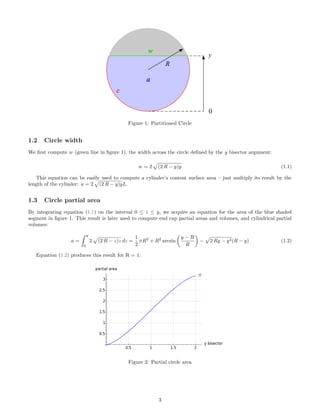
We first compute w (green line in figure 1), the width across the circle defined by the y bisector argument:
w = 2 (2 R − y)y (1.1)
This equation can be easily used to compute a cylinder’s content surface area – just multiply its result by the
length of the cylinder: a = 2 (2 R − y)yL.
1.3 Circle partial area
By integrating equation (1.1) on the interval 0 ≤ z ≤ y, we acquire an equation for the area of the blue shaded
segment in figure 1. This result is later used to compute end cap partial areas and volumes, and cylindrical partial
volumes:
a =
y
0
2 (2 R − z)z dz =
1
2
πR2
+ R2
arcsin
y − R
R
− 2 Ry − y2(R − y) (1.2)
Equation (1.2) produces this result for R = 1:
Figure 2: Partial circle area
3
1.4 Circle partial circumference
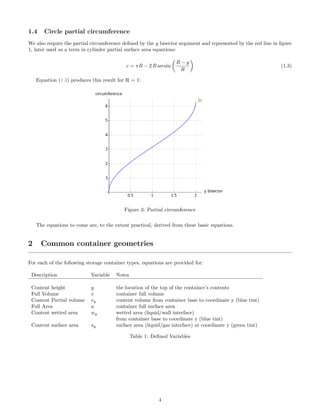
We also require the partial circumference defined by the y bisector argument and represented by the red line in figure
1, later used as a term in cylinder partial surface area equations:
c = πR − 2 R arcsin
R − y
R
(1.3)
Equation (1.3) produces this result for R = 1:
Figure 3: Partial circumference
The equations to come are, to the extent practical, derived from these basic equations.
2 Common container geometries
For each of the following storage container types, equations are provided for:
Description Variable Notes
Content height y the location of the top of the container’s contents
Full Volume v container full volume
Content Partial volume vy content volume from container base to coordinate y (blue tint)
Full Area a container full surface area
Content wetted area wy wetted area (liquid/wall interface)
from container base to coordinate y (blue tint)
Content surface area sy surface area (liquid/gas interface) at coordinate y (green tint)
Table 1: Defined Variables
4
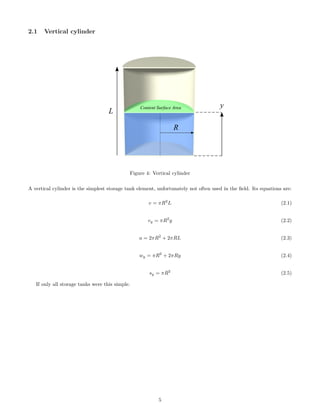
2.1 Vertical cylinder
Figure 4: Vertical cylinder
A vertical cylinder is the simplest storage tank element, unfortunately not often used in the field. Its equations are:
v = πR2
L (2.1)
vy = πR2
y (2.2)
a = 2πR2
+ 2πRL (2.3)
wy = πR2
+ 2πRy (2.4)
sy = πR2
(2.5)
If only all storage tanks were this simple.
5
2.2 Horizontal cylinder
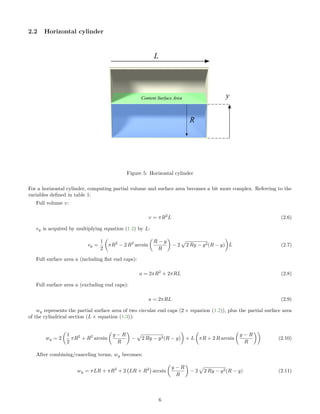
Figure 5: Horizontal cylinder
For a horizontal cylinder, computing partial volume and surface area becomes a bit more complex. Referring to the
variables defined in table 1:
Full volume v:
v = πR2
L (2.6)
vy is acquired by multiplying equation (1.2) by L:
vy =
1
2
πR2
− 2 R2
arcsin
R − y
R
− 2 2 Ry − y2(R − y) L (2.7)
Full surface area a (including flat end caps):
a = 2πR2
+ 2πRL (2.8)
Full surface area a (excluding end caps):
a = 2πRL (2.9)
wy represents the partial surface area of two circular end caps (2 × equation (1.2)), plus the partial surface area
of the cylindrical section (L × equation (1.3)):
wy = 2
1
2
πR2
+ R2
arcsin
y − R
R
− 2 Ry − y2(R − y) + L πR + 2 R arcsin
y − R
R
(2.10)
After combining/canceling terms, wy becomes:
wy = πLR + πR2
+ 2 LR + R2
arcsin
y − R
R
− 2 2 Ry − y2(R − y) (2.11)
6
Remember about the above equations that, in some tank analyses, one may wish to only compute the cylinder’s
surface area, without end caps. For that case, use this equation (the right-hand part of equation (2.10)):
wy = L πR + 2 R arcsin
y − R
R
(2.12)
sy, content surface area (green plane in figure 4), is acquired by multiplying equation (1.1) by L:
sy = 2L (2 R − y)y (2.13)
2.3 Sphere
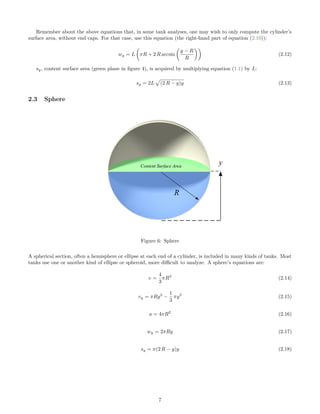
Figure 6: Sphere
A spherical section, often a hemisphere or ellipse at each end of a cylinder, is included in many kinds of tanks. Most
tanks use one or another kind of ellipse or spheroid, more difficult to analyze. A sphere’s equations are:
v =
4
3
πR3
(2.14)
vy = πRy2
−
1
3
πy3
(2.15)
a = 4πR2
(2.16)
wy = 2πRy (2.17)
sy = π(2 R − y)y (2.18)
7
2.4 Elliptical end cap
This section analyzes a class of storage tank end cap whose minor radius varies between flat and hemispherical.
The analysis and equations described here are normally added as terms to an equation for the entire tank, one
whose final form has the height variable y common to all its sections.
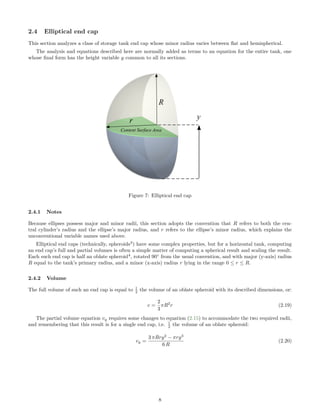
Figure 7: Elliptical end cap
2.4.1 Notes
Because ellipses possess major and minor radii, this section adopts the convention that R refers to both the cen-
tral cylinder’s radius and the ellipse’s major radius, and r refers to the ellipse’s minor radius, which explains the
unconventional variable names used above.
Elliptical end caps (technically, spheroids3
) have some complex properties, but for a horizontal tank, computing
an end cap’s full and partial volumes is often a simple matter of computing a spherical result and scaling the result.
Each such end cap is half an oblate spheroid4
, rotated 90◦
from the usual convention, and with major (y-axis) radius
R equal to the tank’s primary radius, and a minor (x-axis) radius r lying in the range 0 ≤ r ≤ R.
2.4.2 Volume
The full volume of such an end cap is equal to 1
2 the volume of an oblate spheroid with its described dimensions, or:
v =
2
3
πR2
r (2.19)
The partial volume equation vy requires some changes to equation (2.15) to accommodate the two required radii,
and remembering that this result is for a single end cap, i.e. 1
2 the volume of an oblate spheroid:
vy =
3 πRry2
− πry3
6 R
(2.20)
8
2.4.3 Surface area
An oblate spheroid end cap’s full surface area a (half that of an oblate spheroid) requires this equation:
a =
πr2
tanh−1 R2−r2
R2 + πR2 R2−r2
R2
R2−r2
R2
, 0 < r < R (2.21)
Note the valid range of the r argument: 0 < r < R:
• For r = 0 (flat end cap), instead use a = πR2
.
• For r = R (spherical end cap), instead use a = 2πR2
(one end cap).
2.4.4 Partial wetted area
Computing wy, an oblate spheroid wetted area, is more difficult:
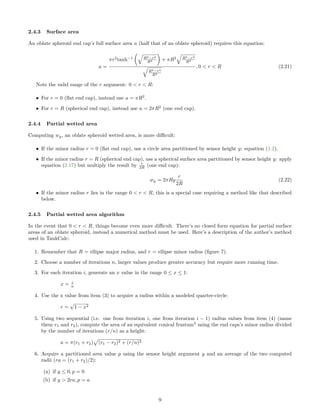
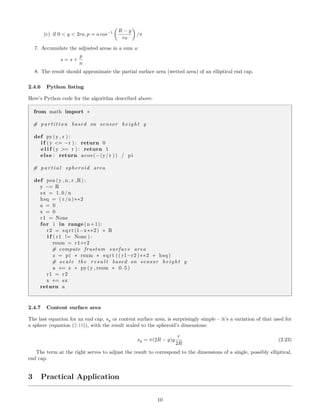
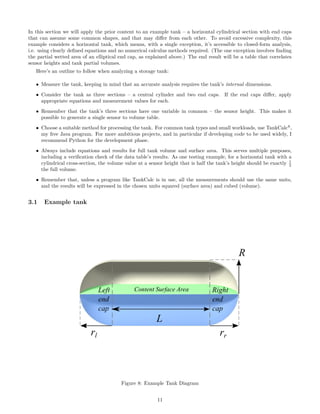
• If the minor radius r = 0 (flat end cap), use a circle area partitioned by sensor height y: equation (1.2).
• If the minor radius r = R (spherical end cap), use a spherical surface area partitioned by sensor height y: apply
equation (2.17) but multiply the result by r
2R (one end cap):
wy = 2πRy
r
2R
(2.22)
• If the minor radius r lies in the range 0 < r < R, this is a special case requiring a method like that described
below.
2.4.5 Partial wetted area algorithm
In the event that 0 < r < R, things become even more difficult. There’s no closed form equation for partial surface
areas of an oblate spheroid, instead a numerical method must be used. Here’s a description of the author’s method
used in TankCalc:
1. Remember that R = ellipse major radius, and r = ellipse minor radius (figure 7).
2. Choose a number of iterations n, larger values produce greater accuracy but require more running time.
3. For each iteration i, generate an x value in the range 0 ≤ x ≤ 1:
x = i
n
4. Use the x value from item (3) to acquire a radius within a modeled quarter-circle:
r =
√
1 − x2
5. Using two sequential (i.e. one from iteration i, one from iteration i − 1) radius values from item (4) (name
them r1 and r2), compute the area of an equivalent conical frustum5
using the end caps’s minor radius divided
by the number of iterations (r/n) as a height:
a = π(r1 + r2) (r1 − r2)2 + (r/n)2
6. Acquire a partitioned area value p using the sensor height argument y and an average of the two computed
radii (ra = (r1 + r2)/2):
(a) if y ≤ 0, p = 0
(b) if y > 2ra, p = a
9
(c) if 0 < y < 2ra, p = a cos−1 R − y
ra
/π
7. Accumulate the adjusted areas in a sum s:
s = s +
p
n
8. The result should approximate the partial surface area (wetted area) of an elliptical end cap.
2.4.6 Python listing
Here’s Python code for the algorithm described above:
from math import ∗
# p a r t i t i o n based on sensor height y
def py(y , r ) :
i f (y <= −r ) : return 0
e l i f (y >= r ) : return 1
else : return acos (−(y/ r )) / pi
# p a r t i a l spheroid area
def psa (y , n , r ,R) :
y −= R
sx = 1.0/n
hsq = ( r /n)∗∗2
a = 0
x = 0
r1 = None
for i in range(n+1):
r2 = sqrt (1−x∗∗2) ∗ R
i f ( r1 != None ) :
rsum = r1+r2
# compute frustum surface area
z = pi ∗ rsum ∗ sqrt (( r1−r2 )∗∗2 + hsq )
# s ca l e the r e s u l t based on sensor height y
a += z ∗ py(y , rsum ∗ 0.5)
r1 = r2
x += sx
return a
2.4.7 Content surface area
The last equation for an end cap, sy or content surface area, is surprisingly simple – it’s a variation of that used for
a sphere (equation (2.18)), with the result scaled to the spheroid’s dimensions:
sy = π(2R − y)y
r
2R
(2.23)
The term at the right serves to adjust the result to correspond to the dimensions of a single, possibly elliptical,
end cap.
3 Practical Application
10
In this section we will apply the prior content to an example tank – a horizontal cylindrical section with end caps
that can assume some common shapes, and that may differ from each other. To avoid excessive complexity, this
example considers a horizontal tank, which means, with a single exception, it’s accessible to closed-form analysis,
i.e. using clearly defined equations and no numerical calculus methods required. (The one exception involves finding
the partial wetted area of an elliptical end cap, as explained above.) The end result will be a table that correlates
sensor heights and tank partial volumes.
Here’s an outline to follow when analyzing a storage tank:
• Measure the tank, keeping in mind that an accurate analysis requires the tank’s internal dimensions.
• Consider the tank as three sections – a central cylinder and two end caps. If the end caps differ, apply
appropriate equations and measurement values for each.
• Remember that the tank’s three sections have one variable in common – the sensor height. This makes it
possible to generate a single sensor to volume table.
• Choose a suitable method for processing the tank. For common tank types and small workloads, use TankCalc6
,
my free Java program. For more ambitious projects, and in particular if developing code to be used widely, I
recommend Python for the development phase.
• Always include equations and results for full tank volume and surface area. This serves multiple purposes,
including a verification check of the data table’s results. As one testing example, for a horizontal tank with a
cylindrical cross-section, the volume value at a sensor height that is half the tank’s height should be exactly 1
2
the full volume.
• Remember that, unless a program like TankCalc is in use, all the measurements should use the same units,
and the results will be expressed in the chosen units squared (surface area) and cubed (volume).
3.1 Example tank
Figure 8: Example Tank Diagram
11
3.1.1 Measuring the tank
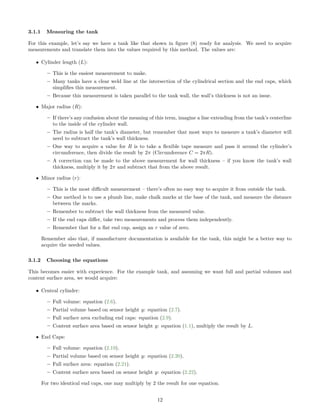
For this example, let’s say we have a tank like that shown in figure (8) ready for analysis. We need to acquire
measurements and translate them into the values required by this method. The values are:
• Cylinder length (L):
– This is the easiest measurement to make.
– Many tanks have a clear weld line at the intersection of the cylindrical section and the end caps, which
simplifies this measurement.
– Because this measurement is taken parallel to the tank wall, the wall’s thickness is not an issue.
• Major radius (R):
– If there’s any confusion about the meaning of this term, imagine a line extending from the tank’s centerline
to the inside of the cylinder wall.
– The radius is half the tank’s diameter, but remember that most ways to measure a tank’s diameter will
need to subtract the tank’s wall thickness.
– One way to acquire a value for R is to take a flexible tape measure and pass it around the cylinder’s
circumference, then divide the result by 2π (Circumference C = 2πR).
– A correction can be made to the above measurement for wall thickness – if you know the tank’s wall
thickness, multiply it by 2π and subtract that from the above result.
• Minor radius (r):
– This is the most difficult measurement – there’s often no easy way to acquire it from outside the tank.
– One method is to use a plumb line, make chalk marks at the base of the tank, and measure the distance
between the marks.
– Remember to subtract the wall thickness from the measured value.
– If the end caps differ, take two measurements and process them independently.
– Remember that for a flat end cap, assign an r value of zero.
Remember also that, if manufacturer documentation is available for the tank, this might be a better way to
acquire the needed values.
3.1.2 Choosing the equations
This becomes easier with experience. For the example tank, and assuming we want full and partial volumes and
content surface area, we would acquire:
• Central cylinder:
– Full volume: equation (2.6).
– Partial volume based on sensor height y: equation (2.7).
– Full surface area excluding end caps: equation (2.9).
– Content surface area based on sensor height y: equation (1.1), multiply the result by L.
• End Caps:
– Full volume: equation (2.19).
– Partial volume based on sensor height y: equation (2.20).
– Full surface area: equation (2.21).
– Content surface area based on sensor height y: equation (2.22).
For two identical end caps, one may multiply by 2 the result for one equation.
12
3.1.3 Example program
Follow this link7
for an example Python program that performs all the tasks outlined in the prior section, prints a
summary list of tank properties, then prints a table of values correlating sensor height, volume, and content surface
area. At the top of the program is a set of user-definable values that permit the user to customize the results.
Examination of this Python program should give readers a sense of how to proceed in crafting a solution for many
types of common storage tanks.
4 Overview
4.1 TankCalc
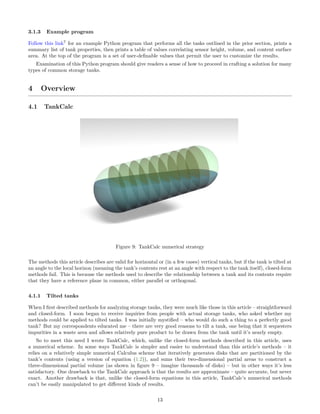
Figure 9: TankCalc numerical strategy
The methods this article describes are valid for horizontal or (in a few cases) vertical tanks, but if the tank is tilted at
an angle to the local horizon (meaning the tank’s contents rest at an angle with respect to the tank itself), closed-form
methods fail. This is because the methods used to describe the relationship between a tank and its contents require
that they have a reference plane in common, either parallel or orthogonal.
4.1.1 Tilted tanks
When I first described methods for analyzing storage tanks, they were much like those in this article – straightforward
and closed-form. I soon began to receive inquiries from people with actual storage tanks, who asked whether my
methods could be applied to tilted tanks. I was initially mystified – who would do such a thing to a perfectly good
tank? But my correspondents educated me – there are very good reasons to tilt a tank, one being that it sequesters
impurities in a waste area and allows relatively pure product to be drawn from the tank until it’s nearly empty.
So to meet this need I wrote TankCalc, which, unlike the closed-form methods described in this article, uses
a numerical scheme. In some ways TankCalc is simpler and easier to understand than this article’s methods – it
relies on a relatively simple numerical Calculus scheme that iteratively generates disks that are partitioned by the
tank’s contents (using a version of equation (1.2)), and sums their two-dimensional partial areas to construct a
three-dimensional partial volume (as shown in figure 9 – imagine thousands of disks) – but in other ways it’s less
satisfactory. One drawback to the TankCalc approach is that the results are approximate – quite accurate, but never
exact. Another drawback is that, unlike the closed-form equations in this article, TankCalc’s numerical methods
can’t be easily manipulated to get different kinds of results.
13
To me, TankCalc exemplifies the collision between pure and applied mathematics, and supports Einstein’s famous
aphorism: ”As far as the laws of mathematics refer to reality, they are not certain, and as far as they are certain,
they do not refer to reality.”
4.2 Tools
In the process of creating mathematical results for articles like this one, I rely on a number of tools including Sage8
,
IPython9
and much past experience in storage tank analysis.
4.2.1 Sage
Sage in particular has turned out to be a valuable resource for both symbolic and numerical results. Because Sage
relies on Python, it’s a relatively simple matter to produce a new symbolic result in Sage, then transfer it to a Python
working script for further analysis and tuning. Here’s an example:
I start with an equation that, if presented with a y coordinate within a circle of radius R, will return the circle’s
width at that coordinate – see equation (1.1) and figure (1) above. The equation:
w = 2 (2 R − y)y (4.1)
First I want to be sure the equation produces the hoped-for result, that is, a width corresponding to a given y
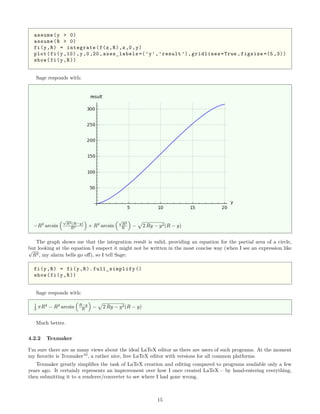
coordinate within a circle. So to find out I provide Sage with the equation and plotting instructions:
f(y,R) = 2 * sqrt ((2*R-y) * y)
plot(f(y,10),y,0,20, axes_labels =(’y’,’result ’),gridlines=True ,figsize =(5 ,3))
show(f(y,R))
latex(f(y,R))
Sage responds with:
2 (2 R − y)y
2 , sqrt{{left(2 , R - yright)} y}
The final printed result above allows me to easily copy LaTeX code from Sage into an article like this one.
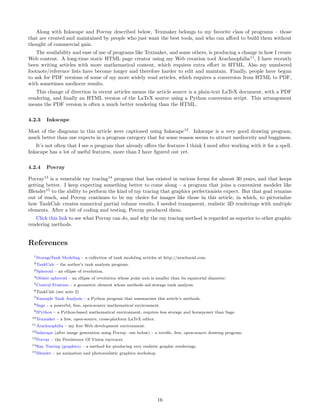
At this point I realize that, if I integrate the above equation on the interval 0 ≤ z ≤ y, I will have an equation
for partial circle area, useful in a number of ways. So I instruct Sage thus:
14
assume(y > 0)
assume(R > 0)
fi(y,R) = integrate(f(z,R),z,0,y)
plot(fi(y,10),y,0,20, axes_labels =(’y’,’result ’),gridlines=True ,figsize =(5 ,3))
show(fi(y,R))
Sage responds with:
−R2
arcsin
√
R2(R−y)
R2 + R2
arcsin
√
R2
R − 2 Ry − y2(R − y)
The graph shows me that the integration result is valid, providing an equation for the partial area of a circle,
but looking at the equation I suspect it might not be written in the most concise way (when I see an expression like√
R2, my alarm bells go off), so I tell Sage:
fi(y,R) = fi(y,R). full_simplify ()
show(fi(y,R))
Sage responds with:
1
2 πR2
− R2
arcsin R−y
R − 2 Ry − y2(R − y)
Much better.
4.2.2 Texmaker
I’m sure there are as many views about the ideal LaTeX editor as there are users of such programs. At the moment
my favorite is Texmaker10
, a rather nice, free LaTeX editor with versions for all common platforms.
Texmaker greatly simplifies the task of LaTeX creation and editing compared to programs available only a few
years ago. It certainly represents an improvement over how I once created LaTeX – by hand-entering everything,
then submitting it to a renderer/converter to see where I had gone wrong.
15
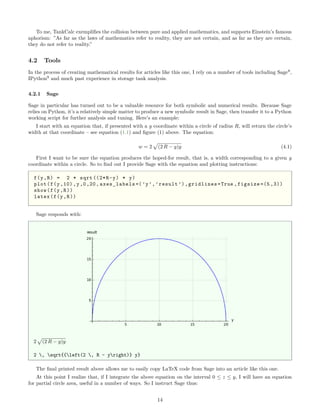
Along with Inkscape and Povray described below, Texmaker belongs to my favorite class of programs – those
that are created and maintained by people who just want the best tools, and who can afford to build them without
thought of commercial gain.
The availability and ease of use of programs like Texmaker, and some others, is producing a change in how I create
Web content. A long-time static HTML page creator using my Web creation tool Arachnophilia11
, I have recently
been writing articles with more mathematical content, which requires extra effort in HTML. Also my numbered
footnote/reference lists have become longer and therefore harder to edit and maintain. Finally, people have begun
to ask for PDF versions of some of my more widely read articles, which requires a conversion from HTML to PDF,
with sometimes mediocre results.
This change of direction in recent articles means the article source is a plain-text LaTeX document, with a PDF
rendering, and finally an HTML version of the LaTeX source using a Python conversion script. This arrangement
means the PDF version is often a much better rendering than the HTML.
4.2.3 Inkscape
Most of the diagrams in this article were captioned using Inkscape12
. Inkscape is a very good drawing program,
much better than one expects in a program category that for some reason seems to attract mediocrity and bugginess.
It’s not often that I see a program that already offers the features I think I need after working with it for a spell.
Inkscape has a lot of useful features, more than I have figured out yet.
4.2.4 Povray
Povray13
is a venerable ray tracing14
program that has existed in various forms for almost 30 years, and that keeps
getting better. I keep expecting something better to come along – a program that joins a convenient modeler like
Blender15
to the ability to perform the kind of ray tracing that graphics perfectionists expect. But that goal remains
out of reach, and Povray continues to be my choice for images like those in this article, in which, to pictorialize
how TankCalc creates numerical partial volume results, I needed transparent, realistic 3D renderings with multiple
elements. After a bit of coding and testing, Povray produced them.
Click this link to see what Povray can do, and why the ray tracing method is regarded as superior to other graphic
rendering methods.
References
1StorageTank Modeling – a collection of tank modeling articles at http://arachnoid.com.
2TankCalc – the author’s tank analysis program.
3Spheroid – an ellipse of revolution.
4Oblate spheroid – an ellipse of revolution whose polar axis is smaller than its equatorial diameter.
5Conical Frustum – a geometric element whose methods aid storage tank analysis.
6TankCalc (see note 2)
7Example Tank Analysis – a Python program that summarizes this article’s methods.
8Sage – a powerful, free, open-source mathematical environment.
9IPython – a Python-based mathematical environment, requires less storage and horsepower than Sage.
10Texmaker – a free, open-source, cross-platform LaTeX editor.
11Arachnophilia – my free Web development environment.
12Inkscape (after image generation using Povray –see below) – a terrific, free, open-source drawing program.
13Povray – the Persistence Of Vision raytracer.
14Ray Tracing (graphics) – a method for producing very realistic graphic renderings.
15Blender – an animation and photorealistic graphics workshop.
16

Storage container tank mathematics

  • 1.
    Storage Container Mathematics Copyrightc 2015, Paul Lutus Most recent revision: June 5, 2015 Abstract This is a collection of full and partial, volume and surface area equations for common storage tank types. It’s meant to serve as an easy-to-use reference for tank analysis methods and mathematics that are distributed across many articles located in the storage tank modeling section1 of http://arachnoid.com. The overarching purpose of this activity is to create summaries and accurate sensor height to volume tables for various kinds of storage tanks. An additional goal is to provide full and partial surface area results when possible. The mathematical treatments are arranged to progress from simple to complex, in most cases building on what has already been presented. Contents 1 Circle equations 2 1.1 Common conventions . . . . . . . . . . . . . . . . . . . . . . . . . . . . . . . . . . . . . . . . . . . . . . 2 1.2 Circle width . . . . . . . . . . . . . . . . . . . . . . . . . . . . . . . . . . . . . . . . . . . . . . . . . . . 3 1.3 Circle partial area . . . . . . . . . . . . . . . . . . . . . . . . . . . . . . . . . . . . . . . . . . . . . . . 3 1.4 Circle partial circumference . . . . . . . . . . . . . . . . . . . . . . . . . . . . . . . . . . . . . . . . . . 4 2 Common container geometries 4 2.1 Vertical cylinder . . . . . . . . . . . . . . . . . . . . . . . . . . . . . . . . . . . . . . . . . . . . . . . . 5 2.2 Horizontal cylinder . . . . . . . . . . . . . . . . . . . . . . . . . . . . . . . . . . . . . . . . . . . . . . . 6 2.3 Sphere . . . . . . . . . . . . . . . . . . . . . . . . . . . . . . . . . . . . . . . . . . . . . . . . . . . . . . 7 2.4 Elliptical end cap . . . . . . . . . . . . . . . . . . . . . . . . . . . . . . . . . . . . . . . . . . . . . . . . 8 2.4.1 Notes . . . . . . . . . . . . . . . . . . . . . . . . . . . . . . . . . . . . . . . . . . . . . . . . . . 8 2.4.2 Volume . . . . . . . . . . . . . . . . . . . . . . . . . . . . . . . . . . . . . . . . . . . . . . . . . 8 2.4.3 Surface area . . . . . . . . . . . . . . . . . . . . . . . . . . . . . . . . . . . . . . . . . . . . . . . 9 2.4.4 Partial wetted area . . . . . . . . . . . . . . . . . . . . . . . . . . . . . . . . . . . . . . . . . . . 9 2.4.5 Partial wetted area algorithm . . . . . . . . . . . . . . . . . . . . . . . . . . . . . . . . . . . . . 9 2.4.6 Python listing . . . . . . . . . . . . . . . . . . . . . . . . . . . . . . . . . . . . . . . . . . . . . . 10 2.4.7 Content surface area . . . . . . . . . . . . . . . . . . . . . . . . . . . . . . . . . . . . . . . . . . 10 3 Practical Application 10 3.1 Example tank . . . . . . . . . . . . . . . . . . . . . . . . . . . . . . . . . . . . . . . . . . . . . . . . . . 11 3.1.1 Measuring the tank . . . . . . . . . . . . . . . . . . . . . . . . . . . . . . . . . . . . . . . . . . 12 3.1.2 Choosing the equations . . . . . . . . . . . . . . . . . . . . . . . . . . . . . . . . . . . . . . . . 12 3.1.3 Example program . . . . . . . . . . . . . . . . . . . . . . . . . . . . . . . . . . . . . . . . . . . 13 1
  • 2.
    4 Overview 13 4.1TankCalc . . . . . . . . . . . . . . . . . . . . . . . . . . . . . . . . . . . . . . . . . . . . . . . . . . . . 13 4.1.1 Tilted tanks . . . . . . . . . . . . . . . . . . . . . . . . . . . . . . . . . . . . . . . . . . . . . . . 13 4.2 Tools . . . . . . . . . . . . . . . . . . . . . . . . . . . . . . . . . . . . . . . . . . . . . . . . . . . . . . . 14 4.2.1 Sage . . . . . . . . . . . . . . . . . . . . . . . . . . . . . . . . . . . . . . . . . . . . . . . . . . . 14 4.2.2 Texmaker . . . . . . . . . . . . . . . . . . . . . . . . . . . . . . . . . . . . . . . . . . . . . . . . 15 4.2.3 Inkscape . . . . . . . . . . . . . . . . . . . . . . . . . . . . . . . . . . . . . . . . . . . . . . . . . 16 4.2.4 Povray . . . . . . . . . . . . . . . . . . . . . . . . . . . . . . . . . . . . . . . . . . . . . . . . . . 16 List of Figures 1 Partitioned Circle . . . . . . . . . . . . . . . . . . . . . . . . . . . . . . . . . . . . . . . . . . . . . . . . 3 2 Partial circle area . . . . . . . . . . . . . . . . . . . . . . . . . . . . . . . . . . . . . . . . . . . . . . . . 3 3 Partial circumference . . . . . . . . . . . . . . . . . . . . . . . . . . . . . . . . . . . . . . . . . . . . . . 4 4 Vertical cylinder . . . . . . . . . . . . . . . . . . . . . . . . . . . . . . . . . . . . . . . . . . . . . . . . 5 5 Horizontal cylinder . . . . . . . . . . . . . . . . . . . . . . . . . . . . . . . . . . . . . . . . . . . . . . . 6 6 Sphere . . . . . . . . . . . . . . . . . . . . . . . . . . . . . . . . . . . . . . . . . . . . . . . . . . . . . . 7 7 Elliptical end cap . . . . . . . . . . . . . . . . . . . . . . . . . . . . . . . . . . . . . . . . . . . . . . . . 8 8 Example Tank Diagram . . . . . . . . . . . . . . . . . . . . . . . . . . . . . . . . . . . . . . . . . . . . 11 9 TankCalc numerical strategy . . . . . . . . . . . . . . . . . . . . . . . . . . . . . . . . . . . . . . . . . 13 List of Tables 1 Defined Variables . . . . . . . . . . . . . . . . . . . . . . . . . . . . . . . . . . . . . . . . . . . . . . . . 4 1 Circle equations This section describes some basic equations from which most of the later equations are derived. 1.1 Common conventions Certain common names used in geometry have different assignments here, to remain consistent across uses and to agree with the conventions used in TankCalc2 , the author’s tank analysis program. One convention seen here differs from TankCalc. In this and later sections, the y value, normally associated with a content sensor height, has a range of 0 ≤ y ≤ 2R, which I think is more consistent and logical than the prior convention. This convention differs from that in the TankCalc documentation, where −R ≤ y ≤ R. This change produces a number of changes in the dependent equations, and readers should expect to see equation forms that differ from those on the arachnoid.com website. 2
  • 3.
    Figure 1: PartitionedCircle 1.2 Circle width We first compute w (green line in figure 1), the width across the circle defined by the y bisector argument: w = 2 (2 R − y)y (1.1) This equation can be easily used to compute a cylinder’s content surface area – just multiply its result by the length of the cylinder: a = 2 (2 R − y)yL. 1.3 Circle partial area By integrating equation (1.1) on the interval 0 ≤ z ≤ y, we acquire an equation for the area of the blue shaded segment in figure 1. This result is later used to compute end cap partial areas and volumes, and cylindrical partial volumes: a = y 0 2 (2 R − z)z dz = 1 2 πR2 + R2 arcsin y − R R − 2 Ry − y2(R − y) (1.2) Equation (1.2) produces this result for R = 1: Figure 2: Partial circle area 3
  • 4.
    1.4 Circle partialcircumference We also require the partial circumference defined by the y bisector argument and represented by the red line in figure 1, later used as a term in cylinder partial surface area equations: c = πR − 2 R arcsin R − y R (1.3) Equation (1.3) produces this result for R = 1: Figure 3: Partial circumference The equations to come are, to the extent practical, derived from these basic equations. 2 Common container geometries For each of the following storage container types, equations are provided for: Description Variable Notes Content height y the location of the top of the container’s contents Full Volume v container full volume Content Partial volume vy content volume from container base to coordinate y (blue tint) Full Area a container full surface area Content wetted area wy wetted area (liquid/wall interface) from container base to coordinate y (blue tint) Content surface area sy surface area (liquid/gas interface) at coordinate y (green tint) Table 1: Defined Variables 4
  • 5.
    2.1 Vertical cylinder Figure4: Vertical cylinder A vertical cylinder is the simplest storage tank element, unfortunately not often used in the field. Its equations are: v = πR2 L (2.1) vy = πR2 y (2.2) a = 2πR2 + 2πRL (2.3) wy = πR2 + 2πRy (2.4) sy = πR2 (2.5) If only all storage tanks were this simple. 5
  • 6.
    2.2 Horizontal cylinder Figure5: Horizontal cylinder For a horizontal cylinder, computing partial volume and surface area becomes a bit more complex. Referring to the variables defined in table 1: Full volume v: v = πR2 L (2.6) vy is acquired by multiplying equation (1.2) by L: vy = 1 2 πR2 − 2 R2 arcsin R − y R − 2 2 Ry − y2(R − y) L (2.7) Full surface area a (including flat end caps): a = 2πR2 + 2πRL (2.8) Full surface area a (excluding end caps): a = 2πRL (2.9) wy represents the partial surface area of two circular end caps (2 × equation (1.2)), plus the partial surface area of the cylindrical section (L × equation (1.3)): wy = 2 1 2 πR2 + R2 arcsin y − R R − 2 Ry − y2(R − y) + L πR + 2 R arcsin y − R R (2.10) After combining/canceling terms, wy becomes: wy = πLR + πR2 + 2 LR + R2 arcsin y − R R − 2 2 Ry − y2(R − y) (2.11) 6
  • 7.
    Remember about theabove equations that, in some tank analyses, one may wish to only compute the cylinder’s surface area, without end caps. For that case, use this equation (the right-hand part of equation (2.10)): wy = L πR + 2 R arcsin y − R R (2.12) sy, content surface area (green plane in figure 4), is acquired by multiplying equation (1.1) by L: sy = 2L (2 R − y)y (2.13) 2.3 Sphere Figure 6: Sphere A spherical section, often a hemisphere or ellipse at each end of a cylinder, is included in many kinds of tanks. Most tanks use one or another kind of ellipse or spheroid, more difficult to analyze. A sphere’s equations are: v = 4 3 πR3 (2.14) vy = πRy2 − 1 3 πy3 (2.15) a = 4πR2 (2.16) wy = 2πRy (2.17) sy = π(2 R − y)y (2.18) 7
  • 8.
    2.4 Elliptical endcap This section analyzes a class of storage tank end cap whose minor radius varies between flat and hemispherical. The analysis and equations described here are normally added as terms to an equation for the entire tank, one whose final form has the height variable y common to all its sections. Figure 7: Elliptical end cap 2.4.1 Notes Because ellipses possess major and minor radii, this section adopts the convention that R refers to both the cen- tral cylinder’s radius and the ellipse’s major radius, and r refers to the ellipse’s minor radius, which explains the unconventional variable names used above. Elliptical end caps (technically, spheroids3 ) have some complex properties, but for a horizontal tank, computing an end cap’s full and partial volumes is often a simple matter of computing a spherical result and scaling the result. Each such end cap is half an oblate spheroid4 , rotated 90◦ from the usual convention, and with major (y-axis) radius R equal to the tank’s primary radius, and a minor (x-axis) radius r lying in the range 0 ≤ r ≤ R. 2.4.2 Volume The full volume of such an end cap is equal to 1 2 the volume of an oblate spheroid with its described dimensions, or: v = 2 3 πR2 r (2.19) The partial volume equation vy requires some changes to equation (2.15) to accommodate the two required radii, and remembering that this result is for a single end cap, i.e. 1 2 the volume of an oblate spheroid: vy = 3 πRry2 − πry3 6 R (2.20) 8
  • 9.
    2.4.3 Surface area Anoblate spheroid end cap’s full surface area a (half that of an oblate spheroid) requires this equation: a = πr2 tanh−1 R2−r2 R2 + πR2 R2−r2 R2 R2−r2 R2 , 0 < r < R (2.21) Note the valid range of the r argument: 0 < r < R: • For r = 0 (flat end cap), instead use a = πR2 . • For r = R (spherical end cap), instead use a = 2πR2 (one end cap). 2.4.4 Partial wetted area Computing wy, an oblate spheroid wetted area, is more difficult: • If the minor radius r = 0 (flat end cap), use a circle area partitioned by sensor height y: equation (1.2). • If the minor radius r = R (spherical end cap), use a spherical surface area partitioned by sensor height y: apply equation (2.17) but multiply the result by r 2R (one end cap): wy = 2πRy r 2R (2.22) • If the minor radius r lies in the range 0 < r < R, this is a special case requiring a method like that described below. 2.4.5 Partial wetted area algorithm In the event that 0 < r < R, things become even more difficult. There’s no closed form equation for partial surface areas of an oblate spheroid, instead a numerical method must be used. Here’s a description of the author’s method used in TankCalc: 1. Remember that R = ellipse major radius, and r = ellipse minor radius (figure 7). 2. Choose a number of iterations n, larger values produce greater accuracy but require more running time. 3. For each iteration i, generate an x value in the range 0 ≤ x ≤ 1: x = i n 4. Use the x value from item (3) to acquire a radius within a modeled quarter-circle: r = √ 1 − x2 5. Using two sequential (i.e. one from iteration i, one from iteration i − 1) radius values from item (4) (name them r1 and r2), compute the area of an equivalent conical frustum5 using the end caps’s minor radius divided by the number of iterations (r/n) as a height: a = π(r1 + r2) (r1 − r2)2 + (r/n)2 6. Acquire a partitioned area value p using the sensor height argument y and an average of the two computed radii (ra = (r1 + r2)/2): (a) if y ≤ 0, p = 0 (b) if y > 2ra, p = a 9
  • 10.
    (c) if 0< y < 2ra, p = a cos−1 R − y ra /π 7. Accumulate the adjusted areas in a sum s: s = s + p n 8. The result should approximate the partial surface area (wetted area) of an elliptical end cap. 2.4.6 Python listing Here’s Python code for the algorithm described above: from math import ∗ # p a r t i t i o n based on sensor height y def py(y , r ) : i f (y <= −r ) : return 0 e l i f (y >= r ) : return 1 else : return acos (−(y/ r )) / pi # p a r t i a l spheroid area def psa (y , n , r ,R) : y −= R sx = 1.0/n hsq = ( r /n)∗∗2 a = 0 x = 0 r1 = None for i in range(n+1): r2 = sqrt (1−x∗∗2) ∗ R i f ( r1 != None ) : rsum = r1+r2 # compute frustum surface area z = pi ∗ rsum ∗ sqrt (( r1−r2 )∗∗2 + hsq ) # s ca l e the r e s u l t based on sensor height y a += z ∗ py(y , rsum ∗ 0.5) r1 = r2 x += sx return a 2.4.7 Content surface area The last equation for an end cap, sy or content surface area, is surprisingly simple – it’s a variation of that used for a sphere (equation (2.18)), with the result scaled to the spheroid’s dimensions: sy = π(2R − y)y r 2R (2.23) The term at the right serves to adjust the result to correspond to the dimensions of a single, possibly elliptical, end cap. 3 Practical Application 10
  • 11.
    In this sectionwe will apply the prior content to an example tank – a horizontal cylindrical section with end caps that can assume some common shapes, and that may differ from each other. To avoid excessive complexity, this example considers a horizontal tank, which means, with a single exception, it’s accessible to closed-form analysis, i.e. using clearly defined equations and no numerical calculus methods required. (The one exception involves finding the partial wetted area of an elliptical end cap, as explained above.) The end result will be a table that correlates sensor heights and tank partial volumes. Here’s an outline to follow when analyzing a storage tank: • Measure the tank, keeping in mind that an accurate analysis requires the tank’s internal dimensions. • Consider the tank as three sections – a central cylinder and two end caps. If the end caps differ, apply appropriate equations and measurement values for each. • Remember that the tank’s three sections have one variable in common – the sensor height. This makes it possible to generate a single sensor to volume table. • Choose a suitable method for processing the tank. For common tank types and small workloads, use TankCalc6 , my free Java program. For more ambitious projects, and in particular if developing code to be used widely, I recommend Python for the development phase. • Always include equations and results for full tank volume and surface area. This serves multiple purposes, including a verification check of the data table’s results. As one testing example, for a horizontal tank with a cylindrical cross-section, the volume value at a sensor height that is half the tank’s height should be exactly 1 2 the full volume. • Remember that, unless a program like TankCalc is in use, all the measurements should use the same units, and the results will be expressed in the chosen units squared (surface area) and cubed (volume). 3.1 Example tank Figure 8: Example Tank Diagram 11
  • 12.
    3.1.1 Measuring thetank For this example, let’s say we have a tank like that shown in figure (8) ready for analysis. We need to acquire measurements and translate them into the values required by this method. The values are: • Cylinder length (L): – This is the easiest measurement to make. – Many tanks have a clear weld line at the intersection of the cylindrical section and the end caps, which simplifies this measurement. – Because this measurement is taken parallel to the tank wall, the wall’s thickness is not an issue. • Major radius (R): – If there’s any confusion about the meaning of this term, imagine a line extending from the tank’s centerline to the inside of the cylinder wall. – The radius is half the tank’s diameter, but remember that most ways to measure a tank’s diameter will need to subtract the tank’s wall thickness. – One way to acquire a value for R is to take a flexible tape measure and pass it around the cylinder’s circumference, then divide the result by 2π (Circumference C = 2πR). – A correction can be made to the above measurement for wall thickness – if you know the tank’s wall thickness, multiply it by 2π and subtract that from the above result. • Minor radius (r): – This is the most difficult measurement – there’s often no easy way to acquire it from outside the tank. – One method is to use a plumb line, make chalk marks at the base of the tank, and measure the distance between the marks. – Remember to subtract the wall thickness from the measured value. – If the end caps differ, take two measurements and process them independently. – Remember that for a flat end cap, assign an r value of zero. Remember also that, if manufacturer documentation is available for the tank, this might be a better way to acquire the needed values. 3.1.2 Choosing the equations This becomes easier with experience. For the example tank, and assuming we want full and partial volumes and content surface area, we would acquire: • Central cylinder: – Full volume: equation (2.6). – Partial volume based on sensor height y: equation (2.7). – Full surface area excluding end caps: equation (2.9). – Content surface area based on sensor height y: equation (1.1), multiply the result by L. • End Caps: – Full volume: equation (2.19). – Partial volume based on sensor height y: equation (2.20). – Full surface area: equation (2.21). – Content surface area based on sensor height y: equation (2.22). For two identical end caps, one may multiply by 2 the result for one equation. 12
  • 13.
    3.1.3 Example program Followthis link7 for an example Python program that performs all the tasks outlined in the prior section, prints a summary list of tank properties, then prints a table of values correlating sensor height, volume, and content surface area. At the top of the program is a set of user-definable values that permit the user to customize the results. Examination of this Python program should give readers a sense of how to proceed in crafting a solution for many types of common storage tanks. 4 Overview 4.1 TankCalc Figure 9: TankCalc numerical strategy The methods this article describes are valid for horizontal or (in a few cases) vertical tanks, but if the tank is tilted at an angle to the local horizon (meaning the tank’s contents rest at an angle with respect to the tank itself), closed-form methods fail. This is because the methods used to describe the relationship between a tank and its contents require that they have a reference plane in common, either parallel or orthogonal. 4.1.1 Tilted tanks When I first described methods for analyzing storage tanks, they were much like those in this article – straightforward and closed-form. I soon began to receive inquiries from people with actual storage tanks, who asked whether my methods could be applied to tilted tanks. I was initially mystified – who would do such a thing to a perfectly good tank? But my correspondents educated me – there are very good reasons to tilt a tank, one being that it sequesters impurities in a waste area and allows relatively pure product to be drawn from the tank until it’s nearly empty. So to meet this need I wrote TankCalc, which, unlike the closed-form methods described in this article, uses a numerical scheme. In some ways TankCalc is simpler and easier to understand than this article’s methods – it relies on a relatively simple numerical Calculus scheme that iteratively generates disks that are partitioned by the tank’s contents (using a version of equation (1.2)), and sums their two-dimensional partial areas to construct a three-dimensional partial volume (as shown in figure 9 – imagine thousands of disks) – but in other ways it’s less satisfactory. One drawback to the TankCalc approach is that the results are approximate – quite accurate, but never exact. Another drawback is that, unlike the closed-form equations in this article, TankCalc’s numerical methods can’t be easily manipulated to get different kinds of results. 13
  • 14.
    To me, TankCalcexemplifies the collision between pure and applied mathematics, and supports Einstein’s famous aphorism: ”As far as the laws of mathematics refer to reality, they are not certain, and as far as they are certain, they do not refer to reality.” 4.2 Tools In the process of creating mathematical results for articles like this one, I rely on a number of tools including Sage8 , IPython9 and much past experience in storage tank analysis. 4.2.1 Sage Sage in particular has turned out to be a valuable resource for both symbolic and numerical results. Because Sage relies on Python, it’s a relatively simple matter to produce a new symbolic result in Sage, then transfer it to a Python working script for further analysis and tuning. Here’s an example: I start with an equation that, if presented with a y coordinate within a circle of radius R, will return the circle’s width at that coordinate – see equation (1.1) and figure (1) above. The equation: w = 2 (2 R − y)y (4.1) First I want to be sure the equation produces the hoped-for result, that is, a width corresponding to a given y coordinate within a circle. So to find out I provide Sage with the equation and plotting instructions: f(y,R) = 2 * sqrt ((2*R-y) * y) plot(f(y,10),y,0,20, axes_labels =(’y’,’result ’),gridlines=True ,figsize =(5 ,3)) show(f(y,R)) latex(f(y,R)) Sage responds with: 2 (2 R − y)y 2 , sqrt{{left(2 , R - yright)} y} The final printed result above allows me to easily copy LaTeX code from Sage into an article like this one. At this point I realize that, if I integrate the above equation on the interval 0 ≤ z ≤ y, I will have an equation for partial circle area, useful in a number of ways. So I instruct Sage thus: 14
  • 15.
    assume(y > 0) assume(R> 0) fi(y,R) = integrate(f(z,R),z,0,y) plot(fi(y,10),y,0,20, axes_labels =(’y’,’result ’),gridlines=True ,figsize =(5 ,3)) show(fi(y,R)) Sage responds with: −R2 arcsin √ R2(R−y) R2 + R2 arcsin √ R2 R − 2 Ry − y2(R − y) The graph shows me that the integration result is valid, providing an equation for the partial area of a circle, but looking at the equation I suspect it might not be written in the most concise way (when I see an expression like√ R2, my alarm bells go off), so I tell Sage: fi(y,R) = fi(y,R). full_simplify () show(fi(y,R)) Sage responds with: 1 2 πR2 − R2 arcsin R−y R − 2 Ry − y2(R − y) Much better. 4.2.2 Texmaker I’m sure there are as many views about the ideal LaTeX editor as there are users of such programs. At the moment my favorite is Texmaker10 , a rather nice, free LaTeX editor with versions for all common platforms. Texmaker greatly simplifies the task of LaTeX creation and editing compared to programs available only a few years ago. It certainly represents an improvement over how I once created LaTeX – by hand-entering everything, then submitting it to a renderer/converter to see where I had gone wrong. 15
  • 16.
    Along with Inkscapeand Povray described below, Texmaker belongs to my favorite class of programs – those that are created and maintained by people who just want the best tools, and who can afford to build them without thought of commercial gain. The availability and ease of use of programs like Texmaker, and some others, is producing a change in how I create Web content. A long-time static HTML page creator using my Web creation tool Arachnophilia11 , I have recently been writing articles with more mathematical content, which requires extra effort in HTML. Also my numbered footnote/reference lists have become longer and therefore harder to edit and maintain. Finally, people have begun to ask for PDF versions of some of my more widely read articles, which requires a conversion from HTML to PDF, with sometimes mediocre results. This change of direction in recent articles means the article source is a plain-text LaTeX document, with a PDF rendering, and finally an HTML version of the LaTeX source using a Python conversion script. This arrangement means the PDF version is often a much better rendering than the HTML. 4.2.3 Inkscape Most of the diagrams in this article were captioned using Inkscape12 . Inkscape is a very good drawing program, much better than one expects in a program category that for some reason seems to attract mediocrity and bugginess. It’s not often that I see a program that already offers the features I think I need after working with it for a spell. Inkscape has a lot of useful features, more than I have figured out yet. 4.2.4 Povray Povray13 is a venerable ray tracing14 program that has existed in various forms for almost 30 years, and that keeps getting better. I keep expecting something better to come along – a program that joins a convenient modeler like Blender15 to the ability to perform the kind of ray tracing that graphics perfectionists expect. But that goal remains out of reach, and Povray continues to be my choice for images like those in this article, in which, to pictorialize how TankCalc creates numerical partial volume results, I needed transparent, realistic 3D renderings with multiple elements. After a bit of coding and testing, Povray produced them. Click this link to see what Povray can do, and why the ray tracing method is regarded as superior to other graphic rendering methods. References 1StorageTank Modeling – a collection of tank modeling articles at http://arachnoid.com. 2TankCalc – the author’s tank analysis program. 3Spheroid – an ellipse of revolution. 4Oblate spheroid – an ellipse of revolution whose polar axis is smaller than its equatorial diameter. 5Conical Frustum – a geometric element whose methods aid storage tank analysis. 6TankCalc (see note 2) 7Example Tank Analysis – a Python program that summarizes this article’s methods. 8Sage – a powerful, free, open-source mathematical environment. 9IPython – a Python-based mathematical environment, requires less storage and horsepower than Sage. 10Texmaker – a free, open-source, cross-platform LaTeX editor. 11Arachnophilia – my free Web development environment. 12Inkscape (after image generation using Povray –see below) – a terrific, free, open-source drawing program. 13Povray – the Persistence Of Vision raytracer. 14Ray Tracing (graphics) – a method for producing very realistic graphic renderings. 15Blender – an animation and photorealistic graphics workshop. 16