Continuous Deployment with Jenkins
Stephen Connolly
Architect, CloudBees


TL;DR http://goo.gl/kNgyu

                       ©2012 CloudBees, Inc.
                        All Rights Reserved
Who am I?
• One of the first non-Sun contributors to
  Jenkins.
   – Creator of the Weather Icons!
• Architect @ CloudBees
• Member & Maven PMC @ Apache Software
  Foundation
• In my previous lives:
   –   Software Engineer @ Avaya
   –   IT Project Manager @ Elan Pharmaceuticals
   –   PhD development chemist @ Bristol Myer Squibb
   –   Freelance software developer since 1989


                          ©2012 CloudBees, Inc.        2
                           All Rights Reserved
Jenkins

What the feck is this Jenkins thing anyway?


                            ©2012 CloudBees, Inc.
                             All Rights Reserved
Introducing Jenkins
      • What is Jenkins?
                 – A relatively recent product, but growing in popularity
                 – Currently used by*:
                             •    Yahoo
                             •    NASA
                             •    JBoss / RedHat
                             •    Amazon
                             •    HP
                             •    And more!


*Source: Kohsuke Kawaguchi, lead developer of the Jenkins project


                                                                            4
Introducing Jenkins
• What makes Jenkins so great?


                                      Distributed Builds

                          Reporting
               Plugins
 Ease of use

                                                           5
jenkins-ci.org
• OSS CI server
    – Written in Java
•   About 7 years old
•   Easy to install/use
•   Extensible via 530+ plugins
•   Widely adopted
    – 40K+ installations


                           ©2012 CloudBees, Inc.   6
                            All Rights Reserved
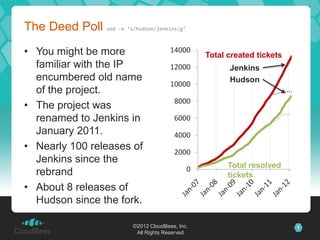
The Deed Poll sed -e ‘s/hudson/jenkins/g’
• You might be more                      14000
                                                   Total created tickets
  familiar with the IP                   12000           Jenkins
  encumbered old name                                    Hudson
                                         10000
  of the project.
                                          8000
• The project was
  renamed to Jenkins in                   6000
  January 2011.                           4000
• Nearly 100 releases of                  2000
  Jenkins since the
                                               0         Total resolved
  rebrand                                                tickets
• About 8 releases of
  Hudson since the fork.

                           ©2012 CloudBees, Inc.                           7
                            All Rights Reserved
Just for Continuous Integration?

Yeah! Look mate, this is a PUPPET conference not a Continuous
Integration conference… show me that you’re relevant before I start
lobbing soft fruits!


                            ©2012 CloudBees, Inc.
                             All Rights Reserved
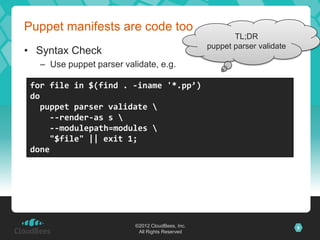
Puppet manifests are code too
                                                         TL;DR
                                                  puppet parser validate
• Syntax Check
   – Use puppet parser validate, e.g.

 for file in $(find . -iname '*.pp’)
 do
   puppet parser validate 
     --render-as s 
     --modulepath=modules 
     "$file" || exit 1;
 done


                          ©2012 CloudBees, Inc.                            9
                           All Rights Reserved
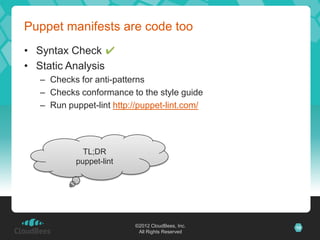
Puppet manifests are code too
• Syntax Check ✔
• Static Analysis
  – Checks for anti-patterns
  – Checks conformance to the style guide
  – Run puppet-lint http://puppet-lint.com/


             TL;DR
           puppet-lint


                         ©2012 CloudBees, Inc.   10
                          All Rights Reserved
Puppet manifests are code too
• Syntax Check ✔                                    TL;DR
                                                 RSpec-puppet
• Static Analysis ✔
• Automated Tests
   – Use RSpec-puppet http://rspec-puppet.com
      There are a lot of people confused by the purpose of
      these tests as they can’t test the result of the
      manifest on a live system. That is not the point of
      rspec-puppet.

      Rspec-puppet tests are there to test the behaviour of
      Puppet when it compiles your manifests into a catalogue
      of Puppet resources.
                    Source: http://rspec-puppet.com/tutorial/


                         ©2012 CloudBees, Inc.                  11
                          All Rights Reserved
Puppet manifests are code too
•   Syntax Check ✔
•   Static Analysis ✔
•   Automated Tests ✔
•   Setup Jenkins to run these on every change to the
    Puppet manifests
    ✍ You are storing your scripts in Version Control?
• Now you know your Puppet scripts are doing what they
  should do…
                                                           TL;DR
                                                    Jenkins can save my
                                                            ass!


                            ©2012 CloudBees, Inc.                         12
                             All Rights Reserved
Continuous Integration for Puppet
• i.e. regularly run the puppet scripts against a test
  environment and verify that the result is a valid
  deployment
• Should be just part of the End-to-end Continuous
  Integration testing.
• Use parameterized builds / build promotion so that QA
  can re-use to deploy to their test environment.

              TL;DR
     I still need tests on
              metal


                             ©2012 CloudBees, Inc.        13
                              All Rights Reserved
What tests should we run against metal?

Nagios health checks                     Real tests
• Pro                                    • Pro
  – This is what we will be                        – Verifies that the installed
    using in production                              application works
  – Checks that the                                – High Confidence
    application is installed             • Con
    and alive
                                                   – Hard to automate
  – Should be fast
                                                   – Long duration
• Con
  – Does not verify that the                        TL;DR
    installed application                     Nagios vs Real: use
    works                                            both


                           ©2012 CloudBees, Inc.                                   14
                            All Rights Reserved
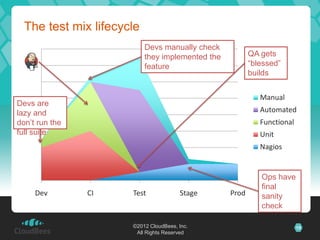
The test mix lifecycle
  80                       Devs manually check
                           they implemented the          QA gets
  70                       feature                       “blessed”
                                                         builds
  60

    50                                                      Manual
Devs are
lazy and                                                    Automated
    40
don’t run the                                               Functional
full30
     suite                                                  Unit
  20                                                        Nagios

  10

   0                                                        Ops have
                                                            final
       Dev      CI    Test             Stage      Prod      sanity
                                                            check

                      ©2012 CloudBees, Inc.                              15
                       All Rights Reserved
The cost of running tests
                                                     Lost Users
14                                     Staging env    cost $$$
                                        costs $$$
12

10
     Keep Devs              Manual =
 8    in “The                 $$$
       Flow”
 6

 4

 2                                                    Users pay
                                                      us to test
 0                 Robot
        Dev         CI         Test         Stage        Prod

       I can keep costs down and productivity up if
       I have lots of tests for Jenkins to run for me
                         ©2012 CloudBees, Inc.
                          All Rights Reserved
                                                                   16
Continuous Deployment is just one step more
• Let Jenkins manage the push to production servers
  too.
                                                          TL;DR
                                                    Automation = Jenkins
• Risks?
   – Accidental deployment
      • Solve with build promotion plugin.
   – Breaking production
      • Revert the change and redeploy.
      • Jenkins is actually a solution to this problem, not a cause
   – Security
      • Jenkins has strong security model.
      • Use a second Jenkins instance (if truly paranoid)


                            ©2012 CloudBees, Inc.                          17
                             All Rights Reserved
Setting up a Jenkins Server

Tips that will make your life easier down the road


                      ©2012 CloudBees, Inc.
                       All Rights Reserved
Invest in good URL


• If your users can’t see Jenkins, much of the benefit is
  lost

   – Make the URL easier to remember


           http://sca14-3530.sca.cloudbees.com:8080/jenkins/


           http://jenkins.cloudbees.com/


                                                               19
Share port 80 with other apps


• Apache reverse proxy
   – Let you run Jenkins in non-root, too


  browser                        Apache        Jenkins


• For Windows
   – IIS7+URL Rewrite+Application Request Routing


                                                         20
No “/jenkins”
• Use virtual host to distinguish multiple apps, not
  context path


                                                               Jenkins


      browser                                   Apache / IIS


                http://jenkins.cloudbees.com/                  Redmine
                http://redmine.cloudbees.com/


                                                                         21
Jenkins Home Directory
• Prepare for disk usage growth
   – Especially when you start to host jobs from people who aren’t
     close to you
   – Make sure you can throw more disks at the problem later


• No need to waste money on 15000rpm SCSI disks
   – But bigger disk is nice


                                                                     22
Plugins for Puppet

There’s 530+ plugins for Jenkins which ones do I actually
need?


                       ©2012 CloudBees, Inc.
                        All Rights Reserved
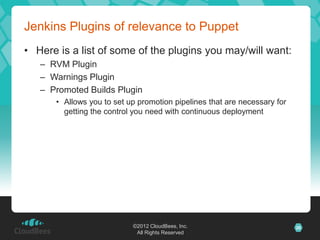
Jenkins Plugins of relevance to Puppet
• Here is a list of some of the plugins you may/will want:
   – RVM Plugin
      • Runs your entire build (from SCM check out to post-build actions)
        within the context of an RVM managed environment of your
        choice


                           ©2012 CloudBees, Inc.                            24
                            All Rights Reserved
Jenkins Plugins of relevance to Puppet
• Here is a list of some of the plugins you may/will want:
   – RVM Plugin
   – Warnings Plugin
      • For integration with puppet-lint


                            ©2012 CloudBees, Inc.            25
                             All Rights Reserved
Jenkins Plugins of relevance to Puppet
• Here is a list of some of the plugins you may/will want:
   – RVM Plugin
   – Warnings Plugin
   – Promoted Builds Plugin
      • Allows you to set up promotion pipelines that are necessary for
        getting the control you need with continuous deployment


                           ©2012 CloudBees, Inc.                          26
                            All Rights Reserved
Jenkins Plugins of relevance to Puppet
• Here is a list of some of the plugins you may/will want:
   –   RVM Plugin
   –   Warnings Plugin
   –   Promoted Builds Plugin
   –   CloudSmith’s StackHammer Plugin
        • Makes testing and deploying “stacks” of puppet modules much
          easier and more tractable
            – Removes the left-over failed deployment mess hell


                              ©2012 CloudBees, Inc.                     27
                               All Rights Reserved
Jenkins Plugins of relevance to Puppet
• Here is a list of some of the plugins you may/will want:
   –   RVM Plugin
   –   Warnings Plugin
   –   Promoted Builds Plugin
   –   CloudSmith’s StackHammer Plugin
   –   HTML Publisher Plugin
        • Handy for publishing your puppet RDoc


                                  TL;DR
                            Lots of plugins for
                                 puppet


                            ©2012 CloudBees, Inc.            28
                             All Rights Reserved
Show me how

Ok, so quit showing me fancy slides, how the feck do I do all this


                          ©2012 CloudBees, Inc.
                           All Rights Reserved
Setup Jenkins
puppet module install rtyler-jenkins
puppet apply -v -e "include jenkins"

                   Quit complaining… this is a
                   Puppet conference!


                   Oh yeah, rtyler runs on Ubuntu
                   10.04
                      does not always work quite so
                      well on other OS…
                      may need tweaks to work on
                      Ubuntu 12.04


                             ©2012 CloudBees, Inc.    30
                              All Rights Reserved
©2012 CloudBees, Inc.   31
 All Rights Reserved
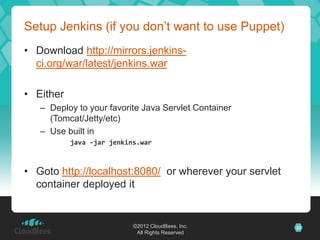
Setup Jenkins (if you don’t want to use Puppet)
• Download http://mirrors.jenkins-
  ci.org/war/latest/jenkins.war

• Either
   – Deploy to your favorite Java Servlet Container
     (Tomcat/Jetty/etc)
   – Use built in
           java -jar jenkins.war


• Goto http://localhost:8080/ or wherever your servlet
  container deployed it


                           ©2012 CloudBees, Inc.         32
                            All Rights Reserved
Or Don’t Setup Jenkins (the shameless plug)


   Just use CloudBees’ DEV@cloud
              (Jenkins as a Service)


                   ©2012 CloudBees, Inc.      33
                    All Rights Reserved
Welcome to Jenkins


                 ©2012 CloudBees, Inc.   34
                  All Rights Reserved
Testing Puppet with Jenkins

If you are reading these tags do a Mexican Wave on three… 1…
2… 3!


                        ©2012 CloudBees, Inc.
                         All Rights Reserved
©2012 CloudBees, Inc.   36
 All Rights Reserved
Issues with testing Puppet on metal
• Puppet needs to run as root.
• There can be only one version
   – Of Puppet on a machine
   – Of RVM that Puppet will use on a machine
• Running tests from a clean baseline
   – Side-effects from previous test runs can affect test results
   – Solve with Virtualization
   – Martyrs can use LXC & Snapshotted VolGroups


                           ©2012 CloudBees, Inc.                    37
                            All Rights Reserved
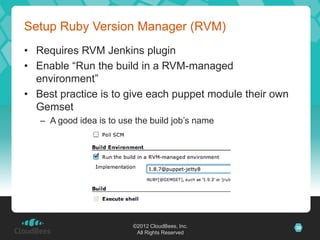
Setup Ruby Version Manager (RVM)
• Requires RVM Jenkins plugin
• Enable “Run the build in a RVM-managed
  environment”
• Best practice is to give each puppet module their own
  Gemset
   – A good idea is to use the build job’s name


                          ©2012 CloudBees, Inc.           38
                           All Rights Reserved
Ensure RVM environment has required Gems
One solution
• Stick a Gemfile file in the
  root of the SCM checkout
   source "http://rubygems.org"
   gem "puppet", "=2.7.17”
   gem "ci_reporter", "=1.7.0”
   gem "rspec-puppet", "=0.1.3”
   gem "puppet-lint", "=0.1.13"

• Add a shell buildstep
• Run “bundle install”
                                            These fixed versions
                                            work for me with Ruby
More than one way to skin                   1.8.7
this cat, use whatever works
for you
                          ©2012 CloudBees, Inc.                     39
                           All Rights Reserved
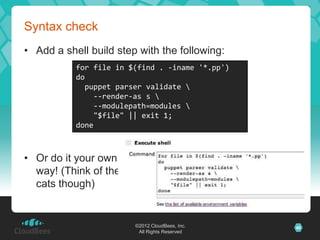
Syntax check
• Add a shell build step with the following:
           for file in $(find . -iname '*.pp')
           do
             puppet parser validate 
               --render-as s 
               --modulepath=modules 
               "$file" || exit 1;
           done


• Or do it your own
  way! (Think of the
  cats though)


                        ©2012 CloudBees, Inc.    40
                         All Rights Reserved
Static Analysis
• Add a shell build step with the following:
   find . 
     -iname *.pp 
     -exec 
       puppet-lint 
         --log-format 
         "%{path}:%{linenumber}:%{check}:%{KIND}:%{message}" 
         {} 
     ;

• Add a “Scan for compiler
  warnings” Post-Build Action
   – Add Puppet-lint parser to
     “Scan console log”


                           ©2012 CloudBees, Inc.                 41
                            All Rights Reserved
RSpec-puppet
• Configure Rakefile for ci_reporter
   require 'ci/reporter/rake/rspec'

• Add a shell Build Step with the following:
   export CI_REPORTS=results
   rake ci:setup:rspec spec


• Add a “Publish JUnit test result report” Post-Build
  Action
   **/results/SPEC-*.xml


                           ©2012 CloudBees, Inc.        42
                            All Rights Reserved
Documentation
• Add a shell build step with the following:
   ## Cleanup old docs.
   [ -d doc/ ] && rm -rf doc/
   ## Dummy manifests folder.
   ! [ -d manifests/ ] && mkdir manifests/
   ## Generate docs
   puppet doc --mode rdoc --manifestdir manifests/ --modulepath ./modules/ --outputdir doc

   ## Fix docs to remove the complete workspace from all file paths.
   if [ -d ${WORKSPACE}/doc/files/${WORKSPACE}/modules ]; then
     mv -v "${WORKSPACE}/doc/files/${WORKSPACE}/modules" "${WORKSPACE}/doc/files/modules"
   fi;
   grep -l -R ${WORKSPACE} * | while read fname; do perl -pi -e "s@${WORKSPACE}/@/@g" $fname; done;


• Add a “Publish HTML Reports” Post-Build Action
   – doc, index.html, Puppet Docs


                                        ©2012 CloudBees, Inc.                                         43
                                         All Rights Reserved
Deploying to metal
• Set up a build promotion process


                      ©2012 CloudBees, Inc.   44
                       All Rights Reserved
Promotion process ideas
• Use “Promote immediately once the
  build is complete” to deploy into the
  developer’s sandbox environment
• Use “Only when manually approved”
  to allow QA to select which builds to
  test
   – Or Dev sign-off on being feature
     complete
• Use “Only when manually approved”
  (Manual tests) with “When the
  following downstream projects build
  successfully” (Automated tests) to
  promote to ops
                          ©2012 CloudBees, Inc.   45
                           All Rights Reserved
Case study: Lookout


• Jenkins is internal, off the production network 100%
   – Use Capistrano for deploying to production


• “Shipping code”
   – git push production-puppet-master:/srv/git/puppet.git
   – ssh production-puppet-master "(cd /etc/puppet/blah &&
     git fetch origin && git checkout ${TAGNAME})"
   – ssh production-puppet-master "run-puppet.sh"


                         ©2012 CloudBees, Inc.               46
                          All Rights Reserved
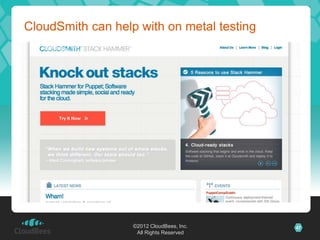
CloudSmith can help with on metal testing


                   ©2012 CloudBees, Inc.    47
                    All Rights Reserved
Useful links
• All the code snippets from this deck


   http://goo.gl/kNgyu
• Others links
   –   http://cloudbees.com/                – http://jenkins-ci.org/
   –   http://rvm.io/                       – http://puppet-lint.com/
   –   http://rspec-puppet.com/             – http://gembundler.com/
   –   https://wiki.jenkins-ci.org/display/JENKINS/RVM+Plugin
   –   https://wiki.jenkins-ci.org/display/JENKINS/Warnings+Plugin
   –   https://wiki.jenkins-ci.org/display/JENKINS/HTML+Publisher+Plugin
   –   https://wiki.jenkins-ci.org/display/JENKINS/Promoted+Builds+Plugin


                             ©2012 CloudBees, Inc.                          48
                              All Rights Reserved
©2012 CloudBees, Inc.
 All Rights Reserved

Continuous Development with Jenkins - Stephen Connolly at PuppetCamp Dublin '12

  • 1.
    Continuous Deployment withJenkins Stephen Connolly Architect, CloudBees TL;DR http://goo.gl/kNgyu ©2012 CloudBees, Inc. All Rights Reserved
  • 2.
    Who am I? •One of the first non-Sun contributors to Jenkins. – Creator of the Weather Icons! • Architect @ CloudBees • Member & Maven PMC @ Apache Software Foundation • In my previous lives: – Software Engineer @ Avaya – IT Project Manager @ Elan Pharmaceuticals – PhD development chemist @ Bristol Myer Squibb – Freelance software developer since 1989 ©2012 CloudBees, Inc. 2 All Rights Reserved
  • 3.
    Jenkins What the feckis this Jenkins thing anyway? ©2012 CloudBees, Inc. All Rights Reserved
  • 4.
    Introducing Jenkins • What is Jenkins? – A relatively recent product, but growing in popularity – Currently used by*: • Yahoo • NASA • JBoss / RedHat • Amazon • HP • And more! *Source: Kohsuke Kawaguchi, lead developer of the Jenkins project 4
  • 5.
    Introducing Jenkins • Whatmakes Jenkins so great? Distributed Builds Reporting Plugins Ease of use 5
  • 6.
    jenkins-ci.org • OSS CIserver – Written in Java • About 7 years old • Easy to install/use • Extensible via 530+ plugins • Widely adopted – 40K+ installations ©2012 CloudBees, Inc. 6 All Rights Reserved
  • 7.
    The Deed Pollsed -e ‘s/hudson/jenkins/g’ • You might be more 14000 Total created tickets familiar with the IP 12000 Jenkins encumbered old name Hudson 10000 of the project. 8000 • The project was renamed to Jenkins in 6000 January 2011. 4000 • Nearly 100 releases of 2000 Jenkins since the 0 Total resolved rebrand tickets • About 8 releases of Hudson since the fork. ©2012 CloudBees, Inc. 7 All Rights Reserved
  • 8.
    Just for ContinuousIntegration? Yeah! Look mate, this is a PUPPET conference not a Continuous Integration conference… show me that you’re relevant before I start lobbing soft fruits! ©2012 CloudBees, Inc. All Rights Reserved
  • 9.
    Puppet manifests arecode too TL;DR puppet parser validate • Syntax Check – Use puppet parser validate, e.g. for file in $(find . -iname '*.pp’) do puppet parser validate --render-as s --modulepath=modules "$file" || exit 1; done ©2012 CloudBees, Inc. 9 All Rights Reserved
  • 10.
    Puppet manifests arecode too • Syntax Check ✔ • Static Analysis – Checks for anti-patterns – Checks conformance to the style guide – Run puppet-lint http://puppet-lint.com/ TL;DR puppet-lint ©2012 CloudBees, Inc. 10 All Rights Reserved
  • 11.
    Puppet manifests arecode too • Syntax Check ✔ TL;DR RSpec-puppet • Static Analysis ✔ • Automated Tests – Use RSpec-puppet http://rspec-puppet.com There are a lot of people confused by the purpose of these tests as they can’t test the result of the manifest on a live system. That is not the point of rspec-puppet. Rspec-puppet tests are there to test the behaviour of Puppet when it compiles your manifests into a catalogue of Puppet resources. Source: http://rspec-puppet.com/tutorial/ ©2012 CloudBees, Inc. 11 All Rights Reserved
  • 12.
    Puppet manifests arecode too • Syntax Check ✔ • Static Analysis ✔ • Automated Tests ✔ • Setup Jenkins to run these on every change to the Puppet manifests ✍ You are storing your scripts in Version Control? • Now you know your Puppet scripts are doing what they should do… TL;DR Jenkins can save my ass! ©2012 CloudBees, Inc. 12 All Rights Reserved
  • 13.
    Continuous Integration forPuppet • i.e. regularly run the puppet scripts against a test environment and verify that the result is a valid deployment • Should be just part of the End-to-end Continuous Integration testing. • Use parameterized builds / build promotion so that QA can re-use to deploy to their test environment. TL;DR I still need tests on metal ©2012 CloudBees, Inc. 13 All Rights Reserved
  • 14.
    What tests shouldwe run against metal? Nagios health checks Real tests • Pro • Pro – This is what we will be – Verifies that the installed using in production application works – Checks that the – High Confidence application is installed • Con and alive – Hard to automate – Should be fast – Long duration • Con – Does not verify that the TL;DR installed application Nagios vs Real: use works both ©2012 CloudBees, Inc. 14 All Rights Reserved
  • 15.
    The test mixlifecycle 80 Devs manually check they implemented the QA gets 70 feature “blessed” builds 60 50 Manual Devs are lazy and Automated 40 don’t run the Functional full30 suite Unit 20 Nagios 10 0 Ops have final Dev CI Test Stage Prod sanity check ©2012 CloudBees, Inc. 15 All Rights Reserved
  • 16.
    The cost ofrunning tests Lost Users 14 Staging env cost $$$ costs $$$ 12 10 Keep Devs Manual = 8 in “The $$$ Flow” 6 4 2 Users pay us to test 0 Robot Dev CI Test Stage Prod I can keep costs down and productivity up if I have lots of tests for Jenkins to run for me ©2012 CloudBees, Inc. All Rights Reserved 16
  • 17.
    Continuous Deployment isjust one step more • Let Jenkins manage the push to production servers too. TL;DR Automation = Jenkins • Risks? – Accidental deployment • Solve with build promotion plugin. – Breaking production • Revert the change and redeploy. • Jenkins is actually a solution to this problem, not a cause – Security • Jenkins has strong security model. • Use a second Jenkins instance (if truly paranoid) ©2012 CloudBees, Inc. 17 All Rights Reserved
  • 18.
    Setting up aJenkins Server Tips that will make your life easier down the road ©2012 CloudBees, Inc. All Rights Reserved
  • 19.
    Invest in goodURL • If your users can’t see Jenkins, much of the benefit is lost – Make the URL easier to remember http://sca14-3530.sca.cloudbees.com:8080/jenkins/ http://jenkins.cloudbees.com/ 19
  • 20.
    Share port 80with other apps • Apache reverse proxy – Let you run Jenkins in non-root, too browser Apache Jenkins • For Windows – IIS7+URL Rewrite+Application Request Routing 20
  • 21.
    No “/jenkins” • Usevirtual host to distinguish multiple apps, not context path Jenkins browser Apache / IIS http://jenkins.cloudbees.com/ Redmine http://redmine.cloudbees.com/ 21
  • 22.
    Jenkins Home Directory •Prepare for disk usage growth – Especially when you start to host jobs from people who aren’t close to you – Make sure you can throw more disks at the problem later • No need to waste money on 15000rpm SCSI disks – But bigger disk is nice 22
  • 23.
    Plugins for Puppet There’s530+ plugins for Jenkins which ones do I actually need? ©2012 CloudBees, Inc. All Rights Reserved
  • 24.
    Jenkins Plugins ofrelevance to Puppet • Here is a list of some of the plugins you may/will want: – RVM Plugin • Runs your entire build (from SCM check out to post-build actions) within the context of an RVM managed environment of your choice ©2012 CloudBees, Inc. 24 All Rights Reserved
  • 25.
    Jenkins Plugins ofrelevance to Puppet • Here is a list of some of the plugins you may/will want: – RVM Plugin – Warnings Plugin • For integration with puppet-lint ©2012 CloudBees, Inc. 25 All Rights Reserved
  • 26.
    Jenkins Plugins ofrelevance to Puppet • Here is a list of some of the plugins you may/will want: – RVM Plugin – Warnings Plugin – Promoted Builds Plugin • Allows you to set up promotion pipelines that are necessary for getting the control you need with continuous deployment ©2012 CloudBees, Inc. 26 All Rights Reserved
  • 27.
    Jenkins Plugins ofrelevance to Puppet • Here is a list of some of the plugins you may/will want: – RVM Plugin – Warnings Plugin – Promoted Builds Plugin – CloudSmith’s StackHammer Plugin • Makes testing and deploying “stacks” of puppet modules much easier and more tractable – Removes the left-over failed deployment mess hell ©2012 CloudBees, Inc. 27 All Rights Reserved
  • 28.
    Jenkins Plugins ofrelevance to Puppet • Here is a list of some of the plugins you may/will want: – RVM Plugin – Warnings Plugin – Promoted Builds Plugin – CloudSmith’s StackHammer Plugin – HTML Publisher Plugin • Handy for publishing your puppet RDoc TL;DR Lots of plugins for puppet ©2012 CloudBees, Inc. 28 All Rights Reserved
  • 29.
    Show me how Ok,so quit showing me fancy slides, how the feck do I do all this ©2012 CloudBees, Inc. All Rights Reserved
  • 30.
    Setup Jenkins puppet moduleinstall rtyler-jenkins puppet apply -v -e "include jenkins" Quit complaining… this is a Puppet conference! Oh yeah, rtyler runs on Ubuntu 10.04 does not always work quite so well on other OS… may need tweaks to work on Ubuntu 12.04 ©2012 CloudBees, Inc. 30 All Rights Reserved
  • 31.
    ©2012 CloudBees, Inc. 31 All Rights Reserved
  • 32.
    Setup Jenkins (ifyou don’t want to use Puppet) • Download http://mirrors.jenkins- ci.org/war/latest/jenkins.war • Either – Deploy to your favorite Java Servlet Container (Tomcat/Jetty/etc) – Use built in java -jar jenkins.war • Goto http://localhost:8080/ or wherever your servlet container deployed it ©2012 CloudBees, Inc. 32 All Rights Reserved
  • 33.
    Or Don’t SetupJenkins (the shameless plug) Just use CloudBees’ DEV@cloud (Jenkins as a Service) ©2012 CloudBees, Inc. 33 All Rights Reserved
  • 34.
    Welcome to Jenkins ©2012 CloudBees, Inc. 34 All Rights Reserved
  • 35.
    Testing Puppet withJenkins If you are reading these tags do a Mexican Wave on three… 1… 2… 3! ©2012 CloudBees, Inc. All Rights Reserved
  • 36.
    ©2012 CloudBees, Inc. 36 All Rights Reserved
  • 37.
    Issues with testingPuppet on metal • Puppet needs to run as root. • There can be only one version – Of Puppet on a machine – Of RVM that Puppet will use on a machine • Running tests from a clean baseline – Side-effects from previous test runs can affect test results – Solve with Virtualization – Martyrs can use LXC & Snapshotted VolGroups ©2012 CloudBees, Inc. 37 All Rights Reserved
  • 38.
    Setup Ruby VersionManager (RVM) • Requires RVM Jenkins plugin • Enable “Run the build in a RVM-managed environment” • Best practice is to give each puppet module their own Gemset – A good idea is to use the build job’s name ©2012 CloudBees, Inc. 38 All Rights Reserved
  • 39.
    Ensure RVM environmenthas required Gems One solution • Stick a Gemfile file in the root of the SCM checkout source "http://rubygems.org" gem "puppet", "=2.7.17” gem "ci_reporter", "=1.7.0” gem "rspec-puppet", "=0.1.3” gem "puppet-lint", "=0.1.13" • Add a shell buildstep • Run “bundle install” These fixed versions work for me with Ruby More than one way to skin 1.8.7 this cat, use whatever works for you ©2012 CloudBees, Inc. 39 All Rights Reserved
  • 40.
    Syntax check • Adda shell build step with the following: for file in $(find . -iname '*.pp') do puppet parser validate --render-as s --modulepath=modules "$file" || exit 1; done • Or do it your own way! (Think of the cats though) ©2012 CloudBees, Inc. 40 All Rights Reserved
  • 41.
    Static Analysis • Adda shell build step with the following: find . -iname *.pp -exec puppet-lint --log-format "%{path}:%{linenumber}:%{check}:%{KIND}:%{message}" {} ; • Add a “Scan for compiler warnings” Post-Build Action – Add Puppet-lint parser to “Scan console log” ©2012 CloudBees, Inc. 41 All Rights Reserved
  • 42.
    RSpec-puppet • Configure Rakefilefor ci_reporter require 'ci/reporter/rake/rspec' • Add a shell Build Step with the following: export CI_REPORTS=results rake ci:setup:rspec spec • Add a “Publish JUnit test result report” Post-Build Action **/results/SPEC-*.xml ©2012 CloudBees, Inc. 42 All Rights Reserved
  • 43.
    Documentation • Add ashell build step with the following: ## Cleanup old docs. [ -d doc/ ] && rm -rf doc/ ## Dummy manifests folder. ! [ -d manifests/ ] && mkdir manifests/ ## Generate docs puppet doc --mode rdoc --manifestdir manifests/ --modulepath ./modules/ --outputdir doc ## Fix docs to remove the complete workspace from all file paths. if [ -d ${WORKSPACE}/doc/files/${WORKSPACE}/modules ]; then mv -v "${WORKSPACE}/doc/files/${WORKSPACE}/modules" "${WORKSPACE}/doc/files/modules" fi; grep -l -R ${WORKSPACE} * | while read fname; do perl -pi -e "s@${WORKSPACE}/@/@g" $fname; done; • Add a “Publish HTML Reports” Post-Build Action – doc, index.html, Puppet Docs ©2012 CloudBees, Inc. 43 All Rights Reserved
  • 44.
    Deploying to metal •Set up a build promotion process ©2012 CloudBees, Inc. 44 All Rights Reserved
  • 45.
    Promotion process ideas •Use “Promote immediately once the build is complete” to deploy into the developer’s sandbox environment • Use “Only when manually approved” to allow QA to select which builds to test – Or Dev sign-off on being feature complete • Use “Only when manually approved” (Manual tests) with “When the following downstream projects build successfully” (Automated tests) to promote to ops ©2012 CloudBees, Inc. 45 All Rights Reserved
  • 46.
    Case study: Lookout •Jenkins is internal, off the production network 100% – Use Capistrano for deploying to production • “Shipping code” – git push production-puppet-master:/srv/git/puppet.git – ssh production-puppet-master "(cd /etc/puppet/blah && git fetch origin && git checkout ${TAGNAME})" – ssh production-puppet-master "run-puppet.sh" ©2012 CloudBees, Inc. 46 All Rights Reserved
  • 47.
    CloudSmith can helpwith on metal testing ©2012 CloudBees, Inc. 47 All Rights Reserved
  • 48.
    Useful links • Allthe code snippets from this deck http://goo.gl/kNgyu • Others links – http://cloudbees.com/ – http://jenkins-ci.org/ – http://rvm.io/ – http://puppet-lint.com/ – http://rspec-puppet.com/ – http://gembundler.com/ – https://wiki.jenkins-ci.org/display/JENKINS/RVM+Plugin – https://wiki.jenkins-ci.org/display/JENKINS/Warnings+Plugin – https://wiki.jenkins-ci.org/display/JENKINS/HTML+Publisher+Plugin – https://wiki.jenkins-ci.org/display/JENKINS/Promoted+Builds+Plugin ©2012 CloudBees, Inc. 48 All Rights Reserved
  • 49.
    ©2012 CloudBees, Inc. All Rights Reserved

Editor's Notes

  • #34 Cannot do this slide as you need root access on the slave