Building a data warehouse with
Pentaho and Docker
Wellington Marinho
wpmarinho@globo.com
Sources
https://github.com/wmarinho/edw_cenipa
OPEN DATA CASE STUDY: CENIPA - AERONAUTICAL ACCIDENT INVESTIGATION AND PREVENTION CENTER
http://dados.gov.br/dataset/ocorrencias-aeronauticas-da-aviacao-civil-brasileira
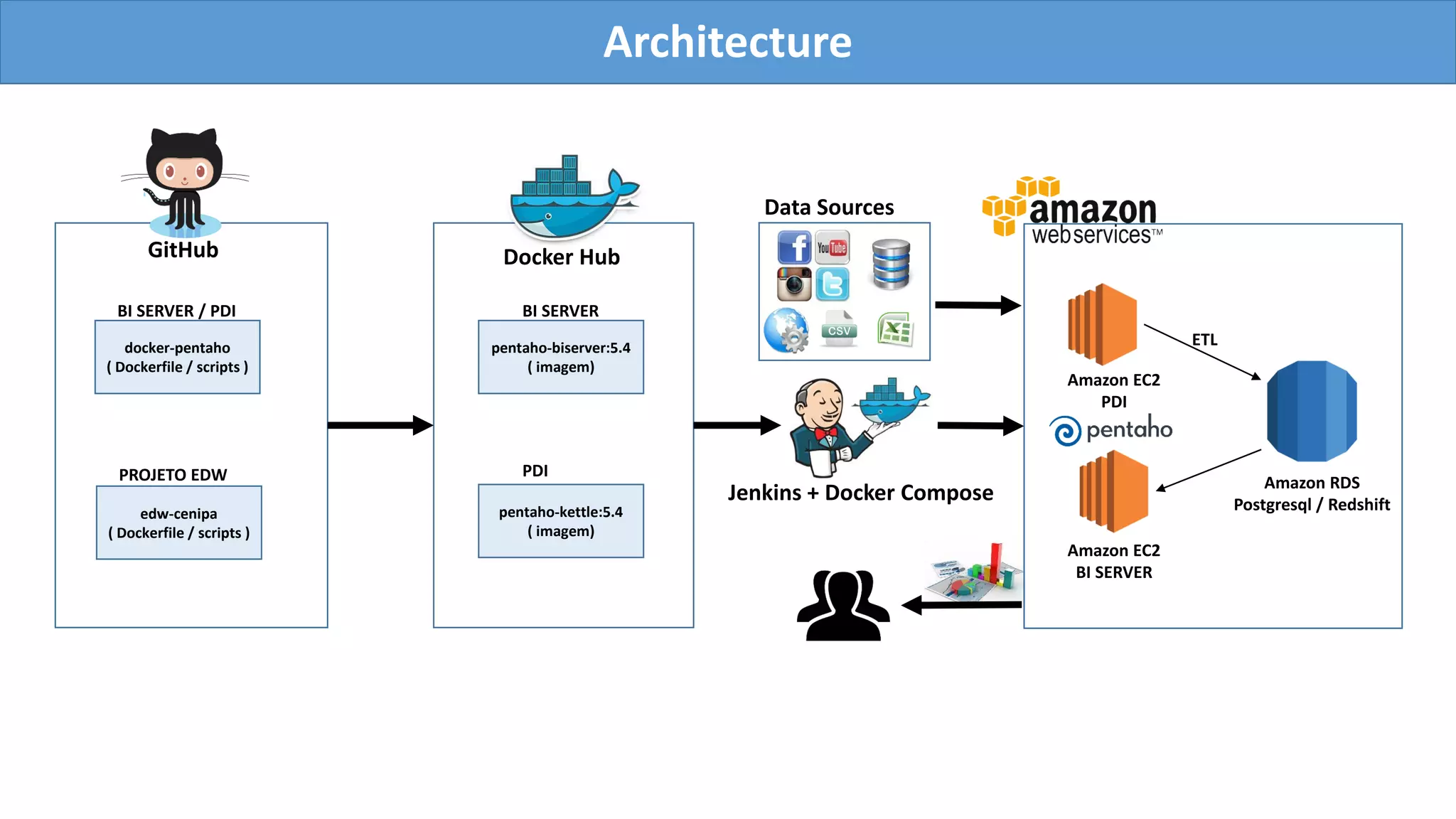
Architecture
GitHub
docker-pentaho
( Dockerfile / scripts )
pentaho-biserver:5.4
( imagem)
edw-cenipa
( Dockerfile / scripts )
BI SERVER / PDI
PROJETO EDW
pentaho-kettle:5.4
( imagem)
BI SERVER
PDI
Docker Hub
Jenkins + Docker Compose
Amazon EC2
BI SERVER
Amazon EC2
PDI
Amazon RDS
Postgresql / Redshift
ETL
Data Sources
Dashboards – Aeronautical Accident & Incident
http://localhost/pentaho/plugin/cenipa/api/ocorrencias
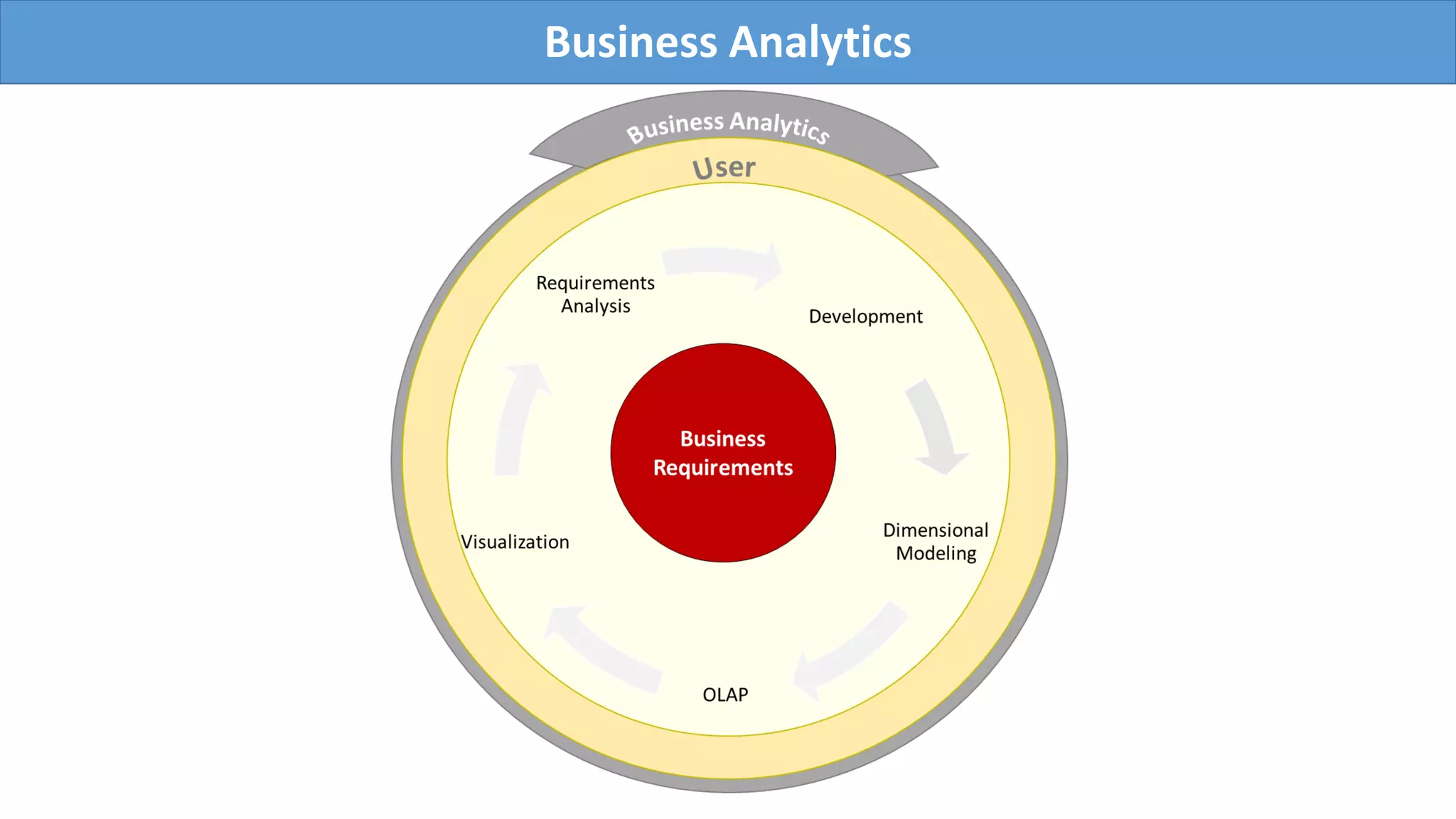
Business Analytics
CASE STUDY- EDW CENIPA
EDW CENIPA is a opensource project designed to enable analysis of aeronautical incidentes that occured
in the brazilian civil aviation. The project uses techniques and BI tools that explore innovative low-cost
technologies. Historically, Business Intelligence platforms are expensive and impracticable for small projects.
BI projects require specialized skills and high development costs. This work aims to break this barrier.
All analyzes are based on open data provided by CENIPA with historical events of the last 10 years :
• http://dados.gov.br/dataset/ocorrencias-aeronauticas-da-aviacao-civil-brasileira
The graphics were inspired by the report available on the link:
• http://www.cenipa.aer.mil.br/cenipa/index.php/estatisticas/estatisticas/panorama.
Tools
Here are some resources, tools and platforms that were used to develop and deploy the project
• Amazon Web Services - https://aws.amazon.com/
• Linux Operating System - CentOS 6 / Ubuntu 14
• GitHub - https://github.com/ - Powerful collaboration, code review, and code management for
open source and private projects
• Docker - https://www.docker.com/ - An open platform for distributed applications for developers and
sysadmins.
• Pentaho - http://www.pentaho.com/ e http://community.pentaho.com/ - Big data integration and analytics
solutions.
Requirements
• Linux Operating System 4GB RAM and 10GB available hard disk space
• Docker v1.7.1
• CentOS: https://docs.docker.com/installation/centos/
• Ubuntu: https://docs.docker.com/installation/ubuntulinux/
• Mac : https://docs.docker.com/installation/mac/
• Docker Compose v1.4.2 - https://docs.docker.com/compose/install/
$ yum update -y
$ yum install -y docker
$ service docker start
$ usermod -a -G docker ec2-user
$ yum install -y git
$ pip install -U docker-compose
$ PATH=$PATH:/usr/local/bin
Fast deployment on Amazon Linux AMI
Pentaho + Docker – Building an image from a Dockerfile
FROM java:7
MAINTAINER Wellington Marinho wpmarinho@globo.com
# Init ENV
ENV BISERVER_VERSION 5.4
ENV BISERVER_TAG 5.4.0.1-130
ENV PENTAHO_HOME /opt/pentaho
# Apply JAVA_HOME
RUN . /etc/environment
ENV PENTAHO_JAVA_HOME $JAVA_HOME
ENV PENTAHO_JAVA_HOME /usr/lib/jvm/java-1.7.0-openjdk-amd64
ENV JAVA_HOME /usr/lib/jvm/java-1.7.0-openjdk-amd64
# Install Dependences
RUN apt-get update; apt-get install zip -y; 
apt-get install wget unzip git -y; 
apt-get clean && rm -rf /var/lib/apt/lists/* /tmp/* /var/tmp/*;
RUN mkdir ${PENTAHO_HOME};
# Download Pentaho BI Server
RUN /usr/bin/wget --progress=dot:giga http://downloads.sourceforge.net/project/pentaho/Business%20Intelligence%20Server/${BISERVER_VERSION}/biserver-ce-${BISERVER_TAG}.zip
-O /tmp/biserver-ce-${BISERVER_TAG}.zip; 
/usr/bin/unzip -q /tmp/biserver-ce-${BISERVER_TAG}.zip -d $PENTAHO_HOME; 
rm -f /tmp/biserver-ce-${BISERVER_TAG}.zip $PENTAHO_HOME/biserver-ce/promptuser.sh; 
sed -i -e 's/(exec ".*") start/1 run/' $PENTAHO_HOME/biserver-ce/tomcat/bin/startup.sh; 
chmod +x $PENTAHO_HOME/biserver-ce/start-pentaho.sh
RUN useradd -s /bin/bash -d ${PENTAHO_HOME} pentaho; chown -R pentaho:pentaho ${PENTAHO_HOME};
#Always non-root user
USER pentaho
WORKDIR /opt/pentaho
EXPOSE 8080
CMD ["sh", "/opt/pentaho/biserver-ce/start-pentaho.sh"]
Pentaho BI Server
$ docker build -t pentaho/biserver:5.4 .
$ docker run --rm -p 8080:8080 -it pentaho/biserver:5.4
Building an image and runing docker container
Open Pentaho BI Server
Deploying Project
Deploying EDW CENIPA project
$ wget -O - https://raw.githubusercontent.com/wmarinho/edw_cenipa/master/easy_install | sh
Check if containers are running
$ docker ps
The project has 3 containers :
• edwcenipa_db_1 – PostgreSQL database container
• edwcenipa_pdi_1 – Pentaho Data Integration container
• edwcenipa_biserver_1 – Pentaho BI Server container
Check logs
$ docker logs -f edwcenipa_pdi_1
$ docker logs -f edwcenipa_biserver_1
Installation can take over 30 minutes , depending of server configuration and Internet bandwidth .
Docker Compose
docker-composse.yml – Define and run all docker applications
pdi:
image: image_cenipa/pdi
links:
- biserver:edw_biserver
volumes:
- /data/stage:/tmp/stage
environment:
- PGHOST=172.17.42.1
- PGUSER=pgadmin
- PGPASSWORD=pgadmin.
- PENTAHO_DI_JAVA_OPTIONS=-Xmx2014m -XX:MaxPermSize=256m
biserver:
image: image_cenipa/biserver
ports:
- "80:8080"
links:
- db:edw_db
environment:
- PGUSER=pgadmin
- PGPASSWORD=pgadmin.
- INSTALL_PLUGIN=saiku
- CUSTOM_LAYOUT=y
db:
image: wmarinho/postgresql:9.3
ports:
- "5432:5432"
Pentaho + Docker + Amazon
$ SUBNET_ID=
$ SGROUP_IDS=
$ KEY_NAME=
$ aws ec2 run-instances 
--image-id ami-e3106686 
--instance-type c4.large 
--subnet-id ${SUBNET_ID} 
--security-group-ids ${SGROUP_IDS} 
--key-name ${KEY_NAME} 
--associate-public-ip-address 
--user-data "https://raw.githubusercontent.com/wmarinho/edw_cenipa/master/aws/user-data.sh" 
--count 1
With the following command and the appropriate credentials , you can run the project on
Amazon Web Services. REMEMBER to replace the variables before running the command (check
the parameters in the AWS console) .
Thank you!
Sources:
https://github.com/wmarinho/edw_cenipa
https://github.com/wmarinho/docker-pentaho
https://hub.docker.com/r/wmarinho/pentaho/
Thanks:
Marcelo Módolo – Globosat
Caio Moreno – IT4Biz
Fernando Maia – IT4Biz

Building a data warehouse with Pentaho and Docker

  • 1.
    Building a datawarehouse with Pentaho and Docker Wellington Marinho wpmarinho@globo.com Sources https://github.com/wmarinho/edw_cenipa OPEN DATA CASE STUDY: CENIPA - AERONAUTICAL ACCIDENT INVESTIGATION AND PREVENTION CENTER http://dados.gov.br/dataset/ocorrencias-aeronauticas-da-aviacao-civil-brasileira
  • 2.
    Architecture GitHub docker-pentaho ( Dockerfile /scripts ) pentaho-biserver:5.4 ( imagem) edw-cenipa ( Dockerfile / scripts ) BI SERVER / PDI PROJETO EDW pentaho-kettle:5.4 ( imagem) BI SERVER PDI Docker Hub Jenkins + Docker Compose Amazon EC2 BI SERVER Amazon EC2 PDI Amazon RDS Postgresql / Redshift ETL Data Sources
  • 3.
    Dashboards – AeronauticalAccident & Incident http://localhost/pentaho/plugin/cenipa/api/ocorrencias
  • 4.
  • 5.
    CASE STUDY- EDWCENIPA EDW CENIPA is a opensource project designed to enable analysis of aeronautical incidentes that occured in the brazilian civil aviation. The project uses techniques and BI tools that explore innovative low-cost technologies. Historically, Business Intelligence platforms are expensive and impracticable for small projects. BI projects require specialized skills and high development costs. This work aims to break this barrier. All analyzes are based on open data provided by CENIPA with historical events of the last 10 years : • http://dados.gov.br/dataset/ocorrencias-aeronauticas-da-aviacao-civil-brasileira The graphics were inspired by the report available on the link: • http://www.cenipa.aer.mil.br/cenipa/index.php/estatisticas/estatisticas/panorama.
  • 6.
    Tools Here are someresources, tools and platforms that were used to develop and deploy the project • Amazon Web Services - https://aws.amazon.com/ • Linux Operating System - CentOS 6 / Ubuntu 14 • GitHub - https://github.com/ - Powerful collaboration, code review, and code management for open source and private projects • Docker - https://www.docker.com/ - An open platform for distributed applications for developers and sysadmins. • Pentaho - http://www.pentaho.com/ e http://community.pentaho.com/ - Big data integration and analytics solutions.
  • 7.
    Requirements • Linux OperatingSystem 4GB RAM and 10GB available hard disk space • Docker v1.7.1 • CentOS: https://docs.docker.com/installation/centos/ • Ubuntu: https://docs.docker.com/installation/ubuntulinux/ • Mac : https://docs.docker.com/installation/mac/ • Docker Compose v1.4.2 - https://docs.docker.com/compose/install/ $ yum update -y $ yum install -y docker $ service docker start $ usermod -a -G docker ec2-user $ yum install -y git $ pip install -U docker-compose $ PATH=$PATH:/usr/local/bin Fast deployment on Amazon Linux AMI
  • 8.
    Pentaho + Docker– Building an image from a Dockerfile FROM java:7 MAINTAINER Wellington Marinho wpmarinho@globo.com # Init ENV ENV BISERVER_VERSION 5.4 ENV BISERVER_TAG 5.4.0.1-130 ENV PENTAHO_HOME /opt/pentaho # Apply JAVA_HOME RUN . /etc/environment ENV PENTAHO_JAVA_HOME $JAVA_HOME ENV PENTAHO_JAVA_HOME /usr/lib/jvm/java-1.7.0-openjdk-amd64 ENV JAVA_HOME /usr/lib/jvm/java-1.7.0-openjdk-amd64 # Install Dependences RUN apt-get update; apt-get install zip -y; apt-get install wget unzip git -y; apt-get clean && rm -rf /var/lib/apt/lists/* /tmp/* /var/tmp/*; RUN mkdir ${PENTAHO_HOME}; # Download Pentaho BI Server RUN /usr/bin/wget --progress=dot:giga http://downloads.sourceforge.net/project/pentaho/Business%20Intelligence%20Server/${BISERVER_VERSION}/biserver-ce-${BISERVER_TAG}.zip -O /tmp/biserver-ce-${BISERVER_TAG}.zip; /usr/bin/unzip -q /tmp/biserver-ce-${BISERVER_TAG}.zip -d $PENTAHO_HOME; rm -f /tmp/biserver-ce-${BISERVER_TAG}.zip $PENTAHO_HOME/biserver-ce/promptuser.sh; sed -i -e 's/(exec ".*") start/1 run/' $PENTAHO_HOME/biserver-ce/tomcat/bin/startup.sh; chmod +x $PENTAHO_HOME/biserver-ce/start-pentaho.sh RUN useradd -s /bin/bash -d ${PENTAHO_HOME} pentaho; chown -R pentaho:pentaho ${PENTAHO_HOME}; #Always non-root user USER pentaho WORKDIR /opt/pentaho EXPOSE 8080 CMD ["sh", "/opt/pentaho/biserver-ce/start-pentaho.sh"]
  • 9.
    Pentaho BI Server $docker build -t pentaho/biserver:5.4 . $ docker run --rm -p 8080:8080 -it pentaho/biserver:5.4 Building an image and runing docker container Open Pentaho BI Server
  • 10.
    Deploying Project Deploying EDWCENIPA project $ wget -O - https://raw.githubusercontent.com/wmarinho/edw_cenipa/master/easy_install | sh Check if containers are running $ docker ps The project has 3 containers : • edwcenipa_db_1 – PostgreSQL database container • edwcenipa_pdi_1 – Pentaho Data Integration container • edwcenipa_biserver_1 – Pentaho BI Server container Check logs $ docker logs -f edwcenipa_pdi_1 $ docker logs -f edwcenipa_biserver_1 Installation can take over 30 minutes , depending of server configuration and Internet bandwidth .
  • 11.
    Docker Compose docker-composse.yml –Define and run all docker applications pdi: image: image_cenipa/pdi links: - biserver:edw_biserver volumes: - /data/stage:/tmp/stage environment: - PGHOST=172.17.42.1 - PGUSER=pgadmin - PGPASSWORD=pgadmin. - PENTAHO_DI_JAVA_OPTIONS=-Xmx2014m -XX:MaxPermSize=256m biserver: image: image_cenipa/biserver ports: - "80:8080" links: - db:edw_db environment: - PGUSER=pgadmin - PGPASSWORD=pgadmin. - INSTALL_PLUGIN=saiku - CUSTOM_LAYOUT=y db: image: wmarinho/postgresql:9.3 ports: - "5432:5432"
  • 12.
    Pentaho + Docker+ Amazon $ SUBNET_ID= $ SGROUP_IDS= $ KEY_NAME= $ aws ec2 run-instances --image-id ami-e3106686 --instance-type c4.large --subnet-id ${SUBNET_ID} --security-group-ids ${SGROUP_IDS} --key-name ${KEY_NAME} --associate-public-ip-address --user-data "https://raw.githubusercontent.com/wmarinho/edw_cenipa/master/aws/user-data.sh" --count 1 With the following command and the appropriate credentials , you can run the project on Amazon Web Services. REMEMBER to replace the variables before running the command (check the parameters in the AWS console) .
  • 13.