Seven Habits of Highly Effective Jenkins Users Andrew Bayer
Cloudera
OSCON Java 2011
Introduction – Who am I? I'm a build guy, with a focus on Java builds.
I've been using and working on Jenkins since early 2009.
I am currently working at Cloudera.
I am a contributor to Jenkins core, and maintainer of a number of Jenkins plugins, including the git plugin and the Throttle Concurrent Builds plugin.
I'm a member of the Jenkins interim governance board.
@abayer on Twitter
What is Jenkins? Jenkins is the leading open source continuous integration server.
It is primarily written in Java, but also used for Ruby, Python, Objective-C, and much, much more.
It's essential to development workflow at such companies as GitHub, Netflix, LinkedIn, and many, many more .
HABIT #1: Use plugins productively.
Habit #1: Use plugins productively Search for plugins to fit your needs. Plugins available are listed in the update center and at  https://wiki.jenkins-ci.org/display/JENKINS/Plugins
Plugins are organized by category on the wiki and in the update center.
Plugins may have overlapping functionality. If you're not using a plugin any more, disable it. Save memory.
Reduce clutter on job configuration pages.
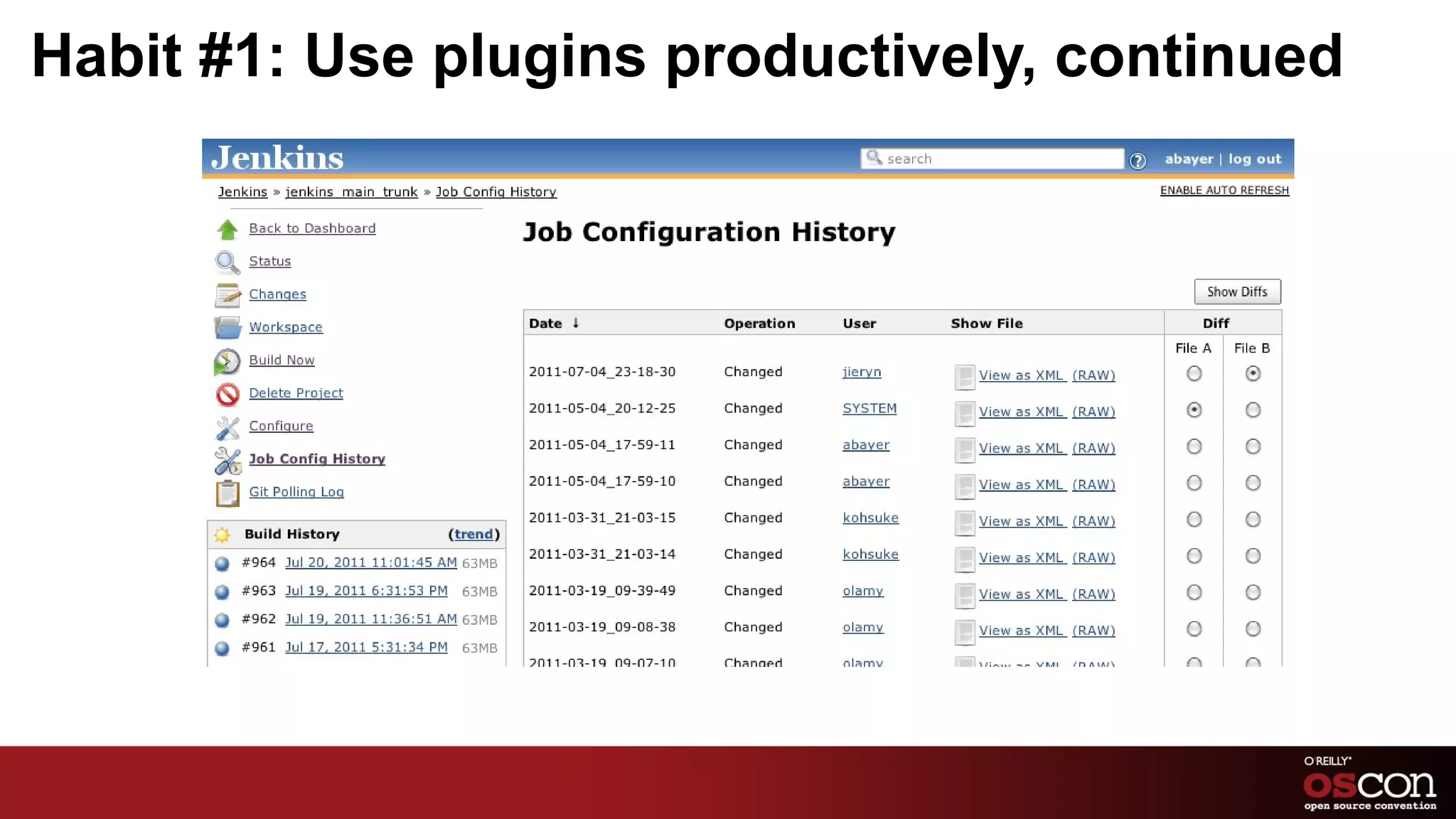
Habit #1: Use plugins productively, continued Plugins you should be using: JobConfigHistory See the difference between job configurations now and then.
With authentication enabled, see who changed the job and how.
Not quite as nice as true SCM-backed Jenkins configurations, but far, far simpler to put in place.
Seriously, this is my favorite plugin. Go install it!
Habit #1: Use plugins productively, continued
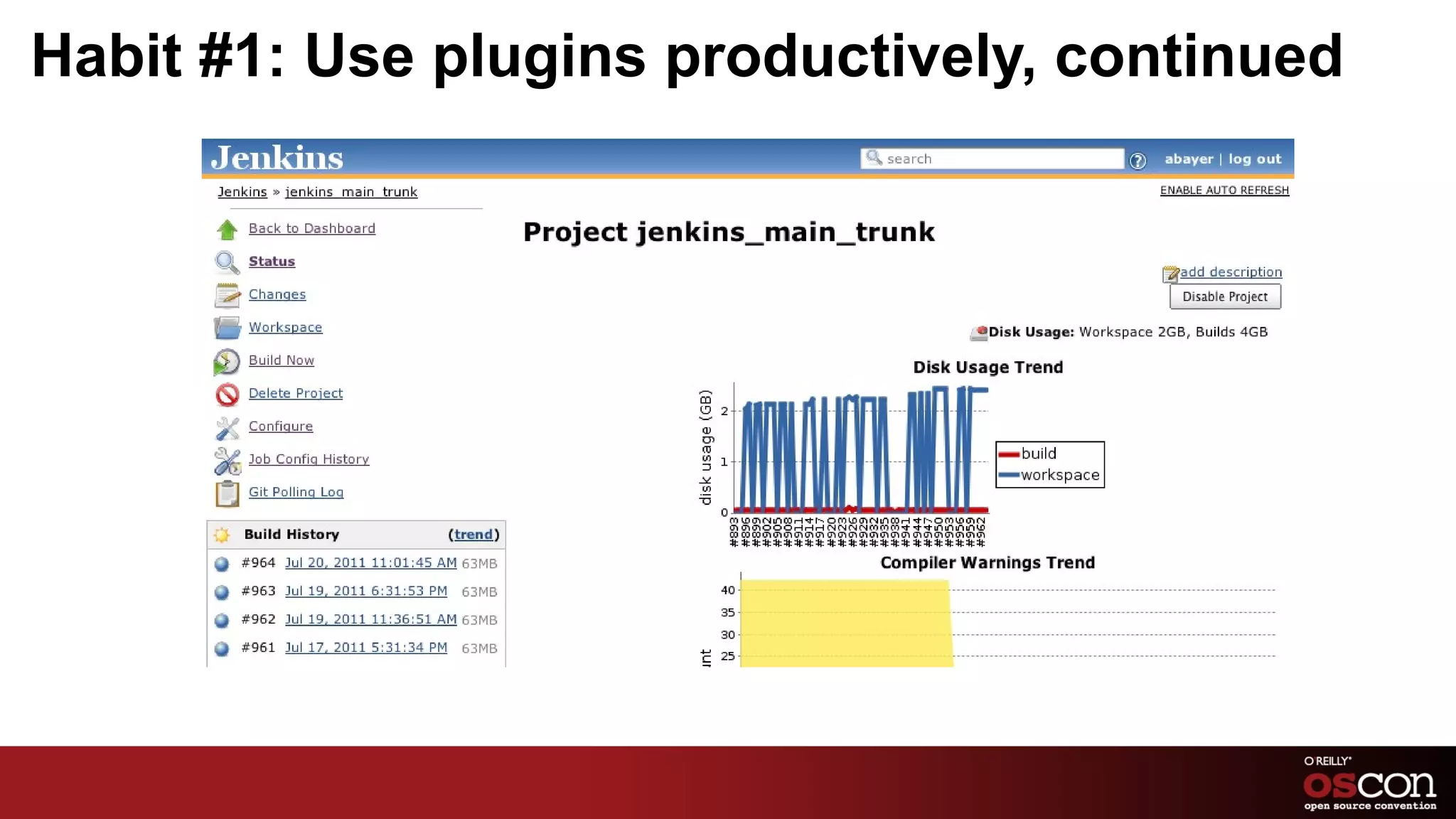
Habit #1: Use plugins productively, continued Plugins you should be using, continued: Disk Usage How much space is that job taking up on the slave? How large ar the archived artifacts for that build? Find the answers easily. Build Timeout Hanging tests a problem? Set a timeout – the build will be aborted if it takes longer.
Habit #1: Use plugins productively, continued
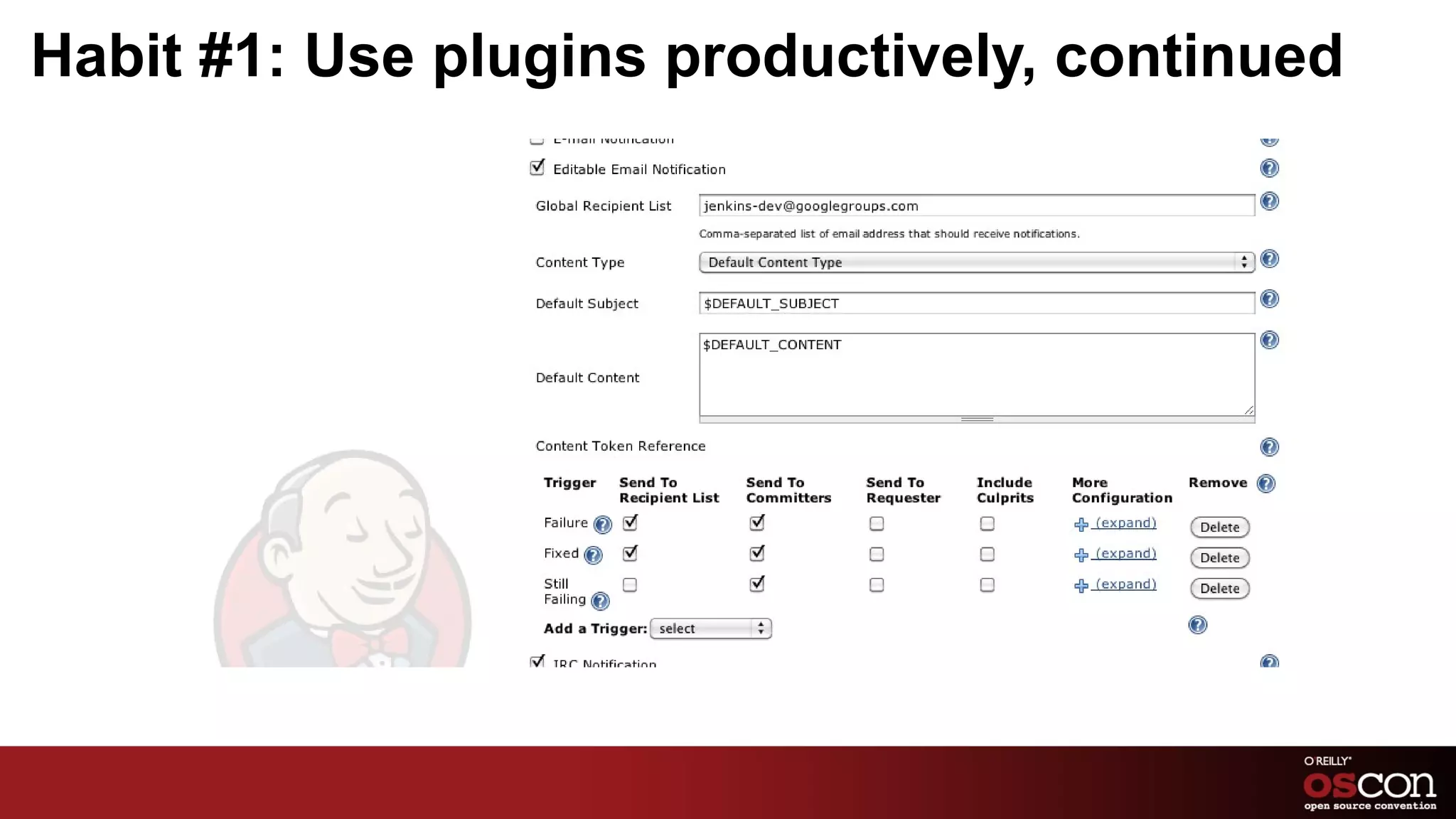
Habit #1: Use plugins productively, continued Plugins you should be using, continued: Email-ext Better control of when emails get sent and who they get sent to.
Format the emails the way you want, using information from your builds. Parameterized Trigger Kick off downstream builds with information from upstream – i.e., tell a system test where to find the packages it needs to install, etc.
Habit #1: Use plugins productively, continued
HABIT #2: Standardize your slaves.
Habit #2: Standardize your slaves If you've got more than a couple builds, you've probably got multiple slaves.
Ad hoc slaves may be convenient, but if your slaves have different environments, you're in for trouble eventually.
If you have multiple slaves playing the same role, they should be as identical as you can make them.
Habit #2: Standardize your slaves, continued Puppet, Chef, etc Sysadmins are used to these tools already.
Configuring your build slaves is the same as configuring any other puppet/chef/etc-managed machine. Have Jenkins or your job install your tools Jenkins tool installation for Maven, Ant, JDK, etc.
Scripting downloading/installation of tools in the job itself.
May not be possible for all tools – e.g., RPM/Debian packages.
Habit #2: Standardize your slaves, continued Cloud or VMs Spin up your slaves from a pre-configured image.
When you need to change your slave configurations, update the image and spin up new slaves, rather than updating the existing slaves. Whatever method you choose, just make sure your slaves are consistent!
Habit #2: Standardize your slaves, continued Side note!
Don't build on master. Always build on slaves. No conflict on memory/CPU/IO between master process and builds.

7 Habits of Highly Effective Jenkins Users

  • 1.
    Seven Habits ofHighly Effective Jenkins Users Andrew Bayer
  • 2.
  • 3.
  • 4.
    Introduction – Whoam I? I'm a build guy, with a focus on Java builds.
  • 5.
    I've been usingand working on Jenkins since early 2009.
  • 6.
    I am currentlyworking at Cloudera.
  • 7.
    I am acontributor to Jenkins core, and maintainer of a number of Jenkins plugins, including the git plugin and the Throttle Concurrent Builds plugin.
  • 8.
    I'm a memberof the Jenkins interim governance board.
  • 9.
  • 10.
    What is Jenkins?Jenkins is the leading open source continuous integration server.
  • 11.
    It is primarilywritten in Java, but also used for Ruby, Python, Objective-C, and much, much more.
  • 12.
    It's essential todevelopment workflow at such companies as GitHub, Netflix, LinkedIn, and many, many more .
  • 13.
    HABIT #1: Useplugins productively.
  • 14.
    Habit #1: Useplugins productively Search for plugins to fit your needs. Plugins available are listed in the update center and at https://wiki.jenkins-ci.org/display/JENKINS/Plugins
  • 15.
    Plugins are organizedby category on the wiki and in the update center.
  • 16.
    Plugins may haveoverlapping functionality. If you're not using a plugin any more, disable it. Save memory.
  • 17.
    Reduce clutter onjob configuration pages.
  • 18.
    Habit #1: Useplugins productively, continued Plugins you should be using: JobConfigHistory See the difference between job configurations now and then.
  • 19.
    With authentication enabled,see who changed the job and how.
  • 20.
    Not quite asnice as true SCM-backed Jenkins configurations, but far, far simpler to put in place.
  • 21.
    Seriously, this ismy favorite plugin. Go install it!
  • 22.
    Habit #1: Useplugins productively, continued
  • 23.
    Habit #1: Useplugins productively, continued Plugins you should be using, continued: Disk Usage How much space is that job taking up on the slave? How large ar the archived artifacts for that build? Find the answers easily. Build Timeout Hanging tests a problem? Set a timeout – the build will be aborted if it takes longer.
  • 24.
    Habit #1: Useplugins productively, continued
  • 25.
    Habit #1: Useplugins productively, continued Plugins you should be using, continued: Email-ext Better control of when emails get sent and who they get sent to.
  • 26.
    Format the emailsthe way you want, using information from your builds. Parameterized Trigger Kick off downstream builds with information from upstream – i.e., tell a system test where to find the packages it needs to install, etc.
  • 27.
    Habit #1: Useplugins productively, continued
  • 28.
  • 29.
    Habit #2: Standardizeyour slaves If you've got more than a couple builds, you've probably got multiple slaves.
  • 30.
    Ad hoc slavesmay be convenient, but if your slaves have different environments, you're in for trouble eventually.
  • 31.
    If you havemultiple slaves playing the same role, they should be as identical as you can make them.
  • 32.
    Habit #2: Standardizeyour slaves, continued Puppet, Chef, etc Sysadmins are used to these tools already.
  • 33.
    Configuring your buildslaves is the same as configuring any other puppet/chef/etc-managed machine. Have Jenkins or your job install your tools Jenkins tool installation for Maven, Ant, JDK, etc.
  • 34.
    Scripting downloading/installation oftools in the job itself.
  • 35.
    May not bepossible for all tools – e.g., RPM/Debian packages.
  • 36.
    Habit #2: Standardizeyour slaves, continued Cloud or VMs Spin up your slaves from a pre-configured image.
  • 37.
    When you needto change your slave configurations, update the image and spin up new slaves, rather than updating the existing slaves. Whatever method you choose, just make sure your slaves are consistent!
  • 38.
    Habit #2: Standardizeyour slaves, continued Side note!
  • 39.
    Don't build onmaster. Always build on slaves. No conflict on memory/CPU/IO between master process and builds.
  • 40.
    Easier to addslaves than to beef up master.
  • 41.
    Mixing builds onmaster with builds on slaves means inconsistencies between builds – as before, consistency is always good.
  • 42.
    HABIT #3: Useincremental builds.
  • 43.
    Habit #3: Useincremental builds ...if possible.
  • 44.
    Why use incrementalbuilds? If your build takes 4-8 hours to run end-to-end, you can't do real continuous integration on every change.
  • 45.
    If you're integratingwith code review or otherwise using pre-tested commit processes, you want to verify changes as fast as possible.
  • 46.
    Habit #3: Useincremental builds, continued Incremental builds are complementary to full builds, not replacements.
  • 47.
    Don't do QA/deploymentsof incremental builds – use full, clean builds for that. e.g., incremental build whenever a change is detected, full build once a day. Either use multiple jobs (one for incremental, one for full) or configure one job to behave differently, depending on parameters.
  • 48.
    Habit #3: Useincremental builds, continued Maven project type has built-in support for incremental builds. Look in Advanced Options in the Maven configuration section.
  • 49.
    When enabled, checksthe changelist for the build and compares to Maven module layout.
  • 50.
    Any modules containingchanged files are built. As are modules depending on changed modules, and any modules with failures in the previous build.
  • 51.
    Habit #3: Useincremental builds, continued Incremental builds may not be possible in all cases.
  • 52.
    Freestyle projects wouldrequire custom work to determine what needs to be run for incremental builds. e.g., use code coverage data to determine what tests need to be run when a given source file is changed.
  • 53.
    HABIT #4: Integratewith other tools.
  • 54.
    Habit #4: Integratewith other tools Jenkins plugins are available for integrating with any number of other tools. For example...
  • 55.
    Pre-tested commits withGerrit (git code review) When a change gets submitted, a build runs automatically and reports back to Gerrit.
  • 56.
    Code can't bemerged if the build doesn't pass.
  • 57.
    Pre-tested commits havebeen implemented elsewhere – see Apache Hadoop build process, e.g.
  • 58.
    Habit #4: Integratewith other tools, continued JIRA and other bug trackers Update bug tracker when a fix gets built, automatically. Sonar Code metrics, code coverage, unit test results, etc, all in one place.
  • 59.
    Great graphs, charts,etc – fantastic manager candy!
  • 60.
    Habit #4: Integratewith other tools, continued Artifactory Control staging of Maven/Gradle/Ivy release candidates.
  • 61.
  • 62.
    See http://blogs.jfrog.org/2011/06/jenkins-new-maven-and-gradle-release.html for more details. Mylyn See build and test results, launch new builds and more, all from within Eclipse.
  • 63.
    Habit #4: Integratewith other tools, continued Chat/IM notifications Most organizations have some chat/IM solution in place.
  • 64.
    Jenkins can integratewith many of them – Jabber, IRC, Campfire, etc.
  • 65.
    Notify committers whenbuilds with their changes break!
  • 66.
    HABIT #5: Breakup bloat.
  • 67.
    Habit #5: Breakup bloat Too many builds make it hard to navigate the Jenkins UI and hurt performance.
  • 68.
    Builds that tryto do too much take too long and make it impossible to restart a build process partway through.
  • 69.
    Two similar problems,with similar solutions.
  • 70.
  • 71.
    Habit #5: Breakup bloat, continued Don't be afraid to spread your jobs across multiple Jenkins masters.
  • 72.
    Easier to navigateeach instance than the one big one.
  • 73.
    Better performance withless jobs per instance.
  • 74.
    Restarting Jenkins canbe done much more readily when there are less jobs on the instance.
  • 75.
    Split jobs ina logical way – separate instances per group, per product, per physical location, etc.
  • 76.
    Habit #5: Breakup bloat, continued Big, long builds are unwieldy.
  • 77.
    Split builds uplogically as well, into coherent phases.
  • 78.
    Pass data/binaries fromone phase to the next (using the Parameterized Trigger plugin!)
  • 79.
    When the lastof 6 phases fails due to network problems or the like, just re-run that phase without having to run the whole pipeline again. Much faster!
  • 80.
    HABIT #6: Stickwith stable releases.
  • 81.
    Habit #6: Stickwith stable releases Jenkins releases weekly.
  • 82.
    This means rapidturnaround on fixes, new features, etc, but, inherently, not 100% stability for every release.
  • 83.
    Plugins release whenevertheir developers choose to.
  • 84.
    Update center makesit easy to upgrade core and plugins to the latest at any time, but that's not always the smart move.
  • 85.
    Habit #6: Stickwith stable releases, continued Use Jenkins core LTS releases. LTS – Long Term Support, similar to Ubuntu.
  • 86.
    Every ~3 months,a particularly stable release is chosen, a branch is created from it and the new branch is rigorously tested.
  • 87.
    Backports of criticalfixes are made to this branch and new releases (e.g., 1.409.1, 1.409.2, etc) are made.
  • 88.
    Habit #6: Stickwith stable releases, continued Use Jenkins core LTS releases, continued. Plugin developers are encouraged to build against the latest LTS release, helping keep new plugin releases compatible.
  • 89.
    If you don'thave a specific reason to be on the bleeding edge, you should probably be running an LTS release.
  • 90.
  • 91.
    Habit #6: Stickwith stable releases, continued Upgrade plugins carefully.
  • 92.
    Check plugin wikipages for changelog. In the update center, click the link for the plugin name – that will take you to the wiki page. If you don't need a bugfix or new feature, you probably don't need to upgrade.
  • 93.
    Stick with whatworks until it doesn't work any longer.
  • 94.
    HABIT #7: Jointhe community.
  • 95.
    Habit #7: Jointhe community Write a plugin or work on an existing one.
  • 96.
  • 97.
    Get on themailing list and help out.
  • 98.
    Join the IRCchannel.
  • 99.
    If you runinto a bug, submit it at https://issues.jenkins-ci.org !
  • 100.
    Conclusion These arejust one person's thoughts and experiences.
  • 101.
    There are manyways to use Jenkins – there is no single “Right Way” to do things.
  • 102.
    Your organization's requirementsshould dictate your build process and tool usage, within reason.
  • 103.