A Report On–
EXPERIMENT - 7
(Statistical Data Analysis Using SPSS Software)
Submitted by-
SHRIKRISHNA KESHARWANI
Roll no.-
22CEM3R23
Subject-
TRANSPORTATION ANALYTICS LABORATORY
Bachelor of Technology
In
TRANSPORTATION ENGINEERING
DEPARTMENT OF CIVIL ENGINEERING
NATIONAL INSTITUTE OF TECHNOLOGY WARANGAL
OCTOBER, 2022
2.
Transportation Analytics Laboratory
SHRIKRISHNAKESHARWANI (22CEM3R23) 2
Table of Contents
1. Objectives-..........................................................................................................................3
2. Software Used- ...................................................................................................................3
3. Theory- ...............................................................................................................................3
3.1 Descriptive Statistics........................................................................................................3
3.2 Inferential Statistics .........................................................................................................5
4. Procedure-...........................................................................................................................5
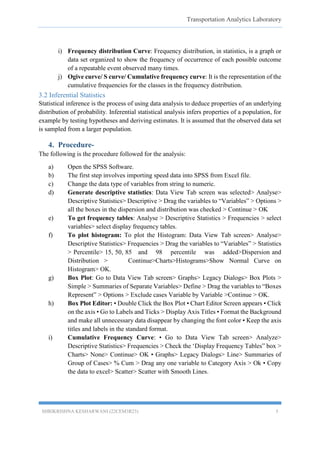
5.1 Descriptive Statistics- ......................................................................................................6
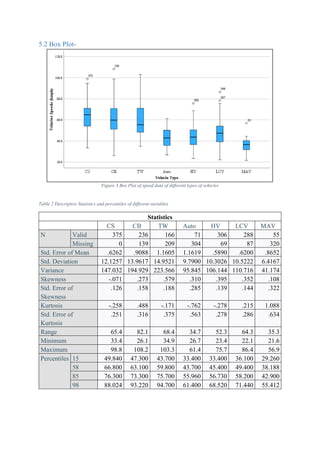
5.2 Box Plot-..........................................................................................................................7
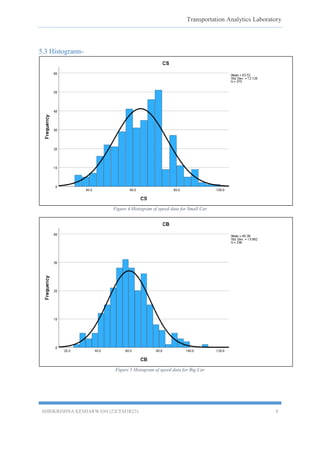
5.3 Histograms-......................................................................................................................8
5.4 Cumulative Frequency Curves:......................................................................................11
6. Results & Discussion:.......................................................................................................15
7. Conclusion........................................................................................................................15
References................................................................................................................................15
List of Tables-
Table 1 descriptive statistics......................................................................................................6
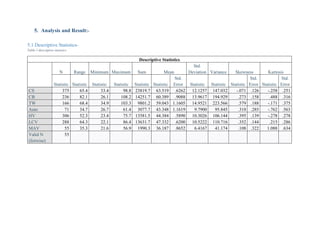
Table 2 Descriptive Statistics and percentiles of different variables.........................................7
List of Figures-
Figure 1 Box Plot of speed data of different types of vehicles..................................................7
Figure 2 Histogram of speed data for Small Car .......................................................................8
Figure 3 Histogram of speed data for Big Car...........................................................................8
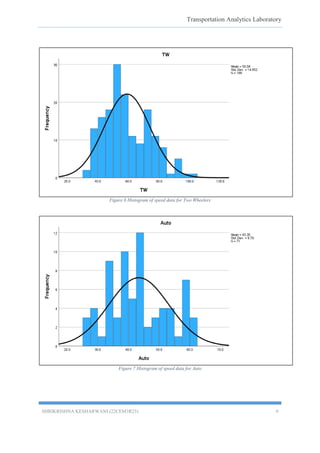
Figure 4 Histogram of speed data for Two Wheelers................................................................9
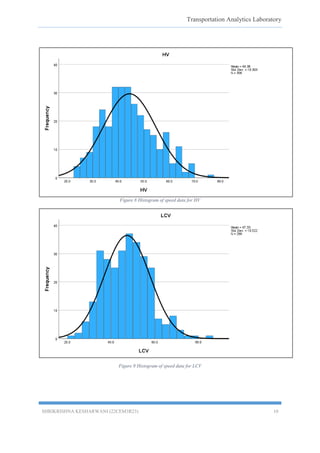
Figure 5 Histogram of speed data for Auto ...............................................................................9
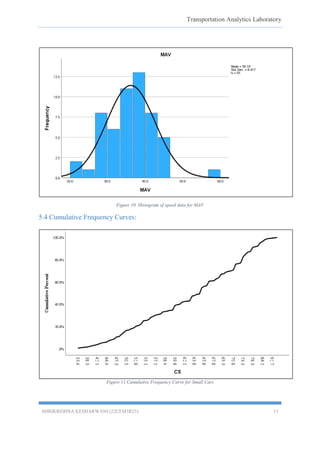
Figure 6 Histogram of speed data for HV................................................................................10
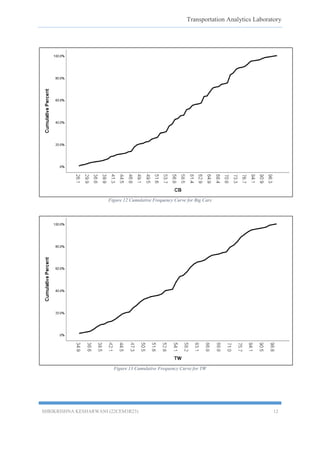
Figure 7 Histogram of speed data for LCV .............................................................................10
Figure 8 Histogram of speed data for MAV ...........................................................................11
Figure 9 Cumulative Frequency Curve for Small Cars ...........................................................11
Figure 10 Cumulative Frequency Curve for Big Cars.............................................................12
Figure 11 Cumulative Frequency Curve for TW.....................................................................12
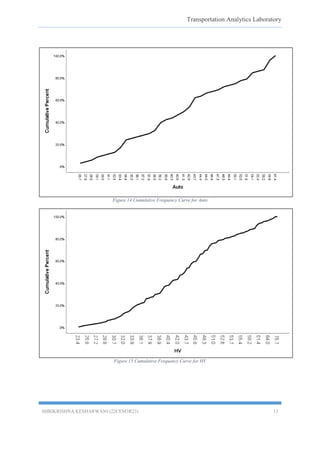
Figure 12 Cumulative Frequency Curve for Auto ...................................................................13
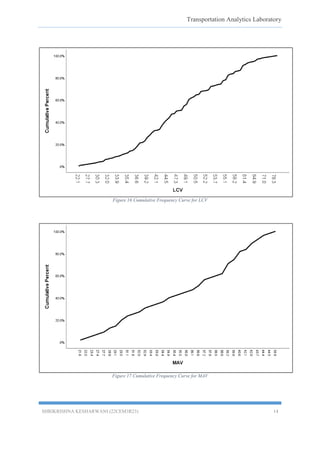
Figure 13 Cumulative Frequency Curve for HV .....................................................................13
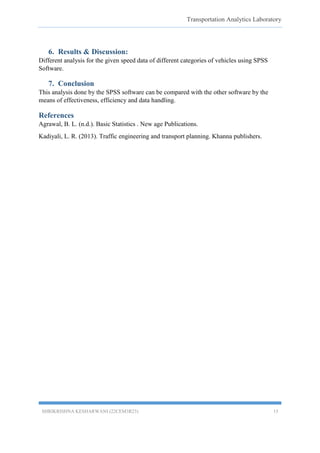
Figure 14 Cumulative Frequency Curve for LCV ...................................................................14
Figure 15 Cumulative Frequency Curve for MAV..................................................................14
3.
Transportation Analytics Laboratory
SHRIKRISHNAKESHARWANI (22CEM3R23) 3
1. Objectives-
Exploring different analysis for the given speed data of different categories of vehicles using
SPSS Software.
2. Software Used-
IBM SPSS statistics.
3. Theory-
Transportation engineering deals with a lot of data involved with a wide range of parameters.
To get a better idea regarding how the data is indicated the analysis of data is an important
phase. Some of the analysis that are very basic in dealing with this data are creating basic box
plots, histograms, and frequency curves.
3.1 Descriptive Statistics
a) Mean: The mean of a series of data is the value equal to the sum of the values of
all the observations divided by the number of observations.
b) Median: In statistics and probability theory, a median is a value separating the
higher half from the lower half of a data sample, a population or a probability
distribution.
c) Range: The Range is the difference between the lowest and highest values.
d) Standard Deviation: In statistics, the standard deviation is a measure of the amount
of variation or dispersion of a set of values. A low standard deviation indicates that
the values tend to be close to the mean of the set, while a high standard deviation
indicates that the values are spread out over a wider range.
e) Variance: In statistics, variance is the expectation of the squared deviation of a
random variable from its mean. Informally, it measures how far a set of numbers is
spread out from their average value.
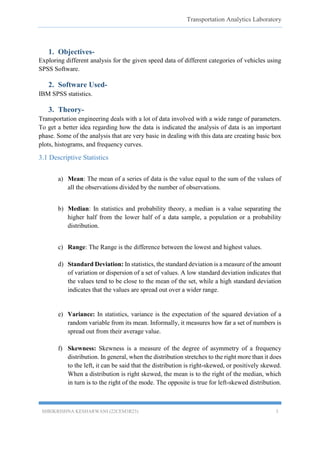
f) Skewness: Skewness is a measure of the degree of asymmetry of a frequency
distribution. In general, when the distribution stretches to the right more than it does
to the left, it can be said that the distribution is right-skewed, or positively skewed.
When a distribution is right skewed, the mean is to the right of the median, which
in turn is to the right of the mode. The opposite is true for left-skewed distribution.
4.
Transportation Analytics Laboratory
SHRIKRISHNAKESHARWANI (22CEM3R23) 4
Figure 1 positively and negatively skewed
g) Kurtosis: Kurtosis is a statistical measure that defines how heavily the tails of
a distribution differ from the tails of a normal distribution. In other words, kurtosis
identifies whether the tails of a given distribution contain extreme values.
Leptokurtic: It is a curve having peak than normal curve. Too much concentration
of the items near the center. (Kurtosis value >3)
Platykurtic: A curve having a lower peak (flatter) than the normal curve. There is
less concentration of items near the center. (Kurtosis value < 3)
Mesokurtic: It is a curve having a normal peak or normal curve. There is equal
distribution around the center value (mean). (Kurtosis value = 3)
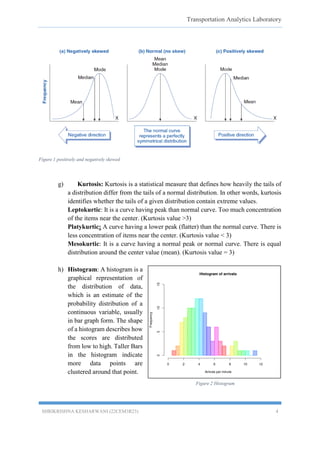
h) Histogram: A histogram is a
graphical representation of
the distribution of data,
which is an estimate of the
probability distribution of a
continuous variable, usually
in bar graph form. The shape
of a histogram describes how
the scores are distributed
from low to high. Taller Bars
in the histogram indicate
more data points are
clustered around that point.
Figure 2 Histogram
5.
Transportation Analytics Laboratory
SHRIKRISHNAKESHARWANI (22CEM3R23) 5
i) Frequency distribution Curve: Frequency distribution, in statistics, is a graph or
data set organized to show the frequency of occurrence of each possible outcome
of a repeatable event observed many times.
j) Ogive curve/ S curve/ Cumulative frequency curve: It is the representation of the
cumulative frequencies for the classes in the frequency distribution.
3.2 Inferential Statistics
Statistical inference is the process of using data analysis to deduce properties of an underlying
distribution of probability. Inferential statistical analysis infers properties of a population, for
example by testing hypotheses and deriving estimates. It is assumed that the observed data set
is sampled from a larger population.
4. Procedure-
The following is the procedure followed for the analysis:
a) Open the SPSS Software.
b) The first step involves importing speed data into SPSS from Excel file.
c) Change the data type of variables from string to numeric.
d) Generate descriptive statistics: Data View Tab screen was selected> Analyse>
Descriptive Statistics> Descriptive > Drag the variables to “Variables” > Options >
all the boxes in the dispersion and distribution was checked > Continue > OK
e) To get frequency tables: Analyse > Descriptive Statistics > Frequencies > select
variables> select display frequency tables.
f) To plot histogram: To plot the Histogram: Data View Tab screen> Analyse>
Descriptive Statistics> Frequencies > Drag the variables to “Variables” > Statistics
> Percentile> 15, 50, 85 and 98 percentile was added>Dispersion and
Distribution > Continue>Charts>Histograms>Show Normal Curve on
Histogram> OK.
g) Box Plot: Go to Data View Tab screen> Graphs> Legacy Dialogs> Box Plots >
Simple > Summaries of Separate Variables> Define > Drag the variables to “Boxes
Represent” > Options > Exclude cases Variable by Variable >Continue > OK.
h) Box Plot Editor: • Double Click the Box Plot • Chart Editor Screen appears • Click
on the axis • Go to Labels and Ticks > Display Axis Titles • Format the Background
and make all unnecessary data disappear by changing the font color • Keep the axis
titles and labels in the standard format.
i) Cumulative Frequency Curve: • Go to Data View Tab screen> Analyze>
Descriptive Statistics> Frequencies > Check the ‘Display Frequency Tables” box >
Charts> None> Continue> OK • Graphs> Legacy Dialogs> Line> Summaries of
Group of Cases> % Cum > Drag any one variable to Category Axis > Ok • Copy
the data to excel> Scatter> Scatter with Smooth Lines.
Transportation Analytics Laboratory
SHRIKRISHNAKESHARWANI (22CEM3R23) 11
Figure 10 Histogram of speed data for MAV
5.4 Cumulative Frequency Curves:
Figure 11 Cumulative Frequency Curve for Small Cars
Transportation Analytics Laboratory
SHRIKRISHNAKESHARWANI (22CEM3R23) 15
6. Results & Discussion:
Different analysis for the given speed data of different categories of vehicles using SPSS
Software.
7. Conclusion
This analysis done by the SPSS software can be compared with the other software by the
means of effectiveness, efficiency and data handling.
References
Agrawal, B. L. (n.d.). Basic Statistics . New age Publications.
Kadiyali, L. R. (2013). Traffic engineering and transport planning. Khanna publishers.