SOFTWARE ENGINEERING | USER
INTERFACE ANALYSIS & DESIGN
BY,
ISHWARIYA.R,
M.Sc(cs).,
NSCAS,Theni.
INTRODUCTION
User interface is the front-end application view to which user interacts in order
to use the software. The software becomes more popular if its user interface
is:
•Attractive
•Simple to use
•Responsive in short time
•Clear to understand
•Consistent on all interface screens
TWO TYPES OF
USER INTERFACE:
Command Line Interface: Command
Line Interface provides a command
prompt, where the user types the
command and feeds to the system. The
user needs to remember the syntax of
the command and its use.
Graphical User Interface: Graphical
User Interface provides the simple
interactive interface to interact with the
system. GUI can be a combination of
both hardware and software. Using GUI,
user interprets the software.
Command Line
Interface
Graphical User
Interface
USER INTERFACE
DESIGN PROCESS:
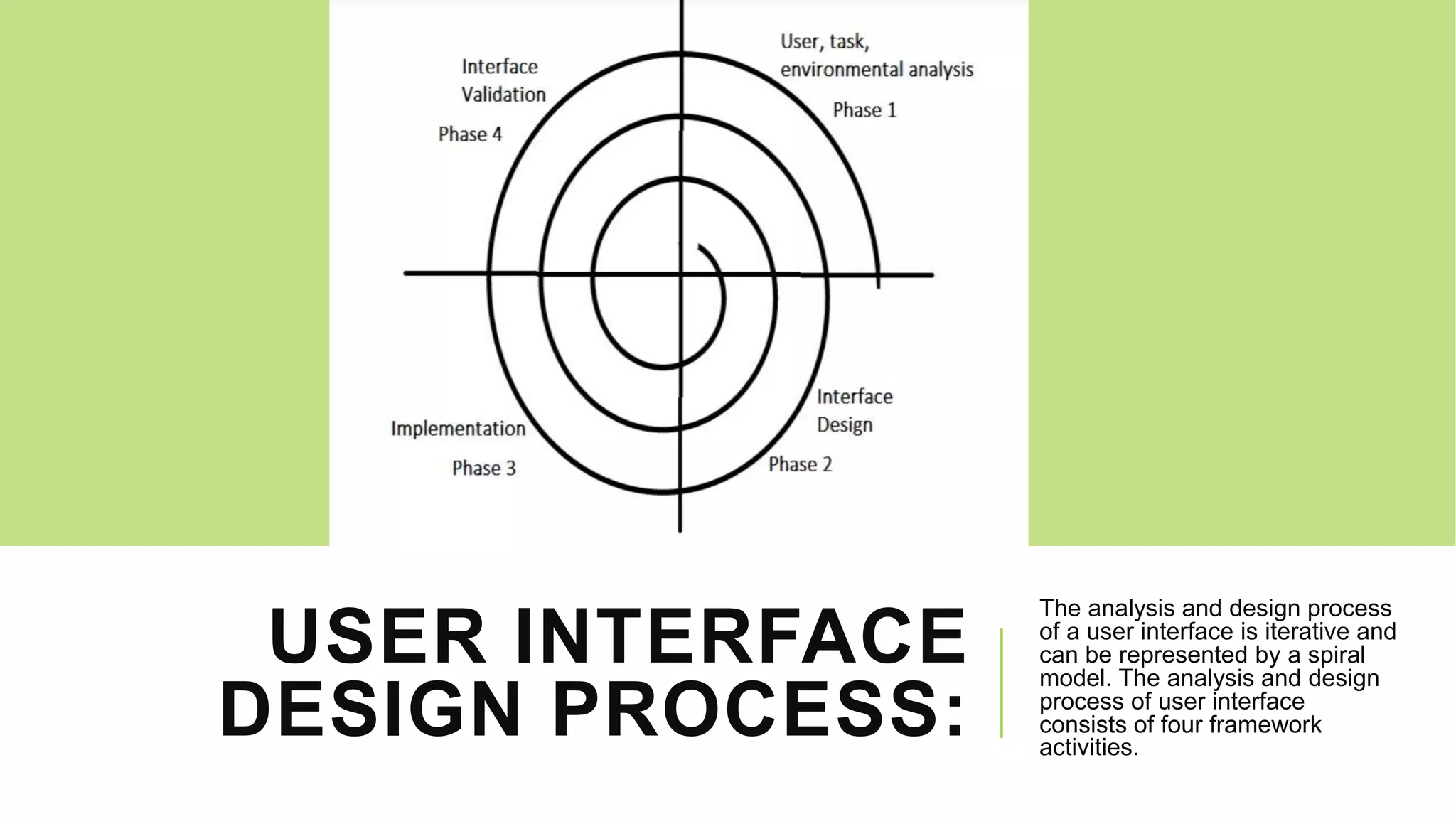
The analysis and design process
of a user interface is iterative and
can be represented by a spiral
model. The analysis and design
process of user interface
consists of four framework
activities.
USER, TASK, ENVIRONMENTAL
ANALYSIS, AND MODELING:
Initially, the focus is based on the profile of users who will interact with
the system, i.e. understanding, skill and knowledge, type of user, etc,
based on the user’s profile are made into categories. From each
category requirements are gathered. Based on the requirements
developer understand how to develop the interface. Once all the
requirements are gathered a detailed analysis is conducted. In the
analysis part, the tasks that the user performs to establish the goals of
the system are identified, described and elaborated. The analysis of
the user environment focuses on the physical work environment.
INTERFACE DESIGN:
The goal of this phase is to define the set of interface objects and
actions i.e. Control mechanisms that enable the user to perform
desired tasks. Indicate how these control mechanisms affect the
system. Specify the action sequence of tasks and subtasks, also
called a user scenario. Indicate the state of the system when the user
performs a particular task. Always follow the three golden rules stated
by Theo Mandel. Design issues such as response time, command and
action structure, error handling, and help facilities are considered as
the design model is refined. This phase serves as the foundation for
the implementation phase.
INTERFACE CONSTRUCTION AND
IMPLEMENTATION:
The implementation activity begins with the creation of
prototype (model) that enables usage scenarios to be
evaluated. As iterative design process continues a User
Interface toolkit that allows the creation of windows, menus,
device interaction, error messages, commands, and many
other elements of an interactive environment can be used
for completing the construction of an interface.
INTERFACE VALIDATION:
This phase focuses on testing the interface. The
interface should be in such a way that it should be
able to perform tasks correctly and it should be able
to handle a variety of tasks. It should achieve all the
user’s requirements. It should be easy to use and
easy to learn. Users should accept the interface as a
useful one in their work.
THREE GOLDEN RULES IN UI
Place the user in control
Reduce the user memory load
Make the interface consistent
TECHNIQUE: PLACE THE USER IN
CONTROL
oDefine interaction in such a way that the user is not
forced into performing unnecessary action.
oProvide for flexible interaction
oUser interaction to be interrupted & reversible
oHide technical internals from the casual user.
REDUCE THE USER MEMORY LOAD
Reduce demand an users on short term
memory
Establish meaningful default
Define shortcuts
Disclose information in a progressive fashion
MAKE THE INTERFACE CONSISTENT
Allow user to put the current task into a
meaning context
Maintain consistency across all
applications
Use the past interaction model.
THANK YOU....

Software engineering

  • 1.
    SOFTWARE ENGINEERING |USER INTERFACE ANALYSIS & DESIGN BY, ISHWARIYA.R, M.Sc(cs)., NSCAS,Theni.
  • 2.
    INTRODUCTION User interface isthe front-end application view to which user interacts in order to use the software. The software becomes more popular if its user interface is: •Attractive •Simple to use •Responsive in short time •Clear to understand •Consistent on all interface screens
  • 3.
    TWO TYPES OF USERINTERFACE: Command Line Interface: Command Line Interface provides a command prompt, where the user types the command and feeds to the system. The user needs to remember the syntax of the command and its use. Graphical User Interface: Graphical User Interface provides the simple interactive interface to interact with the system. GUI can be a combination of both hardware and software. Using GUI, user interprets the software. Command Line Interface Graphical User Interface
  • 4.
    USER INTERFACE DESIGN PROCESS: Theanalysis and design process of a user interface is iterative and can be represented by a spiral model. The analysis and design process of user interface consists of four framework activities.
  • 5.
    USER, TASK, ENVIRONMENTAL ANALYSIS,AND MODELING: Initially, the focus is based on the profile of users who will interact with the system, i.e. understanding, skill and knowledge, type of user, etc, based on the user’s profile are made into categories. From each category requirements are gathered. Based on the requirements developer understand how to develop the interface. Once all the requirements are gathered a detailed analysis is conducted. In the analysis part, the tasks that the user performs to establish the goals of the system are identified, described and elaborated. The analysis of the user environment focuses on the physical work environment.
  • 6.
    INTERFACE DESIGN: The goalof this phase is to define the set of interface objects and actions i.e. Control mechanisms that enable the user to perform desired tasks. Indicate how these control mechanisms affect the system. Specify the action sequence of tasks and subtasks, also called a user scenario. Indicate the state of the system when the user performs a particular task. Always follow the three golden rules stated by Theo Mandel. Design issues such as response time, command and action structure, error handling, and help facilities are considered as the design model is refined. This phase serves as the foundation for the implementation phase.
  • 7.
    INTERFACE CONSTRUCTION AND IMPLEMENTATION: Theimplementation activity begins with the creation of prototype (model) that enables usage scenarios to be evaluated. As iterative design process continues a User Interface toolkit that allows the creation of windows, menus, device interaction, error messages, commands, and many other elements of an interactive environment can be used for completing the construction of an interface.
  • 8.
    INTERFACE VALIDATION: This phasefocuses on testing the interface. The interface should be in such a way that it should be able to perform tasks correctly and it should be able to handle a variety of tasks. It should achieve all the user’s requirements. It should be easy to use and easy to learn. Users should accept the interface as a useful one in their work.
  • 9.
    THREE GOLDEN RULESIN UI Place the user in control Reduce the user memory load Make the interface consistent
  • 10.
    TECHNIQUE: PLACE THEUSER IN CONTROL oDefine interaction in such a way that the user is not forced into performing unnecessary action. oProvide for flexible interaction oUser interaction to be interrupted & reversible oHide technical internals from the casual user.
  • 11.
    REDUCE THE USERMEMORY LOAD Reduce demand an users on short term memory Establish meaningful default Define shortcuts Disclose information in a progressive fashion
  • 12.
    MAKE THE INTERFACECONSISTENT Allow user to put the current task into a meaning context Maintain consistency across all applications Use the past interaction model.
  • 13.