SQL Server Reporting Services 2016
Features
Chennai SQL Server User Group
Hariharan
Lead Consultant, Your SQL Man (I) Pvt Ltd
Microsoft Certified Trainer
Microsoft Certified Solution Expert
Business Intelligence & Data Management and Analytics
SAP HANA & Business Objects
Active Speaker in DAGEOP DATA DAY
Blog
http://dataap.org/author/hariharanr/
Twitter
@imhariharanr
Linked In
hariharan-r-12635640
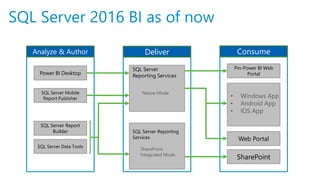
SQL Server 2016 BI as of now
Power BI Desktop
SQL Server Mobile
Report Publisher
SQL Server Report
Builder
SQL Server Data Tools
SQL Server
Reporting Services
SQL Server Reporting
Services
Pin-Power BI Web
Portal
Web Portal
SharePoint
Native Mode
Analyze & Author Deliver Consume
• Windows App
• Android App
• IOS App
SharePoint
Integrated Mode
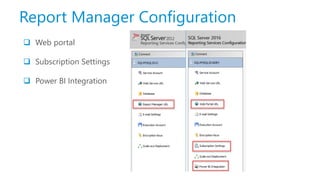
Report Manager Configuration
 Web portal
 Subscription Settings
 Power BI Integration
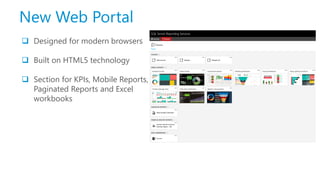
New Web Portal
 Designed for modern browsers
 Built on HTML5 technology
 Section for KPIs, Mobile Reports,
Paginated Reports and Excel
workbooks
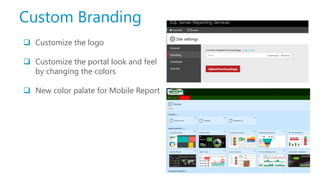
Custom Branding
 Customize the logo
 Customize the portal look and feel
by changing the colors
 New color palate for Mobile Report
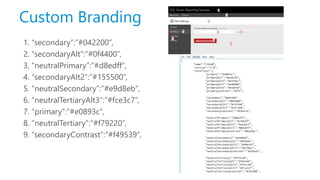
Custom Branding
1. “secondary”:”#042200”,
2. “secondaryAlt”:”#0f4400”,
3. “neutralPrimary”:”#d8edff″,
4. “secondaryAlt2″:”#155500”,
5. “neutralSecondary”:”#e9d8eb″,
6. “neutralTertiaryAlt3″:”#fce3c7”,
7. “primary”:”#e0893c″,
8. “neutralTertiary”:”#f79220”,
9. “secondaryContrast”:”#f49539″,
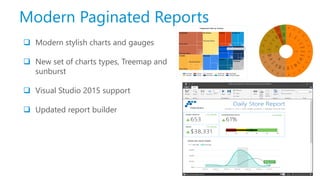
Modern Paginated Reports
 Modern stylish charts and gauges
 New set of charts types, Treemap and
sunburst
 Visual Studio 2015 support
 Updated report builder
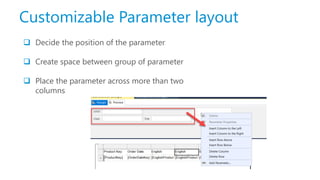
Customizable Parameter layout
 Decide the position of the parameter
 Create space between group of parameter
 Place the parameter across more than two
columns
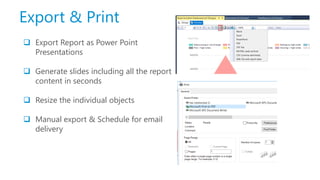
Export & Print
 Export Report as Power Point
Presentations
 Generate slides including all the report
content in seconds
 Resize the individual objects
 Manual export & Schedule for email
delivery
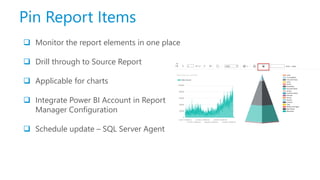
Pin Report Items
 Monitor the report elements in one place
 Drill through to Source Report
 Applicable for charts
 Integrate Power BI Account in Report
Manager Configuration
 Schedule update – SQL Server Agent
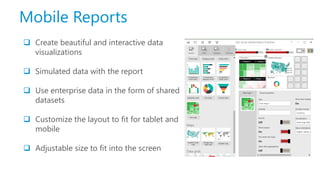
Mobile Reports
 Create beautiful and interactive data
visualizations
 Simulated data with the report
 Use enterprise data in the form of shared
datasets
 Customize the layout to fit for tablet and
mobile
 Adjustable size to fit into the screen
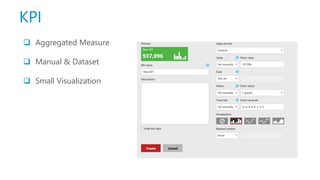
KPI
 Aggregated Measure
 Manual & Dataset
 Small Visualization
Additional Features
• Report Manager to Web portal
• Report embedding
• Zoom in reports
• Choose date values for report parameters using a calendar control
• Subscriptions improvements – Create and Manage with in portal
• Choose currency for KPI and mobile reports
• Manage data caching and refresh
• Manage shared datasets
Demo
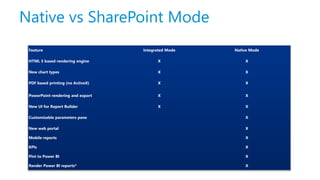
Feature Integrated Mode Native Mode
HTML 5 based rendering engine X X
New chart types X X
PDF based printing (no ActiveX) X X
PowerPoint rendering and export X X
New UI for Report Builder X X
Customizable parameters pane X
New web portal X
Mobile reports X
KPIs X
Pint to Power BI X
Render Power BI reports* X
Native vs SharePoint Mode
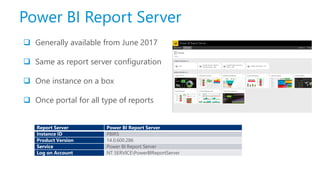
Power BI Report Server
 Generally available from June 2017
 Same as report server configuration
 One instance on a box
 Once portal for all type of reports
Report Server Power BI Report Server
Instance ID PBIRS
Product Version 14.0.600.286
Service Power BI Report Server
Log on Account NT SERVICEPowerBIReportServer
Demo
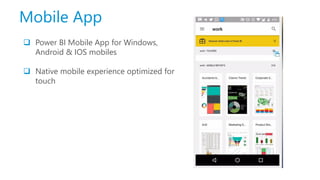
Mobile App
 Power BI Mobile App for Windows,
Android & IOS mobiles
 Native mobile experience optimized for
touch
Demo
Thank You

SQL Server Reporting Services 2016 Features

  • 1.
    SQL Server ReportingServices 2016 Features Chennai SQL Server User Group
  • 2.
    Hariharan Lead Consultant, YourSQL Man (I) Pvt Ltd Microsoft Certified Trainer Microsoft Certified Solution Expert Business Intelligence & Data Management and Analytics SAP HANA & Business Objects Active Speaker in DAGEOP DATA DAY Blog http://dataap.org/author/hariharanr/ Twitter @imhariharanr Linked In hariharan-r-12635640
  • 3.
    SQL Server 2016BI as of now Power BI Desktop SQL Server Mobile Report Publisher SQL Server Report Builder SQL Server Data Tools SQL Server Reporting Services SQL Server Reporting Services Pin-Power BI Web Portal Web Portal SharePoint Native Mode Analyze & Author Deliver Consume • Windows App • Android App • IOS App SharePoint Integrated Mode
  • 4.
    Report Manager Configuration Web portal  Subscription Settings  Power BI Integration
  • 5.
    New Web Portal Designed for modern browsers  Built on HTML5 technology  Section for KPIs, Mobile Reports, Paginated Reports and Excel workbooks
  • 6.
    Custom Branding  Customizethe logo  Customize the portal look and feel by changing the colors  New color palate for Mobile Report
  • 7.
    Custom Branding 1. “secondary”:”#042200”, 2.“secondaryAlt”:”#0f4400”, 3. “neutralPrimary”:”#d8edff″, 4. “secondaryAlt2″:”#155500”, 5. “neutralSecondary”:”#e9d8eb″, 6. “neutralTertiaryAlt3″:”#fce3c7”, 7. “primary”:”#e0893c″, 8. “neutralTertiary”:”#f79220”, 9. “secondaryContrast”:”#f49539″,
  • 8.
    Modern Paginated Reports Modern stylish charts and gauges  New set of charts types, Treemap and sunburst  Visual Studio 2015 support  Updated report builder
  • 9.
    Customizable Parameter layout Decide the position of the parameter  Create space between group of parameter  Place the parameter across more than two columns
  • 10.
    Export & Print Export Report as Power Point Presentations  Generate slides including all the report content in seconds  Resize the individual objects  Manual export & Schedule for email delivery
  • 11.
    Pin Report Items Monitor the report elements in one place  Drill through to Source Report  Applicable for charts  Integrate Power BI Account in Report Manager Configuration  Schedule update – SQL Server Agent
  • 12.
    Mobile Reports  Createbeautiful and interactive data visualizations  Simulated data with the report  Use enterprise data in the form of shared datasets  Customize the layout to fit for tablet and mobile  Adjustable size to fit into the screen
  • 13.
    KPI  Aggregated Measure Manual & Dataset  Small Visualization
  • 14.
    Additional Features • ReportManager to Web portal • Report embedding • Zoom in reports • Choose date values for report parameters using a calendar control • Subscriptions improvements – Create and Manage with in portal • Choose currency for KPI and mobile reports • Manage data caching and refresh • Manage shared datasets
  • 15.
  • 16.
    Feature Integrated ModeNative Mode HTML 5 based rendering engine X X New chart types X X PDF based printing (no ActiveX) X X PowerPoint rendering and export X X New UI for Report Builder X X Customizable parameters pane X New web portal X Mobile reports X KPIs X Pint to Power BI X Render Power BI reports* X Native vs SharePoint Mode
  • 17.
    Power BI ReportServer  Generally available from June 2017  Same as report server configuration  One instance on a box  Once portal for all type of reports Report Server Power BI Report Server Instance ID PBIRS Product Version 14.0.600.286 Service Power BI Report Server Log on Account NT SERVICEPowerBIReportServer
  • 18.
  • 19.
    Mobile App  PowerBI Mobile App for Windows, Android & IOS mobiles  Native mobile experience optimized for touch
  • 20.
  • 21.