PASS
Chennai Power BI Webinar – July 2017CPBIG Webinar
A Deep Dive into Power BI – Level 2
Hariharan Rajendran
CPBIG
About Speaker
Hariharan
Lead Consultant, Your SQL Man (I) Pvt Ltd
 Solution Expert in MSBI
 SAP HANA & Business Objects
 Active Speaker in DAGEOP DATA DAY
& CSSUG
Blog
http://dataap.org/author/hariharanr/
Twitter
@imhariharanr
Linked In
hariharan-r-12635640
Email
hari@yoursqlman.com
CPBIG
Level 1
 M and DAX
 Power Query Transformations
 Data Connectivity
https://tinyurl.com/ya3zor67
CPBIG
Topics
 Parameters & Functions
 Power BI Templates
 Gateways
 Report Visuals
CPBIG
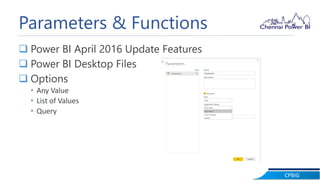
Parameters & Functions
 Power BI April 2016 Update Features
 Power BI Desktop Files
 Options
• Any Value
• List of Values
• Query
CPBIG
Parameters & Functions
 Filter the records
 Apply transformation to all the files
 Pass multiple values to parameter
CPBIG
Power BI Template
 Power BI April 2016 Update Features
 Streamline the work
 Extension - .pbit
 Definition of Report, Data Model and Queries
 Share with your team
 Import Template
CPBIG
Demo
CPBIG
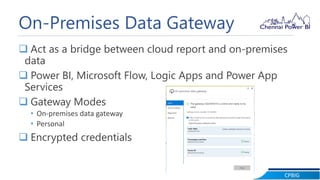
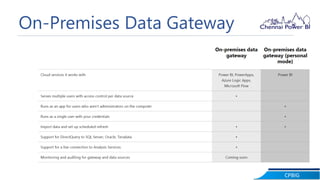
On-Premises Data Gateway
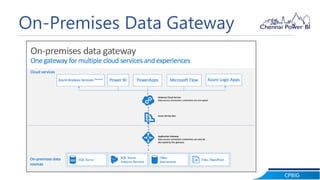
 Act as a bridge between cloud report and on-premises
data
 Power BI, Microsoft Flow, Logic Apps and Power App
Services
 Gateway Modes
• On-premises data gateway
• Personal
 Encrypted credentials
CPBIG
On-Premises Data Gateway
CPBIG
On-Premises Data Gateway
CPBIG
On-Premises Data Gateway
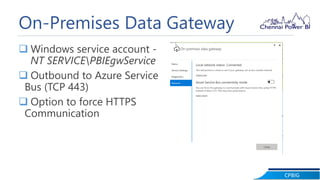
 Windows service account -
NT SERVICEPBIEgwService
 Outbound to Azure Service
Bus (TCP 443)
 Option to force HTTPS
Communication
CPBIG
Demo
CPBIG
Report Visuals
 Interactive Charts
 Filter
 Pages
 Visual Formatting
CPBIG
Q & A& A
CPBIG
Thank You

A Deep Dive into to Power BI - level 2