PASS
Chennai Power BI Webinar – June 2017CPBIG Webinar
A Deep Dive into Power BI – Level 1
Hariharan Rajendran
CPBIG
About Speaker
Hariharan
Lead Consultant, Your SQL Man (I) Pvt Ltd
 Solution Expert in MSBI
 SAP HANA & Business Objects
 Active Speaker in DAGEOP DATA DAY
& CSSUG
Blog
http://dataap.org/author/hariharanr/
Twitter
@imhariharanr
Linked In
hariharan-r-12635640
Email
hari@yoursqlman.com
CPBIG
Topics
 Introduction to Microsoft Power BI
 Languages
 Data Connectivity
 Additional Features
CPBIG
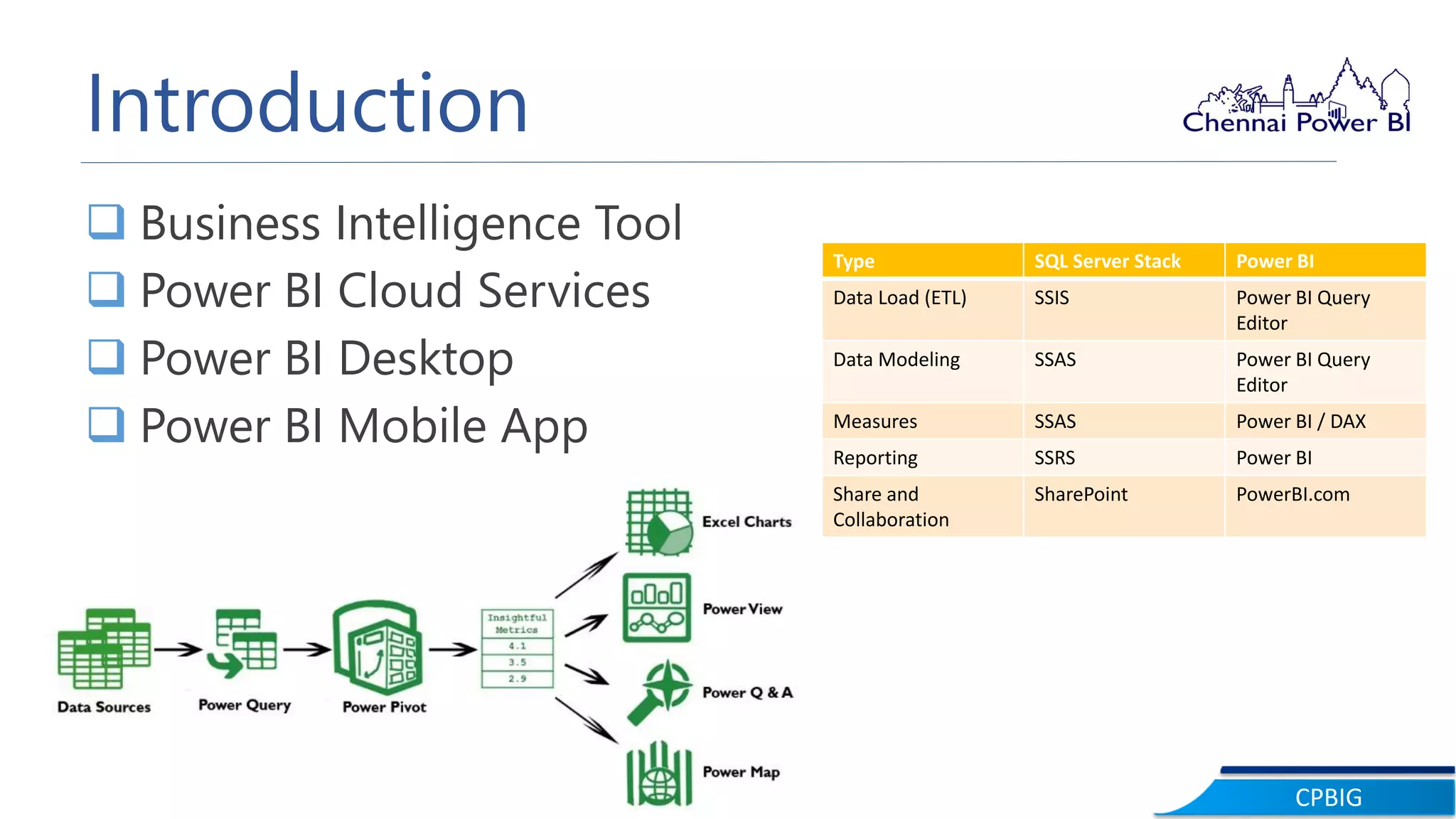
Introduction
 Business Intelligence Tool
 Power BI Cloud Services
 Power BI Desktop
 Power BI Mobile App
Type SQL Server Stack Power BI
Data Load (ETL) SSIS Power BI Query
Editor
Data Modeling SSAS Power BI Query
Editor
Measures SSAS Power BI / DAX
Reporting SSRS Power BI
Share and
Collaboration
SharePoint PowerBI.com
CPBIG
Languages
M Language DAX Language
CPBIG
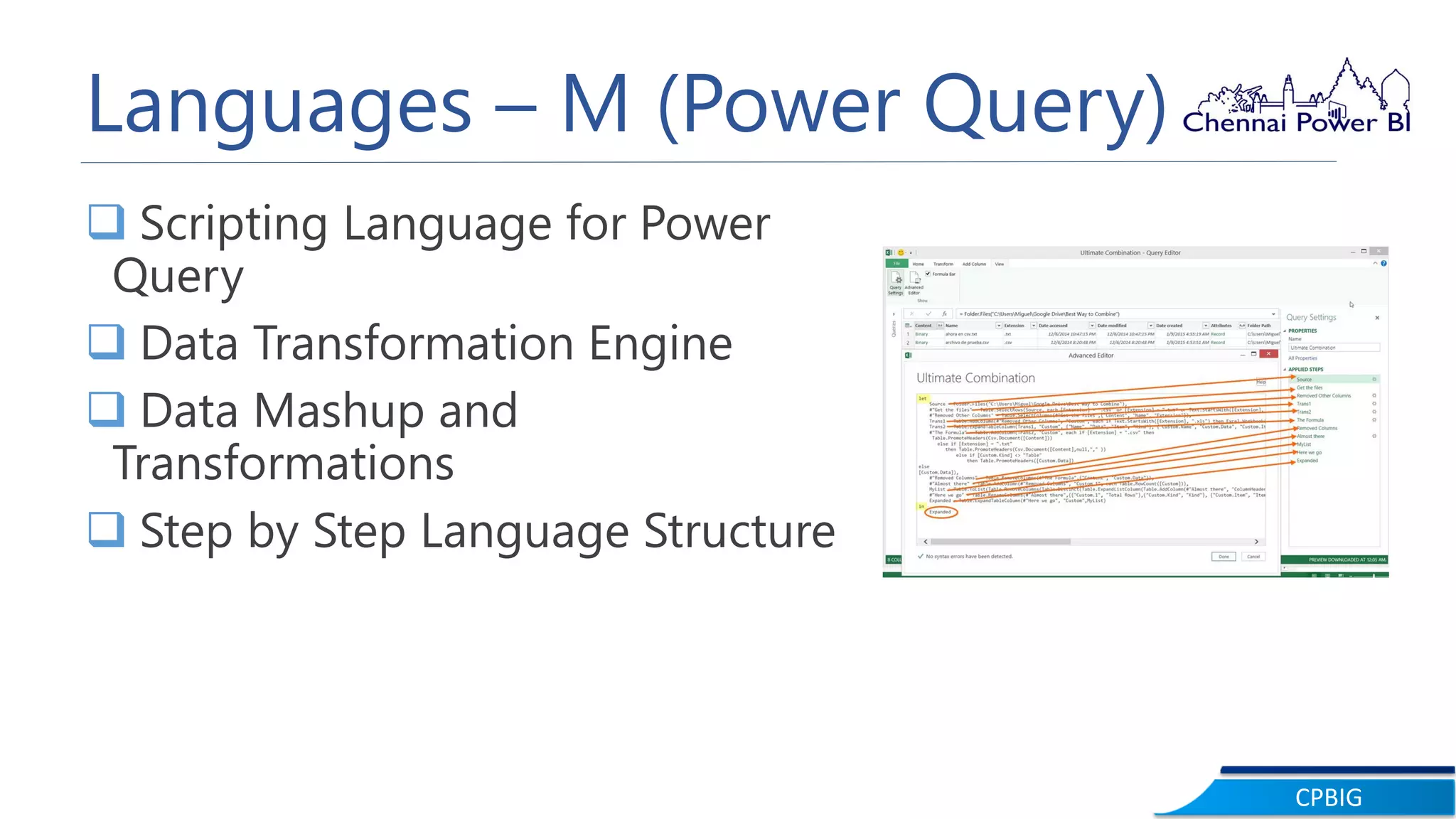
Languages – M (Power Query)
 Scripting Language for Power
Query
 Data Transformation Engine
 Data Mashup and
Transformations
 Step by Step Language Structure
CPBIG
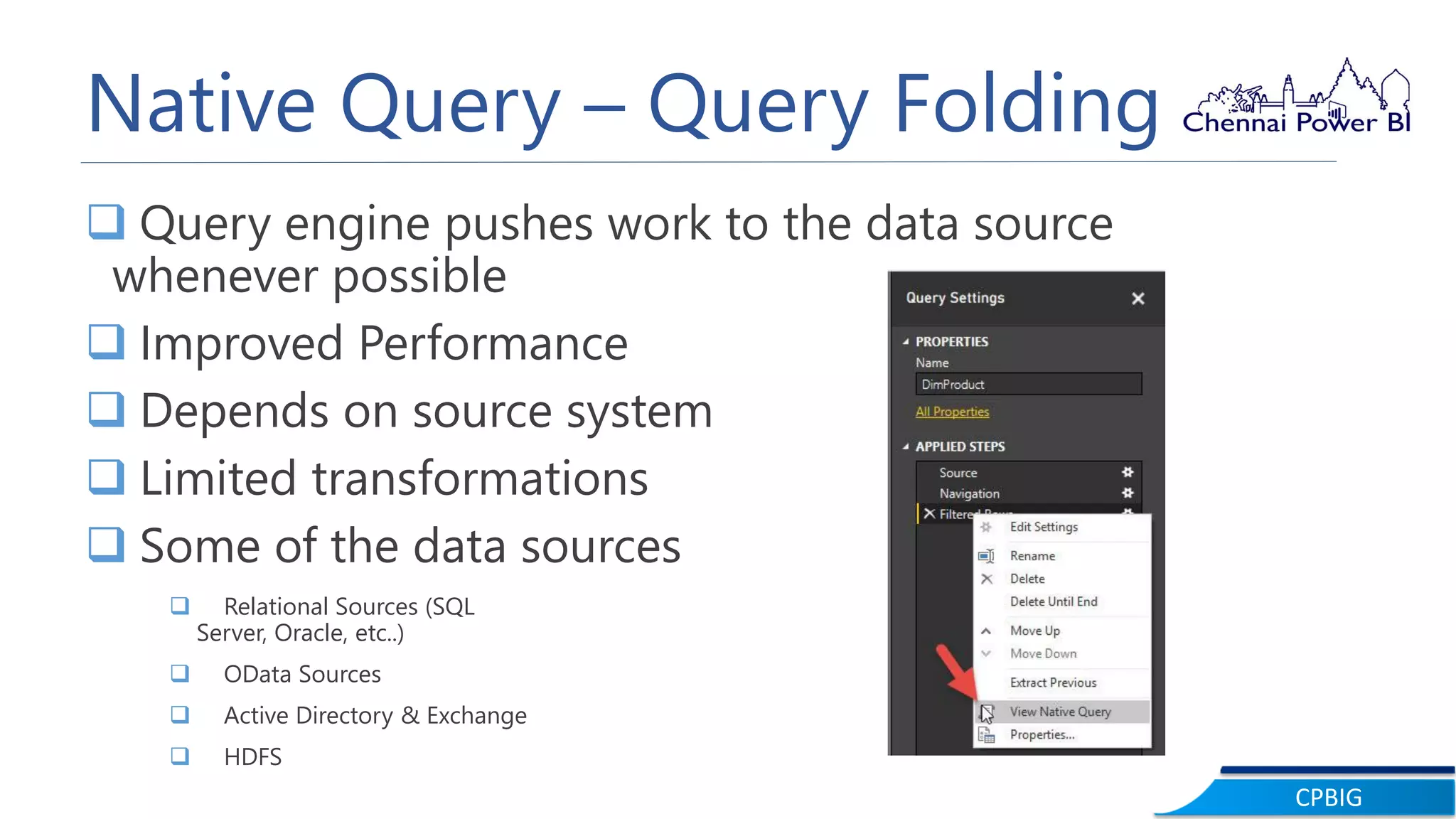
Native Query – Query Folding
 Query engine pushes work to the data source
whenever possible
 Improved Performance
 Depends on source system
 Limited transformations
 Some of the data sources
 Relational Sources (SQL
Server, Oracle, etc..)
 OData Sources
 Active Directory & Exchange
 HDFS
CPBIG
Languages – DAX
 Data Analysis eXpression Language
 SQL Server Analysis Services Tabular, Power Pivot in Excel
and Power BI
 Functional Language
 Analytical Engine
 It is very similar to Excel Functions
CPBIG
M VS DAX
 Which language is better?
 M – Any data preparation & data transformation before
loading into model.
 DAX - Analytical Questions
CPBIG
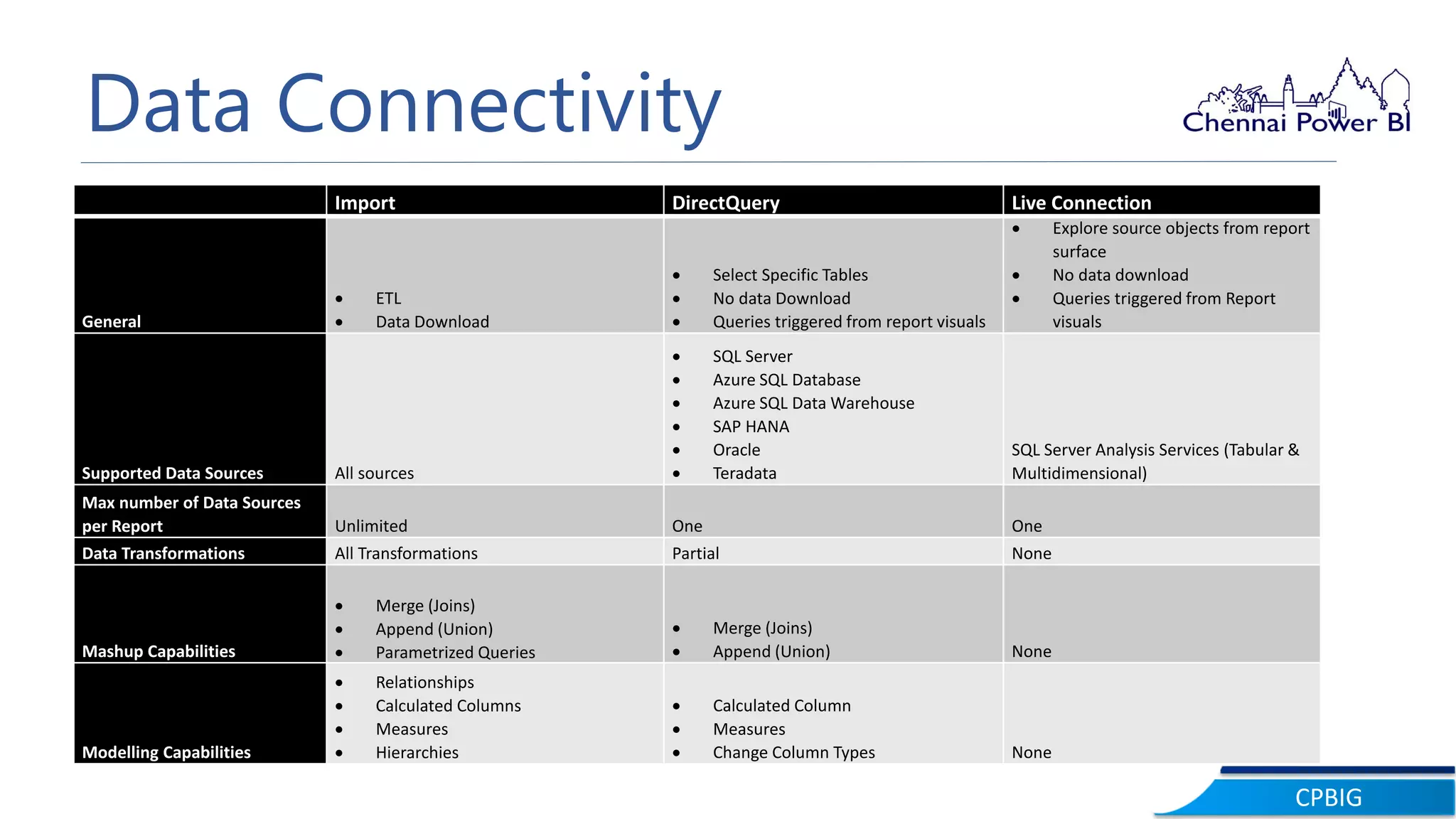
Data Connectivity
Import DirectQuery Live Connection
General
 ETL
 Data Download
 Select Specific Tables
 No data Download
 Queries triggered from report visuals
 Explore source objects from report
surface
 No data download
 Queries triggered from Report
visuals
Supported Data Sources All sources
 SQL Server
 Azure SQL Database
 Azure SQL Data Warehouse
 SAP HANA
 Oracle
 Teradata
SQL Server Analysis Services (Tabular &
Multidimensional)
Max number of Data Sources
per Report Unlimited One One
Data Transformations All Transformations Partial None
Mashup Capabilities
 Merge (Joins)
 Append (Union)
 Parametrized Queries
 Merge (Joins)
 Append (Union) None
Modelling Capabilities
 Relationships
 Calculated Columns
 Measures
 Hierarchies
 Calculated Column
 Measures
 Change Column Types None
CPBIG
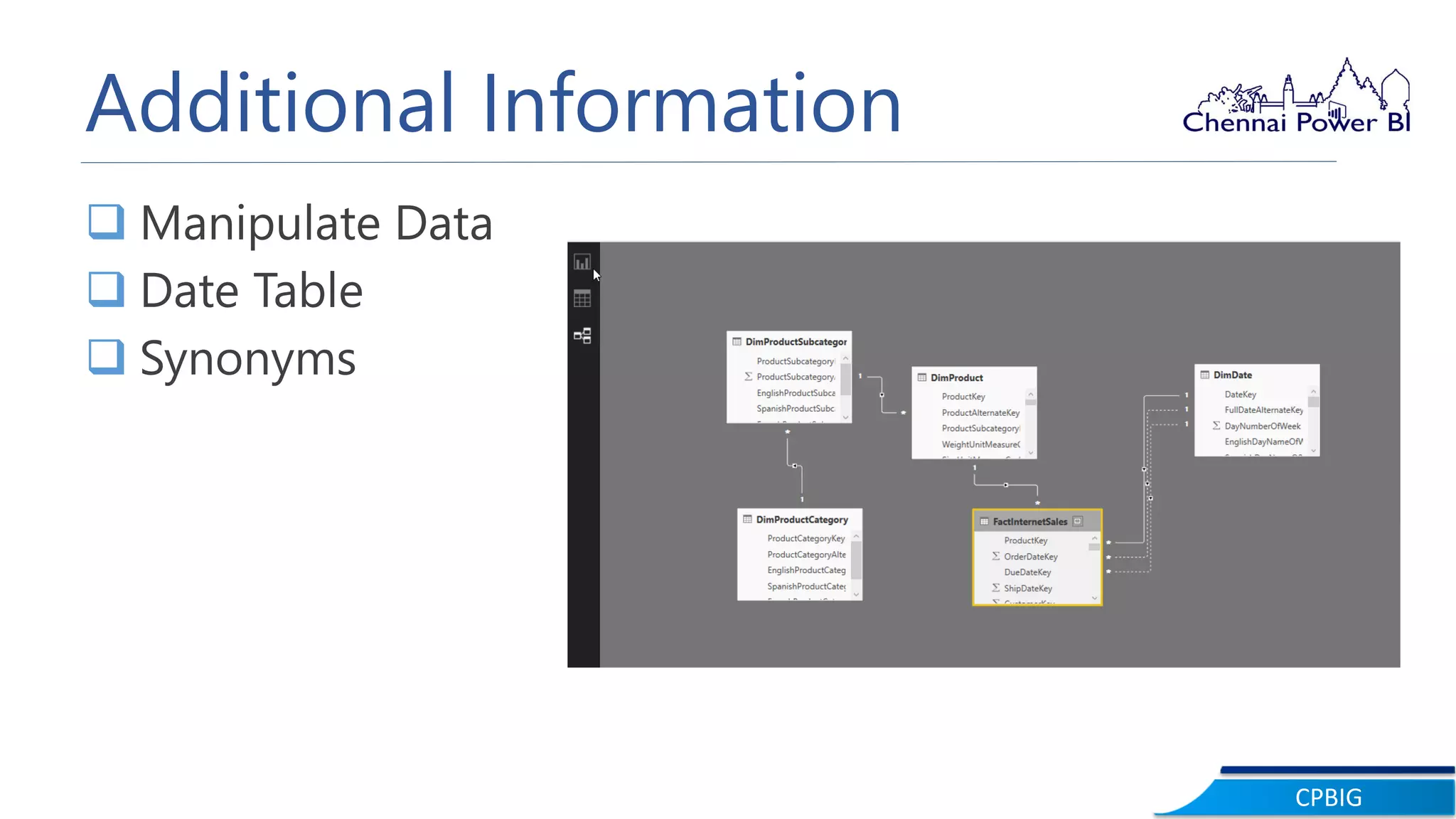
Additional Information
 Manipulate Data
 Date Table
 Synonyms
CPBIG
Demo
CPBIG
Q & A& A
CPBIG
Thank You

CPBIG - A Deep Dive into Power BI

  • 1.
    PASS Chennai Power BIWebinar – June 2017CPBIG Webinar A Deep Dive into Power BI – Level 1 Hariharan Rajendran
  • 2.
    CPBIG About Speaker Hariharan Lead Consultant,Your SQL Man (I) Pvt Ltd  Solution Expert in MSBI  SAP HANA & Business Objects  Active Speaker in DAGEOP DATA DAY & CSSUG Blog http://dataap.org/author/hariharanr/ Twitter @imhariharanr Linked In hariharan-r-12635640 Email hari@yoursqlman.com
  • 3.
    CPBIG Topics  Introduction toMicrosoft Power BI  Languages  Data Connectivity  Additional Features
  • 4.
    CPBIG Introduction  Business IntelligenceTool  Power BI Cloud Services  Power BI Desktop  Power BI Mobile App Type SQL Server Stack Power BI Data Load (ETL) SSIS Power BI Query Editor Data Modeling SSAS Power BI Query Editor Measures SSAS Power BI / DAX Reporting SSRS Power BI Share and Collaboration SharePoint PowerBI.com
  • 5.
  • 6.
    CPBIG Languages – M(Power Query)  Scripting Language for Power Query  Data Transformation Engine  Data Mashup and Transformations  Step by Step Language Structure
  • 7.
    CPBIG Native Query –Query Folding  Query engine pushes work to the data source whenever possible  Improved Performance  Depends on source system  Limited transformations  Some of the data sources  Relational Sources (SQL Server, Oracle, etc..)  OData Sources  Active Directory & Exchange  HDFS
  • 8.
    CPBIG Languages – DAX Data Analysis eXpression Language  SQL Server Analysis Services Tabular, Power Pivot in Excel and Power BI  Functional Language  Analytical Engine  It is very similar to Excel Functions
  • 9.
    CPBIG M VS DAX Which language is better?  M – Any data preparation & data transformation before loading into model.  DAX - Analytical Questions
  • 10.
    CPBIG Data Connectivity Import DirectQueryLive Connection General  ETL  Data Download  Select Specific Tables  No data Download  Queries triggered from report visuals  Explore source objects from report surface  No data download  Queries triggered from Report visuals Supported Data Sources All sources  SQL Server  Azure SQL Database  Azure SQL Data Warehouse  SAP HANA  Oracle  Teradata SQL Server Analysis Services (Tabular & Multidimensional) Max number of Data Sources per Report Unlimited One One Data Transformations All Transformations Partial None Mashup Capabilities  Merge (Joins)  Append (Union)  Parametrized Queries  Merge (Joins)  Append (Union) None Modelling Capabilities  Relationships  Calculated Columns  Measures  Hierarchies  Calculated Column  Measures  Change Column Types None
  • 11.
    CPBIG Additional Information  ManipulateData  Date Table  Synonyms
  • 12.
  • 13.
  • 14.