SQL Database Development
Overview
 Define a database using SQL data definition language
 Work with Views
 Write single table queries
 Establish referential integrity
SQL Overview
 Structured Query Language
 The standard for relational database management
systems (RDBMS)
 SQL-92 and SQL-99 Standards – Purpose:
 Specify syntax/semantics for data definition and

manipulation
 Define data structures
 Enable portability
 Specify minimal (level 1) and complete (level 2)
standards
What Is SQL Developer?
 SQL Developer is a graphical tool that enhances

productivity and simplifies database development tasks.
 You can connect to any target database schema by using
standard database authentication.

SQL Developer
Specifications of SQL Developer
 Developed in Java

 Supports Windows, Linux, and Mac OS X platforms
 Default connectivity by using the JDBC Thin driver
 Does not require an installer
 Unzip the downloaded SQL Developer kit and double-click
sqldeveloper.exe to start SQL Developer.

 Connects to Oracle Database version 9.2.0.1 and later
 Freely downloadable from the following link:
 http://www.oracle.com/technology/products/database/sql_develop
er/index.html
 Needs JDK 1.5 installed on your system that can be

downloaded from the following link:


http://java.sun.com/javase/downloads/index_jdk5.jsp
Installing SQL Developer
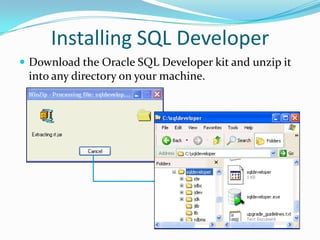
 Download the Oracle SQL Developer kit and unzip it

into any directory on your machine.
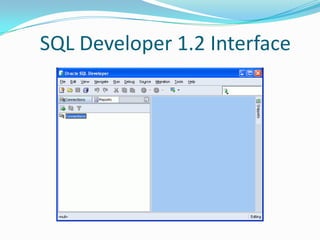
SQL Developer 1.2 Interface
Creating a Database Connection
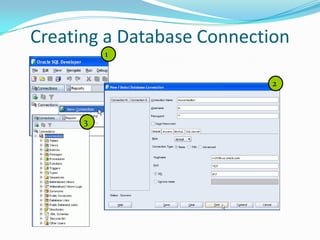
 You must have at least one database connection to use

SQL Developer.
 You can create and test connections for:



Multiple databases
Multiple schemas

 SQL Developer automatically imports any connections

defined in the tnsnames.ora file on your system.
 You can export connections to an Extensible Markup
Language (XML) file.
 Each additional database connection created is listed in
the Connections Navigator hierarchy.
Creating a Database Connection
1
2

3
SQL Environment
SQL Environment
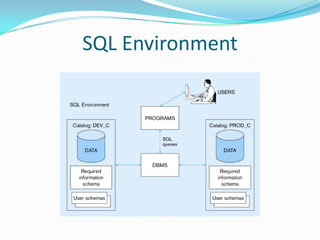
 Catalog
 A set of schemas that constitute the description of a database

 Schema
 The structure that contains descriptions of objects created by

a user (base tables, views, constraints)

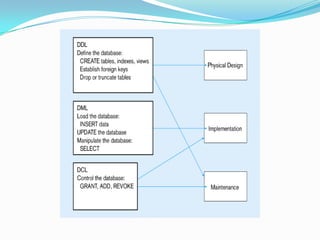
 Data Definition Language (DDL)
 Commands that define a database, including creating,

altering, and dropping tables and establishing constraints

 Data Manipulation Language (DML)
 Commands that maintain and query a database

 Data Control Language (DCL)
 Commands that control a database, including administering

privileges and committing data
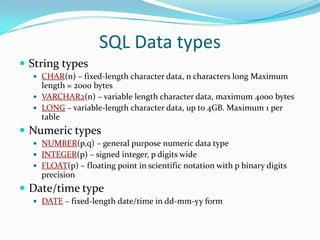
SQL Data types
 String types
 CHAR(n) – fixed-length character data, n characters long Maximum

length = 2000 bytes
 VARCHAR2(n) – variable length character data, maximum 4000 bytes
 LONG – variable-length character data, up to 4GB. Maximum 1 per
table

 Numeric types
 NUMBER(p,q) – general purpose numeric data type
 INTEGER(p) – signed integer, p digits wide
 FLOAT(p) – floating point in scientific notation with p binary digits

precision

 Date/time type
 DATE – fixed-length date/time in dd-mm-yy form
Design components
 Tables

 Indexes
 Views
 Transactions

 Access Authorities
 Stored Procedures
 Functions
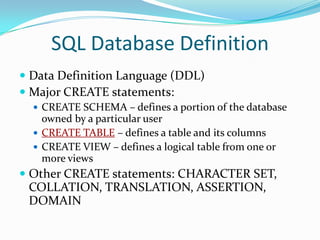
SQL Database Definition
 Data Definition Language (DDL)
 Major CREATE statements:
 CREATE SCHEMA – defines a portion of the database

owned by a particular user
 CREATE TABLE – defines a table and its columns
 CREATE VIEW – defines a logical table from one or
more views

 Other CREATE statements: CHARACTER SET,

COLLATION, TRANSLATION, ASSERTION,
DOMAIN
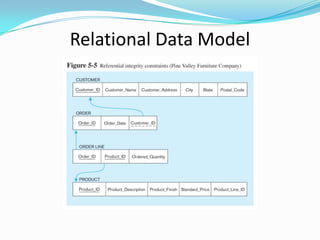
Relational Data Model
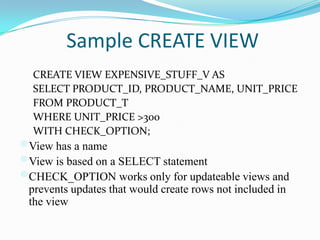
Sample CREATE VIEW
CREATE VIEW EXPENSIVE_STUFF_V AS
SELECT PRODUCT_ID, PRODUCT_NAME, UNIT_PRICE
FROM PRODUCT_T
WHERE UNIT_PRICE >300
WITH CHECK_OPTION;

View has a name
View is based on a SELECT statement
CHECK_OPTION works only for updateable views and
prevents updates that would create rows not included in
the view
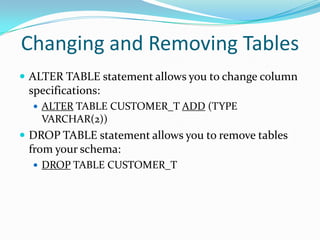
Changing and Removing Tables
 ALTER TABLE statement allows you to change column

specifications:
 ALTER TABLE CUSTOMER_T ADD (TYPE

VARCHAR(2))

 DROP TABLE statement allows you to remove tables

from your schema:
 DROP TABLE CUSTOMER_T
Schema Definition
 Control processing/storage efficiency:






Choice of indexes
File organizations for base tables
File organizations for indexes
Data clustering
Statistics maintenance

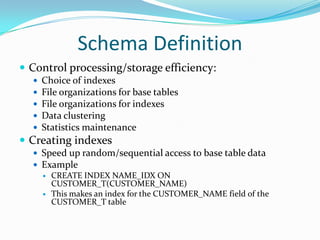
 Creating indexes
 Speed up random/sequential access to base table data
 Example
 CREATE INDEX NAME_IDX ON
CUSTOMER_T(CUSTOMER_NAME)
 This makes an index for the CUSTOMER_NAME field of the
CUSTOMER_T table
Thank You
 http://www.sql-programmers.com/new-sql-database-development.aspx

Sql database development part 1

  • 1.
  • 2.
    Overview  Define adatabase using SQL data definition language  Work with Views  Write single table queries  Establish referential integrity
  • 3.
    SQL Overview  StructuredQuery Language  The standard for relational database management systems (RDBMS)  SQL-92 and SQL-99 Standards – Purpose:  Specify syntax/semantics for data definition and manipulation  Define data structures  Enable portability  Specify minimal (level 1) and complete (level 2) standards
  • 4.
    What Is SQLDeveloper?  SQL Developer is a graphical tool that enhances productivity and simplifies database development tasks.  You can connect to any target database schema by using standard database authentication. SQL Developer
  • 5.
    Specifications of SQLDeveloper  Developed in Java  Supports Windows, Linux, and Mac OS X platforms  Default connectivity by using the JDBC Thin driver  Does not require an installer  Unzip the downloaded SQL Developer kit and double-click sqldeveloper.exe to start SQL Developer.  Connects to Oracle Database version 9.2.0.1 and later  Freely downloadable from the following link:  http://www.oracle.com/technology/products/database/sql_develop er/index.html  Needs JDK 1.5 installed on your system that can be downloaded from the following link:  http://java.sun.com/javase/downloads/index_jdk5.jsp
  • 6.
    Installing SQL Developer Download the Oracle SQL Developer kit and unzip it into any directory on your machine.
  • 7.
  • 8.
    Creating a DatabaseConnection  You must have at least one database connection to use SQL Developer.  You can create and test connections for:   Multiple databases Multiple schemas  SQL Developer automatically imports any connections defined in the tnsnames.ora file on your system.  You can export connections to an Extensible Markup Language (XML) file.  Each additional database connection created is listed in the Connections Navigator hierarchy.
  • 9.
    Creating a DatabaseConnection 1 2 3
  • 10.
  • 11.
    SQL Environment  Catalog A set of schemas that constitute the description of a database  Schema  The structure that contains descriptions of objects created by a user (base tables, views, constraints)  Data Definition Language (DDL)  Commands that define a database, including creating, altering, and dropping tables and establishing constraints  Data Manipulation Language (DML)  Commands that maintain and query a database  Data Control Language (DCL)  Commands that control a database, including administering privileges and committing data
  • 12.
    SQL Data types String types  CHAR(n) – fixed-length character data, n characters long Maximum length = 2000 bytes  VARCHAR2(n) – variable length character data, maximum 4000 bytes  LONG – variable-length character data, up to 4GB. Maximum 1 per table  Numeric types  NUMBER(p,q) – general purpose numeric data type  INTEGER(p) – signed integer, p digits wide  FLOAT(p) – floating point in scientific notation with p binary digits precision  Date/time type  DATE – fixed-length date/time in dd-mm-yy form
  • 13.
    Design components  Tables Indexes  Views  Transactions  Access Authorities  Stored Procedures  Functions
  • 15.
    SQL Database Definition Data Definition Language (DDL)  Major CREATE statements:  CREATE SCHEMA – defines a portion of the database owned by a particular user  CREATE TABLE – defines a table and its columns  CREATE VIEW – defines a logical table from one or more views  Other CREATE statements: CHARACTER SET, COLLATION, TRANSLATION, ASSERTION, DOMAIN
  • 16.
  • 17.
    Sample CREATE VIEW CREATEVIEW EXPENSIVE_STUFF_V AS SELECT PRODUCT_ID, PRODUCT_NAME, UNIT_PRICE FROM PRODUCT_T WHERE UNIT_PRICE >300 WITH CHECK_OPTION; View has a name View is based on a SELECT statement CHECK_OPTION works only for updateable views and prevents updates that would create rows not included in the view
  • 18.
    Changing and RemovingTables  ALTER TABLE statement allows you to change column specifications:  ALTER TABLE CUSTOMER_T ADD (TYPE VARCHAR(2))  DROP TABLE statement allows you to remove tables from your schema:  DROP TABLE CUSTOMER_T
  • 19.
    Schema Definition  Controlprocessing/storage efficiency:      Choice of indexes File organizations for base tables File organizations for indexes Data clustering Statistics maintenance  Creating indexes  Speed up random/sequential access to base table data  Example  CREATE INDEX NAME_IDX ON CUSTOMER_T(CUSTOMER_NAME)  This makes an index for the CUSTOMER_NAME field of the CUSTOMER_T table
  • 20.